1
November Edition, 2009
Did you Know...
It is not advisable to cut and paste into Blackboard directly from MS Word. MS Word contains
hidden code that when pasted into Blackboard (or any other site for that matter) can cause
problems. What is recommended to our faculty is that you either paste as plain text into Blackboard or open your document in Notepad and copy and paste the desired text into Blackboard.
You can avoid accidentally copying bad html code into your website by using the method listed
above.
Contact Abby Scaramuzzo at [email protected] for more information.
Browser Compatibility Issues and Solutions for Blackboard
Internet Explorer 8 Workarounds
For clients who are unable to use the Firefox 3.0 or later client and
who must use Internet Explorer 8, the following additional settings
have been found to improve compatibility with Blackboard:
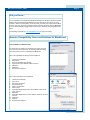
How to Set Compatibility View Settings in Internet Explorer 8
1.
2.
3.
4.
5.
6.
7.
Launch Internet Explorer
Select Tools
Select “Compatibility View Settings”
Type bsu.edu in the "Add this website:" text box
Click Add
Click Close
Restart Internet Explorer
How to Set Trusted Sites in Internet Explorer 8
1.
2.
3.
4.
5.
6.
7.
Launch Internet Explorer
Select Tools
Select Internet Options
Select Security Tab
Click on Trusted Sites
Click on Sites
Type https://blackboard.bsu.edu in the "Add this website to the
zone:" text box
8. Click Add
9. Type https://blackboard.com in the "Add this website to the zone:"
text box
10. Click Close
11. Click Ok
12. Restart Internet Explorer
Page 7