1
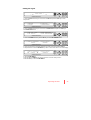
SELECT CONTINENT
EUROPE
SELECT REGION
DENMARK
M
R
F
OK
6. Set the REGION.
Press the UP and DOWN arrow keys to select the region you are in.
Press the OK key to set the REGION.
LOAD ?
YES
NO
M
R
F
OK
7. Press the RETURN key to load the current setting or abort and return to the main
display.
LOADING . . .
DO NOT TURN OFF !
M
R
F
OK
8. Setting is being loaded to the system.
The ACU will restart the system automatically after uploading the setting.
DO NOT turn off ACU power while uploading is being processed.
SEARCH
[ ] THOR_1
[2] SIRIUS_1
M
R
F
OK
9. Region information has been updated.
54
t110w/ t130w – Marine Satellite TV Antenna System