1
GB
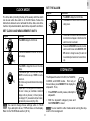
CLOCK Mode .................................................................... 9
Set clock and measurement units ................................. 9
Set the alarm ................................................................. 9
Stopwatch ......................................................................... 9
Timer ................................................................................. 10
Temperature display ........................................................ 10
ALTI-BARO Mode ............................................................. 10
Access altimeter options ................................................ 11
Set current altitude and resolution ................................. 11
Set sea-level pressure ................................................... 12
View sea-level pressure ................................................ 12
Set altitude alert ............................................................. 12
Recall altitude data ........................................................ 13
Switch between view options ......................................... 13
Weather forecast ........................................................... 13
TOUR Mode ...................................................................... 14
TOUR memory .............................................................. 14
Activate TOUR Mode ..................................................... 15
Record markers in TOUR Mode .................................... 15
Pause TOUR Mode ....................................................... 15
Deactivate TOUR Mode ................................................ 15
Clear all TOUR memories ............................................. 16
CARDIO (Heart Rate) Mode (RS109, RP109 only) ......... 16
Wearing the chest belt ................................................... 17
Training Zones ............................................................... 17
Set upper and lower heart rate limits for
Training Zone 5 ......................................................... 18
Activate the Training Zone alarm ................................... 19
Track heart rate during training ..................................... 19
Oregon Scientific™ OUTBREAKER
Sports Watch (RX109 series)
User Manual
TABLE OF CONTENTS
Introduction ...................................................................... 2
Key features ..................................................................... 3
OUTBREAKER watch ................................................... 3
Chest belt (RS109 / RP109 only) .................................. 3
Bicycle equipment (RP109 only) ................................... 3
PC Kit (RP109 only) ..................................................... 4
LCD display symbols ..................................................... 4
How the OUTBREAKER works ....................................... 6
How the altimeter, thermometer and barometer work ... 6
A multi-system facility .................................................... 6
TOUR Mode .................................................................. 6
PC Software Kit (RP109 only) ....................................... 6
Getting started ................................................................. 7
Turn on the watch (first-time use only) .......................... 7
Batteries ........................................................................ 7
Switch between Modes .................................................. 8
Switch between Mode options ....................................... 8
Change setting values ................................................... 8
Use the HI-GLO backlight .............................................. 8
Key lock ......................................................................... 8
Handling the product ..................................................... 8
1
GB
BIKE Mode (RP109 only) ................................................. 20
Set up for BIKE Mode .................................................... 20
Step 1: Attach the equipment to the bicycle .................. 20
Step2: Enter wheel circumference ................................ 21
Access the BIKE Mode options ..................................... 22
View speed and cadence information ............................ 22
PC Kit (RP109 only) ......................................................... 22
PC Mode ............................................................................ 23
Set up for PC Mode ....................................................... 23
Use the software ............................................................ 23
PC Mode options ........................................................... 23
Download data ............................................................... 24
Effective use and range ................................................... 24
Aquatic and outdoor activities ........................................ 24
Safety and care ................................................................ 25
Safety precautions ......................................................... 25
Care instructions ............................................................ 25
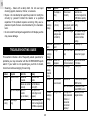
Troubleshooting guide .................................................... 26
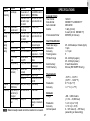
Specifications ................................................................... 27
Warnings ........................................................................... 29
Declaration of conformity ............................................... 29
Additional Resources ...................................................... 30
INTRODUCTION
Thank you for selecting the Oregon Scientific OUTBREAKER
Sports Watch as your fitness product of choice. Your new
sports watch is designed to give you many years of reliable
service and includes the following features:
• Clock, calendar, stopwatch and timer functions
• Barometer with local and sea pressure readings
• Weather forecast and temperature readings
• Altimeter readings up to 9,000 meters (30,000 feet)
• Heart rate monitor that gives pulse rate readings during
exercise (RS109/RP 109 only)
• Bicycle accessory kit to take readings during cycling (RP109
only)
• PC docking station and software to download readings onto
your computer (RP109 only)
The OUTBREAKER RX109 sports watch series comprises the
most advanced and patented Baro-compensation technology,
distinguishing between barometric and altitude pressure
changes, and giving you more reliable readings (weather
forecasts, etc.). It is a precision device designed to augment
your daily or weekly exercise program as well as provide you
with accurate and easy to use watch functions.
This manual contains important safety and care information,
and provides step-by-step instructions for using this product.
Read the manual thoroughly, and keep it in a safe place in case
you need to later refer to it.
2
GB
BICYCLE EQUIPMENT (RP109 ONLY)
KEY FEATURES
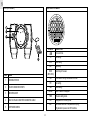
OUTBREAKER WATCH
3
4
1
2
I
I ITEM
1
NAME
SELECT/+/>
2
3
MODE
ST/SP/-
4
LIGHT/KEY
5
FUNC/SET
DESCRIPTION
Press to increase value, change Mode display, or
record a marker during TOUR Mode.
Press to switch between Modes.
Press to start/pause/stop the Stopwatch/Timer or
decrease value.
Press to activate HIGLO- backlight, or press and hold
to activate key lock.
Press to enter a sub-mode or press and hold to change
a value..
I
5
ITEM
CHEST BELT
2
I ITEM
1
2
NAME
CHEST BELT
STRAP
3
NAME
1
SPEED SENSOR
2
CADENCE SENSOR
3
BIKE MOUNT
4
MAGNETS/ SCREWS/ NUTS/PADS
5
FIXING STRAPS
6
RUBBER GRIPS (RS109 only)
6
GB
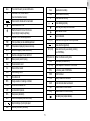
LCD DISPLAY SYMBOLS
PC KIT (RP109 ONLY)
SYMBOL
YR
ITEM
1
DOCKING STATION
2
WATCH CONNECTION POINTS
3
MOUNTING CLIPS
4
BUILT-IN RS-232C COMPUTER CONNECTION CABLE
5
SOFTWARE CD-ROM
Month setting.
DAY
Day setting.
Current day of the week.
TRIP
TOUR Mode is running time/date cannot be set
HR
Hour setting.
MIN
Minute setting.
DM/MD
4
Year setting.
MTH
MON
(MON..SUN)
NAME
DESCRIPTION
The current time.
Order for date to be displayed.
TIME
Time zone setting screen.
SET
Displayed when in a setting mode.
UNIT
Set Celsius/Fahrenheit for temperature and h/p/Hg,
inHg barometric pressure. Set m/ft for altitude.
GB
Zone
AL
The current time set in your second time zone.
Sxxx
Speed sensor low battery.
Shows alarm time, or event alarms
(max/min altitude/heart rate etc)
Cxxx
Cadence sensor low battery.
ttl
Shows max/min altitude alarm is deactivated.
Shows if alarm is on or off.
Heart rate (per minute) monitor activated.
Weather forecast for the next 12-24 hours.
(Sunny/Slightly Cloudy/Cloudy/Rainy)
STW
Stopwatch can be started/stopped/reset.
TMR
Timer (countdown) can be started/stopped/reset
TEMP
Temperature is displayed (in lower second row).
ALTI
Altitude is displayed (in lower second row).
HR
Heart rate is displayed in lower matrix font.
MEM
Memory record (current trip only).
max
Shows maximum record
min
Shows minimum record
AVG
Shows average record
TTL
Show total record
RES
Change resolution of readings on altimeter
ICON
Choose current weather icon.
LOC
Local barometric pressure.
SEA
Sea pressure (barometric).
SPD
Shows vertical speed (historical or current).
Rxxx
Receiver (Bike Mount) low battery.
Shows total time of activity.
Shows altitude graphically.
Heart rate alert in effect.
Key lock activated.
Z1 (1-5)
Shows which training shown is currently selected.
Shows heart beat graphically.
M1 (1..99)
Shows which record you are making, or storing
(see TOUR Mode).
WØ (wheel icon) Wheel circumference setting mode.
CAD
T1 (1…99)
Pedal speed (revolutions/min).
Shows sequence of memories in TOUR Mode.
88%
% of memory used in TOUR Mode.
END
TOUR is finished.
CLR
Ready to clear all tour memories.
donE
All tour memories have been cleared.
hpa
Pressure shown in Hecto-Pascal’s.
inHg
Pressure shown in inches of mercury.
Low battery level (replace batteries)
Graphical display of your bicycle speed.
5
GB
use the stopwatch or timer (countdown) facility in combination
with other functions, and both will continue to run in the
background while you use other features of the watch.
HOW THE OUTBREAKER WORKS
The OUTBREAKER sports watch comes equipped with a
barometer (measuring altitude, barometric pressure, and
weather conditions), a weather forecast display, a thermometer, a heart rate monitor (RS109/RP 109 only), and a bicycle
computer to display information when cycling (RP109 only).
The heart-rate monitor and altimeter features of the
OUTBREAKER watch include customized settings. Maximum
and minimum heart rate limits can be set for use during
exercise, and the altimeter can be set to register ascending and
descending limits. In both cases a short beep signifies either
limit has been exceeded. The watch also has a clock, calendar,
and pressure reading apparatus, all of which need to be set
according to the current date and location.
HOW THE ALTIMETER, THERMOMETER, AND
BAROMETER WORK
The patented baro-compensation technology used in this watch
allows it to distinguish between barometric pressure change
and altitude pressure change. This means it can detect barometric pressure (localized weather conditions) as distinct from
changes in altitude pressure, and gives more accurate readings than most average devices (which frequently rely on
manual deactivation before initiating a new forecast).
TOUR MODE
The watch features a TOUR Mode in which you can record all
data from a single trip, or workout, and then download this
information onto your PC for storage and viewing. The watch
can recall 99 different single tours, trips or workouts.
NOTE The docking station and CD-ROM are required (optional for the RA109 and RS109, but not supplied) to download
information from TOUR Mode.
A MULTI-SYSTEM FACILITY
The product is designed for use during many kinds of activity.
It can display and store a range of information of interest to the
casual and more serious sports or exercise enthusiast. The
watch includes the following Modes: CLOCK, ALTIMETER,
CARDIO (Heart Rate) (RS109/RP109 only), BIKE (RP109
only), and PC (docking station and CDROM are optional for the
RA109 and RS109, and are not supplied). It is equipped with
a multi-system facility that allows you to combine information
according to your preference, such as altitude and time, altitude
and heart rate, or bike speed and altitude, etc. You may also
PC SOFTWARE KIT (RP109 ONLY)
A docking station is provided with the watch for connecting to
a computer, along with a CD-ROM for installing the necessary
software onto your computer. You can also use the software to
change some of the watch settings.
NOTE The RZ910 PC Kit can be purchased separately for the
RA109 and RS109.
6
GB
To load new batteries in the chest belt (RS109 and RP109
only) and bike mount:
GETTING STARTED
NOTE The chest belt will stop sending signals if its battery is
low. Bad transmission from the chest belt may also be the result
of poor contact with the skin, surrounding interference, or
placing the receiver watch too far away.
TURN ON THE WATCH (FIRST-TIME USE ONLY)
Press mode key for 2 seconds or more to activate the LCD
Display
Diagram
BATTERIES
All batteries are included and already installed. Refer to the
Specifications page for battery types (➔ 27).
NOTE To avoid the possibility of permanently damaging the
watch, we strongly recommend that you take your watch to a
local retailer or jeweler to have the watch battery replaced.
Instructions
1. Insert a coin into the grove. Turn counter-clockwise.
2. Insert the battery. Match the correct polarity.
3. Replace the battery compartment. Tighten into
place.
To load new batteries in the watch:
Diagram
Instructions
1. Remove the watchband and screw pin.
To load new batteries in the bicycle sensors (RP109 0nly):
NOTE The sensors will stop sending signals to the watch if
their batteries are low.
2. Remove the back cover with a small Phillips screwdriver.
CR
20 3 2
3. Install the battery by matching the correct polarity.
Always use the correct battery type.
Warning: Reversing the polarity may damage the
product.
4. Replace the cover, screws, screw pin, and
watchband. (Be sure to replace the O ring properly).
5. Check the replacement batteries are fitted properly
by confirming there is a key tone (beep).
Diagram
Instructions
1. Insert a coin into the grove. Turn counter-clockwise.
2. Remove the battery and insert a new one.
3. Replace the compartment. Tighten into place.
NOTE Replace the batteries whenever the HIGLO backlight
dims or stops working, or when you see the low battery icon.
7
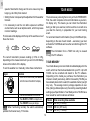
GB
The watch will show Cxxx, Rxxx or Sxxx whenever either the
bike mount, cadence or speed sensor batteries are low.
USE THE HI-GLO BACKLIGHT
Press light/key to turn on the HI-GLO backlight on for five
seconds. Once the light is on, press any key to keep it on for a
further five seconds.
NOTE Replace all the batteries at the same time – it is
dangerous to mix old and new batteries.
NOTE Used batteries can be harmful to the environment, and
should not be thrown out with household rubbish. Contact your
local waste disposal authority for instructions on how to dispose
of used batteries. Protect the environment by taking exhausted
batteries to authorized disposal stations.
In order to save power the light will not work when the battery
is low. If this happens, change the battery as soon as possible.
KEY LOCK
The watch also has a key lock function to stop the buttons from
being accidentally pressed during an activity. To activate it
simply press and hold light/key until a small key icon appears
in the right hand corner of the screen. The function keys are now
useless. To reactivate them, press and hold light/key again
until the key icon disappears.
SWITCH BETWEEN MODES
Press the MODE button to switch between the Modes: CLOCK,
ALTI-BARO, CARDIO (RS109/RP109 only), BIKE (RP109
only), and PC. A bar shows next to the appropriate Mode (on
the outer ring of the LCD display) when it is selected.
NOTE The alarm will still go off while the Key Lock is activated.
Pressing any key while in Key lock will stop the alarm.
SWITCH BETWEEN MODE OPTIONS
HANDLING THE PRODUCT
Press SELECT/+ to switch between the options within a Mode.
The watch is designed to withstand a wide range of sports
activities, and comes complete with a strong wristband. When
riding (RP109 only), make sure the watch is firmly connected to
the bike mount, and connect all bicycle equipment carefully and
securely. See the BIKE Mode section (➔ 20) for instructions.
CHANGE SETTING VALUES
Press and hold FUNC/SET for 2 seconds to enter setting mode.
Then, press ST/SP/- or SELECT/+ to change the value. Press
FUNC/SET to switch between options, and to confirm the
changes when you are done.
8
GB
SET THE ALARM
CLOCK MODE
Diagram
The time, date (including the day of the week) and time alarm
can be set while the watch is in CLOCK Mode. Follow the
instructions below to set or activate the time, date, zone time,
metric or imperial standards, alarm time, stopwatch and timer.
Instructions
1. Press MODE to display the CLOCK mode.
2. Press SELECT/+ 3 times to move it into the alarm
setting screen.
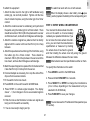
SET CLOCK AND MEASUREMENT UNITS:
Diagram
3. Press ST/SP/- to activate or deactivate the alarm.
A small bell icon will appear on the left side of the
alarm time when it is activated.
4. Press and hold FUNC/SET for 2 seconds, to set the
alarm hour and minutes. Use the SELECT/+ or ST/
SP/- buttons to change the value. (The alarm will
be automatically activated once the alarm time is
set).
Instructions
1.Press MODE to display the CLOCK mode.
2.Press and hold FUNC/SET for 2 seconds. “24h” will flash
on the display.
3.Press ST/SP/- to change from 24 hour to 12 hour time
display.
4.Press FUNC/SET again. The hour will flash. Press SELECT/+ to move the value up, or ST/SP/- to move the
value down.
Tip: Continuously press and hold a button to fast-change
the value.
5.Repeat Steps 3 – 4 to change the rest of the settings, in
this order: minutes, year, month/date or date/month
display, month, day, time zone (+/- 23 hours), temperature display (°C / °F), measurement units (feet / meters),
and barometric pressure units (inHg or hPa).
NOTE You cannot change these settings while in TOUR
Mode. If you attempt to do so, TRIP will show on the display.
Refer to the TOUR Mode section (➔ 14).
STOPWATCH
The Stopwatch works in CLOCK, ALTI-BARO,
CARDIO, and BIKE modes. From any of
these modes, press SELECT/+ to display the
stopwatch. Then,
• Press ST/SP/- to start, pause, and stop the
stopwatch.
• With the stopwatch stopped, press and
hold FUNC/SET to reset.
NOTE You can switch to other modes while running the stopwatch in the background.
9
GB
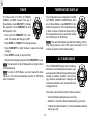
TIMER
TEMPERATURE DISPLAY
The Timer works in CLOCK, ALTI-BARO,
CARDIO, and BIKE modes. From any of
these Modes, press SELECT/+ to display
the stopwatch. Press FUNC/SET to reset
the Stopwatch, then:
The Temperature can be displayed in CLOCK,
ALTI-BARO, CARDIO, and BIKE Modes. From
any of these Modes, press SELECT/+ to display the Temperature. The Temperature shows
in either Celsius or Fahrenheit, depending on
the measurement unit you select when setting
the CLOCK (see CLOCK Mode).
• Press and hold FUNC/SET for 2 seconds. The display will change to TMR.
NOTE Your wrist temperature may affect the reading, particularly during exercise. Take off the watch and leave it for 15
minutes to get the most accurate reading.
• Press ST/SP/- or SELECT/+ to change a value.
• Press FUNC/SET to switch between values and accept
changes.
• Press ST/SP/- to start or stop the timer.
ALTI-BARO MODE
• With the timer stopped, press and hold FUNC/SET to reset.
NOTE You can switch to other Modes while running the timer
in the background.
The OUTBREAKER sports watch includes a
barometer that distinguishes between pressure caused by altitude changes and pressure
caused by weather conditions. This technology reduces discrepancies in readings and
makes the altimeter more accurate than most
average devices.
NOTE To return to STW Mode, you must reset all the timer
values to 0. The timer automatically switches to STW Mode
when it reaches 0.
The watch can store and recall the following values:
• Current altitude (updated every 2 seconds)
• Maximum / minimum altitudes attained during your a trip
• Total accumulated maximum / minimum altitudes attained
during your trip
10
GB
• Maximum / minimum altitude alert (sounds an alarm when
exceeded)
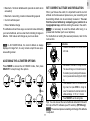
SET CURRENT ALTITUDE AND RESOLUTION
When you first use the watch, it is important to set the current
altitude and local sea-level pressure so your ascending and
descending altitude can be accurately measured. You can
find the current altitude by comparing your position to a
topographical map, and then entering the value in the watch.
NOTE It is necessary to reset the altitude after being in a
pressurized chamber (such as an airplane).
For instructions on setting the sea-level pressure, refer to the
next section.
• Maximum / ascending, maximum descending speeds
• Current vertical speed
• Rate of altitude change
The altitude is shown it two ways, as a numeric value indicating
your current altitude, and as a bar chart indicating changes in
altitude. Both values will change as you move about.
Diagram
NOTE In ALTI-BARO Mode, the current altitude is always
displayed in larger font, in every screen except the sea pressure-setting screen.
Instructions
1. Press and hold FUNC/SET for 2 seconds while in
ALT mode.
ACCESSING THE ALTIMETER OPTIONS
2. Use SELECT/+ or ST/SP/- to change the value.
The value will change in unit increments based on
the resolution you set (next step) and the measurement unit you selected when setting the CLOCK (➔
9).
3. Press FUNC/SET to switch to the Resolution setting screen, then press ST/SP/- to change the
value. The resolution is the increment at which the
altitude will display: 3 / 10 ft, or 1 / 3 meters.
4. Press FUNC/SET to exit the setting mode.
Tip: You can also set the current altitude and alarm limits with
the help of the PC software (see PC section). (RP109 only)
NOTE The sea level pressure reading will change if the altitude
is adjusted.
Press MODE to access the ALTI-BARO mode, then press
SELECT/+ to loop through the options.
11
GB
SET THE SEA-LEVEL PRESSURE
SET ALTITUDE ALERT
Sea level pressure can change relative to location. To achieve
accurate altitude readings, set the sea-level pressure value
before every trip. Check the newspaper, local news station,
trail marker, or weather forecast for local readings, and always
select the reading nearest to your present location.
The watch can be set to remember an altitude limit (either up or
down, but not both simultaneously). If the alarm is activated, a
series of beeps (at 5 second intervals) will sound, and the mode
bar will blink, when you breach the limit. To end the alert, press
any button.
Diagram
To set the alert limits and activate or deactivate the alert:
Instructions
1. While in ALTI-BARO Mode, press SELECT/+ until
the SEA (sea pressure) screen is shown.
Diagram
2. Press and hold FUNC/SET for two seconds, then
use SELECT/+ or ST/SP/- to change the value.
The value will change in increments of 1 hPa or
.03 inHg, depending on the measurement unit you
selected in CLOCK Mode (see CLOCK mode).
3. Press FUNC/SET again when finished.
Instructions
1. Press SELECT/+ until you reach the Alarm screen.
(Display reads 'AL' or 'NoAL' at the bottom)
2. Press and hold FUNC/SET for two seconds.
NOTE The altitude reading will change according to the sea
level pressure adjustment.
3. You may set the arrow at the bottom of the screen
to a ascending, or descending limit (but not both).
To change direction, press SELECT/+ or ST/SP/.
4. Press FUNC/SET again, then press SELECT/+ or
ST/SP/- to change the altitude limit. (The alarm will
be automatically activated once the limits are set).
5. Alternatively press ST/SP/- if you simply want to
accept a preset altitude alert setting. (Activated
[AL] or deactivated [NoAL]).
VIEW THE SEA-LEVEL PRESSURE
To view a graphical image of the current sea
level pressure reading, press FUNC/SET with
the SEA screen shown in ALTI-BARO Mode.
Press again to return to normal display.
12
GB
RECALLING ALTITUDE DATA
SWITCH BETWEEN VIEW OPTIONS
The OUTBREAKER allows you to track the following information as you exercise.
While in ALT/TIME Mode, press
FUNC/SET to switch between the
view options: max / min altitude, total
ascending / descending altitude, and
speed. In the speed display, you can
view current speed (ascending or
descending), maximum ascending
speed, and maximum descending
speed.
• Max / min altitude attained -- shows the highest or lowest
point you have reached so far in relation to your watch’s
permanent altitude setting.
• Max / min altitude accumulated – represents the total distance you have ascended or descended; that is, every
incline is added together or ‘accumulated’, and likewise
every decline is added and ‘accumulated’, to give a total.
Press SELECT/+ or ST/SP/- to loop through the values for each
option.
• Vertical speed -- how fast you are currently climbing
• Max ascending speed – fastest speed you have climbed
To clear a value from the memory, press and hold FUNC/SET
for 2 seconds.
• Max descending speed – fastest speed you have descended
The following illustration shows these points:
FUNC./SET
WEATHER FORECAST
These display screens are
shown in a loop, and the information in each screen is displayed for 30 seconds (excluding the ALT/SPD vertical speed
screen, which is not on a timeout)
at which point the watch returns
to ALT Mode.
ST/SP/-
SEC/+
FUNC./SET
ST/SP/-
SEC/+
FUNC./SET
The built-in barometer helps to forecast the weather for the next
12-24 hours. This reading is based on barometric pressure
changes and has an effective range of 30 to 50 kilometers
(18 – 31 miles). The patented baro-compensation technology
in the OUTBREAKER watch allows it to differentiate between
pressure changes due to altitude, and those due to weather
changes. To avoid inaccurate forecasts, the watch will favor
altitude readings when you are actually ascending or descending. This means the weather icon will disappear after significant
vertical movements. To display an accurate forecast, simply
remain at any fixed altitude for roughly 5 minutes.
ST/SP/-
SEC/+
SEC/+
ST/SP/-
NOTE Clearing the memory
allows you to start over again on
a new trip, though all the information from your current trip will
be lost.
You may wish to set the icon manually for these reasons:
• The speed in the change of icon forecast depends on the
13
GB
speed of barometric change and in some cases may take
longer (up to 24hrs) than desired.
TOUR MODE
There are two ways of using the memory on the OUTBREAKER.
First, the watch computer will record information as you train,
for display only. This means you can check the information
during or after your exercise, but there will be no record once
you clear the memory in preparation for your next training
event.
• Setting the icon can speed up the adjustment for the weather
forecast.
• It is necessary to set the icon after exposure to artificial
environments, such as an airplane cabin, which may cause
incorrect readings.
The forecast will be displayed at the top of the watch as one of
these four icons:
To record and store this information (for up to 99 different trips,
depending on the size of each record – see below) you must
activate the TOUR Mode and view the records through the PC
software.
NOTE The information from a TOUR can only be viewed
through the PC software.
The current barometric pressure reading (in hPa or inHg,
depending on the measurement unit you set in CLOCK Mode)
shows at the bottom of the display.
TOUR MEMORY
Tour mode allows you to record and store data displayed on the
watch, which can then be downloaded onto your PC. Up to 99
TOURs can be recorded and stored to the PC software.
Depending on the model you purchase, the information you
choose to record (see below), and the time used by TOURs you
have already stored on the watch, the available memory length
may vary. The average memory storage capacities in realtime, (taking a data sample every 5 seconds), assuming default
settings (see Specifications: Tour Mode) and no TOURs have
been saved for each model are as follows:
To set the weather icon manually, follow these instructions:
Diagram
Instructions
1. While in the ALTI-BARO Mode, press SELECT/+
until LOC shows at the bottom of the display.
2. Press and hold FUNC/SET for two seconds.
3. Press SELECT/+ or ST/SP/- to change the icon.
4. Press FUNC/SET to save your changes.
Model
RA109
RS109
RP109
NOTE When functioning normally the watch automatically
updates the forecast every 15 minutes.
14
Total recording time available
598 min (10 hours)
508 min (8.5 hours)
659 min (11 hours)
GB
The watch can record and store up to 99 different trips,
providing there is enough remaining memory.
RECORD MARKERS IN TOUR MODE
The marker function is used to mark a particular position during
a TOUR. To place a marker, press and hold SELECT/+ when
the TOUR Mode is in use.
Default sampling time for readings in TOUR Mode is every 5
seconds. To increase the gap between samplings, and thus
increase the memory capacity, you can adjust this setting
through the PC software.
NOTE The marker will only be shown in the PC data, once it
has been downloaded from the watch.
ACTIVATE TOUR MODE:
PAUSE TOUR MODE:
For best results, perform these
steps immediately before you begin your trip.
1. Simultaneously press FUNC/
SET and MODE. The TOUR
END screen will display.
2. Press and hold FUNC/SET for
two seconds. The TOUR number (T1, T2, etc.) will show at
the bottom of the display. You are now recording information. The percentage (%) at the top indicates the total used
memory.
3. To stop the TOUR, press and hold FUNC/SET for 2 seconds.
END will show at the bottom of the display. The Tour data will
be stopped.
4. To begin another TOUR, press and hold FUNC/SET for 2
seconds. The new TOUR number (T3, etc.) will show at the
bottom of the display. You are recording information again.
5. Press MODE to return to the CLOCK display.
NOTE Used watch memory is given as a percentage. It is
recommended that you download information to your PC and
clear all TOUR memories when this figure approaches 100%.
When the used memory hits 100% it will no longer record, and
any future readings will not be recorded.
1. If you are not already in TOUR
Mode, simultaneously press
FUNC/SET and MODE. The
TOUR number will display. The
percentage (%) at the top indicates the total used memory.
2. Press FUNC/SET. REST shows
at the bottom of the display.
3. Press ST/SP/- to turn the rest on (paused) or off (recording).
DEACTIVATE TOUR MODE:
For best results, perform
these steps immediately
after you end your trip.
2 sec
1. Simultaneously press
FUNC/SET and MODE.
The TOUR number will
display. The percentage
(%) at the top indicates the total used memory.
15
GB
2. Press and hold FUNC/SET for two seconds. This ENDS the
TOUR recording session.
CARDIO (HEART RATE) MODE
(RS109/RP109 ONLY)
3. Press MODE to return to the CLOCK display.
The OUTBREAKER watch is
equipped with a CARDIO Mode
and heart rate chest belt, which
together allow you to measure
your heart rate (from 25-240 beats
per minute) while exercising. You
can track your heart rate while in
the ALTI-BARO, CARDIO, or
BIKE Modes, and with the following features: Stopwatch,
Timer, Temperature, and Altimeter display.
CLEAR ALL TOUR MEMORIES
For best results, perform these steps after you download TOUR
information to the PC software.
Either:
1. Download the information to you PC (the TOUR will be
automatically cleared.
Or:
There are five screens in the CARDIO Mode including the
HEART RATE/CLOCK/HR chart (starting) screen. They are:
1. Deactivate the TOUR
Mode. With the END
screen shown, press the
FUNC/SET button. CLR
shows at the bottom of
the display.
•
HEART RATE/CLOCK/HR
chart (starting) screen,
•
2. Press and hold FUNC/
SET until donE shows at the bottom of the display.
HEART RATE/HR alarm on/off/
screen,
•
3. Press FUNC/SET again to display 0% and confirm all data
has been cleared.
HEART RATE/STW (stopwatch) screen,
•
HEART RATE/TEMP (temperature) screen,
•
HEART RATE/ALTI (altimeter)
screen.
4. Press MODE to return to the CLOCK display.
NOTE The maximum and minimum values for the various submodes (i.e., max heart rate, or max altitude, etc) will remain
after all data has been cleared.
To move between them, simply
press SELECT/+.
16
GB
will begin
Once you have good contact with the chest belt,
to flash. This means the signal is being sent and your heart rate
will soon appear in place of the large 0. Your heart rate will be
displayed as the larger font in every screen of this Mode, and
can also be displayed in a smaller font, below the line, while in
BIKE Mode. If you remove the chest belt, or the watch is moved
too far away from it, the signal will be broken.
NOTE The CARDIO Mode will stop functioning after no signal
is received for 5 or more minutes.
WEARING THE CHEST BELT
You must wear the chest belt to measure your heart rate.
NOTE This OUTBREAKER watch is specially designed to
work with the chest belt with which it was sold. It is not
recommended you use any other chest belt with this watch, as
the transmission may not work.
Diagram
Instructions
1. Wet the conductive pads on the underside
of the chest belt with few drops of water or a
conductive gel to ensure a better, solid contact.
2. Put on the belt, wrapping it around the upper
chest so the heart rate monitor is in the
middle of the chest, tucked snugly under the
pectoral muscles.
3. Adjust the belt for comfort and best contact
with the skin.
NOTE When you are measuring your heart rate, keep the
watch away from signal generating sources, such as TVs, PCs,
and car engines, as these may impair the reading.
TRAINING ZONES
The OUTBREAKER watch is
equipped with a special Training Zone
feature that allows you to pre-select
the optimal heart rate range (50-240
beats per minute) for your activity.
For example, the amount of exertion
required for a stroll in the park is
different from the amount of exertion required for weight lifting
to build muscle mass. With the Training Zone feature, you can
set and then monitor the upper and lower heart rate limits
(Training Zone) that best support your training activity and
goals.
Tips: The transmission from the belt is dependent on good
contact with the skin and proximity to the receiver watch. Make
sure the transmitting section of the belt is against the skin, not
blocked by chest hair, and close enough to the receiver watch
(approximately 30 inches) to send a clear signal. Sweat or gel
can help to improve the signal, and remember it is not instantaneous. If no signal is received immediately, wait for a few
seconds for the signal to get through.
NOTE An old battery may weaken the transmission and reception power. Replace the battery if the performance is progressively worse.
17
GB
The calculation for determining your upper and lower heart rate
limits is as follows.
Maximum Heart Lower limit
Upper limit
Range (MHR)
Men 220 – age = MHR MHR x (lower training zone %) MHR x (upper training zone %)
Women 230 – age = MHR
Once you know your maximum heart range, you can set the 5
Training Zones (described below) with the PC software (refer
to the online help). With the OUTBREAKER watch, you can
directly set your upper and lower limits for Training Zone 5, and
can set an alarm to sound whenever you exceed the limits for
the selected Training Zone.
4
80 – 90%
5
90 – 100%
Sex
NOTE High-altitude activities may elevate your maximum heart
rate.
NOTE You can override the zone preference by adjusting the
value through the PC (all zones), or by manually adjusting
Zone 5.
Warning: The heart rate limits for Training Zones 1 – 4 are
based on the profile for a 20-year-old young man. If you do not
meet this profile, we HIGHLY RECOMMEND that you either set
the limits for Training Zones 1 – 4 using the PC software, or
follow the steps below to set the limits for Training Zone 5.
SET UPPER AND LOWER HEART RATE LIMITS
FOR TRAINING ZONE 5
1. Press MODE to access the CARDIO
(heart rate) Mode.
The recommended Training Zones are as follows:
Zone
1
2
3
Anaerobic Zone – Generates speed and power. It works at
or above the body’s oxygen intake capability, builds muscle,
and cannot be maintained for a long period of time.
Red Line Zone – This high-intensity zone can only be
maintained in short bursts or intervals, as it pushes your
muscles and cardiovascular system beyond their capacity.
2. Press SELECT/+ to switch to the AL
(Alarm) setting.
MHR range Description
(min – max %)
50 – 60%
Moderate Activity – This low-intensity zone is good for warmups, cool downs, and activities such as brisk walking. It is also
good for beginners and those who want to strengthen their
cardiovascular systems.
60 – 70%
Weight Management – Up to 85% of calories burned in this
zone are from fat cells. Moderate exercises such as light
jogging or swimming are good for this zone.
70 – 80%
Aerobic Zone – Increases strength and endurance. It works
within the body’s oxygen intake capability, burns more calories, and can be maintained for a long period of time.
3. Press and hold FUNC/SET for two
seconds. The zone number will flash
at the bottom of the screen. The upper limit is shown above
the line in larger font, and the lower limit is below. (You may
adjust the value for upper and lower rate limits in Zones 14 by using the PC software. Otherwise pressing ST/SP/- will
simply activate or deactivate the preset alarm).
4. Press SELECT/+ or ST/SP/- to switch to Zone 5.
5. Press FUNC/SET again to display the SET screen
18
GB
6. Press SELECT/+ or ST/SP/- to change the upper heart rate
limit.
Mode and check to make sure the watch is receiving your
heart rate signals.
7. Repeat Steps 5 – 6 to set the lower heart rate limit.
8. Press FUNC/SET when finished.
3. Select the Training Zone that is most appropriate for your
activity (refer to previous section).
NOTE Heart rate range is between (upper 26-240 bpm) and
(lower 25-239 bpm).
4. Activate the Stopwatch or Timer in CARDIO Mode (refer to
the Stopwatch / Timer section).
ACTIVATE THE TRAINING ZONE ALARM
5. Set up the TOUR Mode if you want to store a long-term record
of your heart rate history that spans several training sessions
or activities (refer to the TOUR Mode section).
Once activated, the Training Zone Alarm will sound whenever
you exceed the upper or lower heart rate limits for the selected
Training Zone.
Once you complete these steps, you are ready to begin
exercising. After you finish, reset the Stopwatch or Timer to
zero, then press FUNC/SET to have the following metrics
displayed in 5-second intervals:
1. From the CARDIO Mode, press SELECT/+ to switch to the
AL (Alarm) screen.
• Time and date in M1 or M2….M99 (all current data will be
stored under M1, while previous data is stored under M2 and
so on until M99).
2. Press and hold FUNC/SET for two seconds.
3. Press SELECT/+ or ST/SP/- to select the desired Training
Zone.
• Average heart rate during exercise and Total exercise time
4. Press FUNC/SET.
• Upper Training Zone limit and time spent above limit
5. Press ST/SP/- to turn the alarm off or on.
• Lower Training Zone limit and time spent below limit
• Total time spent exercising within the heart rate limits
TRACK HEART RATE DURING TRAINING
NOTE If you have more than one set (M1-M99) of training
records, press SELECT/+ or ST/SP/- to loop through the
records.
To set up the OUTBREAKER watch so
that it can track your heart rate activity
during training, first do the following:
1. Put on the chest belt (refer to the
“Wearing the Chest belt” section).
2. Press MODE to access the CARDIO
19
GB
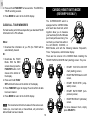
STEP 1: ATTACH THE EQUIPMENT TO THE BICYCLE
BIKE MODE (RP109 ONLY)
The OUTBREAKER sports watch comes complete with a
bicycle computer (and accessories), which records and displays the following information:
• Speed: 0 – 255 km/hour or 0 – 158 mile/hour, depending on
the measurement unit you select (refer to the Clock Mode
section)
• Average speed (Max:255km/hr or 158 mile/hr)
• Maximum speed (Max:255km/hr or 158 mile/hr)
• Cadence: 0 – 255 rpm (pedal revolutions per minute)
• Distance traveled (Max:999.9 km or 620 miles)
• Total distance travelled (Max:99,999.9 km or 620,000 miles)
• Total time spent cycling
Max 5 mm
Max 100 cm
The BIKE Mode comprises pioneering technology that uses
two wireless sensors instead of one. The high frequency of
each sensor (868 MHz) eliminates possible interference between the cadence and signal sensors, ensuring you accurate
performance measurements.
SET UP FOR BIKE MODE
To set up the BIKE Mode you must first do two things:
1. Attach the measuring equipment to your bicycle:speed
sensor (front wheel), cadence sensor (pedal), two magnets
(front wheel and pedal), and bike mount (handle bar). Refer
to the next section for instructions.
2. Specify your wheel circumference. See below for instructions.
20
GB
To attach the equipment:
NOTE The watch can work with one or both sensors.
1. Attach the bike mount to the right or left handlebar using
rubber grip, nut and bolt provided. Tighten until the bike
mount is fixed into place, using the rubber grip for a firmer
contact.
2. Attach the cadence sensor to a stationary point just behind
the pedal, using the rubber grip for a firmer contact. There
should be maximum 100cm (39 inches) between the sensor
and the bike mount, and less than 30 degrees vertical angle.
3. Attach the cadence magnet to a pedal so that it is directly
aligned with the sensor with less than 5mm (0.2 inches)
between.
4. Attach the speed sensor to either leg of the front forks, using
the rubber grip for a firmer contact. There should be
maximum 100cm (39 inches) between the sensor and the
bike mount, and less than 30 degrees vertical angle.
5. Attach the speed magnet on a spoke of the front wheel so that
it less than 5mm (0.2 inches) from the sensor.
6. Check and adjust as necessary, then snip the ends off the
clips so that no excess remains.
7. Fit the watch into the bike mount.
8. Press MODE on the watch to switch to BIKE Mode.
NOTE When the display shows a low battery icon
(see
‘Battery’ section) replace the battery for the corresponding unit.
STEP 2: ENTER WHEEL CIRCUMFERENCE
You must set the bike’s wheel circumference on the watch so it can accurately
calculate your speed and distance. If you
do not know the bike’s wheel circumference, you can check the manufacturer’s
specifications or measure it by marking
the wheel where it touches the ground,
and then rotating the wheel once fully along the ground.
Measure the difference between the two marks.
NOTE Most wheels have their specifications written on them.
To specify this information on the watch:
1. Press MODE to switch to the BIKE Mode.
2. Press and hold FUNC/SET for 2 seconds.
3. Press SELECT/+ or ST/SP/- to change the circumference
(cm or inches, depending on the measurement unit you
selected in CLOCK Mode).
9. Press ST/SP/- to activate signal reception. The display
shows “- -“, then changes to 0 once a successful signal is
received.
4. Press FUNC/SET to save your changes.
10. Ride the bike a short distance to make sure signals are
being sent to the watch successfully.
NOTE You can also use the PC software for this operation (see
PC section).
11. You are now ready to begin your trip.
21
GB
ACCESSING THE MODE OPTIONS
PC KIT (RP109 ONLY)
Press MODE to access the BIKE
Mode, then press SELECT/+ to loop
through the options: Speed, Stopwatch/Timer, Temperature, Altitude,
and Heart Rate.
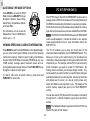
The RP109 Oregon Scientific OUTBREAKER sports watch is
equipped with a PC Kit that includes a PC Docking Station and
CD-ROM for downloading information to a personal computer.
Full instructions for using the software are provided in the online
help and can be viewed once you have installed the CD-ROM.
For instructions on how to use the
Stopwatch or Timer in BIKE Mode,
refer to pp. 9 – 10.
NOTE The PC Kit for the RA109/RS109 series OUTBREAKER
watch is sold separately. Contact the retailer or our website
(www.oregonscientific.com) for more information about the
RZ910 PC Kit.
VIEWING SPEED AND CADENCE INFORMATION
The PC Kit enables you to store and recall most of the
information that is collected by the OUTBREAKER watch. This
allows you to free up the watch memory for recording more
information, while preserving the training records that are most
important to you. For example, with the PC Kit you can specify
which information you want to record in TOUR Mode: By
limiting what is recorded, you can keep longer records. This
can be useful if you wish to monitor your performance during an
extended period such as a two-day hike, where only heart rate
and altitude are of concern, or a day of cycling, where only
speed and distance are important to you. Full details of the
watch’s memory capacity are given in the TOUR MEMORY
section.
Press MODE to switch to the BIKE Mode. In the Speed display,
you can view current speed (default view) and the following
metrics from memory: total time spent cycling, total distance
traveled, total TOUR distance traveled (TOUR Mode only, see
TOUR section), average speed, maximum speed, and cadence (pedal revolutions per minute). Press FUNC/SET to loop
through the values for each option.
To clear a value from a specific memory, press and hold
FUNC/SET for 2 seconds.
You can also use the PC Hook-up Kit to set values on the watch
through the PC. A full list of options is given at the end of this
section.
NOTE The hardware/software requirements for the PC Kit are
listed at the back of this manual.
22
GB
USING THE SOFTWARE
PC MODE
Double-click on the Oregon Scientific icon. Once the software
opens, click on Help for information about the function you
require.
SET UP FOR PC MODE
To use the features of the PC Mode, you will need the PC Kit
(includes PC docking station, connector cable, and the installation software CD-ROM), and a PC or laptop computer.
NOTE All three models (RA/RP/RS 109) support the PC Mode.
However, the PC Kit for the RA109 and the RS109 is sold
separately.
Diagram
PC MODE OPTIONS
Instructions
1. Connect the PC Docking Station to your computer. For
best results, turn the computer off before you connect.
You can perform the following tasks by using the CD-ROM
software supplied.
2. Install the software using the CD-ROM (first-time use
only). The process is automatic, and requires you to
respond to self-explanatory prompts.
Once the software is installed, an Oregon Scientific icon
will be placed on your desktop.
3. Mount the watch on the docking station, making sure the
contact points on the station and the watch are aligned.
The watch should automatically switch to PC Mode.
NOTE The cadence, speed and heart rate functions
will be temporarily disabled when you use the watch in
PC Mode.
23
Access/recall information/ on the PC
Change watch settings on the PC
• All information recorded in TOUR
Mode, including temperature,
altitude, heart rate, wheel speed,
cadence, trip distance, etc,
[Provided this data has been
selected in “Data should be stored”
in the “Configuration menu” (see
software help menu)].
• Back up/import and export data
• Define user data
• Display graphical chart and print
table
• Give data overview with a specified
duration
• Date and time (set to PC time, or a
manual setting)
• Time, and event alarm (3 event
alarms, 1 daily alarm, and select alarm
duration)
• Current sea-level pressure
• Altitude limits
• Weather icon
• Upper and lower heart rate limits for
Training Zones 1 – 5.
• Wheel circumference/diameter
• TOUR Mode data recording and
download options
• Choose a serial port (Com 1 to Com 4)
• Sampling rate (1 second and up)
• Unit settings (Metric or Imperial)
GB
NOTE To send all selected settings and preferences to the
watch select “Transfer configuration” in the “communication”
sub-menu (PC software).
EFFECTIVE USE AND RANGE
The watch and heart rate chest belt have a maximum transmission range of about 76 centimeters (30 inches). If the signal is
weak take the following steps:
DOWNLOAD DATA
• Shorten the distance between the heart rate chest belt and
watch
Follow these procedures to download data
1. After installing the CD-ROM click the OUTBREAKER icon on
your PC.
• Re-adjust the position of the heart rate chest belt
• Check the batteries. If they are low or exhausted, change the
battery immediately
2. In the man menu, select “Communication”.
3. Connect the docking station to your PC.
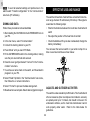
You can wear the receiver watch on your wrist or strap it to a
bike or exercise machine as shown below:
4. Press “Mode” until you reach PC Mode.
5. Fit the OUTBREAKER watch in the docking station, making
sure the pins are matched and secured.
6. Close the cover gently and select “Connect” in the “Communication” sub-menu.
7. You will see an arrow mark on the watch, and “download in
progress” on your PC.
8. Select “Read Trip Data” in the “Communication” sub-menu,
then follow the on screen instructions.
9. Select “Format” to process the data arrangement.
AQUATIC AND OUTDOOR ACTIVITIES
10.Download is now complete. Select desired graphical report.
The watch is water-resistant up to 50 meters. The chest belt and
other accessories (bike mount/speed and cadence sensors)
are splash-proof up to 10 meters, but should not be worn for
underwater activities, as the heart rate transmission cannot
work properly under water. Refer to the table below for
guidelines.
24
GB
SAFETY AND CARE INSTRUCTIONS
SAFETY PRECAUTIONS
RAIN
SPLASHES, ETC
30m / 100ft
50m / 165ft
100m / 325ft
OK
OK
OK
SHOWERING
SHALLOW DIVING /
(WARM / COOL LIGHT SWIMMING
SURFING /
WATER ONLY) / SHALLOW WATER WATER SPORT
OK
OK
OK
NO
OK
OK
NO
NO
OK
SNORKELING /
DEEP WATER
DIVING
Please observe these safety precautions when using this
product.
NO
NO
NO
• Do not consult the watch while moving or engaging in active
sports. Doing so may result in a collision that causes
personal injury.
When using the watch for outdoor sports activities, observe the
following guidelines:
• Do not subject the product to excessive force, shock, dust or
temperatures.
• Do not press the buttons underwater or with wet fingers.
• Do not tamper with the product’s internal components.
• Rinse with water and mild soap after use.
• Do not mix fresh and old batteries, or batteries of different
specifications.
• Do not use the watch in hot water.
• Do not use this watch as a substitute for professional
measuring devices used in skydiving, hang gliding,
paragliding, gyrocopter piloting and flying small aircraft.
Tips for keeping your watch fit: Keep your watch water
resistant! Avoid chemicals (gasoline, chlorine, perfumes, alcohol, hair sprays, etc.). Rinse after use. Reduce exposure to
heat. Have your watch serviced by an approved service center
once yearly.
• Do not use this watch as a substitute for industrial precision
instruments.
• Follow the water-resistance guidelines carefully before use
in water (see Effective Use and Range section).
• Keep the product away from heat sources such as radiators,
stoves, heaters, and other heat-generating products.
CARE INSTRUCTIONS
To ensure you receive the maximum benefit from using this
product, please observe the following guidelines.
25
GB
• Cleaning – Clean with a damp cloth. Do not use liquid
cleaning agents, benzene, thinner, or aerosols.
Problem
Remedy
Reset time zone
Cannot be changed when
TOUR Mode is operating.
Altitude
Reset watch, or accept
Reading is less than Current altitude is
reading is 0 (-20, etc.)
below ground, (watch reading
strange
sea level setting)
Different height
Barometric changes Minor pressure changes
may produce minimal
reading at same
deviations in altitude
point after trip
readings
No altitude Alarm does not
Set levels (➔ 12)
Levels not set
alarm
sound
Temperature Too high
Watch is too close to Take off watch, wait 15
minutes, then try again
reading is
body
strange
Height displacement Remain at fixed altitude
No weather Weather icon
(Vertical movement) for 5 minutes
reading
disappears
Set units (➔ 9)
Wrong unit Incorrect unit setting Unit settings
reading
(imperial/
metric)
Set levels (➔ see relevant
Levels not set
Expected alarm
No alarm
MODE Section)
does not sound
Alarm not activated Activate alarm (➔ see
relevant MODE section)
Reset after you have
Is change due to
Too high or low
Pressure
changed locations
wind, pressurized
reading is
chamber, or
strange
pressurized
environment
(airplane)?
• Repair – Do not attempt to repair the product or modify the
circuitry by yourself. Contact the retailer or a qualified
repairman if the product requires servicing. Only use replacement parts that are recommended by the manufacturer.
• Do not scratch hard objects against the LCD display as this
may cause damage.
TROUBLESHOOTING GUIDE
This section includes a list of frequently asked questions for
problems you may encounter with the OUTBREAKER sports
watch. If your watch is not operating as you think it should,
check here before arranging for servicing.
Problem
No power
Date / time
is wrong
Symptom
Power will not turn
on.
Check this
Batteries are
exhausted.
Batteries are inserted
incorrectly.
Keys do not respond Key lock in
operation.
(Key icon shown)
Date display is
Date not set
wrong
Remedy
Replace with new
batteries.
Insert the batteries
correctly (➔7).
Press key/lock for 2
seconds (Key icon will
disappear).
Set date correctly (➔9)
Cannot be changed when
TOUR Mode is operating.
26
Symptom
Time display is
wrong
Check this
Time zone set
incorrectly
GB
Problem
Symptom
Heart icon Blank display
not working
No heart rate Expected alarm
alert
does not sound
No heart rate No heart rate data
memory
No bike
reading/
Strange
reading
No data
Check this
Time out due to 5
minutes of inactivity
Chest belt is too far
from watch or poor
skin contact
Training Zone/Alert
limits not set
Chest belt is too far
from watch or poor
skin contact
Sensor not ready
Remedy
Press MODE to return to
CARDIO Mode
Move chest belt closer or
adjust contact with skin
SPECIFICATIONS
Calendar Clock
Hour format
Date format
Auto calendar
Alarms
Set limits (➔ 18)
Move chest belt closer or
adjust contact with skin
Chronometer/Timer
Heart Rate Monitor
Heart rate range
Resolution
Accuracy
Training zones
HR alert range
Check distance between
sensor and magnet
Rx/Cx/Sx shown
No battery
Replace batteries (➔7)
No display
Watch not activated Press ST/SP/Display shows “- -“ then“0”
No TOUR data
Disabled feature
Re-select check box in PC
stored
through PC
software
Strange reading
Wrong wheel size set Measure and set wheel
diameter again
Strange reading
Sensors fitted
Check sensor fittings
(continued)
incorrectly
Magnet not aligned Realign magnet
Interference
Find source and move or
switch off
No sensor Rx/Sx/Cx displayed Battery low or empty Replace battery
power
in BIKE mode
No memory Empty memory, or Tour mode not set Set tour mode
used memory %
unchanged
100% of memory Memory full
Clear all memories
used
manually, or download to
the PC
Alert memory
TOUR memory
Thermometer
Range
Resolution
Accuracy
Altimeter
Range
Resolution
Accuracy
Vertical speed
NOTE Data manually erased cannot be recalled or recovered.
27
12/24 hr
DD:MM:YY or MM:DD:YY
2000-2099
1 daily (hr:min)
3 event (hr:min DD.MM.YY)
99:59:59 (hr:min:sec)
25…240 beats per minute (bpm)
1 bpm
+/- 1 bpm
5
26…240 bpm (upper)
25…239 bpm (lower)
3 heart rate alarms
99 max (RS109/RP109 only)
-10.0º C….60.0º C
(14.0º F….140.0º F)
0.1º C (0.2 º F)
+/- 1º C (+/- 2º F)
-400…9,000 meters
(-1,312….30,000 feet)
1 or 3 m (3 or 10 ft)
+/- 10 m (+/- 30 ft)
0…125 m/sec (0…415 ft/sec)
(ascending or descending)
GB
Vertical speed resolution
Max altitude change
Total altitude change
Alerts
Barometer
Local pressure range
Sea level pressure range
Resolution
Accuracy
Bar graph x-resolution
Bar graph y-resolution
TOUR Mode
OUTBREAKER RA109
Record time:
5 second samplings:
ture
1 m/sec (3 ft/sec)
1 m/sec (3 ft/sec)
+/- 60,000 m (+/- 180,000 ft)
1 alarm
Temperature
BIKE Computer
Wheel speed range
Wheel speed resolution
Cadence range
300…1100 hPa
(8.86…32.46 inHg)
900…1100 hPa
(26.58…32.46 inHg)
1 hPa (0.03 inHg)
+/- hPa (+/- 0.1 inHg)
1 hour
1 hPa (0.02953 inHg)
Altitude / Barometer / Tempera-
OUTBREAKER RS109
508 min
5 second samplings:
Heart Rate / Altitude / Barometer
/ Temperature
OUTBREAKER RP109
Record time:
659 min
5 second samplings:
Distance / Cadence / Speed /
Heart Rate/ Altitude / Barometer /
Environment
Operation
Storage
Relative Humidity
-10º C…60º C (14º F…140º F)
-20º C…70º C (-4º F…158º F)
10%…95%
Water Resistance
Watch
Other accessories
not actuating keys to 50 m (165 ft)
splash proof
Power
Watch
Chest belt
Bike mount
Cadence sensor
Speed sensor
1 x CR2032 3V lithium battery
1 x CR2032 3V lithium battery
2 x CR2032 3V lithium battery
2 x LR44 1.5 V alkaline battery
2 x LR44 1.5 V alkaline battery
Cadence resolution
Max trip distance
Max total trip distance
Wheel circumference
598 min
Record time:
Circumference resolution
Bike sensor RF
255 km/hr (158 mile/hr)
1 km/hr (1 mile/hr)
0…255 revolutions per minute
(rpm)
1 rpm
999.9 km (620 miles)
99,999.9 km (62,000 miles)
1,000….3,000 mm
(39 in…118 in)
1 mm (0.04 in)
868 MHz
28
GB
• Do not subject the product to impact or shock.
WARNINGS
• Check all major functions when the device is unused for a
long period of time. This is to ensure its full operation.
Maintain a regular internal testing and cleaning of your
device.
To ensure you use your product correctly and safely, read these
Warnings and the entire user manual before using the product.
The warnings given here provide important safety information
and should be observed at all times.
• When disposing of this product, do so in accordance with
your local waste disposal regulations.
• Do not attempt to repair the product yourself. Contact the
retailer or our customer service department if it requires
servicing.
• Take precautions when handling all battery types. They can
cause injuries, burns, or property damage as a result of
contact with conducting materials, heat, corrosive materials
or explosives. Remove the batteries before storing the
product for long periods of time.
DECLARATION OF CONFORMITY
This product contains the approved transmitter & receiver that
comply with the essential requirements of Article 3 of the
R&TTE 1995/5/EC Directives, if used as intended and the
following standards have been applied:
• The product is a precision instrument. Never attempt to take
this device apart. There is a serious danger of powerful
electric shocks.
Safety of Information technology equipment (Article 3.1.a of the
R&TTE directive)
• Do not, under any circumstances, touch the exposed electronic circuitry of the device as there is a danger of electric
shock should it become exposed.
Applied Standards: IEC 60950
Electromagnetic compatibility (Article 3.1.b of the R&TTE directive)
• Take special care when handling a damaged LCD display,
as the liquid crystals can be harmful to your health.
Applied Standards EN 301 489-3: (2000)
• Do not use or store the device, including the remote sensor,
in locations that may adversely affect the product such as,
snow, desert, and magnetic fields.
Efficient use of the radio frequency spectrum (Article 3.2 of the
R&TTE directive)
• Do not use this device in aircrafts or hospitals. The use of
radio frequency products can cause malfunctions in the
control devices of other equipment.
Additional Information: The product herewith complies with the
requirements of the Low-Voltage Directive 73/23/EEC and the
Applied Standards EN300 330-2: (2000)
29
GB
EMC Directive 89/336/EEC and carries the CE 0359 (!) marking
accordingly.
Hereby, IDT Technology Limited declares that this low power
radio equipment is in compliance with the essential requirements and other relevant provisions of R&TTE Directive 1999/
5/EC.
VS-Villingen / Germany March 2003
Gerhard Preis
EC representative of manufacturer
R&TTE Compliant Countries:
All EC countries, Switzerland CH
And Norway N
ADDITIONAL RESOURCES
Visit our website (www.oregonscientific.com) to learn more
about your OUTBREAKER sports watch and other Oregon
Scientific™ products such as digital cameras, hand-held organizers, alarm clocks, and weather stations. The website also
includes contact information for our customer service department, in case you need to reach us.
© 2003 Oregon Scientific. All rights reserved.
30