1
17
#9: Associations
Association (linking devices) - direct control of other devices within
the Z-Wave system network using the wall switch connected to the
Dimmer 2.
The association enables the Dimmer 2 to control directly a device
included in Z-Wave network e.g. other Dimmer, Relay Switch, Roller
Shutter or scene (may be controlled only through a Z-Wave controller).
The Dimmer 2 provides the association of five groups:
1st Association Group „Lifeline” reports state of the device. Main
Z-Wave+ network controller should be added to this group. The „Lifeline” group can handle only one device. It is not recommended to
modify this group.
2nd Association Group „On/Off (S1)” is assigned to switch no. 1.
Sends BASIC command class frame according to the state of the device.
3rd Association Group „Dimmer (S1)” is assigned to switch no. 1.
Sends MULTILEVEL SWITCH command class frame. Allows sending
dim/brighten command to associated devices.
4th Association Group „On/Off (S2)” is assigned to switch no. 2.
Sends BASIC command class frame according to the state of the device.
i
NOTE
Association ensures
direct transfer of
control
commands
between devices, is
performed
without
participation of the
main controller and
requires
associated
device to be in the direct range.
i
NOTE
Dimmer 2 supports
the operation of multichannel
devices.
Multichannel devices
are devices that include two or more circuits inside one physical unit.
5th Association Group „Dimmer (S2)” is assigned to switch no. 2.
Sends MULTILEVEL SWITCH command class frame. Allows sending
dim/brighten command to associated devices.
Dimmer 2 in 2nd to 5th group allows for controlling 5 regular and 5
multichannel devices per an association group, out of which 1 field is
reserved for the Z-Wave network main controller. It is not recommended to associate more than 10 devices in general, as the response time
to control commands depends on the number of associated devices.
In extreme cases, system response may be delayed.
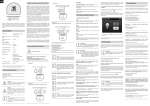
To add an association (using the Home Center controller):
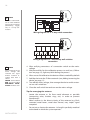
1. Go to device options by clicking the icon:
2. Select the „Advanced” tab
3. Specify to which group and what devices are to be associated
4. Wait for the configuration process to end. Sending relevant information to devices added to associated groups may take even a
few minutes
Associations