1
Getting Started
The SQ.200 is designed to be intuitive and easy-to-use. Its Automatic
Speech Recognition technology, or ‘ASR’, allows you to begin translating
instantaneously, without the need for tedious voice training.
1. Ensure that the headset is securely connected to the SQ.200 via the slide-lock connector.
Adjust the microphone so that it is approximately one finger width from your lips
positioned at the left corner of your mouth. NOTE: THE HEADSET SHOULD LOOP BEHIND
YOUR HEAD AND THE EARPIECE SHOULD BE COVERING YOUR LEFT EAR.
2. Press the POWER button to turn on the SQ.200. The POWER button is located on
the front face of the device, just below the right side of the speaker.
3. You will immediately see the LCD screen light up and the word ‘Loading…’ appear
below the
logo. It will take 20-25 seconds for the SQ.200 application to
fully load. Once the application is ready, you will hear the current category and
language announced through the headset.
4. Using the five-button keypad, select CATEGORIES> from the main menu. Scroll
down and select a category that meets your needs.
5. Clearly say the wake-up word “TRANSLATOR” and you will hear a single ‘ping’ in
the earpiece. This ‘ping’ indicates that the SQ.200 is listening for your phrase.
6. Once you hear the ‘ping’, say a phrase* into the microphone in a clear,
commanding voice, making sure to enunciate your words. You can select a phrase
from your phrase reference booklet or read directly from the screen. NOTE: MAKE
SURE YOU ARE SAYING A PHRASE THAT IS WITHIN THE ALWAYS ACTIVE> OR
SELECTED CATEGORY, OR THE SQ.200 WILL NOT RECOGNIZE THE PHRASE!
7. You will hear the English verification of the phrase in your headset earpiece prior
to translation to ensure that the SQ.200 correctly heard what you said into the
microphone.
8. After verification, you will hear the phrase translation from the SQ.200’s speaker.
*Some phrases are recognized by their triggers. Triggers are shortened versions of the
phrase. Where there is a trigger, use that instead of the entire phrase. Triggers will
be clearly displayed onscreen or in your phrase reference booklet.
The Package
The SQ.200 comes equipped with everything you need to quickly get started. The
package includes:
1. A Voxtec-approved, high performance
6. A MOLLE-compatible custom holster
headset with noise-canceling microphone.
designed to attach the SQ.200 to your
equipment.
2. An SQ.200 User Manual, Quick Reference
Guide, Training Program, and DVD of all
7. A MOLLE-compatible weatherproof bag to
currently available SQ.200 Language Modules.
store and carry your SQ.200, headset and
accessories.
3. An AC/DC power supply with universal
charger adapters to allow for charging
8. If purchased, optional accessories
throughout the world.
include: a lapel microphone, car charger
or audio Y-cable connector kit for
4. A mini USB cable for downloading Language
attaching the SQ.200 to an external
Modules and software updates to the SQ.200.
megaphone or loudspeaker system.
5. A form-fitting armband which includes a booklet
9.
The SQU.ID® SQ.200 itself.
to help you reference key phrases at a glance.
One-Way Translation
1. The SQU.ID® SQ.200 is a phrase based, one-way translator. This means that it
plays pre-recorded phrases in target languages to help you communicate with
people who do not speak English. IT IS IMPORTANT TO KNOW THAT THE SQ.200
WILL NOT TRANSLATE A TARGET LANGUAGE BACK INTO ENGLISH.
2. Phrases are predefined by industry experts then translated by fluent interpreters,
organized and thoroughly vetted to ensure that you are getting the most accurate
translation possible.
Translations/Commands with the Voice User
Interface (VUI)
PUSH TO TALK Mode (Eyes Free)
PUSH TO TALK Mode for eyes free translation is useful when you have a
free hand to tap or press and release the PUSH TO TALK button. Using
the PUSH TO TALK button is the fail-safe method for ensuring that the
SQ.200 is listening for a phrase or command.
Translations
1. To translate a phrase in this mode, simply tap the PUSH TO TALK button located on
the front of the SQ.200.
2. You should hear a single ‘ping’ in the earpiece. This ‘ping’ indicates that the SQ.200
is waiting for you to speak one of the pre-recorded phrases.
3. Say the pre-recorded phrase you wish to translate. NOTE: BE SURE THE PHRASE IS
WITHIN THE ALWAYS ACTIVE> OR SELECTED CATEGORY.
4. There will be a short pause followed by the English verification of the phrase in
your headset earpiece.
5. The SQ.200 will then broadcast the phrase in the target language you have chosen.
Commands
1. To initiate commands in the PUSH TO TALK Mode, simply press the PUSH TO TALK button
as if you were translating, except hold it down for about a second, then release it.
2. You will hear two pings, the second with a higher pitch (‘ping-PING’). This indicates
that the SQ.200 is waiting for a command rather than a translation.
3. In a normal clear voice, say one of the designated commands into the headset
microphone. For a complete listing of SQ.200 commands, refer to the “Voice
Commands” chart on this guide.
4. The SQ.200 will immediately perform your command while playing an English
command verification through the headset earpiece.
3. Recorded translations are stored on the SQ.200’s flash memory drive. These
translations have been grouped into categories designed to meet your situational needs.
4. For your convenience, a customizable category called MY FAVORITES> is provided. You
can add, remove, and change the order of phrases in this category. To add a phrase
to MY FAVORITES>, navigate on screen to highlight a phrase you wish to add and hold
down the CENTER button on the five-button keypad for three seconds until a message
appears indicating that the phrase is being added to MY FAVORITES>.
Voice Recognition Mode (Hands Free, Eyes Free)
Your SQ.200 is also designed to translate in Hands Free, Eyes Free Mode,
allowing you to maintain maximum situational awareness when you need it most.
Translations
1. To translate a phrase in this mode, clearly say “TRANSLATOR” into the microphone.
For ideal performance, be sure to stress the ‘T’ in the word “TRANSLATOR”.
2. This will act as a wake-up word for the SQ.200 and you will hear a single ‘ping’ in the
earpiece. This ‘ping’ indicates that the SQ.200 is listening for you to speak a phrase.
3. Say the pre-recorded phrase you wish to translate. NOTE: BE SURE THE PHRASE IS
WITHIN THE ALWAYS ACTIVE> OR SELECTED CATEGORY.
4. There will be a short pause followed by the English verification of the phrase in your
headset earpiece.
5. The SQ.200 will then broadcast the phrase in the target language you have chosen.
Commands
1. To initiate commands in this mode, clearly say “COMMAND” into the headset
microphone. Be sure to enunciate the ‘C’ in “COMMAND” for optimal performance.
2. You will hear the two successive pings that resulted earlier from pressing the PUSH
TO TALK button (‘ping-PING’). Again, this indicates that the SQ.200 is waiting for a
command rather than a translation.
3. In a normal clear voice, say one of the designated commands into the headset
microphone. For a complete listing of SQ.200 commands, refer to the “Voice
Commands” chart on this guide.
4. The SQ.200 will immediately perform your command while playing an English
command verification through the headset earpiece.
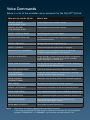
Voice Commands
Below is a list of the available voice commands for the SQU.ID® SQ.200:
What you say into the SQ.200
What it does
SPEAKER VOLUME
(LOW, MEDIUM, HIGH)
Increases/decreases speaker volume
HEADSET VOLUME
(LOW, MEDIUM, HIGH)
Increases/decreases headset volume
SELECT <CATEGORY NAME>
Sets/changes the current category
CONFIRM CONFIGURATION*
Confirms the current target language and category in
the headset earpiece
SELECT <LANGUAGE>
Changes the current target language
CANCEL PLAYBACK
Cancels the playback of the phrase in progress
BROADCAST ALL LANGUAGES*
Broadcasts any one selected phrase in all of the
available target languages on the SQ.200
LOOP ALL LANGUAGES*
Loops through a series of phrases within a sequence
or MY FAVORITES> category in all of the available
target languages on the SQ.200
BEGIN OPEN MICROPHONE*
Puts the SQ.200 into Open Microphone Mode, eliminating
the need to use the wake-up word
END OPEN MICROPHONE*
Takes the SQ.200 out of Open Microphone Mode
LOOP SEQUENCE
<SEQUENCE NAME>*
Loops the entire sequence continuously in only the
currently selected target language
BEGIN SEQUENCE
<SEQUENCE NAME>
Translates only the first phrase in a selected sequence
NEXT PHRASE
Translates the next phrase in that sequence
REPEAT LAST PHRASE
Repeats the translation of the last selected phrase
BEGIN VERIFICATION
Turns synthesized English phrase verification function on
END VERIFICATION
Turns synthesized English phrase verification function off
END WAKE-UP WORD
Turns wake-up word function off (look for icon
indicator on Main Menu screen)
BEGIN WAKE-UP WORD**
Turns wake-up word function on
NOTE:
*This feature can only be performed through Voice Commands.
** You must use the PUSH TO TALK button to initiate this command. The SQ.200 will NOT recognize “TRANSLATOR” or “COMMAND” since the wake up word function is off.
RESET Button: In the unlikely event of a lockup, your RESET button is located
within your DC-In Port at the base of the unit (labeled “10-18VDC” on device)
Manual Mode
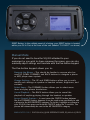
If you do not need to have the SQ.200 attached to your
equipment or you wish to show someone the screen, you can also
manually adjust settings and translate with the five-button keypad.
The five-button keypad allows you to:
1. Navigate the Menus – This should be familiar to anyone who has
used UP, DOWN, FORWARD, and BACK buttons to navigate a phone
or MP3 player menu system.
2. Change Settings – The UP and DOWN buttons allow you to easily
modify such settings as speaker or headset volume, brightness, and
contrast.
3. Select Items – The FORWARD button allows you to select menu
items and play phrase translations.
4. Cancel Playback – The BACK button allows you to cancel the
playback of anything playing through the headset or speaker.
5. Access Special Features – In most cases the CENTER button behaves
like the FORWARD button, however it can be used more specifically to add
a phrase to the MY FAVORITES> category. To do this, highlight any phrase in
your SQ.200, then press and hold the CENTER button for 3 seconds. The
phrase will automatically be sent to the MY FAVORITES> category.
WWW.VOXTEC.COM | DOCS-52-0034_QUICK REFERENCE GUIDE, SQ.200 v2.0_REV-C1
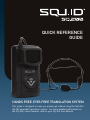
Quick Reference
Guide
Hands Free, Eyes Free Translation System
This guide is designed to help you quickly get started using the SQU.ID®
SQ.200 wearable translation system. For more detailed information on
the SQ.200’s many features, refer to your SQ.200 User Manual.