1
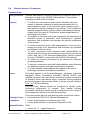
Work disk
A floppy disk, containing course material, supplied with a distance
learning course. A work disk is also a blank floppy disk supplied by a
correctional education officer for education and training purposes.
5.4.1. Information
This policy concerns inmate access to computers for work, educational and legal
purposes.
Staff must also consult the CSI Policy Manual for specific information concerning
employment of inmates. That manual includes information concerning inmate access to
computers in the course of their employment that must be read with this policy.
All personal computers (PC’s) for the use of inmates are identifiable through their colour –
green. There are some authorised exceptions to these, being some PC’s located with CSI
and Education areas.
5.4.1.1.
Offender Citrix Environment (OAC Network)
The CSNSW Offender Citrix Environment was rolled out in 2011. Referred to in this policy
as the Offender Access to Computers (OAC) Network, it is a solution designed and
deployed to support user access from correctional centres.
The OAC Network is a centralised network, allowing inmates to maintain their work
regardless of their location. Each green computer is preloaded with a set of software
applications and allows each inmate who has an OAC Network account, to login to the
OAC Network and save their work to their own ‘My Documents’ folder on a central server,
enabling them to access their work from different green PC’s at different locations.
5.4.1.2.
Non-networked PC’s
There will remain some PC’s for the use of inmates that will not be part of the OAC
Network. Non OAC Network PC’s will include stand-alone green computers for inmates to
view and prepare legal documentation and at some remote CSI locations which do not
need to be part of the OAC Network.
5.4.2. Types of access
5.4.2.1.
Inmate access to computers for employment purposes
The procedures for inmate employment as a CSI/AEVTI clerk are outlined in the CSI
Policy Manual. The balance of this policy concerns inmate access to computers for
educational and legal purposes.
5.4.2.2.
Inmate access to computers for educational and legal purposes
All inmates seeking access to desktop computers for educational purposes or to access a
computer to view and prepare legal documentation are required to fill out the following
forms:
• Inmate Application for Access to Computers - Annexure 5.5
• Guidelines for Inmates Using Computers – Annexure 5.6
Inmates are to not have access to a laptop computer for any purpose.
5.4.3. Viewing of legal material provided on an external storage device (e.g. CD,
DVD, MP3, USB flash drive)
Staff must only accept and allow access by an inmate to their legal material supplied on an
external storage device that have been sent by an inmate’s legal representative, an
exempt body or a prosecutorial body. The external storage device must be supplied with a
V2.0 February 2012
Section 5.4 Offender Access to Computers
Page 5 of 12