1
v The server supports memory mirroring (mirroring mode) and online-spare
memory.
– Memory mirroring replicates and stores data on DIMMs within two branches
simultaneously. You must enable memory mirroring through the
Configuration/Setup Utility program. To enable memory mirroring in the
Configuration/Setup Utility program, select Devices and I/O Ports →
Advanced Chipset Control → Memory Branch Mode. Use the arrow keys to
change the Memory Branch Mode setting to Mirror; then, save your changes.
For more information on the Configuration/Setup Utility program, see “Using
the Configuration/Setup Utility program” on page 61. When you use memory
mirroring, consider the following information:
- For TD100 models, the maximum available memory is reduced to 16 GB,
instead of the 32 GB available in non-mirroring mode.
- For TD100x models, the maximum available memory is reduced to 24 GB,
instead of the 48 GB available in non-mirroring mode.
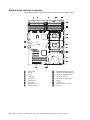
- The minimum memory configuration is four identical DIMMs. You must
install identical pairs of fully buffered, dual-inline memory modules (DIMMs)
in all four DIMM connectors (same size, type, speed, and technology).
These DIMMs must span across both branches and all four channels. For
example, when you install the first four DIMMs, you must install two DIMMs
in branch 0 (one in channel 0 and one in channel 1) and two DIMMs in
branch 1 (one in channel 2 and one in channel 3). See Table 4 for the
DIMM installation sequence.
- When you upgrade the server to eight or 12 DIMMs, the DIMMs that are
next to each other (for example, DIMM connector 1 and DIMM connector 4)
within the channels of a branch must be identical in size, type, speed, and
technology. However, the DIMMs in the connectors above or below each
other within the channels of a branch do not have to be identical to each
other (for example, the DIMMs in DIMM connector 1 and DIMM connector
2).
- Both branches operate in dual-channel mode.
The following table shows the DIMM configuration upgrade sequence for
operating in mirroring mode.
Table 4. DIMM upgrade configuration sequence in mirroring mode
Number of DIMMs
DIMM connectors
4
1, 4, 7, 10
8
1, 4, 7, 10, 2, 5, 8, 11
12 (TD100x Machine Types 4203, 4204,
4205, 4206)
1, 4, 7, 10, 2, 5, 8, 11, 3, 6, 9, 12
Note: For TD100 models (Machine Types 6398, 6399, 6419, 6429), DIMM connectors 3, 6,
9, and 12 are not functional. Do not install DIMMs in these connectors.
– Online-spare memory disables a failed rank pair of DIMMs from the system
configuration and activates an online-spare rank pair of DIMMs to replace the
failed rank pair of DIMMs. For an online-spare pair of DIMMs to be activated,
you must enable this feature and have installed an additional rank pair of
DIMMs of the same speed, type, size (or larger), and technology as the failed
pair of DIMMs. You must enable the feature through the Configuration/Setup
Utility program. To enable online-spare memory in the Configuration/Setup
Utility program, select Devices and I/O Ports → Advanced Chipset Control →
Memory Branch Mode. Use the arrow keys to change the setting for Branch
0 Rank Sparing or Branch 1 Rank Sparing to Enabled; then, save your
Chapter 2. Installing optional devices
29