1
7
8
8
9
9
1
1
4
10
2
3
9
11
4
2
12
5
10
12
5
13
6
14
16
15
18
17
17
16
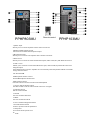
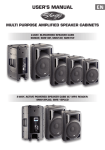
PPHP803MU
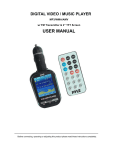
Remote control
PPHP103MU
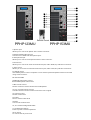
1.Iphone input
Allows you to connect an Iphone with a 3.5mm connector.
2.Banlanced Microphone Input
Connector for a balanced microphone input .
3 .Microphone input
Allows you to connect a microphone with a 6.3mm connector.
4.RCA Line-In
Allows you to connect an externel audio device(CD, radio / DVD,etc) with RCA connectors
5 .XLR Line-In
Allows you to connect an external audio device (CD, radio / DVD,etc) with XLR connectors
6.Signal output
Use 6.35mm jack to connect amplifier or even another powered speaker cabinet in cascade
using a XLR connector
7/8. SD card /USB
9.MP3/ Iphone Volume control
Set the MP3/ Iphone volume level
10.Mic volume control
Use this control to set the volume level of Microphone
11.Line-In signal volume control
Use this control to set the volume level of the Line-In signal
12.Volume control
Set the volume level9
13.Treble
Use it to set the treble level
14.Bass
Use it to set the bass level
15 .AC 110/220 Voltage Selectable
16.On/Off Power Switch
Press to power on/off the speak box
17.AC power
To connect the AC power cord
18 .Fuse