1
FRONT PANEL CONTROLS & SWITCHES
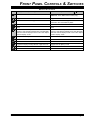
MIC Jack
P1 - P4 Keys (PROGRAMMABLE FUNCTION KEYS)
This modular jack accepts microphone voice input,
as well as scanning and PTT (Push To Talk) control
from the microphone. Specified microphone impedance is 500 - 600 Ohms.
These four keys functions can be customized, via programming by your Vertex Standard dealer. The factory defaults are shown below.
P1 Key: Press this key to tune the receiver frequency
downward without changing the transmit
frequency (Clarifier function).
P2 Key: Toggles the Key Lockout feature “on” and
“off.”
P3 Key: Press this key to tune the receiver frequency
upward without changing the transmit frequency (Clarifier function).
P4 Key: Turns the internal speaker (or external
speaker, if used) “on” and “off.”
POWER Switch
This is the main on/off switch for the VX-1700. Press
and hold in this switch for one second to toggle the
transceiver’s power on and off.
CH (Channel) Selector Knob
The Channel selector knob selects memory channels.
(Down) Button
Pressing this button move the memory group to the
next-lowest group.
Keypad
(UP) Button
These twelve keys are used for certain operational
commands (described in subsequent chapters).
Pressing this button move the memory group to the
next-highst group.
LCD Display
This control adjusts the receiver audio volume from
the speaker. Clockwise rotation of this control increases the volume level.
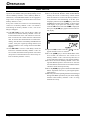
This multi function LCD (Liquid Crystal Display) includes frequency readout or Alpha/Numeric “Tag”
labeling of the channel in use, plus a Signal Strength/
Power Output meter, and icons which provide visual
confirmation of transceiver status.
SQL Knob
Speaker
VOL Knob
This control may be used silence the receiver when
no signals are being received. Clockwise rotation of
this control causes the receiver to respond only to progressively stronger signals; conversely, counter-clockwise rotation of this control allows progressively
weaker signals to be heard.
When a signal or noise breaks through the squelch
“threshold,” the “
” icon on the display will be
illuminated.
Page 2
The internal speaker is located here.
VX-1700 OPERATING MANUAL