1
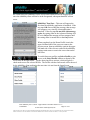
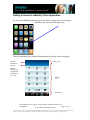
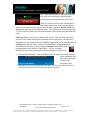
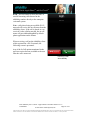
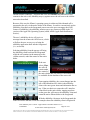
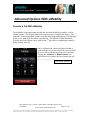
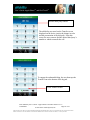
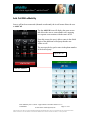
User‟s Guide Apple iPhoneTM and iPod TouchTM The following identifies each in call option and gives a brief description on its operation. Please note that specific functions of some of these in call capabilities are dependent upon the type of call manger engaged. Announce Transfer – this allows the user to transfer an active call to a third party. This in call capability can be used when the iPhone user wishes to announce the transfer to the 3rd party before leaving the call. Move – this feature engages Device Mobility and is described in detail in the previous section. Blind Transfer – this allows the user to transfer an active call without speaking to the 3rd party. Mute – this key mutes the call, turning off the device‟s microphone until it is deactivated by tapping. Keypad – this selection brings up the 10-digit keypad for the user. Speaker – tapping the Speaker button turns on and off the device‟s speakerphone. Note – when using this feature it is strongly encouraged that Echo Cancellation be turned On (see Settings -> uMobility -> (Desired) Profile ->Advanced Settings to engage this feature). Add Call - tapping this selection allows the user to put the first call on Hold, bringing up the uMobility dialer to make a 2nd call (Note – if the user has selected Always Ask in the uMobility settings, Add Call will still default to the uMobility dialer for the second call). Engaging this feature brings up the call capability, Swap (allowing the user to move from the first call to the second and back again). Swap can be used as many times as necessary to accomplish the objective. See Advanced Options for more information on this feature‟s operation. Hold – tapping this selection allows the user to place the call on hold so that another action can be taken (e.g., placing a 2nd call to consult with another party, then return to the first call to address the issue). See Add Call for additional information. Title: uMobility User‟s Guide – Apple iPhoneTM and iPod TouchTM 2.1.4 Confidential Page 21 of 41 2003-2010 Varaha Systems, Inc. THIS DOCUMENT AND THE DATA DISCLOSED HEREIN OR HEREWITH IS PROPRIETARY AND IS NOT TO BE REPRODUCED, USED OR DISCLOSED IN WHOLE OR IN PART TO ANYONE WITHOUT THE WRITTEN PERMISSION OF VARAHA SYSTEMS. COPYRIGHT, © Varaha Systems 2008