1
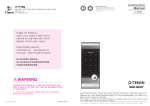
YDM4109
ISL-1228-00 Rev.0
※ The functions and design of this product can be changed without prior notice for quality improvement.
※ Chinese manual is from 31 page.
INTRO
To get peace of mind, you need to secure yourself, your home and your personal belongings.
CONTENTS
Getting Started
Yale Digital Door Locks take care of all this so that you can enjoy your life without any worries.
Safety Cautions
4
In these products we have combined our long experience in making secure and reliable locks with
Product Features
5
Simplified Directions
6
the latest technology for convenience and safety.
With all the functions for convenience and safety, Yale Digital Door Locks clearly offer you more than
just security. In addition to this, we have also put a lot of effort in the aesthetic design of these
Directions
products, so that your Yale Digital Door lock can actually enhance the appearance of your door while
Directions
10
Components Overview•Identification
securing it at the same time.
How to Use
The future of locking is already here and ready for use. Get rid of all your concerns regarding the
12
Master Number
Password
Fingerprint Guide
Normal Mode: Use Fingerprint
Security Mode: Use Fingerprint
Remove Fingerprint
Lock Door
Open Door from Inside
security of your home and use a Yale Digital Door Lock to unlock the door to the potential of your life.
Unlock your life!
Settings
20
Safe Handle Feature•Volume Setting Feature
Auto / Manual Feature•Change to Fingerprint Mode
Voice / Melody Feature•Language Setting
Forced Lock
http://www.yalegateman.com
Safety Feature
25
Alarm Feature
3-minute Lock Feature•Open Door with false PIN code
Extra Features
Option
28
Remote Control Module
Remote Control
Customer Service
30
Emergency Power Supply for Discharged Batteries
Customer Service Request for Product Errors
Product Specification
2
58
3
Must Read This!!!
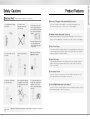
Product Features
Please read this carefully for your own safety.
1⃞ One-touch Fingerprint Verification Method (Easy Scan)
Do not install the unit in outdoor
environment.
Be careful not to let
unauthorized user know
your PIN Code.
An infant and some users who
have unusual fingerprints (those
which are difficult to register) may
not be registered for fingerprint
verification.
Easy Scan technology has been applied to conveniently read a fingerprint in one
shot without the need to open or close the cover to enter a fingerprint.
Getting Started
Safety Cautions
2⃞ SHM(Safe Handle Mechanism) Technology
SHM(Safe Handle Mechanism) Technology that makes it impossible to open the Doorlock to
trespass a house by drilling a hole on the entrance or through a pet door has been applied.
※ Scan-type fingerprint modules do
not recognize fingerprints with
water or foreign materials and set
off alarm sounds.
Do not use force with a tool onto
the product.
Please keep your password
safely.
Make sure to lock the door
tight when you go out.
3⃞ Palm Touch Feature
To prevent the password from being exposed due to residual fingerprints after opening a door,
a new technology has been adopted to complete the door opening process by touching the
keypad with a palm after entering the password.
4⃞ Smart Pad Feature
A separate lighting method where each keypad number has been separately designed is
applied so that users may examine intuitively how the selected function is operated and
if they are run normally.
5⃞ Voice Guide Feature
As the voice guide is offered that lets you know the operation status and how to set
each feature and mode for easier and more convenient use.
Be careful not to hit the handle
as it may cause injuries.
Caution
4
Keep foreign materials away from
the fingerprint sensor to maintain
it cleanly and do not use it with
wet fingers.
Do not spray water directly to the
product or wipe it with chemical
substances such as benzene,
thinner, or alcohol when cleaning
the product.
6⃞ Yale GATEMAN Networking System (Option)
You may use a remote control by installing the Remote control Module. It enables you to link it
with the Network package - a wireless security system.
Make sure to follow the above instructions to avoid any injuries or damages on the properties .
5
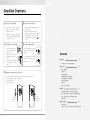
Simplified Directions
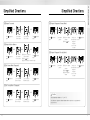
1⃞ Register Password
5⃞ Register Fingerprints (Normal Mode)
➞
Press
button
Enter number
1 and 1 button
(Registration)
➞
➞
Enter password
(6 to 12 digits)
➞
Press
button
(Registration)
Press
button
➞
Enter number
2 button
(Registration)
➞
❶ Enter the Master
Number
❷ Press button
2⃞ Register Master Number
➞
➞
Getting Started
Simplified Directions
➞
Sweep your
Press
finger(fingerprint) button
through the
fingerprint
sensor 3 times
to register
(Registration)
➞
6⃞ Register Fingerprint (Security Mode)
Press
button
❶ Enter the registered
(Registration)
Press
Master Number
button
❷ Press button
❸ Enter new Master Number (6 digits)
Enter number
1 and 2 button
(Registration)
3⃞ Set Normal Mode (Fingerprint)
➞
Press
button
Press
button
(Registration)
➞
➞
Enter number
#, 1 and 3 button
(Registration)
➞
Press
button
Enter the Master
Number (6 digits)
➞
Enter number
2 button
➞
❶ Enter the Master
Number
❷ Press button
❸ Enter fingerprint
number
➞
Sweep your
Press
finger(fingerprint) button
through the
fingerprint
sensor 3 times
to register
(Registration)
(Registration)
4⃞ Set Security Mode (Fingerprint)
➞
Press
button
6
(Registration)
➞
➞
Enter number
#, 1 and 1 button
Caution
Enter the Master
Number (6 digits)
Press
button
(Registration)
•The default Master Number is‘1 2 3 4 5 6’.
•It is advised to register the Master Number with the same one as a password in
case you lose it.
7
Simplified Directions
7⃞ Lock Door from Outside
① If you close a door in Auto Lock status,
it will be closed within 5 seconds by the
automatic lock sensor.
② In Manual Lock status, touch the keypad
in the front body (Front Body) gently with
your palm to lock a door.
9⃞ Lock/Open Door from Inside
① Turn the manual open/close
device. The deadbolt will open
and close in turn.
② If Auto Lock is set, a door will
automatically be closed once
closed.
③ Press the Safe Handle button
and lower the handle to open
a door.
8⃞ Open Door from Outside
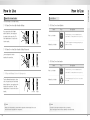
① Sweep a registered fingerprint through the
fingerprint sensor.
② Touch the keypad in the front body
gently with your palm to press the registered
password. And then, press the keypad
again gently with your palm or press button
to end.
[10] Set Auto/ Manual Mode
Press the Auto/Manual Lock Setting
button in the back body to keep the
button up.
Press the Auto/Manual Lock Setting
button in the back body to keep the
button down.
Auto Set
Directions
Manual Set
Directions
Components Overview•Identification
How to Use
12
Master Number
Password
Fingerprint Guide
Normal Mode: Use Fingerprint
Security Mode: Use Fingerprint
Remove Fingerprint
Lock Door
Open Door from Inside
7⃞ Emergency mechanical key override
Please operate the lock with the mechanical key when there is a problem to the lock or
unlock the door that is the same as below listed.
•Forgotten security code
•Electronic malfunction
Settings
Pull down the
emergency
cover
10
A hole on
emergency key
20
Safe Handle Feature•Volume Setting Feature
Auto / Manual Feature•Change to Fingerprint Mode
Voice / Melody Feature•Language Setting
Forced Lock
Safety Feature
25
Alarm Feature
3-minute Lock Feature•Open Door with false PIN code
8
Identification
Basic Contents
Front
(Front Body, install on the outside of the door)
The contents of this product may be subject to change without notice for performance or quality improvement.
Pull down Emergency Cover
❺
❶
》 Basic Contents
❽
❷
❼
❸
❻
❿
❹
Front (Front Body)
Back (Main Body)
Installation Template
❾
Lock case
9V Emergency battery
(Optional)
❿
4 Batteries
Emergency keys
Screws
Back
❶
Fingerprint Operation Lamp
❷
Keypad (10-Key)
❸
Dead Bolt Jam Lamp
❹
Lever
❺
Fingerprint Cover
❻
Battery Change Lamp
❼
Reset button
❽
Emergency Key
❾
Emergency Power Supply
Terminal
❿
Emergency Cover
Directions
Components Overview
(Back Body, install on the inside of the door)
❶
Battery Cover
❷
Slot for Remote control
module(Option)
❾
❸
Registration button
❿
❹
Lever
❷
❺
Safe handle button
❸
❻
Manual thumb turn
❼
Internal Forced Lock Switch
❽
1.5V AA Alkaline Batteries
❾
Auto / Manual Lock button
❿
Volume Control Switch
❶
❽
Strike Plate
》 Option
Users Guide
❹
❺
•Remote control
•Remote control
module
❻
Lock case
Latch Bolt
❼
Automatic Locking Sensor
Dead Bolt
10
11
How to Use
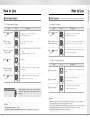
To Use Master Number
To Use Password
》 To Register Master Number
Order
1⃞ Press
button
Passwords should be selected from 6 to 12 digits. [*] and [#] are not allowed.
》 To Register Password
Play
Description
Order
Play
Description
Open the battery cover in the back body and
press Ⓘ (Registration) button once.
1⃞ Press
button
2⃞ Enter number
1 and 2 button
Press the number 1 and 2 according to
the voice guide.
2⃞ Press number 1, 1 button
➞ Enter the password
Press the number 1, 1 button and then the password on the
keypad according to the voice guide. (6 to 12 digits)
3⃞ Enter the registered
Master Number
Press the registered Master Number (6 digits) according to the
voice guide.
(The default Master Number is‘1 2 3 4 5 6’
)
3⃞ Press
button
Press the Ⓘ (Registration) button in the back body again to
complete the password registration.
4⃞ Enter
Press # button.
》 To Open Door with Password
(Registration)
button
(Registration)
Open the battery cover in the back body and
press Ⓘ (Registration) button once.
(Registration)
Order
Play
Description
5⃞ Enter a new Master
Number to register
Press a Master Number (6 digits) to register according to
the voice guide.
1⃞ Touch with palm
Touch the keypad of the front body gently with your
palm.
6⃞ Press
button
Press the Ⓘ (Registration) button in the back body again to
complete the Master Number registration.
2⃞ Enter password
Enter the registered password in the
exterior number plate.
3⃞ Touch with palm
Touch the keypad of the front body gently with
your palm or press [*] button to end.
(Registration)
To use Master Number
Directions
How to Use
- The Master Number is required to register or remove a fingerprint.
- If you forget the Master Number, you may not register or remove a
fingerprint.
Note
Note
•The default Master Number is‘1 2 3 4 5 6’.
•It is advised to register the Master Number with the same one as a password in case you lose it.
12
•Make sure to leave the door open when registering a password because you may accidentally lock
a door while trying to register or change a password the first time.
•The previously registered password will automatically be deleted when the new password is registered.
•When registering a password, the registered password will be displayed on the keypad
(Smart Pad) in sequential order and, then, be disappeared.
13
How to Use
Fingerprint
Normal Mode: Use Fingerprint
It enables you to make separate registration, and open a door through the registered fingerprint or password.
》 Fingerprint Guide
To change modes: Please refer to page 19.
Normal Mode : It enables you to make separate registration, and open a door through the registered
fingerprint or password.
Security Mode : It enables you to make separate registration and deletion, and open a door only when
the fingerprint number and the fingerprint match.
Repeated Operations
1⃞
2⃞
➞
➞
Press and lift up the Guide
Bar on the fingerprint cover.
4⃞
3⃞
You will see the fingerprint cover
being raised and start to open.
5⃞
➞
When the fingerprint cover is
completely open, the lamp will
be on.
》 To Register Fingerprint
Order
1⃞ Press
button
Play
Description
(Registration)
Open the battery cover in the back body and
press Ⓘ (Registration) button once.
2⃞ Press number 2 button
➞ Enter the Master Number
➞ Enter button
Press the number 2 button according to the voice guide.
Press the Master Number and then the [#] button on the
keypad.
3⃞ Register fingerprint
- 3 times
After the operation lamp is on, sweep your fingerprint
3 times through the fingerprint sensor according to
the voice guide.
4⃞ Press
button
Press the Ⓘ (Registration) button in the back body again to
complete the fingerprint registration.
(Registration)
( Press [#] button to continue the fingerprint registration process.)
6⃞
➞
Start sweeping your fingerprint
through the sensor.
Complete your fingerprint
registration.
Note
•You may register up to 20 fingerprints. (The same applies to Normal/Security Mode)
※ Note that you may not register 20 fingerprints depending on the state of the previously registered fingerprints.
•Scan-type fingerprint modules do not recognize fingerprints with water or foreign materials and
set off alarm sounds.
•Make sure to register a password just in case you fail to register a fingerprint.
•Make sure to leave the door open when registering a password because you may accidentally lock
a door while trying to register or change a password the first time.
•If an error occurs during registration, the process reverts back the beginning (entering fingerprint).
•If no more input is made for 20 seconds after registering at least 1 fingerprint, the registration will be complete.
•Duplicate fingerprints may be registered. •Same fingerprints can be registered repeatedly.
14
Directions
How to Use
》 To Open Door with Fingerprint
Order
Play
Description
1⃞ Lift the fingerprint
cover open
Lift open the fingerprint cover and wait for the operation
lamp to light on.
2⃞ Enter fingerprint
Sweep the registered fingerprint through the fingerprint
sensor in the front body.
Check if a door opens!
Make sure to examine if the door opens normally with the
registered password or fingerprint after the registration is
complete.
15
How to Use
Security Mode: Use Fingerprint
Remove Fingerprint
It enables you to make separate registration and deletion, and open a door only when the fingerprint number and the fingerprint match
You may only delete each fingerprint separately in the Security Mode.
》 To Register Fingerprint
》 To Delete All Fingerprints
Order
1⃞ Press
button
Play
Description
Play
Description
Open the battery cover in the back body and
press Ⓘ (Registration) button once.
1⃞ Press
button
2⃞ Press number 2 button
➞ Enter the Master Number
➞ Enter button
Press the number 2 button according to the voice guide.
Press the Master Number and then the [#] button on the
keypad.
2⃞ Press number 3 button
➞ Enter the Master Number
Press the number 3 according to the voice guide and then,
the Master Number on the keypad.
3⃞ Press fingerprint
number
Enter 4-digit fingerprint number to register.
3⃞ Press
button
Press the Ⓘ (Registration) button in the back body again
to delete all fingerprints.
4⃞ Register fingerprint
- 3 times
After the operation lamp is on, sweep your fingerprint 3 times
through the fingerprint sensor according to the voice guide
5⃞ Press
button
(Registration)
Press the Ⓘ (Registration) button in the back body again to
complete the fingerprint registration.
(Registration)
( Press [#] button to continue the fingerprint registration process.)
》 To Open Door with Fingerprint
Order
16
Order
Play
Description
Directions
How to Use
Open the battery cover in the back body and
press Ⓘ (Registration) button once.
(Registration)
(Registration)
》 To Delete Each Fingerprint
Order
1⃞ Press
button
(Registration)
Play
Description
Open the battery cover in the back body and
press Ⓘ (Registration) button once.
2⃞ Press number 4 button
➞ Enter the Master Number
➞ Enter the
Press the number 4 according to the voice guide and then,
the Master Number and [#] on the keypad.
1⃞ Touch with palm
Touch the keypad of the front body gently
with your palm.
3⃞ Registered fingerprint
number
Enter the fingerprint number to delete on the
keypad.
2⃞ Press fingerprint
number
Enter the registered fingerprint number in the keypad.
4⃞ Press
button
Press the Ⓘ (Registration) button in the back
body again to delete a single fingerprint.
3⃞ Enter fingerprint
Sweep the registered fingerprint through the
exterior fingerprint sensor.
(Registration)
17
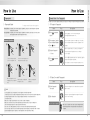
How to Use
Open Door from Inside
Lock Door
The default setting is Safe Handle Setting.
》 To Open Door from Safe Handle Setting
Directions
How to Use
》 To Close Door from Outside
Order
Keep pressing the Safe Handle
button. And then, lower and push
the handle at the same time. The
Safe Handle button is found on the
interior handle.
Auto Lock status
(Closed)
(Open)
Play
5 Sec
Description
The built-in Auto Lock sensor automatically locks
a door within 5 seconds after the door was closed.
Touch the keypad in the front body gently with your
palm to lock a door.
Manual Lock status
》 To Open Door from Safe Handle Setting Released
Lower and push the interior
handle at the same time.
》 To Close Door from Inside
(Closed)
(Open)
Order
Auto Lock status
》 To Open with Manual Device for Emergencies
Turn the Manual thumb turn to Open
side. Keep pressing the Safe Handle
button. And then, lower and push the
handle at the same time. The Safe
Handle button is found on the interior
handle.
Manual Lock status
(Closed)
Note
•Make sure to fully familiarize yourself with the operations for the Manual Device and
the Safe Handle in preparation for emergencies.
18
Play
5 Sec
Description
The built-in Auto Lock sensor automatically locks
a door within 5 seconds after the door was closed.
Turn the Manual Open/Close Device to Close side to
lock a door.
(Open)
Note
•Even after a door was locked by the Auto Lock function,
please check again if the door was completely closed and locked.
19
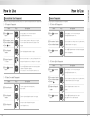
Settings
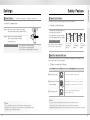
Safe Handle Feature
Auto / Manual Feature
The technology to prevent a forced attempt to drill a hole in the door and unlock the Doorlock has been applied.
》 To Release Safe Handle Setting
Auto Lock setting locks a door within 5 seconds after the door was closed.
Directions
Settings
》 To Set Auto/Manual Feature
Order
1⃞ Open the battery cover and
take out a hex wrench.
2⃞ Keep pressing the Safe Handle button.
Turn the set bolt found in next to
the handle to Close side.
Play
Description
Auto Lock Setting
Press the interior Auto/Manual Setting button to keep
the button up.
Manual Lock Setting
Press the interior Auto/Manual Setting button
to keep the button down.
》 To Set Safe Handle
Change to Fingerprint Mode
1⃞ Open the battery cover and
take out a hex wrench.
The default setting is Normal Mode.
》 Fingerprint Mode Setting
2⃞ Turn the set bolt found in next to the
handle to Open side until the Safe Handle
button comes out.
Order
1⃞ Press
(Registration)
button and button
Volume Setting Feature
》 Volume Setting
To set volume switch
Open the battery cover in the back body.
Press Ⓘ (Registration) button and then, [#] button.
Press number 1 and 1 button
➞ Enter the Master Number
Press the number 1 and then, 1 again on the keypad.
Enter the registered Master Number.
Normal Mode Setting
Play
Description
The operation sound volumes are adjusted according
to the Volume Switch Setting.
(2 : Louder / 1: Lower / 0 : Mute )
Note
•Be careful that the set bolt won’t detach when modifying the Safe Handle Setting.
•Even when the operation sound is set as‘Mute,’the error and alarm sounds will go off.
20
Description
Security Mode Setting
It enables you adjust the volume of various sounds from the product.
Order
Play
Press number 1 and 3 button
➞ Enter the Master Number
2⃞ Press
button
(Registration)
Press the number 1 and then, 3 again on the keypad. Enter
the registered Master Number.
Press Ⓘ (Registration) button again to set
Security Mode or Normal Mode.
Note
•Even after a door was locked by the Auto Lock function, please check again if the door was completely locked.
•It is advised to keep the fingerprint exclusive number(4 digits) as a separate list just in case for a separate
fingerprint deletion at Security Mode.
•If more than 1 fingerprint is registered after the Security Mode is set, you may not open a door with a password.
(If the fingerprint module is broken, you may use a password.)
21
Settings
Voice / Melody Feature
Forced Lock
You may select the operation sound that is set off when a door is open and closed.
》 Outside Forced Lock Setting - Fingerprint
》 To Set Voice/Melody Feature
Order
Play
1⃞ Press
(Registration)
button and button
Order
Description
Open the battery cover in the back body.
Press Ⓘ (Registration) button and then, [#] button.
2⃞ Enter number 2 and
2 on the keypad
Directions
Settings
Enter the number 2 and then, 2 again on the keypad.
Play
Description
1⃞ Enter fingerprint
Enter the registered fingerprint on the fingerprint sensor
when the operation lamp(LED) is on.
2⃞ Press button for
5 seconds
Press the [#] button for 5 seconds.
(A beeping sound sets off for 3 times.)
》 Outside Forced Lock Setting - Password
3⃞ Press
button
(Registration)
Language Setting
Press Ⓘ (Registration) button again in the back body.
1⃞ Press
(Registration)
button and button
Play
Play
Description
1⃞ Touch with palm
Touch the keypad of the front body gently with your
palm.
2⃞ Enter password
Enter the registered password in the
exterior number plate.
English and Chinese languages are supported.
》 Language Setting
Order
Order
Description
Press the [#] button for 5 seconds.
(A beeping sound sets off for 3 times.)
3⃞ Press
Open the battery cover in the back body.
Press Ⓘ (Registration) button and then, [#] button.
button for
5 seconds
》 Inside Forced Lock Setting
2⃞ Enter number 2 and
3 on the keypad
3⃞ Press
button
(Registration)
Enter the number 2 and then, 3 again on the keypad.
Press Ⓘ (Registration) button again in the back body.
Order
Set / Release Inside
Forced Lock Switch
Play
Description
When the door is closed, move the Inside Forced Lock
Switch to LOCK position so that a red sticker can be seen.
Note
•If you try to open a door with the handle or the Manual Open/Close Device from inside when the Outside Forced Lock is set,
the alarm goes off.
•If the Inside Forced Lock is set, any attempt to open a door from outside whether it’d be a fingerprint or a password won’t work.
•When setting the Outside/Inside Forced Lock, enter the number on the keypad (Smart Pad) and
the numbers will flicker from left to right one by one and repeat twice.
22
23
Alarm Feature
Safety Feature
The alarm sound continues for 30 minutes or until it is reset.
3-minute Lock Feature
At 3-minute Lock mode, no button, besides those in the back body, will work.
Directions
Settings
》 Break-in / Damage Alarm
》 3-minute Lock Mode Display
Break-in: When someone tries to Break-in by opening
a door when it was locked, the alarm will go off.
Damage: When the front body was damaged
due to forced separation or drilling,
the alarm will go off.
Release Trespass/Damage Alarm
Method ❶ Enter the registered password.
Method ❷ Enter the registered fingerprint.
Method ❸ Press the interior Ⓘ button for 5 seconds.
•If a password or a fingerprint that is yet
to be registered is entered for 5
consecutive times, 3-minute Lock mode
is on and nothing will work for 3 minutes.
2 minute
passes.
1 minute
passes.
To Release 3-minute Lock
Method ❶ Press the interior Ⓘ button.
Method ❷ Turn the interior handle.
3 minute Lock starts.
2 minutes left.
1 minutes left.
The number [3]
lights up.
The number [2]
lights up.
The number [1]
lights up.
Open Door with false PIN code
It is the most effective feature when you are concerned about your password being accidentally exposed
when you have company or in the similar situations.
》 To Open Door with false PIN code
Order
Play
Description
1⃞ Touch with a palm
Touch the keypad with your palm gently.
2⃞ Enter the false PIN code
and a password
Method ❶ Enter the false PIN code --> password
Method ❷ Enter the password --> fake PIN code
3⃞ Touch with a palm
Touch the keypad with your palm gently or
press [*] button to end.
Note
Note
•If a door is open when the Auto Lock is not properly operated, the Break-in alarm might go off.
•If the alarm goes off due to damage, fire, or break in, the numbers on the keypad will light up clockwise.
(It repeats the status for 30 minutes with alarm sound.)
24
•3-minute Lock mode won’t affect the alarm mode and is sustained even after the product is rebooted.
•Once 3-minute Lock mode is on, the fake PIN code mode won’t work until the next normal verification
(fingerprint verification, normal password, open door from inside). In this case, please open a door with your correct password.
25
Safety Feature
Emergency mechanical key override
》 Emergency mechanical key override
•Please operate the lock with the mechanical key when there is a problem to the lock or
unlock the door that is the same as below listed.
•Forgotten security code
•Electronic malfunction
Extra Features
Pull down the
emergency cover
A hole on
emergency key
Option
28
Remote Control Module
Remote Control
Customer Service
30
Emergency Power Supply for Discharged Batteries
Customer Service Request for Product Errors
Note
•Keep the mechanical override key in a safe place.
•Otherwise, you may not get a free after-sales service even within during the warranty period.
26
Option
Remote Control Module
Remote Control
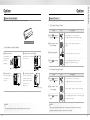
Buy the Remote control Module and install it to link the remote control.
Not only FSK method but also the wireless encryption algorithm has been applied.
Extra Features
Option
》 To Register Remote Control
Order
Remote control Module
》 Install Remote Control Module
1⃞ Remove batteries
2⃞ Install Remote Control Module
Open the battery cover
in the back body
and remove
all batteries.
Equip the Remote control Module
to the connector.
Play
Description
1⃞ Press
(Registration)
button and button
Open the battery cover in the back body.
Press Ⓘ (Registration) button and then, [#] button.
2⃞ Enter number 0 and
5 on the keypad
Enter the number 0 and then, 5 button on the
keypad.
3⃞ Register fingerprint
4⃞ Press
button
Press the SET button of the remote control
Press the Ⓘ (Registration) button in the back
body again to complete the procedure.
(Registration)
》 To Release Remote Control
3⃞ Insert batteries
4⃞ Confirm the installation
Insert all the batteries by
checking the [⊕, ⊖]
connector.
If you hear a‘ting-a-ling’
sound, the Remote control
Module has been installed
correctly. Close the
battery cover.
Note
•The operation status may only be examined through the remote control.
28
Order
Ting-a-ling
Play
Description
1⃞ Press
(Registration)
button and button
Open the battery cover in the back body.
Press Ⓘ (Registration) button and then, [#] button.
2⃞ Enter number 7 and
5 on the keypad
Enter the number 7 and then, 5 again on the keypad.
3⃞ Press
button
Press the Ⓘ (Registration) button in the back body again
to complete the procedure.
(Registration)
Note
•The wireless encryption algorithm resorts to the floating ID technology where the wireless
password is changed every time the remote control is operated.
29
Customer Service
Emergency Power Supply for Discharged Batteries
You may open a door when contacting the 9V battery.
》 To Supply Emergency Power
Order
Play
Description
1⃞ Contact the
9V battery
Open the emergency cover. Keep contacting the 9V
battery onto the emergency power supply terminal.
2⃞ Touch with a palm
Touch the keypad gently with your parm.
3⃞ Enter password
Press each number of your password.
4⃞ Enter
Press [*] button again.
button
(Once the motor is fully operated, you may detach the 9V battery.)
》 To Replace Battery
1⃞ Expiry Period
The product uses four 1.5V alkaline AA batteries. They may
sustain 1 year if used 10 times a day.
(Users are advised to use authentic alkaline batteries.)
2⃞ Low Battery Alarm
You must replace all 4 batteries for the following cases:
* The Low Battery Lamp on the front body lights on
* The Low Battery Lamp on the back body flickers red
* The alarm melody goes off
(a nursery rhyme starting with ting-a-ling melodies)
* The voice guide goes off “Please
(
replace batteries.”
)
One-on-one real-life size
1.5V alkaline AA battery
Low Battery Lamp (red)
front body
back body
Note
•The battery duration varies in the temperature, humidity, the number of use, and the quality of the battery.
30






![INSTALL GUIDE OEM-AL(RS)-FM6-[ADS-ALCA]-EN](http://vs1.manualzilla.com/store/data/005732796_1-2697dd4b3634b9609d4f115002bbbdbf-150x150.png)