1
CDSA User Manual
Infrared Remote Control
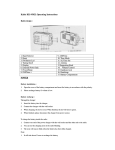
The remote control provides combined functions
for all the EMM Labs products. The functions that
are relevant to the CDSA specifically are
highlighted in blue rectangles in the drawing on
the right.
DISC:
This function toggles the front
panel display on the CDSD on
and off while the player continues
to operate normally otherwise.
Numeric keys: These buttons can be used to
directly access any track on the
disc.
MODE:
This provides the same
functionality as the button on the
front panel (i.e.switching between
CD and SA-CD stereo playback).
REPEAT:
Toggles through No Repeat –
Repeat track – Repeat all.
PHASE:
Toggles the phase of the analog
and digital outputs.
PLAY, PAUSE: These buttons provide the same
functionality as the corresponding
ones on the front panel.
STOP:
This key stops playback and
positions the read head on track
1. As the key is pressed a small
decimal point is lit behind the
digits for the display of the
seconds. After releasing the key
and right after this decimal point
disappears, the key can be
pressed again to open the tray.
NEXT, PREV: These keys have the same
functionality as the ones on the
front panel. When holding them
pressed for more than a second,
the transport enters a fast
scanning mode, which can be
exited by pressing PLAY.
6