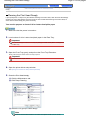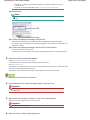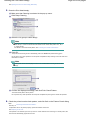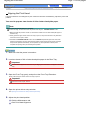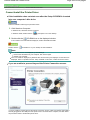
1
Canon Pro9000 Mark II series On-screen Manual
Page 1 of 539 pages
How to Use This Manual
Printing This Manual
MC-3582-V1.00
Basic Guide
Advanced Guide
Describes the summary of this
product.
Describes the detailed function
of this product.
Troubleshooting
Digital Photo Printing
Guide
Pro9000 Mark II series Basic Guide
Page 2 of 539 pages
How to Use This Manual
Printing This Manual
Printing on DVD/CDs
MP-3098-V1.00
Advanced Guide
Contents
Safety Precautions
Overview of the Printer
Loading Paper
Loading Paper
Main Components
Routine Maintenance
Printing Photos / Documents
Replacing an Ink Tank
Printing Photos (Easy-PhotoPrint EX)
When Printing Becomes Faint or Colors Are
Incorrect
Printing Documents (Windows)
Printing Documents (Macintosh)
Other Usages
Printing Photos from a PictBridge Compliant
Device
Solution Menu and My Printer
Cleaning the Paper Feed Rollers
Opening the Maintenance Screens
Appendix
Legal Limitations on Use of Your Product and
Use of Images
Tips on How to Use Your Printer
Safety Precautions
Page 3 of 539 pages
Advanced Guide
Troubleshooting
Contents > Safety Precautions
Safety Precautions
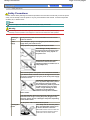
Please read the safety warnings and cautions provided in this manual to ensure that you use the printer
safely. Do not attempt to use the printer in any way not described in this manual. It causes unexpected
accident, fire, or electric shock.
Note
The power supply is AC100-240V 50/60Hz via AC power supply unit K30309.
Warning
The following are instructions that, if ignored, could result in death or serious personal injury
caused by incorrect operation of the equipment. These must be observed for safe operation.
Choosing a
location
Do not place the printer close to flammable solvents such as
alcohol or thinners.
Power
supply
Never attempt to plug in or unplug the printer from the power
supply when your hands are wet.
Always push the plug all the way into the power outlet.
Never damage, modify, stretch or
excessively bend or twist the power
cord.Do not place heavy objects on
the power cord.
Never plug the printer into a power
socket that is shared with other
equipment (extension lead/cord, 2- or
3-way adapter, etc.).
Never use the printer if the power cord is bundled or knotted.
If you detect smoke, unusual smells or strange noises around
the printer, immediately unplug the printer at the power supply
and call for service.
Periodically, unplug the printer and
use a dry cloth to wipe off any dust or
dirt collected on the plug and the
power outlet. If the printer is placed at
a location exposed to a lot of dust,
smoke, or high humidity, the dust
collected on the plug absorbs
moisture and may cause insulation
failure and fire.
If you hear thunder, disconnect the power supply of the printer
and refrain from using it. Leaving the printer plugged in may
cause fire, electric shock, or damage to the printer, depending
on the thunder storm.
Use the power cable included with the printer.
Cleaning the
printer
Use a damp cloth to clean the printer.
Never use flammable solvents such
as alcohol, benzene or thinners.
If flammable solvents come in contact with
electrical components inside the printer, it
could cause a fire or electric shock.
Safety Precautions
Page 4 of 539 pages
Always unplug the printer from the power outlet before
cleaning the printer.
If you accidentally switch the printer on while cleaning it, you could
injure yourself or damage the printer.
Maintaining
the printer
Do not attempt to disassemble or modify the printer. There are
no user serviceable parts inside the printer.
The printer contains high-voltage components. Never attempt any
maintenance procedure not described in this guide.
Do not connect other than recommended devices to the Direct
Print Port or cable connector on the printer. It could cause a
fire or electric shock.
Working
around the
printer
Do not use highly flammable sprays near the printer.
This could cause a fire or electric shock if the spray comes into contact
with electrical components inside the printer.
Caution
The following are instructions that, if ignored, could result in personal injury or material damage
caused by incorrect operation of the equipment. These must be observed for safe operation.
Choosing a
location
Do not install the printer in a location that is unstable or
subject to excessive vibration.
Do not install the printer in locations that are very humid or
dusty, in direct sunlight, outdoors, or close to a heating
source.
To avoid the risk of fire or electric shocks, install the printer in
a location with an ambient temperature range of 5°C to 35°C
(41°F to 95°F) and humidity of 10% to 90% (condensation free).
Do not place the printer on a thick rug or carpet.
Do not place the printer with its back attached to the wall.
Power supply
Ensure that the area around the
power outlet is kept clear at all times
so you can easily unplug the power
cord if necessary.
Never remove the plug by pulling on
the cord.
Do not use an extension lead/cord.
Working
around the
printer
Never put your hands or fingers in the printer while it is
printing.
When moving the printer, carry the printer at both ends.
Do not place any object on the printer.
Do not place metal objects (paper clips, staples, etc.) or
containers of flammable solvents (alcohol, thinners, etc.) on
top of the printer.
If any foreign object (metal or liquid) fall into the printer,
unplug the power cord and call for service.
Safety Precautions
Page 5 of 539 pages
Do not transport or use the printer on a slant, vertically or
upside-down, as the ink may leak and damage the printer.
Print Heads
Keep ink tanks out of the reach of children.
and ink tanks In case ink is accidentally licked or swallowed, rinse out mouth or give
one or two glasses of water to drink.
If irritation or discomfort occurs, obtain medical advice immediately.
In case ink gets in contact with eyes, rinse with water
immediately.
In case ink gets in contact with skin, wash with soap and
water immediately.
If irritation to eyes or skin persists, obtain medical advice immediately.
Do not shake Print Heads or ink tanks.
Ink may leak out and stain clothing or the surrounding area.
Never touch the electrical contacts on
a Print Head after printing.
The metal parts may be very hot and could
cause burns.
Do not throw ink tanks into fire.
Do not attempt to disassemble or modify the Print Head and
ink tanks.
Do not handle the Print Head and ink tanks roughly such as
applying them excessive pressure or dropping them.
Do not rinse or wipe the Print Head
and ink tanks.
Once you have installed the Print Head and ink tanks, do not
remove them unnecessarily.
Note when you place the printer near other electrical appliances such as fluorescent lamps
Place the printer at least 5.91 inches / 15 cm away from other electrical appliances such as
fluorescent lamps. If the printer is placed closer to those, it may not be able to work properly due to
fluorescent noises.
When you disconnect the power plug
When you disconnect the power plug, always press the Power button and be sure that the Power
lamp (in green) has gone out. If you disconnect the power plug from the power outlet when the
Power lamp lights or flashes, the Print Head cannot be protected and you may not be able to print
later.
Page top
Overview of the Printer
Page 6 of 539 pages
Advanced Guide
Troubleshooting
Contents > Overview of the Printer
Overview of the Printer
This section shows the component names of the printer and describes their functions.
Main Components
Front View
Rear View
Inside View
Page top
Main Components
Page 7 of 539 pages
Advanced Guide
Troubleshooting
Contents > Overview of the Printer > Main Components
Main Components
Front View
Rear View
Inside View
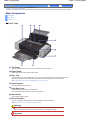
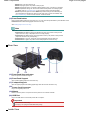
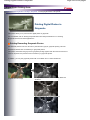
Front View
(1) Top Cover
Open to replace the ink tanks or to remove jammed paper inside the printer.
(2) Paper Guide
Slide to align with the left side of the paper stack.
(3) Rear Tray
Load various sizes or types of paper which you can use on the printer. Two or more sheets of the same
size and type of paper can be loaded at the same time, and fed automatically one sheet at a time.
See Loading Paper in the Rear Tray and Media Types You Can Use .
(4) Paper Support
Open to load paper in the Rear Tray.
(5) Feed Slot Cover
Prevents anything from falling into the Feed Slot.
Open it to slide the Paper Guide, and close it before printing.
(6) Inner Cover
Close it when printing on paper.
(7) Direct Print Port
Connect a PictBridge compliant device such as a digital camera to print directly.
See Printing Photos from a PictBridge Compliant Device.
Warning
Do not connect any equipment other than PictBridge compliant devices to the Direct Print
Port of the printer. This may cause fire, electric shock, or damage to the printer.
Important
Main Components
Do not touch the metal casing.
(8) Front Tray
Printed paper ejects here. Open it before printing.
Load paper in the Front Tray to print on large size paper, such as 14" x 17" / 36 x 43 cm paper, or on thick
paper.
See Loading Paper in the Front Tray and Media Types You Can Use .
(9) Front Tray Extension
Pull out to support paper. Pull it out before printing.
(10) Power button
Press to turn the power on or off.
Important
Disconnecting the power plug
When disconnecting the power plug after turning off the power, be sure to confirm that
the Power lamp is not lit. If the power plug is disconnected from the wall outlet while the
Power lamp is lit or flashing, the printer may become unable to print properly since the
Print Head is not protected.
Note
Auto power on/off feature
You can set the printer to turn on or off automatically.
- Auto Power On: Automatically turns on the printer when print data is sent from the
computer.
- Auto Power Off: Automatically turns off the printer when no print data is sent for a
certain interval.
Specify this setting in the Maintenance sheet of the printer driver setup window
(Windows) or in the Canon IJ Printer Utility (Macintosh).
For details on the settings, refer to the on-screen manual: Advanced Guide.
(11) Power lamp
Lights green after flashing when the power is turned on.
(12) RESUME/CANCEL button
Press to cancel a print job in progress. You can press this button after resolving a printer error to dismiss
an error message and resume printing.
(13) Alarm lamp
Lights or flashes orange when an error, such as paper-out or ink-out, occurs.
Note
Power and Alarm lamps
You can check the status of the printer by the Power and Alarm lamps.
Page 8 of 539 pages
Main Components
- Power lamp is off: The power is off.
- Power lamp lights green: The printer is ready to print.
- Power lamp flashes green: The printer is getting ready to print, or printing is in progress.
- Alarm lamp flashes orange: An error has occurred and the printer is not ready to print.
For details, refer to " Troubleshooting " in the on-screen manual: Advanced Guide.
- Power lamp flashes green once and Alarm lamp flashes orange once alternately: An
error that requires contacting the service center may have occurred. For details, refer
to "Troubleshooting " in the on-screen manual: Advanced Guide.
(14) Front Feed button
Press it when feeding paper from the Front Tray. You can check the printer status by the indication of the
Front Feed button when feeding paper from the Front Tray.
See Loading Paper in the Front Tray .
Note
Indication of the Front Feed button
- Front Feed button flashes quickly (two flashes at a time): The printer is ready to load
paper in the Front Tray. Load paper in the Front Tray properly.
- Front Feed button flashes slowly (one long flash at a time): The printer is ready to feed
paper from the Front Tray. Start printing.
- Front Feed button is not lit: The printer is set to feed paper from the Rear Tray.
- Front Feed button lights: The printer is set to feed paper from the Front Tray.
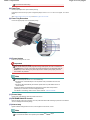
Rear View
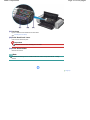
(15) Front Feed Support button
Press to open the Front Feed Support.
(16) Front Feed Support
Open it when feeding paper from the Front Tray.
(17) V-shaped Support
Open to support paper when feeding paper larger than A4 size from the Front Tray.
(18) Power Cord Connector
Plug in the supplied power cord.
(19) Wheels
Used to move the printer. Lift up the front of the printer to move it back and forth.
(20) USB Port
Plug in the USB cable to connect the printer with a computer.
Important
Do not touch the metal casing.
Do not plug in or unplug the USB cable while printing.
Inside View
Page 9 of 539 pages
Main Components
Page 10 of 539 pages
(21) Ink lamp
Lights or flashes red to indicate the ink tank status.
See Checking the Ink Status .
(22) Print Head Lock Lever
Locks the Print Head into place.
Important
Do not raise this lever after installing the Print Head.
(23) Print Head Holder
Install the Print Head.
Note
For details on installing the Print Head and ink tanks, refer to the printed manual: Getting
Started .
Page top
Printing Photos / Documents
Page 11 of 539 pages
Advanced Guide
Troubleshooting
Contents > Printing Photos / Documents
Printing Photos / Documents
This section describes how to print documents or photos.
You can easily print photos taken with your digital camera by using Easy-PhotoPrint EX supplied with
your printer.
This section also introduces the supplied plug-in application, Easy-PhotoPrint Pro, that provides photo
editing and printing with optimal reproduction of image color and quality.
Printing Photos (Easy-PhotoPrint EX)
Using Various Functions of Easy-PhotoPrint EX
Using Various Functions of Easy-PhotoPrint Pro
Printing Documents (Windows)
Printing Documents (Macintosh)
For Mac OS X v.10.5.x
For Mac OS X v.10.4.x or Mac OS X v.10.3.9
Page top
Printing Photos (Easy-PhotoPrint EX)
Page 12 of 539 pages
Advanced Guide
Troubleshooting
Contents > Printing Photos / Documents > Printing Photos (Easy-PhotoPrint EX)
Printing Photos (Easy-PhotoPrint EX)
Print image data saved on your computer by using Easy-PhotoPrint EX supplied with your printer.
This section describes the procedure, using the settings to print borderless photos on 4" x 6" / 10 x 15
cm photo paper as an example.
For details on Easy-PhotoPrint EX, refer to the on-screen manual: Advanced Guide .
Note
The screens used in this section are for printing with Windows. The operations are also the same
for printing with Macintosh.
Install Easy-PhotoPrint EX from the Setup CD-ROM when it has not been installed or has been
uninstalled. To install Easy-PhotoPrint EX, select Easy-PhotoPrint EX in Custom Install.
1.
Prepare for printing.
(1) Make sure that the printer is turned on.
See Front View .
(2) Load paper.
See Loading Paper in the Rear Tray .
Here we load 4" x 6" / 10 x 15 cm photo paper in the Rear Tray.
(3) Gently press the upper center of the Front Tray to open it.
(4) Pull out the Front Tray Extension.
Note
To load paper in the Front Tray, see Loading Paper in the Front Tray .
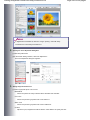
2.
Start Easy-PhotoPrint EX, and select Photo Print.
(1) Start Easy-PhotoPrint EX.
Double-click
(Easy-PhotoPrint EX) on the desktop.
Click Here: Easy-PhotoPrint EX
Select the Go menu, Applications, Canon Utilities, Easy-PhotoPrint EX, then double-click Easy-
Printing Photos (Easy-PhotoPrint EX)
Page 13 of 539 pages
PhotoPrint EX.
Note
To start Easy-PhotoPrint EX from Solution Menu, double-click
(Solution Menu) on the
desktop and click
(Print photos or albums, etc.).
See To Start Solution Menu.
To start Easy-PhotoPrint EX from the Start menu, select All Programs (Programs in
Windows 2000), Canon Utilities, Easy-PhotoPrint EX, then Easy-PhotoPrint EX.
To start Easy-PhotoPrint EX from Solution Menu, click
(Solution Menu) in the Dock and
click
(Print photos or albums, etc.).
See To Start Solution Menu.
(2) Click Photo Print.
Note
You can select Album, Calendar, Stickers, etc., besides Photo Print.
See Using Various Functions of Easy-PhotoPrint EX .
3.
Select a photo to print.
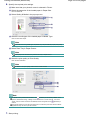
(1) Select the folder in which images are saved.
(2) Click the image to print.
The number of copies appears as "1", and the image you selected appears in the selected image area (A).
You can select two or more images at the same time.
Note
To print two or more copies, click
(Up arrow) to change the number of copies.
To cancel the selection, click the image to cancel in the selected image area and click
(Delete Imported Image). You can also use
(Down arrow) to change the number of
copies to zero.
You can also correct or enhance the selected image.
See Using Various Functions of Easy-PhotoPrint EX .
(3) Click Select Paper.
Printing Photos (Easy-PhotoPrint EX)
4.
Select the loaded paper.
(1) Make sure that your printer's name is selected in Printer.
(2) Select Rear Tray in Paper Source.
Note
To feed paper from the Front Tray, select Front Tray in Paper Source.
(3) Select the size and type of the loaded paper in Paper Size and Media Type.
Here we select 4"x6" 10x15cm in Paper Size and the type of the loaded photo paper in Media Type.
Note
If you select the wrong media type, the printer may not print with the proper print quality.
(4) Click Layout/Print.
Note
To print photos in grayscale, select Grayscale Photo.
5.
Select a layout and start printing.
(1) Select the layout of the photo.
Here we select Borderless [full].
The preview appears in the selected layout for confirmation of the required print result.
Note
You can change the direction of photo or crop a part of photo (trimming) to print.
For details on the operation, refer to the on-screen manual: Advanced Guide.
(2) Click Print.
Page 14 of 539 pages
Printing Photos (Easy-PhotoPrint EX)
Page 15 of 539 pages
Note
To cancel a print job in progress, press the RESUME/CANCEL button on the printer or click
Cancel Printing on the printer status monitor.
To display the printer status monitor, click Canon XXX (where " XXX" is your printer's
name) on the taskbar.
Click the printer icon in the Dock to display the list of print jobs in progress.
To cancel a print job in progress, select the desired job in the Name list and click Delete.
To temporarily stop a job in progress, click Hold. To temporarily stop all the jobs in the list,
click Pause Printer (or Stop Jobs).
Note
To print photos in grayscale, we recommend selecting Bordered [Margin 45]. When you select
the paper smaller than 8" x 10" / 20 x 25 cm in Paper Size, Bordered [Margin 45] is not
available.
Page top
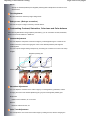
Using Various Functions of Easy-PhotoPrint EX
Page 16 of 539 pages
Advanced Guide
Troubleshooting
Contents > Printing Photos / Documents > Printing Photos (Easy-PhotoPrint EX) > Using Various Functions of EasyPhotoPrint EX
Using Various Functions of Easy-PhotoPrint EX
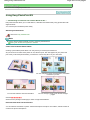
This section describes a few of the useful functions of Easy-PhotoPrint EX.
For details, refer to the on-screen manual: Advanced Guide .
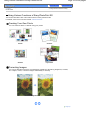
Creating Your Own Prints
You can create an album or calendar using your photos.
Album
Calendar
Stickers
Layout Print
Correcting Images
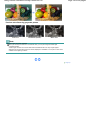
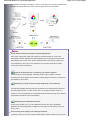
You can use Red-Eye Correction, Face Sharpener, Digital Face Smoothing, Brightness, Contrast,
etc. to adjust, correct, or enhance images automatically or manually.
Brightness
Page top
Using Various Functions of Easy-PhotoPrint Pro
Page 17 of 539 pages
Advanced Guide
Troubleshooting
Contents > Printing Photos / Documents > Printing Photos (Easy-PhotoPrint EX) > Using Various Functions of EasyPhotoPrint Pro
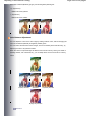
Using Various Functions of Easy-PhotoPrint Pro
Easy-PhotoPrint Pro is a plug-in application started from Adobe Photoshop or Digital Photo Professional
for Canon brand Single Lens Reflex camera.
Easy-PhotoPrint Pro allows easy performance of various photo prints, such as borderless print, index
print, grayscale print, or print using Adobe RGB.
For details, refer to the on-screen manual: Advanced Guide .
Note
Easy-PhotoPrint Pro is only compatible with Adobe Photoshop CS/Photoshop CS2/Photoshop CS3/
Photoshop Elements 6, or Digital Photo Professional Ver.2.1 or later.
For updated compatibility, visit our website.
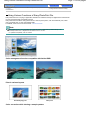
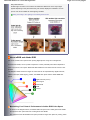
Color management function compatible with Adobe RGB
Adobe RGB
sRGB
Print in various layouts
Bordered [full] print
Color correction while viewing a sample pattern
Index print
Using Various Functions of Easy-PhotoPrint Pro
Page 18 of 539 pages
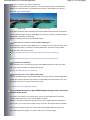
Produce retro flavor by grayscale photos
Cool Tone
Black/White (Default)
Warm Tone
Note
Ambient light correction function
When you use Easy-PhotoPrint Pro in Windows Vista, you can print using the ambient light
correction function.
Ambient light correction is a function that reduces the differences in the way images appear
depending on the place where they are viewed, displayed or exhibited. You can print in color tones
suitable for each lighting condition.
Page top
Printing Documents (Windows)
Page 19 of 539 pages
Advanced Guide
Troubleshooting
Contents > Printing Photos / Documents > Printing Documents (Windows)
Printing Documents (Windows)
This section describes the procedure, using the settings to print a document of A4 size on plain paper as
an example.
For details, refer to the on-screen manual: Advanced Guide .
Note
Operations may vary depending on your software application. For details on the operation, refer to
the instruction manual of your application.
The screens used in this section are for printing with Windows Vista operating system Ultimate
Edition (hereafter referred to as "Windows Vista").
When printing in grayscale, depending on an image, the printing troubles may occur on the top and/
or bottom edges of the paper such as uneven coloration or white streaks. In this case, we
recommend printing on paper with top and bottom margins of 1.77 inches / 45 mm or more
according to the direction of printing, using Easy-PhotoPrint Pro provided on the Setup CD-ROM or
your page layout software application.
When using a page layout software application or the like, prepare paper whose longer side is at
least 3.54 inches / 90 mm longer than the length of the image, then print it with top and bottom
margins of 1.77 inches / 45 mm or more according to the direction of printing.
For details on grayscale printing, refer to the on-screen manual: Digital Photo Printing Guide .
1.
Make sure that the printer is turned on.
See Front View .
2.
Load paper.
See Loading Paper in the Rear Tray .
Here we load A4 plain paper in the Rear Tray.
Note
To load paper in the Front Tray, see Loading Paper in the Front Tray .
3.
Open the Front Tray gently, and pull out the Front Tray Extension.
Gently press the upper center of the Front Tray to open it.
4.
Create (or open) a document to print using an appropriate software application.
5.
Open the printer driver setup window.
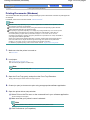
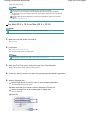
(1) Select Print on the File menu or the command bar in your software application.
The Print dialog box will appear.
(2) Make sure that your printer's name is selected.
Note
If another printer's name is selected, click and select your printer's name.
(3) Click Preferences (or Properties).
Printing Documents (Windows)
6.
Page 20 of 539 pages
Specify the required print settings.
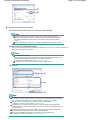
(1) Select Business Document in Commonly Used Settings.
Note
When the print object such as Business Document or Photo Printing is selected in
Commonly Used Settings, the items in Additional Features will be selected automatically.
The settings suitable for the print object such as media type or print quality will also
appear.
When you specify two or more copies in Copies, the Collate check box will be selected.
(2) Make sure of the displayed settings.
Here we make sure that Plain Paper in Media Type, Standard in Print Quality, A4 in Printer Paper Size, and
Rear Tray in Paper Source are selected.
Note
The settings can be changed.
However, after changing Printer Paper Size, confirm that the setting for Page Size in the
Page Setup sheet matches the setting set in the software application.
For details, refer to the on-screen manual: Advanced Guide.
To feed paper from the Front Tray, select Front Tray in Paper Source.
(3) Click OK.
Note
For details on the printer driver functions, click Help or Instructions to view the online help or
the on-screen manual: Advanced Guide. The Instructions button appears on the Quick Setup,
Main, and Maintenance sheets if the on-screen manual is installed on your computer.
You can name the changed settings and add to Commonly Used Settings.
For details, refer to the on-screen manual: Advanced Guide.
To display the current settings next time when you open the printer driver setup window,
select the Always Print with Current Settings check box. Some software applications may not
have this function.
To display the preview to confirm the print result, select the Preview before printing check
box. Some software applications may not have a preview function.
You can specify detailed print settings on the Main sheet or Page Setup sheet.
For details, refer to the on-screen manual: Advanced Guide.
Printing Documents (Windows)
7.
Page 21 of 539 pages
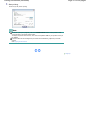
Start printing.
Click Print (or OK) to start printing.
Note
To cancel a print job in progress, press the RESUME/CANCEL button on the printer or click
Cancel Printing on the printer status monitor.
To display the printer status monitor, click Canon XXX (where " XXX" is your printer's name) on
the taskbar.
If printed ruled lines are misaligned or print results are unsatisfactory, adjust the print head
position.
See Aligning the Print Head.
Page top
Printing Documents (Macintosh)
Page 22 of 539 pages
Advanced Guide
Troubleshooting
Contents > Printing Photos / Documents > Printing Documents (Macintosh)
Printing Documents (Macintosh)
This section describes the procedure, using the settings to print a document of A4 size on plain paper as
an example.
For details, refer to the on-screen manual: Advanced Guide .
Note
Operations may vary depending on your software application. For details on the operation, refer to
the instruction manual of your application.
When printing in grayscale, depending on an image, the printing troubles may occur on the top and/
or bottom edges of the paper such as uneven coloration or white streaks. In this case, we
recommend printing on paper with top and bottom margins of 1.77 inches / 45 mm or more
according to the direction of printing, using Easy-PhotoPrint Pro provided on the Setup CD-ROM or
your page layout software application.
When using a page layout software application or the like, prepare paper whose longer side is at
least 3.54 inches / 90 mm longer than the length of the image, then print it with top and bottom
margins of 1.77 inches / 45 mm or more according to the direction of printing.
For details on grayscale printing, refer to the on-screen manual: Digital Photo Printing Guide .
For Mac OS X v.10.5.x
1.
Make sure that the printer is turned on.
See Front View .
2.
Load paper.
See Loading Paper in the Rear Tray .
Here we load A4 plain paper in the Rear Tray.
Note
To load paper in the Front Tray, see Loading Paper in the Front Tray .
3.
Open the Front Tray gently, and pull out the Front Tray Extension.
Gently press the upper center of the Front Tray to open it.
4.
Create (or open) a document to print using an appropriate software application.
5.
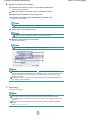
Open the Print dialog box.
Select Print on the File menu in your software application.
The Print dialog box will appear.
Note
If the dialog box below appears, click
(Down arrow).
Printing Documents (Macintosh)
6.
Specify the required print settings.
(1) Make sure that your printer's name is selected in Printer.
(2) Select the page size of the loaded paper in Paper Size.
Here we select A4.
(3) Select Quality & Media in the pop-up menu.
(4) Select the media type of the loaded paper in Media Type.
Here we select Plain Paper.
Note
If you select the wrong media type, the printer may not print with the proper print quality.
(5) Select Rear Tray in Paper Source.
Note
To feed paper from the Front Tray, select Front Tray in Paper Source.
(6) Select the print quality in Print Quality.
Here we select Standard.
Note
For details on the print quality, refer to the on-screen manual: Advanced Guide.
Note
(Question) on the Quality & Media, Color
For details on the printer driver functions, click
Options, Borderless Printing, or Margin screen to view the on-screen manual: Advanced
Guide. If the on-screen manual is not installed, it does not appear even if
(Question) is
clicked.
The preview appears on the left of the dialog box to confirm the print result. Some software
applications may not have a preview function.
7.
Start printing.
Page 23 of 539 pages
Printing Documents (Macintosh)
Click Print to start printing.
Note
Click the printer icon in the Dock to display the list of print jobs in progress.
To cancel a print job in progress, select the desired job in the Name list and click Delete.
To temporarily stop a job in progress, click Hold. To temporarily stop all the jobs in the list, click
Pause Printer.
If printed ruled lines are misaligned or print results are unsatisfactory, adjust the print head
position.
See Aligning the Print Head.
For Mac OS X v.10.4.x or Mac OS X v.10.3.9
Note
The screens used in this section are for printing with Mac OS X v.10.4.x.
1.
Make sure that the printer is turned on.
See Front View .
2.
Load paper.
See Loading Paper in the Rear Tray .
Here we load A4 plain paper in the Rear Tray.
Note
To load paper in the Front Tray, see Loading Paper in the Front Tray .
3.
Open the Front Tray gently, and pull out the Front Tray Extension.
Gently press the upper center of the Front Tray to open it.
4.
Create (or open) a document to print using an appropriate software application.
5.
Specify the page size.
(1) Select Page Setup on the File menu in your software application.
The Page Setup dialog box will appear.
(2) Make sure that your printer's name is selected in Format for.
(3) Select the page size of the loaded paper in Paper Size.
Here we select A4.
(4) Click OK.
Page 24 of 539 pages
Printing Documents (Macintosh)
6.
Specify the required print settings.
(1) Select Print on the File menu in your software application.
The Print dialog box will appear.
(2) Make sure that your printer's name is selected in Printer.
(3) Select Quality & Media in the pop-up menu.
(4) Select the media type of the loaded paper in Media Type.
Here we select Plain Paper.
Note
If you select the wrong media type, the printer may not print with the proper print quality.
(5) Select Rear Tray in Paper Source.
Note
To feed paper from the Front Tray, select Front Tray in Paper Source.
(6) Select the print quality in Print Quality.
Here we select Standard.
Note
For details on the print quality, refer to the on-screen manual: Advanced Guide.
Note
(Question) on the Quality & Media, Color
For details on the printer driver functions, click
Options, Special Effects, Borderless Printing, or Margin screen to view the on-screen manual:
Advanced Guide. If the on-screen manual is not installed, it does not appear even if
(Question) is clicked.
To display the preview to confirm the print result, click Preview. Some software applications
may not have a preview function.
7.
Start printing.
Click Print to start printing.
Note
Click the printer icon in the Dock to display the list of print jobs in progress.
To cancel a print job in progress, select the desired job in the Name list and click Delete.
To temporarily stop a job in progress, click Hold. To temporarily stop all the jobs in the list, click
Stop Jobs.
If printed ruled lines are misaligned or print results are unsatisfactory, adjust the print head
position.
See Aligning the Print Head.
Page 25 of 539 pages
Printing Documents (Macintosh)
Page 26 of 539 pages
Page top
Other Usages
Page 27 of 539 pages
Advanced Guide
Troubleshooting
Contents > Other Usages
Other Usages
This section describes the function to print photos from your PictBridge compliant device such as a
digital camera connecting with a USB cable.
This section also introduces other useful functions; Solution Menu and My Printer.
Printing Photos from a PictBridge Compliant Device
Solution Menu and My Printer
Page top
Printing Photos from a PictBridge Compliant Device
Page 28 of 539 pages
Advanced Guide
Troubleshooting
Contents > Other Usages > Printing Photos from a PictBridge Compliant Device
Printing Photos from a PictBridge Compliant Device
Connecting the PictBridge compliant device to the printer with a USB cable that is recommended by the
device's manufacturer, you can print saved images directly.
For the basic features of printing from a PictBridge compliant digital camera, such as compatible media
types, available layouts, and image correction function, refer to the on-screen manual: Advanced Guide .
For details on the print settings on the PictBridge compliant device, refer to the instruction manual
supplied with the device.
Connectable devices:
Any PictBridge compliant device can be connected to the printer regardless of the manufacturer or model
as long as it is compliant with the PictBridge Standard.
Note
PictBridge is the standard to print your photos directly without using a computer, connecting a
device such as a digital still camera, digital camcorder, or camera-equipped mobile phone.
(PictBridge) A device with this mark is PictBridge compliant.
With some Canon brand Single Lens Reflex cameras that are PictBridge compliant, you can select a
desired color mode and make detailed color adjustments.
For details on the color mode, refer to the on-screen manual: Digital Photo Printing Guide or the
instruction manual supplied with your Canon brand PictBridge compliant device.
Printable image data format:
This printer accepts images* taken with a camera compliant with the Design rule for Camera File
system.
* Exif 2.2/2.21 compliant
Page top
Solution Menu and My Printer
Page 29 of 539 pages
Advanced Guide
Troubleshooting
Contents > Other Usages > Solution Menu and My Printer
Solution Menu and My Printer
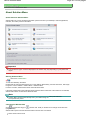
Using Solution Menu or My Printer, you can easily get the information on the printer or change the print
settings by only clicking buttons on a screen.
With Solution Menu, you can start the software applications supplied with the printer or display the
operating instructions. It also provides you with the information on troubleshooting.
With My Printer, you can display the printer driver setup window. It also provides you with the information
on how to take an action when you have trouble with the operation. My Printer is not available in
Macintosh.
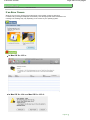
To Start Solution Menu
Double-click
(Solution Menu) on the desktop.
Click Here: Solution Menu
Click
(Solution Menu) in the Dock.
* The screens below are for Windows Vista.
Click the button of a function to use.
After starting Solution Menu, click the button on the title bar to reduce the window size.
Note
Install Solution Menu from the Setup CD-ROM when it has not been installed or has been
uninstalled. To install Solution Menu, select Solution Menu in Custom Install.
The buttons displayed on the screen may vary depending on the country or region of purchase.
To start Solution Menu from the Start menu, select All Programs (Programs in Windows 2000),
Canon Utilities, Solution Menu, then Solution Menu.
To start Solution Menu from the menu bar, select the Go menu, Applications, Canon Utilities, Solution
Menu, then double-click Solution Menu.
To Start My Printer
Double-click
(My Printer) on the desktop.
Solution Menu and My Printer
Page 30 of 539 pages
Note
You can also start My Printer from Solution Menu.
Install My Printer from the Setup CD-ROM when it has not been installed or has been uninstalled. To
install My Printer, select My Printer in Custom Install.
To start My Printer from the Start menu, select All Programs (Programs in Windows 2000), Canon
Utilities, My Printer, then My Printer.
Page top
Loading Paper
Page 31 of 539 pages
Advanced Guide
Troubleshooting
Contents > Loading Paper
Loading Paper
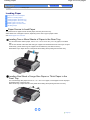
This section describes types of paper you can load and how to load printing paper in the Rear Tray or
Front Tray.
Loading Paper
Paper Source to Load Paper
Notes on Loading Paper
Loading Paper in the Rear Tray
Loading Paper in the Front Tray
Media Types You Can Use
Media Types You Cannot Use
Handling Paper
Page top
Loading Paper
Page 32 of 539 pages
Advanced Guide
Troubleshooting
Contents > Loading Paper > Loading Paper
Loading Paper
Paper Source to Load Paper
Notes on Loading Paper
Loading Paper in the Rear Tray
Loading Paper in the Front Tray
Media Types You Can Use
Media Types You Cannot Use
Handling Paper
Paper Source to Load Paper
The printer has two paper sources to feed paper, Rear Tray and Front Tray.
Select either one of the paper sources, depending on the size or type of paper to load.
See Media Types You Can Use .
Loading Two or More Sheets of Paper in the Rear Tray
You can load various sizes of paper, from 4" x 6" / 10 x 15 cm to A3+ (13" x 19") paper, in the Rear
Tray.
Two or more sheets of the same size and type of paper can be loaded at a time so that you can print
continuously. (Some sizes or types of paper can be loaded only one sheet at a time.)
Select Rear Tray in Paper Source in the printer driver setting when printing from the Rear Tray.
Loading One Sheet of Large Size Paper or Thick Paper in the
Front Tray
You can load large size paper such as 14" x 17" / 36 x 43 cm paper, or thick paper such as art paper
and board paper, in the Front Tray.
Select Front Tray in Paper Source in the printer driver setting when printing from the Front Tray.
Page top
Notes on Loading Paper
Page 33 of 539 pages
Advanced Guide
Troubleshooting
Contents > Loading Paper > Loading Paper > Notes on Loading Paper
Notes on Loading Paper
Important
If you cut plain paper into small size such as 4" x 6" / 10 x 15 cm, 4" x 8" / 101.6 x 203.2 mm, or 5" x
7" / 13 x 18 cm to perform trial print, it can cause paper jams.
Note
We recommend Canon genuine photo paper for printing photos.
For details on the Canon genuine paper, see Media Types You Can Use .
You can use general copy paper.
For the page size and paper weight/thickness you can use for the printer, see Media Types You
Can Use.
Page top
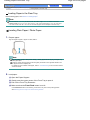
Loading Paper in the Rear Tray
Page 34 of 539 pages
Advanced Guide
Troubleshooting
Contents > Loading Paper > Loading Paper > Loading Paper in the Rear Tray
Loading Paper in the Rear Tray
Before loading paper, see Notes on Loading Paper .
Note
You can load A3+ (13" x 19"), A3, B4, A4, B5, A5, Letter, Legal, 11" x 17" / 279.4 x 431.8 mm
(Tabloid), Wide (4" x 7.1"), 4" x 6" / 10 x 15 cm, 4" x 8" / 101.6 x 203.2 mm, 5" x 7" / 13 x 18 cm, 8"
x 10" / 20 x 25 cm, and 10" x 12" / 25 x 30 cm sizes of paper, and envelopes in the Rear Tray.
Loading Plain Paper / Photo Paper
1.
Prepare paper.
Align the edges of paper. If paper is curled, flatten it.
Note
Align the edges of paper neatly before loading. Loading paper without aligning the edges may
cause paper jams.
If paper is curled, hold the curled corners and gently bend them in the opposite direction until
the paper becomes completely flat.
For details on how to flatten curled paper, refer to " Troubleshooting " in the on-screen manual:
Advanced Guide.
2.
Load paper.
(1) Open the Paper Support.
(2) Gently press the upper center of the Front Tray to open it.
(3) Pull out the Front Tray Extension.
(4) Make sure that the Front Feed button is not lit.
If the Front Feed button is lit or flashing, set the Front Tray to its normal printing position.
See Returning the Front Tray to Its Normal Printing Position.
Loading Paper in the Rear Tray
(5) Open the Feed Slot Cover.
(6) Load the paper in the Rear Tray WITH THE PRINT SIDE FACING YOU.
Align the paper stack with the right edge of the Rear Tray.
Important
Always load paper in the portrait orientation (A). Loading paper in the landscape
orientation (B) can cause paper jams.
(7) Slide the Paper Guide to align it with the left side of the paper stack.
Do not slide the Paper Guide too hard. The paper may not be fed properly.
Note
Do not load sheets of paper higher than the Load Limit Mark (C).
Page 35 of 539 pages
Loading Paper in the Rear Tray
Page 36 of 539 pages
(8) Close the Feed Slot Cover.
Note
After loading paper
Select the size and type of the loaded paper in Printer Paper Size (or Paper Size) and Media Type in
the printer driver.
See Printing Documents (Windows) or Printing Documents (Macintosh) .
Loading Envelopes
You can print on European DL and US Comm. Env. #10-sized envelopes.
The address is automatically rotated and printed according to the envelope's direction by specifying
with the printer driver properly.
Important
You cannot use the following envelopes.
- Envelopes with an embossed or treated surface
- Envelopes with a double flap (or sticker flaps)
- Envelopes whose gummed flaps are already moistened and adhesive
Note
You cannot load envelopes in the Front Tray. Load them in the Rear Tray.
1.
Prepare envelopes.
Press down on all four corners and edges of the envelopes to flatten them.
If the envelopes are curled, hold the opposite corners and gently twist them in the
opposite direction.
If the corner of the envelope flap is folded, flatten it.
Loading Paper in the Rear Tray
Page 37 of 539 pages
Use a pen to press the leading edge in the inserting direction flat and sharpen the
crease.
The figures above show a side view of the leading edge of the envelope.
Important
The envelopes may jam in the printer if they are not flat or the edges are not aligned. Make
sure that no curl or puff exceeds 0.1 inches / 3 mm.
2.
Load envelopes.
(1) Open the Paper Support.
(2) Gently press the upper center of the Front Tray to open it.
(3) Pull out the Front Tray Extension.
(4) Make sure that the Front Feed button is not lit.
If the Front Feed button is lit or flashing, set the Front Tray to its normal printing position.
See Returning the Front Tray to Its Normal Printing Position.
(5) Open the Feed Slot Cover.
(6) Load the envelopes in the Rear Tray WITH THE ADDRESS SIDE FACING YOU.
Align the envelopes with the right edge of the Rear Tray. The folded flap of the envelope will be faced
down on the left side.
Up to 10 envelopes can be loaded at once.
(7) Slide the Paper Guide to align it with the left side of the envelopes.
Do not slide the Paper Guide too hard. The envelopes may not be fed properly.
Loading Paper in the Rear Tray
(A) Rear side
(B) Address side
(8) Close the Feed Slot Cover.
3.
Specify the settings in the printer driver.
(1) Select Business Document in Commonly Used Settings on the Quick Setup
sheet.
(2) Select Envelope in Media Type.
(3) Select DL Env. or Comm. Env. #10 in Printer Paper Size.
(4) Select Landscape in Orientation.
Note
If the print result is upside down, select Rotate 180 degrees on the Page Setup sheet in the
printer driver setup window.
(1) Select Envelope in Media Type.
(2) Select DL Envelope or #10 Envelope in Paper Size.
(3) Select the landscape orientation in Orientation.
Important
If you do not specify Printer Paper Size (or Paper Size) or Orientation properly, the address will be
printed upside down or will be turned to 90 degrees.
Note
For details on the printer driver settings, see Printing Documents (Windows) or Printing Documents
(Macintosh) .
When printing starts, the printer may not detect the envelope correctly depending on the type of
envelope. If the Alarm lamp flashes orange eleven times, set the printer driver not to detect the
width of the paper.
Refer to "Error Regarding the Width of Paper Is Displayed" in " Troubleshooting " of the on-screen
manual: Advanced Guide.
Page 38 of 539 pages
Loading Paper in the Rear Tray
Page 39 of 539 pages
Page top
Loading Paper in the Front Tray
Page 40 of 539 pages
Advanced Guide
Troubleshooting
Contents > Loading Paper > Loading Paper > Loading Paper in the Front Tray
Loading Paper in the Front Tray
Before loading paper, see Notes on Loading Paper .
Important
When loading paper in the Front Tray, the paper sticks out from the back of the printer. Keep a
space of 15.7 inches / 40 cm for this purpose behind the printer.
There are wheels on the back corners of the printer. Lift up the front of the printer to move it back
and forth.
Note
You can load A3+ (13" x 19"), A3, B4, A4, B5, A5, Letter, Legal, 11" x 17" / 279.4 x 431.8 mm
(Tabloid), Wide (4" x 7.1"), 4" x 6" / 10 x 15 cm, 4" x 8" / 101.6 x 203.2 mm, 5" x 7" / 13 x 18 cm, 8"
x 10" / 20 x 25 cm, 10" x 12" / 25 x 30 cm, and 14" x 17" / 36 x 43 cm sizes of paper in the Front
Tray.
When printing on paper other than 14" x 17" / 36 x 43 cm size from a PictBridge compliant device,
load paper in the Rear Tray.
For details on paper that can be used for a PictBridge compliant device, refer to the on-screen
manual: Advanced Guide.
1.
Set the Front Tray in the front paper feeding position.
(1) Gently press the upper center of the Front Tray to open it.
(2) Tilt the Front Tray upward.
(3) Lift the Front Tray until it stops.
The Front Feed button lights.
(4) While keeping the Front Tray lifted, tilt the Front Tray forward to set it in the front
paper feeding position.
Loading Paper in the Front Tray
Page 41 of 539 pages
(5) Make sure that the Front Feed button is lit.
2.
Press the Front Feed Support button to open the Front Feed Support.
3.
Prepare for loading paper.
(1) Pull out the Front Tray Extension.
(2) Press the right corner of the Front Feed Support to open the V-shaped Support.
Note
When loading A4 or smaller size paper, this procedure is not necessary.
(3) Press the Front Feed button.
The printer starts making operating noise, then the Power lamp flashes for about 30 seconds.
Important
Do not load paper when the Power lamp is flashing. Otherwise, the paper or the printer
may be damaged.
Loading Paper in the Front Tray
4.
Page 42 of 539 pages
Load paper.
(1) Make sure that the Power lamp is lit and the Front Feed button is flashing
quickly.
If the Power lamp is flashing, wait until it stops flashing and stays lit.
(2) Load the paper straight into the Front Tray WITH THE PRINT SIDE FACING UP.
Align the front edge of the paper with the mark
(Paper Alignment Mark) on the Front Tray.
Load only one sheet of paper in the Front Tray at a time.
Note
Align the right edge of the paper with the right side (A) of the Front Tray and load the
paper straight into the Front Tray.
If paper is curled, hold the curled corners and gently bend them in the opposite direction
until the paper becomes completely flat.
For details on how to flatten curled paper, refer to " Troubleshooting " in the on-screen
manual: Advanced Guide.
Important
If the printer is not used for about 5 minutes while it is as described in (1) in step 4 above, the
Front Feed button stops flashing and stays lit, and you cannot load the paper in the Front
Tray. In this case, return to (3) in step 3.
5.
Press the Front Feed button to feed the paper from the Front Tray.
The paper feeds into the printer automatically and the Front Feed button flashes slowly.
The printer is ready to start printing.
Note
After loading paper
Select the size and type of the loaded paper in Printer Paper Size (or Paper Size) and Media Type in
the printer driver.
Loading Paper in the Front Tray
Page 43 of 539 pages
See Printing Documents (Windows) or Printing Documents (Macintosh) .
To print continuously
To print from the Front Tray again, return to (3) in step 3 and load paper in the Front Tray. Then start
printing.
Returning the Front Tray to Its Normal Printing Position
When using the Rear Tray, set the Front Tray to its normal printing position.
Important
Be sure to follow the procedure below when returning the Front Tray to its normal printing
position. Otherwise, the printer may be damaged.
When the Front Tray is set to the front paper feeding position, printing by using the Rear Tray
is not possible. Be sure to set it to its normal printing position.
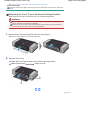
1.
Hold the Front Tray and slowly tilt it like you are closing it.
Tilting the Front Tray lowers it to its normal printing position.
2.
Open the Front Tray.
(1) Open the Front Tray to return it to its normal printing position.
(2) Make sure that the Front Feed button is not lit.
Page top
Media Types You Can Use
Page 44 of 539 pages
Advanced Guide
Troubleshooting
Contents > Loading Paper > Loading Paper > Media Types You Can Use
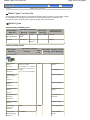
Media Types You Can Use
Choose paper suitable for printing, for the best print results. Canon provides you various types of paper
to enhance the fun of printing, such as stickers as well as papers for photo or document. We
recommend the use of Canon genuine paper for printing your important photos.
Media Types
Commercially available papers
Name of Paper <
Model No.>
Paper Source Load Limit
Rear Tray
Paper Output
Load Limit
Front Tray
*1
Plain Paper
Settings in Printer
Driver: Media Type
*2
1 sheet
Approx. 50 sheets
Plain Paper
(Recycled paper) *3
Approx. 150
sheets *4
Envelopes
10 envelopes
Not
*6
Envelope
loadable*5
Canon genuine papers
Name of Paper
<Model No.>
Paper Source Load Limit
Rear Tray
*1
Paper Output
Front
Tray
Load Limit
Settings in Printer
Driver: Media Type
*2
For printing photos:
Photo Paper Pro
Platinum
A3+ (13" x 19") and 10" x 12" /
25 x 30 cm: 1 sheet
<PT-101>*7
Photo Paper Pro II
A3, A4, Letter, 5" x 7" / 13 x 18
cm, and 8" x 10" / 20 x 25 cm:
10 sheets
<PR-201>*7
4" x 6" / 10 x 15 cm: 20 sheets
1 sheet
*6
Photo Paper Pro
Platinum
Photo Paper Pro II
Glossy Photo
Paper "Everyday
Use"
Glossy Photo Paper
<GP-501>*7
Photo Paper
Glossy Photo Paper
Glossy
<GP-502>*7
Photo Paper Plus
Glossy II
Photo Paper Plus
Glossy II
<PP-201>*7
Photo Paper Plus
Semi-gloss
Photo Paper Plus
Semi-gloss
<SG-201>*4 *7
Matte Photo Paper
Matte Photo Paper
<MP-101>
Fine Art Paper
"Photo Rag"
1 sheet
1 sheet
Fine Art "Photo Rag"
<FA-PR1>
Fine Art Paper
"Museum Etching"
<FA-ME1>*8
Not loadable*9
Fine Art "Museum
Etching"
Media Types You Can Use
Page 45 of 539 pages
Fine Art Premium
Matte
Not loadable*9
Fine Art Paper
Premium Matte
<FA-PM1>*8
For printing business documents:
High Resolution
Paper
A3+ (13" x 19"): 20 sheets
<HR-101N>
A4 and Letter: 80 sheets
1 sheet
50 sheets
High Resolution Paper
1 sheet
*6
T-Shirt Transfers
A3: 50 sheets
For creating your own prints:
T-Shirt Transfers
1 sheet
<TR-301>
Photo Stickers
Glossy Photo Paper
<PS-101>*10
*1 Paper with a Model Number is Canon genuine paper. Refer to the instruction manual supplied with
the paper for detailed information on the printable side and notes on handling paper. For information on
the page sizes available for each Canon genuine paper, visit our website. You may not be able to
purchase some Canon genuine papers depending on the country or region of purchase. Paper is not
sold in the US by Model Number. Purchase paper by name.
*2 Maximum number of sheets that can be ejected and stacked on the Front Tray when feeding paper
from the Rear Tray.
When feeding paper from the Front Tray, remove each sheet as it is ejected.
*3 Proper feeding of paper may not be possible at the maximum capacity depending on the type of paper
or environmental conditions (either very high or low temperature or humidity). In such cases, reduce the
number of paper you load at a time to less than half (100% recycled paper can be used).
*4 14" x 17" / 36 x 43 cm paper cannot be loaded in the Rear Tray.
*5 Feeding this paper from the Front Tray can damage the printer. Always load in the Rear Tray.
*6 We recommend that you remove the previously printed sheet from the Front Tray before continuously
printing to avoid blurs and discoloration.
*7 When loading paper in stacks, the print side may become marked as it is fed or paper may not feed
properly. In this case, load one sheet at a time.
*8 If you are using Fine Art Paper "Museum Etching" or Fine Art Paper Premium Matte, you cannot print in
the 1.38 inches / 35 mm margin on the top and bottom edges according to the direction of printing. If you
select a special page size for Fine Art Paper in the printer driver, a limit is set to prevent printing in the
1.38 inches / 35 mm margin on the top and bottom edges of the paper. We recommend checking the
printing area in the preview screen before printing.
For details, refer to the on-screen manual: Advanced Guide .
Canon genuine media is produced and managed to get optimal print quality. We recommend using
Canon genuine media.
*9 Feeding this paper from the Rear Tray can damage the printer. Always load in the Front Tray.
*10 You can easily specify print settings for sticker paper with Easy-PhotoPrint EX provided on the Setup
CD-ROM. Install it on your computer.
Non-Canon genuine specialty paper
Loading paper
Load one sheet at a time in both the Rear Tray and the Front Tray.
Important
If you select Canvas or Board Paper in Media Type in the printer driver, always load the paper
in the Front Tray. The paper cannot be fed from the Rear Tray.
Printer driver settings and paper source
Paper Source
Characteristics
Media Type
Page Size /
Front
Media Types You Can Use
Page 46 of 539 pages
Paper Size
Paper that has the texture of
drawing paper
Other Fine Art
Paper
Art XX (Margin 35
Paper that has a texture like
Canvas
Art XX (Margin 35
(From 23 mil / 0.6 mm to 47 mil / 1.2
mm)
Tray
Available *2 Available
mm) *1
Unavailable Available
mm) *1
canvas
Board Paper, Thick paper
Rear Tray
Board Paper *3
Art XX (Margin 35
Unavailable Available
mm) *1
*1 Select Art A4 (Margin 35), Art Letter (Margin 35) / Art US Letter (Margin 35), Art A3 (Margin 35), or Art
A3+ 13x19 (Margin 35) according to the size you are using.
For details on the printable area, refer to the on-screen manual: Advanced Guide .
*2 Less than 53 lb / 200 gsm
*3 Be sure to select Board Paper in Media Type. Selecting other media types may cause a
malfunction.
Note
Other than Canon genuine specialty paper, alternative paper types listed on our website may
provide better quality printing. For more information about the alternative paper, see your local
retailer's homepage listed on the Canon Inc. website.
Please note that the customer must bear the cost for connection to the Internet.
Information regarding the alternative paper is updated on an irregular basis. And alternative
products may change without prior announcement.
Page Sizes
You can use the following sizes of paper.
You can load paper of the following sizes in the Rear Tray.
A3+ (13" x 19"), A3, B4, A4, B5, A5, Letter, Legal, 11" x 17" / 279.4 x 431.8 mm (Tabloid), Wide (4" x
7.1"), 4" x 6" / 10 x 15 cm, 4" x 8" / 101.6 x 203.2 mm, 5" x 7" / 13 x 18 cm, 8" x 10" / 20 x 25 cm, 10" x
12" / 25 x 30 cm, and envelopes
You can load paper of the following sizes in the Front Tray.
A3+ (13" x 19"), A3, B4, A4, B5, A5, Letter, Legal, 11" x 17" / 279.4 x 431.8 mm (Tabloid), Wide (4" x
7.1"), 4" x 6" / 10 x 15 cm, 4" x 8" / 101.6 x 203.2 mm, 5" x 7" / 13 x 18 cm, 8" x 10" / 20 x 25 cm, 10" x
12" / 25 x 30 cm, and 14" x 17" / 36 x 43 cm
In Macintosh, Choukei 3 and Choukei 4 are not available.
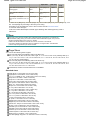
Standard sizes:
Letter (8.50 x 11.00 inches / 215.9 x 279.4 mm)
Legal (8.50 x 14.00 inches / 215.9 x 355.6 mm)
11" x 17" / Tabloid (11.00 x 17.00 inches / 279.4 x 431.8 mm)
A5 (5.83 x 8.27 inches / 148.0 x 210.0 mm)
A4 (8.27 x 11.69 inches / 210.0 x 297.0 mm)
A3 (11.69 x 16.54 inches / 297.0 x 420.0 mm)
A3+ (13.00 x 19.00 inches / 329.0 x 483.0 mm)
B5 (7.17 x 10.12 inches / 182.0 x 257.0 mm)
B4 (10.12 x 14.33 inches / 257.0 x 364.0 mm)
4" x 6" (4.00 x 6.00 inches / 10 x 15 cm)
4" x 8" (4.00 x 8.00 inches / 101.6 x 203.2 mm)
5" x 7" (5.00 x 7.00 inches / 13 x 18 cm)
8" x 10" (8.00 x 10.00 inches / 20 x 25 cm)
10" x 12" (10.00 x 12.00 inches / 25 x 30 cm)
14" x 17" (14.00 x 17.00 inches / 36 x 43 cm)
L (3.50 x 5.00 inches / 89.0 x 127.0 mm)
2L (5.00 x 7.01 inches / 127.0 x 178.0 mm)
Hagaki (3.94 x 5.83 inches / 100.0 x 148.0 mm)
Hagaki 2 (7.87 x 5.83 inches / 200.0 x 148.0 mm)
Comm. Env. #10 (4.12 x 9.50 inches / 104.6 x 241.3 mm)
DL Env. (4.33 x 8.66 inches / 110.0 x 220.0 mm)
Choukei 3 (4.72 x 9.25 inches / 120.0 x 235.0 mm)
Choukei 4 (3.54 x 8.07 inches / 90.0 x 205.0 mm)
Youkei 4 (4.13 x 9.25 inches / 105.0 x 235.0 mm)
Youkei 6 (3.86 x 7.48 inches / 98.0 x 190.0 mm)
Wide (4.00 x 7.10 inches / 101.6 x 180.6 mm)
Art Letter (Margin 35) (8.50 x 11.00 inches / 215.9 x 279.4 mm)
Media Types You Can Use
Page 47 of 539 pages
Art A4 (Margin 35) (8.27 x 11.69 inches / 210.0 x 297.0 mm)
Art A3 (Margin 35) (11.69 x 16.54 inches / 297.0 x 420.0 mm)
Art A3+ (Margin 35) (13.00 x 19.00 inches / 329.0 x 483.0 mm)
Non-standard sizes:
You can also specify a custom size within the following range.
3.50 x 5.00 inches / 89.0 x 127.0 mm (Rear Tray)
Minimum size:
3.94 x 5.83 inches / 100.0 x 148.0 mm (Front Tray)
Maximum size:
12.95 x 26.61 inches / 329.0 x 676.0 mm (Rear Tray)
14.00 x 23.00 inches / 355.6 x 584.2 mm (Front Tray)
Paper Weight / Thickness
Rear Tray:
From 17 lb / 64 gsm to 28 lb / 105 gsm (plain paper except for Canon genuine paper)
Do not use heavier or lighter paper (except for Canon genuine paper), as it could jam in the printer.
However, you can use non-Canon genuine art paper that is up to 53 lb / 200 gsm.
See Non-Canon genuine specialty paper .
Front Tray:
From 4 mil / 0.1 mm to 47 mil / 1.2 mm
Do not use paper thicker than this, as it could jam in the printer.
Page top
Media Types You Cannot Use
Page 48 of 539 pages
Advanced Guide
Troubleshooting
Contents > Loading Paper > Loading Paper > Media Types You Cannot Use
Media Types You Cannot Use
Do not use the following types of paper. Using such paper will not only produce unsatisfactory results,
but can also cause the printer to jam or malfunction.
Folded, curled, or wrinkled paper
Damp paper
Paper that is too thin
Rear Tray: Less than 17 lb / 64 gsm
Front Tray: Less than 4 mil / 0.1 mm
Paper that is too thick
Rear Tray: More than 28 lb / 105 gsm (plain paper except for Canon genuine paper)
* However, you can use non-Canon genuine art paper that is up to 53 lb / 200 gsm.
See Non-Canon genuine specialty paper .
Front Tray: More than 47 mil / 1.2 mm
Paper thinner than a postcard, including plain paper or notepad paper cut to a small size (when
printing on A5 or smaller sized paper)
Picture postcards
Postcards affixed with photos or stickers
Envelopes with a double flap (or sticker flaps)
Envelopes with an embossed or treated surface
Envelopes whose gummed flaps are already moistened and adhesive
Any type of paper with holes
Paper that is not rectangular
Paper bound with staples or glue
Paper with adhesives
Paper decorated with glitter, etc.
Page top
Handling Paper
Page 49 of 539 pages
Advanced Guide
Troubleshooting
Contents > Loading Paper > Loading Paper > Handling Paper
Handling Paper
Be careful not to rub or scratch the surfaces of any types of paper when handling.
Hold the paper as closely as possible to its edges and try not to touch the printing surface. The print
quality may be degraded if the printing surface is smudged with sweat or oil that comes from your
hands.
Take out only the necessary number of paper from the package, just before printing.
To avoid curling, when you do not print, put unused paper back into the package and keep it on a
level surface. And also, store it avoiding heat, humidity, and direct sunlight.
Page top
Routine Maintenance
Page 50 of 539 pages
Advanced Guide
Troubleshooting
Contents > Routine Maintenance
Routine Maintenance
This section describes how to replace ink tanks when they run out of ink, to clean the printer when the
print result is faint, or to take an action when paper does not feed properly.
Replacing an Ink Tank
Replacing Procedure
Checking the Ink Status
When Printing Becomes Faint or Colors Are Incorrect
Printing the Nozzle Check Pattern
Examining the Nozzle Check Pattern
Cleaning the Print Head
Cleaning the Print Head Deeply
Aligning the Print Head
Cleaning the Paper Feed Rollers
Opening the Maintenance Screens
Opening the Printer Driver Setup Window (Windows)
Opening the Canon IJ Printer Utility (Macintosh)
Page top
Replacing an Ink Tank
Page 51 of 539 pages
Advanced Guide
Troubleshooting
Contents > Routine Maintenance > Replacing an Ink Tank
Replacing an Ink Tank
When ink runs out while printing is in progress, the Alarm lamp flashes orange four times and the error
message will appear on your computer screen. Make sure which ink tank has run out of ink and replace
it with a new one.
Note
When ink runs out or other errors occur, the Alarm lamp flashes orange to inform you of the error.
Refer to "Four flashes:" of "Alarm Lamp Flashes Orange" in " Troubleshooting " of the on-screen
manual: Advanced Guide, and take an appropriate action.
For information on the compatible ink tanks, refer to the printed manual: Getting Started .
If print results become faint or white streaks appear despite sufficient ink levels, see When Printing
Becomes Faint or Colors Are Incorrect .
Replacing Procedure
When the ink tanks run out of ink, follow the procedure below to replace them.
Important
Handling ink
To maintain optimal print quality, we recommend the use of specified Canon brand ink tanks. Refilling
ink is not recommended.
If you remove an ink tank, replace it immediately. Do not leave the printer with ink tanks removed.
Use new ink tanks for replacement. Installing used ink tanks may cause the nozzles to clog.
Furthermore, with such ink tanks, the printer will not be able to inform you when to replace the ink
tanks properly.
Once an ink tank has been installed, do not remove it from the printer and leave it out in the open.
This will cause the ink tank to dry out, and the printer may not operate properly when it is
reinstalled. To maintain optimal printing quality, use an ink tank within six months of first use.
Note
Color ink may be consumed even when printing a black-and-white document or when black-andwhite printing is specified.
Every ink is also consumed in the standard cleaning and deep cleaning of the Print Head, which
may be necessary to maintain the printer's performance. When an ink tank is out of ink, replace it
immediately with a new one.
1.
Make sure that the power is turned on, and open the Front Tray gently.
Gently press the upper center of the Front Tray to open it.
2.
Open the Top Cover.
The Print Head Holder moves to the replacement position.
Caution
Do not hold the Print Head Holder to stop or move it forcibly. Do not touch the Print Head Holder
until it stops completely.
Important
Do not touch the metallic parts or other parts inside the printer.
If the Top Cover is left open, the Print Head Holder moves to the right. In this case, close and
reopen the Top Cover.
If you open the Top Cover while the Front Feed button is flashing quickly, the Print Head
Holder may not move to the replacement position. In this case, close the Top Cover, press the
Front Feed button, then wait until the Front Feed button stops flashing and stays lit. To
continue printing from the Front Tray after replacing the ink tank, follow the procedure from (3)
in step 3 in Loading Paper in the Front Tray and start printing again.
Do not open the Inner Cover (A) when replacing the ink tank. If the Inner Cover is open after
Replacing an Ink Tank
Page 52 of 539 pages
replacing the ink tank, be sure to close it.
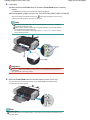
3.
Replace the ink tank with the lamp flashing fast.
Push the tab (B) and lift the ink tank to remove.
Do not touch the Print Head Lock Lever (C).
Important
Handle the ink tank carefully to avoid staining of clothing or the surrounding area.
Discard the empty ink tank according to the local laws and regulations regarding disposal of
consumables.
Note
Do not remove two or more ink tanks at the same time. Be sure to replace ink tanks one by one
when replacing two or more ink tanks.
For details on ink lamp flashing speed, see Checking the Ink Status .
4.
Prepare the new ink tank.
(1) Take the new ink tank out of its package, pull the orange tape (
direction of the arrow to peel it off, then remove the film (
Important
) in the
).
Make sure that the film is completely removed from the air hole (D). If the air hole is blocked
with the remaining film, ink may leak out or may not eject properly.
Replacing an Ink Tank
(2) Hold the orange protective cap (E) as indicated in the figure below, then twist
and remove it from the bottom of the ink tank.
Remove the protective cap while holding it to prevent the ink from staining your fingers.
Discard the protective cap once it is removed.
Important
Do not touch the electrical contacts (F) on the ink tank. It can cause the printer to
malfunction or become unable to print.
Important
If you shake the ink tank, the ink may spill out and stain your hands and the surrounding area.
Be careful to handle the ink tank.
Do not squeeze the side of ink tanks as this may cause the ink to leak out.
Be careful not to stain your hands and the surrounding area with ink on the removed
protective cap.
Do not reattach the protective cap once you have removed it. Discard it according to the local
laws and regulations regarding disposal of consumables.
Do not touch the open ink port once the protective cap is removed, as this may prevent the ink
from being ejected properly.
5.
Install the new ink tank.
(1) Insert the front end of ink tank into the Print Head at a slant.
Make sure that the position of the ink tank matches the label.
Page 53 of 539 pages
Replacing an Ink Tank
(2) Press the mark
place.
Page 54 of 539 pages
(Push) on the ink tank until the ink tank snaps firmly into
Make sure that the ink lamp lights up red.
Important
You cannot print if the ink tank is installed in the wrong position. Be sure to install the ink tank in
the correct position according to the label on the Print Head Holder.
You cannot print unless all the ink tanks are installed. Be sure to install all the ink tanks.
6.
Close the Top Cover.
Note
If the Alarm lamp still flashes orange after the Top Cover is closed, refer to "Alarm Lamp
Flashes Orange" in " Troubleshooting " of the on-screen manual: Advanced Guide.
When you start printing after replacing the ink tank, the printer starts cleaning the Print Head
automatically. Do not perform any other operations until the printer completes the cleaning of
the Print Head. The Power lamp flashes green while cleaning.
If printed ruled lines are misaligned or the print head position is misaligned, adjust the print head
position.
See Aligning the Print Head.
Page top
Checking the Ink Status
Page 55 of 539 pages
Advanced Guide
Troubleshooting
Contents > Routine Maintenance > Replacing an Ink Tank > Checking the Ink Status
Checking the Ink Status
You can check the ink status with the ink lamps or your computer screen.
With the Ink Lamps
1.
Make sure that the power is turned on, and open the Front Tray gently.
Gently press the upper center of the Front Tray to open it.
2.
Open the Top Cover.
3.
Check the ink lamps.
Ink lamp is on
The ink tank is correctly installed and there is sufficient ink left for printing.
Ink lamp is flashing
Flashing slowly (at around 3-second intervals)
..... Repeats
Ink is low. You can continue printing for a while, but we recommend you to have a new ink tank available.
Flashing fast (at around 1-second intervals)
...... Repeats
The ink tank is installed in the wrong position or it is empty. Make sure that the ink tank is installed in the
correct position as indicated by the label on the Print Head Holder. If the position is correct but the lamp
flashes, the ink tank is empty. Replace it with a new one.
Ink lamp is off
The ink tank is not installed properly or the function for detecting the remaining ink level is disabled. If the ink
(Push) on the ink tank until the ink tank clicks into place. If it
tank is not installed properly, press the mark
does not click into place, make sure that the orange protective cap has been removed from the bottom of
the ink tank. If the function for detecting the remaining ink level is disabled, replace the ink tank with a new
one.
See Replacing Procedure .
If the ink lamp is still off after reinstalling the ink tank, there has been an error and the printer cannot print.
Check the Alarm lamp on the printer.
Refer to " Troubleshooting " in the on-screen manual: Advanced Guide.
With the Computer Screen
You can confirm the status of each ink tank with the printer status monitor (Windows) or the Canon
Checking the Ink Status
Page 56 of 539 pages
IJ Printer Utility (Macintosh).
(A) Check if any symbol appears on the screen.
(Ink low) is running low. You can continue printing for a while, but we recommend
The ink with
you to have a new ink tank available.
Note
An error message may appear while printing. Confirm the message and take an appropriate
action.
Follow the procedure below to open each of the confirmation screens.
1.
Open the printer driver setup window.
See Opening the Printer Driver Setup Window (Windows) .
2.
Click View Printer Status on the Maintenance sheet.
To confirm the ink tank information, click the Ink Details menu.
Note
You can also display the printer status monitor by clicking Canon XXX (where " XXX" is your
printer's name) which appears on the taskbar while printing.
1.
Open the Canon IJ Printer Utility dialog box.
See Opening the Canon IJ Printer Utility (Macintosh) .
2.
Select Ink Level Information in the pop-up menu.
To confirm the ink tank information, click Ink Details.
Page top
When Printing Becomes Faint or Colors Are Incorrect
Page 57 of 539 pages
Advanced Guide
Troubleshooting
Contents > Routine Maintenance > When Printing Becomes Faint or Colors Are Incorrect
When Printing Becomes Faint or Colors Are Incorrect
If print results are blurred or colors are not printed correctly, the pint head nozzles are probably clogged.
Follow the procedure below to print the nozzle check pattern, check the print head nozzle condition, then
clean the Print Head.
If printed ruled lines are misaligned or print results are otherwise unsatisfactory, aligning the Print Head
may improve print quality.
Important
Do not rinse or wipe the Print Head and ink tanks. This can cause trouble with the Print Head and ink
tanks.
Note
Before performing maintenance
Open the Top Cover and make sure that all lamps on the ink tanks are lit red.
If not, see Checking the Ink Status and take an appropriate action.
Increasing the print quality in the printer driver settings may improve the print result.
For details, refer to the on-screen manual: Advanced Guide.
When the Print Results Are Blurred or Uneven:
Step 1
See Printing the Nozzle Check Pattern .
See Examining the Nozzle Check Pattern.
If there are horizontal white streaks in the pattern:
After cleaning the Print Head, print
and examine the nozzle check
pattern.
Step 2
See Cleaning the Print Head .
If the problem is not resolved after cleaning the Print Head
twice:
Step 3
See Cleaning the Print Head Deeply.
Note
If you have performed the procedure until step 3 and the problem has not been resolved, turn off
the power and clean the Print Head deeply again after 24 hours. If the problem is still not resolved,
the Print Head may be damaged. Contact the service center.
When the Print Results Are Not Even such as the Ruled Lines
Are Misaligned:
See Aligning the Print Head.
Page top
Printing the Nozzle Check Pattern
Page 58 of 539 pages
Advanced Guide
Troubleshooting
Contents > Routine Maintenance > When Printing Becomes Faint or Colors Are Incorrect > Printing the Nozzle Check
Pattern
Printing the Nozzle Check Pattern
Print the nozzle check pattern to determine whether the ink ejects properly from the print head nozzles.
You need to prepare: a sheet of A4 or Letter-sized plain paper
Note
If the remaining ink level is low, the nozzle check pattern will not be printed correctly. Replace the
ink tank whose ink is low.
See Replacing an Ink Tank .
Printing the nozzle check pattern without a computer
You can also print the nozzle check pattern from the printer itself using the RESUME/CANCEL
button.
1. Make sure that the power is turned on, and load a sheet of A4 or Letter-sized plain paper in the
Rear Tray.
2. Gently press the upper center of the Front Tray to open it, and pull out the Front Tray Extension.
If the Inner Cover is open, close it.
3. Hold down the RESUME/CANCEL button until the Power lamp flashes green twice, then release
it immediately. The nozzle check pattern will be printed. Do not perform any other operations until
the printer completes the printing of the nozzle check pattern. Examine the nozzle check pattern
and take an appropriate action. See step 1 in Examining the Nozzle Check Pattern.
1.
Make sure that the power is turned on.
2.
Load a sheet of A4 or Letter-sized plain paper in the Rear Tray.
Important
You cannot feed paper from the Front Tray for printing the nozzle check pattern. Load paper in
the Rear Tray.
3.
Open the Front Tray gently, and pull out the Front Tray Extension.
Gently press the upper center of the Front Tray to open it.
Important
If the Inner Cover is open, close it.
4.
Open the printer driver setup window.
See Opening the Printer Driver Setup Window (Windows) .
5.
Print the nozzle check pattern.
(1) Click the Maintenance tab.
(2) Click Nozzle Check.
Printing the Nozzle Check Pattern
(3) Confirm the displayed message, and click Print Check Pattern.
The nozzle check pattern will be printed.
Do not perform any other operations until the printer completes the printing of the nozzle check pattern.
Note
Clicking Initial Check Items displays the items to be checked before printing the nozzle
check pattern.
6.
Examine the nozzle check pattern.
See Examining the Nozzle Check Pattern.
1.
Make sure that the power is turned on.
2.
Load a sheet of A4 or Letter-sized plain paper in the Rear Tray.
Important
You cannot feed paper from the Front Tray for printing the nozzle check pattern. Load paper in
the Rear Tray.
3.
Open the Front Tray gently, and pull out the Front Tray Extension.
Gently press the upper center of the Front Tray to open it.
Important
If the Inner Cover is open, close it.
4.
Open the Canon IJ Printer Utility dialog box.
See Opening the Canon IJ Printer Utility (Macintosh) .
5.
Print the nozzle check pattern.
(1) Select Test Print in the pop-up menu.
(2) Click Nozzle Check.
Page 59 of 539 pages
Printing the Nozzle Check Pattern
Page 60 of 539 pages
(3) Confirm the displayed message, and click Print Check Pattern.
The nozzle check pattern will be printed.
Do not perform any other operations until the printer completes the printing of the nozzle check pattern.
Note
Clicking Initial Check Items displays the items to be checked before printing the nozzle
check pattern.
6.
Examine the nozzle check pattern.
See Examining the Nozzle Check Pattern.
Page top
Examining the Nozzle Check Pattern
Page 61 of 539 pages
Advanced Guide
Troubleshooting
Contents > Routine Maintenance > When Printing Becomes Faint or Colors Are Incorrect > Examining the Nozzle Check
Pattern
Examining the Nozzle Check Pattern
Examine the nozzle check pattern, and clean the Print Head if necessary.
1.
Check if there are horizontal white streaks in the pattern (1) and/or pattern (2).
If there are horizontal white streaks in the pattern (1):
Cleaning the print head nozzles of ink group 1 (BK, R, G, PC, or PM) is required.
If there are horizontal white streaks in the pattern (2):
Cleaning the print head nozzles of ink group 2 (C, M, or Y) is required.
If there are horizontal white streaks in both the pattern (1) and pattern (2):
Cleaning the print head nozzles of all ink colors is required.
(A) Good (no horizontal white streaks)
(B) Bad (horizontal white streaks are present)
2.
Take the appropriate action.
When cleaning is not required :
Click Exit (Windows) or Quit (Macintosh) on the Pattern Check dialog box to exit nozzle check
pattern examination.
When cleaning is required :
(1) Click Cleaning.
Examining the Nozzle Check Pattern
Page 62 of 539 pages
(2) Load a sheet of A4 or Letter-sized plain paper in the Rear Tray.
Follow the procedure from (3) in step 5 (Windows or Macintosh) in Cleaning the Print Head to clean the Print
Head.
Go to Select the ink group to clean. in "Cleaning the Print Head".
Go to Select the ink group to clean. in "Cleaning the Print Head".
Page top
Cleaning the Print Head
Page 63 of 539 pages
Advanced Guide
Troubleshooting
Contents > Routine Maintenance > When Printing Becomes Faint or Colors Are Incorrect > Cleaning the Print Head
Cleaning the Print Head
Clean the Print Head if there are horizontal white streaks in the printed nozzle check pattern. Cleaning
unclogs the nozzles and restores the print head condition. Cleaning the Print Head consumes ink, so
clean the Print Head only when necessary.
You need to prepare: a sheet of A4 or Letter-sized plain paper
Note
Cleaning the Print Head without a computer
You can also clean the Print Head (print head nozzles of all ink colors) from the printer itself using
the RESUME/CANCEL button.
1. Make sure that the power is turned on.
2. Hold down the RESUME/CANCEL button until the Power lamp flashes green once, then release
it immediately. The printer starts cleaning the Print Head. When the Power lamp is lit green after
flashing, the cleaning will be completed. Print the nozzle check pattern to check the print head
condition after cleaning. See Printing the Nozzle Check Pattern .
If you click Cleaning on the Pattern Check dialog box that appears after printing the nozzle check pattern,
the printer starts cleaning the Print Head. Load a sheet of A4 or Letter-sized plain paper in the Rear Tray,
then go to (3) in step 5.
1.
Make sure that the power is turned on.
2.
Load a sheet of A4 or Letter-sized plain paper in the Rear Tray.
Important
You cannot feed paper from the Front Tray for printing the nozzle check pattern. Load paper in
the Rear Tray.
3.
Open the Front Tray gently, and pull out the Front Tray Extension.
Gently press the upper center of the Front Tray to open it.
Important
If the Inner Cover is open, close it.
4.
Open the printer driver setup window.
See Opening the Printer Driver Setup Window (Windows) .
5.
Clean the Print Head.
(1) Click the Maintenance tab.
(2) Click Cleaning.
Cleaning the Print Head
Page 64 of 539 pages
(3) Select the ink group to clean.
Note
If there are horizontal white streaks in the nozzle check pattern of BK, R, G, PC, or PM,
select Group 1. If there are horizontal white streaks in the nozzle check pattern of C, M, or
Y, select Group 2.
For details on the nozzle check pattern, see Examining the Nozzle Check Pattern.
(4) Click Execute.
The printer starts cleaning the Print Head when the Power lamp starts flashing green.
Do not perform any other operations until the printer completes the cleaning of the Print Head. This takes
about 1 minute 30 seconds.
Note
Clicking Initial Check Items displays the items to be checked before cleaning the Print Head.
(5) Confirm the displayed message, and click Print Check Pattern.
The nozzle check pattern will be printed.
Do not perform any other operations until the printer completes the printing of the nozzle check pattern.
6.
Check the printed nozzle check pattern.
See Examining the Nozzle Check Pattern.
Note
If the problem is not resolved after cleaning the Print Head twice, clean the Print Head deeply.
See Cleaning the Print Head Deeply.
If you click Cleaning on the Pattern Check dialog box that appears after printing the nozzle check pattern,
the printer starts cleaning the Print Head. Load a sheet of A4 or Letter-sized plain paper in the Rear Tray,
then go to (3) in step 5.
1.
Make sure that the power is turned on.
Cleaning the Print Head
2.
Load a sheet of A4 or Letter-sized plain paper in the Rear Tray.
Important
You cannot feed paper from the Front Tray for printing the nozzle check pattern. Load paper in
the Rear Tray.
3.
Open the Front Tray gently, and pull out the Front Tray Extension.
Gently press the upper center of the Front Tray to open it.
Important
If the Inner Cover is open, close it.
4.
Open the Canon IJ Printer Utility dialog box.
See Opening the Canon IJ Printer Utility (Macintosh) .
5.
Clean the Print Head.
(1) Make sure that Cleaning is selected in the pop-up menu.
(2) Click Cleaning.
(3) Select the ink group to clean.
Note
If there are horizontal white streaks in the nozzle check pattern of BK, R, G, PC, or PM,
select Group1. If there are horizontal white streaks in the nozzle check pattern of C, M, or
Y, select Group2.
For details on the nozzle check pattern, see Examining the Nozzle Check Pattern.
(4) Click OK.
The printer starts cleaning the Print Head when the Power lamp starts flashing green.
Do not perform any other operations until the printer completes the cleaning of the Print Head. This takes
about 1 minute 30 seconds.
Note
Clicking Initial Check Items displays the items to be checked before cleaning the Print Head.
Page 65 of 539 pages
Cleaning the Print Head
Page 66 of 539 pages
(5) Confirm the displayed message, and click Print Check Pattern.
The nozzle check pattern will be printed.
Do not perform any other operations until the printer completes the printing of the nozzle check pattern.
6.
Check the printed nozzle check pattern.
See Examining the Nozzle Check Pattern.
Note
If the problem is not resolved after cleaning the Print Head twice, clean the Print Head deeply.
See Cleaning the Print Head Deeply.
Page top
Cleaning the Print Head Deeply
Page 67 of 539 pages
Advanced Guide
Troubleshooting
Contents > Routine Maintenance > When Printing Becomes Faint or Colors Are Incorrect > Cleaning the Print Head
Deeply
Cleaning the Print Head Deeply
If print quality does not improve by the standard cleaning of the Print Head, clean the Print Head deeply.
Cleaning the Print Head deeply consumes more ink than the standard cleaning of the Print Head, so
clean the Print Head deeply only when necessary.
You need to prepare: a sheet of A4 or Letter-sized plain paper
1.
Make sure that the power is turned on.
2.
Load a sheet of A4 or Letter-sized plain paper in the Rear Tray.
Important
You cannot feed paper from the Front Tray for printing the nozzle check pattern. Load paper in
the Rear Tray.
3.
Open the Front Tray gently, and pull out the Front Tray Extension.
Gently press the upper center of the Front Tray to open it.
Important
If the Inner Cover is open, close it.
4.
Open the printer driver setup window.
See Opening the Printer Driver Setup Window (Windows) .
5.
Clean the Print Head deeply.
(1) Click the Maintenance tab.
(2) Click Deep Cleaning.
(3) Select the ink group to clean deeply.
Note
If there are horizontal white streaks in the nozzle check pattern of BK, R, G, PC, or PM,
Cleaning the Print Head Deeply
Page 68 of 539 pages
select Group 1. If there are horizontal white streaks in the nozzle check pattern of C, M, or
Y, select Group 2.
For details on the nozzle check pattern, see Examining the Nozzle Check Pattern.
(4) Click Execute.
Note
Clicking Initial Check Items displays the items to be checked before cleaning the Print Head
deeply.
(5) Confirm the displayed message, and click OK.
The printer starts cleaning the Print Head deeply when the Power lamp starts flashing green.
Do not perform any other operations until the printer completes the deep cleaning of the Print Head. This
takes about 2 minutes.
(6) Confirm the displayed message, and click Print Check Pattern.
The nozzle check pattern will be printed.
Do not perform any other operations until the printer completes the printing of the nozzle check pattern.
6.
Check the printed nozzle check pattern.
See step 1 in Examining the Nozzle Check Pattern.
If a particular color is not printed properly, replace the ink tank of that color.
See Replacing an Ink Tank .
If the problem is not resolved, open the Top Cover to confirm that the ink is remaining, turn off the power, then
clean the Print Head deeply again after 24 hours.
If the problem is still not resolved, the Print Head may be damaged. Contact the service center.
1.
Make sure that the power is turned on.
2.
Load a sheet of A4 or Letter-sized plain paper in the Rear Tray.
Important
You cannot feed paper from the Front Tray for printing the nozzle check pattern. Load paper in
the Rear Tray.
3.
Open the Front Tray gently, and pull out the Front Tray Extension.
Gently press the upper center of the Front Tray to open it.
Important
If the Inner Cover is open, close it.
4.
Open the Canon IJ Printer Utility dialog box.
Cleaning the Print Head Deeply
Page 69 of 539 pages
See Opening the Canon IJ Printer Utility (Macintosh) .
5.
Clean the Print Head deeply.
(1) Make sure that Cleaning is selected in the pop-up menu.
(2) Click Deep Cleaning.
(3) Select the ink group to clean deeply.
Note
If there are horizontal white streaks in the nozzle check pattern of BK, R, G, PC, or PM,
select Group1. If there are horizontal white streaks in the nozzle check pattern of C, M, or
Y, select Group2.
For details on the nozzle check pattern, see Examining the Nozzle Check Pattern.
(4) Click OK.
The printer starts cleaning the Print Head deeply when the Power lamp starts flashing green.
Do not perform any other operations until the printer completes the deep cleaning of the Print Head. This
takes about 2 minutes.
Note
Clicking Initial Check Items displays the items to be checked before cleaning the Print Head
deeply.
(5) Confirm the displayed message, and click Print Check Pattern.
The nozzle check pattern will be printed.
Do not perform any other operations until the printer completes the printing of the nozzle check pattern.
6.
Check the printed nozzle check pattern, and click Quit on the Pattern Check dialog
box.
See step 1 in Examining the Nozzle Check Pattern.
If a particular color is not printed properly, replace the ink tank of that color.
See Replacing an Ink Tank .
If the problem is not resolved, open the Top Cover to confirm that the ink is remaining, turn off the power, then
clean the Print Head deeply again after 24 hours.
Cleaning the Print Head Deeply
Page 70 of 539 pages
If the problem is still not resolved, the Print Head may be damaged. Contact the service center.
Page top
Aligning the Print Head
Page 71 of 539 pages
Advanced Guide
Troubleshooting
Contents > Routine Maintenance > When Printing Becomes Faint or Colors Are Incorrect > Aligning the Print Head
Aligning the Print Head
If printed ruled lines are misaligned or print results are otherwise unsatisfactory, adjust the print head
position.
You need to prepare: two sheets of A4 or Letter-sized plain paper
Note
Aligning the Print Head without a computer
You can also align the Print Head from the printer itself using the RESUME/CANCEL button.
1. Make sure that the power is turned on, and load two sheets of A4 or Letter-sized plain paper in
the Rear Tray.
2. Gently press the upper center of the Front Tray to open it, and pull out the Front Tray Extension.
If the Inner Cover is open, close it.
3. Hold down the RESUME/CANCEL button until the Power lamp flashes green four times, then
release it immediately. The print head alignment pattern will be printed and the printer will adjust
the print head position automatically. Do not perform any other operations until the printer
completes the printing of the print head alignment pattern.
1.
Make sure that the power is turned on.
2.
Load two sheets of A4 or Letter-sized plain paper in the Rear Tray.
Important
You cannot feed paper from the Front Tray for aligning the Print Head. Load paper in the Rear
Tray.
3.
Open the Front Tray gently, and pull out the Front Tray Extension.
Gently press the upper center of the Front Tray to open it.
Important
If the Inner Cover is open, close it.
4.
Open the printer driver setup window.
See Opening the Printer Driver Setup Window (Windows) .
5.
Adjust the print head position.
(1) Click the Maintenance tab.
(2) Click Print Head Alignment.
Aligning the Print Head
(3) Confirm the displayed message, and click Align Print Head.
The print head alignment pattern will be printed and the printer will adjust the print head position
automatically.
Do not perform any other operations until the printer completes the printing of the print head alignment
pattern. This takes about 4 minutes.
Page 72 of 539 pages
Aligning the Print Head
Note
If the automatic adjustment of the print head position has failed, the Alarm lamp flashes.
Refer to "Eleven flashes:" of "Alarm Lamp Flashes Orange" in " Troubleshooting " of the onscreen manual: Advanced Guide.
If the print results are still not satisfactory after adjusting the print head position as described
above, align the Print Head manually.
Refer to the on-screen manual: Advanced Guide.
1.
Make sure that the power is turned on.
2.
Load two sheets of A4 or Letter-sized plain paper in the Rear Tray.
Important
You cannot feed paper from the Front Tray for aligning the Print Head. Load paper in the Rear
Tray.
3.
Open the Front Tray gently, and pull out the Front Tray Extension.
Gently press the upper center of the Front Tray to open it.
Important
If the Inner Cover is open, close it.
4.
Open the Canon IJ Printer Utility dialog box.
See Opening the Canon IJ Printer Utility (Macintosh) .
5.
Adjust the print head position.
(1) Select Test Print in the pop-up menu.
Page 73 of 539 pages
Aligning the Print Head
(2) Click Print Head Alignment.
(3) Confirm the displayed message, and click Align Print Head.
The print head alignment pattern will be printed and the printer will adjust the print head position
automatically.
Do not perform any other operations until the printer completes the printing of the print head alignment
pattern. This takes about 4 minutes.
Page 74 of 539 pages
Aligning the Print Head
Page 75 of 539 pages
Note
If the automatic adjustment of the print head position has failed, the Alarm lamp flashes.
Refer to "Eleven flashes:" of "Alarm Lamp Flashes Orange" in " Troubleshooting " of the onscreen manual: Advanced Guide.
If the print results are still not satisfactory after adjusting the print head position as described
above, align the Print Head manually.
Refer to the on-screen manual: Advanced Guide.
Page top
Cleaning the Paper Feed Rollers
Page 76 of 539 pages
Advanced Guide
Troubleshooting
Contents > Routine Maintenance > Cleaning the Paper Feed Rollers
Cleaning the Paper Feed Rollers
If the Paper Feed Rollers are dirty or paper powder is attached to them, paper may not be fed properly. In
this case, clean the Paper Feed Rollers. Cleaning will wear out the Paper Feed Rollers, so perform this
only when necessary.
You need to prepare: three sheets of A4 or Letter-sized plain paper
1.
Make sure that the power is turned on, and remove any paper from the printer.
2.
Open the Front Tray gently, and pull out the Front Tray Extension.
Gently press the upper center of the Front Tray to open it.
Important
If the Inner Cover is open, close it.
3.
Open the printer driver setup window.
See Opening the Printer Driver Setup Window (Windows) .
4.
Clean the Paper Feed Rollers.
(1) Click the Maintenance tab.
(2) Click Roller Cleaning.
(3) Confirm the displayed message, and click OK.
The Paper Feed Rollers will rotate as they are cleaned.
5.
Make sure that the Paper Feed Rollers stop rotating, and load paper when the
Cleaning the Paper Feed Rollers
message appears.
Load three sheets of A4 or Letter-sized plain paper in the Rear Tray.
Important
You cannot feed paper from the Front Tray for cleaning the Paper Feed Rollers. Load paper in
the Rear Tray.
6.
Click OK.
The paper is ejected after cleaning.
Do not perform any other operations until the printer completes the cleaning of the Paper Feed Rollers.
7.
When the completion message appears, click OK.
If the problem is not resolved after cleaning the Paper Feed Rollers, contact the service center.
1.
Make sure that the power is turned on, and remove any paper from the printer.
2.
Open the Front Tray gently, and pull out the Front Tray Extension.
Gently press the upper center of the Front Tray to open it.
Important
If the Inner Cover is open, close it.
3.
Open the Canon IJ Printer Utility dialog box.
See Opening the Canon IJ Printer Utility (Macintosh) .
4.
Clean the Paper Feed Rollers.
(1) Make sure that Cleaning is selected in the pop-up menu.
(2) Click Roller Cleaning.
(3) Confirm the displayed message, and click OK.
The Paper Feed Rollers will rotate as they are cleaned.
Page 77 of 539 pages
Cleaning the Paper Feed Rollers
5.
Page 78 of 539 pages
Make sure that the Paper Feed Rollers stop rotating, and load paper when the
message appears.
Load three sheets of A4 or Letter-sized plain paper in the Rear Tray.
Important
You cannot feed paper from the Front Tray for cleaning the Paper Feed Rollers. Load paper in
the Rear Tray.
6.
Click OK.
The paper is ejected after cleaning.
Do not perform any other operations until the printer completes the cleaning of the Paper Feed Rollers.
If the problem is not resolved after cleaning the Paper Feed Rollers, contact the service center.
Page top
Opening the Maintenance Screens
Page 79 of 539 pages
Advanced Guide
Troubleshooting
Contents > Routine Maintenance > Opening the Maintenance Screens
Opening the Maintenance Screens
You can perform maintenance operations from the printer driver setup window (Windows) or the Canon
IJ Printer Utility (Macintosh).
Opening the Printer Driver Setup Window (Windows)
1.
Click Control Panel, and Printer under Hardware and Sound.
When you are using Windows XP
Click Control Panel, Printers and Other Hardware, then Printers and Faxes.
When you are using Windows 2000
Click Control Panel, and Printers.
2.
Right-click the Canon XXX icon (where " XXX" is your printer's name), and select
Printing Preferences.
The printer driver setup window appears.
Note
You can also open the printer driver setup window from your software application or My
Printer on the desktop.
For details, refer to the on-screen manual: Advanced Guide.
Opening the Canon IJ Printer Utility (Macintosh)
When you are using Mac OS X v.10.5.x
1.
Open System Preferences, and click Print & Fax.
2.
Select your printer's name in Printers, and click Open Print Queue.
The list of print jobs appears.
3.
Click Utility.
The Printer List dialog box appears.
Opening the Maintenance Screens
4.
Page 80 of 539 pages
Select your printer's name in the Product list, and click Maintenance.
The Canon IJ Printer Utility starts up.
Note
When you are using Mac OS X v.10.4.x or Mac OS X v.10.3.9
Follow the procedure below to open the Canon IJ Printer Utility.
Select Applications from the Go menu, double-click the Utilities folder, then double-click Printer
Setup Utility to open the Printer List dialog box. Select your printer's name in the Name list and
click Utility, then select your printer's name in the Product list and click Maintenance. The Canon
IJ Printer Utility starts up.
For details, refer to the on-screen manual: Advanced Guide.
Page top
Appendix
Page 81 of 539 pages
Advanced Guide
Troubleshooting
Contents > Appendix
Appendix
Legal Limitations on Use of Your Product and Use of Images
Tips on How to Use Your Printer
Page top
Legal Limitations on Use of Your Product and Use of Images
Advanced Guide
Page 82 of 539 pages
Troubleshooting
Contents > Appendix > Legal Limitations on Use of Your Product and Use of Images
Legal Limitations on Use of Your Product and Use of Images
It may be unlawful to print the following documents.
The list provided is non-exhaustive. When in doubt, check with a legal representative in your jurisdiction.
Paper money
Money orders
Certificates of deposit
Postage stamps (canceled or
uncanceled)
Identifying badges or insignias
Selective service or draft papers
Checks or drafts issued by
governmental agencies
Motor vehicle licenses and
certificates of title
Traveler's checks
Food stamps
Passports
Immigration papers
Internal revenue stamps (canceled or
uncanceled)
Bonds or other certificates of indebtedness
Stock certificates
Copyrighted works/works of art without
permission of copyright owner
Page top
Tips on How to Use Your Printer
Page 83 of 539 pages
Advanced Guide
Troubleshooting
Contents > Appendix > Tips on How to Use Your Printer
Tips on How to Use Your Printer
This section introduces the tips on how to use your printer and for printing with optimal quality.
Ink is used for various purposes.
How is ink used for various purposes other than printing?
Ink may be used for purposes other than printing. Ink is not only used for printing, but also for cleaning
the Print Head to maintain the optimal printing quality.
The printer has the function to automatically clean the ink jet nozzles to prevent clogging. In the cleaning
procedure, ink is pumped out from the nozzles. Used ink for nozzle cleaning is limited to a small amount.
Does black-and-white printing use color ink?
The use of each ink varies depending on the color of image to be printed or the contents of document.
Black-and-white printing may also use ink other than black ink. So, color ink is consumed even when
printing in black-and-white.
Ink lamp indicates when ink is running low.
The inside of the ink tank consists of (A) the part where ink is preserved and (B) the sponge with
absorbed ink.
When the ink (A) runs out, the ink lamp flashes slowly to indicate that the ink is running low. Then, when
the ink (B) runs out, the ink lamp flashes fast to indicate that the ink tank needs to be replaced with a new
one.
See Replacing an Ink Tank .
Printing on special paper: How to print with optimal quality!?
Tip!: Check the printer status before printing!
Is the Print Head OK?
If print head nozzles are clogged, print will be faint and papers will be wasted. Print the nozzle
check pattern to check the Print Head.
See When Printing Becomes Faint or Colors Are Incorrect .
Is the inside of the printer smeared with ink?
After printing large quantities of paper or performing borderless printing, the area where papers
go through may get smeared with ink. Clean the inside of your printer with Bottom Plate
Cleaning.
Refer to the on-screen manual: Advanced Guide .
Tip!: Check how to load the paper correctly!
Is the paper loaded in the correct orientation?
Load paper in the Rear Tray or Front Tray in the correct orientation.
Tips on How to Use Your Printer
Page 84 of 539 pages
(A) Desired print result
(B) Rear Tray
(C) Front Tray
Load paper in the Rear Tray with the print side
facing you.
Load paper in the Front Tray with the print side
facing up.
Is the paper loaded in the proper paper source?
Load paper either in the Rear Tray or in the Front Tray, depending on the size or type of paper.
(D) Rear Tray
(E) Front Tray
You can load various sizes of paper in the
Rear Tray.
Two or more sheets of the same size and
type of paper can be loaded at a time.
You can load large size paper, such as 14" x 17"
/ 36 x 43 cm paper, or thick paper in the Front
Tray.
Only one sheet of paper can be loaded at a time.
Is the paper curled?
The curled paper causes paper jam. Flatten the curled paper, then reload it.
Refer to "Troubleshooting" in the on-screen manual: Advanced Guide .
Tip!: After loading paper, be sure to specify the paper settings!
After loading paper, be sure to select the loaded paper in Media Type of the printer driver. If the type of
paper is not selected, you may not be able to get the satisfactory print result.
See Printing Photos / Documents and Media Types You Can Use .
There are various types of paper: paper with special coating on the surface for printing photos with
optimal quality and paper suitable for documents. Media Type of the printer driver has different settings
for each type of paper in advance (such as using ink, ejecting ink, or distance from nozzles) so that you
can print on each paper with the optimal image quality. You can print with different settings in Media Type
suitable for each type of loaded paper.
Use the RESUME/CANCEL button to cancel printing!
Tip!: Never press the Power button!
If you press the Power button while printing is in progress, the print data sent from the computer queues
Tips on How to Use Your Printer
Page 85 of 539 pages
in the printer and you may not be able to continue to print.
Press the RESUME/CANCEL button to cancel printing.
Note
If you cannot cancel printing by pressing the RESUME/CANCEL button while printing from a
computer, open the printer driver setup window to delete the unnecessary print jobs from the
printer status monitor (Windows).
How to maintain the optimal printing quality?
The key to printing with the optimal printing quality is to prevent the Print Head from drying or clogging.
Always follow the following steps for optimal printing quality.
Follow the procedure below to disconnect the power plug.
1. Press the Power button on the printer to turn it off.
2. Make sure that the Power lamp is not lit.
3. Disconnect the power plug from the wall outlet, or turn off the extender cable connector.
If you press the Power button to turn off the power, the printer caps the Print Head (nozzles)
automatically to prevent from drying. If you disconnect the power plug from the wall outlet or turn
off the extender cable connector before the Power lamp is turned off, the Print Head will not be
capped properly and this will cause drying or clogging.
To disconnect the power plug, be sure to follow this procedure.
Print periodically!
Just as the tip of a felt pen becomes dry and unusable if it has not been used for a long time,
even if it is capped, the Print Head too, may become dried or clogged if the printer has not been
used for a long time.
We recommend the printer to be used at least once a month.
Note
Depending on the type of paper, ink may blur if you trace the printed area with a highlight pen or
paint-stick, or bleed if water or sweat comes in contact with the printed area.
Does the printer need to be handled with care when using or
transporting?
Tip!: Do not use or transport the printer vertically or slanted!
If the printer is used or transported vertically or slanted, the printer may become damaged or ink may
leak from the printer.
Be sure not to use or transport the printer vertically or slanted.
Tip!: Do not place any object on the Top Cover!
Do not place any object on the Top Cover. It will fall into the Rear Tray when the Top Cover is opened and
cause the printer to malfunction.
Also, place the printer where objects will not fall on it.
Tips on How to Use Your Printer
Page 86 of 539 pages
Lamp on the printer is flashing: What can I do?
Alarm lamp is flashing orange.
(A) Alarm lamp flashes
(B) Alarm lamp is off
(C) Alarm lamp flashes repeatedly
Your printer has an error.
Refer to "Troubleshooting" in the on-screen manual: Advanced Guide , then resolve the error.
Power lamp flashes green once and Alarm lamp flashes orange once
alternately.
An error that requires repair has occurred. Contact the service center.
Colors are uneven, and print results are blurred.
Tip!: Print the nozzle check pattern to check if the nozzles are
clogged.
If the print head nozzles are clogged, colors may become uneven or the print results may be blurred.
In this case
Print the nozzle check pattern
Check the printed check pattern to see if the nozzles are clogged.
See When Printing Becomes Faint or Colors Are Incorrect .
How can I adjust color tones of the photos to print?
You can make detailed settings to adjust colors with Easy-PhotoPrint Pro or the printer driver.
For details, refer to the on-screen manual: Advanced Guide .
Tips on How to Use Your Printer
Page 87 of 539 pages
Adjust the intensity of each color, Cyan, Magenta, and Yellow, in the color balance setting.
Color correction applied
Default
Select the cool tone or warm tone in grayscale printing.
Cool tone
Warm tone
Default
Print images using the ICC profile specified in the software application.
Adobe RGB
sRGB
Page top
Pro9000 Mark II series Advanced Guide
Page 88 of 539 pages
MC-3613-V1.00
Basic Guide
Printing
Troubleshooting
How to Use This Manual
Printing This Manual
Printing
Printing from a Computer
Printing with the Bundled Application Software
What Is Easy-PhotoPrint EX?
Printing Photos
Printing on DVD/CDs
Starting Easy-PhotoPrint EX
Maintenance
Selecting a Photo
Changing the Printer Settings
Selecting the Paper
Printing
Appendix
When you display this on-screen
manual in a language
environment other than English,
some English descriptions may
be displayed.
Creating an Album
Starting Easy-PhotoPrint EX
Selecting the Paper and Layout
Selecting a Photo
Editing
Printing
Printing a DVD/CD
Printing Calendars
Starting Easy-PhotoPrint EX
Selecting the Paper and Layout
Selecting a Photo
Editing
Printing
Printing Stickers
Starting Easy-PhotoPrint EX
Selecting the Paper and Layout
Selecting a Photo
Editing
Printing
Printing Layout
Starting Easy-PhotoPrint EX
Selecting the Paper and Layout
Selecting a Photo
Editing
Printing
Correcting and Enhancing Photos
Using the Auto Photo Fix Function
Using the Red-Eye Correction Function
Using the Face Brightener Function
Using the Face Sharpener Function
Using the Digital Face Smoothing Function
Pro9000 Mark II series Advanced Guide
Page 89 of 539 pages
Using the Blemish Remover Function
Adjusting Images
Correct/Enhance Images Window
Questions and Answers
How Can I Move (or Copy) the Saved File?
Which Side of the Displayed Image Does the Printing
Start from?
How Do I Print with Even Margins?
What Is "C1" or "C4"?
Photo Print Settings
Printing on a DVD/CD
Printing Photos in Grayscale
Printing Vivid Photos
Reducing Photo Noise
Cropping Photos (Photo Print)
Printing Dates on Photos (Photo Print)
Printing Multiple Photos on One Page
Printing an Index
Printing ID Photos (ID Photo Print)
Printing Photo Information
Saving Photos
Opening Saved Files
Other Settings
Changing Layout
Changing Background
Adding Photos
Swapping Positions of Photos
Replacing Photos
Changing Position, Angle and Size of Photos
Cropping Photos
Framing Photos
Printing Dates on Photos
Attaching Comments to Photos
Adding Text to Photos
Saving
Setting Holidays
Setting Calendar Display
Opening Saved Files
What Is Easy-PhotoPrint Pro?
Printing Beautiful Photos
Printing with ICC Profiles (Adobe RGB, sRGB)
Printing Edited/Retouched sRGB Images
Printing with Canon's Unique Color Tones
Printing According to the Lighting in the Viewing
Environment
Printing with Easy-PhotoPrint Pro
Starting Easy-PhotoPrint Pro
Selecting a Photo
Selecting the Paper and Layout
Printing
Pro9000 Mark II series Advanced Guide
Page 90 of 539 pages
Adjust the Colors of Photo
Printing Photos in Grayscale
Adjusting the Color Balance
Adjusting Color Balance Using Sample Patterns
Adjusting Brightness/Contrast
Adjusting Brightness/Contrast Using Sample
Patterns
Easy-PhotoPrint Pro Settings
Printing Borderless Photos
Printing an Index
Printing Contact Sheets
Printing Advanced Information
Trimming Photos
Printing with Adjusted Print Size
Saving Print Settings
Printing with Other Application Software
Various Printing Methods
Printing with Easy Setup
Setting a Page Size and Orientation
Setting the Number of Copies and Printing Order
Setting the Stapling Margin
Borderless Printing
Fit-to-Page Printing
Scaled Printing
Page Layout Printing
Poster Printing
Booklet Printing
Duplex Printing
Stamp/Background Printing
Saving a Stamp Setting
Saving Image Data to be Used as a Background
Printing an Envelope
Front Feed Printing
Displaying the Print Results before Printing
Setting Paper Dimensions (Custom Size)
Changing the Print Quality and Correcting Image Data
Selecting a Combination of the Print Quality Level
and a Halftoning Method
Printing a Color Document in Monochrome
Adjusting Tone
Specifying Color Correction
Optimal Photo Printing of Image Data
Adjusting Colors with the Printer Driver
Printing with ICC Profiles
Adjusting Color Balance
Adjusting Brightness
Adjusting Intensity
Adjusting Contrast
Simulating an Illustration
Representing Image Data with a Single Color
Pro9000 Mark II series Advanced Guide
Page 91 of 539 pages
Presenting Image Data with Vivid Colors
Smoothing Jagged Outlines
Changing Color Properties to Improve Coloration
Reducing Photo Noise
Overview of the Printer Driver
Printer Driver Operations
Canon IJ Printer Driver
How to Open the Printer Driver Setup Window
Maintenance Tab
Canon IJ Status Monitor
The Canon IJ Preview
Printing Photographs Directly from a Compliant Device
Printing Photographs Directly from a Compliant Device
Printing Photographs Directly from a Compliant Device
About PictBridge Print Settings
Settings on a PictBridge Compliant Device
Troubleshooting
Troubleshooting
If an Error Occurs
The Printer Cannot Be Powered On
Alarm Lamp Flashes Orange
Power Lamp Flashes Green and Alarm Lamp Flashes
Orange Alternately
Cannot Install the Printer Driver
Cannot Install the Application Program
Easy-PhotoPrint Pro Does Not Start up or EasyPhotoPrint Pro Menu Does Not Appear
Cannot Connect to Computer Properly
Printing Speed Is Slow / Hi-Speed USB Connection Does
Not Work/"This device can perform faster" Message Is
Displayed
Print Results Not Satisfactory
Cannot Print to End of Job
No Printing Results/Printing Is Blurred/Colors Are Wrong/
White Streaks
Lines Are Misaligned
Printed Paper Curls or Has Ink Blots
Paper Is Smudged/Printed Surface Is Scratched
Back of the Paper Is Smudged
Colors Are Uneven or Streaked
Printing Does Not Start
Printing Stops Before It Is Completed
Printer Moves But Ink Is Not Ejected
Printing Speed Is Not as Fast as Expected
Print Head Holder Does Not Move to the Position for
Replacing
Paper Does Not Feed Properly
Paper Does Not Feed from the Paper Source Specified in the
Printer Driver
Paper Jams
Pro9000 Mark II series Advanced Guide
Page 92 of 539 pages
Message Appears on the Computer Screen
Error Number: B200 A printer error has occurred. Turn the
printer off and unplug the power cord of the printer from
the power supply. Then contact the service center. Is
Displayed
Error Number: **** A printer error has occurred. Turn the
printer off and then on again. If this doesn't clear the error,
see the user's guide for more detail. Is Displayed
Error Regarding the Rear Tray or Front Tray Is Displayed
Error Regarding the Width of Paper Is Displayed
Error Regarding Automatic Print Head Alignment Is
Displayed
Writing Error/Output Error/Communication Error
Error Number: 92 Is Displayed
Error Number: 93 Is Displayed
Error Number: 300 Is Displayed
Error Number: 1281 Is Displayed
Error Number: 1283 Is Displayed
Error Number: 1284 Is Displayed
Error Number: 1320 Is Displayed
Error Number: 1321 Is Displayed
Error Number: 1700 Is Displayed
Ink Info Number: 1600 Is Displayed
Ink Info Number: 1683 Is Displayed
Ink Info Number: 1688 Is Displayed
Error Number: 1851 Is Displayed
Error Number: 1856 Is Displayed
Error Number: 2001 Is Displayed
Error Number: 2002 Is Displayed
Error Number: 2500 Is Displayed
Other Error Messages
The Inkjet Printer/Scanner/Fax Extended Survey Program
Screen Is Displayed
The Inkjet Printer/Scanner/Fax Extended Survey Program
Icon Appears
For Windows Users
Printer Status Monitor Is Not Displayed
Error Message Appears on a PictBridge Compliant Device
FAQs
If You Cannot Resolve the Problem
Instructions for Use (Printer Driver)
Using Easy-PhotoPrint EX
About Solution Menu
How to Use This Manual
Page 93 of 539 pages
Advanced Guide > How to Use This Manual
How to Use This Manual
Operating the Contents Pane
Operating the Explanation Window
Printing This Manual
Using Keywords to Find a Topic
Registering Topics to My Manual
Symbols Used in This Document
Trademarks
Page top
Operating the Contents Pane
Page 94 of 539 pages
Advanced Guide > How to Use This Manual > Operating the Contents Pane
Operating the Contents Pane
When you click a title displayed in the Contents pane found to the left of the on-screen manual, the pages
of that title are displayed in the explanation window on the right side.
When you click
found to the left of
, the titles found in the lower hierarchies are displayed.
Note
Click
to close or display the Contents pane.
Page top
Operating the Explanation Window
Page 95 of 539 pages
Advanced Guide > How to Use This Manual > Operating the Explanation Window
Operating the Explanation Window
(1) Click the green characters to jump to the corresponding page.
(2) The cursor jumps to the top of this page.
Page top
Printing This Manual
Page 96 of 539 pages
Advanced Guide > How to Use This Manual > Printing This Manual
Printing This Manual
Click
to display the Print pane to the left of the on-screen manual.
Important
When printing on plain paper, open the printer driver setup window, click the Quick Setup tab, and
select Plain Paper for Media Type.
To open the printer driver setup window, click
then click Properties....
, click Print Settings to open the Print dialog box, and
Note
Click
to close or display the Print pane.
Click , and then click Option Settings to display the Option Settings dialog box. You can then set up
the printing operation.
Print document title and page number
When this check box is checked, the manual name and the page number are printed in the
header (top of the document).
Print background color and images
When this check box is checked, the background color and the image are printed. Some
images are printed regardless of whether this check box is checked or not.
Check number of pages to be printed before printing
When this check box is checked, the Print Page Count Confirmation dialog box is displayed
before printing starts. This dialog box allows you to check how many pages will be printed.
Click , and then click Print Settings to display the Print dialog box. When the dialog box is
displayed, select the printer to be used for printing.
After selecting the printer to be used, click Properties... to specify the print settings.
The following four methods of printing are available:
Current Document
Selected Documents
My Manual
All Documents
Printing This Manual
Page 97 of 539 pages
Current Document
You can print the currently displayed topic.
1. From Select Target, select Current Document
The title of the currently displayed topic is displayed in the Documents to Be Printed list.
Note
By selecting Print linked documents, you can also print documents that are linked to the current
document. The linked documents are added to the Documents to Be Printed list.
Click Print Preview to display and check what the print results will look like before you actually
print the document.
2. Click Start Printing
The Print Page Count Confirmation dialog box is displayed.
3. Execute print
Confirm the number of pages to be printed, and then click Yes.
The topics that are currently displayed are printed.
Selected Documents
You can select and print the topics that you want printed.
1. From Select Target, select Selected Documents
The titles of all topics are displayed in the Documents to Be Printed list.
2. Select the topics to be printed
From the Documents to Be Printed list, select the title check boxes of the topics to be printed.
Note
When you select the Automatically select documents in lower hierarchies check box, the check
boxes of all titles found in the lower hierarchies are selected.
Click Select All to select the check boxes of all titles.
Click Clear All to clear the check boxes of all titles.
Click Print Preview to display and check what the print results will look like before you actually
print the document.
3. Click Start Printing
The Print Page Count Confirmation dialog box is displayed.
4. Execute print
Confirm the number of pages to be printed, and then click Yes.
All topics with selected check boxes are printed.
My Manual
You can select and print topics registered in My Manual.
For details about My Manual, see " Registering Topics to My Manual ."
1. From Select Target, select My Manual
The titles of the topics that have been registered to My Manual are displayed in the Documents to Be
Printed list.
2. Select the topics to be printed
From the Documents to Be Printed list, select the title check boxes of the topics to be printed.
Note
Printing This Manual
Page 98 of 539 pages
Click Select All to select the check boxes of all titles.
Click Clear All to clear the check boxes of all titles.
Click Print Preview to display and check what the print results will look like before you actually
print the document.
3. Click Start Printing
The Print Page Count Confirmation dialog box is displayed.
4. Execute print
Confirm the number of pages to be printed, and then click Yes.
All topics with selected check boxes are printed.
All Documents
You can print all topics of the on-screen manual.
1. From Select Target, select All Documents
The titles of all topics are displayed in the Documents to Be Printed list, and the check boxes are
automatically selected.
Note
If you clear the check box of a topic, that topic is not printed.
Click Select All to select the check boxes of all titles.
Click Clear All to clear the check boxes of all titles.
Click Print Preview to display and check what the print results will look like before you actually
print the document.
2. Click Start Printing
The Print Page Count Confirmation dialog box is displayed.
3. Execute print
Confirm the number of pages to be printed, and then click Yes.
All topics are printed.
Important
A large amount of paper is necessary to print all topics. Before printing, be sure to check the
number of print pages displayed in the Print Page Count Confirmation dialog box.
The Print Preview dialog box allows you to scale the printing to the paper width or to set the
zoom rate. However, if the print data extends outside the paper because of the new zoom rate,
that portion of the document will not be printed on the paper.
Page top
Using Keywords to Find a Topic
Page 99 of 539 pages
Advanced Guide > How to Use This Manual > Using Keywords to Find a Topic
Using Keywords to Find a Topic
You can enter a keyword to search for a target page.
All installed on-screen manuals (user's guides) are searched.
1. Click
The Search pane is displayed to the left of the on-screen manual.
Note
Click
to close or display the Search pane.
2. Enter a keyword
In Keyword, enter a keyword for the item to be checked.
If you want to enter multiple keywords, insert a space between the keywords.
Note
You can enter up to 10 keywords or up to 255 characters.
Uppercase and lowercase are not discriminated.
The program can also search for keywords that contain spaces.
3. Click Start Searching
The search is started, and the titles of topics containing the keyword are displayed in the search
results list.
When you execute a search by entering multiple keywords, the search results are displayed as
shown below.
[Documents Containing Perfect Match]
Topics containing the entire search character string (including spaces) exactly as entered (perfect
match)
[Documents Containing All Keywords]
Topics containing all keywords that were entered
Using Keywords to Find a Topic
Page 100 of 539 pages
[Documents Containing Any Keyword]
Topics containing at least one of the keywords that were entered
4. Display the topic that you want to read
From the search results list, double-click (or select and press Enter) the title of the topic you want to
read.
When the pages of that title are displayed, the keywords found on those pages are highlighted.
Page top
Registering Topics to My Manual
Page 101 of 539 pages
Advanced Guide > How to Use This Manual > Registering Topics to My Manual
Registering Topics to My Manual
Register frequently read pages as My Manual topics so that you can refer to those pages easily at any
time.
1. Display the topic
Display the topic to be added to My Manual.
2. Click
The My Manual pane is displayed to the left of the on-screen manual.
Note
Click
to close or display the My Manual pane.
3. Register the topic to My Manual
Click Add.
The currently displayed topic is added to List of My Manual.
Note
Alternatively, from the Recently Displayed Documents list, double-click (or select and press
Enter) the topic to be added to My Manual to display that topic, and then click Add.
4. Display My Manual
When you double-click (or select and press Enter) a topic displayed in List of My Manual, that topic is
displayed in the Explanation window.
Note
To delete a topic from List of My Manual, select that topic from the list, and then click Delete (or
press Delete).
Page top
Symbols Used in This Document
Page 102 of 539 pages
Advanced Guide > How to Use This Manual > Symbols Used in This Document
Symbols Used in This Document
Warning
Instructions that, if ignored, could result in death or serious personal injury caused by incorrect operation
of the equipment. These must be observed for safe operation.
Caution
Instructions that, if ignored, could result in personal injury or material damage caused by incorrect
operation of the equipment. These must be observed for safe operation.
Important
Instructions that must be observed for safe operation.
Note
Instructions as notes for operation or additional explanations.
Indicates operations in Windows.
Indicates operations in Macintosh.
Page top
Trademarks
Page 103 of 539 pages
Advanced Guide > How to Use This Manual > Trademarks
Trademarks
Microsoft is a registered trademark of Microsoft Corporation.
Windows is a trademark or registered trademark of Microsoft Corporation in the U.S. and/or other
countries.
Windows Vista is a trademark or registered trademark of Microsoft Corporation in the U.S. and/or
other countries.
Macintosh and Mac are trademarks of Apple Inc., registered in the U.S. and other countries.
Adobe, Adobe Photoshop, Adobe RGB and Adobe RGB (1998) are either registered trademarks or
trademarks of Adobe Systems Incorporated in the United States and or other countries.
Bluetooth is a trademark of Bluetooth SIG, Inc.,U.S.A. and licensed to Canon Inc.
Exif Print
This machine supports Exif Print.
Exif Print is a standard for enhancing the communication between digital cameras and printers. By
connecting to an Exif Print-compliant digital camera, the camera's image data at the time of shooting is
used and optimized, yielding extremely high quality prints.
Page top
Printing from a Computer
Page 104 of 539 pages
Advanced Guide > Printing from a Computer
Printing from a Computer
Printing with the Bundled Application Software
Printing with Other Application Software
Page top
Printing with the Bundled Application Software
Page 105 of 539 pages
Advanced Guide > Printing from a Computer > Printing with the Bundled Application Software
Printing with the Bundled Application Software
What Is Easy-PhotoPrint EX?
Printing Photos
Creating an Album
Printing a DVD/CD
Printing Calendars
Printing Stickers
Printing Layout
Correcting and Enhancing Photos
Questions and Answers
Photo Print Settings
Other Settings
What Is Easy-PhotoPrint Pro?
Printing Beautiful Photos
Printing with Easy-PhotoPrint Pro
Adjust the Colors of Photo
Easy-PhotoPrint Pro Settings
Page top
What Is Easy-PhotoPrint EX?
Page 106 of 539 pages
Advanced Guide > Printing from a Computer > Printing with the Bundled Application Software > What Is Easy-PhotoPrint
EX?
What Is Easy-PhotoPrint EX?
Easy-PhotoPrint EX allows you to create albums, calendars and stickers easily using photos taken with
digital cameras.
You can also print borderless photos easily.
Important
Easy-PhotoPrint EX does not support Windows 95, Windows 98, Windows Me, or Windows NT4.
Easy-PhotoPrint EX can only be used with Canon inkjet printers. It does not support some printers,
including Canon compact printers (SELPHY CP series).
If a printer that supports Easy-PhotoPrint EX is not installed, you cannot print items you create.
If Easy-PhotoPrint EX is installed on a computer that already has Easy-LayoutPrint installed, EasyLayoutPrint will be replaced by Easy-PhotoPrint EX.
Note
Printing on paper larger than A4 is available with supported printers only. See your printer manual
for details.
See Help of Easy-PhotoPrint EX for descriptions of Easy-PhotoPrint EX screens.
Click Help in a screen or dialog box, or select Easy-PhotoPrint EX Help from the Help menu. Help
appears.
About Exif Print
Easy-PhotoPrint EX supports "Exif Print." Exif Print is a standard for enhancing the communication
between digital cameras and printers.
By connecting to an Exif Print-compliant digital camera, the image data at the time of shooting is used
and optimized, yielding extremely high quality prints.
Starting Easy-PhotoPrint EX from Other Applications
Easy-PhotoPrint EX can be started from other applications.
See the application's manual for details on the procedure for starting.
The Photo Print function is available with the following applications:
What Is Easy-PhotoPrint EX?
Page 107 of 539 pages
MP Navigator EX Ver.1.00 or later
ZoomBrowser EX Ver.6.0 or later
Digital Photo Professional Ver.3.2 or later
Important
Easy-PhotoPrint EX is subject to the following restrictions when started from Digital Photo
Professional:
- Menu does not appear in the step button area on the left side of the screen.
- Images cannot be corrected/enhanced.
- Image display order cannot be changed.
- Edited images cannot be saved.
- Options other than Enable ICC Profile cannot be selected for Color correction for printing on
the Advanced tab of the Preferences dialog box. Therefore, you cannot use the Vivid Photo and
Photo Noise Reduction functions.
The Album function is available with the following applications:
MP Navigator EX Ver.1.00 or later
ZoomBrowser EX Ver.5.8 or later
Supported Image File Formats (Extensions)
BMP (.bmp)
JPEG (.jpg, .jpeg)
TIFF (.tif, .tiff)
PICT (.pict, .pct)
Easy-PhotoPrint image files (.epp)
Important
When selecting an image, if there is a TIFF file in the selected folder, the image may not be
displayed correctly or Easy-PhotoPrint EX may shut down depending on the TIFF format. In such
cases, move the TIFF file to another folder or recreate the file in a different file format, and then
select the folder again.
Note
(Question Mark).
The thumbnails of files in unsupported formats are displayed as
When Easy-PhotoPrint EX is started from Digital Photo Professional, all image files supported by
Digital Photo Professional will be displayed.
File Formats (Extensions) Supported by Easy-PhotoPrint EX
Easy-PhotoPrint EX Photo Print file (.el6)
Easy-PhotoPrint EX Album file (.el1)
Easy-PhotoPrint EX Stickers file (.el2)
Easy-PhotoPrint EX Calendar file (.el4)
Easy-PhotoPrint EX Layout file (.el5)
CD-LabelPrint data (.cld)
Page top
Printing Photos
Page 108 of 539 pages
Advanced Guide > Printing from a Computer > Printing with the Bundled Application Software > Printing Photos
Printing Photos
Easy-PhotoPrint EX allows you to print your favorite photos in a variety of layouts.
You can also create borderless photos easily.
Corrections suitable for photos will be applied automatically when printing.
Steps
1. Starting Easy-PhotoPrint EX
2. Selecting a Photo
3. Selecting the Paper
4. Printing
Try This
Correcting and Enhancing Photos
Printing on a DVD/CD
Printing Photos in Grayscale
Printing Vivid Photos
Reducing Photo Noise
Cropping Photos (Photo Print)
Printing Dates on Photos (Photo Print)
Printing Multiple Photos on One Page
Printing an Index
Printing ID Photos (ID Photo Print)
Printing Photo Information
Saving Photos
Opening Saved Files
Questions and Answers
How Can I Move (or Copy) the Saved File?
Which Side of the Displayed Image Does the Printing Start from?
How Do I Print with Even Margins?
Page top
Starting Easy-PhotoPrint EX
Page 109 of 539 pages
Advanced Guide > Printing from a Computer > Printing with the Bundled Application Software > Printing Photos > Starting
Easy-PhotoPrint EX
Starting Easy-PhotoPrint EX
1. From the Start menu, select (All) Programs > Canon Utilities > Easy-PhotoPrint EX
> Easy-PhotoPrint EX.
Easy-PhotoPrint EX starts and Menu appears.
Page top
Selecting a Photo
Page 110 of 539 pages
Advanced Guide > Printing from a Computer > Printing with the Bundled Application Software > Printing Photos >
Selecting a Photo
Selecting a Photo
1. Click Photo Print from Menu.
The Select Images screen appears.
Important
The thumbnails (reduced images) displayed in the screen may appear as follows:
- A black line appears along an edge of the image.
- An edge of the image appears cropped.
However, such images will be displayed normally when enlarged or previewed, and print
results will not be affected.
2. Select the folder that contains the image you want to print from the folder tree area.
The images in the folder will be displayed as thumbnails (miniatures).
Important
If Easy-PhotoPrint EX is started from another application (MP Navigator EX, ZoomBrowser EX
or Digital Photo Professional), the folder tree area will not be displayed.
The images opened in the application will be displayed as thumbnails.
3. Click the image you want to print.
The number of copies appears as "1" below the clicked image, while the selected image itself will
appear in the selected image area.
Note
To delete an image in the selected image area, select the image you want to delete and click
(Delete Imported Image).
To delete all images from the selected image area, click
To print two or more copies of an image, click
(Delete All Imported Images).
(Up arrow) until the number of copies you
Selecting a Photo
Page 111 of 539 pages
want is reached. To reduce the number of copies shown in the box, click
(Down arrow).
You can change the order of photos using the list located at the top right corner of the screen.
You can select the printing order from Sort by Date and Sort by Name.
Note
You can correct or enhance the selected image before printing.
Correcting and Enhancing Photos
See Help for details on the Select Images screen.
Page top
Selecting the Paper
Page 112 of 539 pages
Advanced Guide > Printing from a Computer > Printing with the Bundled Application Software > Printing Photos >
Selecting the Paper
Selecting the Paper
1. Click Select Paper.
The Select Paper screen appears.
2. Set the following items according to the printer and paper to be used:
Printer
Paper Source
Paper Size
Media Type
Note
The paper sizes and media types may vary depending on the printer. See Help for details.
The paper sources may vary depending on the printer and the media type.
Important
When Fine Art is selected for Paper Size, a 1.38 inch (35 mm) margin is automatically left at the top
and bottom of the paper.
It is recommended that you check the print range with the image shown in Preview before printing.
Note
You can print directly on the DVD/CD surface by selecting CD-R for Paper Size.
Printing on a DVD/CD
You can print photos in grayscale.
Printing Photos in Grayscale
You can print photos with more vivid colors or you can reduce the photo noise.
Printing Vivid Photos
Reducing Photo Noise
See Help for details on the Select Paper screen.
Selecting the Paper
Page 113 of 539 pages
Page top
Printing
Page 114 of 539 pages
Advanced Guide > Printing from a Computer > Printing with the Bundled Application Software > Printing Photos > Printing
Printing
1. Click Layout/Print.
The Layout/Print screen appears.
Important
The thumbnails (reduced images) displayed in the screen may appear as follows:
- A black line appears along an edge of the image.
- An edge of the image appears cropped.
However, such images will be displayed normally when enlarged or previewed, and print
results will not be affected.
2. Select a layout you want to use.
Click a borderless layout to print borderless photos.
Note
The layouts that can be selected may vary depending on the printer, paper size, and media
type.
3. Click Print.
Important
When you print on large size paper such as A3/A3+, some computers cannot print properly if you
print more than one page or copy at a time. It is recommended that you print page by page when
you print on such paper.
While printing on paper larger than A4 or printing high-resolution images, data may be printed only
to the middle if many images are printed at one time. In such cases, select the Spool print job page
by page checkbox in the Preferences dialog box, and then print again.
To display the Preferences dialog box, click
(Settings) or select Preferences... from the File
menu.
When Fine Art is selected for Paper Size, a 1.38 inch (35 mm) margin is automatically left at the top
and bottom of the paper.
It is recommended that you check the print range with the image shown in Preview before printing.
Printing
Page 115 of 539 pages
White streaks may appear at the top and bottom edges of grayscale photos. In that case, print with
a 45 mm (1.77 inch) or more margin at the top and bottom edges.
If you select Bordered (Margin 45) from the layouts, images will be reduced when printing to allow a
45 mm (1.77 inch) margin at the top and bottom edges relative to the printing direction.
The photo print settings will be discarded if you exit Easy-PhotoPrint EX without saving the settings.
It is recommended that you save the printed image if you want to print it again.
Saving Photos
When you print on a bordered layout, the margins on the left and right or the top and bottom may
become wider than the other.
How Do I Print with Even Margins?
Note
You can crop images or print dates on photos.
Cropping Photos (Photo Print)
Printing Dates on Photos (Photo Print)
You can correct or enhance the selected image before printing.
Correcting and Enhancing Photos
You can print photos in grayscale.
Printing Photos in Grayscale
You can specify advanced Photo Print settings (number of copies, print quality, etc.) in the
Preferences dialog box.
To display the Preferences dialog box, click
(Settings) or select Preferences... from the File
menu.
See Help for details on the Layout/Print screen.
Page top
Creating an Album
Page 116 of 539 pages
Advanced Guide > Printing from a Computer > Printing with the Bundled Application Software > Creating an Album
Creating an Album
Easy-PhotoPrint EX allows you to create your own personalized photo album.
Steps
1. Starting Easy-PhotoPrint EX
2. Selecting the Paper and Layout
3. Selecting a Photo
4. Editing
5. Printing
Try This
Correcting and Enhancing Photos
Changing Layout
Changing Background
Adding Photos
Swapping Positions of Photos
Replacing Photos
Changing Position, Angle and Size of Photos
Cropping Photos
Framing Photos
Printing Dates on Photos
Attaching Comments to Photos
Adding Text to Photos
Saving
Opening Saved Files
Questions and Answers
How Can I Move (or Copy) the Saved File?
What Is "C1" or "C4"?
Page top
Starting Easy-PhotoPrint EX
Page 117 of 539 pages
Advanced Guide > Printing from a Computer > Printing with the Bundled Application Software > Creating an Album >
Starting Easy-PhotoPrint EX
Starting Easy-PhotoPrint EX
1. From the Start menu, select (All) Programs > Canon Utilities > Easy-PhotoPrint EX
> Easy-PhotoPrint EX.
Easy-PhotoPrint EX starts and Menu appears.
Page top
Selecting the Paper and Layout
Page 118 of 539 pages
Advanced Guide > Printing from a Computer > Printing with the Bundled Application Software > Creating an Album >
Selecting the Paper and Layout
Selecting the Paper and Layout
1. Click Album from Menu.
The Page Setup screen appears.
2. Set the following items in the General Settings section:
Paper Size
Orientation
Cover
Double page album
Page number
Note
See Help on the paper size that can be selected.
You can select whether to display images on the inside of the front and back covers in the
Cover Options dialog box. To display the Cover Options dialog box, select Front or Front & Back
for Cover and click Options....
Select the Double page album checkbox to enable the spread page layout (consisting of twopage master). In a double-page album, you can arrange an image across the left and right
pages.
You can customize the page numbers (position, font size, etc.) in the Page Number Settings
dialog box. To display the Page Number Settings dialog box, select the Page number checkbox
and click Settings....
You can customize the margins of the front cover, inside pages and back cover in the Margin
Settings dialog box. To display the Margin Settings dialog box, click Margins....
3. Select the theme you want to use from Theme in Sample Layout.
4. If you want to change the layout, click Layout....
The Change Layout dialog box appears.
In the Change Layout dialog box, you can change the layout or select whether to print the date (on
Selecting the Paper and Layout
Page 119 of 539 pages
which the picture was taken) on the photo.
Note
The layouts that can be selected may vary depending on the Paper Size, Orientation, Double
page album, or the type of page selected (front cover, inside pages or back cover).
You can customize the date (position, size, color, etc.) in the Date Settings dialog box. To
display the Date Settings dialog box, select the Print date checkbox in the Change Layout
dialog box and click Date Settings....
5. If you want to change the background, click Background....
The Change Background dialog box appears.
In the Change Background dialog box, you can paint the background in a single color or paste an
image file to it.
Note
See Help for details on the Page Setup screen.
Page top
Selecting a Photo
Page 120 of 539 pages
Advanced Guide > Printing from a Computer > Printing with the Bundled Application Software > Creating an Album >
Selecting a Photo
Selecting a Photo
1. Click Select Images.
The Select Images screen appears.
2. Select the folder that contains the image you want to print from the folder tree area.
The images in the folder will be displayed as thumbnails (miniatures).
Important
If Easy-PhotoPrint EX is started from another application (MP Navigator EX or ZoomBrowser
EX), the folder tree area will not be displayed.
The images opened in the application will be displayed as thumbnails.
3. Select the image(s) you want to print, and click one of the buttons below.
To print on the front cover, click
To print on the inside pages, click
To print on the back cover, click
(Import to Front Cover).
(Import to Inside Pages).
(Import to Back Cover).
The selected image(s) are displayed in the selected image area.
You can also select the image(s) you want to print by dragging them into the selected image area.
Note
To delete an image in the selected image area, select the image you want to delete and click
(Delete Imported Image).
To delete all images from the selected image area, click
Note
(Delete All Imported Images).
Selecting a Photo
Page 121 of 539 pages
See Help for details on the Select Images screen.
Page top
Editing
Page 122 of 539 pages
Advanced Guide > Printing from a Computer > Printing with the Bundled Application Software > Creating an Album >
Editing
Editing
1. Click Edit.
The Edit screen appears.
2. Edit your album if necessary.
Changing Layout
Changing Background
Adding Photos
Swapping Positions of Photos
Replacing Photos
Changing Position, Angle and Size of Photos
Cropping Photos
Framing Photos
Printing Dates on Photos
Attaching Comments to Photos
Adding Text to Photos
Important
The edit information will be discarded if you exit Easy-PhotoPrint EX without saving the edited
album. It is recommended that you save the item if you want to edit it again.
The page numbers on the front and back covers of the album are displayed as follows:
C1: Front cover
C2: Inside the front cover
C3: Inside the back cover
C4: Back cover
Saving
Editing
Page 123 of 539 pages
Note
See Help for details on the Edit screen.
Page top
Printing
Page 124 of 539 pages
Advanced Guide > Printing from a Computer > Printing with the Bundled Application Software > Creating an Album >
Printing
Printing
1. Click Print Settings.
The Print Settings screen appears.
2. Set the following items according to the printer and paper to be used:
Printer
Media Type
Copies
Paper Source
Print Quality
Borderless Printing
Note
The media types may vary depending on the printer and the paper size.
Duplex Printing appears if the selected printer and media type support duplex printing. Select
this checkbox to print on both sides of the paper.
Automatic appears if you select the Duplex Printing checkbox after selecting a printer that
supports automatic duplex printing and media type that supports duplex printing. Select this
checkbox to print on both sides of the paper automatically.
The paper sources may vary depending on the printer and the media type.
You can set a custom print quality level in the Print Quality Settings dialog box. To display the
Print Quality Settings dialog box, select Custom for Print Quality and click Quality Settings....
Select the Borderless Printing checkbox to print borderless photos.
You can specify the print range and the amount of extension for borderless printing in the Print
Settings dialog box. To display the Print Settings dialog box, click Advanced....
3. Click Print.
Note
See Help for details on the Print Settings screen.
Printing
Page 125 of 539 pages
Page top
Printing a DVD/CD
Page 126 of 539 pages
Advanced Guide > Printing from a Computer > Printing with the Bundled Application Software > Printing a DVD/CD
Printing a DVD/CD
Start Easy-PhotoPrint EX and select DVD/CD Label in Menu to start CD-LabelPrint. CD-LabelPrint allows
you to print DVD/CD labels easily.
For details on how to use CD-LabelPrint, install CD-LabelPrint and refer to the application's manual as
follows. From the Start menu, select (All) Programs > CD-LabelPrint > Manual.
Important
DVD/CD Label is not displayed in Menu if CD-LabelPrint is not installed on your computer.
Page top
Printing Calendars
Page 127 of 539 pages
Advanced Guide > Printing from a Computer > Printing with the Bundled Application Software > Printing Calendars
Printing Calendars
Easy-PhotoPrint EX allows you to create your own calendar using your favorite photos.
Steps
1. Starting Easy-PhotoPrint EX
2. Selecting the Paper and Layout
3. Selecting a Photo
4. Editing
5. Printing
Try This
Correcting and Enhancing Photos
Changing Layout
Changing Background
Adding Photos
Swapping Positions of Photos
Replacing Photos
Changing Position, Angle and Size of Photos
Cropping Photos
Framing Photos
Printing Dates on Photos
Adding Text to Photos
Setting Calendar Display
Setting Holidays
Saving
Opening Saved Files
Questions and Answers
How Can I Move (or Copy) the Saved File?
Page top
Starting Easy-PhotoPrint EX
Page 128 of 539 pages
Advanced Guide > Printing from a Computer > Printing with the Bundled Application Software > Printing Calendars >
Starting Easy-PhotoPrint EX
Starting Easy-PhotoPrint EX
1. From the Start menu, select (All) Programs > Canon Utilities > Easy-PhotoPrint EX
> Easy-PhotoPrint EX.
Easy-PhotoPrint EX starts and Menu appears.
Page top
Selecting the Paper and Layout
Page 129 of 539 pages
Advanced Guide > Printing from a Computer > Printing with the Bundled Application Software > Printing Calendars >
Selecting the Paper and Layout
Selecting the Paper and Layout
1. Click Calendar from Menu.
The Page Setup screen appears.
2. Set the following items in the General Settings section:
Paper Size
Orientation
Start from
Period
Note
See Help on the paper size that can be selected.
You can add holidays to your calendar.
Setting Holidays
3. Select a layout for Design.
If necessary, make advanced settings on the calendar and set the background.
Note
You can customize the calendar display (font colors of the dates and days of the week, position
and size of the calendar, etc.).
Setting Calendar Display
You can paint the background in a single color or paste an image file to it in the Change
Background dialog box. To display the Change Background dialog box, click Background....
Note
See Help for details on the Page Setup screen.
Selecting the Paper and Layout
Page 130 of 539 pages
Page top
Selecting a Photo
Page 131 of 539 pages
Advanced Guide > Printing from a Computer > Printing with the Bundled Application Software > Printing Calendars >
Selecting a Photo
Selecting a Photo
1. Click Select Images.
The Select Images screen appears.
2. Select the folder that contains the image you want to print from the folder tree area.
The images in the folder will be displayed as thumbnails (miniatures).
3. Select the image(s) you want to print and click
(Import to Inside Pages).
The selected image(s) are displayed in the selected image area.
You can also select the image(s) you want to print by dragging them into the selected image area.
Note
To delete an image in the selected image area, select the image you want to delete and click
(Delete Imported Image).
To delete all images from the selected image area, click
(Delete All Imported Images).
Note
See Help for details on the Select Images screen.
Page top
Editing
Page 132 of 539 pages
Advanced Guide > Printing from a Computer > Printing with the Bundled Application Software > Printing Calendars >
Editing
Editing
1. Click Edit.
The Edit screen appears.
2. Edit the calendar if necessary.
Changing Layout
Changing Background
Adding Photos
Swapping Positions of Photos
Replacing Photos
Changing Position, Angle and Size of Photos
Cropping Photos
Framing Photos
Printing Dates on Photos
Adding Text to Photos
Setting Calendar Display
Setting Holidays
Important
The edit information will be discarded if you exit Easy-PhotoPrint EX without saving the edited
calendar. It is recommended that you save the item if you want to edit it again.
Saving
Note
See Help for details on the Edit screen.
Editing
Page 133 of 539 pages
Page top
Printing
Page 134 of 539 pages
Advanced Guide > Printing from a Computer > Printing with the Bundled Application Software > Printing Calendars >
Printing
Printing
1. Click Print Settings.
The Print Settings screen appears.
2. Set the following items according to the printer and paper to be used:
Printer
Media Type
Copies
Paper Source
Print Quality
Borderless Printing
Note
The media types may vary depending on the printer and the paper size.
Duplex Printing appears if the selected printer and media type support duplex printing. Select
this checkbox to print on both sides of the paper.
Automatic appears if you select the Duplex Printing checkbox after selecting a printer that
supports automatic duplex printing and media type that supports duplex printing. Select this
checkbox to print on both sides of the paper automatically.
The paper sources may vary depending on the printer and the media type.
You can set a custom print quality level in the Print Quality Settings dialog box. To display the
Print Quality Settings dialog box, select Custom for Print Quality and click Quality Settings....
You can specify the print range and the amount of extension for borderless printing in the Print
Settings dialog box. To display the Print Settings dialog box, click Advanced....
3. Click Print.
Note
See Help for details on the Print Settings screen.
Printing
Page 135 of 539 pages
Page top
Printing Stickers
Page 136 of 539 pages
Advanced Guide > Printing from a Computer > Printing with the Bundled Application Software > Printing Stickers
Printing Stickers
You can print your favorite photos on compatible sticker sheets.
Steps
1. Starting Easy-PhotoPrint EX
2. Selecting the Paper and Layout
3. Selecting a Photo
4. Editing
5. Printing
Try This
Correcting and Enhancing Photos
Adding Photos
Swapping Positions of Photos
Replacing Photos
Changing Position, Angle and Size of Photos
Cropping Photos
Framing Photos
Adding Text to Photos
Saving
Opening Saved Files
Questions and Answers
How Can I Move (or Copy) the Saved File?
Page top
Starting Easy-PhotoPrint EX
Page 137 of 539 pages
Advanced Guide > Printing from a Computer > Printing with the Bundled Application Software > Printing Stickers >
Starting Easy-PhotoPrint EX
Starting Easy-PhotoPrint EX
1. From the Start menu, select (All) Programs > Canon Utilities > Easy-PhotoPrint EX
> Easy-PhotoPrint EX.
Easy-PhotoPrint EX starts and Menu appears.
Page top
Selecting the Paper and Layout
Page 138 of 539 pages
Advanced Guide > Printing from a Computer > Printing with the Bundled Application Software > Printing Stickers >
Selecting the Paper and Layout
Selecting the Paper and Layout
1. Click Stickers from Menu.
The Page Setup screen appears.
2. Set the following items in the General Settings section:
Paper Size
Orientation
Print date
Use the same image in all frames
Note
Paper sizes other than Photo Stickers cannot be selected.
Select the Use the same image in all frames checkbox to use the same image in all the
frames on the page.
You can customize the date (position, size, color, etc.) in the Date Settings dialog box. To
display the Date Settings dialog box, select the Print date checkbox and click Date Settings....
Note
See Help for details on the Page Setup screen.
Page top
Selecting a Photo
Page 139 of 539 pages
Advanced Guide > Printing from a Computer > Printing with the Bundled Application Software > Printing Stickers >
Selecting a Photo
Selecting a Photo
1. Click Select Images.
The Select Images screen appears.
2. Select the folder that contains the image you want to print from the folder tree area.
The images in the folder will be displayed as thumbnails (miniatures).
3. Select the image(s) you want to print and click
(Import to Inside Pages).
The selected image(s) are displayed in the selected image area.
You can also select the image(s) you want to print by dragging them into the selected image area.
Note
To delete an image in the selected image area, select the image you want to delete and click
(Delete Imported Image).
To delete all images from the selected image area, click
(Delete All Imported Images).
Note
See Help for details on the Select Images screen.
Page top
Editing
Page 140 of 539 pages
Advanced Guide > Printing from a Computer > Printing with the Bundled Application Software > Printing Stickers > Editing
Editing
1. Click Edit.
The Edit screen appears.
2. Edit the stickers if necessary.
Adding Photos
Swapping Positions of Photos
Replacing Photos
Changing Position, Angle and Size of Photos
Cropping Photos
Printing Dates on Photos
Adding Text to Photos
Important
The edit information will be discarded if you exit Easy-PhotoPrint EX without saving the edited
stickers. It is recommended that you save the item if you want to edit it again.
Saving
Note
See Help for details on the Edit screen.
Page top
Printing
Page 141 of 539 pages
Advanced Guide > Printing from a Computer > Printing with the Bundled Application Software > Printing Stickers >
Printing
Printing
1. Click Print Settings.
The Print Settings screen appears.
2. Set the following items according to the printer and paper to be used:
Printer
Media Type
Copies
Paper Source
Print Quality
Borderless Printing
Note
The media types may vary depending on the printer and the paper size.
The paper sources may vary depending on the printer and the media type.
You can set a custom print quality level in the Print Quality Settings dialog box. To display the
Print Quality Settings dialog box, select Custom for Print Quality and click Quality Settings....
You can adjust the printing position in the Adjust Print Position dialog box. To display the Adjust
Print Position dialog box, click Print Position....
You can specify the print range and the amount of extension for borderless printing in the Print
Settings dialog box. To display the Print Settings dialog box, click Advanced....
3. Click Print.
Note
See Help for details on the Print Settings screen.
Printing
Page 142 of 539 pages
Page top
Printing Layout
Page 143 of 539 pages
Advanced Guide > Printing from a Computer > Printing with the Bundled Application Software > Printing Layout
Printing Layout
You can add text to your favorite photos and print them in a variety of layouts.
Steps
1. Starting Easy-PhotoPrint EX
2. Selecting the Paper and Layout
3. Selecting a Photo
4. Editing
5. Printing
Try This
Correcting and Enhancing Photos
Changing Layout
Adding Photos
Swapping Positions of Photos
Replacing Photos
Changing Position, Angle and Size of Photos
Cropping Photos
Printing Dates on Photos
Adding Text to Photos
Saving
Opening Saved Files
Questions and Answers
How Can I Move (or Copy) the Saved File?
Page top
Starting Easy-PhotoPrint EX
Page 144 of 539 pages
Advanced Guide > Printing from a Computer > Printing with the Bundled Application Software > Printing Layout > Starting
Easy-PhotoPrint EX
Starting Easy-PhotoPrint EX
1. From the Start menu, select (All) Programs > Canon Utilities > Easy-PhotoPrint EX
> Easy-PhotoPrint EX.
Easy-PhotoPrint EX starts and Menu appears.
Page top
Selecting the Paper and Layout
Page 145 of 539 pages
Advanced Guide > Printing from a Computer > Printing with the Bundled Application Software > Printing Layout >
Selecting the Paper and Layout
Selecting the Paper and Layout
1. Click Layout Print from Menu.
The Page Setup screen appears.
2. Set the following items in the General Settings section:
Paper Size
Orientation
Print date
Note
See Help on the paper size that can be selected.
You can customize the date (position, size, color, etc.) in the Date Settings dialog box. To
display the Date Settings dialog box, select the Print date checkbox and click Date Settings....
3. Select a layout from Layouts.
Note
The layouts may vary depending on the Orientation.
Note
See Help for details on the Page Setup screen.
Page top
Selecting a Photo
Page 146 of 539 pages
Advanced Guide > Printing from a Computer > Printing with the Bundled Application Software > Printing Layout >
Selecting a Photo
Selecting a Photo
1. Click Select Images.
The Select Images screen appears.
2. Select the folder that contains the image you want to print from the folder tree area.
The images in the folder will be displayed as thumbnails (miniatures).
3. Select the image(s) you want to print and click
(Import to Inside Pages).
The selected image(s) are displayed in the selected image area.
You can also select the image(s) you want to print by dragging them into the selected image area.
Note
To delete an image in the selected image area, select the image you want to delete and click
(Delete Imported Image).
To delete all images from the selected image area, click
(Delete All Imported Images).
Note
See Help for details on the Select Images screen.
Page top
Editing
Page 147 of 539 pages
Advanced Guide > Printing from a Computer > Printing with the Bundled Application Software > Printing Layout > Editing
Editing
1. Click Edit.
The Edit screen appears.
2. Edit the layout if necessary.
Changing Layout
Adding Photos
Swapping Positions of Photos
Replacing Photos
Changing Position, Angle and Size of Photos
Cropping Photos
Printing Dates on Photos
Adding Text to Photos
Important
The edit information will be discarded if you exit Easy-PhotoPrint EX without saving the edited layout.
It is recommended that you save the item if you want to edit it again.
Saving
Note
See Help for details on the Edit screen.
Page top
Printing
Page 148 of 539 pages
Advanced Guide > Printing from a Computer > Printing with the Bundled Application Software > Printing Layout > Printing
Printing
1. Click Print Settings.
The Print Settings screen appears.
2. Set the following items according to the printer and paper to be used:
Printer
Media Type
Copies
Paper Source
Print Quality
Borderless Printing
Note
The media types may vary depending on the printer and the paper size.
Duplex Printing appears if the selected printer and media type support duplex printing. Select
this checkbox to print on both sides of the paper.
Automatic appears if you select the Duplex Printing checkbox after selecting a printer that
supports automatic duplex printing and media type that supports duplex printing. Select this
checkbox to print on both sides of the paper automatically.
The paper sources may vary depending on the printer and the media type.
You can set a custom print quality level in the Print Quality Settings dialog box. To display the
Print Quality Settings dialog box, select Custom for Print Quality and click Quality Settings....
Select the Borderless Printing checkbox to print borderless photos.
You can specify the print range and the amount of extension for borderless printing in the Print
Settings dialog box. To display the Print Settings dialog box, click Advanced....
3. Click Print.
Note
See Help for details on the Print Settings screen.
Printing
Page 149 of 539 pages
Page top
Correcting and Enhancing Photos
Page 150 of 539 pages
Advanced Guide > Printing from a Computer > Printing with the Bundled Application Software > Correcting and
Enhancing Photos
Correcting and Enhancing Photos
You can correct and enhance images.
(Correct/Enhance Images) in the Select Images or Edit screen, or in the Layout/Print screen of
Click
Photo Print. You can make the following corrections and enhancements in the Correct/Enhance Images
window.
Important
For Photo Print, if you select Enable ICC Profile in the Advanced tab of the Preferences dialog box,
you cannot correct/enhance images.
Note
See "Correct/Enhance Images Window " for details on the Correct/Enhance Images window.
Auto Photo Fix
This function will automatically analyze the captured scene and apply suitable corrections.
Using the Auto Photo Fix Function
Red-Eye Correction Function
You can correct red eyes caused by a camera flash.
Using the Red-Eye Correction Function
Face Brightener Function
You can brighten dark faces caused by bright background.
Using the Face Brightener Function
Face Sharpener Function
You can sharpen out-of-focus faces in a photo.
Using the Face Sharpener Function
Digital Face Smoothing Function
You can enhance skin beautifully by removing blemishes and wrinkles.
Using the Digital Face Smoothing Function
Blemish Remover Function
You can remove moles.
Using the Blemish Remover Function
Image Adjustment
You can adjust brightness and contrast or sharpen the entire image.
You can also blur the outline of the subjects or remove the base color.
Adjusting Images
Page top
Using the Auto Photo Fix Function
Page 151 of 539 pages
Advanced Guide > Printing from a Computer > Printing with the Bundled Application Software > Correcting and
Enhancing Photos > Using the Auto Photo Fix Function
Using the Auto Photo Fix Function
Apply optimum corrections automatically to the photos used for an album, calendar, etc.
Important
The Auto Photo Fix function is not available for Photo Print. Photo Print allows you to automatically
apply suitable corrections to all photos when printing, by selecting Auto Photo Fix in Color correction
for printing on the Advanced tab of the Preferences dialog box. To display the Preferences dialog
box, click
(Settings) in the Layout/Print screen or select Preferences... from the File menu.
Once image is corrected with Auto Photo Fix and saved, it cannot be corrected again with Auto
Photo Fix.
Also, Auto Photo Fix may not be available for images edited using an application, digital camera,
etc. manufactured by other companies.
1. Select photos in the Select Images screen, then click
(Correct/Enhance
Images).
The Correct/Enhance Images window appears.
Note
You can also display the Correct/Enhance Images window by clicking
(Correct/Enhance
Images) in the Layout/Print or Edit screen. In that case, only the image displayed in Preview
can be corrected/enhanced.
See "Correct/Enhance Images Window " for details on the Correct/Enhance Images window.
2. Select the image you want to correct from the list displayed in the lower part of the
Correct/Enhance Images window.
The image appears in Preview.
Note
If only one image is selected, the thumbnail does not appear below Preview.
3. Make sure that Auto is selected.
Using the Auto Photo Fix Function
Page 152 of 539 pages
4. Click Auto Photo Fix, then click OK.
The entire photo is corrected automatically and the
the upper left of the image.
(Correction/Enhancement) mark appears on
Note
(Compare) to display the images before and after the correction side by side so that
Click
you can compare and check the result.
Click Reset Selected Image to undo the correction operation.
If you want to apply the correction to all the selected images at once, select the Apply to all
images checkbox.
5. Click Save Selected Image or Save All Corrected Images.
You can save corrected images as new files.
Note
To save only the image you like, click Save Selected Image. To save all images, click Save All
Corrected Images.
Only JPEG/Exif file format is available for corrected images.
6. Click Exit.
Important
The corrections will be lost if you exit before saving corrected images.
Page top
Using the Red-Eye Correction Function
Page 153 of 539 pages
Advanced Guide > Printing from a Computer > Printing with the Bundled Application Software > Correcting and
Enhancing Photos > Using the Red-Eye Correction Function
Using the Red-Eye Correction Function
You can correct red eyes caused by a camera flash.
You can perform the Red-Eye Correction function either automatically or manually.
Note
Photo Print allows you to automatically correct red eyes when printing. To correct automatically,
select Enable Auto Photo Fix in Color correction for printing on the Advanced tab of the Preferences
dialog box and select the Enable Red-Eye Correction checkbox.
1. Select photos in the Select Images screen, then click
(Correct/Enhance
Images).
The Correct/Enhance Images window appears.
Note
(Correct/Enhance
You can also display the Correct/Enhance Images window by clicking
Images) in the Layout/Print or Edit screen. In that case, only the image displayed in Preview
can be corrected/enhanced.
See "Correct/Enhance Images Window " for details on the Correct/Enhance Images window.
2. Select the image you want to correct from the list displayed in the lower part of the
Correct/Enhance Images window.
The image appears in Preview.
Note
If only one image is selected, the thumbnail does not appear below Preview.
Auto Correction
3. Make sure that Auto is selected.
Using the Red-Eye Correction Function
Page 154 of 539 pages
4. Click Red-Eye Correction.
5. Click OK.
Red eyes are corrected and the
the image.
(Correction/Enhancement) mark appears on the upper left of
Important
Areas other than the eyes may be corrected depending on the image.
Note
(Compare) to display the images before and after the correction side by side so that
Click
you can compare and check the result.
Click Reset Selected Image to undo the correction operation.
If you want to apply the correction to all the selected images at once, select the Apply to all
images checkbox.
Manual Correction
3. Click Manual, then click Correct/Enhance.
4. Click Red-Eye Correction.
Move the cursor over the image. The shape of the cursor changes to
(Paintbrush).
5. Drag to select the red area you want to correct, then click OK that appears over the
image.
Red eye is corrected and the
(Correction/Enhancement) mark appears on the upper left of the
image.
Note
Effect levels can be changed using the slider below Red-Eye Correction.
Click Undo to undo the preceding correction operation.
Using the Red-Eye Correction Function
Page 155 of 539 pages
6. Click Save Selected Image or Save All Corrected Images.
You can save corrected images as new files.
Note
To save only the image you like, click Save Selected Image. To save all images, click Save All
Corrected Images.
Only JPEG/Exif file format is available for corrected images.
7. Click Exit.
Important
The corrections will be lost if you exit before saving corrected images.
Page top
Using the Face Brightener Function
Page 156 of 539 pages
Advanced Guide > Printing from a Computer > Printing with the Bundled Application Software > Correcting and
Enhancing Photos > Using the Face Brightener Function
Using the Face Brightener Function
You can brighten dark faces caused by bright background.
1. Select photos in the Select Images screen, then click
(Correct/Enhance
Images).
The Correct/Enhance Images window appears.
Note
You can also display the Correct/Enhance Images window by clicking
(Correct/Enhance
Images) in the Layout/Print or Edit screen. In that case, only the image displayed in Preview
can be corrected/enhanced.
See "Correct/Enhance Images Window " for details on the Correct/Enhance Images window.
2. Select the image you want to correct from the list displayed in the lower part of the
Correct/Enhance Images window.
The image appears in Preview.
Note
If only one image is selected, the thumbnail does not appear below Preview.
3. Click Manual, then click Correct/Enhance.
4. Click Face Brightener.
Move the cursor over the image. The shape of the cursor changes to
(Cross).
Using the Face Brightener Function
Page 157 of 539 pages
5. Drag to select the area you want to correct, then click OK that appears over the
image.
The entire image is corrected so that the selected area containing the face becomes brighter, and
the
(Correction/Enhancement) mark appears on the upper left of the image.
Note
You can also drag to rotate the selected area.
Effect levels can be changed using the slider below Face Brightener.
Click Undo to undo the preceding correction operation.
6. Click Save Selected Image or Save All Corrected Images.
You can save corrected images as new files.
Note
To save only the image you like, click Save Selected Image. To save all images, click Save All
Corrected Images.
Only JPEG/Exif file format is available for corrected images.
7. Click Exit.
Important
The corrections will be lost if you exit before saving corrected images.
Page top
Using the Face Sharpener Function
Page 158 of 539 pages
Advanced Guide > Printing from a Computer > Printing with the Bundled Application Software > Correcting and
Enhancing Photos > Using the Face Sharpener Function
Using the Face Sharpener Function
You can sharpen out-of-focus faces in a photo.
You can perform the Face Sharpener function either automatically or manually.
1. Select photos in the Select Images screen, then click
(Correct/Enhance
Images).
The Correct/Enhance Images window appears.
Note
You can also display the Correct/Enhance Images window by clicking
(Correct/Enhance
Images) in the Layout/Print or Edit screen. In that case, only the image displayed in Preview
can be corrected/enhanced.
See "Correct/Enhance Images Window " for details on the Correct/Enhance Images window.
2. Select the image you want to correct from the list displayed in the lower part of the
Correct/Enhance Images window.
The image appears in Preview.
Note
If only one image is selected, the thumbnail does not appear below Preview.
Auto Correction
3. Make sure that Auto is selected.
4. Click Face Sharpener.
5. Click OK.
Using the Face Sharpener Function
The face is sharpened and the
image.
Page 159 of 539 pages
(Correction/Enhancement) mark appears on the upper left of the
Note
Effect levels can be changed using the slider below Face Sharpener.
(Compare) to display the images before and after the correction side by side so that
Click
you can compare and check the result.
Click Reset Selected Image to undo the correction operation.
If you want to apply the correction to all the selected images at once, select the Apply to all
images checkbox.
Manual Correction
3. Click Manual, then click Correct/Enhance.
4. Click Face Sharpener.
Move the cursor over the image. The shape of the cursor changes to
(Cross).
5. Drag to select the area you want to correct, then click OK that appears over the
image.
The facial area in and around the selected area is sharpened and the
Enhancement) mark appears on the upper left of the image.
Note
You can also drag to rotate the selected area.
Effect levels can be changed using the slider below Face Sharpener.
Click Undo to undo the preceding correction operation.
6. Click Save Selected Image or Save All Corrected Images.
You can save corrected images as new files.
(Correction/
Using the Face Sharpener Function
Page 160 of 539 pages
Note
To save only the image you like, click Save Selected Image. To save all images, click Save All
Corrected Images.
Only JPEG/Exif file format is available for corrected images.
7. Click Exit.
Important
The corrections will be lost if you exit before saving corrected images.
Page top
Using the Digital Face Smoothing Function
Page 161 of 539 pages
Advanced Guide > Printing from a Computer > Printing with the Bundled Application Software > Correcting and
Enhancing Photos > Using the Digital Face Smoothing Function
Using the Digital Face Smoothing Function
You can enhance skin beautifully by removing blemishes and wrinkles.
You can perform the Digital Face Smoothing function either automatically or manually.
1. Select photos in the Select Images screen, then click
(Correct/Enhance
Images).
The Correct/Enhance Images window appears.
Note
You can also display the Correct/Enhance Images window by clicking
(Correct/Enhance
Images) in the Layout/Print or Edit screen. In that case, only the image displayed in Preview
can be corrected/enhanced.
See "Correct/Enhance Images Window " for details on the Correct/Enhance Images window.
2. Select the image you want to enhance from the list displayed in the lower part of the
Correct/Enhance Images window.
The image appears in Preview.
Note
If only one image is selected, the thumbnail does not appear below Preview.
Auto Enhancement
3. Make sure that Auto is selected.
4. Click Digital Face Smoothing.
5. Click OK.
Using the Digital Face Smoothing Function
Skin is enhanced beautifully and the
of the image.
Page 162 of 539 pages
(Correction/Enhancement) mark appears on the upper left
Note
Effect levels can be changed using the slider below Digital Face Smoothing.
(Compare) to display the images before and after the enhancement side by side so
Click
that you can compare and check the result.
Click Reset Selected Image to undo the enhancement operation.
If you want to apply the enhancement to all the selected images at once, select the Apply to all
images checkbox.
Manual Enhancement
3. Click Manual, then click Correct/Enhance.
4. Click Digital Face Smoothing.
Move the cursor over the image. The shape of the cursor changes to
(Cross).
5. Drag to select the area you want to enhance, then click OK that appears over the
image.
Skin in and around the selected area is enhanced beautifully and the
mark appears on the upper left of the image.
(Correction/Enhancement)
Note
You can also drag to rotate the selected area.
Effect levels can be changed using the slider below Digital Face Smoothing.
Click Undo to undo the preceding enhancement operation.
6. Click Save Selected Image or Save All Corrected Images.
You can save enhanced images as new files.
Using the Digital Face Smoothing Function
Page 163 of 539 pages
Note
To save only the image you like, click Save Selected Image. To save all images, click Save All
Corrected Images.
Only JPEG/Exif file format is available for enhanced images.
7. Click Exit.
Important
The enhancements will be lost if you exit before saving enhanced images.
Page top
Using the Blemish Remover Function
Page 164 of 539 pages
Advanced Guide > Printing from a Computer > Printing with the Bundled Application Software > Correcting and
Enhancing Photos > Using the Blemish Remover Function
Using the Blemish Remover Function
You can remove moles.
1. Select photos in the Select Images screen, then click
(Correct/Enhance
Images).
The Correct/Enhance Images window appears.
Note
You can also display the Correct/Enhance Images window by clicking
(Correct/Enhance
Images) in the Layout/Print or Edit screen. In that case, only the image displayed in Preview
can be corrected/enhanced.
See "Correct/Enhance Images Window " for details on the Correct/Enhance Images window.
2. Select the image you want to enhance from the list displayed in the lower part of the
Correct/Enhance Images window.
The image appears in Preview.
Note
If only one image is selected, the thumbnail does not appear below Preview.
3. Click Manual, then click Correct/Enhance.
4. Click Blemish Remover.
Move the cursor over the image. The shape of the cursor changes to
(Cross).
Using the Blemish Remover Function
Page 165 of 539 pages
5. Drag to select the area you want to enhance, then click OK that appears over the
image.
Moles in and around the selected area are removed and the
appears on the upper left of the image.
(Correction/Enhancement) mark
Note
Click Undo to undo the preceding enhancement operation.
6. Click Save Selected Image or Save All Corrected Images.
You can save enhanced images as new files.
Note
To save only the image you like, click Save Selected Image. To save all images, click Save All
Corrected Images.
Only JPEG/Exif file format is available for enhanced images.
7. Click Exit.
Important
The enhancements will be lost if you exit before saving enhanced images.
Page top
Adjusting Images
Page 166 of 539 pages
Advanced Guide > Printing from a Computer > Printing with the Bundled Application Software > Correcting and
Enhancing Photos > Adjusting Images
Adjusting Images
You can make fine adjustments to the overall brightness, contrast, etc. of images.
1. Select photos in the Select Images screen, then click
(Correct/Enhance
Images).
The Correct/Enhance Images window appears.
Note
You can also display the Correct/Enhance Images window by clicking
(Correct/Enhance
Images) in the Layout/Print or Edit screen. In that case, only the image displayed in Preview
can be corrected/enhanced.
See "Correct/Enhance Images Window " for details on the Correct/Enhance Images window.
2. Select the image you want to adjust from the list displayed in the lower part of the
Correct/Enhance Images window.
The image appears in Preview.
Note
If only one image is selected, the thumbnail does not appear below Preview.
3. Click Manual, then click Adjust.
4. Move the slider of the item you want to adjust and set the effect level.
The following adjustments are available:
Brightness
Contrast
Sharpness
Blur
Show-through Removal
Adjusting Images
Page 167 of 539 pages
Note
Click Defaults to reset all adjustments.
5. Click Save Selected Image or Save All Corrected Images.
You can save adjusted images as new files.
Note
To save only the image you like, click Save Selected Image. To save all images, click Save All
Corrected Images.
Only JPEG/Exif file format is available for adjusted images.
6. Click Exit.
Important
The adjustments will be lost if you exit before saving adjusted images.
Page top
Correct/Enhance Images Window
Page 168 of 539 pages
Advanced Guide > Printing from a Computer > Printing with the Bundled Application Software > Correcting and
Enhancing Photos > Correct/Enhance Images Window
Correct/Enhance Images Window
You can correct/enhance images in this window.
To display the Correct/Enhance Images window, click
(Correct/Enhance Images) in the Select
Images or Edit screen, or in the Layout/Print screen of Photo Print.
(1)Toolbar
Toolbar
(Zoom In/Zoom Out)
Displays the enlarged or reduced preview of the page.
(Full Screen)
Displays the entire image in Preview.
(Compare)
Displays the Compare Images window. You can compare the images before and after the correction/
enhancement side by side.
The image before the correction/enhancement is displayed on the left, and the image after the
correction/enhancement is displayed on the right.
Correct/Enhance Images Window
Page 169 of 539 pages
(2)Task Area
Available tasks and settings may vary between the Auto and Manual tabs.
Click Auto or Manual to display the corresponding tab.
Auto Tab
Select to correct automatically.
Auto Photo Fix
Applies automatic corrections suitable for photos.
Important
The Auto Photo Fix function is not available for Photo Print. Photo Print allows you to
automatically apply suitable corrections to all photos when printing. Select this option in Color
correction for printing on the Advanced tab of the Preferences dialog box. To display the
Preferences dialog box, click
from the File menu.
(Settings) in the Layout/Print screen or select Preferences...
Red-Eye Correction
Corrects red eyes.
Note
For Photo Print, you can also correct red eyes by selecting Enable Auto Photo Fix in Color
correction for printing on the Advanced tab of the Preferences dialog box and selecting the
Correct/Enhance Images Window
Page 170 of 539 pages
Enable Red-Eye Correction checkbox.
Face Sharpener
Sharpens out-of-focus faces.
You can adjust the effect level using the slider.
Digital Face Smoothing
Enhances skin beautifully by removing blemishes and wrinkles.
You can adjust the effect level using the slider.
Apply to all images
Automatically corrects all the images displayed in the list.
OK
Applies the selected effect to the selected image or all images.
Reset Selected Image
Cancels all corrections and enhancements applied to the selected image.
Save Selected Image
Saves the selected image in the list that applied corrections and enhancements.
Save All Corrected Images
Saves all the images that applied corrections and enhancements displayed in the list.
Exit
Click to close the Correct/Enhance Images window.
Manual Tab
Select to correct manually.
Use Adjust to adjust brightness and contrast, or to sharpen the entire image.
Use Correct/Enhance to correct/enhance specific areas.
Adjust
Brightness
Adjusts the overall image brightness.
Move the slider to the left to darken and right to brighten the image.
Contrast
Adjusts the contrast of the image. Adjust the contrast when the image is flat due to lack of contrast.
Move the slider to the left to decrease and right to increase the contrast of the image.
Sharpness
Emphasizes the outline of the subjects to sharpen the image. Adjust the sharpness when the photo
is out of focus or text is blurred.
Correct/Enhance Images Window
Page 171 of 539 pages
Move the slider to the right to sharpen the image.
Blur
Blurs the outline of the subjects to soften the image.
Move the slider to the right to soften the image.
Show-through Removal
Removes show-through of text from the reverse side or removes the base color. Adjust the showthrough level to prevent text on the reverse side of thin document or the base color of the document
from appearing on the image.
Move the slider to the right to increase the show-through removal effect.
Defaults
Resets each adjustment (brightness, contrast, sharpness, blur, and show-through removal).
Reset Selected Image
Cancels all adjustments applied to the selected image.
Save Selected Image
Saves the selected image in the list that applied adjustments.
Save All Corrected Images
Saves all the images that applied adjustments displayed in the list.
Exit
Click to close the Correct/Enhance Images window.
Correct/Enhance
Red-Eye Correction
Corrects red eyes.
You can specify the area you want to apply the effect to. You can adjust the effect level using the
slider.
Note
For Photo Print, red eyes are automatically corrected when Enable Auto Photo Fix is selected in
Color correction for printing on the Advanced tab of the Preferences dialog box and the Enable
Red-Eye Correction checkbox is selected. To disable the automatic correction, deselect the
checkbox.
Face Brightener
Corrects the entire image so that the selected facial area is brightened.
You can adjust the effect level using the slider.
Face Sharpener
Sharpens out-of-focus faces.
You can specify the area you want to apply the effect to. You can adjust the effect level using the
Correct/Enhance Images Window
Page 172 of 539 pages
slider.
Digital Face Smoothing
Enhances skin beautifully by removing blemishes and wrinkles.
You can specify the area you want to apply the effect to. You can adjust the effect level using the
slider.
Blemish Remover
Removes moles.
You can specify the area you want to apply the effect to.
OK
Applies the selected effect to the specified area.
Undo
Cancels the latest correction/enhancement.
Reset Selected Image
Cancels all corrections and enhancements applied to the selected image.
Save Selected Image
Saves the selected image in the list that applied corrections and enhancements.
Save All Corrected Images
Saves all the images that applied corrections and enhancements displayed in the list.
Exit
Click to close the Correct/Enhance Images window.
Page top
Questions and Answers
Page 173 of 539 pages
Advanced Guide > Printing from a Computer > Printing with the Bundled Application Software > Questions and Answers
Questions and Answers
How Can I Move (or Copy) the Saved File?
Which Side of the Displayed Image Does the Printing Start from?
How Do I Print with Even Margins?
What Is "C1" or "C4"?
Page top
How Can I Move (or Copy) the Saved File?
Page 174 of 539 pages
Advanced Guide > Printing from a Computer > Printing with the Bundled Application Software > Questions and Answers
> How Can I Move (or Copy) the Saved File?
How Can I Move (or Copy) the Saved File?
If you want to move (or copy) a file created and saved with Easy-PhotoPrint EX from one folder to another,
you need to move (or copy) the folder that was automatically created when originally saving that file as
well.
For example, when you save a file named "MyAlbum.el1," a folder named "MyAlbum.el1.Data" is
automatically created in the same folder that contains the "MyAlbum.el1" file. If you want to move (or copy)
the "MyAlbum.el1" file to another folder, move (or copy) the "MyAlbum.el1.Data" folder as well. The
"MyAlbum.el1.Data" folder contains the photos used in the album.
Note
The icons may vary depending on the items.
Important
Do not change the Data folder name; otherwise you will not be able to display the photos you edited
with Easy-PhotoPrint EX.
Page top
Which Side of the Displayed Image Does the Printing Start from?
Page 175 of 539 pages
Advanced Guide > Printing from a Computer > Printing with the Bundled Application Software > Questions and Answers
> Which Side of the Displayed Image Does the Printing Start from?
Which Side of the Displayed Image Does the Printing Start
from?
As shown below, printing starts from the left side of the image displayed in the Layout/Print screen.
Outputs the paper in the direction as the arrow indicates.
See your printer manual for details on how to load paper (to print on the front/back, etc.).
Page top
How Do I Print with Even Margins?
Page 176 of 539 pages
Advanced Guide > Printing from a Computer > Printing with the Bundled Application Software > Questions and Answers
> How Do I Print with Even Margins?
How Do I Print with Even Margins?
When you print on a bordered layout, the margins on the left and right or the top and bottom may become
wider than the other, depending on the image and printer.
To always print with even margins, select the Always crop images when selecting a layout with margins
checkbox on the Advanced tab of the Preferences dialog box.
To display the Preferences dialog box, click
Preferences... from the File menu.
(Settings) in the Layout/Print screen or select
Crop the photo to apply even margins individually.
Cropping Photos (Photo Print)
Note
This setting is available for Photo Print only.
Page top
What Is "C1" or "C4"?
Page 177 of 539 pages
Advanced Guide > Printing from a Computer > Printing with the Bundled Application Software > Questions and Answers
> What Is "C1" or "C4"?
What Is "C1" or "C4"?
When an album is printed, labels such as "C1" and "C4" are printed as page numbers.
The "C1" and "C4" represent the front cover and back cover, respectively.
C1: Front cover
C2: Inside the front cover
C3: Inside the back cover
C4: Back cover
Page top
Photo Print Settings
Page 178 of 539 pages
Advanced Guide > Printing from a Computer > Printing with the Bundled Application Software > Photo Print Settings
Photo Print Settings
Printing on a DVD/CD
Printing Photos in Grayscale
Printing Vivid Photos
Reducing Photo Noise
Cropping Photos (Photo Print)
Printing Dates on Photos (Photo Print)
Printing Multiple Photos on One Page
Printing an Index
Printing ID Photos (ID Photo Print)
Printing Photo Information
Saving Photos
Opening Saved Files
Page top
Printing on a DVD/CD
Page 179 of 539 pages
Advanced Guide > Printing from a Computer > Printing with the Bundled Application Software > Photo Print Settings >
Printing on a DVD/CD
Printing on a DVD/CD
You can print on a DVD/CD using Photo Print.
Select CD-R for Paper Size in the Select Paper screen, then select a layout and enter the title.
If you want to edit the details, return to Menu and select DVD/CD Label and edit/print using CDLabelPrint.
Follow the steps for other items to complete image selection in the Select Images screen.
Selecting a Photo
1. Select CD-R for Paper Size in the Select Paper screen.
Set the Printer and Media Type according to the printer and DVD/CD to be used.
Note
When CD-R is selected, only Disc tray will be selectable for Paper Source.
2. Click Layout/Print.
The Layout/Print screen appears.
Printing on a DVD/CD
Page 180 of 539 pages
3. Select a layout you want to use.
4. Enter the title(s) and specify the details of the layout in Advanced.
Note
Items that can be set may vary depending on the selected layout.
5. Click Print.
Set a DVD/CD and print according to the message.
Printing starts from the top of the image displayed in Preview.
Important
Do not install a CD-R tray until the message prompting you to set a DVD/CD appears.
Note
You can adjust the printing position on the DVD/CD in the Adjust dialog box. To display the Adjust
(Adjust Print Area/Print Position).
dialog box, click
You can specify advanced Photo Print settings (number of copies, print quality, etc.) in the
Preferences dialog box. To display the Preferences dialog box, click
Preferences... from the File menu.
(Settings) or select
Page top
Printing Photos in Grayscale
Page 181 of 539 pages
Advanced Guide > Printing from a Computer > Printing with the Bundled Application Software > Photo Print Settings >
Printing Photos in Grayscale
Printing Photos in Grayscale
Select the Grayscale Photo checkbox in the Select Paper screen to print photos in grayscale.
Important
Vivid Photo is not available when the Grayscale Photo checkbox is selected.
White streaks may appear at the top and bottom edges of grayscale photos. In that case, print with
a 45 mm (1.77 inch) or more margin at the top and bottom edges.
If you select Bordered (Margin 45) from the layouts in the Layout/Print screen, images will be
reduced when printing to allow a 45 mm (1.77 inch) margin at the top and bottom edges relative to
the printing direction.
Printing Photos in Grayscale
Page 182 of 539 pages
Note
When the Grayscale Photo checkbox is selected, preview images appear in grayscale in the Layout/
Print screen. However, they appear in color in the Correct/Enhance Images window.
In the Adjust Grayscale window, you can adjust the black color tone of grayscale photos.
To display the Adjust Grayscale window , select the Grayscale Photo checkbox in the Select Paper
screen and click
(Adjust Grayscale) in the Layout/Print screen. See Help for details.
Page top
Printing Vivid Photos
Page 183 of 539 pages
Advanced Guide > Printing from a Computer > Printing with the Bundled Application Software > Photo Print Settings >
Printing Vivid Photos
Printing Vivid Photos
Select the Vivid Photo checkbox in the Select Paper screen to boost the colors in a photo before printing.
Important
This function is available only with a printer that supports Vivid Photo.
This function is not available when Enable ICC Profile is selected on the Advanced tab of the
Preferences dialog box.
Note
Even if you select the Vivid Photo checkbox, this effect applies only to the print result. The original
image or preview image will not be affected.
Page top
Reducing Photo Noise
Page 184 of 539 pages
Advanced Guide > Printing from a Computer > Printing with the Bundled Application Software > Photo Print Settings >
Reducing Photo Noise
Reducing Photo Noise
When a photo is taken in a dark location such as night scene using digital camera, noise may appear in
the image.
Select the Photo Noise Reduction checkbox in the Select Paper screen to reduce noise in the image and
make the printed photos more vivid.
Important
This function is not available when Enable ICC Profile is selected on the Advanced tab of the
Preferences dialog box.
Note
When the noise is severe, change Normal to Strong.
The noise reduction effect applies only to the print result. The original image or preview image will
not be affected.
Page top
Cropping Photos (Photo Print)
Page 185 of 539 pages
Advanced Guide > Printing from a Computer > Printing with the Bundled Application Software > Photo Print Settings >
Cropping Photos (Photo Print)
Cropping Photos (Photo Print)
Cropping a photo is the act of removing the unnecessary portions of the photo by selecting the
necessary portions.
Click
(Crop Image) in the Layout/Print screen or double-click the preview image.
Move the white frame to the portion to print and click OK.
Note
To move the cropping area, place the cursor within the white frame and drag it. Drag the white lines
to enlarge/reduce the cropping area.
Select the The Rule of Thirds checkbox to display white broken lines. To create a balanced
composition, drag any of the intersecting points (white squares) or white broken lines over the main
subject of the photo.
The cropping effect applies only to the print result. The original image will not be cropped.
See Help for details on the Crop window.
Cropping Photos (Photo Print)
Page 186 of 539 pages
Page top
Printing Dates on Photos (Photo Print)
Page 187 of 539 pages
Advanced Guide > Printing from a Computer > Printing with the Bundled Application Software > Photo Print Settings >
Printing Dates on Photos (Photo Print)
Printing Dates on Photos (Photo Print)
To print the date the photo was taken on the photo, click
(Date Settings) in the Layout/Print screen,
then select the Print date checkbox in the Date Settings dialog box.
Note
The date is displayed in the short date format (mm/dd/yyyy, etc.) specified in your operating system.
See Help for details on setting dates.
Page top
Printing Multiple Photos on One Page
Page 188 of 539 pages
Advanced Guide > Printing from a Computer > Printing with the Bundled Application Software > Photo Print Settings >
Printing Multiple Photos on One Page
Printing Multiple Photos on One Page
You can print multiple photos on one page by selecting a multiple-photo layout in the Layout/Print screen.
Note
See the following section for details on how to select photos.
Selecting a Photo
The available number of photos and layout may vary depending on the media type.
Photos are arranged in the following order.
Example: Borderless (x4)
You can change the printing order in Printing Order on the Print tab of the Preferences dialog box.
You can select the printing order from By Date, By Name and By Selection.
To display the Preferences dialog box, click
menu.
(Settings) or select Preferences... from the File
Page top
Printing an Index
Page 189 of 539 pages
Advanced Guide > Printing from a Computer > Printing with the Bundled Application Software > Photo Print Settings >
Printing an Index
Printing an Index
You can print an index of selected photos. An index print shows the thumbnails of the photos in one
page. It is convenient for managing your photos.
To print an index, select Index from the layouts in the Layout/Print screen.
Important
Index print will be disabled if you select any of the following paper sizes.
- Credit Card
- Fine Art A4
- Fine Art A3
- Fine Art A3+
- Fine Art Letter
- CD-R
You can print up to 80 images on one page.
Note
See the following section for details on how to select photos.
Selecting a Photo
Photos are arranged in the following order.
Example: Index (x20)
You can change the printing order in Printing Order on the Print tab of the Preferences dialog box.
You can select the printing order from By Date, By Name, and By Selection.
To display the Preferences dialog box, click
menu.
(Settings) or select Preferences... from the File
Printing an Index
Page 190 of 539 pages
Page top
Printing ID Photos (ID Photo Print)
Page 191 of 539 pages
Advanced Guide > Printing from a Computer > Printing with the Bundled Application Software > Photo Print Settings >
Printing ID Photos (ID Photo Print)
Printing ID Photos (ID Photo Print)
You can print a variety of ID photos.
Important
The photo may not qualify as an official ID photo depending on its use.
For details, contact the party to whom you will be submitting the photo.
To print ID photos, select 4"x6" 10x15cm for Paper Size in the Select Paper screen, and select a layout of
the ID photo from the layouts in the Layout/Print screen.
Note
See the following section for details on how to select photos.
Selecting a Photo
Photos are arranged in the following order.
Example: ID Photo 3.5x4.5cm
You can change the printing order in Printing Order on the Print tab of the Preferences dialog box.
You can select the printing order from By Date, By Name, and By Selection.
To display the Preferences dialog box, click
menu.
(Settings) or select Preferences... from the File
Page top
Printing Photo Information
Page 192 of 539 pages
Advanced Guide > Printing from a Computer > Printing with the Bundled Application Software > Photo Print Settings >
Printing Photo Information
Printing Photo Information
Select Captured Info from the layouts in the Layout/Print screen to print the photo and the Exif information
side by side.
Note
See the following section for details on how to select photos.
Selecting a Photo
This function is available only on paper sizes Letter 8.5"x11" and A4.
Page top
Saving Photos
Page 193 of 539 pages
Advanced Guide > Printing from a Computer > Printing with the Bundled Application Software > Photo Print Settings >
Saving Photos
Saving Photos
You can save edited photos. The information of cropping and layout can be saved.
Click Save in the Layout/Print screen.
When the Save As dialog box appears, specify the save location and file name, then click Save.
Important
If you edit a saved file and save it again, the file will be overwritten.
To save a file again with a new name or to a different location, select Save As... from the File menu
and save.
Note
Save will not be displayed in the Select Images or Select Paper screen.
Page top
Opening Saved Files
Page 194 of 539 pages
Advanced Guide > Printing from a Computer > Printing with the Bundled Application Software > Photo Print Settings >
Opening Saved Files
Opening Saved Files
You can open files created with Easy-PhotoPrint EX.
1. Click Library from Menu.
The Open dialog box appears.
You can check files created and saved with Easy-PhotoPrint EX by icon view (only for Windows Vista)
or thumbnail view.
Important
When using 64bit Edition of Windows Vista or Windows XP, the contents of files cannot be
displayed on Explorer.
2. Select the file you want to open and click Open.
The Layout/Print screen appears.
Note
Easy-PhotoPrint EX supports the following file format (extension).
- Easy-PhotoPrint EX Photo Print file (.el6)
3. Edit the file if necessary.
Note
You can open files created with Easy-PhotoPrint EX with the following methods, besides from
Library in Menu.
- Double-click or click the file.
- From the File menu, click Open..., then select the file you want to edit.
You can also open a recently used file by clicking the file name shown in the File menu.
Page top
Other Settings
Page 195 of 539 pages
Advanced Guide > Printing from a Computer > Printing with the Bundled Application Software > Other Settings
Other Settings
Changing Layout
Changing Background
Adding Photos
Swapping Positions of Photos
Replacing Photos
Changing Position, Angle and Size of Photos
Cropping Photos
Framing Photos
Printing Dates on Photos
Attaching Comments to Photos
Adding Text to Photos
Saving
Setting Holidays
Setting Calendar Display
Opening Saved Files
Page top
Changing Layout
Page 196 of 539 pages
Advanced Guide > Printing from a Computer > Printing with the Bundled Application Software > Other Settings >
Changing Layout
Changing Layout
You can change the layout of each page separately.
Select the page you want to change the layout of in the Edit screen, then click
(Change Layout).
Select the layout you want to use in the Change Layout dialog box and click OK.
Album
Important
If the new layout has a different number of frames per page from the current layout, the following will
happen:
: Images will move from the subsequent pages to fill all the frames
If the number of layout
in the new layout.
frames is increased
If the number of layout
frames is decreased
: Pages with the new layout will be added until all the images on the
pages with the current layout can be fitted.
If you change the current layout for the front or back cover to one that has fewer layout frames, any
image that does not fit in the new layout will be deleted, starting with the last image that was added
to the former layout page.
Note
The layouts that can be selected may vary depending on the Paper Size, Orientation, or the type of
page selected (front cover, inside pages or back cover).
Select the Apply to all pages checkbox to change the layouts of all pages to the one you newly
selected.
Calendar
Changing Layout
Page 197 of 539 pages
Important
The layouts of all pages are changed to the selected layout.
All images that do not fit in the new layout will be collected on the last page.
Note
The layouts that can be selected may vary depending on the Paper Size and Orientation.
Layout Print
Important
If the new layout has a different number of frames per page from the current layout, the following will
happen:
: Images will move from the subsequent pages to fill all the frames
If the number of layout
in the new layout.
frames is increased
If the number of layout
frames is decreased
: Pages with the new layout will be added until all the images on the
pages with the current layout can be fitted.
Note
The layouts that can be selected may vary depending on the Paper Size and Orientation.
Select the Apply to all pages checkbox to change the layouts of all pages to the one you newly
selected.
Page top
Changing Background
Page 198 of 539 pages
Advanced Guide > Printing from a Computer > Printing with the Bundled Application Software > Other Settings >
Changing Background
Changing Background
You can change the background of each page.
Important
You cannot change the background of the Photo Print, Stickers, and Layout Print.
Click Background... in the Page Setup screen or select the page you want to change the background of in
the Edit screen, then click
(Change Background).
Note
The screens for Album printing are used as examples in the following descriptions. The screens
may vary depending on what you create.
Select the type of background you want to use in the Change Background dialog box.
When Select from samples is Selected
Select the image you want to use from Samples and click OK.
Note
Select from samples will be displayed only if Album has been selected.
When Single color is Selected
Select the color you want to use from Standard color or Custom color and click OK.
Changing Background
When Image file is Selected
Set Image File Path and Image Layout, then click OK.
Page 199 of 539 pages
Changing Background
Page 200 of 539 pages
Note
See Help for details on how to set the background in the Change Background dialog box.
Page top
Adding Photos
Page 201 of 539 pages
Advanced Guide > Printing from a Computer > Printing with the Bundled Application Software > Other Settings > Adding
Photos
Adding Photos
You can add images to pages.
Select the page you want to add photos in the Edit screen, then click
(Add Image).
Note
The screens for Album printing are used as examples in the following descriptions. The screens
may vary depending on what you create.
Select the folder containing the image you want to add from the folder tree area on the left of the Add
Image dialog box, and select the image you want to add from the thumbnail window on the right.
Note
Click an image to select it (background turns blue) or deselect it (background turns white). You can
also select multiple images.
Select an option for Add to and click OK.
Important
You can add up to 20 images at one time to a single page.
Up to 99 of the same images can be added to all pages combined.
You cannot add two or more of the same image at one time. Add it one at a time.
When the number of pages increases due to added images, you cannot add images beyond page
400.
Note
In the Add Image dialog box, you can select all images at one time or change the display size and
order of the thumbnails. See Help for details.
Page top
Swapping Positions of Photos
Page 202 of 539 pages
Advanced Guide > Printing from a Computer > Printing with the Bundled Application Software > Other Settings >
Swapping Positions of Photos
Swapping Positions of Photos
You can swap the positions of images.
Click
(Swap Image Positions) in the Edit screen.
Note
The screens for Album printing are used as examples in the following descriptions. The screens
may vary depending on what you create.
Select the target and source images you want to swap, then click Swap.
When you finish swapping all images you want to swap, click Back to Edit.
Page top
Replacing Photos
Page 203 of 539 pages
Advanced Guide > Printing from a Computer > Printing with the Bundled Application Software > Other Settings >
Replacing Photos
Replacing Photos
You can replace an image with another image.
Select the image you want to replace in the Edit screen, then click
(Replace Selected Image).
Select the folder containing the image you want to replace with from the folder tree area on the left of the
Replace Image dialog box.
Select the image you want to replace with from the thumbnail window on the right of the screen and click
OK.
If you want to select from the images already imported, click the Imported Images tab and select the
image you want to replace with from the thumbnail window and click OK.
Important
You cannot select multiple images in the Replace Image dialog box.
Note
If you select multiple images in the Edit screen and use the replacement function, all the images
selected in the Edit screen will be replaced with the image selected in the Replace Image dialog
box.
When images are replaced, the following settings of the old image are inherited to the new image.
- Position
- Size
- Frame
- Position and size of the date
The cropping information and image orientation are not inherited.
In the Replace Image dialog box, you can change the display size and order of the thumbnails. See
Help for details.
Page top
Changing Position, Angle and Size of Photos
Page 204 of 539 pages
Advanced Guide > Printing from a Computer > Printing with the Bundled Application Software > Other Settings >
Changing Position, Angle and Size of Photos
Changing Position, Angle and Size of Photos
You can adjust the position, angle and size of images.
Select the image of which you want to change the position or size in the Edit screen and click
Image) or double-click the image.
(Edit
Set the Center Position, Rotation and Size, then click OK.
Note
You can also change the position and size of an image by dragging it in the Edit screen.
(Free Rotate) and drag a corner of the image to
Select an image in the Edit screen, then click
rotate it.
See Help for details on the position and size of images.
Page top
Cropping Photos
Page 205 of 539 pages
Advanced Guide > Printing from a Computer > Printing with the Bundled Application Software > Other Settings >
Cropping Photos
Cropping Photos
Cropping an image is the act of removing the unnecessary portions of the image by selecting the
necessary portions.
Select the image you want to crop in the Edit screen and click
(Edit Image) or double-click the
image.
Click the Crop tab in the Edit Image dialog box.
Drag the white squares on the image to change the area to be cropped and click OK.
Note
See Help for details on cropping.
Page top
Framing Photos
Page 206 of 539 pages
Advanced Guide > Printing from a Computer > Printing with the Bundled Application Software > Other Settings > Framing
Photos
Framing Photos
You can add frames to images.
Important
You cannot add frames to images in Photo Print, Stickers, and Layout Print.
Select the image you want to frame in the Edit screen and click
image.
(Edit Image) or double-click the
Click the Frame tab in the Edit Image dialog box.
Select the frame you want to use from Frames and click OK.
Important
You cannot print dates on framed photos.
Note
Select the Apply to all images in the page checkbox to add the same frame to all the images on a
selected page at one time.
See Help for details on frames.
Page top
Printing Dates on Photos
Page 207 of 539 pages
Advanced Guide > Printing from a Computer > Printing with the Bundled Application Software > Other Settings > Printing
Dates on Photos
Printing Dates on Photos
You can print dates on images.
Select the image you want to print the date in the Edit screen and click
the image.
(Edit Image) or double-click
Click the Date tab in the Edit Image dialog box.
Select the Show date checkbox.
Set the Text Orientation, Position, Font Size and Color, then click OK.
Important
You cannot print dates on framed images.
Note
The date is displayed in the short date format (mm/dd/yyyy, etc.) specified in your operating system.
See Help for details on setting dates.
Page top
Attaching Comments to Photos
Page 208 of 539 pages
Advanced Guide > Printing from a Computer > Printing with the Bundled Application Software > Other Settings >
Attaching Comments to Photos
Attaching Comments to Photos
You can attach comments to images and display them in your album. The photo name, shooting date
and comments are displayed (from top to bottom) in a comment box.
Important
You cannot attach comments to Photo Print, Calendar, Stickers, and Layout Print.
Select the image you want to attach comments to in the Edit screen and click
double-click the image.
Click the Comments tab in the Edit Image dialog box.
Select the Show comment box checkbox.
Select the checkboxes of the items you want to display, and enter comments.
Set the size and color of font, and position of the comments, etc., then click OK.
(Edit Image) or
Attaching Comments to Photos
Page 209 of 539 pages
Note
See Help for details on comments.
Page top
Adding Text to Photos
Page 210 of 539 pages
Advanced Guide > Printing from a Computer > Printing with the Bundled Application Software > Other Settings > Adding
Text to Photos
Adding Text to Photos
You can add text to photos.
Click
(Add Text) in the Edit screen and drag the mouse over the area in which you want to add text.
Note
The screens for Album printing are used as examples in the following descriptions. The screens
may vary depending on what you create.
Select the Text tab in the Edit Text Box dialog box and enter text.
Note
In the Edit Text Box dialog box, you can change the position, angle and size of the text. You can also
set the color and line of the text box. See Help for details.
To change the entered text, select it and click
appears. You can change the text.
(Edit Text Box). The Edit Text Box dialog box
Page top
Saving
Page 211 of 539 pages
Advanced Guide > Printing from a Computer > Printing with the Bundled Application Software > Other Settings > Saving
Saving
You can save edited items.
Click Save in the Edit or Print Settings screen.
Note
The screens for Album printing are used as examples in the following descriptions. The screens
may vary depending on what you create.
When the Save As dialog box appears, specify the save location and file name, then click Save.
Important
If you edit a saved file and save it again, the file will be overwritten.
To save a file again with a new name or to a different location, select Save As... from the File menu
and save.
Note
Save will not be displayed in the Page Setup or Select Images screen.
Page top
Setting Holidays
Page 212 of 539 pages
Advanced Guide > Printing from a Computer > Printing with the Bundled Application Software > Other Settings > Setting
Holidays
Setting Holidays
You can add holidays to your calendar.
Click Set Holidays... in the Page Setup screen of Calendar, or click
(Setup Period/Holiday) in the
Edit screen and click Set Holidays... in the Calendar General Settings dialog box to display the Holiday
Settings dialog box.
To add a holiday, click Add.... The Add/Edit Holiday dialog box appears. To edit a saved holiday, select it
and click Edit....
To delete a holiday, select it and click Delete. To delete all the saved holidays within your calendar
period, click Clear.
Enter the name in Holiday Name and specify the date.
Setting Holidays
Page 213 of 539 pages
Select the Set as Holiday checkbox to display that day as a holiday in your calendar.
Note
See Help for details on each dialog box.
Page top
Setting Calendar Display
Page 214 of 539 pages
Advanced Guide > Printing from a Computer > Printing with the Bundled Application Software > Other Settings > Setting
Calendar Display
Setting Calendar Display
You can customize the calendar display (fonts, lines, colors, position, size, etc.).
Click Settings... in the Page Setup screen of Calendar, or select a calendar in the Edit screen and click
(Setup Calendar) to display the Calendar Settings dialog box.
Important
The Position & Size tab is displayed only when the Calendar Settings dialog box is displayed from
the Edit screen.
Note
See Help for details on the Calendar Settings dialog box.
Page top
Opening Saved Files
Page 215 of 539 pages
Advanced Guide > Printing from a Computer > Printing with the Bundled Application Software > Other Settings > Opening
Saved Files
Opening Saved Files
You can open files created with Easy-PhotoPrint EX.
1. Click Library from Menu.
The Open dialog box appears.
You can check files created and saved with Easy-PhotoPrint EX by icon view (only for Windows Vista)
or thumbnail view.
Important
When using 64bit Edition of Windows Vista or Windows XP, the contents of files cannot be
displayed on Explorer.
2. Select the file you want to open and click Open.
The Edit screen appears.
Note
Easy-PhotoPrint EX supports the following file formats (extensions).
- Easy-PhotoPrint EX Album file (.el1)
- Easy-PhotoPrint EX Stickers file (.el2)
- Easy-PhotoPrint EX Calendar file (.el4)
- Easy-PhotoPrint EX Layout file (.el5)
- CD-LabelPrint data (.cld)
3. Edit the file if necessary.
Note
See the following sections for details on the editing procedures.
Editing Album
Editing Calendar
Editing Stickers
Editing Layout Print
Opening Saved Files
Page 216 of 539 pages
Note
You can open files created with Easy-PhotoPrint EX with the following methods, besides from
Library in Menu.
- Double-click or click the file.
- From the File menu, click Open..., then select the file you want to edit.
You can also open a recently used file by clicking the file name shown in the File menu.
Page top
What Is Easy-PhotoPrint Pro?
Page 217 of 539 pages
Advanced Guide > Printing from a Computer > Printing with the Bundled Application Software > What Is Easy-PhotoPrint
Pro?
What Is Easy-PhotoPrint Pro?
Easy-PhotoPrint Pro is a plug-in for Adobe Photoshop and Digital Photo Professional, an application for
Canon digital single-lens reflex cameras. Easy-PhotoPrint Pro allows you to print photos easily in
various styles, including borderless full-page, index, grayscale, and Adobe RGB mode.
Important
Easy-PhotoPrint Pro supports Adobe Photoshop CS, Photoshop CS2, Photoshop CS3 and
Photoshop Elements 6, and Digital Photo Professional Ver.2.1 or later only.
For updated compatibility, visit our website.
Easy-PhotoPrint Pro does not support Windows 95, Windows 98, Windows Me, or Windows NT4.
If a printer that supports Easy-PhotoPrint Pro is not installed, you cannot start Easy-PhotoPrint Pro.
Although compatibility with Windows Vista and Windows XP has been confirmed, Easy-PhotoPrint
Pro does not support the Fast User Switching feature of Windows Vista and Windows XP. It is
recommended that you exit Easy-PhotoPrint Pro before using Fast User Switching.
If Adobe Photoshop is installed after installing Easy-PhotoPrint Pro, you cannot start EasyPhotoPrint Pro as it does not appear in Adobe Photoshop's menu.
In that case, follow these steps to install the Photoshop Plug-In.
1. From the Start menu, select (All) Programs > Canon Utilities > Easy-PhotoPrint Pro > Photoshop
Plug-In Installer.
2. Follow the on-screen instructions to install.
Note
See Help of Easy-PhotoPrint Pro for descriptions of Easy-PhotoPrint Pro screens.
Click Help in a dialog box, or select Help Topics from the Help menu. Help appears.
In Windows Vista, using the XPS printer driver enables you to print in the High Dynamic Range (full
16-bit workflow).
See "XPS Printer Driver" for details on the XPS printer driver.
Supported Data Formats
One color (8 or 16 bits) per pixel RGB data formats supported by Adobe Photoshop
One color (8 or 16 bits) per pixel RGB data formats supported by Digital Photo Professional
What Is Easy-PhotoPrint Pro?
Page 218 of 539 pages
General Note
The color tone of the image displayed on the display (monitor) is different from the print result.
Page top
Printing Beautiful Photos
Page 219 of 539 pages
Advanced Guide > Printing from a Computer > Printing with the Bundled Application Software > Printing Beautiful Photos
Printing Beautiful Photos
Easy-PhotoPrint Pro allows you to print images captured in Adobe RGB or sRGB mode, in colors that are
close to their original colors by using ICC profiles. You can also print with Canon's unique color tones
(Canon Digital Photo Color) or print edited/retouched sRGB images in the edited/retouched state.
By applying the suitable printing method, you can produce photos that meet your expectations.
The diagram below shows the flow of digital imaging from importing captured photo into Adobe
Photoshop or Digital Photo Professional to printing.
Operation varies depending on the purpose. Check the operational flow in the following diagram.
: Operations with Adobe Photoshop or Digital Photo Professional
: Operations with Easy-PhotoPrint Pro
Detailed Operations
: Printing an Adobe RGB or sRGB image by utilizing its original color space
: Printing an image by utilizing its original color space
Printing with ICC Profiles (Adobe RGB, sRGB)
: Printing an edited/retouched sRGB image in the edited/retouched state
Printing Edited/Retouched sRGB Images
Printing Beautiful Photos
Page 220 of 539 pages
: Printing an sRGB image using Canon Digital Photo Color
Printing with Canon's Unique Color Tones
Note
Colors in prints look different depending on the lighting conditions. To prevent such differences, you
can correct images and print in color tones suitable for their corresponding light sources.
Printing According to the Lighting in the Viewing Environment
Color Management Terms
What is an ICC Profile?
ICC profile is a data file that describes the color reproduction characteristics of individual devices to
match the colors between input devices (scanners and digital cameras) and output devices
(displays and printers).
What is sRGB?
sRGB is an international standard color space, developed for the purpose of unifying the colors of
digital cameras and displays.
What is Adobe RGB?
Adobe RGB is a color space (which defines the range of colors) that is larger than sRGB. In printing,
Adobe RGB can represent the range of colors between green and cyan that cannot be represented
by sRGB.
What is Canon Digital Photo Color?
Canon Digital Photo Color is Canon's unique image processing technology. This technology allows
you to print images in popular, beautiful color tones by producing high contrast with sharp, threedimensional feel while reproducing the genuine colors of the original image.
Page top
Printing with ICC Profiles (Adobe RGB, sRGB)
Page 221 of 539 pages
Advanced Guide > Printing from a Computer > Printing with the Bundled Application Software > Printing Beautiful Photos
> Printing with ICC Profiles (Adobe RGB, sRGB)
Printing with ICC Profiles (Adobe RGB, sRGB)
By specifying an ICC profile, you can print an image captured in Adobe RGB or sRGB mode by utilizing its
original color space, or print in colors that are close to those corrected with Adobe Photoshop or Digital
Photo Professional.
1. Start Easy-PhotoPrint Pro and select the photo you want to print.
The photo appears in the bottom right area of the screen.
Note
See "Selecting a Photo " for details on how to select photos.
2. In the Printer Settings window, click Color Adjustment....
The Color Adjustment dialog box appears.
3. Click the Color Management tab.
4. Select Enable ICC Profile for Color Mode.
5. Select Auto for Printer Profile.
Note
For Auto, the most suitable profile is selected automatically based on the selected printer,
paper and print quality.
You can also select a specific ICC profile.
6. Select the desired matching method from Rendering Intent.
Note
Relative Colorimetric: Converts the image to the printer color space in a way that the source
colors within the color gamut of the target space are reproduced to the nearest level. Select this
when you want to print in colors that are close to the original image.
Perceptual: Reproduces the image focusing on the use of popular color tones. Select this
Printing with ICC Profiles (Adobe RGB, sRGB)
Page 222 of 539 pages
when you want to print the photo.
7. Click OK.
8. Click Print.
The Print dialog box appears.
9. Click OK.
Note
You can also change the color balance, brightness and contrast of the image.
Adjusting the Color Balance
Adjusting Brightness/Contrast
Page top
Printing Edited/Retouched sRGB Images
Page 223 of 539 pages
Advanced Guide > Printing from a Computer > Printing with the Bundled Application Software > Printing Beautiful Photos
> Printing Edited/Retouched sRGB Images
Printing Edited/Retouched sRGB Images
You can print edited/retouched sRGB images in the edited/retouched state.
Important
You may not be able to print with this setting depending on the printer type.
1. Start Easy-PhotoPrint Pro and select the photo you want to print.
The photo appears in the bottom right area of the screen.
Note
See "Selecting a Photo " for details on how to select photos.
2. In the Printer Settings window, click Color Adjustment....
The Color Adjustment dialog box appears.
3. Click the Color Management tab.
4. Select Linear Tone for Color Mode.
Printing Edited/Retouched sRGB Images
Page 224 of 539 pages
5. Click OK.
6. Click Print.
The Print dialog box appears.
7. Click OK.
Note
You can also change the color balance, brightness and contrast of the image.
Adjusting the Color Balance
Adjusting Brightness/Contrast
Page top
Printing with Canon's Unique Color Tones
Page 225 of 539 pages
Advanced Guide > Printing from a Computer > Printing with the Bundled Application Software > Printing Beautiful Photos
> Printing with Canon's Unique Color Tones
Printing with Canon's Unique Color Tones
You can print sRGB images using Canon Digital Photo Color.
Note
Canon Digital Photo Color is Canon's unique image processing technology.
This technology allows you to print images in popular, beautiful color tones by producing high
contrast with sharp, three-dimensional feel while reproducing the genuine colors of the original
image.
1. Start Easy-PhotoPrint Pro and select the photo you want to print.
The photo appears in the bottom right area of the screen.
Note
See "Selecting a Photo " for details on how to select photos.
2. In the Printer Settings window, click Color Adjustment....
The Color Adjustment dialog box appears.
3. Click the Color Management tab.
4. Select Photo Color for Color Mode.
Printing with Canon's Unique Color Tones
Page 226 of 539 pages
5. Click OK.
6. Click Print.
The Print dialog box appears.
7. Click OK.
Note
You can also change the color balance, brightness and contrast of the image.
Adjusting the Color Balance
Adjusting Brightness/Contrast
Page top
Printing According to the Lighting in the Viewing Environment
Page 227 of 539 pages
Advanced Guide > Printing from a Computer > Printing with the Bundled Application Software > Printing Beautiful Photos
> Printing According to the Lighting in the Viewing Environment
Printing According to the Lighting in the Viewing Environment
You can print in color tones suitable for the lighting conditions of the places where images are viewed,
displayed or exhibited by using a function that reduces the differences in the way images appear in
different lighting conditions.
Important
You may not be able to print with this setting depending on the printer and media type.
Note
This function is supported under Windows Vista only.
1. Start Easy-PhotoPrint Pro and select the photo you want to print.
The photo appears in the bottom right area of the screen.
Note
See "Selecting a Photo " for details on how to select photos.
2. In the Printer Settings window, click Color Adjustment....
The Color Adjustment dialog box appears.
3. Click the Color Management tab.
4. Select Ambient Light Correction for Color Mode.
Printing According to the Lighting in the Viewing Environment
Page 228 of 539 pages
5. Select the lighting (ambient light) in the place where you use the prints from Ambient
Light.
Note
From Ambient Light, you can select the following lighting options.
- High Color Rendering Fluorescent lamp (6500K)
- High Color Rendering Fluorescent lamp (5000K)
- High Color Rendering Fluorescent lamp (3000K)
- Triphosphor Fluorescent lamp (6500K)
- Triphosphor Fluorescent lamp (5000K)
- Triphosphor Fluorescent lamp (4000K)
- Triphosphor Fluorescent lamp (3000K)
- Normal Fluorescent lamp (4000K)
*The name may vary depending on your fluorescent lamp.
High color rendering fluorescent lamp: Lamp with high color rendering properties (good color
appearance), used for color evaluation, comparison, inspection, etc., where accurate color
management is required. 5000K is often used for evaluation of printed materials.
Triphosphor fluorescent lamp: Lamp widely used for general household lighting.
Normal fluorescent lamp: Lamp with low color rendering properties (poor color appearance)
compared to high color rendering lamps or triphosphor lamps.
Select a higher K value for a cooler tint, and select a lower K value for a warmer tint.
6. Click OK.
7. Click Print.
The Print dialog box appears.
8. Click OK.
Note
You can also change the color balance, brightness and contrast of the image.
Adjusting the Color Balance
Adjusting Brightness/Contrast
Page top
Printing with Easy-PhotoPrint Pro
Page 229 of 539 pages
Advanced Guide > Printing from a Computer > Printing with the Bundled Application Software > Printing with EasyPhotoPrint Pro
Printing with Easy-PhotoPrint Pro
Steps
1. Starting Easy-PhotoPrint Pro
2. Selecting a Photo
3. Selecting the Paper and Layout
4. Printing
Adjust the Colors of Photo
Printing Photos in Grayscale
Adjusting the Color Balance
Adjusting Color Balance Using Sample Patterns
Adjusting Brightness/Contrast
Adjusting Brightness/Contrast Using Sample Patterns
Try This
Printing Borderless Photos
Printing an Index
Printing Contact Sheets
Printing Advanced Information
Trimming Photos
Printing with Adjusted Print Size
Saving Print Settings
Page top
Starting Easy-PhotoPrint Pro
Page 230 of 539 pages
Advanced Guide > Printing from a Computer > Printing with the Bundled Application Software > Printing with EasyPhotoPrint Pro > Starting Easy-PhotoPrint Pro
Starting Easy-PhotoPrint Pro
Easy-PhotoPrint Pro can be started from Adobe Photoshop or Digital Photo Professional.
Starting from Adobe Photoshop
1. From the File menu of Adobe Photoshop, select Automate > Canon Easy-PhotoPrint
Pro....
Easy-PhotoPrint Pro starts.
Important
Easy-PhotoPrint Pro cannot be started when no image is displayed in Adobe Photoshop.
If Easy-PhotoPrint Pro does not appear in Adobe Photoshop's menu even after installing EasyPhotoPrint Pro, follow these steps to install the Photoshop Plug-In.
1. Exit Adobe Photoshop.
2. From the Start menu, select (All) Programs > Canon Utilities > Easy-PhotoPrint Pro >
Photoshop Plug-In Installer.
3. Follow the on-screen instructions to install.
*The Photoshop Plug-In will not be installed if Adobe Photoshop has never been started.
If you create or edit an image in Adobe Photoshop CS3 using the layer function, the image may
not be displayed in Easy-PhotoPrint Pro.
In this case, combine the image and the layer in Adobe Photoshop CS3.
Note
The images displayed in Adobe Photoshop appear in Easy-PhotoPrint Pro.
Starting from Digital Photo Professional
1. From the File menu of Digital Photo Professional, select Plug-in printing > Print with
Easy-PhotoPrint Pro.
Easy-PhotoPrint Pro starts.
Starting Easy-PhotoPrint Pro
Page 231 of 539 pages
Important
Easy-PhotoPrint Pro cannot be started when no image is displayed in Digital Photo
Professional.
Note
The images displayed in Digital Photo Professional appear in Easy-PhotoPrint Pro.
Page top
Selecting a Photo
Page 232 of 539 pages
Advanced Guide > Printing from a Computer > Printing with the Bundled Application Software > Printing with EasyPhotoPrint Pro > Selecting a Photo
Selecting a Photo
1. Check that the photo you want to print is displayed in the bottom right area of the
screen.
Note
To increase the number of copies, click
(Up arrow) below the thumbnail in the center of the
screen until the number of copies you want is reached. To reduce the number of copies shown
in the box, click
(Down arrow).
You can select up to 99 copies per one image and 1,000 copies in total.
You can change the printing order by clicking
window.
You can resize the thumbnails by clicking
window.
Click
(Specify Print Order) in the Print Preview
(Specify Thumbnail Size) in the thumbnail
(Clear Image Selection) to cancel all selections.
Page top
Selecting the Paper and Layout
Page 233 of 539 pages
Advanced Guide > Printing from a Computer > Printing with the Bundled Application Software > Printing with EasyPhotoPrint Pro > Selecting the Paper and Layout
Selecting the Paper and Layout
1. Set the following items according to the printer and paper to be used:
Printer
Paper Size
Media Type
Paper Source
Important
When Fine Art is selected for Paper Size, a 1.38 inch (35 mm) margin is automatically left at the
top and bottom of the paper.
It is recommended that you check the print range with the image shown in Preview before
printing.
Note
The paper sizes and media types may vary depending on the printer.
The paper sources may vary depending on the printer and the media type.
Select the XPS printer driver ("Your model name XPS") for Printer to print in the High Dynamic
Range (full 16-bit workflow).
See "XPS Printer Driver" for details on the XPS printer driver.
2. Select a print quality from Print Quality.
Note
The available print quality options may vary depending on the printer and media type.
3. Select a layout from Layout.
Selecting the Paper and Layout
Page 234 of 539 pages
Important
When Plain Paper is selected for Media Type and Bordered (full) is selected for Layout, the
print result may be soft. In that case, change Media Type or Layout and print again.
Note
The layouts may vary depending on the printer, paper size, and media type.
Note
For borderless photos and index prints, you can make advanced settings such as the amount of
extension and the arrangement of images. After selecting a layout, click Set... that appears to the
right of Layout.
When you select Bordered (full) for Layout, you can specify the print size and amount of margin.
Printing with Adjusted Print Size
You can also change the color balance, brightness and contrast of the image.
Adjusting the Color Balance
Adjusting Brightness/Contrast
Page top
Printing
Page 235 of 539 pages
Advanced Guide > Printing from a Computer > Printing with the Bundled Application Software > Printing with EasyPhotoPrint Pro > Printing
Printing
1. Click Print.
The Print dialog box appears.
Note
You can change the printing order by clicking
window.
(Specify Print Order) in the Print Preview
2. Click OK.
Important
If "An error occurred during printing. Memory may be insufficient for printing." appears while printing
with Easy-PhotoPrint Pro started from Adobe Photoshop, increasing the memory allocation for
Adobe Photoshop may solve the problem.
Note
Select the XPS printer driver for Printer to print in the High Dynamic Range (full 16-bit workflow).
See "XPS Printer Driver" for details on the XPS printer driver.
You can print photos in grayscale or crop photos. You can also print in various styles including
index prints and contact sheets.
Printing Photos in Grayscale
Trimming Photos
Printing Borderless Photos
Printing an Index
Printing Contact Sheets
Printing Advanced Information
Page top
Adjust the Colors of Photo
Page 236 of 539 pages
Advanced Guide > Printing from a Computer > Printing with the Bundled Application Software > Adjust the Colors of
Photo
Adjust the Colors of Photo
Printing Photos in Grayscale
Adjusting the Color Balance
Adjusting Color Balance Using Sample Patterns
Adjusting Brightness/Contrast
Adjusting Brightness/Contrast Using Sample Patterns
Page top
Printing Photos in Grayscale
Page 237 of 539 pages
Advanced Guide > Printing from a Computer > Printing with the Bundled Application Software > Adjust the Colors of
Photo > Printing Photos in Grayscale
Printing Photos in Grayscale
You can print color photos in grayscale photos.
1. Check that the photo you want to print is displayed in the bottom right area of the
screen.
Note
See "Selecting a Photo " for details on how to select photos.
2. Select the Grayscale Photo checkbox in the Printer Settings window.
Important
When you select the Grayscale Photo checkbox, all the selected images will be printed in
grayscale.
Note
You can adjust the black color tone in the Color Adjustment dialog box.
To display the Color Adjustment dialog box, select the Grayscale Photo checkbox in the Printer
Settings window and click Color Adjustment.... See Help for details.
3. Click Print.
The Print dialog box appears.
Printing Photos in Grayscale
Page 238 of 539 pages
4. Click OK.
Important
White streaks may appear at the top and bottom edges of grayscale photos. In that case, print with
a 45 mm (1.77 inch) or more margin at the top and bottom edges.
If you select Bordered (Margin 45) for Layout, images will be reduced when printing to allow a 45
mm (1.77 inch) margin at the top and bottom edges relative to the printing direction.
If the print result after adjusting the color balance in the Color Adjustment dialog box is different
from the preview image, print a color pattern and adjust the colors based on the pattern.
Adjusting Color Balance Using Sample Patterns
Page top
Adjusting the Color Balance
Page 239 of 539 pages
Advanced Guide > Printing from a Computer > Printing with the Bundled Application Software > Adjust the Colors of
Photo > Adjusting the Color Balance
Adjusting the Color Balance
You can adjust the color balance of an image.
1. Check that the photo you want to print is displayed in the bottom right area of the
screen.
Note
See "Selecting a Photo " for details on how to select photos.
2. Click Color Adjustment... in the Printer Settings window.
The Color Adjustment dialog box appears.
3. Adjust the intensity for Cyan, Magenta and Yellow in Color Balance.
Adjusting the Color Balance
Page 240 of 539 pages
Important
If the print result after adjusting the color balance is different from the preview image, print a
color pattern and adjust the colors based on the pattern.
Adjusting Color Balance Using Sample Patterns
The color balance adjustment applies to all images to print.
Note
Move the slider to the right to increase and left to reduce intensity.
4. Click OK.
Page top
Adjusting Color Balance Using Sample Patterns
Page 241 of 539 pages
Advanced Guide > Printing from a Computer > Printing with the Bundled Application Software > Adjust the Colors of
Photo > Adjusting Color Balance Using Sample Patterns
Adjusting Color Balance Using Sample Patterns
You can print a pattern of an image and adjust the color balance of the image based on the pattern.
1. Check that the photo you want to print is displayed in the bottom right area of the
screen.
Note
See "Selecting a Photo " for details on how to select photos.
2. Click Color Adjustment... in the Printer Settings window.
The Color Adjustment dialog box appears.
3. Click Pattern Print....
Adjusting Color Balance Using Sample Patterns
Page 242 of 539 pages
The Pattern Print window appears.
4. Select Color for Pattern Print, then select the color direction in which you want to
adjust.
Note
Select Print in ALL Directions to print a pattern of the image adjusted in the following six
directions. (The image with the current color balance values is printed in the center.) Use the
pattern to determine the color direction in which you want to adjust the color balance.
R (upper right) direction : Red
Y (upper) direction
: Yellow
G (upper left) direction
: Green
C (lower left) direction
: Cyan
B (lower) direction
: Blue
Adjusting Color Balance Using Sample Patterns
Page 243 of 539 pages
M (lower right) direction : Magenta
Select a specific direction such as Print in Direction R to print a pattern of the image adjusted in
the selected direction. (The image with the current color balance values is printed at the bottom
left.) For example, select Print in Direction R to print a more detailed pattern of the portion in the
R direction of the pattern for all directions (the portion outlined in red in the figure below). This
allows you to check more variations than in all directions.
5. Select Paper Size and Pattern Size.
Note
You can crop the image before printing the pattern. Move the white frame in Preview to change
the cropping area.
Click Preview... to display the print preview in a different window in which you can check the
settings before printing.
See Help for details on the Pattern Print window.
6. Click Print.
The pattern is printed.
7. Click OK.
8. Select the image with the desired color balance from the printed pattern and enter
the values indicated below the image into Color Balance.
9. Click OK.
Page top
Adjusting Brightness/Contrast
Page 244 of 539 pages
Advanced Guide > Printing from a Computer > Printing with the Bundled Application Software > Adjust the Colors of
Photo > Adjusting Brightness/Contrast
Adjusting Brightness/Contrast
You can adjust the brightness and contrast of an image.
1. Check that the photo you want to print is displayed in the bottom right area of the
screen.
Note
See "Selecting a Photo " for details on how to select photos.
2. Click Color Adjustment... in the Printer Settings window.
The Color Adjustment dialog box appears.
3. Adjust Brightness and Contrast.
Adjusting Brightness/Contrast
Page 245 of 539 pages
Important
If the print result after adjusting the brightness and contrast is different from the preview image,
print a color pattern and adjust the colors based on the pattern.
Adjusting Brightness/Contrast Using Sample Patterns
The brightness/contrast adjustment applies to all images to print.
Note
For Brightness, move the slider to the right to brighten and left to darken the image.
For Contrast, move the slider to the right to increase and left to reduce the contrast of the
image.
4. Click OK.
Page top
Adjusting Brightness/Contrast Using Sample Patterns
Page 246 of 539 pages
Advanced Guide > Printing from a Computer > Printing with the Bundled Application Software > Adjust the Colors of
Photo > Adjusting Brightness/Contrast Using Sample Patterns
Adjusting Brightness/Contrast Using Sample Patterns
You can print a pattern of an image and adjust the brightness/contrast of the image based on the pattern.
1. Check that the photo you want to print is displayed in the bottom right area of the
screen.
Note
See "Selecting a Photo " for details on how to select photos.
2. Click Color Adjustment... in the Printer Settings window.
The Color Adjustment dialog box appears.
3. Click Pattern Print....
Adjusting Brightness/Contrast Using Sample Patterns
Page 247 of 539 pages
The Pattern Print window appears.
4. Select Brightness/Contrast for Pattern Print.
5. Select Paper Size and Pattern Size.
Note
You can crop the image before printing the pattern. Move the white frame in Preview to change
the cropping area.
Click Preview... to display the print preview in a different window in which you can check the
settings before printing.
See Help for details on the Pattern Print window.
6. Click Print.
The pattern is printed.
Note
The source image is printed in the center. Brightness increases from bottom to top. Contrast
increases from left to right.
Adjusting Brightness/Contrast Using Sample Patterns
Page 248 of 539 pages
7. Click OK.
8. Select the image with the desired brightness/contrast from the printed pattern and
enter the values indicated below the image into Brightness and Contrast.
9. Click OK.
Page top
Easy-PhotoPrint Pro Settings
Page 249 of 539 pages
Advanced Guide > Printing from a Computer > Printing with the Bundled Application Software > Easy-PhotoPrint Pro
Settings
Easy-PhotoPrint Pro Settings
Printing Borderless Photos
Printing an Index
Printing Contact Sheets
Printing Advanced Information
Trimming Photos
Printing with Adjusted Print Size
Saving Print Settings
Page top
Printing Borderless Photos
Page 250 of 539 pages
Advanced Guide > Printing from a Computer > Printing with the Bundled Application Software > Easy-PhotoPrint Pro
Settings > Printing Borderless Photos
Printing Borderless Photos
You can print borderless photos by selecting a borderless layout from Layout in the Printer Settings
window.
Note
Select a borderless layout and click Set... that appears to the right of Layout to display the Set
Amount of Extension of Borderless Printing dialog box in which you can specify the amount of
extension. See Help for details.
Page top
Printing an Index
Page 251 of 539 pages
Advanced Guide > Printing from a Computer > Printing with the Bundled Application Software > Easy-PhotoPrint Pro
Settings > Printing an Index
Printing an Index
You can print an index of selected photos. An index print shows the thumbnails of the photos in one
page. It is convenient for managing your photos.
To print an index, select Index for Layout in the Printer Settings window.
Important
You can print up to 80 images on one page.
Note
Index prints can only be printed on Letter 8.5"x11", A4 and A3 paper.
Select Index and click Set... that appears to the right of Layout to change the number of columns and
rows, or add a header/footer.
Page top
Printing Contact Sheets
Page 252 of 539 pages
Advanced Guide > Printing from a Computer > Printing with the Bundled Application Software > Easy-PhotoPrint Pro
Settings > Printing Contact Sheets
Printing Contact Sheets
You can print an index of photos with a design that looks like negative film strips.
To print a contact sheet, select Contact Sheet for Layout in the Printer Settings window.
Note
Contact sheets can only be printed on Letter 8.5"x11" and A4 paper.
Page top
Printing Advanced Information
Page 253 of 539 pages
Advanced Guide > Printing from a Computer > Printing with the Bundled Application Software > Easy-PhotoPrint Pro
Settings > Printing Advanced Information
Printing Advanced Information
Select the Print advanced info checkbox in the Printer Settings window to print the photo with photo
information or color correction information side by side.
Note
Displayed photo information items may vary depending on the application from which EasyPhotoPrint Pro is started.
(Advanced Information Settings) to customize the information display (print position, item,
Click
etc.). See Help for details.
The following combinations of layout and paper size are available for printing photo information or
color correction information.
Layout
Paper Size
Bordered (full)
A4, Letter 8.5"x11", A3, A3+ 13"x19" 329x483mm, 11"x17" 279.4x431.8mm, Art
A4 (Margin 35), Art Letter (Margin 35), Art A3 (Margin 35), Art A3+ 13x19
(Margin 35), 4"x6" 10x15cm, 5"x7" 13x18cm, 4"x8" 101.6x203.2mm, 8"x10"
20x25cm, 10"x12" 25x30cm, 14"x17" 36x43cm
Bordered (x2)
Bordered (x4)
A4, Letter 8.5"x11", A3, A3+ 13"x19" 329x483mm, 11"x17" 279.4x431.8mm, Art
A4 (Margin 35), Art Letter (Margin 35), Art A3 (Margin 35), Art A3+ 13x19
(Margin 35), 8"x10" 20x25cm, 10"x12" 25x30cm, 14"x17" 36x43cm
Index (*)
A4, Letter 8.5"x11"
*When Index is selected for Layout, only photo information is printed.
*When Index is selected for Layout, image arrangement is automatically changed to four columns
and five rows.
To change the print position of photo information for each image, select an image and click
(Change the photo information position for the image.).
Page top
Trimming Photos
Page 254 of 539 pages
Advanced Guide > Printing from a Computer > Printing with the Bundled Application Software > Easy-PhotoPrint Pro
Settings > Trimming Photos
Trimming Photos
Cropping a photo is the act of removing the unnecessary portions of the photo by selecting the
necessary portions.
Click
(Trimming) in the Print Preview window or double-click the preview image.
Move the white frame to the portion to crop and click OK.
Note
To move the cropping area, place the cursor within the white frame and drag it. Drag the white lines
to enlarge/reduce the cropping area.
Select the The Rule of Thirds checkbox to display white broken lines. To create a balanced
composition, drag any of the intersecting points (white squares) or white broken lines over the main
subject of the photo.
The cropping effect applies only to the print result. The original image will not be cropped.
Page top
Printing with Adjusted Print Size
Page 255 of 539 pages
Advanced Guide > Printing from a Computer > Printing with the Bundled Application Software > Easy-PhotoPrint Pro
Settings > Printing with Adjusted Print Size
Printing with Adjusted Print Size
(Specify Print Size) in the Print Preview window to adjust the print size and amount of margin
Click
before printing.
Important
Set Printer, Paper Size and Layout before changing the values in Scale, Height, etc. in the Set Print
Size dialog box. If you change Printer, Paper Size or Layout after changing the values, the original
values return.
To return the Scale, Height and other values in the Set Print Size dialog box to the original values,
set the number of copies below the thumbnail to 0, then specify the number again.
Note
Print size can be adjusted only when Bordered (full) is selected for Layout.
Margins can be adjusted only when the image is cropped.
Page top
Saving Print Settings
Page 256 of 539 pages
Advanced Guide > Printing from a Computer > Printing with the Bundled Application Software > Easy-PhotoPrint Pro
Settings > Saving Print Settings
Saving Print Settings
You can save frequently used combinations of paper size, media type, color adjustment, etc. as custom
profiles. Saved profiles can be loaded from a list. This allows you to print photos instantly with your
favorite settings.
Click Add... in the Printer Settings window to display the Add to Profiles dialog box. Enter Name and
Description, then click OK.
Important
Enter up to 64 characters in Name.
"Default" or "Custom" cannot be used for Name.
Enter up to 256 characters in Description.
Note
Click Edit/Delete... in the Printer Settings window to edit names and descriptions or delete profiles.
Page top
Printing with Other Application Software
Page 257 of 539 pages
Advanced Guide > Printing from a Computer > Printing with Other Application Software
Printing with Other Application Software
Various Printing Methods
Changing the Print Quality and Correcting Image Data
Overview of the Printer Driver
Page top
Various Printing Methods
Page 258 of 539 pages
Advanced Guide > Printing from a Computer > Printing with Other Application Software > Various Printing Methods
Various Printing Methods
Printing with Easy Setup
Setting a Page Size and Orientation
Setting the Number of Copies and Printing Order
Setting the Stapling Margin
Borderless Printing
Fit-to-Page Printing
Scaled Printing
Page Layout Printing
Poster Printing
Booklet Printing
Duplex Printing
Stamp/Background Printing
Saving a Stamp Setting
Saving Image Data to be Used as a Background
Printing an Envelope
Front Feed Printing
Displaying the Print Results before Printing
Setting Paper Dimensions (Custom Size)
Page top
Printing with Easy Setup
Page 259 of 539 pages
Advanced Guide > Printing from a Computer > Printing with Other Application Software > Various Printing Methods >
Printing with Easy Setup
Printing with Easy Setup
A simple procedure that is necessary for printing data properly with this printer, is as follows:
1. Open the printer driver setup window
2. Select a frequently used profile
In Commonly Used Settings, select a printing profile suited for the purpose.
When you select a printing profile, the Additional Features, Media Type, and Printer Paper Size
settings are automatically switched to the values that were preset.
3. Select the print quality
Select High, Standard, or Fast for Print Quality.
Important
Certain print quality levels cannot be selected depending on the settings of Media Type.
4. Complete the setup
Click OK.
When you execute print, the document is printed with settings suited for the purpose.
Important
If you check the Always Print with Current Settings check box, all settings on the Quick Setup, Main,
Page Setup, and Effects tabs are saved, and you can print with the same settings from the next time
as well.
Click Save... to register the specified settings. For instructions on registering settings, see "
Registering a Frequently Used Printing Profile ."
Page top
Setting a Page Size and Orientation
Page 260 of 539 pages
Advanced Guide > Printing from a Computer > Printing with Other Application Software > Various Printing Methods >
Setting a Page Size and Orientation
Setting a Page Size and Orientation
The paper size and orientation are essentially determined by the application. If the page size and
orientation set for Page Size and Orientation on the Page Setup tab are same as those set with the
application, you do not need to select them on the Page Setup tab.
If you are not able to specify them with the application, the procedure for selecting a page size and
orientation is as follows:
You can also set Page Size and Orientation on the Quick Setup tab.
1. Open the printer driver setup window
2. Select the paper size
Select a page size from the Page Size list on the Page Setup tab.
3. Select Orientation
Select Portrait or Landscape for Orientation. Check Rotate 180 degrees check box if you want to
perform printing with the original being rotated 180 degrees.
4. Complete the setup
Click OK.
The document will be printed with the selected page size and the orientation.
Page top
Setting the Number of Copies and Printing Order
Page 261 of 539 pages
Advanced Guide > Printing from a Computer > Printing with Other Application Software > Various Printing Methods >
Setting the Number of Copies and Printing Order
Setting the Number of Copies and Printing Order
Default Setting
Print from Last Page
Collate
Print from Last Page + Collate
The procedure for specifying the number of copies and printing order is as follows:
You can also set the number of copies on the Quick Setup tab.
1. Open the printer driver setup window
2. Specify the number of copies to be printed
For Copies on the Page Setup tab, specify the number of copies to be printed.
3. Specify the print sequence
Check the Print from Last Page check box if you want to print from the last page in order. If you do
this, you do not need to sort pages into their correct order after printing.
4. Set up collated printing when you specify multiple copies in the Copies box
Check the Collate check box if you are specifying multiple copy together.
Uncheck this check box to print all pages with the same page number together.
5. Complete the setup
Setting the Number of Copies and Printing Order
Page 262 of 539 pages
Click OK.
The specified number of copies will be printed with the specified printing order.
Important
If the application software that you used to create the document has the same function, give priority
to the printer driver settings. However, if the print results are not acceptable, specify the function
settings on the application software. If you specify the number of copies and the printing order with
both the application and this printer driver, the number of copies may be multiplied numbers of the
two settings or the specified printing order may not be enabled.
Print from Last Page and Collate appear grayed out and are unavailable if Booklet is selected for
Page Layout.
Print from Last Page appears grayed out and is unavailable if Poster is selected for Page Layout.
Note
By setting both Print from Last Page and Collate, you can perform printing so that papers are
collated one by one starting from the last page.
These settings can be used in combination with Borderless, Normal-size, Fit-to-Page, Scaled,
Page Layout, and Duplex Printing.
Page top
Setting the Stapling Margin
Page 263 of 539 pages
Advanced Guide > Printing from a Computer > Printing with Other Application Software > Various Printing Methods >
Setting the Stapling Margin
Setting the Stapling Margin
The procedure for setting the stapling direction and the width of the stapling margin is as follows:
1. Open the printer driver setup window
2. Specify the side to be stapled
Check the position of the stapling margin from Staple Side on the Page Setup tab.
The printer analyzes the Orientation and Page Layout settings, and automatically selects the best
staple position. If you want to change the setting, select from the list.
3. Set the margin width
If necessary, click Specify Margin... and set the width of the stapling margin, and then click OK.
4. Complete the setup
Click OK on the Page Setup tab.
When you execute print, the data is printed with the specified staple side and margin.
Setting the Stapling Margin
Page 264 of 539 pages
Important
Staple Side and Specify Margin... appear grayed out and are unavailable when:
Borderless, Poster, or Booklet is selected for Page Layout.
Scaled is selected for Page Layout (If Duplex Printing is also selected, only Staple Side is
selectable).
Page top
Borderless Printing
Page 265 of 539 pages
Advanced Guide > Printing from a Computer > Printing with Other Application Software > Various Printing Methods >
Borderless Printing
Borderless Printing
The borderless printing function allows you to print data without any margin by enlarging the data so that
it extends slightly off the paper. Without the borderless printing function, a margin is provided around the
printed data. If you want to print data such as a photo without providing any margin around it, select
Borderless Printing.
The procedure for performing borderless printing is as follows:
Setting Borderless Printing
1. Open the printer driver setup window
2. Set borderless printing
Select Borderless from the Page Layout list on the Page Setup tab.
Click OK when the confirmation message appears.
When a message prompting you to change the media type appears, select a media type from the
list and click OK.
3. Check the paper size
Check the Page Size list. If you want to change, select another page size from the list. The list
displays only sizes that can be used for borderless printing.
4. Adjust the amount of extension from the paper
Adjust the amount of extension using the Amount of Extension slider as necessary.
Borderless Printing
Page 266 of 539 pages
Moving the slider to the right makes the amount larger and moving the slider to the left makes the
amount smaller.
It is recommended to set the slider at the second position from the right for most cases.
Important
If you set the slider at the rightmost position, the back side of the paper may become smudged.
5. Complete the setup
Click OK.
The data will be printed without any margins on the paper.
Important
If a page size that cannot be used for borderless printing is selected, the size is automatically
changed to the valid page sizes for borderless printing.
You can execute borderless printing only when the following Media Type is selected on the Main
tab.
Plain Paper
Photo Paper Plus Glossy II
Photo Paper Pro II
Photo Paper Pro Platinum
Photo Paper Plus Semi-gloss
Glossy Photo Paper
Matte Photo Paper
Ink Jet Hagaki
Hagaki
Other Photo Paper
When Borderless is selected, the Printer Paper Size, Staple Side settings, and the Stamp/
Background... button on the Page Setup tab appear grayed out and are unavailable.
Print quality may deteriorate or the sheet may be stained at the top and bottom depending on the
type of the media used.
When the ratio of the height to the width differs greatly from the image data, a portion of the image
may not be printed depending on the size of the media used.
In this case, crop the image data with an application software according to the paper size.
Expanding the Range of the Document to Print
Specifying a large amount of extension allows you to perform borderless printing with no problems.
However, the portion of the document that extends off the paper range will not be printed. Subjects
around the perimeter of a photo may not be printed.
Try borderless printing once. If you are not satisfied with the result of borderless printing, reduce the
amount of extension. The extension amount becomes shorter as the Amount of Extension slider is
moved to the left.
Important
If the amount of extension is shortened, an unexpected margin may be produced on the print,
depending on the size of the paper.
Note
If the Amount of Extension slider is set to the leftmost position, image data will be printed in the full
size.
If Preview before printing is checked on the Main tab, you can confirm before printing whether there
will be no border.
Page top
Fit-to-Page Printing
Page 267 of 539 pages
Advanced Guide > Printing from a Computer > Printing with Other Application Software > Various Printing Methods > Fitto-Page Printing
Fit-to-Page Printing
The procedure for printing document, which is enlarged or reduced to fit to the page size, is as follows:
1. Open the printer driver setup window
2. Set fit-to-page printing
Select Fit-to-Page from the Page Layout list on the Page Setup tab.
3. Select the paper size for the data
Using Page Size, select the page size that was set with your application.
4. Select the print paper size
Select the size of the paper loaded in the printer from the Printer Paper Size list.
If the printer paper size is smaller than the Page Size, the page image will be reduced. If the printer
paper size is larger than the page size, the page image will be enlarged.
The current settings are displayed in the Settings Preview on the left side of the printer driver.
Fit-to-Page Printing
Page 268 of 539 pages
5. Complete the setup
Click OK.
When you execute print, the document will be enlarged or reduced to fit to the page size.
Page top
Scaled Printing
Page 269 of 539 pages
Advanced Guide > Printing from a Computer > Printing with Other Application Software > Various Printing Methods >
Scaled Printing
Scaled Printing
The procedure for printing a document with pages enlarged or reduced is as follows:
1. Open the printer driver setup window
2. Set scaled printing
Select Scaled from the Page Layout list on the Page Setup tab.
3. Select the paper size for the data
Using Page Size, select the page size that was set with your application.
4. Set the scaling rate by using one of the following methods:
Select a Printer Paper Size
Select a printer paper size, which is different from the Page Size, from the Printer Paper Size list.
If the printer paper size is smaller than the Page Size, the page image will be reduced. If the
printer paper size is larger than the page size, the page image will be enlarged.
Scaled Printing
Page 270 of 539 pages
Specify a scaling factor
Directly type in a value into the Scaling box.
The current settings are displayed in the Settings Preview on the left side of the printer driver.
5. Complete the setup
Click OK.
When you execute print, the document will be printed with the specified scale.
Important
If the application software with which you created the original has the scaled printing function,
configure the settings on your application software. You do not need to also configure the same
setting in the printer driver.
When Scaled is selected, the Staple Side list box appears grayed out and is unavailable (when
Duplex Printing is not selected).
Note
Selecting Scaled changes the printable area of the document.
Page top
Page Layout Printing
Page 271 of 539 pages
Advanced Guide > Printing from a Computer > Printing with Other Application Software > Various Printing Methods >
Page Layout Printing
Page Layout Printing
The page layout printing function allows you to print more than one page image on a single sheet of
paper.
The procedure for performing page layout printing is as follows:
1. Open the printer driver setup window
2. Set page layout printing
Select Page Layout from the Page Layout list on the Page Setup tab.
The current settings are displayed in the Settings Preview on the left side of the printer driver.
3. Select the print paper size
Select the size of the paper loaded in the printer from the Printer Paper Size list.
Now you have finished setting the layout of the document from left to right.
4. Set the number of pages to be printed on one sheet and the page sequence
If necessary, click Specify..., specify the following settings in the Page Layout Printing dialog box, and
click OK.
Page Layout Printing
Page 272 of 539 pages
Pages
To increase the number of pages to be included on a single sheet of paper, select a desired
number of pages from the list.
Page Order
To change the page arrangement order, select an icon from the list to change the page placement
order.
Page Border
To print a page border around each document page, check this check box.
5. Complete the setup
Click OK on the Page Setup tab.
When you execute print, the specified number of pages will be arranged on each sheet of paper in
the specified order.
Page top
Poster Printing
Page 273 of 539 pages
Advanced Guide > Printing from a Computer > Printing with Other Application Software > Various Printing Methods >
Poster Printing
Poster Printing
The poster printing function allows you to enlarge image data, divide it into several pages, and print
these pages on separate sheets of paper. When the pages are pasted together, they form a large print
like a poster.
The procedure for performing poster printing is as follows:
Setting Poster Printing
1. Open the printer driver setup window
2. Set poster printing
Select Poster from the Page Layout list on the Page Setup tab.
The current settings are displayed in the Settings Preview on the left side of the printer driver.
3. Select the print paper size
Select the size of the paper loaded in the printer from the Printer Paper Size list.
Now you have finished setting 2 by 2-page poster printing.
4. Set the number of image divisions and the pages to be printed.
If necessary, click Specify..., specify the following settings in the Poster Printing dialog box, and then
click OK.
Poster Printing
Page 274 of 539 pages
Image Divisions
Select the number of divisions (vertical x horizontal) from the Image Divisions list. As the number of
divisions increases, the number of sheets used for printing increases, allowing you to create a
larger poster.
Print "Cut/Paste" in margins
To leave out words "Cut" and "Paste", uncheck this check box.
Important
This feature is unavailable when the 64-bit printer driver is used.
Print "Cut/Paste" lines in margins
To leave out cut lines, uncheck this check box.
Pages
To reprint only specific pages, enter the page number you want to print. To print multiple pages,
specify by separating the pages with commas or entering a hyphen between the page numbers.
Note
You can also specify the print range by clicking the pages in the setup preview.
5. Complete the setup
Click OK on the Page Setup tab.
When you execute print, the document will be divided into several pages during printing.
After all poster pages have been printed, paste the pages together to create a poster.
Printing Only Specific Pages
If ink becomes faint or runs out during printing, you can print the pages you still need, by following the
procedure below:
1. Set the print range
In the Settings Preview on the left of the Page Setup tab, click the pages that do not need to be
printed.
The pages that were clicked are deleted, and only the pages to be printed are displayed.
Poster Printing
Page 275 of 539 pages
Note
Click the deleted pages to display them again.
Right-click the Settings Preview to select Print all pages or Delete all pages.
2. Complete the setup
After completing the page selection, click OK.
When you execute print, only specified pages will be printed.
Important
When Poster is selected, the Duplex Printing and Print from Last Page check boxes and the Staple
Side list box appear grayed out and are unavailable.
Since poster printing enlarges the document when printing it, the print results may become coarse.
Page top
Booklet Printing
Page 276 of 539 pages
Advanced Guide > Printing from a Computer > Printing with Other Application Software > Various Printing Methods >
Booklet Printing
Booklet Printing
The booklet printing function allows you to print data for a booklet. Data is printed on both sides of the
paper. This type of printing ensures that pages can be collated properly, in page number order, when the
printed sheets are folded and stapled at the center.
The procedure for performing booklet printing is as follows:
1. Open the printer driver setup window
2. Set booklet printing
Select Booklet from the Page Layout list on the Page Setup tab.
The current settings are displayed in the Settings Preview on the left side of the window.
3. Select the print paper size
Select the size of the paper loaded in the printer from the Printer Paper Size list.
4. Set the margin for stapling and the margin width
Click Specify..., specify the following settings in the Booklet Printing dialog box, and then click OK.
Booklet Printing
Page 277 of 539 pages
Margin for stapling
Select which side the stapling margin should be on when the booklet is completed.
Insert blank page
To leave one side of a sheet blank, check Insert blank page check box, and select the page to be left
blank.
Margin
Enter the margin width. The specified width from the center of the sheet becomes the margin for one
page.
Page Border
To print a page border around each document page, check the Page Border check box.
5. Complete the setup
Click OK on the Page Setup tab.
When you execute print, the document will be printed on one side of a sheet of paper. When the
printing of one side is complete, set the paper correctly by following the message and click OK.
When the printing of the other side is complete, fold the paper at the center of the margin and make
a booklet.
Important
Booklet cannot be selected when a media type other than Plain Paper is selected for Media Type.
When Booklet is selected, Duplex Printing, Staple Side, Print from Last Page, and Collate appear
grayed out and are unavailable.
Note
The stamp and background are not printed on blank sheets inserted with the Insert blank page
function of Booklet Printing.
Page top
Duplex Printing
Page 278 of 539 pages
Advanced Guide > Printing from a Computer > Printing with Other Application Software > Various Printing Methods >
Duplex Printing
Duplex Printing
The procedure for printing data on both sides of a sheet of paper is as follows:
You can also set duplex printing in Additional Features on the Quick Setup tab.
1. Open the printer driver setup window
2. Set duplex printing
Check the Duplex Printing check box on the Page Setup tab.
3. Select the layout
Select Normal-size (or Fit-to-Page, Scaled, or Page Layout) from the Page Layout list.
4. Specify the side to be stapled
The printer analyzes the Orientation and Page Layout settings, and automatically selects the best
Staple Side. If you want to change the setting, select another value from the list.
5. Set the margin width
If necessary, click Specify Margin... and set the width of the stapling margin, and then click OK.
6. Complete the setup
Click OK on the Page Setup tab.
When you execute print, the document will be printed on one side of a sheet of paper. When the
printing of one side is complete, set the paper correctly by following the message and click OK. The
document will be printed on the opposite side.
Duplex Printing
Page 279 of 539 pages
Important
Duplex Printing is unavailable when:
A media type other than Plain Paper is selected from the Media Type list.
Poster is selected from the Page Layout list.
When Booklet is selected from the Page Layout list, Duplex Printing and Staple Side appear grayed
out and are unavailable.
Note
If the back side of the paper becomes smudged during duplex printing, perform Bottom Plate
Cleaning in the Maintenance tab.
Page top
Stamp/Background Printing
Page 280 of 539 pages
Advanced Guide > Printing from a Computer > Printing with Other Application Software > Various Printing Methods >
Stamp/Background Printing
Stamp/Background Printing
This feature is unavailable when the 64-bit printer driver is used.
The Stamp function allows you to print a stamp text or a bitmap over or behind document data. It also
allows you to print date, time and user name. The Background function allows you to print a light
illustration behind the document data.
The procedure for performing stamp/background printing is as follows:
Printing a Stamp
"CONFIDENTIAL," "IMPORTANT," and other stamps that are used often in companies are pre-registered.
1. Open the printer driver setup window
2. Click Stamp/Background... on the Page Setup tab
The Stamp/Background dialog box opens.
3. Select a stamp
Check the Stamp check box, and select a desired stamp from the list.
The current settings are displayed in the Settings Preview on the left side of the Page Setup tab.
4. Set the stamp details
If necessary, complete the following settings, and then click OK.
Stamp/Background Printing
Page 281 of 539 pages
Place stamp over text
To print the stamp on the front of the document, check this check box.
Note
The stamp is given priority because the stamp is printed over the document data in the
sections where the stamp and the document data overlap. If the Place stamp over text check
box is unchecked, the stamp is printed behind the document data and may be hidden in the
overlapping sections depending on the application used.
Stamp first page only
To print the stamp only on the first page, check this check box.
Define Stamp... button
To change the stamp text, bitmap, or position, click this (refer to Saving a Stamp Setting).
5. Complete the setup
Click OK on the Page Setup tab.
When you execute print, the data is printed with the specified stamp.
Printing a Background
1. Select the background for which the settings are to be changed
Two bitmap files are pre-registered as samples.
2. Click Stamp/Background... on the Page Setup tab
The Stamp/Background dialog box opens.
3. Select the background
Check the Background check box, and select a desired background from the list.
The current settings are displayed in the Settings Preview on the left side of the Page Setup tab.
4. Set the background details
If necessary, complete the following settings, and then click OK.
Background first page only
To print the background only on the first page, check this check box.
Select Background... button
To use another bitmap file or change the layout or density of a background, click this (refer to Saving
Image Data to be Used as a Background ).
5. Complete the setup
Click OK on the Page Setup tab.
When you execute print, the data is printed with the specified background.
Important
When Borderless is selected, the Stamp/Background... button appears grayed out and is
unavailable.
Note
The stamp and background are not printed on blank sheets inserted with the Insert blank page
function of Booklet Printing.
Related Topics
Saving a Stamp Setting
Saving Image Data to be Used as a Background
Stamp/Background Printing
Page 282 of 539 pages
Page top
Saving a Stamp Setting
Page 283 of 539 pages
Advanced Guide > Printing from a Computer > Printing with Other Application Software > Various Printing Methods >
Stamp/Background Printing > Saving a Stamp Setting
Saving a Stamp Setting
This feature is unavailable when the 64-bit printer driver is used.
You can create and save a new stamp. You can also change and register some of the settings of an
existing stamp. Unnecessary stamps can be deleted at any time.
The procedure for registering a new stamp is as follows:
Registering a New Stamp
1. Open the printer driver setup window
2. Click Stamp/Background... on the Page Setup tab
The Stamp/Background dialog box opens.
3. Click Define Stamp...
The Stamp Settings dialog box opens.
Saving a Stamp Setting
Page 284 of 539 pages
4. Configure the stamp while viewing the preview window
Stamp tab
Select Text, Bitmap, or Date/Time/User Name for Stamp Type.
For Text registration, the characters must already be entered in Stamp Text. Change the
TrueType Font, Style, Size, and Outline settings, as necessary. You can select the color of the
stamp by clicking Select Color....
For Bitmap, click Select File... and select the bitmap file (.bmp) to be used. Change the
settings of the Size and Transparent white area if necessary.
For Date/Time/User Name, the creation date/time and user name of the printed object are
displayed in Stamp Text. Change the settings of TrueType Font, Style, Size, and Outline, if
necessary. You can select the color of the stamp by clicking Select Color....
Important
Stamp Text appears grayed out and is unavailable if Date/Time/User Name is selected.
Placement tab
Select the stamp position from the Position list. You can also select Custom from the Position
list and specify coordinates for X-Position and Y-Position.
You can also change the stamp position by dragging the stamp in the preview window.
To change the stamp position angle, type a value in the Orientation box directly.
5. Save the stamp
Click the Save settings tab and enter a new stamp title in the Title box, and then click Save.
Click OK when the confirmation message appears.
6. Complete the setup
Click OK. The Stamp/Background dialog box opens again.
The registered title appears in the Stamp list.
Changing and Registering Some of Stamp Settings
1. Select the stamp for which the settings are to be changed
Check the Stamp check box in the Stamp/Background dialog box, and then select the title of the
stamp to be changed from the Stamp list.
2. Click Define Stamp...
The Stamp Settings dialog box opens.
Saving a Stamp Setting
Page 285 of 539 pages
3. Configure the stamp while viewing the preview window
4. Save the stamp
Click Save overwrite on the Save settings tab.
If you want to save the stamp with a different title, type a new title in the Title box and click Save.
Click OK when the confirmation message appears.
5. Complete the setup
Click OK. The Stamp/Background dialog box opens again.
The registered title appears in the Stamp list.
Deleting an Unnecessary Stamp
1. Click Define Stamp... in the Stamp/Background dialog box
The Stamp Settings dialog box opens.
2. Select the stamp to be deleted
Select the title of the stamp you want to delete from the Stamps list on the Save settings tab. Then
click Delete.
Click OK when the confirmation message appears.
3. Complete the setup
Click OK. The Stamp/Background dialog box opens again.
Page top
Saving Image Data to be Used as a Background
Page 286 of 539 pages
Advanced Guide > Printing from a Computer > Printing with Other Application Software > Various Printing Methods >
Stamp/Background Printing > Saving Image Data to be Used as a Background
Saving Image Data to be Used as a Background
This feature is unavailable when the 64-bit printer driver is used.
You can select a bitmap file and save it as a new background. You can also change and register some
of the settings of an existing background. An unnecessary background can be deleted at any time.
The procedure for registering image data to be used as a background is as follows:
Registering Image Data to be Used as a Background
1. Open the printer driver setup window
2. Click Stamp/Background... on the Page Setup tab
The Stamp/Background dialog box opens.
3. Click Select Background...
The Background Settings dialog box opens.
Saving Image Data to be Used as a Background
Page 287 of 539 pages
4. Select the image data to be registered to the background
Click Select File.... Select the target image data (bitmap file), and then click Open.
5. Specify the following settings while viewing the preview window
Layout Method
Select how the background image data is to be placed.
When Custom is selected, you can set coordinates for X-Position and Y-Position.
You can also change the background position by dragging the image in the preview window.
Intensity
Set the intensity of the background image data with the Intensity slider. To lighten the background,
move the slider to the left. To darken the background, move the slider to the right. To print the
background at the original bitmap intensity, move the slider to the rightmost position.
6. Save the background
Click the Save settings tab and enter a new stamp title in the Title box, and then click Save.
Click OK when the confirmation message appears.
7. Complete the setup
Click OK. The Stamp/Background dialog box opens again.
The registered title appears in the Background list.
Changing and Saving Some Background Settings
1. Select the background for which the settings are to be changed
Check the Background check box in the Stamp/Background dialog box, and then select the title of
the background you want to change from the Background list.
2. Click Select Background...
The Background Settings dialog box opens.
3. While viewing the preview, set the items on the Background tab
4. Save the background
Click Save overwrite on the Save settings tab. If you want to save the background with a different title,
type a new title in the Title box and click Save.
Click OK when the confirmation message appears.
5. Complete the setup
Click OK. The Stamp/Background dialog box opens again.
The registered title appears in the Background list.
Saving Image Data to be Used as a Background
Page 288 of 539 pages
Deleting an Unnecessary Background
1. Click Select Background... in the Stamp/Background dialog box
The Background Settings dialog box opens.
2. Select the background to be deleted
Select the title of the background you want to delete from the Backgrounds list on the Save settings
tab, and then click Delete.
Click OK when the confirmation message appears.
3. Complete the setup
Click OK. The Stamp/Background dialog box opens again.
Page top
Printing an Envelope
Page 289 of 539 pages
Advanced Guide > Printing from a Computer > Printing with Other Application Software > Various Printing Methods >
Printing an Envelope
Printing an Envelope
For details on how to load an envelope into the printer, refer to "Loading Paper in the Rear Tray" in the
manual: Basic Guide.
The procedure for performing envelope printing is as follows:
1. Load an envelop into the printer
Fold down the envelope flap.
Orient the envelope so that the flap is on the left and the folded surface is facing down.
2. Open the printer driver setup window
3. Select the media type
Select Envelope from the Media Type list on the Main tab.
4. Select the paper size
Click the Page Setup tab, and select Youkei 4, Youkei 6, Comm.Env. #10, or DL Env. for Page Size.
5. Select the landscape for orientation
To print the addressee horizontally, select Landscape for Orientation.
6. Complete the setup
Click OK.
When you execute print, the information is printed on the envelope.
Printing an Envelope
Page 290 of 539 pages
Page top
Front Feed Printing
Page 291 of 539 pages
Advanced Guide > Printing from a Computer > Printing with Other Application Software > Various Printing Methods >
Front Feed Printing
Front Feed Printing
If you are printing on thick paper such as art paper, feed the paper from the front tray of the printer.
For instructions on setting up paper in the front tray, see the user's manual.
The procedure for printing by feeding paper from the front tray is as follows:
1. Open the printer driver setup window
2. Select the media type
On the Main tab, for Media Type, select the media type to be loaded in the front tray.
Click OK when the confirmation message saying the paper source has been changed appears.
Then the Paper Source changes to the Front Tray.
3. Select the paper source
Select Front Tray from the Paper Source list on the Main tab.
4. Select the paper size
Click the Page Setup tab, and for Page Size, select the paper size that was set with the application
software.
Front Feed Printing
Page 292 of 539 pages
Note
When Fine Art "Photo Rag", Fine Art "Museum Etching", Fine Art Premium Matte, Other Fine Art
Paper, Canvas, or Board Paper is selected for Media Type on the Main tab, select Art XX
(Margin 35) from the Page Size list.
5. Complete the setup
Click OK.
When you execute print, the printer starts printing by feeding paper from the front tray.
Load the paper in the front tray as instructed by the displayed message.
Important
When Fine Art "Museum Etching", Fine Art Premium Matte, Canvas, or Board Paper is selected for
Media Type on the Main tab, Paper Source is set to Front Tray and cannot be changed.
If Envelope is selected for Media Type on the Main tab, front-feed printing cannot be executed.
If L 89x127mm was selected for Page Size on the Page Setup tab, front feed printing cannot be
executed.
When Duplex Printing is selected for Page Layout on the Page Setup tab, Front Feed Printing
cannot be performed.
If 14"x17" 36x43cm was selected for Page Size on the Page Setup tab, always select Front Tray for
Paper Source.
Note
Canon IJ Status Monitor can display guidelines for Front Feed Printing.
Display the Status Monitor by clicking View Printer Status... on the Maintenance tab, click Display
Guide Message in the Option menu, and make sure that Front Feed Printing is checked.
The instruction guide is displayed when you use Front Feed Printing.
Page top
Displaying the Print Results before Printing
Page 293 of 539 pages
Advanced Guide > Printing from a Computer > Printing with Other Application Software > Various Printing Methods >
Displaying the Print Results before Printing
Displaying the Print Results before Printing
You can display and check the print result before printing.
The procedure for displaying the print result before printing is as follows:
You can also set the print results display on the Quick Setup tab.
1. Open the printer driver setup window
2. Set the preview
Check the Preview before printing check box on the Main tab.
3. Complete the setup
Click OK.
The Canon IJ Preview will start and the print result will be displayed before printing.
Related Topic
Canon IJ Preview
Page top
Setting Paper Dimensions (Custom Size)
Page 294 of 539 pages
Advanced Guide > Printing from a Computer > Printing with Other Application Software > Various Printing Methods >
Setting Paper Dimensions (Custom Size)
Setting Paper Dimensions (Custom Size)
You can specify the height and width of paper if its size cannot be selected in Page Size. Such a paper
size is called a custom size.
The procedure for specifying a custom size is as follows:
You can also set a custom size in Printer Paper Size on the Quick Setup tab.
1. Set the custom size in the application software
On your application's paper size feature, specify your custom size.
Important
If the application software that created the document has a function for specifying the height
and width values, use the application software to set the values. If the application software
does not have such a function or if the document does not print correctly, use the printer driver
to set the values.
2. Open the printer driver setup window
3. Select the paper size
Select Custom... for Page Size on the Page Setup tab.
The Custom Paper Size dialog box opens.
4. Set the custom size in the application software
Specify Units, and enter the Width and Height of the paper to be used. Then click OK.
Setting Paper Dimensions (Custom Size)
Page 295 of 539 pages
5. Complete the setup
Click OK on the Page Setup tab.
When you execute print, the data is printed with the specified paper size.
Important
If you use a custom paper size to print, specify the size of paper correctly in the Custom Paper Size
dialog box.
If an error message appears when you use the specified paper size, uncheck the Detect Paper
Width check box on the Custom Settings dialog box of the Maintenance tab.
Related Topic
Changing the Printer Operation Mode
Page top
Changing the Print Quality and Correcting Image Data
Page 296 of 539 pages
Advanced Guide > Printing from a Computer > Printing with Other Application Software > Changing the Print Quality and
Correcting Image Data
Changing the Print Quality and Correcting Image Data
Selecting a Combination of the Print Quality Level and a Halftoning Method
Printing a Color Document in Monochrome
Adjusting Tone
Specifying Color Correction
Optimal Photo Printing of Image Data
Adjusting Colors with the Printer Driver
Printing with ICC Profiles
Adjusting Color Balance
Adjusting Brightness
Adjusting Intensity
Adjusting Contrast
Simulating an Illustration
Representing Image Data with a Single Color
Presenting Image Data with Vivid Colors
Smoothing Jagged Outlines
Changing Color Properties to Improve Coloration
Reducing Photo Noise
Page top
Selecting a Combination of the Print Quality Level and a Halftoning Method
Page 297 of 539 pages
Advanced Guide > Printing from a Computer > Printing with Other Application Software > Changing the Print Quality and
Correcting Image Data > Selecting a Combination of the Print Quality Level and a Halftoning Method
Selecting a Combination of the Print Quality Level and a
Halftoning Method
You can set the print quality level and the halftoning method.
The procedure for setting the print quality level and the halftoning method is as follows:
1. Open the printer driver setup window
2. Select the print quality
Select Custom for Print Quality on the Main tab, and click Set....
The Custom dialog box opens.
3. Setting the print quality and halftone expression method
Move the Quality slider to select the quality level.
Select Halftoning and click OK.
Selecting a Combination of the Print Quality Level and a Halftoning Method
Page 298 of 539 pages
Note
Halftones refer to color shades between the darkest color and the brightest color.
The printer replaces the color shades with a collection of small dots to express the halftones.
Dither arranges the dots according to fixed rules to express the halftones. Diffusion places the
dots randomly to express the halftones. When you select Auto, the data is printed with the
optimal halftoning method for the selected print quality.
4. Complete the setup
Click OK on the Main tab.
When you execute print, the data is printed with the specified quality level and halftoning method.
Important
Certain print quality levels and halftoning methods cannot be selected depending on the settings of
Media Type.
Note
When the part of the object is not printed, selecting Diffusion for Halftoning may solve the problem.
Related Topics
Specifying Color Correction
Adjusting Color Balance
Adjusting Brightness
Adjusting Intensity
Adjusting Contrast
Page top
Printing a Color Document in Monochrome
Page 299 of 539 pages
Advanced Guide > Printing from a Computer > Printing with Other Application Software > Changing the Print Quality and
Correcting Image Data > Printing a Color Document in Monochrome
Printing a Color Document in Monochrome
The procedure for printing a color document in monochrome is as follows:
You can also set a grayscale printing in Additional Features on the Quick Setup tab.
1. Open the printer driver setup window
2. Set grayscale printing
Check the Grayscale Printing check box on the Main tab.
3. Complete the setup
Click OK.
When you execute print, the document is converted to grayscale data. It allows you to print the color
document in monochrome.
Important
When the Grayscale Printing check box is checked, the printer driver processes image data as
sRGB data. In this case, actual colors printed may differ from those in the original image data.
When using the grayscale printing function to print Adobe RGB data, convert the data to sRGB data
using an application software.
Note
During Grayscale Printing, color inks may be used as well as black ink.
Related Topic
Printing a Color Document in Monochrome
Page 300 of 539 pages
Adjusting Tone
Page top
Adjusting Tone
Page 301 of 539 pages
Advanced Guide > Printing from a Computer > Printing with Other Application Software > Changing the Print Quality and
Correcting Image Data > Adjusting Tone
Adjusting Tone
When printing black and white photos, you can produce the cooling effects of cool colors and the
warming effects of warm colors.
Tone is set to Cool
Tone is set to standard
Tone is set to Warm
The procedure for adjusting tone is as follows:
1. Open the printer driver setup window
2. Select the media type
Select the type of paper loaded in the printer from the Media Type list on the Main tab.
3. Set grayscale printing
Check the Grayscale Printing check box.
4. Select the manual color adjustment
Select Manual for Color/Intensity, and click Set....
The Manual Color Adjustment dialog box opens.
5. Adjusting monochrome tones
Moving the Tone slider to the right brings out the warm colors (Warm), and moving it to the left brings
out the cool colors (Cool).
You can also directly enter a value linked to the slider. Enter a value in the range from -50 to 50.
After adjusting the tones, click OK.
Adjusting Tone
Page 302 of 539 pages
6. Complete the setup
Click OK on the Main tab.
The color document is converted to grayscale data with adjusted tones. It allows you to print the
color document in monochrome.
Note
If white streaks appear at the top and bottom of the paper when you print black and white photos,
use your application software to set top and bottom margins of at least 45 mm (1.77 inch) in the
print direction, and then print the photo.
Related Topics
Printing a Color Document in Monochrome
Adjusting Brightness
Adjusting Intensity
Adjusting Contrast
Page top
Specifying Color Correction
Page 303 of 539 pages
Advanced Guide > Printing from a Computer > Printing with Other Application Software > Changing the Print Quality and
Correcting Image Data > Specifying Color Correction
Specifying Color Correction
You can specify the color correction method suited to the type of document to be printed.
Normally, the printer driver adjusts the colors by using Canon Digital Photo Color so that data is printed
with color tints that most people prefer. This method is suitable for printing sRGB data.
If you want to print by using the color space of sRGB or Adobe RGB data effectively, select ICM. If you
want to use an application software to specify a printing ICC profile, select None.
The procedure for specifying color correction is as follows:
You can also set color correction on the Quick Setup tab by choosing Color/Intensity Manual Adjustment
under Additional Features.
1. Open the printer driver setup window
2. Select the manual color adjustment
On the Main tab, select Manual for Color/Intensity, and click Set....
The Manual Color Adjustment dialog box opens.
3. Select color correction
Click Matching tab, select Color Correction setting suited to your purpose from the following, and
click OK.
Specifying Color Correction
Page 304 of 539 pages
Driver Matching
By using Canon Digital Photo Color, you can print sRGB data with color tints that most people prefer.
Driver Matching is the default setting for Color Correction.
ICM
You can print by using the color space of sRGB or Adobe RGB data effectively.
None
The printer driver does not perform color adjustment. Select this value if you are specifying an
individually created printing ICC profile or a printing ICC profile for special Canon paper in an
application software to print data.
4. Complete the setup
Click OK on the Main tab.
When you execute print, the data is printed with the specified color adjustment method.
Important
If ICM is disabled in the application software, ICM is unavailable for Color Correction and the printer
may not be able to print the image data properly.
When the Grayscale Printing check box on the Main tab is checked, Color Correction appears
grayed out and is unavailable.
Related Topics
Optimal Photo Printing of Image Data
Adjusting Colors with the Printer Driver
Printing with ICC Profiles
Page top
Optimal Photo Printing of Image Data
Page 305 of 539 pages
Advanced Guide > Printing from a Computer > Printing with Other Application Software > Changing the Print Quality and
Correcting Image Data > Specifying Color Correction > Optimal Photo Printing of Image Data
Optimal Photo Printing of Image Data
When people print images taken with digital cameras, they sometimes feel that the printed color tones
differ from those of actual image or those displayed on the monitor.
To get the print results as close as possible to the desired color tones, you must select a printing
method that is best suited to the application software used or to your purpose.
Color Management
Devices such as digital cameras, scanners, monitors, and printers handle color differently. Color
management (color matching) is a method that manages device-dependent "colors" as a common color
space. For Windows, a color management system called "ICM" is built into the operating system.
Adobe RGB and sRGB are popularly used as common color spaces. Adobe RGB has a wider color
space than sRGB.
ICC profiles convert device-dependent "colors" into a common color space.
By using an ICC profile and carrying out color management, you can draw out the color space of the
image data within the color reproduction area that the printer can express.
Note
Normally, image files are saved in JPEG format. Some digital cameras allow you to save images in
a format called RAW. RAW data refers to an image saving format that requires a computer to
develop the image. You can embed an input ICC profile tag into a RAW file by using special
application software.
Selecting a Printing Method Suited to the Image Data
The recommended printing method depends on the color space (Adobe RGB or sRGB) of the image
data or the application software to be used. There are two typical printing methods. Check the color
space (Adobe RGB or sRGB) of the image data and the application software to be used, and then select
the printing method suited to your purpose.
Adjusting Colors with the Printer Driver
Describes the procedure for printing sRGB data by using the color correction function of the printer driver.
To print using Canon Digital Photo Color
The printer prints data with color tints that most people prefer, reproducing colors of the original image
data and producing three-dimensional effects and high, sharp contrasts.
To print by directly applying editing and touch-up results of an application software
When printing the data, the printer brings out subtle color difference between dark and light areas,
while leaving the darkest and lightest areas intact.
When printing the data, the printer applies fine adjustment results, such as brightness adjustments
made with an application software.
Printing with ICC Profiles
Describes the procedure for printing by using the color space of Adobe RGB or sRGB effectively.
You can print with a common color space by setting up the application software and the printer driver so
that the color management matches the input ICC profile of the image data.
The method for setting up the printer driver differs depending on the application software to be used.
Page top
Adjusting Colors with the Printer Driver
Page 306 of 539 pages
Advanced Guide > Printing from a Computer > Printing with Other Application Software > Changing the Print Quality and
Correcting Image Data > Specifying Color Correction > Adjusting Colors with the Printer Driver
Adjusting Colors with the Printer Driver
You can specify the color correction function of the printer driver to print sRGB data with color tints that
most people prefer (through the use of Canon Digital Photo Color).
When printing from an application software that can identify ICC profiles and allows you to specify them,
use a printing ICC profile in the application software, and select settings for color management.
The procedure for adjusting colors with the printer driver is as follows:
1. Open the printer driver setup window
2. Select the media type
Select the type of paper loaded in the printer from the Media Type list on the Main tab.
3. Select the print quality
Select High, Standard, or Fast for Print Quality.
Important
Certain print quality levels cannot be selected depending on the settings of Media Type.
4. Select the manual color adjustment
Select Manual for Color/Intensity, and click Set....
The Manual Color Adjustment dialog box opens.
5. Select color correction
Click Matching tab, and select Driver Matching for Color Correction.
Adjusting Colors with the Printer Driver
Page 307 of 539 pages
6. Select Color Mode
To print using Canon Digital Photo Color:
Select Standard.
The printer prints data with color tints that most people prefer, reproducing colors of the original
image data and producing three-dimensional effects and high, sharp contrasts.
To print data by directly applying the editing and touch-up results of the application software:
Select Linear Tone.
When printing the data, the printer brings out subtle color difference between dark (black) and
bright (white) areas, while leaving the darkest (blackest) and brightest (whitest) areas intact.
When printing the data, the printer applies fine adjustment results, such as brightness
adjustments made with an application software.
7. Set the other items
If necessary, click Color Adjustment tab, and adjust the color balance of Cyan, Magenta, Yellow, and
adjust Brightness, Intensity, and Contrast settings, and then click OK.
8. Complete the setup
Click OK on the Main tab.
When you execute print, the printer driver adjusts the colors when printing the data.
Related Topics
Selecting a Combination of the Print Quality Level and a Halftoning Method
Specifying Color Correction
Adjusting Color Balance
Adjusting Brightness
Adjusting Intensity
Adjusting Contrast
Page top
Printing with ICC Profiles
Page 308 of 539 pages
Advanced Guide > Printing from a Computer > Printing with Other Application Software > Changing the Print Quality and
Correcting Image Data > Specifying Color Correction > Printing with ICC Profiles
Printing with ICC Profiles
If the image data has a specified input ICC profile, you can effectively use the color space (Adobe RGB or
sRGB) of the data when printing.
The printer driver setting procedure varies depending on the application software used to print.
Specify an ICC Profile from the Application Software and Print the Data
When you print the editing and touch-up results of Adobe Photoshop, Canon Digital Photo Professional,
or any application software that allows you to specify input and printing ICC profiles, you print by
effectively using the color space of the input ICC profile specified in the image data.
To use this printing method, use your application software to select color management items and
specify an input ICC profile and a printing ICC profile in the image data.
Even if you print using a printing ICC profile that you created yourself or one for special Canon paper from
your application software, be sure to select color management items from your application software.
For instructions, refer to the manual of the application software you are using.
1. Open the printer driver setup window
2. Select the media type
Select the type of paper loaded in the printer from the Media Type list on the Main tab.
3. Select the print quality
Select High, Standard, or Fast for Print Quality.
Important
Certain print quality levels cannot be selected depending on the settings of Media Type.
4. Select the manual color adjustment
Select Manual for Color/Intensity, and click Set....
The Manual Color Adjustment dialog box opens.
5. Select color correction
Printing with ICC Profiles
Page 309 of 539 pages
Click Matching tab, and select None for Color Correction.
6. Set the other items
If necessary, click Color Adjustment tab, and adjust the color balance of Cyan, Magenta, Yellow, and
adjust Brightness, Intensity, and Contrast settings, and then click OK.
7. Complete the setup
Click OK on the Main tab.
When you execute print, the printer uses the color space of the image data.
Specify an ICC Profile with the Printer Driver, and then Print
When you print from an application software that cannot identity input ICC profiles or does allow you to
specify one, the printer prints using the color space of the input ICC profile found in the data. When
printing Adobe RGB data, you can print the data with the Adobe RGB color space even if the application
software does not support Adobe RGB.
1. Open the printer driver setup window
2. Select the media type
Select the type of paper loaded in the printer from the Media Type list on the Main tab.
Printing with ICC Profiles
Page 310 of 539 pages
3. Select the print quality
Select High, Standard, or Fast for Print Quality.
4. Select the manual color adjustment
Select Manual for Color/Intensity, and click Set....
Manual Color Adjustment dialog box opens.
5. Select color correction
Click Matching tab, and select ICM for Color Correction.
6. Select the input profile
Select an Input Profile that matches the color space of the image data.
For sRGB data or data without an input ICC profile:
Select Standard.
For Adobe RGB data:
Select Adobe RGB (1998).
Important
If the application software specifies an input profile, the input profile setting of the printer driver
becomes invalid.
If no input ICC profiles are installed on your computer, Adobe RGB (1998) is not displayed. You
can install ICC profiles from the Setup CD-ROM that accompanies the printer.
7. Select the rendering intent
Select the coloring adjustment method in Rendering Intent.
Saturation
This method reproduces images even more vividly than the Perceptual method.
Perceptual
This method reproduces images by focusing on colors that most people find desirable. Select
this method to print photos.
Relative Colorimetric
When image data is converted to the color space of the printer, this method converts the image
data so the color reproduction approximates the shared color regions. Select this method to print
image data with colors that are close to the original colors.
Abosolute Colorimetric
When Relative Colorimetric is selected, white spots are reproduced as white spots of the paper
(background color). However, when Abosolute Colorimetric is selected, how the white spots are
Printing with ICC Profiles
Page 311 of 539 pages
reproduced depends on the image data.
Important
When Windows XP SP2 or Windows XP SP3 is used, this function is disabled.
8. Set the other items
If necessary, click Color Adjustment tab, and adjust the color balance of Cyan, Magenta, Yellow, and
adjust Brightness, Intensity, and Contrast settings, and then click OK.
9. Complete the setup
Click OK on the Main tab.
When you execute print, the data is printed with the color space of the selected image data.
Related Topics
Selecting a Combination of the Print Quality Level and a Halftoning Method
Specifying Color Correction
Adjusting Color Balance
Adjusting Brightness
Adjusting Intensity
Adjusting Contrast
Page top
Adjusting Color Balance
Page 312 of 539 pages
Advanced Guide > Printing from a Computer > Printing with Other Application Software > Changing the Print Quality and
Correcting Image Data > Adjusting Color Balance
Adjusting Color Balance
You can adjust the color tints during printing.
Since this function adjusts color balance of the output by changing the ink ratios of each color, it changes
the total color balance of the document. Use the application software if you want to change the color
balance significantly. Use the printer driver only if you want to adjust the color balance slightly.
The following sample shows the case when Color Balance is used to intensify cyan and to diminish
yellow so that the overall colors are more uniform.
No adjustment
Adjusted in Color Balance
The procedure for adjusting color balance is as follows:
You can also set color balance on the Quick Setup tab by choosing Color/Intensity Manual Adjustment
under Additional Features.
1. Open the printer driver setup window
2. Select the manual color adjustment
On the Main tab, select Manual for Color/Intensity, and click Set....
The Manual Color Adjustment dialog box opens.
3. Adjust color balance
There are individual sliders for Cyan, Magenta, and Yellow. Each color becomes stronger when the
corresponding slider is moved to the right, and becomes weaker when the corresponding slider is
moved to the left. For example, if cyan becomes weaker, the color red becomes stronger.
You can also directly enter a value linked to the slider. Enter a value in the range from -50 to 50.
After adjusting each color, click OK.
Adjusting Color Balance
Page 313 of 539 pages
Important
Adjust the slider gradually.
4. Complete the setup
Click OK on the Main tab.
When you execute print, the document is printed with the adjusted color balance.
Important
When the Grayscale Printing check box on the Main tab is checked, Cyan, Magenta, and Yellow
appear grayed out and are unavailable.
Related Topics
Selecting a Combination of the Print Quality Level and a Halftoning Method
Specifying Color Correction
Adjusting Brightness
Adjusting Intensity
Adjusting Contrast
Page top
Adjusting Brightness
Page 314 of 539 pages
Advanced Guide > Printing from a Computer > Printing with Other Application Software > Changing the Print Quality and
Correcting Image Data > Adjusting Brightness
Adjusting Brightness
You can change the brightness of the overall image data during printing.
This function does not change pure white or pure black but it changes the brightness of the intermediate
colors.
The following sample shows the print result when the Brightness specification is changed.
Light is selected
Normal is selected
Dark is selected
The procedure for adjusting brightness is as follows:
You can also set brightness on the Quick Setup tab by choosing Color/Intensity Manual Adjustment
under Additional Features.
1. Open the printer driver setup window
2. Select the manual color adjustment
On the Main tab, select Manual for Color/Intensity, and click Set....
The Manual Color Adjustment dialog box opens.
3. Specify the brightness
Select Light, Normal, or Dark for Brightness, and click OK.
Adjusting Brightness
Page 315 of 539 pages
4. Complete the setup
Click OK on the Main tab.
When you execute print, the data is printed at the specified brightness.
Related Topics
Selecting a Combination of the Print Quality Level and a Halftoning Method
Specifying Color Correction
Adjusting Color Balance
Adjusting Intensity
Adjusting Contrast
Page top
Adjusting Intensity
Page 316 of 539 pages
Advanced Guide > Printing from a Computer > Printing with Other Application Software > Changing the Print Quality and
Correcting Image Data > Adjusting Intensity
Adjusting Intensity
You can dilute (brighten) or intensify (darken) the colors of the overall image data during printing.
If you want to sharpen the print results, you should intensify the colors.
The following sample shows the case when the intensity is increased so that all colors become more
intense when the image data is printed.
No adjustment
Higher Intensity
The procedure for adjusting intensity is as follows:
You can also set intensity on the Quick Setup tab by choosing Color/Intensity Manual Adjustment under
Additional Features.
1. Open the printer driver setup window
2. Select the manual color adjustment
Select Manual for Color/Intensity on the Main tab, and click Set....
The Manual Color Adjustment dialog box opens.
3. Adjust intensity
Moving the Intensity slider to the right intensifies (darkens) the colors. Moving the slider to the left
dilutes (brightens) the colors.
You can also directly enter a value linked to the slider. Enter a value in the range from -50 to 50.
After adjusting each color, click OK.
Adjusting Intensity
Page 317 of 539 pages
Important
Adjust the slider gradually.
4. Complete the setup
Click OK on the Main tab.
When you execute print, the image data is printed with the adjusted intensity.
Related Topics
Selecting a Combination of the Print Quality Level and a Halftoning Method
Specifying Color Correction
Adjusting Color Balance
Adjusting Brightness
Adjusting Contrast
Page top
Adjusting Contrast
Page 318 of 539 pages
Advanced Guide > Printing from a Computer > Printing with Other Application Software > Changing the Print Quality and
Correcting Image Data > Adjusting Contrast
Adjusting Contrast
You can adjust the image contrast during printing.
To make the differences between the light and dark portions of images greater and more distinct,
increase the contrast. On the other hand, to make the differences between the light and dark portions of
images smaller and less distinct, reduce the contrast.
No adjustment
Adjust the contrast
The procedure for adjusting contrast is as follows:
You can also set contrast on the Quick Setup tab by choosing Color/Intensity Manual Adjustment under
Additional Features.
1. Open the printer driver setup window
2. Select the manual color adjustment
On the Main tab, select Manual for Color/Intensity, and click Set....
The Manual Color Adjustment dialog box opens.
3. Adjust the contrast
Moving the Contrast slider to the right increases the contrast, and moving it to the left decreases the
contrast.
You can also directly enter a value linked to the slider. Enter a value in the range from -50 to 50.
After adjusting each color, click OK.
Adjusting Contrast
Page 319 of 539 pages
Important
Adjust the slider gradually.
4. Complete the setup
Click OK on the Main tab.
When you execute print, the image is printed with the adjusted contrast.
Related Topics
Selecting a Combination of the Print Quality Level and a Halftoning Method
Specifying Color Correction
Adjusting Color Balance
Adjusting Brightness
Adjusting Intensity
Page top
Simulating an Illustration
Page 320 of 539 pages
Advanced Guide > Printing from a Computer > Printing with Other Application Software > Changing the Print Quality and
Correcting Image Data > Simulating an Illustration
Simulating an Illustration
With the Simulate Illustration function, you can print full-color or 256-color image data so that it looks like
a hand-drawn illustration. You can add different effects to the original profile and colors.
The procedure for performing Simulate Illustration is as follows:
1. Open the printer driver setup window
2. Set the Simulate Illustration
Check the Simulate Illustration check box on the Effects tab, and adjust the Contrast as necessary.
Moving the slider to the right lightens the image data and moving the slider to the left darkens the
image data.
The current settings are displayed in the Settings Preview on the left side of the printer driver.
3. Complete the setup
Click OK.
When you execute print, the image will be printed so that it looks hand-drawn.
Page top
Representing Image Data with a Single Color
Page 321 of 539 pages
Advanced Guide > Printing from a Computer > Printing with Other Application Software > Changing the Print Quality and
Correcting Image Data > Representing Image Data with a Single Color
Representing Image Data with a Single Color
With the Monochrome Effects function, you can benefit from coloring effects such as changing a
photograph to a sepia tone image.
The procedure for performing Monochrome Effects is as follows:
1. Open the printer driver setup window
2. Set Monochrome Effects
Check the Monochrome Effects check box on the Effects tab and select your desired color.
If you use Select Color, move the Color slider to specify the color you want.
The current settings are displayed in the Settings Preview on the left side of the printer driver.
3. Complete the setup
Click OK.
When you execute print, the image will be printed with a single color.
Important
When the Grayscale Printing check box on the Main tab is checked, Monochrome Effects appears
grayed out and is unavailable.
Page top
Presenting Image Data with Vivid Colors
Page 322 of 539 pages
Advanced Guide > Printing from a Computer > Printing with Other Application Software > Changing the Print Quality and
Correcting Image Data > Presenting Image Data with Vivid Colors
Presenting Image Data with Vivid Colors
The Vivid Photo function allows you to print image data with vivid colors.
The notable feature of Vivid Photo is that it emphasizes the colors in background sceneries while
maintaining the human skin color natural. By using this function, you can make vivid hues appear even
more vivid.
The procedure for performing Vivid Photo is as follows:
You can also set a vivid photos in Additional Features on the Quick Setup tab.
1. Open the printer driver setup window
2. Set Vivid Photo
Check the Vivid Photo check box on the Effects tab.
3. Complete the setup
Click OK.
When you execute print, the image will be printed with vivid colors.
Page top
Smoothing Jagged Outlines
Page 323 of 539 pages
Advanced Guide > Printing from a Computer > Printing with Other Application Software > Changing the Print Quality and
Correcting Image Data > Smoothing Jagged Outlines
Smoothing Jagged Outlines
The Image Optimizer function allows you to smooth jagged outlines in photos and graphics that have
been enlarged with your application. This feature is especially useful when printing low-resolution
images from Web pages.
The procedure for performing Image Optimizer is as follows:
1. Open the printer driver setup window
2. Perform Image Optimizer
Check the Image Optimizer check box on the Effects tab.
3. Complete the setup
Click OK.
The photos and graphics will be printed with jagged outlines smoothed.
Note
Depending on application software or resolution of image data, the Image Optimizer may have no
discernible effects.
It may take longer to complete printing if the Image Optimizer is used.
Page top
Changing Color Properties to Improve Coloration
Page 324 of 539 pages
Advanced Guide > Printing from a Computer > Printing with Other Application Software > Changing the Print Quality and
Correcting Image Data > Changing Color Properties to Improve Coloration
Changing Color Properties to Improve Coloration
The Photo Optimizer PRO function corrects colors of digital camera images or scanned images. It is
specially designed to compensate for color shift, overexposure, and underexposure.
The procedure for performing Photo Optimizer PRO is as follows:
1. Open the printer driver setup window
2. Set the Auto Photo mode
Check the Photo Optimizer PRO check box on the Effects tab.
Normally there is no need to check the Apply Throughout Page check box.
Images within each page are optimized on an image-by-image basis.
Note
Check the Apply Throughout Page check box when printing image data that has been
processed, such as being cropped or rotated. In this case the entire page will be treated as a
single image to be optimized.
3. Complete the setup
Click OK.
When you execute print, the images will be printed with color compensation.
Important
Photo Optimizer PRO does not function when:
Background is set in the Stamp/Background dialog box on the Page Setup tab.
Changing Color Properties to Improve Coloration
Page 325 of 539 pages
Define Stamp... is selected in the Stamp/Background dialog box on the Page Setup tab, and the
bitmapped stamp is configured.
Note
Depending on images, the Photo Optimizer PRO may have no discernible effect.
Page top
Reducing Photo Noise
Page 326 of 539 pages
Advanced Guide > Printing from a Computer > Printing with Other Application Software > Changing the Print Quality and
Correcting Image Data > Reducing Photo Noise
Reducing Photo Noise
With the Photo Noise Reduction function, you can reduce the digital camera noise and improve the
image quality of the digital print.
The procedure for performing Photo Noise Reduction is as follows:
1. Open the printer driver setup window
2. Set Photo Noise Reduction
Check the Photo Noise Reduction check box on the Effects tab and select Normal or Strong for the
level.
3. Complete the setup
Click OK.
When you execute print, the image will be printed with the digital camera noise being reduced.
Note
It is recommended to select Normal for most cases. Select Strong if you have selected Normal and
the noise still bothers you.
Depending on application software or resolution of image data, effects of digital camera noise
reduction may not be obvious.
When this function is used for other than photos taken by digital cameras, image may be distorted.
Reducing Photo Noise
Page 327 of 539 pages
Page top
Overview of the Printer Driver
Page 328 of 539 pages
Advanced Guide > Printing from a Computer > Printing with Other Application Software > Overview of the Printer Driver
> Overview of the Printer Driver
Overview of the Printer Driver
Canon IJ Printer Driver
How to Open the Printer Driver Setup Window
Maintenance Tab
Canon IJ Status Monitor
The Canon IJ Preview
Page top
Printer Driver Operations
Page 329 of 539 pages
MA-5158-V1.00
| Instructions for Use (Printer Driver) | How to Use This Manual | Printing This Manual |
| XPS Printer Driver |
Various Printing Methods
Changing Printer Settings from Your
Computer
Printing with Easy Setup
Setting a Page Size and Orientation
Setting the Number of Copies and Printing
Order
Changing the Print Options
Registering a Frequently Used Printing Profile
Managing the Printer Power
Setting the Stapling Margin
Reducing the Printer Noise
Borderless Printing
Changing the Printer Operation Mode
Fit-to-Page Printing
Performing Maintenance from a Computer
Scaled Printing
Page Layout Printing
Poster Printing
Cleaning the Print Heads
Cleaning the Paper Feed Rollers
Booklet Printing
Aligning the Print Head Position
Duplex Printing
Checking the Print Head Nozzles
Stamp/Background Printing
Cleaning Inside the Printer
Printing an Envelope
Overview of the Printer Driver
Front Feed Printing
Displaying the Print Results before Printing
Setting Paper Dimensions (Custom Size)
Changing the Print Quality and Correcting
Image Data
Selecting a Combination of the Print Quality
Level and a Halftoning Method
Canon IJ Printer Driver
How to Open the Printer Driver Setup Window
Maintenance Tab
Canon IJ Status Monitor
The Canon IJ Preview
Updating the Printer Driver
Printing a Color Document in Monochrome
Obtaining the Latest Printer Driver
Adjusting Tone
Uninstalling the Printer Driver
Specifying Color Correction
Before Installing the Printer Driver
Adjusting Color Balance
Installing the Printer Driver
Adjusting Brightness
Appendix
Adjusting Intensity
Adjusting Contrast
Simulating an Illustration
Representing Image Data with a Single Color
Presenting Image Data with Vivid Colors
Smoothing Jagged Outlines
Changing Color Properties to Improve
Coloration
Reducing Photo Noise
Deleting the Undesired Print Job
Sharing the Printer on a Network
Canon IJ Printer Driver
Page 330 of 539 pages
Advanced Guide > Printing from a Computer > Printing with Other Application Software > Overview of the Printer Driver
> Canon IJ Printer Driver
Canon IJ Printer Driver
The Canon IJ printer driver is software that is installed on your computer for printing data on this printer.
The Canon IJ printer driver converts the print data created by your Windows application into data that your
printer can understand and sends the converted data to the printer.
Because different models support different print data formats, you need a Canon IJ printer driver for the
specific model you are using.
How to Use Help
You can display the Help describing the driver setting items through the Printing Preferences screen of
the Canon IJ printer driver.
To view all descriptions of a tab...
Click the Help button on each tab. A dialog box opens, displaying a description of each item on the
tab.
You can also click the link found in the description of an item to display a description of the linked
dialog box.
To see a description for each item...
Right-click the item you want to learn about and then click Help.
Alternatively, if the
[Help] button is found at the right end of the title bar, click that button, and
then click the item you want to learn about.
A description of the item is displayed.
Related Topic
How to Open the Printer Driver Setup Window
Page top
How to Open the Printer Driver Setup Window
Page 331 of 539 pages
Advanced Guide > Printing from a Computer > Printing with Other Application Software > Overview of the Printer Driver
> Canon IJ Printer Driver > How to Open the Printer Driver Setup Window
How to Open the Printer Driver Setup Window
The printer driver setup window can be displayed through the application software in use or the Start
menu of the Windows.
Note
This guide mainly describes operations on the Windows Vista. Operations may differ depending on
versions of the Windows.
Open the Printer Driver Setup Window through the Application Software
Follow the procedure below to configure print settings when printing.
1. Select the command you perform printing on the application software in use
In general, select Print on the File menu to open the Print dialog box.
2. Select your model name and click Preferences (or Properties)
The printer driver setup window appears.
Note
Depending on application software you use, command names or menu names may vary and
there may be more steps. For details, refer to the user's manual of your application software.
Open the Printer Driver Setup Window through the Start Menu
Follow the procedure below to perform maintenance operations such as print head cleaning, or to
configure print settings that are common for all application software.
1. Select items from the Start menu as shown below:
In Windows Vista, select the Start menu -> Control Panel -> Hardware and Sound -> Printers.
In Windows XP, select the Start menu -> Control Panel -> Printers and Other Hardware ->
Printers and Faxes.
In Windows 2000, select the Start menu -> Settings -> Printers.
2. Right-click your model name icon, and then select Printing Preferences from the
displayed menu.
The printer driver setup window appears.
Important
Opening the printer driver setup window through Properties displays such tabs regarding the
Windows functions as the Ports (or Advanced) tab. Those tabs do not appear when opening
through Printing Preferences or application software. About tabs regarding Windows functions,
refer to the user's manual for the Windows.
Page top
Maintenance Tab
Page 332 of 539 pages
Advanced Guide > Printing from a Computer > Printing with Other Application Software > Overview of the Printer Driver
> Canon IJ Printer Driver > Maintenance Tab
Maintenance Tab
The Maintenance tab allows you to perform printer maintenance or change the settings of the printer.
Features
Cleaning the Print Heads
Cleaning the Paper Feed Rollers
Aligning the Print Head Position
Checking the Print Head Nozzles
Cleaning Inside the Printer
Managing the Printer Power
Related Features
Reducing the Printer Noise/Quiet Mode
Changing the Printer Operation Mode
Page top
Canon IJ Status Monitor
Page 333 of 539 pages
Advanced Guide > Printing from a Computer > Printing with Other Application Software > Overview of the Printer Driver
> Canon IJ Status Monitor
Canon IJ Status Monitor
The Canon IJ Status Monitor is an application software that shows the status of the printer and the
progress of printing on the Windows screen. You will know the status of the printer with graphics, icons,
and messages.
Launching the Canon IJ Status Monitor
The Canon IJ Status Monitor launches automatically when data is sent to the printer. When launched, the
Canon IJ Status Monitor appears as a button on the Task Bar.
Click the Status Monitor button displayed on the Task Bar. The Canon IJ Status Monitor appears.
Note
To open the Canon IJ Status Monitor when the printer is not printing, open the printer driver setup
window and click View Printer Status... on the Maintenance tab.
When Errors Occur
The Canon IJ Status Monitor is automatically displayed when an error occurs (e.g., if the printer runs out
of paper or if the ink is low).
In such cases, take the appropriate action as described.
Page top
The Canon IJ Preview
Page 334 of 539 pages
Advanced Guide > Printing from a Computer > Printing with Other Application Software > Overview of the Printer Driver
> The Canon IJ Preview
The Canon IJ Preview
The Canon IJ Preview is an application software that displays what the print result will look like before a
document is actually printed.
The preview reflects the information that is set within the printer driver and allows you to check the
document layout, print sequence, and number of pages. You can also change the media type settings.
If you want to display a preview before printing, open the printer driver setup window , click the Main tab,
and check the Preview before printing check box.
If you do not want to display a preview before printing, uncheck the check box.
Related Topic
Displaying the Print Results before Printing
Page top
Printing on DVD/CDs
Page 335 of 539 pages
Advanced Guide > Printing on DVD/CDs
Printing on DVD/CDs
Printing on the Label Side of DVD/CDs
Troubleshooting
Page top
Printing on the Label Side of DVD/CDs
Page 336 of 539 pages
Advanced Guide > Printing on DVD/CDs > Printing on the Label Side of DVD/CDs
Printing on the Label Side of DVD/CDs
Items to Prepare
Cautions When Printing on DVD/CDs
Attaching/Removing the CD-R Tray
Printing on the Label Side of DVD/CDs
Printing with CD-LabelPrint from the Computer
Printing Area
Page top
Items to Prepare
Page 337 of 539 pages
Advanced Guide > Printing on DVD/CDs > Printing on the Label Side of DVD/CDs > Items to Prepare
Items to Prepare
The following items are needed to print on DVD/CDs:
CD-R Tray
"E" is on the upper side.
8 cm CD-R Adapter
Needed only when printing on 8 cm DVD/CDs.
Attached to the CD-R Tray when shipped.
Printable DVD/CDs
Obtain a 12 cm or 8 cm DVD/CD with a label surface compatible with inkjet printing.
A "printable disc" differs from regular DVD/CDs in that its label surface has been specially
processed to be printed on by an inkjet printer.
Page top
Cautions When Printing on DVD/CDs
Page 338 of 539 pages
Advanced Guide > Printing on DVD/CDs > Printing on the Label Side of DVD/CDs > Cautions When Printing on DVD/CDs
Cautions When Printing on DVD/CDs
Be sure to use the CD-R Tray supplied with this printer. It has an "E" on the upper side.
Do not print on DVD/CDs that are not compatible with ink-jet printing. The ink will not dry and may
cause problems with the disc itself or devices which the disc is loaded onto.
Do not print on the DVD/CDs' recording surface. Doing so will make data recorded on DVD/CDs
unreadable.
Hold DVD/CDs by their edges. Do not touch either the label surface (printing surface) or recording
surface.
Remove any dirt from the CD-R Tray before placing DVD/CDs on the CD-R Tray. Loading discs in a
dirty CD-R Tray may scratch the recording surface of the discs.
After printing, allow the printing surface of the disc to dry naturally. Do not use hairdryers or expose
the disc to direct sunlight to dry the ink. Do not touch the printing surface until the ink has dried.
Do not attach the CD-R Tray while the printer is in operation.
Do not remove the CD-R Tray while printing on DVD/CDs. Doing so may damage the printer, the CDR Tray, or the disc.
Do not get dirt or scratches on the reflectors of the CD-R Tray. The printer may not be able to
recognize loading of the DVD/CD, or printing may become misaligned. If the reflectors on the CD-R
Tray become dirty, wipe the reflector clean with a soft, dry cloth, taking care not to scratch the plate.
The CD-R Tray may become dirty if software other than CD-LabelPrint or Easy-PhotoPrint EX is
used.
Always use the supplied 8 cm CD-R Adapter when printing on 8 cm DVD/CDs.
Always close the Inner Cover after printing on DVD/CDs.
Page top
Attaching/Removing the CD-R Tray
Page 339 of 539 pages
Advanced Guide > Printing on DVD/CDs > Printing on the Label Side of DVD/CDs > Attaching/Removing the CD-R Tray
Attaching/Removing the CD-R Tray
Attaching the CD-R Tray
1.
Gently press the
the Inner Cover (B).
mark on the Front Tray to open the Front Tray (A), then open
Note
The Inner Cover does not open when the Front Tray is set in the Front paper feeding
position. Return the Front Tray to the normal printing position before opening the Inner
Cover.
2.
Place the DVD/CD on the CD-R Tray.
Important
Make sure that there is no dirt on the CD-R Tray before placing a DVD/CD on the CD-R
Tray.
When placing a DVD/CD on the CD-R Tray, do not touch the printing surface of the disc
or the reflectors (C) on the CD-R Tray.
When printing on an 8 cm DVD/CD, attach the supplied 8 cm CD-R Adapter. If you do not,
print quality will be reduced and the disc may become damaged.
12 cm DVD/CD:
1. Place the disc on the CD-R Tray with the printable surface facing up.
Do not touch the reflectors (C).
8 cm DVD/CD:
1. Align the protrusions on both edge of the 8 cm CD-R Adapter with indentations on
the CD-R Tray.
Attaching/Removing the CD-R Tray
Page 340 of 539 pages
2. Place the 8 cm disc on the CD-R Tray with the printing surface facing up.
3.
Attach the CD-R Tray to the printer.
Important
Do not attach the CD-R Tray while the printer is in operation ( Power lamp is blinking).
Note
The printer may eject the CD-R Tray while it is preparing for printing. In this case, wait
until the Power lamp stops blinking and stays lit, then follow the on-screen instructions
to attach the CD-R Tray again.
4.
Insert the CD-R Tray straight until the arrow (
the arrow (
) on the CD-R Tray.
) on the Inner Cover is almost aligned with
Attaching/Removing the CD-R Tray
Page 341 of 539 pages
(D) Keep the CD-R Tray level when inserting it.
(E) Align the arrow (
) on the CD-R Tray with the arrow (
) on the Inner Cover.
Important
Do not insert the CD-R Tray beyond the arrow (
) on the Inner Cover.
Removing the CD-R Tray
1.
Pull out the CD-R Tray.
2.
Close the Inner Cover.
Important
If the Inner Cover is opened, you cannot print on paper as it will not feed properly. Make
sure that the Inner Cover is closed.
3.
Remove the DVD/CD from the CD-R Tray.
Important
Do not touch the printing surface when removing the disc from the CD-R Tray.
Note
Attaching/Removing the CD-R Tray
Dry the printing surface sufficiently before removing the disc. If you see printing on the
CD-R Tray or the transparent parts on inner or outer diameter of DVD/CD, wipe them off
after the printing surface has dried.
12 cm DVD/CD:
1. Remove the disc from the CD-R Tray.
8 cm DVD/CD:
1. Remove the 8 cm CD-R Adapter from the CD-R Tray.
2. Remove the 8 cm disc from the CD-R Tray.
Storing the CD-R Tray
You can keep the CD-R Tray in the Storage Compartment located at the center of the bottom
of printer.
Insert the CD-R Tray straight.
Important
The CD-R Tray cannot be used if it becomes warped. Be sure to keep the CD-R Tray on
Page 342 of 539 pages
Attaching/Removing the CD-R Tray
Page 343 of 539 pages
a flat place.
Page top
Printing on the Label Side of DVD/CDs
Page 344 of 539 pages
Advanced Guide > Printing on DVD/CDs > Printing on the Label Side of DVD/CDs > Printing on the Label Side of DVD/CDs
Printing on the Label Side of DVD/CDs
The CD-R Tray (supplied) allows the printing of images on printable DVD/CDs.
CD-LabelPrint is bundled application software that allows you to edit and modify data before printing.
Install it on your computer to use it.
Printing with CD-LabelPrint from the Computer
Note
We recommend that you test print on an unneeded printable DVD/CD first.
Page top
Printing with CD-LabelPrint from the Computer
Page 345 of 539 pages
Advanced Guide > Printing on DVD/CDs > Printing on the Label Side of DVD/CDs > Printing with CD-LabelPrint from the
Computer
Printing with CD-LabelPrint from the Computer
CD-LabelPrint is bundled application software that allows you to edit and modify data before
printing. Install it on your computer to use it. For information on how to install this software, refer to
your setup manual.
For details on how to print with CD-LabelPrint, refer to its manual.
If you are using a Windows computer, click Start > All Programs (or Programs in Windows 2000) >
CD-LabelPrint > Manual.
If you are using a Macintosh, open the Applications folder in the location where the MP Drivers have
been installed > CD-LabelPrint folder > Manual folder > double-click Manual.htm.
Page top
Printing Area
Page 346 of 539 pages
Advanced Guide > Printing on DVD/CDs > Printing on the Label Side of DVD/CDs > Printing Area
Printing Area
Printable DVD/CDs
The printing area of both printable DVDs and CDs is the area excluding the 1 mm area from the
internal and external diameters of the label.
Recommended printing area
Page top
Troubleshooting
Page 347 of 539 pages
Advanced Guide > Printing on DVD/CDs > Troubleshooting
Troubleshooting
Message Appears on the Computer Screen
Cannot Print on DVD/CDs
Page top
Message Appears on the Computer Screen
Page 348 of 539 pages
Advanced Guide > Printing on DVD/CDs > Troubleshooting > Message Appears on the Computer Screen
Message Appears on the Computer Screen
Errors About DVD/CD Printing Are Displayed
Message: 1001 Is Displayed
Error Number: 1002 Is Displayed
Message: 1850 Is Displayed
Errors About DVD/CD Printing Are Displayed
Check 1: Is the CD-R Tray placed properly?
Open the Inner Cover, properly place the CD-R Tray again, then press the RESUME/CANCEL
button.
Make sure that you are using the CD-R Tray supplied with the printer ("E" is on the upper
side).
For details on how to place the CD-R Tray, see Attaching/Removing the CD-R Tray .
Check 2: Is the DVD/CD placed on the CD-R Tray?
Properly place the DVD/CD on the CD-R Tray, attach the CD-R Tray again, then press the
RESUME/CANCEL button.
Make sure that you are using the CD-R Tray supplied with this printer ("E" is on the upper
side).
For details on how to place the CD-R Tray, see Attaching/Removing the CD-R Tray .
Check 3: Unrecognizable DVD/CD may be placed.
Canon recommends that you use DVD/CDs specially processed to be printed on by an inkjet
printer.
Check 4: Is the DVD/CD on the CD-R Tray already printed?
If you place a DVD/CD on which has already been printed on the CD-R Tray, the CD-R Tray
may be ejected.
In this case, change the settings of the printer driver and try printing again.
Clear the Detects a printable disc in the CD-R tray check box in Custom Settings on
the Maintenance tab, then click Send.
When printing is over, select the Detects a printable disc in the CD-R tray check box
and click Send.
Note
If the Detects a printable disc in the CD-R tray check box is cleared, printing may start
without the DVD/CD loaded. Selecting the check box prevents the CD-R Tray from getting
dirty.
Check 5: Is the Inner Cover opened when starting printing on paper, or while
printing is in progress?
Close Inner Cover, then press the RESUME/CANCEL button on the printer.
Do not open or close the Inner Cover while printing is in progress. This may damage the
printer.
Message: 1001 Is Displayed
Check: Place the CD-R Tray properly.
Place the CD-R Tray properly, then press the RESUME/CANCEL button.
Make sure that you are using the CD-R Tray supplied with the printer ("E" is on the upper
side).
Message Appears on the Computer Screen
Page 349 of 539 pages
For details on how to place the CD-R Tray, see Attaching/Removing the CD-R Tray .
Error Number: 1002 Is Displayed
Check 1: Place the DVD/CD on the CD-R Tray properly.
Place the DVD/CD on the CD-R Tray properly, then press the RESUME/CANCEL button on the
printer.
Make sure that you are using the CD-R Tray supplied with the printer ("E" is on the upper
side).
For details on how to place the CD-R Tray, see Attaching/Removing the CD-R Tray .
Check 2: Unrecognizable DVD/CD may be placed.
Canon recommends that you use DVD/CDs specially processed to be printed on by an inkjet
printer.
Check 3: Is the DVD/CD on the CD-R Tray already printed?
If you place a DVD/CD on which has already been printed on the CD-R Tray, the CD-R Tray
may be ejected.
In this case, change the settings of the printer driver and try printing again.
Clear the Detects a printable disc in the CD-R tray check box in Custom Settings on
the Canon IJ Printer Utility dialog box, then click Send.
When printing is over, select the Detects a printable disc in the CD-R tray check box
and click Send.
Note
If the Detects a printable disc in the CD-R tray check box is cleared, printing may start
without the DVD/CD loaded. Selecting the check box prevents the CD-R Tray from getting
dirty.
Message: 1850 Is Displayed
Check: Open the Inner Cover, then place the CD-R Tray properly.
Open the Inner Cover, place the CD-R Tray properly, then press the RESUME/CANCEL button.
For details on how to place the CD-R Tray, see Attaching/Removing the CD-R Tray .
Page top
Cannot Print on DVD/CDs
Page 350 of 539 pages
Advanced Guide > Printing on DVD/CDs > Troubleshooting > Cannot Print on DVD/CDs
Cannot Print on DVD/CDs
DVD/CD Printing Does Not Start
CD-R Tray Does Not Feed Properly
CD-R Tray Jammed
DVD/CD Printing Does Not Start
Check 1: Is the CD-R Tray placed properly?
Open the Inner Cover, properly place the CD-R Tray again, then press the RESUME/CANCEL
button.
Use the CD-R Tray supplied with this printer ("E" is on the upper side).
For details on how to place the CD-R Tray, see Attaching/Removing the CD-R Tray .
Check 2: Is the DVD/CD placed on the CD-R Tray?
Place the DVD/CD on the CD-R Tray properly, then press the RESUME/CANCEL button on the
printer.
Make sure that you are using the CD-R Tray supplied with the printer ("E" is on the upper
side).
For details on how to place the CD-R Tray, see Attaching/Removing the CD-R Tray .
CD-R Tray Does Not Feed Properly
Check 1: Is the CD-R Tray placed properly?
Properly place the CD-R Tray again, then press the RESUME/CANCEL button.
Make sure that you are using the CD-R Tray supplied with the printer ("E" is on the upper
side).
For details on how to place the CD-R Tray, see Attaching/Removing the CD-R Tray .
Check 2: Unrecognizable DVD/CD may be placed.
Canon recommends that you use DVD/CDs specially processed to be printed on by an inkjet
printer.
Check 3: Is the DVD/CD on the CD-R Tray already printed?
If you place a DVD/CD on which has already been printed on the CD-R Tray, the CD-R Tray
may be ejected.
In this case, change the settings of the printer driver and try printing again.
Clear the Detects a printable disc in the CD-R tray check box in Custom Settings on
the Maintenance tab, then click Send.
When printing is over, select the Detects a printable disc in the CD-R tray check box
and click Send.
Clear the Detects a printable disc in the CD-R tray check box in Custom Settings on
the Canon IJ Printer Utility dialog box, then click Send.
When printing is over, select the Detects a printable disc in the CD-R tray check box
and click Send.
Note
If you left cleared Detects a printable disc in the CD-R tray check box and start printing
another DVD/CD, printing may start without the DVD/CD loaded. Selecting the check box
prevents the CD-R Tray from getting dirty.
Cannot Print on DVD/CDs
Page 351 of 539 pages
CD-R Tray Jammed
Pull out the CD-R Tray gently.
If the CD-R Tray cannot be pulled out, turn the printer off and then turn the printer back on again.
The CD-R Tray will automatically be ejected.
When the CD-R Tray is pulled out, place the CD-R Tray again, with an "E" on the upper side, and
retry printing. Place the DVD/CD properly.
Attaching/Removing the CD-R Tray
If the CD-R Tray is still jammed, check if there is a problem with the DVD/CD.
CD-R Tray Does Not Feed Properly
Page top
Printing Photographs Directly from a Compliant Device
Page 352 of 539 pages
Advanced Guide > Printing Photographs Directly from a Compliant Device
Printing Photographs Directly from a Compliant Device
Printing Photographs Directly from a Compliant Device
Page top
Printing Photographs Directly from a Compliant Device
Page 353 of 539 pages
Advanced Guide > Printing Photographs Directly from a Compliant Device > Printing Photographs Directly from a
Compliant Device
Printing Photographs Directly from a Compliant Device
Printing Photographs Directly from a Compliant Device
About PictBridge Print Settings
Page top
Printing Photographs Directly from a Compliant Device
Page 354 of 539 pages
Advanced Guide > Printing Photographs Directly from a Compliant Device > Printing Photographs Directly from a
Compliant Device > Printing Photographs Directly from a Compliant Device
Printing Photographs Directly from a Compliant Device
You can connect a PictBridge compliant device such as a digital camera, camcorder, or mobile phone
using a USB cable recommended by the device's manufacturer, and print recorded images directly
without using a computer.
Note
When printing photos with the PictBridge compliant device connected to the printer, we recommend
the use of the AC adapter supplied with the device. If you are using the device battery, be sure to
charge it fully.
Depending on the model or brand of your device, you may have to select a print mode compliant
with PictBridge before connecting the device. You may also have to turn on the device or select Play
mode manually after connecting the device to the printer.
Perform necessary operations on the PictBridge compliant device before connecting it to this printer
according to instructions given in the device's instruction manual.
1. Make sure that the printer is turned on.
2. Load paper.
When printing on paper other than 14" x 17"/355.6 x 431.8 mm:
Load paper in the Rear Tray. Refer to Loading paper.
When printing on 14" x 17"/355.6 x 431.8 mm paper:
Load paper in the Front Tray. Refer to Loading paper .
3. Make sure that the PictBridge compliant device is turned off.
4. Connect the PictBridge compliant device to the printer using a USB cable (A)
recommended by the device's manufacturer.
The PictBridge compliant device turns on automatically.
If your device does not turn on automatically, turn it on manually.
will appear on the LCD of the device when the printer is correctly connected.
Printing Photographs Directly from a Compliant Device
Page 355 of 539 pages
5. Specify the print settings such as the paper type and layout.
You can perform settings using the menu on the LCD of your PictBridge compliant device. Select the
size and type of paper that you loaded in the printer.
Settings on a PictBridge Compliant Device
6. Start printing from your PictBridge compliant device.
Important
Never disconnect the USB cable during printing unless when explicitly allowed to by the
PictBridge compliant device. When disconnecting the USB cable between the PictBridge
compliant device and printer, follow the instructions given in the device's instruction manual.
Page top
About PictBridge Print Settings
Page 356 of 539 pages
Advanced Guide > Printing Photographs Directly from a Compliant Device > Printing Photographs Directly from a
Compliant Device > About PictBridge Print Settings
About PictBridge Print Settings
Settings on a PictBridge Compliant Device
This section describes the PictBridge function of the printer. For the print settings on a PictBridge
compliant device, refer to the instructions given in the device's instruction manual.
Note
In the following description, names of setting items are given according to those used in
Canon-brand PictBridge compliant devices. Setting item names may be different depending
on the brand or model of your device.
Some setting items explained below may not be available on some devices. When you
cannot change print settings on a device, the printer prints images as follows:
Paper size: 4" x 6"/101.6 x 152.4 mm
Paper type: Photo
Layout: 1-up, Borderless
Date/File No. Print: Not printed
Image Optimize: The Photo optimizer pro function will be used for optimized printing.
The following settings can be used when printing from a PictBridge compliant device.
Paper size 4" x 6"/10 x 15 cm, 5" x 7"*1, 4" x 7.1"/ 10.1 x 18 cm*2, 8" x 10"/ 20 x 25 cm, A4, 8.5" x
11"(Letter), 10" x 12"/ 25 x 30 cm, A3, A3+/ 13" x 19", 14" x 17"/ 36 x 43 cm
*1 10x15 may appear on some PictBridge compliant device.
*2 Hi Vision may appear on a non-Canon brand PictBridge compliant device.
Paper type
Default: Photo Paper Pro II PR-201
Photo:
Photo Paper Plus Glossy II PP-201/Glossy Photo Paper "Everyday Use" GP-501/
Photo Paper Glossy GP-502/Photo Paper Plus Semi-gloss SG-201/Photo
Stickers*1
*1 When printing on sticker paper, select 10 x 15 cm/4" x 6" in Paper size. Do not set
Layout to Borderless.
Semi-gloss*2:
Photo Paper Plus Semi-gloss SG-201
If your device does not have this setting, select Photo or Default in Paper type.
Fast Photo:
Photo Paper Pro II PR-201
Fine Art*2:
Fine Art Paper "Photo Rag" FA-PR1
When Fine Art is selected for Paper type, borderless printing will be disabled
even when Layout is set to Borderless.
Plain:
A3, A4/Letter
When Paper type is set to Plain, borderless printing will be disabled even when
Layout is set to Borderless.
*2 Available only with a Canon-brand PictBridge compliant device. (May not be
available with some Canon-brand PictBridge compliant devices.)
Layout
Default (Borderless), Index, Bordered, Borderless, N-up (2, 4, 9, 16)*1, 20-up*2, 35up*3
*1 Layout compatible with A4 or Letter-sized paper and Canon-brand sticker above.
A4/Letter: 4-up
Photo Stickers: 2-up, 4-up, 9-up, 16-up.
*2 With a Canon brand PictBridge compliant device, selecting items with "i" mark
allows you to print shooting info (Exif Data) in list format (20-up) or on the margins of
the specified data (1-up). (May not be available with some Canon-brand PictBridge
compliant devices.)
*3 Printed in 35 mm Film Style Layout (Contact Printing Layout). Available only with a
Canon-brand PictBridge compliant device. (May not be available with some Canonbrand PictBridge compliant devices.)
Print date
& file no.
Default (Off: No printing), Date, File No., Both, Off
Image
Default*1, On (Exif Print), Off, NR (Noise Reduction)*2, VIVID*2, Face*2, Red-Eye*2
About PictBridge Print Settings
Page 357 of 539 pages
optimize
*1 Photos are optimized for printing using the Photo optimizer pro function.
*2 Can be selected only on certain Canon-brand PictBridge compliant devices. (May
not be selected depending on the device.)
With some types of Canon PictBridge compliant cameras, you can make finer
color adjustments by selecting the color mode that is most suitable for what you
want to achieve. Refer to the Digital Photo Printing Guide on-screen manual or
the instruction manual provided with your Canon PictBridge compliant device.
You can select the following color modes:
Natural, Natural M, B/W*3, Cool tone*3, Warm tone*3
*3 Depending on the image, printing problems such as uneven coloration or
white streaks may occur at the top and/or bottom edges of the sheet when
printing in grayscale. In this case, we recommend printing with the top and
bottom margins in the print direction of the sheet set to more than 45 mm / 1.77
inches using the Easy-PhotoPrint Pro provided on the Setup CD-ROM or your
page layout software. For details on how to print in grayscale from the computer,
refer to Printing Photos in Grayscale .
Trimming
Default (Off: No trimming), On (follow the camera's setting), Off
Page top
Maintenance
Page 358 of 539 pages
Advanced Guide > Maintenance
Maintenance
Cleaning Your Printer
Performing Maintenance from a Computer
Page top
Cleaning Your Printer
Page 359 of 539 pages
Advanced Guide > Maintenance > Cleaning Your Printer
Cleaning Your Printer
Cleaning
Cleaning the Exterior of the Printer
Cleaning the Protrusions Inside the Printer
Page top
Cleaning
Page 360 of 539 pages
Advanced Guide > Maintenance > Cleaning Your Printer > Cleaning
Cleaning
This section describes the cleaning procedure that is needed to maintain your printer.
Important
Do not use tissue paper, paper towels, rough-textured cloth, or similar materials for cleaning so as
not to scratch the surface. Paper tissue powder or fine threads may remain inside the printer and
cause problems such as print head blockage and poor printing results. Be sure to use a soft cloth.
Never use volatile liquids such as thinners, benzene, acetone, or any other chemical cleaner to
clean the printer, as this may cause a malfunction or damage the printer's surface.
Cleaning the Exterior of the Printer
Cleaning the Protrusions Inside the Printer
Page top
Cleaning the Exterior of the Printer
Page 361 of 539 pages
Advanced Guide > Maintenance > Cleaning Your Printer > Cleaning the Exterior of the Printer
Cleaning the Exterior of the Printer
Be sure to use a soft cloth such as eyeglasses cleaning cloth and wipe off dirt on the surface gently.
Smooth out wrinkles on the cloth if necessary before cleaning.
Important
Be sure to turn off the power and disconnect the power plug before cleaning the printer.
Do not use tissue paper, paper towels, rough-textured cloth, or similar materials, as this may
scratch the surface.
Page top
Cleaning the Protrusions Inside the Printer
Page 362 of 539 pages
Advanced Guide > Maintenance > Cleaning Your Printer > Cleaning the Protrusions Inside the Printer
Cleaning the Protrusions Inside the Printer
If protrusions inside the printer are stained, wipe off any ink from the protrusions using a cotton swab or
the like.
Important
Be sure to turn off the power and disconnect the power plug before cleaning the printer.
Do not touch (A) and (B) inside of the printer when cleaning.
Page top
Performing Maintenance from a Computer
Page 363 of 539 pages
Advanced Guide > Maintenance > Performing Maintenance from a Computer
Performing Maintenance from a Computer
Cleaning the Print Heads
Cleaning the Paper Feed Rollers
Aligning the Print Head Position
Manual Print Head Alignment
Checking the Print Head Nozzles
Cleaning Inside the Printer
Page top
Cleaning the Print Heads
Page 364 of 539 pages
Advanced Guide > Maintenance > Performing Maintenance from a Computer > Cleaning the Print Heads
Cleaning the Print Heads
The print head cleaning function allows you to remove any blockages in the print head nozzles. Perform
print head cleaning if printing is faint or a specific color fails to print, even though there is enough ink.
The procedure for cleaning the print heads is as follows:
Cleaning
1. Open the printer driver setup window
2. Click Cleaning on the Maintenance tab
The Print Head Cleaning dialog box opens. Follow the instruction shown in the dialog box.
Click Initial Check Items to display the items you need to check before performing Cleaning.
3. Execute cleaning
Make sure that the printer is on and then click Execute.
Print head cleaning starts.
4. Complete cleaning
The Nozzle Check dialog box opens after the confirmation message.
5. Check the results
To check whether the print quality has improved, click Print Check Pattern. To cancel the check
process, click Cancel.
If cleaning the head once does not resolve the print head problem, clean it once more.
Deep Cleaning
Deep Cleaning is more thorough than Cleaning. Perform deep cleaning when two cleaning attempts do
not resolve the print head problem.
1. Open the printer driver setup window
2. Click Deep Cleaning on the Maintenance tab
The Deep Cleaning dialog box opens. Follow the instruction shown in the dialog box.
Click Initial Check Items to display the items you need to check before performing Deep Cleaning.
3. Execute deep cleaning
Make sure that the printer is on and then click Execute.
Click OK when the confirmation message appears.
Print head deep cleaning starts.
4. Complete deep cleaning
The Nozzle Check dialog box opens after the confirmation message.
5. Check the results
To check whether the print quality has improved, click Print Check Pattern. To cancel the check
Cleaning the Print Heads
Page 365 of 539 pages
process, click Cancel.
Important
Cleaning consumes a small amount of ink. Deep Cleaning consumes a larger amount of ink than
Cleaning.
Cleaning the print heads frequently will rapidly deplete your printer's ink supply. Consequently,
perform cleaning only when necessary.
Note
If there is no sign of improvement after Deep Cleaning, switch off the printer, wait 24 hours, and
then perform Deep Cleaning again. If there is still no sign of improvement, the ink may have run out
or the print head may be worn. For details on the remedial action to be taken, see " Printer Moves
But Ink Is Not Ejected ."
Related Topic
Checking the Print Head Nozzles
Page top
Cleaning the Paper Feed Rollers
Page 366 of 539 pages
Advanced Guide > Maintenance > Performing Maintenance from a Computer > Cleaning the Paper Feed Rollers
Cleaning the Paper Feed Rollers
The feed roller cleaning function allows you to clean the paper feed roller. Perform feed roller cleaning
when there are paper particles sticking to the paper feed roller and paper is not fed properly.
The procedure for cleaning the feed rollers is as follows:
Roller Cleaning
1. Prepare the printer
Remove all sheets of paper from the paper source from which paper could not be properly fed.
2. Open the printer driver setup window
3. Click Roller Cleaning on the Maintenance tab
The Roller Cleaning dialog box opens.
4. Select Rear Tray or Cassette, and click OK
The confirmation message appears.
5. Execute paper feed roller cleaning
Make sure that the printer is on and click OK.
Paper feed roller cleaning starts.
6. Complete paper feed roller cleaning
After the rollers have stopped, follow the instruction in the message, load three sheets of plain
paper into the selected paper source of the printer, and click OK.
Paper will be ejected and feed roller cleaning will be completed.
Page top
Aligning the Print Head Position
Page 367 of 539 pages
Advanced Guide > Maintenance > Performing Maintenance from a Computer > Aligning the Print Head Position
Aligning the Print Head Position
Print head alignment corrects the installation positions of the print head and improves deviated colors
and lines.
This printer supports two head alignment methods: automatic head alignment and manual head
alignment. Normally, the printer is set for automatic head alignment.
If the printing results are unsatisfactory even after you execute automatic head alignment, see " Manual
Print Head Alignment," and execute manual head alignment. To change to the manual head alignment,
click Custom Settings on the Maintenance tab, and then check the Align heads manually check box.
The procedure for performing print head alignment is as follows:
Print Head Alignment
1. Open the printer driver setup window
2. Click Print Head Alignment on the Maintenance tab
The Start Print Head Alignment dialog box opens.
3. Load paper in the printer
Load two sheets of A4 size or Letter size plain paper into the rear tray.
4. Execute head alignment
Make sure that the printer is on and click Align Print Head.
Follow the instruction in the message.
Note
To check the current setting before you adjust the print head position, click Print Alignment
Value.
Page top
Manual Print Head Alignment
Page 368 of 539 pages
Advanced Guide > Maintenance > Performing Maintenance from a Computer > Manual Print Head Alignment
Manual Print Head Alignment
This section describes how to align the Print Head manually.
If the results of Automatic Print Head Alignment are not satisfactory, follow the procedure below to
perform Manual Print Head Alignment to precisely align the Print Head.
For details on performing Automatic Print Head Alignment, see Routine Maintenance .
Note
Be sure to load paper in the Rear Tray. The Front Tray cannot be used for Manual Print Head
Alignment.
Close the Inner Cover if it is open.
1. Make sure that the printer is turned on.
2. Load two sheets of A4 or Letter-sized plain paper in the Rear Tray.
3. Gently press the
mark on the Front Tray to open the Front Tray and extend
the Front Tray Extension.
4. Print the pattern.
1. Open the printer properties dialog box.
Open the Printer Properties Dialog Box through the Start Menu
2. Click the Maintenance tab, then Custom Settings.
3. Select the Align heads manually check box, then click Send.
4. Confirm the displayed message and click OK.
5. In the Maintenance sheet click Print Head Alignment.
6. Confirm the displayed message and click Align Print Head.
Important
Do not open the Top Cover while printing is in progress.
Note
Clicking Print Alignment Value prints the current settings and finishes Print Head
Alignment.
7. After the pattern is printed, click Yes.
The dialog for entering a print head alignment value is displayed.
5. Look at the first printout and adjust the print head position.
1. Check the printed patterns and select the number of the pattern in column A that has the least
noticeable vertical streaks.
Manual Print Head Alignment
Page 369 of 539 pages
Note
If it is difficult to pick the best pattern, pick the setting that produces the least noticeable
vertical white streaks.
(A) Less noticeable vertical white streaks
(B) More noticeable vertical white streaks
2. Repeat the procedure until you finish inputting the pattern number for column H, then click OK.
Note
If it is difficult to pick the best pattern in column H, pick the setting that produces the least
noticeable vertical white streaks.
(C) Less noticeable vertical white streaks
(D) More noticeable vertical white streaks
3. Confirm the displayed message and click OK.
The second pattern is printed.
Important
Do not open the Top Cover while printing is in progress.
6. Look at the second printout and adjust the print head position.
1. Check the printed patterns and select the number of the pattern in column I that has the least
noticeable vertical streaks.
Manual Print Head Alignment
Page 370 of 539 pages
Note
If it is difficult to pick the best pattern, pick the setting that produces the least noticeable
vertical white streaks.
(E) Less noticeable vertical white streaks
(F) More noticeable vertical white streaks
2. Repeat the procedure until you finish inputting the pattern number for column V, then click OK.
3. Confirm the displayed message and click OK.
1. Make sure that the printer is turned on.
2. Load two sheets of A4 or Letter-sized plain paper in the Rear Tray.
3. Gently press the
mark on the Front Tray to open the Front Tray and extend
the Front Tray Extension.
4. Print the pattern.
1. Open the Canon IJ Printer Utility dialog box.
Opening the Canon IJ Printer Utility (Macintosh)
2. Select Custom Settings in the pop-up menu.
3. Select the Align heads manually check box, then click Send.
4. Confirm the displayed message and click OK.
5. Select Test Print in the pop-up menu.
6. Click Print Head Alignment.
7. Confirm the displayed message and click Align Print Head.
The dialog for entering a print head alignment value is displayed.
Manual Print Head Alignment
Page 371 of 539 pages
Important
Do not open the Top Cover while printing is in progress.
Note
Clicking Print Alignment Value prints the current settings and finishes Print Head
Alignment.
5. Look at the first printout and adjust the print head position.
1. Check the printed patterns and select the number of the pattern in column A that has the least
noticeable vertical streaks.
Note
If it is difficult to pick the best pattern, pick the setting that produces the least noticeable
vertical white streaks.
(A) Less noticeable vertical white streaks
(B) More noticeable vertical white streaks
2. Repeat the procedure until you finish inputting the pattern number for column H, then click
Send.
Note
If it is difficult to pick the best pattern in column H, pick the setting that produces the least
noticeable vertical white streaks.
Manual Print Head Alignment
Page 372 of 539 pages
(C) Less noticeable vertical white streaks
(D) More noticeable vertical white streaks
3. Confirm the displayed message and click OK.
The second pattern is printed.
Important
Do not open the Top Cover while printing is in progress.
6. Look at the second printout and adjust the print head position.
1. Check the printed patterns and select the number of the pattern in column I that has the least
noticeable vertical streaks.
Note
If it is difficult to pick the best pattern, pick the setting that produces the least noticeable
vertical white streaks.
(E) Less noticeable vertical white streaks
(F) More noticeable vertical white streaks
2. Repeat the procedure until you finish inputting the pattern number for column V, then click Send.
Page top
Checking the Print Head Nozzles
Page 373 of 539 pages
Advanced Guide > Maintenance > Performing Maintenance from a Computer > Checking the Print Head Nozzles
Checking the Print Head Nozzles
The nozzle check function allows you to check whether the print heads are working properly by printing a
nozzle check pattern. Print the pattern if printing becomes faint, or if a specific color fails to print.
The procedure for printing a nozzle check pattern is as follows:
Nozzle Check
1. Open the printer driver setup window
2. Click Nozzle Check on the Maintenance tab
The Nozzle Check dialog box opens.
To display a list of items that you should check before printing the check pattern, click Initial Check
Items.
3. Load paper in the printer
Load a sheet of A4 size or Letter size plain paper into the rear tray.
4. Print a nozzle check pattern
Make sure that the printer is on and click Print Check Pattern.
The nozzle check pattern is printed.
Click OK when the confirmation message appears.
The Pattern Check dialog box opens.
5. Check the print result
Check the print result. If the print result is normal, click Exit.
If the print result is smudged or if there are any unprinted sections, click Cleaning to clean the print
head.
Related Topic
Cleaning the Print Heads
Page top
Cleaning Inside the Printer
Page 374 of 539 pages
Advanced Guide > Maintenance > Performing Maintenance from a Computer > Cleaning Inside the Printer
Cleaning Inside the Printer
The bottom plate cleaning function allows you to prevent smudges on the back side of the paper.
Perform bottom plate cleaning before you execute duplex printing.
Also perform bottom plate cleaning if ink smudges caused by something other than print data appear on
the printed page.
The procedure for performing bottom plate cleaning is as follows:
Bottom Plate Cleaning
1. Open the printer driver setup window
2. Click Bottom Plate Cleaning on the Maintenance tab
The Bottom Plate Cleaning dialog box opens.
3. Load paper in the printer
As instructed in the dialog box, fold the A4 size or Letter size plain paper in half lengthwise, and then
unfold the sheet.
Load the paper into the rear tray in the landscape orientation with the crest of the crease facing
down.
4. Perform the bottom plate cleaning
Make sure that the printer is on and click Execute.
Bottom plate cleaning starts.
Page top
Changing the Printer Settings
Page 375 of 539 pages
Advanced Guide > Changing the Printer Settings
Changing the Printer Settings
Changing Printer Settings from Your Computer
Page top
Changing Printer Settings from Your Computer
Page 376 of 539 pages
Advanced Guide > Changing the Printer Settings > Changing Printer Settings from Your Computer
Changing Printer Settings from Your Computer
Changing the Print Options
Registering a Frequently Used Printing Profile
Managing the Printer Power
Reducing the Printer Noise
Changing the Printer Operation Mode
Page top
Changing the Print Options
Page 377 of 539 pages
Advanced Guide > Changing the Printer Settings > Changing Printer Settings from Your Computer > Changing the Print
Options
Changing the Print Options
You change detailed print driver settings for print data that is sent from an application software.
Specify this option if you encounter print failures such as part of an image data being cut off.
The procedure for changing the print options is as follows:
1. Open the printer driver setup window
2. Click Print Options... on the Page Setup tab
The Print Options dialog box opens.
3. Change the individual settings
If necessary, change the setting of each item, and then click OK.
The Page Setup tab is displayed again.
Page top
Registering a Frequently Used Printing Profile
Page 378 of 539 pages
Advanced Guide > Changing the Printer Settings > Changing Printer Settings from Your Computer > Registering a
Frequently Used Printing Profile
Registering a Frequently Used Printing Profile
You can register the frequently used printing profile to Commonly Used Settings on the Quick Setup tab.
Unnecessary printing profiles can be deleted at any time.
The procedure for registering a printing profile is as follows:
Registering a Printing Profile
1. Open the printer driver setup window
2. Set the necessary items
From Commonly Used Settings on the Quick Setup tab, select the printing profile to be used and
change the settings after Additional Features, as necessary.
You can also set necessary items on the Main, Page Setup, and Effects tab.
3. Click Save...
The Save Commonly Used Settings dialog box opens.
4. Save the settings
Set Name, then click OK. Set the items in Options..., as necessary. The printing profile is saved, and
the Quick Setup tab is displayed again.
The name and icon are added to the Commonly Used Settings list.
Note
If you install the printer driver again or upgrade the version of the printer driver, the print settings you
registered will be deleted from Commonly Used Settings.
Registering a Frequently Used Printing Profile
Page 379 of 539 pages
Registered print settings cannot be saved and preserved. In this case, register the print settings
again.
Deleting Unnecessary Printing Profile
1. Select the printing profile to be deleted
Select the printing profile you want to delete from the Commonly Used Settings list on the Quick
Setup tab.
2. Delete the printing profile
Click Delete. When the confirmation message appears, click OK.
The selected printing profile is deleted from the Commonly Used Settings list.
Note
Printing profiles that are registered in the initial settings cannot be deleted.
Page top
Managing the Printer Power
Page 380 of 539 pages
Advanced Guide > Changing the Printer Settings > Changing Printer Settings from Your Computer > Managing the Printer
Power
Managing the Printer Power
This function allows you to manage the printer power from the printer driver.
The procedure for managing the printer power is as follows:
Power Off
The Power Off function turns off the printer. If you use this function, you will not be able to turn the printer
on from the printer driver.
1. Open the printer driver setup window
2. Execute power off
Click Power Off on the Maintenance tab. When the confirmation message appears, click OK.
The printer power switches off, and the Maintenance tab is displayed again.
Auto Power
The Auto Power Off function automatically turns off the printer when print data has not been received from
the computer for a specified period of time.
The Auto Power On function automatically turns on the printer upon reception of print data.
1. Open the printer driver setup window
2. Make sure that the printer is on and then click Auto Power on the Maintenance tab
The Auto Power Settings dialog box opens.
Note
If the printer is off or bi-directional communication is disabled, a message may appear
because the computer cannot collect the printer status.
If this happens, click OK to display the most recent settings specified on your computer.
3. If necessary, complete the following settings:
Auto Power On
Specifying Enable from the list will turn the printer on upon receipt of print data.
Auto Power Off
Specify time from the list. If this time lapses without any print data being received, the printer is
turned off automatically.
4. Transmit the settings
Click Send. When the confirmation message appears, click OK.
The Maintenance tab is displayed again.
The Auto Power On/Off function is enabled. If you want to disable this function, select Disable from
the list according to the same procedure.
Note
When the printer is turned off, the Status Monitor message varies depending on the Auto Power On
setting.
When Auto Power On is enabled, "Printer is standing by" is displayed. When Auto Power On is
Managing the Printer Power
Page 381 of 539 pages
disabled, "Printer is offline" is displayed.
Page top
Reducing the Printer Noise
Page 382 of 539 pages
Advanced Guide > Changing the Printer Settings > Changing Printer Settings from Your Computer > Reducing the Printer
Noise
Reducing the Printer Noise
This function allows you to reduce the operating noise of the printer. Select if you wish to reduce the
operating noise of the printer at night, etc.
Using this function may lower the print speed.
The procedure for changing the quiet mode settings is as follows:
Quiet Mode
1. Open the printer driver setup window
2. Click Quiet Mode on the Maintenance tab
The Quiet Mode dialog box opens.
3. Set the silent function
If necessary, specify one of the following items:
Do not use quiet mode
The operating noise of the printer is at normal volume.
Always use quiet mode
Select this option when you wish to reduce the operating noise of the printer.
Use quiet mode within specified time
The operating noise of the printer can be reduced during a specified period of time.
Set the Start time and End time when you wish the quiet mode to be activated.
Important
The time specified in Start time and in End time must be different.
4. Transmit the settings
Make sure that the printer is on and click Send.
Click OK when the confirmation message appears.
The selected settings are enabled hereafter.
Note
Depending on print quality settings, effects of the quiet mode may be less.
Page top
Changing the Printer Operation Mode
Page 383 of 539 pages
Advanced Guide > Changing the Printer Settings > Changing Printer Settings from Your Computer > Changing the Printer
Operation Mode
Changing the Printer Operation Mode
This function allows you to change the printer settings, as necessary.
The procedure for configuring Custom Settings is as follows:
Custom Settings
1. Open the printer driver setup window
2. Make sure that the printer is on, and then click Custom Settings on the Maintenance
tab
The Custom Settings dialog box opens.
Note
If the printer is off or bi-directional communication is disabled, a message may appear
because the computer cannot collect the printer status.
If this happens, click OK to display the most recent settings specified on your computer.
3. If necessary, complete the following settings:
Prevent paper abrasion
The printer can increase the gap between the print head and the paper during high-density printing
to prevent paper abrasion.
Check this check box to use this function.
Align heads manually
The Print Head Alignment function on the Maintenance tab is normally set to automatic head
alignment, but you can change it to manual head alignment. If the printing results are unsatisfactory
even after you execute automatic head alignment, see " Manual Print Head Alignment ," and execute
manual head alignment.
Check this check box to perform the manual head alignment.
Detect Paper Width
Detects the width of paper loaded in the printer when printing.
If the paper width detected by the printer is narrower than the width of the paper specified in Paper
Size on the Page Setup tab, a message is displayed and printing is stopped.
Check this check box to detect the paper width.
Important
If you use a custom paper size to print, specify the size of paper correctly in the Custom Paper
Size dialog box.
If an error message appears when you use the specified paper size, uncheck the Detect Paper
Width check box.
Ink Drying Wait Time
You can set the length of the printer rest time until printing of the next page begins. Moving the slider
to the right increases the pause time and moving the slider to the left decreases the time.
If the paper gets stained because the next page is ejected before the ink on the printed page dries,
increase the ink drying wait time.
Reducing the ink drying wait time speeds up printing.
4. Transmit the settings
Click Send, and click OK when the confirmation message appears.
After that, the printer operates with the modified settings.
Changing the Printer Operation Mode
Page 384 of 539 pages
Page top
Troubleshooting
Page 385 of 539 pages
Advanced Guide > Troubleshooting
Troubleshooting
If an Error Occurs
The Printer Cannot Be Powered On
Alarm Lamp Flashes Orange
Power Lamp Flashes Green and Alarm Lamp Flashes Orange Alternately
Cannot Install the Printer Driver
Cannot Install the Application Program
Cannot Connect to Computer Properly
Print Results Not Satisfactory
Printing Does Not Start
Printing Stops Before It Is Completed
Printer Moves But Ink Is Not Ejected
Printing Speed Is Not as Fast as Expected
Print Head Holder Does Not Move to the Position for Replacing
Paper Does Not Feed Properly
Paper Does Not Feed from the Paper Source Specified in the Printer Driver
Paper Jams
Message Appears on the Computer Screen
For Windows Users
Error Message Appears on a PictBridge Compliant Device
FAQs
If You Cannot Resolve the Problem
Instructions for Use (Printer Driver)
Page top
If an Error Occurs
Page 386 of 539 pages
Advanced Guide > Troubleshooting > If an Error Occurs
If an Error Occurs
When an error occurs in printing such as the printer is out of paper or paper is jammed, a
troubleshooting message is displayed automatically. Take the appropriate action described in the
message. The message may vary depending on the version of your operating system.
In Mac OS X v.10.5.x:
In Mac OS X v.10.4.x or Mac OS X v.10.3.9:
Page top
The Printer Cannot Be Powered On
Page 387 of 539 pages
Advanced Guide > Troubleshooting > The Printer Cannot Be Powered On
The Printer Cannot Be Powered On
Check 1: Press the Power button.
Check 2: Make sure that the power plug is securely plugged into the
Power Cord Connector of the printer, then turn it back on.
Check 3: Unplug the printer from the power supply, then plug the
printer back in and turn the printer back on after leaving it for at least 5
minutes.
If the problem is not resolved, contact the service center.
Page top
Alarm Lamp Flashes Orange
Page 388 of 539 pages
Advanced Guide > Troubleshooting > Alarm Lamp Flashes Orange
Alarm Lamp Flashes Orange
When a printer error occurs, the Alarm lamp flashes orange as shown below. The number of flashes
indicates the type of error that has occurred. Count the flashes and take the appropriate action to correct
the error.
(A) Note the number of flashes
(B) Flashes repeatedly
Note
Alarm Lamp Is Lit Orange
The printer is not ready to feed paper from the Front Tray yet. Load the paper correctly in the Front
Tray and press the RESUME/CANCEL button on the printer. Refer to Loading Paper for details about
how to load the paper correctly in the Front Tray.
Number of flashes/Cause
Action
Two flashes:
Paper does not feed in the Rear Tray.
Reload paper to the Rear Tray and press the
RESUME/CANCEL button.
Three flashes:
Front Tray or Front Feed Support is
closed./Paper jams.
If the Front Tray is closed, open it. The printer resumes
printing.
If the Front Feed Support is closed when printing from the
Front Tray, open it and press the RESUME/CANCEL button on
the printer.
If the error still remains when the Front Tray or the Front Feed
Support is opened, paper may be jammed. Remove the
jammed paper, reload paper in the printer, and then press
the RESUME/CANCEL button.
Paper Jams
Four flashes:
Ink tank is not installed properly./Ink
may have run out.
If the lamp on the ink tank is not lit, the ink tank may not
be installed properly.
Install an appropriate ink tank.
If the lamp on the ink tank is flashing, ink may have run
out.
Replacing the ink tank is recommended.
If printing is in progress and you want to continue printing,
press the RESUME/CANCEL button with the ink tank installed.
Then printing can continue. Replacing the ink tank is
recommended after the printing. The printer may be
damaged if printing is continued under the ink out condition.
Routine Maintenance
Note
If multiple ink lamps are flashing, refer to Routine
Maintenance and confirm the status of each ink tank.
Alarm Lamp Flashes Orange
Page 389 of 539 pages
Five flashes:
Print Head is not installed./Print Head is
defective.
Follow the directions given in your setup manual to install the
Print Head.
If the Print Head is already installed, remove the Print Head
once and then reinstall it.
If the error is still not resolved, the Print Head may be
damaged. Contact the service center.
Six flashes:
The Inner Cover is opened.
If the Inner Cover is open when starting printing on paper,
close the Inner Cover, then press the RESUME/CANCEL
button on the printer.
Seven flashes:
Ink tank is not installed in the correct
position.
Some ink tanks are not installed in the correct position.
(The lamps on the ink tanks flash.)
More than one ink tanks of the same color are installed.
(The lamps on the ink tanks flash.)
Confirm that the ink tanks are installed in the appropriate
positions.
Routine Maintenance
Eight flashes:
Ink absorber is almost full.
The ink absorber is almost full.
Press the printer's RESUME/CANCEL button to continue
printing. Contact the service center.
Nine flashes:
The printer has not received a response
from the digital camera./The digital
camera or digital video camcorder
connected is not compatible with this
printer.
Check the device connected to the printer. Printing
photos directly is possible only with a PictBridge
compliant device.
A communication time out occurs if an operation takes
too long or if it takes too much time to send data. This
may cancel printing. In such cases, disconnect and
reconnect the USB cable.
When printing from a PictBridge compliant device,
depending on the model or brand of your device, you may
have to select a PictBridge compliant print mode on the
device before connecting it to the printer. You may also
have to turn on your device or select Play mode manually
after connecting the device to the printer. Perform
necessary operations before connecting your device
referring to its instruction manual.
If the error is still not resolved, check if you can print
another photograph.
Ten flashes:
The Front Tray is not set to its correct
position./The Front Tray was moved
during printing.
When printing from the Rear Tray, return the Front Tray to its
normal printing position, make sure that paper is loaded in
the Rear Tray, then press the RESUME/CANCEL button on the
printer to resume printing. Refer to Loading Paper for details
about how to return the Front Tray to its normal printing
position.
If you have moved the Front Tray during printing, return the
Front Tray to the correct position, then press the
RESUME/CANCEL button on the printer and try printing again.
Do not move the Front Tray during printing.
Eleven flashes:
Automatic Print Head alignment failed./
The Page Size setting does not match
the size of the paper loaded in the
printer.
When performing Automatic Print Head Alignment:
Print Head nozzles are clogged.
Press the RESUME/CANCEL button to dismiss the error,
and print the nozzle check pattern to check the status of
the Print Head.
Routine Maintenance
Paper of size other than A4 or Letter is loaded in the Rear
Tray.
Press the RESUME/CANCEL button to dismiss the error,
then load two sheets of A4/Letter-sized plain paper in the
Rear Tray.
For Automatic Print Head Alignment, always load paper
on the Rear Tray.
The Paper Output Slot is exposed to strong light.
Press the RESUME/CANCEL button to dismiss the error,
and then adjust your operating environment and/or the
position of the printer so that the Paper Output Slot is not
exposed directly to strong light.
After carrying out the above measures, if the problem
Alarm Lamp Flashes Orange
Page 390 of 539 pages
continues after aligning the Print Head again, press the
RESUME/CANCEL button to dismiss the error, and then
perform Manual Print Head Alignment.
Manual Print Head Alignment
When printing the nozzle check pattern or performing
Manual Print Head Alignment:
Other than A4/Letter-sized paper is loaded.
Press the RESUME/CANCEL button on the printer to clear the
error, and load A4/Letter-sized plain paper in the Rear Tray.
Then try performing again.
When performing an ordinary print job:
Press the RESUME/CANCEL button on the printer to clear
the error. Then check the Page Size setting in the Page
Setup sheet (Windows) or the Page Setup dialog box
(Macintosh) in the printer driver and load paper that is the
same size as the setting and try printing again.
If this error occurs even when the paper loaded in the
printer is the same as the setting, set the printer driver
not to detect the width of the paper.
* Select the Detect paper width check box again once
printing is complete, and then click Send.
The Custom Settings in the Maintenance sheet, clear the
Detect paper width check box, and then click Send.
In the Canon IJ Printer Utility, select Custom Settings in
the pop-up menu, clear the Detect paper width check box,
and then click Send.
The settings here are also applied under Direct Printing
from a digital camera.
Twelve flashes:
The paper is not loaded correctly in the
Front Tray.
Thirteen flashes:
Ink level cannot be detected.
Press the RESUME/CANCEL button on the printer to clear the
error, and then load the paper correctly in the Front Tray
according to the procedure described in Loading Paper and
try printing again.
The remaining ink level cannot be correctly detected. (The
lamp on the ink tank flashes.)
Replace the ink tank and close the Top Cover.
Printing with an ink tank that was once empty may damage
the printer.
If you want to continue printing in this condition, you need to
release the function for detecting the remaining ink level.
Press and hold the RESUME/CANCEL button for at least 5
seconds, and then release it.
With this operation, releasing the function for detecting the
remaining ink level is memorized. Please be advised that
Canon shall not be liable for any printer malfunction or
damage caused by refilled ink tanks.
Routine Maintenance
Note
If the function for detecting the remaining ink level is
disabled, the remaining ink level is not displayed
correctly on the printer status monitor (Windows) and
Canon IJ Printer Utility (Macintosh).
Routine Maintenance
Fourteen flashes:
Ink tank cannot be recognized.
The ink tank is not compatible with this printer. (The lamp on
the ink tank is off.)
Install an appropriate ink tank.
Routine Maintenance
Fifteen flashes:
Ink tank cannot be recognized.
An Ink tank error has occurred. (The lamp on the ink tank is
off.)
Replace the ink tank.
Routine Maintenance
Alarm Lamp Flashes Orange
Sixteen flashes:
Ink has run out.
Page 391 of 539 pages
Ink has run out. (The lamp on the ink tank flashes.)
Replace the ink tank and close the Top Cover.
Printing under the current condition may damage the printer.
If you want to continue printing in this condition, you need to
release the function for detecting the remaining ink level.
Press and hold the RESUME/CANCEL button for at least 5
seconds, and then release it.
With this operation, releasing the function for detecting the
remaining ink level is memorized. Please be advised that
Canon shall not be liable for any malfunction or trouble
which may be caused by continuation of printing under the
ink out condition.
Routine Maintenance
Note
If the function for detecting the remaining ink level is
disabled, the remaining ink level is not displayed
correctly on the printer status monitor (Windows) and
Canon IJ Printer Utility (Macintosh).
Routine Maintenance
Nineteen flashes:
An unsupported USB hub is connected.
If a PictBridge compliant device is connected via a USB hub,
remove the hub and connect it directly to the printer.
Page top
Power Lamp Flashes Green and Alarm Lamp Flashes Orange Alternately
Page 392 of 539 pages
Advanced Guide > Troubleshooting > Power Lamp Flashes Green and Alarm Lamp Flashes Orange Alternately
Power Lamp Flashes Green and Alarm Lamp Flashes Orange
Alternately
A printer problem has occurred.
Disconnect the printer cable from the printer, turn the printer off, and then unplug the printer from the
power supply.
Plug the printer back in and turn the printer back on.
If the problem is not resolved, contact the service center.
Page top
Cannot Install the Printer Driver
Page 393 of 539 pages
Advanced Guide > Troubleshooting > Cannot Install the Printer Driver
Cannot Install the Printer Driver
If the installation does not start even after the Setup CD-ROM is inserted
into your computer's disc drive:
Start the installation following the procedure below.
1. Click Start then Computer.
In Windows XP, click Start then My Computer.
In Windows 2000, double-click the
2. Double-click the
My Computer icon on the desktop.
CD-ROM icon on the displayed window.
If the contents of the CD-ROM are displayed, double-click MSETUP4.EXE.
Double-click the
CD-ROM icon on your desktop to start installation.
Note
If the CD-ROM icon is not displayed, try the followings:
Remove the CD-ROM from your computer, then insert it again.
Restart your computer.
If the icon is still not displayed, try different discs and see if they are displayed. If other discs are
displayed, there is a problem with the Setup CD-ROM . In this case, contact the service center.
If you are unable to proceed beyond the Printer Connection screen:
If you are unable to proceed beyond the Printer Connection screen, make sure that the USB cable is
securely plugged into the USB port of the printer and is connected to the computer, and then follow
the procedure below to reinstall the printer driver.
Cannot Install the Printer Driver
Page 394 of 539 pages
Note
In Windows Vista, The printer is not detected. Check the connection. may be displayed
depending on the computer you use. In this case, wait for a while. If you still cannot proceed to
the next step, follow the procedure below to reinstall the printer driver.
1. Click Cancel on the Printer Connection screen.
2. Click Start Over on the Installation Failure screen.
3. Click Back on the screen that appears next.
4. Click Exit on the PIXMA XXX screen, then remove the CD-ROM.
5. Turn the printer off.
6. Restart the computer.
7. Make sure that you have no application software running.
8. Follow the procedure described in your setup manual to reinstall the printer
driver.
In other cases:
Follow the procedure described in your setup manual for proper installation.
If the driver was not installed correctly, uninstall the printer driver, restart your computer, then reinstall
the driver.
Uninstalling the Printer Driver
If you reinstall the printer driver, select Custom Install on the Setup CD-ROM .
Note
If the installer was forced to be terminated due to a Windows error, the system may be in an
unstable condition and you may not be able to install the driver. Restart your computer before
reinstalling.
Page top
Cannot Install the Application Program
Page 395 of 539 pages
Advanced Guide > Troubleshooting > Cannot Install the Application Program
Cannot Install the Application Program
Easy-PhotoPrint Pro Does Not Start up or Easy-PhotoPrint Pro Menu Does Not Appear
If the Easy-PhotoPrint Pro menu does not appear on Adobe Photoshop although you have
installed Easy-PhotoPrint Pro, make sure that Adobe Photoshop is not running and install Adobe
Photoshop Plug-In as described below.
1.
Click Start, and select All Programs (or Programs), Canon Utilities, Easy-PhotoPrint Pro
and then Photoshop Plug-In Installer.
2.
Follow the on-screen instructions to install Adobe Photoshop Plug-In.
1.
Select Applications from the Go menu, and double-click the Canon Utilities folder, the Easy
-PhotoPrint Pro folder and then the Plug-In Installer icon.
2.
Follow the on-screen instructions to install Adobe Photoshop Plug-In.
Note
If you have never started up Adobe Photoshop before, Adobe Photoshop Plug-In cannot be
installed.
Page top
Cannot Connect to Computer Properly
Page 396 of 539 pages
Advanced Guide > Troubleshooting > Cannot Connect to Computer Properly
Cannot Connect to Computer Properly
Printing Speed Is Slow/Hi-Speed USB Connection Does Not Work/
can perform faster" Message Is Displayed
"This device
If your system environment is not fully compatible with Hi-Speed USB, the printer will operate at a
lower speed provided under USB 1.1. In this case, the printer operates properly but printing speed
may slow down due to communication speed.
Check: Check the following to make sure that your system environment supports
Hi-Speed USB connection.
Does the USB port on your computer support Hi-Speed USB connection?
Do the USB cable, and the USB hub if you are using one, support Hi-Speed USB
connection?
Be sure to use a certified Hi-Speed USB cable. We recommend that the cable is no
longer than around 10 feet / 3 meters.
Does the operating system of your computer support Hi-Speed USB connection?
Obtain and install the latest update for your computer.
Does the Hi-Speed USB driver operate properly?
Obtain the latest version of the Hi-Speed USB driver compatible with your hardware
and reinstall it on your computer.
Important
For details on Hi-Speed USB of your system environment, contact the manufacturer of
your computer, USB cable, or USB hub.
Page top
Print Results Not Satisfactory
Page 397 of 539 pages
Advanced Guide > Troubleshooting > Print Results Not Satisfactory
Print Results Not Satisfactory
If the print result is not satisfactory due to white streaks, misaligned lines, or uneven colors, confirm the
paper and print quality settings first.
Check 1: Do the page size and media type settings match the size and
type of the loaded paper?
When these settings are incorrect, you cannot obtain a proper print result.
If you are printing a photograph or an illustration, incorrect paper type settings may reduce the quality
of the printout color.
Also, if you print with an incorrect paper type setting, the printed surface may be scratched.
In borderless printing, uneven coloring may occur depending on the combination of the paper type
setting and the loaded paper.
The method of confirming the paper and print quality settings differs depending on what you do with
your printer.
To print from a PictBridge compliant
device
Confirm by using your PictBridge compliant device.
Printing Photographs Directly from a Compliant
Device
To print from a computer
Confirm by using the printer driver.
Printing with Easy Setup
Check 2: Make sure that the appropriate print quality is selected
according to the media type and printing data referring to the table in
Check 1.
Select a print quality option suitable for the paper and image for printing. If you notice blurs or uneven
colors, increase the print quality setting and try printing again.
Note
You cannot change the print quality setting from a PictBridge compliant device.
Check 3: If the problem is not resolved, there may be other causes.
See also the sections below:
Cannot Print to End of Job
No Printing Results/Printing Is Blurred/Colors Are Wrong/White Streaks
Lines Are Misaligned
Printed Paper Curls or Has Ink Blots
Paper Is Smudged/Printed Surface Is Scratched
Back of the Paper Is Smudged
Colors Are Uneven or Streaked
Page top
Cannot Print to End of Job
Page 398 of 539 pages
Advanced Guide > Troubleshooting > Print Results Not Satisfactory > Cannot Print to End of Job
Cannot Print to End of Job
Check 1: Is the size of the print data extremely large?
Click Print Options on the Page Setup sheet. Then, select the Prevent loss of print data check box in
the displayed dialog.
Check 2: Is the space of your computer's hard disk sufficient?
Delete unnecessary files to free disk space.
Page top
No Printing Results/Printing Is Blurred/Colors Are Wrong/White Streaks
Page 399 of 539 pages
Advanced Guide > Troubleshooting > Print Results Not Satisfactory > No Printing Results/Printing Is Blurred/Colors Are
Wrong/White Streaks
No Printing Results/Printing Is Blurred/Colors Are Wrong/White
Streaks
Check 1: Did you confirm the paper and print quality settings?
Print Results Not Satisfactory
Check 2: Check the status of ink tanks. Replace the ink tank if the ink
No Printing Results/Printing Is Blurred/Colors Are Wrong/White Streaks
Page 400 of 539 pages
has run out.
Routine Maintenance
Check 3: Is the orange tape or protective film remaining?
Make sure that all of the protective film is peeled off and the air hole is exposed, as illustrated in (A).
If the orange tape is left as in (B), pull the orange tape and remove it.
Check 4: Print the Nozzle Check Pattern and perform any necessary
maintenance operations such as Print Head Cleaning.
Print the Nozzle Check Pattern to determine whether the ink ejects properly from the print head
nozzles.
Refer to Routine Maintenance for the Nozzle Check Pattern printing, Print Head Cleaning, and Print
Head Deep Cleaning.
If the Nozzle Check Pattern is not printed correctly:
Check to see if a particular color's ink tank is not empty.
If the Nozzle Check Pattern is not printed correctly though ink is sufficient, perform the Print Head
Cleaning and try printing the Nozzle Check Pattern again.
If the problem is not resolved after performing the Print Head Cleaning twice:
Perform the Print Head Deep Cleaning.
If the problem is not resolved after performing the Print Head Deep Cleaning, turn off the printer
and perform another Print Head Deep Cleaning after 24 hours.
If the problem is not resolved after performing the Print Head Deep Cleaning twice:
If Print Head Deep Cleaning does not resolve the problem, the Print Head may be damaged.
Contact the service center.
Check 5: When using paper with one printable surface, make sure that
the paper is loaded with the printable side facing up.
Printing on the wrong side of such paper may cause unclear prints or prints with reduced quality.
Refer to the instruction manual supplied with the paper for detailed information on the printable side.
Check 6: Make sure that the input profile in the printer driver is set
correctly.
If printout color of photographs that are taken in Adobe RGB mode is not satisfactory, configure the
input profile and then try printing again. It may improve the quality of printout color.
1. Open the printer properties dialog box.
Opening the Printer Properties Dialog Box (Windows)
Click Here: Printer Driver
* Before clicking here to open the printer properties dialog box, quit the running application
software.
2. On the Main sheet, select Manual for Color/Intensity, and then click Set.
3. On the Matching sheet, select ICM for Color Correction.
No Printing Results/Printing Is Blurred/Colors Are Wrong/White Streaks
Page 401 of 539 pages
4. Select Adobe RGB (1998) for Input Profile.
If Adobe RGB (1998) is not displayed, select Custom Install on the Setup CD-ROM , then install
the Adobe RGB (1998).
Page top
Lines Are Misaligned
Page 402 of 539 pages
Advanced Guide > Troubleshooting > Print Results Not Satisfactory > Lines Are Misaligned
Lines Are Misaligned
Check 1: Did you confirm the paper and print quality settings?
Print Results Not Satisfactory
Check 2: Perform Print Head Alignment.
If you did not align the Print Head after installation, straight lines may be printed misaligned. Be sure
to align the Print Head after you install it.
Routine Maintenance
Note
If the problem is not resolved after performing the Print Head Alignment, perform Print Head
Alignment manually referring to Manual Print Head Alignment .
Check 3: Is the size of the print data extremely large?
Click Print Options on the Page Setup sheet. Then, select the Prevent loss of print data check box in
the displayed dialog.
Check 4: Is the Page Layout Printing performed or the Binding margin
function used?
When the Page Layout Printing or Binding margin function is being used, thin lines may not be
printed. Try thickening the lines in the document.
Page top
Printed Paper Curls or Has Ink Blots
Page 403 of 539 pages
Advanced Guide > Troubleshooting > Print Results Not Satisfactory > Printed Paper Curls or Has Ink Blots
Printed Paper Curls or Has Ink Blots
Check 1: Did you confirm the paper and print quality settings?
Print Results Not Satisfactory
Check 2: If the intensity is set high, reduce the Intensity setting in the
printer driver and try printing again.
If you are using plain paper to print images with high intensity, the paper may absorb too much ink
and become wavy, causing paper abrasion.
Confirm the intensity using the printer driver.
Adjusting Intensity
Check 3: Is Photo Paper used for printing photographs?
It is recommended that you use photo paper to print photos or pictures in deep color that have high
color saturation.
Loading Paper
Page top
Paper Is Smudged/Printed Surface Is Scratched
Page 404 of 539 pages
Advanced Guide > Troubleshooting > Print Results Not Satisfactory > Paper Is Smudged/Printed Surface Is Scratched
Paper Is Smudged/Printed Surface Is Scratched
Check 1: Did you confirm the paper and print quality settings?
Print Results Not Satisfactory
Check 2: Is the appropriate type of paper used? Check the followings:
Check to see if the paper you are printing on is suitable for your printing purpose.
Loading Paper
When performing Borderless Printing, make sure that the paper you are using is suitable for
Borderless Printing.
If the paper you are using is not suitable for Borderless Printing, the print quality may be
reduced at the top and bottom edges of the paper.
Printing Area
Check 3: Load the paper after correcting its curl.
For Plain Paper
Turn the paper over and reload it to print on the other side.
Leaving the paper loaded on the Rear Tray for a long time may cause the paper to curl. In this
case, load the paper with the other side facing up. It may resolve the problem.
We recommend putting unused paper back into the package and keeping it on a level surface.
For Other Paper
1. With the printing side (A) facing up, cover the paper with a fresh sheet of plain paper to
avoid staining or scratching the surface.
2. Roll up the paper in the opposite direction to the paper curl as shown below.
3. Check to see that the paper curl is within approximately 0.08 to 0.2 inches /2 to 5 mm (B) in
height.
Paper Is Smudged/Printed Surface Is Scratched
Page 405 of 539 pages
We recommend printing curl-corrected paper one sheet at a time.
Note
For Paper That Curls Inward When It Is Printed
Depending on the media type, the paper may be smudged or may not be fed properly even if it
is not curled inward. In such cases, follow the procedure described below to curl the paper
outward before printing. This may improve the print result.
1. With the printing side (A) facing up, cover the paper with a fresh sheet of plain paper to
avoid staining or scratching the surface.
2. Roll up the paper as shown below.
3. Check to see that the paper curl is within approximately 0.08 to 0.2 inches / 2 to 5 mm (B)
in height.
We recommend printing paper that has been curled outward one sheet at a time.
Check 4: If you are printing on thick paper, select the Prevent paper
abrasion setting.
Selecting the Prevent paper abrasion setting will widen the clearance between the Print Head and
the loaded paper. If you notice abrasion even with the media type set correctly to match the loaded
paper, set the printer to prevent paper abrasion by using the printer driver.
* Deactivate the Prevent paper abrasion setting once printing is complete. If not, this setting remains
enabled for all subsequent print jobs.
Open the printer properties dialog box, and in Custom Settings in the Maintenance sheet, select the
Prevent paper abrasion check box, and then click Send.
To open the printer properties dialog box, see Opening the Printer Properties Dialog Box (Windows) .
In the Canon IJ Printer Utility, select Custom Settings in the pop-up menu, select the Prevent paper
abrasion check box, and then click Send.
To open the Canon IJ Printer Utility, see Opening the Canon IJ Printer Utility (Macintosh) .
Check 5: If you are printing on board paper or especially thick paper
(from 0.6 mm / 23 mil to 1.2 mm / 47 mil), select Board Paper from Media
Type in the printer driver.
The printed surface may be scratched or a malfunction may occur if Media Type is set to anything
other than Board Paper. Paper that is thicker than 1.2 mm / 47 mil cannot be used.
Check 6: If the intensity is set high, reduce the Intensity setting in the
printer driver and try printing again.
If you are using plain paper to print images with high intensity, the paper may absorb too much ink
and become wavy, causing paper abrasion.
Reduce the Intensity setting in the printer driver and try printing again.
Paper Is Smudged/Printed Surface Is Scratched
Page 406 of 539 pages
1. Open the printer properties dialog box.
Opening the Printer Properties Dialog Box (Windows)
Click Here: Printer Driver
* Before clicking here to open the printer properties dialog box, quit the running application
software.
2. On the Main sheet, select Manual for Color/Intensity, and then click Set.
3. Drag the Intensity slide bar on the Color Adjustment sheet to adjust the intensity.
1. Open the Print dialog box.
Opening the Page Setup and Print Dialog Box (Macintosh)
2. Select Color Options in the pop-up menu.
3. Drag the Intensity slide bar to set the intensity.
Check 7: Is printing performed beyond the recommended printing area?
If you are printing beyond the recommended printing area of your printing paper, the lower edge of
the paper may become stained with ink.
Resize your original document in your application software.
Printing Area
Check 8: Is the Paper Feed Roller dirty?
Clean the Paper Feed Roller.
Routine Maintenance
Note
Cleaning the Paper Feed Roller will wear the roller, so perform this procedure only when
necessary.
Check 9: Is inside of the printer dirty?
When performing duplex printing, the inside of the printer may become stained with ink, causing the
printout to become smudged.
Perform the Bottom Plate Cleaning to clean the inside of the printer.
Cleaning Inside the Printer
Note
To prevent the inside of the printer from stains, set the paper size correctly.
Check 10: Set Ink Drying Wait Time longer.
Doing so gives the printed surface enough time to dry so that paper smudged and scratched are
prevented.
1. Make sure that the printer is turned on.
2. Open the printer properties dialog box.
Opening the Printer Properties Dialog Box (Windows)
Paper Is Smudged/Printed Surface Is Scratched
Page 407 of 539 pages
3. Click the Maintenance tab and then Custom Settings.
4. Drag the Ink Drying Wait Time slide bar to set the wait time, and then click Send.
5. Confirm the message and click OK.
1. Make sure that the printer is turned on.
2. Open the Canon IJ Printer Utility.
Opening the Canon IJ Printer Utility (Macintosh)
3. Select Custom Settings in the pop-up menu.
4. Drag the Ink Drying Wait Time slide bar to set the wait time, and then click Send.
5. Confirm the message and click OK.
Check 11: Is the paper scratched by other loaded paper?
Depending on the media type, the paper may be scratched by other loaded paper when feeding from
the Rear Tray. In this case, load one sheet at a time.
Page top
Back of the Paper Is Smudged
Page 408 of 539 pages
Advanced Guide > Troubleshooting > Print Results Not Satisfactory > Back of the Paper Is Smudged
Back of the Paper Is Smudged
Check 1: Did you confirm the paper and print quality settings?
Print Results Not Satisfactory
Check 2: Perform the Bottom Plate Cleaning to clean the inside of the
printer.
Cleaning Inside the Printer
Note
When performing duplex printing or too much printing, the inside may become stained with ink.
Page top
Colors Are Uneven or Streaked
Page 409 of 539 pages
Advanced Guide > Troubleshooting > Print Results Not Satisfactory > Colors Are Uneven or Streaked
Colors Are Uneven or Streaked
Check 1: Did you confirm the paper and print quality settings?
Print Results Not Satisfactory
Check 2: Print the Nozzle Check Pattern and perform any necessary
maintenance operations such as Print Head Cleaning.
Print the Nozzle Check Pattern to determine whether the ink ejects properly from the print head
nozzles.
Refer to Routine Maintenance for the Nozzle Check Pattern printing, Print Head Cleaning, and Print
Head Deep Cleaning.
If the Nozzle Check Pattern is not printed correctly:
Check to see if a particular color's ink tank is not empty.
If the Nozzle Check Pattern is not printed correctly though ink is sufficient, perform the Print Head
Cleaning and try printing the Nozzle Check Pattern again.
If the problem is not resolved after performing the Print Head Cleaning twice:
Perform the Print Head Deep Cleaning.
If the problem is not resolved after performing the Print Head Deep Cleaning, turn off the printer
and perform another Print Head Deep Cleaning after 24 hours.
If the problem is not resolved after performing the Print Head Deep Cleaning twice:
If Print Head Deep Cleaning does not resolve the problem, the Print Head may be damaged.
Contact the service center.
Check 3: Perform Print Head Alignment.
Routine Maintenance
Note
If the problem is not resolved after performing the Print Head Alignment, perform Print Head
Colors Are Uneven or Streaked
Page 410 of 539 pages
Alignment manually referring to Manual Print Head Alignment .
Check 4: When printing in grayscale, follow the procedure below.
When printing in grayscale, depending on an image, the printing troubles may occur on the top and/
or bottom edges of the paper such as uneven coloration or white streaks. In this case, we
recommend printing with the top and bottom margins in the print direction of the paper set to more
than 45 mm / 1.77 inches using the Easy-PhotoPrint Pro provided on the Setup CD-ROM or your
page layout software.
To set margins using the Easy-PhotoPrint Pro, print following the procedure described in "Printing
Grayscale Photos from Easy-PhotoPrint Pro" in "Printing in Grayscale" in the Digital Photo Printing
Guide on-screen manual.
If you want to print with no margin, convert the image to grayscale using an image-editing software
or the like, then print it without the Grayscale Printing setting in the printer driver. To do so, in
Windows, clear the Grayscale Printing check box on the Main sheet, then print. In Macintosh, select
Quality & Media from the pop-up menu in the Print dialog box, and clear the Grayscale Printing check
box, then print. If printing using the Easy-PhotoPrint Pro provided on the Setup CD-ROM after
converting to grayscale, clear the Grayscale Photo check box. The gray balance of the image printed
after grayscale conversion may seem different compared with the one printed with the Grayscale
Printing setting in the printer driver or the Grayscale Photo setting in the Easy-PhotoPrint Pro.
Page top
Printing Does Not Start
Page 411 of 539 pages
Advanced Guide > Troubleshooting > Printing Does Not Start
Printing Does Not Start
Check 1: Make sure that the power plug is securely plugged in, then
turn the printer on.
While the Power lamp is flashing green, the printer is initializing. Wait until the Power lamp stops
flashing and remains lit green.
Note
When printing large data such as a photo or graphics, it may take longer to start printing. While
the Power lamp is flashing green, the computer is processing data and sending it to the
printer. Wait until printing starts.
Check 2: Check the status of ink tanks. Replace the ink tank if ink has
run out.
Check 3: Open the Top Cover and check to see if the ink lamps are
flashing red.
If there is still sufficient ink but its ink lamp is flashing red, an ink tank may not be installed in a right
position.
Routine Maintenance
Check 4: Open the Top Cover and make sure that the ink lamps light up
red.
If the ink lamp is not lit, press the
mark on the ink tank until it clicks into place.
Check 5: Make sure that the USB cable is securely plugged in to the
printer and the computer, then check the followings:
If you are using a relay device such as a USB hub, disconnect it, connect the printer directly to
the computer, and try printing again. If printing starts normally, there is a problem with the relay
device. Consult the reseller of the relay device for details.
There could also be a problem with the USB cable. Replace the USB cable and try printing
again.
Check 6: Restart your computer if you are printing from the computer.
If there are any unnecessary print jobs, delete them.
Deleting the Undesired Print Job
Check 7: Make sure that the Inner Cover is closed.
If the Inner Cover is opened, close the Inner Cover and press the RESUME/CANCEL button on the
printer.
Check 8: Does the Page Size setting match the size of the paper loaded
in the printer?
Press the RESUME/CANCEL button on the printer to clear the error. Then check the Page Size setting
in the Page Setup sheet (Windows) or the Page Setup dialog box (Macintosh) in the printer driver
and load paper that is the same size as the setting and try printing again.
If printing does not start even when the paper loaded in the printer is the same as the setting, set the
printer driver not to detect the width of the paper.
* Select the Detect paper width check box again once printing is complete, and then click Send.
Printing Does Not Start
Page 412 of 539 pages
The Custom Settings in the Maintenance sheet, clear the Detect paper width check box, and then
click Send.
In the Canon IJ Printer Utility, select Custom Settings in the pop-up menu, clear the Detect paper
width check box, and then click Send.
The settings here are also applied under Direct Printing from a digital camera.
Check 9: Are the Media Type and the Page Size settings of the printer
driver correct?
When using Art Paper or non Canon genuine specialty paper, be sure to select the type of each
media from Media Type and a paper size which says "Art XX (Margin 35)" from Paper size.
Confirm the settings following the procedure below, and try printing again.
1. If the page size you want to use is not displayed, open the File menu of the
application and select Print. Then make sure that the name of your printer is
selected.
2. Make sure that the paper selected for Media Type in the Main sheet (Windows)
or the Print dialog box (Macintosh) in the printer driver matches the paper loaded
in the printer.
3. Make sure that the Page Size setting in the Page Setup sheet (Windows) or the
Paper size setting in the Page Setup dialog box (Macintosh) in the printer driver
is the same as the size set in step 1.
Check 10: Make sure that your printer's name is selected in the Print
dialog box.
The printer will not print properly if you are using a driver for a different printer.
In Windows, make sure that your printer's name is selected in the Print dialog box.
In Macintosh, make sure that your printer's name is selected in Printer in the Print dialog box.
Note
To make the printer the one selected by default, select Set as Default Printer (Windows),
Default Printer or Make Default (Macintosh).
Check 11: Configure the printer port appropriately.
Configure "USBnnn" (where "n" is a number) as the printer port.
1. Log on as a user account with administrator privilege.
2. Click Control Panel, then Printer under Hardware and Sound.
In Windows XP, click Control Panel, Printers and Other Hardware, then Printers and Faxes.
In Windows 2000, click Control Panel then Printers.
3. Right-click the Canon XXX icon, then select Properties.
4. Click the Ports tab to confirm the port settings.
Make sure that a port named USBnnn (where "n" is a number) with Canon XXX appearing in the
Printer column is selected for Print to the following port(s).
If the setting is incorrect, reinstall the printer driver or change the printer port to the correct one.
Page top
Printing Stops Before It Is Completed
Page 413 of 539 pages
Advanced Guide > Troubleshooting > Printing Stops Before It Is Completed
Printing Stops Before It Is Completed
Check 1: Is the Inner Cover opened while printing on paper?
Close the Inner Cover and press the RESUME/CANCEL button on the printer.
A page of print data being sent at the time of the error will be erased, so print that page again.
Check 2: Has the printer been printing continuously for a long period?
If the printer has been printing continuously for a long time, the Print Head may overheat. To protect
the Print Head, the printer may stop printing at a line break for a period of time and then resume
printing.
In this case, interrupt your print session at a convenient time and turn the printer off for at least 15
minutes.
Additionally, if the printer has been printing graphics or photos with intense colors continuously over
a period of time, the printer may stop printing to protect the Print Head. In this case, printing will not
resume automatically. Turn the printer off for at least 15 minutes.
Caution
The Print Head and the surrounding area can become extremely hot inside the printer. Never
touch the Print Head or nearby components.
Check 3: Is the paper loaded?
Make sure that paper is loaded in the Rear Tray or Front Tray.
If the printer has run out of paper, load paper.
Check 4: Do the printing documents have lots of photographs or
illustrations?
Printing large data such as photos or graphics takes time for the printer and the computer to
process, during which the printer may appear to have stopped operating.
In addition, when printing data that uses a large amount of ink continuously on plain paper, the
printer may pause temporarily. In either case, wait until the process is complete.
Note
If you are printing a document with a large printing area or printing multiple copies of a
document, printing may pause to allow the ink to dry.
Page top
Printer Moves But Ink Is Not Ejected
Page 414 of 539 pages
Advanced Guide > Troubleshooting > Printer Moves But Ink Is Not Ejected
Printer Moves But Ink Is Not Ejected
Check 1: Are the Print Head nozzles clogged?
Print the Nozzle Check Pattern to determine whether the ink ejects properly from the print head
nozzles.
Refer to Routine Maintenance for the Nozzle Check Pattern printing, Print Head Cleaning, and Print
Head Deep Cleaning.
If the Nozzle Check Pattern is not printed correctly:
Check to see if a particular color's ink tank is not empty.
If the Nozzle Check Pattern is not printed correctly though ink is sufficient, perform the Print Head
Cleaning and try printing the Nozzle Check Pattern again.
If the problem is not resolved after performing the Print Head Cleaning twice:
Perform the Print Head Deep Cleaning.
If the problem is not resolved after performing the Print Head Deep Cleaning, turn off the printer
and perform another Print Head Deep Cleaning after 24 hours.
If the problem is not resolved after performing the Print Head Deep Cleaning twice:
If Print Head Deep Cleaning does not resolve the problem, the Print Head may be damaged.
Contact the service center.
Check 2: Has the ink run out?
Open the Top Cover, then check the status of ink lamp.
Routine Maintenance
Check 3: Is the orange tape or protective film remaining?
Make sure that all of the protective film is peeled off and the air hole is exposed, as illustrated in (A).
If the orange tape is left as in (B), pull the orange tape and remove it.
Page top
Printing Speed Is Not as Fast as Expected
Page 415 of 539 pages
Advanced Guide > Troubleshooting > Printing Speed Is Not as Fast as Expected
Printing Speed Is Not as Fast as Expected
Check 1: Is printing performed in Quiet Mode?
Print speed is reduced if you specified to print in Quiet Mode in the printer driver. For faster printing,
do not print in Quiet Mode.
Reducing the Printer Noise
Check 2: Is the print quality set too high?
Increase the printing speed setting in the printer driver. Setting to prioritize speed makes printing
faster.
1. Open the printer properties dialog box.
Opening the Printer Properties Dialog Box (Windows)
Click Here: Printer Driver
* Before clicking here to open the printer properties dialog box, quit the running application
software.
2. On the Main sheet, select Fast for the Print Quality setting.
Depending on the media type, the Fast option may not be available.
1. Open the Print dialog box.
Opening the Page Setup and Print Dialog Box (Macintosh)
2. Select Quality & Media in the pop-up menu and then select Fast for the Print
Quality setting.
Depending on the media type, the Fast option may not be available.
Note
Printing speed may not improve noticeably by following the instructions above, depending on your
system environment.
Page top
Print Head Holder Does Not Move to the Position for Replacing
Page 416 of 539 pages
Advanced Guide > Troubleshooting > Print Head Holder Does Not Move to the Position for Replacing
Print Head Holder Does Not Move to the Position for Replacing
Check 1: Is the Power lamp off?
Check if the Power lamp is lit green.
The Print Head Holder will not move unless the power is on. If the Power lamp is off, close the Top
Cover and turn the printer on.
While the Power lamp is flashing green, the printer is initializing. Wait until the Power lamp stops
flashing and remains lit green, and then open the Top Cover again.
Check 2: Is the Alarm lamp flashing?
Close the Top Cover, confirm the number of times the Alarm lamp is flashing, take the appropriate
action to resolve the error, and then reopen it. For details on how to resolve the error, see Alarm
Lamp Flashes Orange .
Check 3: Has the Top Cover been left open for 10 minutes or longer?
If the Top Cover is left open for more than 10 minutes, the Print Head Holder moves to the right to
prevent the Print Head from drying out. Close and reopen the Top Cover to return the Print Head
Holder to the center.
Check 4: If the printer is preparing to feed paper from the Front Tray
(when the Front Feed button is flashing quickly), close the Top Cover
and press the Front Feed button. Wait until the Front Feed button stops
flashing and stays lit, and then open the Top Cover.
If the printer is preparing to feed paper from the Front Tray (when the Front Feed button is flashing
quickly), the Print Head Holder may not move to the center. In this case, close the Top Cover, press
the Front Feed button and wait until the Front Feed button stops flashing and stays lit. Reopen the
Top Cover to move the Print Head Holder to the center.
To continue printing from the Front Tray after replacing the ink tank, refer to Loading Paper and start
printing again.
Check 5: Has the printer been printing continuously for a long period?
Close the Top Cover, wait a while, then reopen it.
If the printer has been printing continuously for a long time, the Print Head Holder may not move to
the center since the Print Head may overheat.
Note
Opening the Top Cover while printing moves the Print Head Holder to the right. Close the Top
Cover, and reopen it after printing finishes.
Page top
Paper Does Not Feed Properly
Page 417 of 539 pages
Advanced Guide > Troubleshooting > Paper Does Not Feed Properly
Paper Does Not Feed Properly
Check 1: Make sure of the following when you load paper.
When loading two or more sheets of paper, align the edges of the sheets before loading.
When loading two or more sheets of paper, make sure that the paper stack does not exceed the
paper load limit.
However, proper feeding of paper may not be possible at this maximum capacity depending on
the type of paper or environmental conditions (either very high or low temperature and humidity).
In such cases, reduce the sheets of paper you load at a time to less than half of the paper load
limit.
Always load the paper in portrait orientation, either in the Rear Tray or the Front Tray, regardless
of the printing orientation.
When you load the paper on the Rear Tray, load the paper with the print side facing UP. Align the
paper stack against the right side of the Rear Tray and slide the Paper Guide so that it just
touches the left edge of the stack.
When you load the paper on the Front Tray, load one sheet at a time with the print side facing
UP. Insert the paper straight into the Front Tray so that the front edge of the paper aligns with the
mark on the Front Tray, then align the right edge of the paper against the right side of the
Front Tray.
Loading Paper
Check 2: Check to see if the paper you are printing on is not too thick or
curled.
Loading Paper
Check 3: If you are using art paper that is not produced by Canon, make
sure that the paper is 200 gsm (53 lb) or less.
Printing cannot be done from the Rear Tray if the paper is too heavy. Check the paper's package for
information on its weight. If it is more than 200 gsm (53 lb), load it in the Front Tray.
Check 4: Make sure of the following when you load envelopes.
When printing on envelopes, refer to Loading Paper , and prepare the envelopes before printing.
Once you have prepared the envelopes, load them in portrait orientation. If the envelopes are placed
in landscape orientation, they will not feed properly.
Check 5: Remove the foreign object in the Front Tray.
Check 6: Make sure that there are not any foreign objects in the Rear
Tray.
Paper Does Not Feed Properly
Page 418 of 539 pages
If the paper tears in the Rear Tray, see Paper Jams to remove it.
If there are any foreign objects in the Rear Tray, be sure to turn off the printer, unplug it from the
power supply, then remove the foreign object.
Check 7: Make sure that the Inner Cover is closed completely.
Paper does not feed properly if the Inner Cover is even slightly open.
Overview of the Printer
Check 8: Clean the Paper Feed Roller.
Routine Maintenance
Note
Cleaning the Paper Feed Roller will wear the roller, so perform this procedure only when
necessary.
Page top
Paper Does Not Feed from the Paper Source Specified in the Printer Driver
Page 419 of 539 pages
Advanced Guide > Troubleshooting > Paper Does Not Feed from the Paper Source Specified in the Printer Driver
Paper Does Not Feed from the Paper Source Specified in the
Printer Driver
Check: Is the paper source setting inconsistent between the application
program and the printer driver?
Change the application software setting corresponding to the printer driver setting, or click the Print
Options on the Page Setup sheet in the printer driver and select Disable the paper source setting of
the application software on the Print Options screen.
When the paper source setting is inconsistent between an application program and the printer
driver, the application software setting takes precedence.
Page top
Paper Jams
Page 420 of 539 pages
Advanced Guide > Troubleshooting > Paper Jams
Paper Jams
Note
If you need to turn off the printer to remove jammed paper during printing, press the
RESUME/CANCEL button to cancel print jobs before turning off the printer.
If paper is jammed in the Rear Tray, the Front Tray, or the Front Feed Support:
Remove the paper following the procedure below.
1.
Slowly pull the paper out, either from the Rear Tray or from the Paper Output Slot,
whichever is easier.
Feeding from the Rear Tray:
Feeding from the Front Tray:
Note
If the paper tears and a piece remains inside the printer, open the Top Cover and
remove it.
Be careful not to touch the components inside the printer.
After removing all paper, close the Top Cover, turn the printer off, and turn it back on.
If you cannot pull the paper out, turn the printer off and turn it back on. The paper may be
ejected automatically.
2.
Reload the paper, and press the RESUME/CANCEL button on the printer.
Set the Paper Guide correctly when printing from the Rear Tray. The paper may not feed
properly if the Paper Guide is not set correctly.
If you turned off the printer in step 1, all print jobs in the queue are canceled. Reprint if
necessary.
Note
Paper Jams
Page 421 of 539 pages
When reloading the paper, confirm that you are using the correct paper and are loading it
correctly.
Loading Paper
A5 sized paper is suited to printing documents consisting mainly of text. We do not
recommend using such paper to print documents with photos or graphics, since the
printout may curl and cause paper exit jams.
If you cannot remove the paper or the paper tears inside the printer, or if the paper jam error
continues after removing the paper, contact the service center.
In other cases:
Make sure of the following:
Check 1: Are there any foreign objects around the Paper Output Slot?
Check 2: Are there any foreign objects in the Rear Tray?
If there are any foreign objects in the Rear Tray, be sure to turn off the printer, unplug it from
the power supply, then remove the foreign object.
Check 3: Is the paper curled?
Check 3: Load the paper after correcting its curl.
Page top
Message Appears on the Computer Screen
Page 422 of 539 pages
Advanced Guide > Troubleshooting > Message Appears on the Computer Screen
Message Appears on the Computer Screen
Error Number: B200 A printer error has occurred. Turn the printer off and unplug the power cord of the
printer from the power supply. Then contact the service center. Is Displayed
Error Number: **** A printer error has occurred. Turn the printer off and then on again. If this doesn't
clear the error, see the user's guide for more detail. Is Displayed
Error Regarding the Rear Tray or Front Tray Is Displayed
Error Regarding the Width of Paper Is Displayed
Error Regarding Automatic Print Head Alignment Is Displayed
Writing Error/Output Error/Communication Error
Error Number: 92 Is Displayed
Error Number: 93 Is Displayed
Error Number: 300 Is Displayed
Error Number: 1281 Is Displayed
Error Number: 1283 Is Displayed
Error Number: 1284 Is Displayed
Error Number: 1320 Is Displayed
Error Number: 1321 Is Displayed
Error Number: 1700 Is Displayed
Ink Info Number: 1600 Is Displayed
Ink Info Number: 1683 Is Displayed
Ink Info Number: 1688 Is Displayed
Error Number: 1851 Is Displayed
Error Number: 1856 Is Displayed
Error Number: 2001 Is Displayed
Error Number: 2002 Is Displayed
Error Number: 2500 Is Displayed
Other Error Messages
The Inkjet Printer/Scanner/Fax Extended Survey Program Screen Is Displayed
The Inkjet Printer/Scanner/Fax Extended Survey Program Icon Appears
Error Number: B200 A printer error has occurred. Turn the printer off and unplug the
power cord of the printer from the power supply. Then contact the service center. Is
Displayed
Turn off the printer, and unplug the power cord of the printer from the power supply.
Contact the service center.
Error Number: **** A printer error has occurred. Turn the printer off and then on again. If
this doesn't clear the error, see the user's guide for more detail. Is Displayed
"****" is displayed in the alphanumeric character and depends on the error occurred.
5100 or 5110 Is Displayed
Confirm the movement of the Print Head Holder blocked.
Cancel printing from your computer and turn off the printer. Then clear the jammed paper or
Message Appears on the Computer Screen
Page 423 of 539 pages
protective material that is preventing the Print Head Holder from moving, and turn on the
printer again.
Important
Be careful not to touch the components inside the printer. The printer may not print out
properly if you touch it.
If the problem is not resolved, contact the service center.
Four-digit alphanumeric and "Printer error has occurred." Is displayed.
Turn off the printer, and unplug the power cord of the printer from the power supply.
Plug the printer back in and turn the printer back on.
If the problem is not resolved, contact the service center.
Error Regarding the Rear Tray or Front Tray Is Displayed
Check 1: Is the printer ready to feed paper from the Front Tray?
Load the paper correctly in the Front Tray and press the RESUME/CANCEL button on the
printer.
Refer to Loading Paper for details about how to load the paper correctly in the Front Tray.
Check 2: Is the paper size that cannot feed from the Rear Tray selected in the
printer driver?
Select the paper source correctly and try printing again.
Click Cancel Printing, in the dialog box that is displayed. Then select Front Tray from Paper
Source on the Main sheet in the printer driver. Load the paper in the Front Tray and try printing
again.
Click Delete Job in the dialog box that is displayed. Select Quality & Media from the pop-up
menu in the Print dialog box and select Front Tray from Paper Source. Then load the paper in
the Front Tray and try printing again.
Check 3: Is the paper size that cannot feed from the Front Tray selected in the
printer driver?
Select the paper source correctly and try printing again.
Click Cancel Printing, in the dialog box that is displayed. Then select Rear Tray from Paper
Source on the Main sheet in the printer driver. Load the paper in the Rear Tray and try printing
again.
Click Delete Job in the dialog box that is displayed. Select Quality & Media from the pop-up
menu in the Print dialog box and select Rear Tray from Paper Source. Then load the paper in
the Rear Tray and try printing again.
Check 4: Is the paper loaded correctly in the Front Tray?
Press the RESUME/CANCEL button on the printer to clear the error, and then load the paper
correctly in the Front Tray according to the procedure described in Loading Paper and try
printing again.
Check 5: Is the Front Tray up when printing from the Rear Tray starts?
Return the Front Tray to its normal printing position, make sure that paper is loaded in the
Rear Tray, then press the RESUME/CANCEL button on the printer to resume printing. Refer to
Loading Paper for details about how to return the Front Tray to its normal printing position.
Check 6: If the Front Tray is pulled up while printing from the Rear Tray, return
the Front Tray to its normal printing position, then press the RESUME/CANCEL
button on the printer and try printing again.
Refer to Loading Paper for details about how to return the Front Tray to its normal printing
position.
Message Appears on the Computer Screen
Page 424 of 539 pages
Do not move the Front Tray during printing.
Check 7: If the Front Tray is pulled down while printing from the Front Tray,
return the Front Tray to the Front Paper Feeding Position, then press the
RESUME/CANCEL button on the printer and try printing again.
Refer to Loading Paper for details about how to return the Front Tray to its normal printing
position.
Do not move the Front Tray during printing.
Error Regarding the Width of Paper Is Displayed
Check: Make sure that the Page Size setting matches the size of the paper
loaded in the printer.
Press the RESUME/CANCEL button on the printer to clear the error. Then check the Page Size
setting in the Page Setup sheet (Windows) or the Page Setup dialog box (Macintosh) in the
printer driver and load paper that is the same size as the setting and try printing again.
If this message appears even when the paper loaded in the printer is the same as the setting,
set the printer driver not to detect the width of the paper.
* Select the Detect paper width check box again once printing is complete, and then click
Send.
The Custom Settings in the Maintenance sheet, clear the Detect paper width check box, and
then click Send.
In the Canon IJ Printer Utility, select Custom Settings in the pop-up menu, clear the Detect
paper width check box, and then click Send.
The settings here are also applied under Direct Printing from a digital camera.
Error Regarding Automatic Print Head Alignment Is Displayed
Check: See Eleven flashes: in Alarm Lamp Flashes Orange and take the
appropriate action.
Writing Error/Output Error/Communication Error
Check 1: If the Power lamp is off, make sure that the power plug is plugged in,
then turn the printer on.
While the Power lamp is flashing green, the printer is initializing. Wait until the Power lamp
stops flashing and remains lit green.
Check 2: Make sure that the printer port is configured appropriately in the printer
driver.
* In the following instructions, " XXX" signifies your printer's name.
1.
Log on as a user account with administrator privilege.
2.
Click Control Panel, then Printer under Hardware and Sound.
In Windows XP, click Control Panel, Printers and Other Hardware, then Printers and
Faxes.
In Windows 2000, click Control Panel then Printers.
3.
Right-click the Canon XXX icon, then select Properties.
4.
Click the Ports tab to confirm the port settings.
Make sure that a port named USBnnn (where "n" is a number) with Canon XXX appearing
in the Printer column is selected for Print to the following port(s).
If the port setting is not correct, reinstall the printer driver or change the port setting
Message Appears on the Computer Screen
Page 425 of 539 pages
according to the interface you are using.
Check 3: Make sure that the USB cable is securely plugged in to the printer and
the computer.
If you are using a relay device such as a USB hub, disconnect it, connect the printer
directly to the computer, and try printing again. If printing starts normally, there is a
problem with the relay device. Consult the reseller of the relay device for details.
There could also be a problem with the USB cable. Replace the USB cable and try
printing again.
Check 4: Make sure that the printer driver is installed correctly.
Uninstall the printer driver following the procedure described in Uninstalling the Printer Driver
and reinstall it following the procedure described in your setup manual.
Check 5: Check the status of the device on your computer.
Follow the procedure below to check the status of the device.
1.
Click Control Panel, Hardware and Sound, then Device Manager.
If the User Account Control screen is displayed, follow the on-screen instructions.
In Windows XP, click Control Panel, Performance and Maintenance, System, then click
Device Manager on the Hardware sheet.
In Windows 2000, click Control Panel, System, then Device Manager on the Hardware
sheet.
2.
Double-click Universal Serial Bus controllers then USB Printing Support.
If USB Printing Support is not displayed, make sure that the printer is correctly connected
to the computer.
Check 3: Make sure that the USB cable is securely plugged in to the printer and the
computer.
3.
Click the General tab and make sure that there is no indication of a problem with the
device.
If a device error is displayed, refer to Windows help to resolve the error.
Error Number: 92 Is Displayed
Check: Is the paper size that cannot feed from the Rear Tray selected in the
printer driver?
Click Delete Job in the dialog box that is displayed. Select Quality & Media from the pop-up
menu in the Print dialog box and select Front Tray from Paper Source. Then load the paper in
the Front Tray and try printing again.
Error Number: 93 Is Displayed
Check: Is the paper size that cannot feed from the Front Tray selected in the
printer driver?
Click Delete Job in the dialog box that is displayed. Select Quality & Media from the pop-up
menu in the Print dialog box and select Rear Tray from Paper Source. Then load the paper in
the Rear Tray and try printing again.
Error Number: 300 Is Displayed
Check 1: If the Power lamp is off, make sure that the power plug is plugged in,
then turn the printer on.
While the Power lamp is flashing green, the printer is initializing. Wait until the Power lamp
stops flashing and remains lit green.
Check 2: Make sure that the USB cable is securely plugged in to the printer and
Message Appears on the Computer Screen
Page 426 of 539 pages
the computer.
If you are using a relay device such as a USB hub, disconnect it, connect the printer
directly to the computer, and try printing again. If printing starts normally, there is a
problem with the relay device. Consult the reseller of the relay device for details.
There could also be a problem with the USB cable. Replace the USB cable and try
printing again.
Check 3: Make sure that your printer's name is selected in the Print dialog box.
Opening the Page Setup and Print Dialog Box (Macintosh)
Error Number: 1281 Is Displayed
Check: Is the Front Tray up when printing from the Rear Tray starts?
Return the Front Tray to its normal printing position, make sure that paper is loaded in the
Rear Tray, then press the RESUME/CANCEL button on the printer to resume printing. Refer to
Loading Paper for details about how to return the Front Tray to its normal printing position.
Error Number: 1283 Is Displayed
Check: If the Front Tray is pulled up while printing from the Rear Tray, return the
Front Tray to its normal printing position, then press the RESUME/CANCEL button
on the printer and try printing again.
Refer to Loading Paper for details about how to return the Front Tray to its normal printing
position.
Do not move the Front Tray during printing.
Error Number: 1284 Is Displayed
Check: If the Front Tray is pulled down while printing from the Front Tray, return
the Front Tray to the Front Paper Feeding Position, then press the
RESUME/CANCEL button on the printer and try printing again.
Refer to Loading Paper for details about how to return the Front Tray to its normal printing
position.
Do not move the Front Tray during printing.
Error Number: 1320 Is Displayed
Check: Is the printer ready to feed paper from the Front Tray?
Load the paper correctly in the Front Tray and press the RESUME/CANCEL button on the
printer.
Refer to Loading Paper for details about how to load the paper correctly in the Front Tray.
Error Number: 1321 Is Displayed
Check: Is the paper loaded correctly in the Front Tray?
Press the RESUME/CANCEL button on the printer to clear the error, and then load the paper
correctly in the Front Tray according to the procedure described in Loading Paper and try
printing again.
Error Number: 1700 Is Displayed
See Eight flashes: in Alarm Lamp Flashes Orange and take the appropriate
action.
Message Appears on the Computer Screen
Page 427 of 539 pages
Ink Info Number: 1600 Is Displayed
See Four flashes: in Alarm Lamp Flashes Orange and take the appropriate
action.
Ink Info Number: 1683 Is Displayed
See Thirteen flashes: in Alarm Lamp Flashes Orange and take the appropriate
action.
Ink Info Number: 1688 Is Displayed
See Sixteen flashes: in Alarm Lamp Flashes Orange and take the appropriate
action.
Error Number: 1851 Is Displayed
Check: Close the Inner Cover, then press the RESUME/CANCEL button on the
printer.
Error Number: 1856 Is Displayed
Check: Close the Inner Cover, then press the RESUME/CANCEL button on the
printer.
A page of print data being sent at the time of the error will be erased, so print that page again.
Error Number: 2001 Is Displayed
See Nine flashes: in Alarm Lamp Flashes Orange and take the appropriate
action.
Error Number: 2002 Is Displayed
See Nineteen flashes: in Alarm Lamp Flashes Orange and take the appropriate
action.
Error Number: 2500 Is Displayed
See Eleven flashes: in Alarm Lamp Flashes Orange and take the appropriate
action.
Other Error Messages
Check: If an error message is displayed outside the printer status monitor, check
the following:
"Could not spool successfully due to insufficient disk space"
Delete any unnecessary files to increase the amount of free space on the disk.
"Could not spool successfully due to insufficient memory"
Quit other running applications to increase available memory.
If you still cannot print, restart your computer and retry printing.
"Printer driver could not be found"
Uninstall the printer driver according to the procedure described in Uninstalling the
Message Appears on the Computer Screen
Page 428 of 539 pages
Printer Driver , and then reinstall it.
"Could not print Application name - File name"
Try printing again once the current job is complete.
The Inkjet Printer/Scanner/Fax Extended Survey Program Screen Is Displayed
If the Inkjet Printer/Scanner/Fax Extended Survey Program is installed, a confirmation screen
asking for permission to send the printer usage information will be displayed three months and
then six months after the installation. After that, it will be displayed every six months for about four
years.
Read the instructions on the screen and follow the procedure below.
If you agree to participate in the survey program:
Click Agree, then follow the on-screen instructions. The printer usage information will be sent
to Canon via the Internet. If you have followed the on-screen instructions, the information will
be sent automatically from the second time onward and the confirmation screen will not be
displayed again.
Note
When the information is being sent, a caution screen such as an Internet security screen
may be displayed. In this case, confirm that the program name is "IJPLMUI.exe", then
allow it.
If you deselect the Send automatically from the next time check box, the information will
not be sent automatically from the second time onward and a confirmation screen will be
displayed at the time of the next survey. To send the information automatically, see
Changing the confirmation screen setting: .
If you do not agree to participate in the survey program:
Click Do not agree. The confirmation screen will be closed, and the survey at that time is
skipped. The confirmation screen will be displayed again three months later.
To uninstall the Inkjet Printer/Scanner/Fax Extended Survey Program:
To uninstall the Inkjet Printer/Scanner/Fax Extended Survey Program, click Uninstall, then
follow the on-screen instructions.
Changing the confirmation screen setting:
1. Select items the Start menu as shown below.
In Windows Vista, select the Start menu > Control Panel > Programs and
Features > Uninstall a program.
In Windows XP, select the Start menu > Control Panel > Add or Remove
Programs.
In Windows 2000, select the Start menu > Settings > Control Panel > Add/Remove
Programs.
Message Appears on the Computer Screen
Page 429 of 539 pages
Note
In Windows Vista, a confirmation/warning dialog box may appear when installing,
uninstalling or starting up software.
This dialog box appears when administrative rights are required to perform a task.
If you are logged on to an administrator account, click Continue or Allow to continue.
2. Select Canon Inkjet Printer/Scanner/Fax Extended Survey Program.
3. Select Change.
If you select Yes after you have followed the on-screen instructions, the confirmation
screen will be displayed at the time of the next survey.
If you select No, the information will be sent automatically.
Note
If you select Uninstall (or Remove), the Inkjet Printer/Scanner/Fax Extended Survey
Program is uninstalled. Follow the on-screen instructions.
The Inkjet Printer/Scanner/Fax Extended Survey Program Icon Appears
If the Inkjet Printer/Scanner/Fax Extended Survey Program is installed, the printer usage
information is scheduled to be sent three months and then six months after the installation. After
that, it is scheduled to be sent every six months for about four years. The Inkjet Printer/Scanner/Fax
Extended Survey Program icon appears in the Dock when it is time to send the printer usage
information.
In Mac OS X v.10.3.9, the Inkjet Printer/Scanner/Fax Extended Survey Program is not installed.
Read the instructions on the screen after clicking the icon, then follow the procedure below.
If you agree to participate in the survey program:
Click Agree, then follow the on-screen instructions. The printer usage information will be sent
to Canon via the Internet. If you have followed the on-screen instructions, the information will
be sent automatically from the second time onward and the confirmation screen will not be
displayed again.
Note
Message Appears on the Computer Screen
Page 430 of 539 pages
If you deselect the Send automatically from the next time check box, the information will
not be sent automatically from the second time onward and the Inkjet Printer/Scanner/
Fax Extended Survey Program icon will appear in the Dock at the time of the next survey.
If you do not agree to participate in the survey program:
Click Do not agree. The confirmation screen will be closed, and the survey at that time is
skipped. The confirmation screen will be displayed again three months later.
To stop sending the information:
Click Turn off. The Inkjet Printer/Scanner/Fax Extended Survey Program is stopped, and the
information will not be sent. To resume the survey, see Changing the setting:.
To uninstall the Inkjet Printer/Scanner/Fax Extended Survey Program:
1. Stop the Inkjet Printer/Scanner/Fax Extended Survey Program.
Changing the setting:
2. Select Applications from the Go menu, and double-click the Canon Utilities folder, then
the Canon Inkjet Printer/Scanner/Fax Extended Survey Program folder.
3. Place the Canon Inkjet Printer/Scanner/Fax Extended Survey Program.app file into the
Trash.
4. Restart the computer.
Empty the Trash and restart your computer.
Changing the setting:
To display the confirmation screen every time the printer usage information is sent or to
resume surveying, follow the procedure below.
1. Select Applications from the Go menu, and double-click the Canon Utilities folder, then
the Canon Inkjet Printer/Scanner/Fax Extended Survey Program folder.
2. Double-click the Canon Inkjet Printer/Scanner/Fax Extended Survey Program icon.
Do not display the confirmation screen when information is sent:
If the check box is selected, the information will be sent automatically.
If the check box is not selected, the Inkjet Printer/Scanner/Fax Extended Survey
Program icon will appear in the Dock at the time of the next survey. Click the icon,
then follow the on-screen instructions.
Turn off/Turn on button:
Click the Turn off button to stop the Inkjet Printer/Scanner/Fax Extended Survey
Program.
Click the Turn on button to restart the Inkjet Printer/Scanner/Fax Extended Survey
Program.
Page top
For Windows Users
Page 431 of 539 pages
Advanced Guide > Troubleshooting > For Windows Users
For Windows Users
Printer Status Monitor Is Not Displayed
Check: Is the printer status monitor enabled?
Make sure that Enable Status Monitor is selected on the Option menu of the printer status
monitor.
1.
Open the printer properties dialog box.
Opening the Printer Properties Dialog Box (Windows)
2.
On the Maintenance sheet, click View Printer Status.
3.
Select Enable Status Monitor on the Option menu if it is not selected.
Page top
Error Message Appears on a PictBridge Compliant Device
Page 432 of 539 pages
Advanced Guide > Troubleshooting > Error Message Appears on a PictBridge Compliant Device
Error Message Appears on a PictBridge Compliant Device
The following are the possible errors that may occur when printing directly from a PictBridge compliant
device and the countermeasures to clear them.
Note
This section describes errors that are indicated on Canon-brand PictBridge compliant devices. The
error messages and operations may vary depending on the device you are using. For errors on non
-Canon PictBridge compliant devices, check the status of the Alarm lamp and take the
appropriate action to clear the error. For details, see Alarm Lamp Flashes Orange .
For the errors indicated on the PictBridge compliant device and their solution, also refer to the
instruction manual of the device. For other troubles on the device, contact the manufacturer.
Error Message on the PictBridge
Compliant Device
Action
"Printer in use"
If the printer is printing from the computer or warming up,
wait until the job ends.
When it is ready, the printer starts printing automatically.
"No paper"
Load paper, and select Continue* in the display on your
PictBridge compliant device.
* To resume printing, you can also press the
RESUME/CANCEL button on the printer instead of selecting
Continue on the device.
"Paper Error"/"Media type error"
Check the number of how many the Alarm lamp flashes and
take the appropriate action to resolve the error.
Alarm Lamp Flashes Orange
"Paper jam"
Select Stop in the display on your PictBridge compliant
device to stop printing.
Remove the jammed paper, load new paper, press the
RESUME/CANCEL button on the printer, then try printing
again.
"Printer cover open"
Close the Top Cover on the printer.
"No print head"
The Print Head is defective or is not installed.
See Five flashes: in Alarm Lamp Flashes Orange and take
the appropriate action.
"Waste tank full"/"Ink absorber full"
The ink absorber is nearly full.
See Eight flashes: in Alarm Lamp Flashes Orange and take
the appropriate action.
"No ink"/"Ink cassette error"
The ink tank is not installed properly or empty.
Check the number of how many the Alarm lamp flashes and
take the appropriate action to resolve the error.
Alarm Lamp Flashes Orange
"Ink Error"
An ink tank that was once empty is installed.
See Thirteen flashes: in Alarm Lamp Flashes Orange and
take the appropriate action.
"Hardware Error"
Ink tank errors have occurred.
Replace the ink tank.
Routine Maintenance
"Printer error"
An error requiring servicing may have occurred. (The Power
lamp flashes green and Alarm lamp flashes orange
alternately.)
Power Lamp Flashes Green and Alarm Lamp Flashes
Orange Alternately
Disconnect the USB cable between the printer and the
PictBridge compliant device, turn off the printer, and unplug
Error Message Appears on a PictBridge Compliant Device
Page 433 of 539 pages
the power cord of the printer from the power supply.
Plug the power cord of the printer back in, turn on the printer,
and then reconnect the PictBridge compliant device to the
printer.
If the same error occurs, contact the service center.
Page top
FAQs
Page 434 of 539 pages
Advanced Guide > Troubleshooting > FAQs
FAQs
No Printing Results/Printing Is Blurred/Colors Are Wrong/White Streaks
Printer Moves But Ink Is Not Ejected
Cannot Install the Printer Driver
Printing Does Not Start
Printing Stops Before It Is Completed
Writing Error/Output Error/Communication Error
Print Results Not Satisfactory
Paper Jams
Paper Does Not Feed Properly
Page top
If You Cannot Resolve the Problem
Page 435 of 539 pages
Advanced Guide > Troubleshooting > If You Cannot Resolve the Problem
If You Cannot Resolve the Problem
If you cannot resolve the problem with any of the workarounds in this chapter, please contact the seller of
the printer or the service center.
Canon support staff are trained to be able to provide technical support to satisfy customers.
Caution
If the printer emits any unusual sound, smoke, or odor, turn it off immediately. Unplug the power
cord from the outlet and contact the seller or the service center. Never attempt to repair or
disassemble the printer yourself.
Attempts by customers to repair or take apart the printer will invalidate any warranty regardless of
whether the warranty has expired.
Before contacting the service center, confirm the following:
Product name:
* Your printer's name is located on the front cover of the setup manual.
Serial number: please refer to the setup manual
Details of the problem
What you tried to solve the problem, and what happened
Page top
Instructions for Use (Printer Driver)
Page 436 of 539 pages
Advanced Guide > Troubleshooting > Instructions for Use (Printer Driver)
Instructions for Use (Printer Driver)
This printer driver is subject to the following restrictions. Keep the following points in mind when using
the printer driver.
Restrictions on the Printer Driver
With some applications, the Copies setting in the Page Setup tab of the printer driver may not be
enabled.
In this case, use the copies setting in the Print dialog box of the application software.
If the selected Language in the About dialog box does not match the operating system interface
language, the driver screen may not be displayed properly.
Do not change the Advanced tab items of the printer properties. If you change any of the items, you
will not be able to use the following functions correctly.
Also, if Print to file is selected in the Print dialog box of the application software and with applications
that prohibit EMF spooling, such as Adobe Photoshop LE and MS Photo Editor, the following
functions will not operate.
Preview before printing on the Main tab
Prevent loss of print data in the Print Options dialog box
Page Layout, Poster, Booklet, Duplex Printing, Specify Margin..., Print from Last Page, Collate, and
Stamp/Background... on the Page Setup tab
Since the resolution in the preview display differs from the printing resolution, text and lines in the
preview display may appear different from the actual print result.
With some applications, the printing is divided into multiple print jobs.
To cancel printing, delete all divided print jobs.
If image data is not printed correctly, display the Print Options dialog box from the Page Setup tab
and change the setting of Disable ICM required from the application software. This may solve the
problem.
Software windows may not appear correctly on Windows Vista when fonts are set to Larger scale. If
you want to display the windows with Larger scale fonts, set the desktop theme to Windows Classic
as follows:
1. Select Control Panel from the Start menu.
2. Select Appearance and Personalization -> Personalization -> Theme.
The Theme Settings dialog box opens.
3. At the Theme Settings dialog box, click the Themes tab, and select Windows Classic from
Theme.
4. Click OK.
Desktop changes to Windows Classic display.
Points to Note with Applications
There are following restrictions in Microsoft Word (Microsoft Corporation).
If Microsoft Word has the same printing functions as the printer driver, use Word to specify them.
When selecting Scaled, Fit-to-Page, or Page Layout from the Page Layout list on the Page Setup
tab, the selected printing function may not be effective, depending on the version of Word.
If this happens, follow the procedure below.
1. Open Word's Print dialog box.
2. Open the printer driver setup window, specify Page Layout on the Page Setup tab, and click
OK.
Instructions for Use (Printer Driver)
Page 437 of 539 pages
3. Without starting printing, close the Print dialog box.
4. Open Word's Print dialog box again.
5. Open the printer driver setup window again and click OK.
6. Start printing.
Illustrator/Adobe Systems Inc.
If Bitmap Printing takes effect, printing may take time or some data may not be printed. Print after
clearing the Bitmap Printing check box in the Print dialog box.
Page top
Appendix
Page 438 of 539 pages
Advanced Guide > Appendix
Appendix
XPS Printer Driver
Before printing on Art Paper
Printing Area
Deleting the Undesired Print Job
Updating the Printer Driver
Uninstalling the On-Screen Manuals
Transporting the Printer
Opening the Printer Properties Dialog Box (Windows)
Opening the Page Setup and Print Dialog Box (Macintosh)
Opening the Canon IJ Printer Utility (Macintosh)
Sharing the Printer on a Network
Page top
XPS Printer Driver
Page 439 of 539 pages
Advanced Guide > Appendix > XPS Printer Driver
XPS Printer Driver
The following two printer drivers can be installed on Windows Vista:
IJ printer driver
XPS printer driver
In this topic, the above drivers are indicated as "standard IJ printer driver" and "XPS printer driver"
respectively.
Using the XPS printer driver enables you to print in the High Dynamic Range (full 16-bit workflow). Use
the XPS printer driver only when printing in the High Dynamic Range.
Important
To use the XPS printer driver, the standard IJ printer driver must already be installed on your
computer.
Installing the XPS Printer Driver
Load the Setup CD-ROM that comes with the printer, and install the XPS printer driver from Custom
Install.
Using the XPS Printer Driver
To use the XPS printer driver for printing, open the Print dialog box in application you are using, and
select "your printer name XPS."
For detailed operating instructions, see Help of the XPS printer driver.
Page top
Before Printing on Art Paper
Page 440 of 539 pages
Advanced Guide > Appendix > Before Printing on Art Paper
Before Printing on Art Paper
When using art paper, dust is liable to be generated. It is therefore recommended that paper dust be
removed on art paper just before printing.
You will need a soft hair brush (or similar brush used to clean office
automation equipment).
The wider the brush, the more effective it will be.
Important
Be sure not to use brushes as shown below. The printing surface may be damaged.
Paper dust removal procedure:
1. Check that the brush is not wet and free from dust or dirt.
2. Brush the overall printing surface carefully in one direction.
Important
Be sure to brush all the way across the paper; do not start brushing at the middle or stop
halfway.
Be careful not to touch the printing surface as much as possible.
3. To complete the removal of paper dust, brush the paper in the other direction
from top to bottom.
Before Printing on Art Paper
Page 441 of 539 pages
Page top
Printing Area
Page 442 of 539 pages
Advanced Guide > Appendix > Printing Area
Printing Area
To ensure the best print quality, the printer allows a margin along each edge of media. The actual
printable area will be the area inside these margins.
Recommended printing area
Printable area
: Canon recommends that you print within this area.
: The area where it is possible to print.
However, printing in this area can affect the print quality or the paper feed precision.
Note
Borderless Printing
By selecting Borderless Printing option, you can make prints with no margins.
When performing Borderless Printing, slight cropping may occur at the edges since the printed
image is enlarged to fill the whole page.
For Borderless Printing, use the following paper:
Glossy Photo Paper "Everyday Use" GP-501
Photo Paper Glossy GP-502
Photo Paper Plus Semi-Gloss SG-201
Photo Paper Pro Platinum PT-101
Photo Paper Plus Glossy II PP-201
Photo Paper Pro II PR-201
Matte Photo Paper MP-101
Performing Borderless Printing on any other type of paper may substantially reduce printing
quality and/or result in printouts with altered color hues.
Borderless Printing on plain paper may result in printouts with reduced quality. Use them only
for test printing. You can perform Borderless Printing on plain paper only when printing from
your computer.
Depending on the type of paper, Borderless Printing may reduce the print quality at the top and
bottom edges of the paper or cause these parts to become smudged.
When printing in grayscale, depending on an image, the printing troubles may occur on the top and/
or bottom edges of the paper such as uneven coloration or white streaks.
Colors Are Uneven or Streaked
Letter, Legal
Envelopes
Other Sizes than Letter, Legal, Envelopes
Sizes for Art Paper
Page top
Other Sizes than Letter, Legal, Envelopes
Page 443 of 539 pages
Advanced Guide > Appendix > Printing Area > Other Sizes than Letter, Legal, Envelopes
Other Sizes than Letter, Legal, Envelopes
Size
Printable Area (width x height)
A5
5.56 x 7.95 inches / 141.2 x 202.0 mm
A4
8.00 x 11.38 inches / 203.2 x 289.0 mm
A3
11.4 x 16.2 inches / 290.2 x 412.0 mm
A3+ (13" x 19" / 32.9 x 48.3 cm)
12.7 x 18.7 inches / 322.2 x 475.0 mm
B5
6.90 x 9.80 inches / 175.2 x 249.0 mm
B4
9.9 x 14 inches / 250.2 x 356.0 mm
4" x 6" / 10 x 15 cm
3.73 x 5.69 inches / 94.8 x 144.4 mm
4" x 8" / 10 x 20 cm
3.73 x 7.69 inches / 94.8 x 195.2 mm
5" x 7" / 13 x 18 cm
4.73 x 6.69 inches / 120.2 x 169.8 mm
11" x 17" / 279.4 x 431.8 mm
10.7 x 16.7 inches / 272.6 x 423.8 mm
8" x 10" / 20 x 25 cm
7.73 x 9.69 inches / 196.4 x 246.0 mm
10" x 12" / 254.0 x 304.8 mm
9.7 x 11.7 inches / 247.2 x 296.8 mm
14" x 17" / 355.6 x 431.8 mm
13.7 x 16.7 inches / 348.8 x 423.8 mm
Wide
3.73 x 6.80 inches / 94.8 x 172.6 mm
Recommended printing area
Printable area
Page top
Letter, Legal
Page 444 of 539 pages
Advanced Guide > Appendix > Printing Area > Letter, Legal
Letter, Legal
Size
Printable Area (width x height)
Letter
8.00 x 10.69 inches / 203.2 x 271.4 mm
Legal
8.00 x 13.69 inches / 203.2 x 347.6 mm
Recommended printing area
Printable area
Page top
Sizes for Art Paper
Page 445 of 539 pages
Advanced Guide > Appendix > Printing Area > Sizes for Art Paper
Sizes for Art Paper
When using the Art Paper or non Canon genuine specialty paper, printing is not done in a 1.38 inches /
35 mm margin along the top and bottom edges. A limit is set to prevent printing along a 1.38 inches / 35
mm margin on the top and bottom edges when a paper size for Art Paper is selected in the printer driver.
Art A4 (Margin 35), Art A3 (Margin 35), Art A3+ (Margin 35)
Size
Printable Area (width x height)
Art A4 (Margin 35)
8.0 x 8.9 inches / 203.2 x 227.0 mm
Art A3 (Margin 35)
11.4 x 13.8 inches / 290.2 x 350.0 mm
Art A3+ (Margin 35)
12.7 x 16.3 inches / 322.2 x 413.0 mm
Recommended printing area
Art Letter (Margin 35)
Size
Art Letter (Margin 35)
Printable Area (width x height)
8.0 x 8.2 inches / 203.2 x 209.4 mm
Recommended printing area
Page top
Envelopes
Page 446 of 539 pages
Advanced Guide > Appendix > Printing Area > Envelopes
Envelopes
Size
Recommended Printing Area (width x height)
European DL*
4.06 x 7.50 inches / 103.2 x 190.5 mm
US Comm. Env. #10*
3.86 x 8.34 inches / 98.0 x 211.8 mm
Recommended printing area
Page top
Deleting the Undesired Print Job
Page 447 of 539 pages
Advanced Guide > Appendix > Deleting the Undesired Print Job
Deleting the Undesired Print Job
If the printer does not start printing, the print job data cancelled or failed may be remaining.
Delete the undesired print job by using the Canon IJ Status Monitor.
1. Display the Canon IJ Status Monitor
Click the Status Monitor button displayed on the Task Bar.
The Canon IJ Status Monitor appears.
2. Display the print jobs
Click Display Print Queue....
The print queue window opens.
3. Delete the print jobs
Select Cancel All Documents from the Printer menu.
When the confirmation message appears, click Yes.
The print job is deleted.
Important
Users who have not been granted access permission for printer management cannot delete the
print job of another user.
Note
When you perform this operation, all print jobs are deleted. If the print queue list contained a
necessary print job, start the printing process over from the beginning.
Page top
Updating the Printer Driver
Page 448 of 539 pages
Advanced Guide > Appendix > Updating the Printer Driver
Updating the Printer Driver
Obtaining the Latest Printer Driver
Uninstalling the Printer Driver
Before Installing the Printer Driver
Installing the Printer Driver
Page top
Obtaining the Latest Printer Driver
Page 449 of 539 pages
Advanced Guide > Appendix > Updating the Printer Driver > Obtaining the Latest Printer Driver
Obtaining the Latest Printer Driver
By updating the printer driver to the latest version of the printer driver, unresolved problems may be
solved.
You can check the version of the printer driver by clicking the About... button on the Maintenance tab.
Access our web site through the Internet and download the latest printer driver for your model.
Important
You can download the printer driver for free, but any Internet access charges incurred are your
responsibility.
Before installing the latest printer driver, delete the previously installed version.
For information on how to delete the printer driver, refer to Uninstalling the Printer Driver .
Related Topics
Before Installing the Printer Driver
Installing the Printer Driver
Page top
Uninstalling the Printer Driver
Page 450 of 539 pages
Advanced Guide > Appendix > Updating the Printer Driver > Uninstalling the Printer Driver
Uninstalling the Printer Driver
The printer driver you no longer use can be deleted.
When deleting the printer driver, first exit all programs that are running.
The procedure to delete the unnecessary printer driver is as follows:
If There is an Uninstaller
1. Start the uninstaller
In Windows Vista or Windows XP, select the Start menu -> All Programs -> "Your model name" ->
Printer Driver Uninstaller.
In Windows 2000, select the Start menu -> Programs -> "Your model name" -> Printer Driver
Uninstaller.
The Printer Driver Uninstaller dialog box is displayed.
Important
In Windows Vista, a confirmation/warning dialog box may appear when installing, uninstalling
or starting software.
This dialog box appears when administrative rights are required to perform a task.
If you are logged on to an administrator account, click Continue or Allow to continue.
Some applications require an administrator account to continue. If you are logged on to a
standard account, switch to an administrator account, and restart the operation from the
beginning.
2. Execute the uninstaller
Click Execute. When the confirmation message appears, click Yes.
When all the files have been deleted, click Complete.
The deletion of the printer driver is completed.
If There is No Uninstaller
If there is no uninstaller in the Start menu of Windows Vista, follow these steps:
1. Select the printer to be deleted
Select the Start menu -> Control Panel -> Hardware and Sound -> Printers.
Click the model to delete, then press the Alt key on your keyboard. On the File menu, click Delete.
2. Delete the printer
If the User Account Control dialog box appears, click Continue. Then when the confirmation
message appears, click Yes.
The icon is deleted.
3. Select the printer driver to be deleted
Press the Alt key. On the File menu, select Run as administrator, and then click Sever Properties....
If the User Account Control dialog box appears, click Continue.
Click the Drivers tab. In the Installed printer drivers list, click the printer to delete.
4. Delete the printer driver
When you click Remove..., Remove Driver And Package dialog box is displayed.
Select Remove driver and driver package, and then click OK.
In the confirmation dialog box, click Yes.
When data collection is completed in the Remove Driver Package dialog box, click Delete.
Uninstalling the Printer Driver
Page 451 of 539 pages
5. Click OK.
The deletion of the printer driver is complete.
Important
You may not be able to delete the printer driver properly from the Installed printer drivers list.
If this happens, restart your computer, and try again.
Page top
Before Installing the Printer Driver
Page 452 of 539 pages
Advanced Guide > Appendix > Updating the Printer Driver > Before Installing the Printer Driver
Before Installing the Printer Driver
This section describes the items that you should check before installing the printer driver. You should
also refer to this section if the printer driver cannot be installed.
Check the Printer Status
Properly connect the personal computer and the printer. For details on connection instructions, refer
to the "Install the Software" in the manual: Getting Started.
Turn off the printer.
Check the Personal Computer Settings
Terminate all running applications.
In Windows Vista, log on as a user who has the administrator rights.
In Windows XP, log on as the computer administrator.
In Windows 2000, log on as a member of the Administrators group.
Note
If an old version of the printer driver is already installed, first delete (uninstall) that version. For
instructions on deleting the printer driver, see Uninstalling the Printer Driver .
Related Topics
Obtaining the Latest Printer Driver
Installing the Printer Driver
Page top
Installing the Printer Driver
Page 453 of 539 pages
Advanced Guide > Appendix > Updating the Printer Driver > Installing the Printer Driver
Installing the Printer Driver
You can access our web site through the Internet and download the latest Printer Driver for your model.
The procedure for installing the downloaded Printer Driver is as follows:
1. Turn off the printer
Important
If you turn on the computer while the printer is on, the Windows Plug and Play function is
executed automatically, and the Found New Hardware window (Windows Vista) or Found New
Hardware Wizard window (Windows XP, Windows 2000) is displayed. In this case, click
Cancel.
2. Start the installer
Double-click the icon of the downloaded file.
The installation program starts.
Important
In Windows Vista, a confirmation/warning dialog box may appear when installing, uninstalling
or starting software.
This dialog box appears when administrative rights are required to perform a task.
If you are logged on to an administrator account, click Continue or Allow to continue.
Some applications require an administrator account to continue. If you are logged on to a
standard account, switch to an administrator account, and restart the operation from the
beginning.
3. Install the driver
At the Welcome window, click Next.
Read the contents of the License Agreement window. After checking the contents, click Yes.
Installation of the printer driver begins.
After the Installation Complete window is displayed, check that the printer and the computer are
connected through a cable.
To select the connection port for your printer manually, check the Select printer port check box, and
click Manual selection. At the Select printer port window, select the connection destination, and then
click OK.
4. Complete the installation
Click Complete.
Turn on the printer, and wait awhile until the connection is recognized.
This procedure installs the printer driver.
Depending on the environment you are using, a message prompting you to restart the computer may be
displayed. To complete the installation properly, restart the computer.
Important
You can download the printer driver for free, but any Internet access charges incurred are your
responsibility.
Related Topics
Obtaining the Latest Printer Driver
Before Installing the Printer Driver
Page top
Uninstalling the On-Screen Manuals
Page 454 of 539 pages
Advanced Guide > Appendix > Uninstalling the On-Screen Manuals
Uninstalling the On-Screen Manuals
Follow the procedure below to uninstall all of the installed on-screen manuals from your computer.
Before uninstalling the on-screen manuals, exit all on-screen manuals that are opening.
All of the installed on-screen manuals will be deleted at the same time.
1. Click Start > All Programs (Programs in Windows 2000) > Canon XXX Manual
(where "XXX" is your printer's name) > Uninstall.
2. Click OK when the confirmation message appears.
Note
When the message prompting you to restart your computer is displayed, click OK to restart your
computer.
On-screen manuals other than printer driver's help are uninstalled at a time.
1. Select Applications on the Go menu.
2. Double-click the Canon Utilities folder, and then the IJ Manual folder.
3. Drag the folder of your printer's name into the trash.
4. Drag the
Canon XXX On-screen Manual icon (where " XXX" is your printer's
name) on your desktop into the trash.
Page top
Transporting the Printer
Page 455 of 539 pages
Advanced Guide > Appendix > Transporting the Printer
Transporting the Printer
When relocating the printer, pack the printer using the original packing materials.
If you do not have the original packing materials, pack the printer carefully using protective material and
place it inside a sturdy box.
Important
Do not transport or store the printer slanted, vertically, or upside-down, as the ink may leak and
damage the printer.
1. Turn the printer off.
2. Confirm that the Power lamp is off and unplug the printer.
Important
Do not unplug the printer while the Power lamp is lit or flashing green, as it may cause
malfunction or damage to the printer, making the printer unable to print.
3. Retract the Front Tray, the Front Feed Support, and the Paper Support.
4. Disconnect the printer cable from the computer and from the printer, and then
disconnect the power plug from the printer.
5. Use adhesive tape to secure all the covers on the printer to keep them from opening
during transportation. Then pack the printer in the plastic bag.
6. Attach the protective material to the printer when packing the printer.
Important
Pack the printer with the Print Head and ink tanks left installed in the printer.
Note
Clearly label the box as "FRAGILE" or "HANDLE WITH CARE".
Page top
Opening the Printer Properties Dialog Box (Windows)
Page 456 of 539 pages
Advanced Guide > Appendix > Opening the Printer Properties Dialog Box (Windows)
Opening the Printer Properties Dialog Box (Windows)
The printer driver setup window can be displayed through the application software in use or the Start
menu of the Windows.
Open the Printer Properties Dialog Box through the Application Software
Follow the procedure below to configure print settings when printing.
1.
Select the command you perform printing on the application software in use.
In general, select Print on the File menu to open the Print dialog box.
2.
Select your model name and click Preferences (or Properties).
The printer properties dialog box opens.
Note
Depending on application software you use, command names or menu names may vary
and there may be more steps. For details, refer to the user's manual of your application
software.
Open the Printer Properties Dialog Box through the Start Menu
Follow the procedure below to perform maintenance operations such as print head cleaning, or to
configure print settings that are common for all application software.
1.
Select items from the Start menu as shown below.
In Windows Vista, select the Start menu > Control Panel > Hardware and Sound > Printers.
In Windows XP, select the Start menu > Control Panel > Printers and Other Hardware >
Printers and Faxes.
In Windows 2000, select the Start menu > Settings > Printers.
2.
Right-click your model name icon and then select Printing Preferences from the displayed
menu.
The printer properties dialog box opens.
Important
Opening the printer properties dialog box through Properties displays such tabs
regarding the Windows functions as the Ports (or Advanced) tab. Those tabs do not
appear when opening through Printing Preferences or application software. About tabs
regarding Windows functions, refer to the user's manual for the Windows.
Page top
Opening the Page Setup and Print Dialog Box (Macintosh)
Page 457 of 539 pages
Advanced Guide > Appendix > Opening the Page Setup and Print Dialog Box (Macintosh)
Opening the Page Setup and Print Dialog Box (Macintosh)
You can open the Page Setup dialog box and the Print dialog box from the application program you are
using.
Opening the Page Setup Dialog Box
Open the Page Setup dialog box to specify page (paper) settings before printing.
1.
Select Page Setup... on the File menu in your application program.
The Page Setup dialog box opens.
Opening the Print Dialog Box
Open the Print dialog box to specify print settings before printing.
1.
Select Print... on the File menu in your application program.
The Print dialog box opens.
Page top
Opening the Canon IJ Printer Utility (Macintosh)
Advanced Guide > Appendix > Opening the Canon IJ Printer Utility (Macintosh)
Opening the Canon IJ Printer Utility (Macintosh)
To open the Canon IJ Printer Utility, follow the procedure below.
In Mac OS X v.10.5.x
1.
Select System Preferences on the Apple menu.
2.
Click Print & Fax.
3.
Select your printer's name in the Printers and click Open Print Queue....
The job list of your printer is displayed.
4.
Click Utility.
The Printer List opens.
5.
Select your printer's name in the Product list and click Maintenance.
The Canon IJ Printer Utility starts up.
In Mac OS X v.10.4.x or Mac OS X v 10.3.9
Page 458 of 539 pages
Opening the Canon IJ Printer Utility (Macintosh)
1.
Select Applications on the Go menu.
2.
Double-click the Utilities folder, and then double-click the Printer Setup Utility icon.
Page 459 of 539 pages
The Printer List opens.
3.
Select your printer's name in the Name list and click Utility.
4.
Select your printer's name in the Product list and click Maintenance.
The Canon IJ Printer Utility starts up.
Page top
Sharing the Printer on a Network
Page 460 of 539 pages
Advanced Guide > Appendix > Sharing the Printer on a Network
Sharing the Printer on a Network
If multiple computers are being used in the network environment, you can share the printer connected to
one computer with other computers.
The Windows versions of the computers connected to the network do not necessarily have to be the
same.
Settings on Print Server
Describes the procedure for setting up a computer directly connected to a printer with a USB cable.
Settings on Client PC
Describes the procedure for setting up those computers that will use this printer through the
network.
When you execute print, the data is sent through the print server system to the printer.
Important
In case an error occurred when a document is printed by the client system to a shared printer, the
error message of Canon IJ Status Monitor will be displayed both on the client system and the print
server system. For regular printing, Canon IJ Status Monitor will be displayed only on the client
system.
Note
Install the printer driver from the Setup CD-ROM that accompanies the printer on the print server
system and each of the client systems according to the OS of each system.
Related Topic
Restrictions on Printer Sharing
Page top
Settings on Print Server
Page 461 of 539 pages
Advanced Guide > Appendix > Sharing the Printer on a Network > Settings on Print Server
Settings on Print Server
To use a printer in a network, set printer sharing on the print server system.
The procedure for setting up the print server systems is as follows:
1. Install the printer driver on the print server system
For details on installation instructions, refer to the "Install the Software" in the manual: Getting
Started.
2. Select items from the Start menu as shown below:
In Windows Vista, select the Start menu -> Control Panel -> Hardware and Sound -> Printers.
In Windows XP, select the Start menu -> Control Panel -> Printers and Other Hardware ->
Printers and Faxes.
In Windows 2000, select the Start menu -> Settings -> Printers.
The Printers window (Windows Vista, Windows 2000) or Printers and Faxes window (Windows XP)
is displayed.
3. Click the icon for the model name of printer to be shared
In Windows Vista, press the Alt key on your keyboard and then select Run as administrator ->
Sharing... from the displayed File menu.
In Windows XP or Windows 2000, select Sharing... from the File menu.
Note
Windows XP may display a message recommending the user to use the Network Setup
Wizard to set up sharing.
When this message appears, choose not to use the wizard and then set up sharing.
4. Set sharing
Select Share this printer (Windows Vista, Windows XP) or Shared as (Windows 2000) on the
Sharing tab to set a shared name as desired, and click OK.
Important
In Windows Vista, a confirmation/warning dialog box may appear when installing, uninstalling,
or starting software.
This dialog box appears when administrative rights are required to perform a task.
If you are logged on to an administrator account, click Continue or Allow to continue.
Some applications require an administrator account to continue. If you are logged on to a
standard account, switch to an administrator account, and restart the operation from the
beginning.
This completes the setup on the print server system. Next, set up the client systems.
Page top
Settings on Client PC
Page 462 of 539 pages
Advanced Guide > Appendix > Sharing the Printer on a Network > Settings on Client PC
Settings on Client PC
After setting up the print server system, set up the client system.
The procedure for setting up the client systems is as follows:
In Windows Vista
1. Install the printer driver on the client systems
To install the driver, load the Setup CD-ROM that comes with the printer, and select Custom Install.
For details on connection instructions, refer to the "Install the Software" in the manual: Getting
Started.
Note
During the installation, a screen prompting you to turn the printer on appears. Click Manual
Selection and then select an appropriate port to complete your installation.
2. Start the wizard
Select the Start menu -> Network -> Add a printer.
The Add Printer window appears.
3. Add a printer
Select Add a network, wireless or Bluetooth printer, and click the icon for the printer that you have
configured on the print server system to be shared, and then click Next.
Note
If the icon for the printer is not displayed, check that the printer is actually connected to the print
server.
It may take some time for the icon for the printer to appear.
4. Complete the setup
Take the appropriate action as described on the screen and then click Finish.
The icon for the shared printer will be created in the Printers window.
This completes the setup on the client systems. You can now share the printer in the network.
In Windows XP/Windows 2000
1. Install the printer driver on the client systems
To install the driver, load the Setup CD-ROM that comes with the printer, and select Custom Install.
For details on connection instructions, refer to the "Install the Software" in the manual: Getting
Started.
Note
During the installation, a screen prompting you to turn the printer on appears. Click Manual
Selection and then select an appropriate port to complete your installation.
2. Start the wizard
In Windows XP, select the Start menu -> Control Panel -> Printers and Other Hardware ->
Printers and Faxes -> Add a printer.
In Windows 2000, select the Start menu -> Settings -> Printers -> Add a printer.
When Welcome to the Add Printer Wizard screen appears, click Next.
Settings on Client PC
Page 463 of 539 pages
3. Add a printer
Select A network printer, or a printer attached to another computer (Windows XP) or Network printer
(Windows 2000), then click Next.
On the Specify a Printer window (Windows XP) or Locate Your Printer window (Windows 2000), click
Next and then search for the print server system.
Click the icon for the printer that you have configured on the print server system to be shared, and
then click Next.
Note
If the icon for the printer is not displayed, check that the printer is actually connected to the print
server.
4. Complete the setup
Take the appropriate action as described on the screen and then click Finish.
The icon for the shared printer will be created in the Printers and Faxes window (Windows XP) or
Printers window (Windows 2000).
This completes the setup on the client systems. You can now share the printer in the network.
Page top
Restrictions on Printer Sharing
Page 464 of 539 pages
Advanced Guide > Appendix > Sharing the Printer on a Network > Restrictions on Printer Sharing
Restrictions on Printer Sharing
These are restrictions that apply if you are using a printer in a network environment. Check the
restrictions for the environment you are using.
If you are sharing a printer in a network
A print completion message may be displayed. To disable the message display, follow the
procedure below.
In Windows Vista:
Press the Alt key from the Printers window on the client system. Open Run as administrator ->
Server Properties... from the displayed File menu.
Uncheck Show informational notifications for network printers on the Advanced tab, and then
restart the computer.
In Windows XP or Windows 2000:
Open Server Properties from the File menu of the Printer and Faxes window (Windows XP) or the
Printers window (Windows 2000) on the print server system.
Uncheck Notify when remote documents are printed on the Advanced tab, and then restart the
computer.
The bi-directional communication function is disabled so that the correct printer status may not be
recognized.
If a client user opens the printer driver properties and then clicks OK with the Enable bidirectional
support check box on the Ports tab unchecked, the bi-directional function of the printer server system
may also be disabled.
In this case, check Enable bidirectional support check box on both the print server system and the
client system.
When you print from a client system, you cannot use Canon IJ Preview.
If the functions on the Maintenance tab cannot be set properly from a client system, they may be
grayed out. In this case, change the settings from the print server.
When you change the settings of the print server, you should delete the icon of the shared printer
from the client system, and then specify the shared settings again in the client system.
If the same printer driver is installed in the print server system and the client system as
the local printer
The net crawl function may automatically create a network printer icon on the client system.
Page top
Using Easy-PhotoPrint EX
Page 465 of 539 pages
Advanced Guide > Using Easy-PhotoPrint EX
Using Easy-PhotoPrint EX
--- Transforming Your Photos into Creative Works of Art --Easy-PhotoPrint EX allows you to create albums, calendars and stickers easily using photos taken with
digital cameras.
You can also print borderless photos easily.
Start Easy-PhotoPrint EX
Click Here: Easy-PhotoPrint EX
Note
See the section below for details on how to use Easy-PhotoPrint EX.
Printing with the Bundled Application Software
Create a Personalized Photo Album
Creating a personalized photo album is an easy task if you use Easy-PhotoPrint EX!
All you need to do is select which photos to use, select a layout, then load paper into your printer and
print. After you bind the printed sheets, you'll have the one and only album of your memories!
You can change the layout and background, and attach
comments to photos.
You can also select the size and orientation.
You can arrange a photo across the left and right
pages.
CHECK!
Select a theme (background design) to create a single-themed album.
Decorate Items with Text and Frames
You can add text and frames to photos. Attach a description of the photo in an album, and add a frame to
enhance the photo's atmosphere.
Using Easy-PhotoPrint EX
Page 466 of 539 pages
CHECK!
Select Album to add text and frames. You cannot decorate photos with Photo Print.
Create a Calendar Using Your Favorite Photos
Create calendars easily with Easy-PhotoPrint EX. Create your own calendar using your favorite photos!
It'll be exciting to turn the calendar pages.
You can use all kinds of photos.
You can also create 2-month, 6-month and 12-month
calendars.
Create Stickers
Create stickers easily with Easy-PhotoPrint EX!
Create stickers of your favorite photos and share them with your friends!
CHECK!
You can add text to photos.
Page top
About Solution Menu
Page 467 of 539 pages
Advanced Guide > About Solution Menu
About Solution Menu
Quick Shortcut!! Solution Menu
Solution Menu is a menu window that provides quick access from your desktop to Canon applications,
manuals, and online product information.
Important
The number and types of buttons displayed in the window may vary depending on your printer and
region.
Starting Solution Menu
Click Here: Solution Menu
To start from desktop, see below.
Double-click the Canon Solution Menu icon on the desktop. Alternatively, from the Start menu, select (All)
Programs > Canon Utilities > Solution Menu > Solution Menu.
From the next time, Solution Menu starts when Windows starts.
If the Start Solution Menu when Windows starts checkbox at the bottom left of the window is not selected,
Solution Menu does not start when Windows starts.
Note
Solution Menu will start automatically when you install it using the Setup CD-ROM that
accompanies the printer.
Changing the Window Size
(window size: large) or
Click
(large or small).
(window size: small) on the title bar to change the window size
Solution Menu opens with the last used window size next time it is started.
When screen size is small
About Solution Menu
Page 468 of 539 pages
Starting an Application
1. Point to a button on the window to display the description of each application.
2. By clicking each button, the introduced application starts.
Follow the same steps to view the manuals or online product information.
Important
Internet connection is required to access the online information. Internet connection fees apply.
Exiting Solution Menu
Click
(Close) on the title bar.
Restriction on Use of Solution Menu
This software is subject to the following restriction. Keep this point in mind when using it.
All icons of the installed applications that support Solution Menu are displayed in the window. After
the installation, you cannot rearrange the icons or delete only the icons.
Page top
Digital Photo Printing Guide
Page 469 of 539 pages
MA-5221-V1.00
Printer-based Digital Photo Printing
This section describes the differences between silver salt film cameras
and digital cameras as well as the points to check when printing digital
photos.
This section also explains the basics of color management that are
essential for printing digital photos.
Printing from Computers
This section first describes the operational flows of printing from
computers, points to check in shooting settings on digital cameras, and
the points to check in the application settings.
Then, this section explains how to print from Easy-PhotoPrint Pro and
from other applications by utilizing your printer's performance.
Adjusting Colors Flexibly on a Digital Camera before
Printing
This section explains the advanced functions that can be customized on
PictBridge-compatible Canon digital cameras.
Printing in Grayscale
This section explains how to print digital photos in grayscale from EasyPhotoPrint Pro and from other applications by utilizing your printer's
performance.
Page top
Printer-based Digital Photo Printing
Page 470 of 539 pages
Digital Photo Printing Guide
Digital Photo Printing Guide > Printer-based Digital Photo Printing
Printer-based Digital Photo Printing
Printing Photos from Digital Photo Data
Essential Basics of Color Management
Page top
Printing Photos from Digital Photo Data
Page 471 of 539 pages
Digital Photo Printing Guide
Digital Photo Printing Guide > Printer-based Digital Photo Printing > Printing Photos from Digital Photo
Data
Printing Photos from Digital
Photo Data
Digital photo data can only be transformed into photos after being transferred to a computer and
printed using a printer.
Knowledge of color management, that is unnecessary for developing silver salt films, is required
for this process.
This section explains the differences between silver salt film cameras and digital cameras as
well as the points to check when printing digital photos.
Taking Creative Photos Using Digital Cameras
Technological advances in digital cameras over the last few years have been remarkable.
When digital single-lens reflex cameras were first released, they were only used by professional
photographers with extensive knowledge. Today, digital cameras, especially compact models,
are popular among many professionals and amateurs thanks to their ease of use and affordable
prices.
Why do professionals and amateurs use digital cameras? Here are just some of the major
advantages of digital cameras:
Large capacity memory cards can be used.
There are no problems with things like replacing film and rewind failure.
Framed images can be checked on the LCD and captured images can be checked on the
spot.
There is no need to wait for images to be developed before seeing the results.
Captured images can be printed from computers.
There is no need to stay in a dark room or to send films away to be developed and
printed.
Working with a computer leads us into a new world of retouching that allows you to
correct exposure, contrast, etc. after capturing images to reproduce the real scenes.
Users are fairly limited in terms of what can be done with color adjustments in the
photo printing process once films have been developed. With digital photo data, you do
Printing Photos from Digital Photo Data
Page 472 of 539 pages
not need to have it adjusted/corrected by anyone else since you can edit it yourself on a
computer.
In other words, by using a digital camera, you can check and complete all processes from taking
the picture to printing it, and you can convert a picture in your mind into reality as you wish. This is
one of the major reasons for the popularity of digital cameras.
Points to Check when Printing Photos from Digital Photo Data
Digital photo data is only transformed into works of art after you edit/modify it yourself and print it.
When you print digital camera photos from a printer, are the colors really what you wanted?
Complaints about colors such as "The printed colors are different from the colors on the images
taken" and "The printed colors do not match the colors on the monitor" can sometimes be heard.
A way of handling color management for printing could be behind such complaints.
Color management, ICC profile and other factors, that are unnecessary for silver salt film
cameras, can be keywords for taking all the way through to printing digital photos.
This Digital Photo Printing Guide explains the procedures for using applications as well as
keywords and the basics of color management that are essential for maximizing your printer's
performance and for creating rewarding photos.
Let's look at the following points.
Check1 Are printed colors the same as the colors shown on the images taken?
"The printed colors are different from the colors shown on the images taken." "The printed colors
do not match the colors on the monitor." One cause of such complaints about colors is incorrectly
configured color management settings. Follow the link below and learn about the basics of color
management and the required environment.
Essential Basics of Color Management
Check2 Are the digital camera settings correct?
Print results are affected by camera settings and data type.
Follow the link below to learn more about digital camera settings.
Points to Check in the Digital Camera Settings
Check3 Check the operational flow from taking the picture to printing it.
Print settings should be configured according to the application used for editing and the type of
data to be printed. Follow the link below to check the application and data that you are using, and
to find the settings that best meet your requirements.
Overview of Printing from Computers
Check4 Are the application settings correct?
Printing Photos from Digital Photo Data
Page 473 of 539 pages
If you open data in an application and print it with an incorrect ICC profile, the printed photo will
not be what you want. Follow the link below to learn about the procedures for checking opened
data type and for specifying an ICC profile.
Points to Check in the Application Settings
Check5 Check the printing procedure.
Print settings should be configured according to your application and depending on the purpose
of printing such as "I want to print utilizing the color space of the digital photo." Follow the links
below to learn about the print settings for your application and that best meet your requirements.
Printing from Easy-PhotoPrint Pro
Printing from Other Applications
Next
Page top
Essential Basics of Color Management
Page 474 of 539 pages
Digital Photo Printing Guide
Digital Photo Printing Guide > Printer-based Digital Photo Printing > Essential Basics of Color
Management
Essential Basics of Color
Management
This section explains the basics of color management that will help you maximize your printer's
performance and create rewarding work of art (in photographic form).
What is Color Management?
Let's look at the processes involved in printing digital camera photos.
(1) Capture images with a digital camera.
(2) Check the image you want to print and its colors on a computer monitor.
(3) Print it from a printer.
Colors captured with a digital camera, colors that can be displayed on a monitor and colors that
can be printed using a printer cannot be reproduced in the same colors when displayed/printed
on other devices, due to differences between color spaces supported by each device.
The color management system (color matching) is created to uniformly manage devicedependent colors by using a common color space.
The color management system is generally used to convert each device-dependent color to a
common device-independent color space represented by Lab values (defined by lightness, hue
and saturation), then to color spaces of other devices. The color management system is built into
operating systems under such names as ICM (Windows) and ColorSync (Macintosh).
An ICC (International Color Consortium) profile is required to convert (translate) device-
dependent colors to a color space common to Windows and Macintosh.
ICC profiles are compatible with color spaces for devices such as monitors and printers and
color spaces for digital photo data. By specifying ICC profiles correctly, you can display/print
colors of digital photo data in a common color space.
The flow of color management performed when printing digital photos by using ICC profiles is as
follows:
(1) Captured images are converted to Lab values for a common color space via the input
profile for captured images.
(2) For monitors, the images converted to a common color space are converted to RGB values
via the monitor display profile.
Essential Basics of Color Management
(3) For printers, the images converted to a common color space are converted to RGB values
via the printer output profile in accordance with the printer driver's characteristics.
MEMO
Are the monitor settings and usage environment appropriate?
The monitor settings and usage environment are important factors for correct color
management. Monitor calibration and ambient lighting are two of the key factors that will
affect display of the correct colors. Even if profiles have been set correctly, images may
not be displayed in the correct colors depending on the monitor settings and usage
environment. Check the following:
Check1 Is the monitor driver or a profile for your monitor installed?
Check Monitors in Device Manager. If standard monitor types or similar or another
manufacturer's name appears, download the corresponding monitor driver or profile from
the website for your monitor.
Check2 Are you using a fluorescent lamp designed for color evaluation?
Commercially available fluorescent lamps have different color temperatures and cannot
be used as light sources to confirm correct colors. To confirm the correct colors on a
monitor, it is recommended that you use D50 fluorescent lamps with high color rendering
properties that reproduce colors more faithfully.
Check3 Have you calibrated the monitor?
If colors are important to you, you can calibrate the monitor by using a specialized
application and measuring device to display the colors that you want. However, this can
be very costly.
Print according to the lighting in the viewing environment.
In Windows Vista, you can print using the ambient light correction function if you print from
Page 475 of 539 pages
Essential Basics of Color Management
Page 476 of 539 pages
Easy-PhotoPrint Pro.
Ambient light correction is a function that reduces the differences in the way images
appear depending on the place where they are viewed, displayed or exhibited. You can
print in color tones suitable for each lighting condition.
Printing According to the Lighting in the Viewing Environment
About sRGB and Adobe RGB
You must consider color spaces when printing digital photos using color management.
As mentioned earlier, an ICC profile is required to convert (translate) each device-dependent
color to a common color space. sRGB and Adobe RGB are most often used as common color
spaces.
The diagram below shows the ranges of colors that can be represented by digital cameras,
natural colors (the visible region), printers, the sRGB color space and the Adobe RGB color
space.
Digital cameras (sYCC)
Visible region
Adobe RGB
sRGB
Printers
Maximizing Your Printer's Performance in Adobe RGB Color Space
As shown in the diagram above, the Adobe RGB color space has a wider gamut than sRGB.
This printer's color space also has a wider gamut than sRGB.
This means that the Adobe RGB color space provides a larger color space for printing, which
Essential Basics of Color Management
Page 477 of 539 pages
allows you to maximize your printer's performance.
For example, compare the two photos below. You should be able to tell the color difference
between the cobalt blue seas. Color differences are distinct in Adobe RGB when subjects
have vivid, highly saturated gamut.
sRGB image
Adobe RGB image
Some digital single-lens reflex cameras support Adobe RGB. If RAW mode is also supported,
you can edit/print images using the Adobe RGB color space by processing captured images in
Adobe RGB and adding ICC profile tags.
Check the following when printing Adobe RGB images.
Check1 How can I check the colors of Adobe RGB images?
It is impossible to reproduce Adobe RGB colors on computer monitors other than those used
by professionals. Before you edit/retouch Adobe RGB images, print them using the Adobe
RGB color space and check the colors.
Printing by Utilizing the Source Color Space (Printing from Easy-PhotoPrint Pro)
Printing by Utilizing the Source Color Space (Printing from Other Applications)
Check2 What is RAW data?
RAW data allows you to process images using Adobe RGB and save them with ICC profile
tags. Look at the advantages of capturing RAW images.
Printing Rewarding Photos from RAW Data
Check3 How can I convert sRGB to Adobe RGB?
You can edit sRGB images using the Adobe RGB color space. However, sRGB images will be
printed with increased saturation if opened in the Adobe RGB color space directly. They must
go through the correct color space conversion process.
Points to Check in the Application Settings
It is recommended that you print sRGB images using the color correction
function of the driver
You would not be aware of color spaces when using a compact digital camera. Generally,
compact digital cameras are set to use the sRGB color space.
sRGB is a color space designed to display uniform colors on digital cameras and monitors.
On a monitor, you can check the images in colors as close to the original colors as possible.
Use the color correction function of the driver when printing sRGB images so that you can
check edited/retouched images on a monitor and print the resulting images.
Essential Basics of Color Management
Page 478 of 539 pages
In addition, you can print captured images in popular color tones using Canon Digital Photo
Color.
Check1 How can I utilize the characteristics of compressed data?
Exif is the standard file format for digital camera images. You can print Exif images captured
with a digital camera using the sYCC color space that is larger than the sRGB color space.
Utilizing Characteristics of Compressed Data
Check2 How can I print sRGB images using the color correction function of the driver?
You can print sRGB images in popular color tones with Canon Digital Photo Color using the
color correction function of the driver.
Printing with Canon's Unique Color Tones (Printing from Easy-PhotoPrint Pro)
Printing with Canon's Unique Color Tones (Printing from Other Applications)
Check3 How can I edit/retouch sRGB images and print the resulting images?
You can edit/retouch sRGB images and print the resulting images.
Edit/Retouch sRGB Images and Print the Resulting Images (Printing from Easy-PhotoPrint
Pro)
Edit/Retouch sRGB Images and Print the Resulting Images (Printing from Other
Applications)
Previous
Page top
Printing from Computers
Page 479 of 539 pages
Digital Photo Printing Guide
Digital Photo Printing Guide > Printing from Computers
Printing from Computers
Overview of Printing from Computers
Printing from Easy-PhotoPrint Pro
Printing from Other Applications
Points to Check in the Digital Camera Settings
Points to Check in the Application Settings
Printing from Easy-PhotoPrint Pro
Case 1 Printing by Utilizing the Source Color Space
Case 2 Edit/Retouch sRGB Images and Print the Resulting
Images
Case 3 Printing with Canon's Unique Color Tones
Case 4 Printing According to the Lighting in the Viewing
Environment
Printing from Other Applications
Case 1 Printing by Utilizing the Source Color Space
Case 2 Printing by Specifying an ICC Profile within the
Application
Case 3 Printing from Applications in which ICC Profiles Cannot
be Set
Case 4 Edit/Retouch sRGB Images and Print the Resulting
Images
Case 5 Printing with Canon's Unique Color Tones
Page top
Overview of Printing from Computers
Page 480 of 539 pages
Digital Photo Printing Guide
Digital Photo Printing Guide > Printing from Computers > Overview of Printing from Computers
Overview of Printing from
Computers
This section explains the operational flows of printing from computers. Follow the procedure
based on your application, image type and how you want to print.
Which application do you want to print from?
Digital photo printing settings/operations vary for each application. Select a type of application
below and follow the procedure shown.
Print from Easy-PhotoPrint Pro
Check this flow when you want to print digital camera photos from Easy-PhotoPrint Pro, an
application supplied with this printer, after opening (then editing/retouching) them in Adobe
Photoshop CS/Adobe Photoshop CS2/Adobe Photoshop CS3/Adobe Photoshop Elements 6
or Digital Photo Professional.
You can easily print using the color management system when printing from EasyPhotoPrint Pro via Adobe Photoshop CS/Adobe Photoshop CS2/Adobe Photoshop CS3/
Adobe Photoshop Elements 6 or Digital Photo Professional.
Printing from Easy-PhotoPrint Pro
Print from Other Applications Specifying an ICC Profile within the Application
Check this flow when you want to open (then edit/retouch) a digital camera photo in an
application other than Easy-PhotoPrint Pro (such as Adobe Photoshop or an application
supplied with a digital camera) and print it by specifying an ICC profile within the application.
Printing from Other Applications (Specifying an ICC Profile within the Application)
Print from Other Applications Specifying an ICC Profile in the Driver
Check this flow when you want to start the printing process from an application in which ICC
profiles cannot be set (such as an application for simple photo printing), and specify an ICC
profile in the Print Settings screen of the driver.
Printing from Other Applications (Specifying an ICC Profile in the Driver)
Overview of Printing from Computers
Page 481 of 539 pages
Next
Page top
Printing from Easy-PhotoPrint Pro
Digital Photo Printing Guide
Digital Photo Printing Guide > Printing from Computers > Printing from Easy-PhotoPrint Pro
Which application do you want to print from?
Printing from Easy-PhotoPrint Pro
Page 482 of 539 pages
Printing from Easy-PhotoPrint Pro
Detailed Operations
When you want to print by utilizing the color space of the source ICC profile (Adobe
RGB or sRGB)
Page 483 of 539 pages
Printing from Easy-PhotoPrint Pro
Page 484 of 539 pages
Printing from Easy-PhotoPrint Pro (Printing by Utilizing the Source Color Space)
When you want to edit/retouch sRGB images in Adobe Photoshop CS/Adobe
Photoshop CS2/Adobe Photoshop CS3/Adobe Photoshop Elements 6 or Digital
Photo Professional and print the resulting images
Printing from Easy-PhotoPrint Pro (Edit/Retouch sRGB Images and Print the
Resulting Images)
When you want to print sRGB images in popular color tones using Canon Digital
Photo Color
Printing from Easy-PhotoPrint Pro (Printing with Canon's Unique Color Tones)
MEMO
In Windows Vista, you can print using the ambient light correction function if you print from
Easy-PhotoPrint Pro.
Printing According to the Lighting in the Viewing Environment
Previous
Next
Page top
Printing from Other Applications
Digital Photo Printing Guide
Digital Photo Printing Guide > Printing from Computers > Printing from Other Applications
Which application do you want to print from?
Printing from Other Applications
Specifying an ICC Profile within the Application
Page 485 of 539 pages
Printing from Other Applications
Page 486 of 539 pages
Printing from Other Applications
Detailed Operations
When you want to print by utilizing the color space of the source ICC profile (Adobe
RGB or sRGB)
Printing from Easy-PhotoPrint Pro (Printing by Utilizing the Source Color Space)
When you want to print edited/retouched images by specifying a profile
Printing from Other Applications (Printing by Specifying an ICC Profile within the
Application)
Specifying an ICC Profile in the Driver
Page 487 of 539 pages
Printing from Other Applications
Detailed Operations
When you want to print by utilizing the color space of the source ICC profile (Adobe
RGB or sRGB)
Printing from Other Applications (Printing from Applications in which ICC Profiles
Cannot be Set)
When you want to edit/retouch sRGB images and print the resulting images
Page 488 of 539 pages
Printing from Other Applications
Page 489 of 539 pages
Printing from Other Applications (Edit/Retouch sRGB Images and Print the
Resulting Images)
When you want to print sRGB images in popular color tones using Canon Digital
Photo Color
Printing from Other Applications (Printing with Canon's Unique Color Tones)
Previous
Next
Page top
Points to Check in the Digital Camera Settings
Page 490 of 539 pages
Digital Photo Printing Guide
Digital Photo Printing Guide > Printing from Computers > Points to Check in the Digital Camera Settings
Points to Check in the Digital
Camera Settings
This section explains shooting settings on digital cameras and differences in print results by data
type.
Digital Camera Settings
When you capture images with a digital camera, the image quality is significantly affected by the
number of recorded pixels (image size) and the compression rate.
Recorded pixels (image size) refer to the number of pixels comprising an image recorded on a
memory card or other digital media. The higher the value, the higher the resolution and the better
the quality of the image.
However, higher value of the recorded pixels means larger file size and more time spent saving
captured images. Note that if the number of pixels is set to high, you may miss an opportunity to
capture an important moment during sports photography, for example, where continuous
shooting is required.
The compression rate is the rate used to compress image data in JPEG format. With Canon
digital cameras, the compression rate increases depending whether you use SuperFine, Fine, or
Normal. The higher the compression rate, the smaller the file size.
The compression rate also affects the image quality. When the compression rate is increased,
noise caused by tonal variation tends to appear. Many of these noises show up in landscape
photos in which colors of similar tones, such as the blue of the sky and the green of the trees, are
likely to occur. It is recommended that you set the compression rate to low (by selecting
SuperFine) when capturing landscape images.
In other words, you can capture the highest quality images by setting the recorded pixels to the
maximum and by setting the compression rate to the minimum. However, the file size will
increase.
When setting the recorded pixels (image size) and the compression rate, it is important to be
aware of the purpose of printing photos, the paper size and the image quality you want.
When printing on 4" x 6" (10 x 15 cm) size paper, select 1600 x 1200 pixels for the best results.
See the table below to set the number of recorded pixels for the paper on which you are printing.
Recorded Pixels (Image Size) & Corresponding Paper Sizes
Recorded Pixels (Image Size)
Paper Size
Points to Check in the Digital Camera Settings
Page 491 of 539 pages
3600 x 2400 (approx. 8.6 megapixels)
A3/Legal or larger
3456 x 2304 (approx. 8.0 megapixels)
3072 x 2304 (approx. 7.0 megapixels)
A3/Legal
3072 x 2048 (approx. 6.3 megapixels)
From A4/Letter to sizes smaller than A3/Legal
2592 x 1944 (approx. 5.0 megapixels)
2496 x 1664 (approx. 4.15 megapixels)
From 5" x 7" (13 x 18 cm) to A4/Letter
2048 x 1536 (approx. 3.1 megapixels)
2048 x 1360 (approx. 2.8 megapixels)
5" x 7" (13 x 18 cm)
1728 x 1152 (approx. 2.0 megapixels)
1600 x 1200 (approx. 1.9 megapixels)
4" x 6" (10 x 15 cm)
1536 x 1024 (approx. 1.6 megapixels)
Printing Rewarding Photos from RAW Data
Although it is more usual to compress and save captured images in JPEG format, some digital
cameras allow you to capture images in RAW format.
RAW is a file format designed for computer-based image processing. RAW is supported not only
by digital single-lens reflex cameras but also by some compact digital cameras, and it is quite
common for many professionals and amateurs to capture images in RAW format.
RAW images cannot be printed from photo printing applications in most cases, and an image
processing application is required to adjust white balance, contrast, etc. In addition, RAW images
are larger in terms of the number of recorded pixels than images captured in other formats.
Then why is RAW used to capture images when it requires image processing and increases the
file size?
These are the advantages of capturing images in RAW format.
(1) While compressed data continues to degrade after being corrected on a computer, RAW
data shows almost no degradation.
(2) You can adjust images captured with incorrect exposure, contrast, etc. when processing
them on a computer to match the real scenes.
These two characteristics, no degradation from corrections and the ability to adjust on a
computer to match the real scenes, have made it possible to transform pictures in your mind into
actual images as you wish. This is the main reason for the use of RAW.
It is recommended that you capture images according to your own requirements. For example,
capture snapshots as compressed data and capture photos for an exhibition in RAW format to be
able to adjust them to your satisfaction.
Processing RAW Images for Adjustments
Check1 Adjust the white balance
You can adjust the white balance when processing RAW images with a specialized
application.
Source RAW image
After white balance adjustment
Points to Check in the Digital Camera Settings
Page 492 of 539 pages
Check2 Adjust the contrast
You can change gradations of captured images. Increase or decrease contrast to change their
impressions.
Source RAW image
After contrast adjustment
Utilizing Characteristics of Compressed Data
Images captured with a digital camera are normally compressed and saved in JPEG format.
Some photo printing applications only support JPEG format.
An advantage of compressed images is that you can process and print them from various photo
printing applications. In addition, compression of images allows you to reduce the file size and to
save more photos on a memory card.
However, you need to be aware that noise tends to appear when the compression rate is
increased and that the data degrades after being processed repeatedly.
Exif Print allows you to print by utilizing the information embedded in images captured with a
digital camera. Exif 2.2 images captured with a digital camera appear in the sRGB color space
when opened in an application, but are saved in the sYCC color space that is larger than the
sRGB color space.
Therefore, by utilizing the sYCC color space, you can print Exif 2.2 images in a larger color space
than the sRGB color space.
You can print by utilizing the information embedded in images captured with a digital camera
using Easy-PhotoPrint EX supplied with this printer.
> > For details, refer to "Using Easy-PhotoPrint EX" in the On-screen Manual:
Advanced Guide .
Previous
Next
Page top
Points to Check in the Application Settings
Page 493 of 539 pages
Digital Photo Printing Guide
Digital Photo Printing Guide > Printing from Computers > Points to Check in the Application Settings
Points to Check in the
Application Settings
This section explains the points to check and the procedures in applications when specifying ICC
profiles in applications other than Easy-PhotoPrint Pro, using Adobe Photoshop CS3 as an
example.
Checking the Application Settings
After opening an image captured with a digital camera in an application in which ICC profiles can
be set, you will need to check the input status of the image and also check that the ICC profile
setting is correct before printing.
Follow these steps to check.
1.
Checking the Image Data
(1) Check whether the image is in Adobe RGB, sRGB or has no ICC profile.
For example, in Adobe Photoshop, select Print from the File menu. Image data
information appears next to Document under Print in the Color Management screen.
(2) If sRGB appears for an Adobe RGB image or vice versa, check the assigned ICC
profile.
Also, check that you have not converted the color space when opening the image. You
can assign the source ICC profile when selecting Convert to Profile from the Edit
menu.
2.
Setting the ICC Profile for Printing
Set the profile you want to use for printing.
For example, in Adobe Photoshop, select Print from the File menu, and specify a profile
from Color Handling under Options in the Color Management screen.
Printing in Adobe RGB or sRGB Color Space
When you want to print an Adobe RGB or sRGB image in the input profile color
space, check that the input profile is set to Adobe RGB or sRGB, select the item that
allows the application to manage colors, then specify a profile for printing.
For example, in Adobe Photoshop, select Photoshop Manages Colors for Color
Handling, and specify the profile of the paper you want to print on in Printer Profile.
Points to Check in the Application Settings
Page 494 of 539 pages
At this time, please clear the Black Point Compensation checkbox.
For printer settings, see the following section.
Printing from Other Applications (Printing by Utilizing the Source Color Space)
When the ICC Profile is Not Embedded, or when Printing sRGB Images Using the
Driver's Color Correction Function
Select the item that allows the printer to manage colors.
For example, in Adobe Photoshop, select Printer Manages Colors for Color Handling.
For printer settings, see the following sections.
Printing from Other Applications (Edit/Retouch sRGB Images and Print the
Resulting Images)
Printing from Other Applications (Printing with Canon's Unique Color Tones)
Printing with a Specific ICC Profile
When you want to specify a custom profile, check that an input profile is set, select
the item that allows the application to manage colors, then specify the custom profile.
For example, in Adobe Photoshop, select Photoshop Manages Colors for Color
Handling, and specify the custom profile in Printer Profile.
At this time, please clear the Black Point Compensation checkbox.
memo
When you need to specify the printer profile, select the ICC profile for the paper
to print on.
The ICC profiles installed for this printer appear as follows.
(1) Printer model name
(2) Media type
Each pair of letters represents its respective media type:
PR: Photo Paper Pro II
PT: Photo Paper Pro Platinum
GL: Photo Paper Plus Glossy II
MP: Matte Photo Paper
SG: Photo Paper Plus Semi-gloss
(3) Print quality
The numbers correspond to the numbers on the print quality slider in the
Set Print Quality dialog box opened from the Print Quality tab of the driver.
The lower the number, the finer the quality.
For printer settings, see the following section.
Printing from Other Applications (Printing by Specifying an ICC Profile
within the Application)
Points to Check in the Application Settings
Page 495 of 539 pages
MEMO
Editing sRGB Images in Adobe RGB Color Space
Follow these steps to edit/retouch an sRGB image in the Adobe RGB color space. You
can edit/retouch in the Adobe RGB color space while preserving sRGB data colors.
(1) Set the working space to Adobe RGB.
Select Color Settings from the Edit menu, then set Working Spaces to Adobe RGB.
(2) In the Assign Profile window, set the profile to sRGB.
Select Assign Profile from the Edit menu, then set Profile to sRGB.
(3) In the Convert to Profile window, set to convert to Adobe RGB.
Select Convert to Profile from the Edit menu, then set Profile under Destination
Space to Adobe RGB.
Note: If a profile mismatch error appears when opening a new sRGB image after step (1),
select Convert document's colors to the working space.
Previous
Next
Page top
Printing from Easy-PhotoPrint Pro
Page 496 of 539 pages
Digital Photo Printing Guide
Digital Photo Printing Guide > Printing from Computers > Printing from Easy-PhotoPrint Pro
Printing from EasyPhotoPrint Pro
This section explains how to print digital camera photos using Easy-PhotoPrint Pro, an
application supplied with this printer, after opening (then editing/retouching) them in Adobe
Photoshop CS/Adobe Photoshop CS2/Adobe Photoshop CS3/Adobe Photoshop Elements 6 or
Digital Photo Professional.
MEMO
Easy-PhotoPrint Pro can only be started after installing Easy-PhotoPrint Pro supplied with
this printer on a computer on which Adobe Photoshop CS/Adobe Photoshop CS2/Adobe
Photoshop CS3/Adobe Photoshop Elements 6 or Digital Photo Professional is installed.
For updated compatibility, visit our website.
> > For details, refer to "Using Easy-PhotoPrint Pro" in the On-screen Manual:
Advanced Guide .
Using the XPS printer driver enables you to print in the High Dynamic Range (full 16-bit
workflow).
> > For details, refer to "Using Easy-PhotoPrint Pro" in the On-screen Manual:
Advanced Guide .
Printing from Easy-PhotoPrint Pro
Case 1 Printing by Utilizing the Source Color Space
Source image: Adobe RGB or sRGB
Print result: Image printed using an ICC profile
Case 2 Edit/Retouch sRGB Images and Print the Resulting Images
Source image: sRGB
Print result: Resulting image (edited/retouched sRGB image) printed
Case 3 Printing with Canon's Unique Color Tones
Source image: sRGB
Print result: sRGB image printed using Canon Digital Photo Color
Case 4 Printing According to the Lighting in the Viewing Environment
Printing from Easy-PhotoPrint Pro
Page 497 of 539 pages
Source image: Adobe RGB or sRGB
Print result: Image printed according to the selected lighting condition (appearance
difference reduced)
Previous
Next
Page top
Case 1 Printing by Utilizing the Source Color Space
Page 498 of 539 pages
Digital Photo Printing Guide
Digital Photo Printing Guide > Printing from Computers > Printing from Easy-PhotoPrint Pro > Case 1
Printing by Utilizing the Source Color Space
Case 1 Printing by Utilizing the Source Color Space
Edit/retouch an image in an Easy-PhotoPrint Pro-compatible application and print it by utilizing the
color space (Adobe RGB or sRGB) supported by the input ICC profile.
Advice
Follow these steps to print images whose input ICC profile is Adobe RGB in the Adobe RGB color
space.
1.
Starting Easy-PhotoPrint Pro
(1) Open the image you want to print in an Easy-PhotoPrint Pro-compatible application.
Edit/retouch the image as needed.
memo
When printing to check the color tone of an Adobe RGB image, open it in an
Easy-PhotoPrint Pro-compatible application, then proceed to the next step.
(2) In Adobe Photoshop, click File > Automate > Easy-PhotoPrint Pro....
Easy-PhotoPrint Pro starts, and the image displayed in Adobe Photoshop appears in
Easy-PhotoPrint Pro.
MEMO
In Digital Photo Professional, click File > Plug-in printing > Print with EasyPhotoPrint Pro to start Easy-PhotoPrint Pro.
2.
Opening the Color Adjustment Dialog Box
Case 1 Printing by Utilizing the Source Color Space
(1) Select the image for which you want to adjust the color from the Page List area.
(2) In the Printer Settings window, click Color Adjustment....
The Color Adjustment dialog box appears.
3.
Setting the Color Mode and Printer Profile
(1) Click the Color Management tab.
(2) Select Enable ICC Profile for Color Mode.
(3) Select Auto for Printer Profile.
memo
You can also print with a specific profile by selecting one from the list.
Normally select Auto. If a new ICC profile for Canon brand paper is added,
download it and select it from the list.
Checking the Application Settings
(4) Select a method for Rendering Intent and click OK.
4.
Printing
(1) Set the Paper Size, Media Type and Layout.
(2) Click Print.
Page 499 of 539 pages
Case 1 Printing by Utilizing the Source Color Space
Page 500 of 539 pages
MEMO
For details on printing procedures and other settings, refer to "Using Easy-PhotoPrint Pro"
in the On-screen Manual: Advanced Guide .
Previous
Next
Page top
Case 2 Edit/Retouch sRGB Images and Print the Resulting Images
Page 501 of 539 pages
Digital Photo Printing Guide
Digital Photo Printing Guide > Printing from Computers > Printing from Easy-PhotoPrint Pro > Case 2 Edit/
Retouch sRGB Images and Print the Resulting Images
Case 2 Edit/Retouch sRGB Images and Print the Resulting Images
Edit/retouch an sRGB image in an Easy-PhotoPrint Pro-compatible application and print the
resulting image.
Advice
Apply Linear Tone to output the subtle color differences between the dark and bright parts without
changing the brightness of the darkest (blackest) and brightest (whitest) parts. For example, by
applying this effect, you can print a photo of blue sky and shadows without losing the details in
the shadowy parts. You can also edit/retouch the image and print the resulting image.
1.
Starting Easy-PhotoPrint Pro
(1) Open the image you want to print in an Easy-PhotoPrint Pro-compatible application.
Edit/retouch the image as needed.
(2) Start Easy-PhotoPrint Pro.
memo
To start Easy-PhotoPrint Pro, see the following section.
Starting Easy-PhotoPrint Pro
2.
Opening the Color Adjustment Dialog Box
(1) Select the image for which you want to adjust the color from the Page List area.
(2) In the Printer Settings window, click Color Adjustment....
The Color Adjustment dialog box appears.
3.
Setting the Color Mode
(1) Click the Color Management tab.
(2) Select Linear Tone for Color Mode.
Case 2 Edit/Retouch sRGB Images and Print the Resulting Images
Page 502 of 539 pages
(3) Click OK.
4.
Printing
(1) Set the Paper Size, Media Type and Layout.
(2) Click Print.
MEMO
For details on printing procedures and other settings, refer to "Using Easy-PhotoPrint Pro"
in the On-screen Manual: Advanced Guide .
Previous
Next
Page top
Case 3 Printing with Canon's Unique Color Tones
Page 503 of 539 pages
Digital Photo Printing Guide
Digital Photo Printing Guide > Printing from Computers > Printing from Easy-PhotoPrint Pro > Case 3
Printing with Canon's Unique Color Tones
Case 3 Printing with Canon's Unique Color Tones
Print sRGB images using Canon Digital Photo Color.
Advice
Canon Digital Photo Color allows you to print images in popular, beautiful color tones. This is
achieved by producing high contrast with sharp, three-dimensional feel while reproducing the
genuine colors of the original image.
1.
Starting Easy-PhotoPrint Pro
(1) Open the image you want to print in an Easy-PhotoPrint Pro-compatible application.
(2) Start Easy-PhotoPrint Pro.
memo
To start Easy-PhotoPrint Pro, see the following section.
Starting Easy-PhotoPrint Pro
2.
Opening the Color Adjustment Dialog Box
(1) Select the image for which you want to adjust the color from the Page List area.
(2) In the Printer Settings window, click Color Adjustment....
The Color Adjustment dialog box appears.
3.
Setting the Color Mode
(1) Click the Color Management tab.
(2) Select Photo Color for Color Mode.
(3) Click OK.
Case 3 Printing with Canon's Unique Color Tones
4.
Page 504 of 539 pages
Printing
(1) Set the Paper Size, Media Type and Layout.
(2) Click Print.
MEMO
For details on printing procedures and other settings, refer to "Using Easy-PhotoPrint Pro"
in the On-screen Manual: Advanced Guide .
Previous
Next
Page top
Case 4 Printing According to the Lighting in the Viewing Environment
Page 505 of 539 pages
Digital Photo Printing Guide
Digital Photo Printing Guide > Printing from Computers > Printing from Easy-PhotoPrint Pro > Case 4
Printing According to the Lighting in the Viewing Environment
Case 4 Printing According to the Lighting in the Viewing
Environment
In Windows Vista, you can print using the ambient light correction function if you print from EasyPhotoPrint Pro.
Advice
Ambient light correction is a function that reduces the differences in the way images appear
depending on the place where they are viewed, displayed or exhibited. You can print in color
tones suitable for each lighting condition.
It is recommended that you print an image with different ambient light correction settings to find
the color tone suitable for the place where it is viewed, displayed or exhibited.
Color appearance examples (Essential Basics of Color Management)
1.
Starting Easy-PhotoPrint Pro
(1) Open the image you want to print in an Easy-PhotoPrint Pro-compatible application.
Edit/retouch the image as needed.
(2) Start Easy-PhotoPrint Pro.
memo
To start Easy-PhotoPrint Pro, see the following section.
Starting Easy-PhotoPrint Pro
2.
Opening the Color Adjustment Dialog Box
(1) Select the image for which you want to adjust the color from the Page List area.
(2) In the Printer Settings window, click Color Adjustment....
The Color Adjustment dialog box appears.
3.
Setting the Color Mode
(1) Click the Color Management tab.
(2) Select Ambient Light Correction for Color Mode.
(3) From Ambient Light, select the lighting condition of the place where the image is
viewed, displayed or exhibited.
Case 4 Printing According to the Lighting in the Viewing Environment
Page 506 of 539 pages
(4) Click OK.
MEMO
The selectable ambient lighting options include fluorescent lamps designed for
color evaluation and other commercially available ones.
For how to check the type of fluorescent lamp and details on the settings, refer to
"Using Easy-PhotoPrint Pro" in the On-screen Manual:
Advanced Guide .
4.
Printing
(1) Set the Paper Size, Media Type and Layout.
(2) Click Print.
MEMO
For details on printing procedures and other settings, refer to "Using Easy-PhotoPrint Pro"
in the On-screen Manual: Advanced Guide .
Previous
Next
Page top
Printing from Other Applications
Page 507 of 539 pages
Digital Photo Printing Guide
Digital Photo Printing Guide > Printing from Computers > Printing from Other Applications
Printing from Other
Applications
This section explains how to print images from applications other than Easy-PhotoPrint Pro in
Windows Vista.
MEMO
Using the XPS printer driver enables you to print in the High Dynamic Range (full 16-bit
workflow) from Windows Vista Photo Gallery.
> > For details, refer to "XPS Printer Driver" in the On-screen Manual:
Advanced Guide .
Printing from Other Applications
Case 1 Printing by Utilizing the Source Color Space
Source image: Adobe RGB or sRGB
Application: Applications in which ICC profiles can be set
Print result: Image printed according to an input profile using a profile for printing specified
within an application
Case 2 Printing by Specifying an ICC Profile within the Application
Source image: Adobe RGB or sRGB
Application: Applications in which ICC profiles can be set
Print result: Image printed according to an input profile using a profile for printing specified
within an application
Case 3 Printing from Applications in which ICC Profiles Cannot be Set
Source image: Adobe RGB or sRGB
Application: Applications in which ICC profiles cannot be set
Print result: Image printed in the source color space (Adobe RGB or sRGB)
Case 4 Edit/Retouch sRGB Images and Print the Resulting Images
Source image: sRGB
Application: Applications in which ICC profiles can/cannot be set
Printing from Other Applications
Page 508 of 539 pages
Print result: Resulting image (edited/retouched sRGB image) printed
Case 5 Printing with Canon's Unique Color Tones
Source image: sRGB
Application: Applications in which ICC profiles can/cannot be set
Print result: sRGB image printed using Canon Digital Photo Color
Previous
Next
Page top
Case 1 Printing by Utilizing the Source Color Space
Page 509 of 539 pages
Digital Photo Printing Guide
Digital Photo Printing Guide > Printing from Computers > Printing from Other Applications > Case 1
Printing by Utilizing the Source Color Space
Case 1 Printing by Utilizing the Source Color Space
Print an edited/retouched image by utilizing the color space (Adobe RGB or sRGB) supported by
the input ICC profile from an application other than Easy-PhotoPrint Pro in which input ICC
profiles can be identified/set.
1.
Specifying an ICC Profile within an Application
(1) Open the image you want to print in an application other than Easy-PhotoPrint Pro.
Edit/retouch the image as needed.
(2) Check that the correct ICC profile has been assigned, select the item that allows the
application to manage colors, then specify the profile for printing.
For example, in Adobe Photoshop, select Photoshop Manages Colors, and specify the
profile of the paper you want to print on in Printer Profile.
At this time, please clear the Black Point Compensation checkbox.
memo
For application settings, see the following section.
Checking the Application Settings
2.
Opening the Print Settings Screen of the Printer Driver
(1) Select the Print command from the application menu.
Example: Click File > Print....
The Print dialog box appears.
(2) Click Preferences (or Properties...).
The Print Settings screen of the printer driver appears.
Case 1 Printing by Utilizing the Source Color Space
3.
Opening the Manual Color Adjustment Dialog Box
(1) Select the Main tab.
(2) Set the Media Type and Print Quality.
(3) Click Manual for Color/Intensity.
(4) Click Set... to the right of Manual.
The Manual Color Adjustment dialog box appears.
4.
Setting the Color Correction
(1) Select the Matching tab.
(2) Select None for Color Correction.
Page 510 of 539 pages
Case 1 Printing by Utilizing the Source Color Space
Page 511 of 539 pages
(3) Click OK.
5.
Printing
Click Print.
MEMO
For details on printing procedures and other settings, refer to the On-screen Manual:
Advanced Guide .
Previous
Next
Page top
Case 2 Printing by Specifying an ICC Profile within the Application
Digital Photo Printing Guide
Digital Photo Printing Guide > Printing from Computers > Printing from Other Applications > Case 2
Printing by Specifying an ICC Profile within the Application
Case 2 Printing by Specifying an ICC Profile within the Application
Print an edited/retouched image by using the ICC profile for printing specified within the
application when input ICC profiles can be identified/set in an application other than EasyPhotoPrint Pro.
Advice
Normally, the ICC profiles required for this printer are installed automatically when a driver is
installed. Therefore, you can print using the color space of the source ICC profile (Adobe RGB or
sRGB) by following the steps in Case 1 .
Follow these steps when using a custom profile or a new downloaded profile for Canon brand
paper.
1.
Specifying an ICC Profile within an Application
(1) Open the image you want to print in an application other than Easy-PhotoPrint Pro.
Edit/retouch the image as needed.
(2) Check that the correct ICC profile has been assigned, select the item that allows the
application to manage colors, then specify the profile for printing.
For example, in Adobe Photoshop, select Photoshop Manages Colors, then set a
profile as the printer profile.
At this time, please clear the Black Point Compensation checkbox.
memo
For application settings, see the following section.
Checking the Application Settings
2.
Opening the Print Settings Screen of the Printer Driver
(1) Select the Print command from the application menu.
Example: Click File > Print....
The Print dialog box appears.
(2) Click Preferences (or Properties...).
The Print Settings screen of the printer driver appears.
Page 512 of 539 pages
Case 2 Printing by Specifying an ICC Profile within the Application
3.
Opening the Manual Color Adjustment Dialog Box
(1) Select the Main tab.
(2) Set the Media Type and Print Quality.
(3) Click Manual for Color/Intensity.
(4) Click Set... to the right of Manual.
The Manual Color Adjustment dialog box appears.
4.
Setting the Color Correction
(1) Select the Matching tab.
(2) Select None for Color Correction.
Page 513 of 539 pages
Case 2 Printing by Specifying an ICC Profile within the Application
Page 514 of 539 pages
(3) Click OK.
5.
Printing
Click Print.
MEMO
For details on printing procedures and other settings, refer to the On-screen Manual:
Advanced Guide .
Previous
Next
Page top
Case 3 Printing from Applications in which ICC Profiles Cannot be Set
Digital Photo Printing Guide
Digital Photo Printing Guide > Printing from Computers > Printing from Other Applications > Case 3
Printing from Applications in which ICC Profiles Cannot be Set
Case 3 Printing from Applications in which ICC Profiles Cannot be
Set
Print an image using the color space of the input ICC profile (Adobe RGB or sRGB) even when
you cannot (or do not) identify/set input ICC profiles within an application other than EasyPhotoPrint Pro.
Advice
Follow these steps to print Adobe RGB images using the Adobe RGB color space from
applications that do not support Adobe RGB.
1.
Opening an Image in an Application
Open the image you want to print in an application other than Easy-PhotoPrint Pro.
2.
Opening the Print Settings Screen of the Printer Driver
(1) Select the Print command from the application menu.
Example: Click File > Print....
The Print dialog box appears.
(2) Click Preferences (or Properties...).
The Print Settings screen of the printer driver appears.
3.
Opening the Manual Color Adjustment Dialog Box
(1) Select the Main tab.
(2) Set the Media Type and Print Quality.
Page 515 of 539 pages
Case 3 Printing from Applications in which ICC Profiles Cannot be Set
(3) Click Manual for Color/Intensity.
(4) Click Set... to the right of Manual.
The Manual Color Adjustment dialog box appears.
4.
Setting the Color Correction and Input Profile
(1) Select the Matching tab.
(2) Select ICM for Color Correction.
(3) Set the Input Profile.
For Adobe RGB images, select Adobe RGB (1998).
For sRGB images, select Standard.
memo
If an input profile is specified in the application, it takes priority over the input
profile specified in the printer driver.
Page 516 of 539 pages
Case 3 Printing from Applications in which ICC Profiles Cannot be Set
Page 517 of 539 pages
(4) Click OK.
5.
Printing
Click Print.
MEMO
For details on printing procedures and other settings, refer to the On-screen Manual:
Advanced Guide .
Previous
Next
Page top
Case 4 Edit/Retouch sRGB Images and Print the Resulting Images
Page 518 of 539 pages
Digital Photo Printing Guide
Digital Photo Printing Guide > Printing from Computers > Printing from Other Applications > Case 4 Edit/
Retouch sRGB Images and Print the Resulting Images
Case 4 Edit/Retouch sRGB Images and Print the Resulting Images
Edit/retouch an sRGB image and print the resulting image.
Advice
Apply Linear Tone to output the subtle color differences between the dark and bright parts without
changing the brightness of the darkest (blackest) and brightest (whitest) parts. For example, by
applying this effect, you can print a photo of blue sky and shadows without losing the details in
the shadowy parts.
1.
Opening an Image in an Application
(1) Open the image you want to print in an application other than Easy-PhotoPrint Pro.
Edit/retouch the image as needed.
(2) Check that the correct ICC profile (sRGB) has been assigned, then select the item for
managing colors using ICC profiles.
For example, in Adobe Photoshop, select Printer Manages Colors for Color Handling.
2.
Opening the Print Settings Screen of the Printer Driver
(1) Select the Print command from the application menu.
Example: Click File > Print....
The Print dialog box appears.
(2) Click Preferences (or Properties...).
The Print Settings screen of the printer driver appears.
Case 4 Edit/Retouch sRGB Images and Print the Resulting Images
3.
Opening the Manual Color Adjustment Dialog Box
(1) Select the Main tab.
(2) Set the Media Type and Print Quality.
(3) Click Manual for Color/Intensity.
(4) Click Set... to the right of Manual.
The Manual Color Adjustment dialog box appears.
4.
Setting the Color Correction and Color Mode
(1) Select the Matching tab.
(2) Select Driver Matching for Color Correction.
(3) Select Linear Tone for Color Mode.
(4) Click OK.
Page 519 of 539 pages
Case 4 Edit/Retouch sRGB Images and Print the Resulting Images
5.
Page 520 of 539 pages
Printing
Click Print.
MEMO
For details on printing procedures and other settings, refer to the On-screen Manual:
Advanced Guide .
Previous
Next
Page top
Case 5 Printing with Canon's Unique Color Tones
Digital Photo Printing Guide
Digital Photo Printing Guide > Printing from Computers > Printing from Other Applications > Case 5
Printing with Canon's Unique Color Tones
Case 5 Printing with Canon's Unique Color Tones
Print an sRGB image using Canon Digital Photo Color.
Advice
Canon Digital Photo Color allows you to print images in popular, beautiful color tones. This is
achieved by producing high contrast with sharp, three-dimensional feel while reproducing the
genuine colors of the original image.
1.
Opening an Image in an Application
(1) Open the image you want to print in an application other than Easy-PhotoPrint Pro.
Edit/retouch the image as needed.
(2) Check that the correct ICC profile (sRGB) has been assigned, then select the item for
managing colors using ICC profiles.
For example, in Adobe Photoshop, select Printer Manages Colors for Color Handling.
2.
Opening the Print Settings Screen of the Printer Driver
(1) Select the Print command from the application menu.
Example: Click File > Print....
The Print dialog box appears.
(2) Click Preferences (or Properties...).
The Print Settings screen of the printer driver appears.
Page 521 of 539 pages
Case 5 Printing with Canon's Unique Color Tones
3.
Opening the Manual Color Adjustment Dialog Box
(1) Select the Main tab.
(2) Set the Media Type and Print Quality.
(3) Click Manual for Color/Intensity.
(4) Click Set... to the right of Manual.
The Manual Color Adjustment dialog box appears.
4.
Setting the Color Correction and Color Mode
(1) Select the Matching tab.
(2) Select Driver Matching for Color Correction.
(3) Select Standard for Color Mode.
(4) Click OK.
Page 522 of 539 pages
Case 5 Printing with Canon's Unique Color Tones
5.
Page 523 of 539 pages
Printing
Click Print.
MEMO
For details on printing procedures and other settings, refer to the On-screen Manual:
Advanced Guide .
Previous
Page top
Adjusting Colors Flexibly on a Digital Camera before Printing
Page 524 of 539 pages
Digital Photo Printing Guide
Digital Photo Printing Guide > Adjusting Colors Flexibly on a Digital Camera before Printing
Adjusting Colors Flexibly on a Digital Camera before
Printing
Advanced Functions for Direct Printing from Your Camera
Adjusting Colors before Printing
Page top
Advanced Functions for Direct Printing from Your Camera
Page 525 of 539 pages
Digital Photo Printing Guide
Digital Photo Printing Guide > Adjusting Colors Flexibly on a Digital Camera before Printing > Advanced
Functions for Direct Printing from Your Camera
Advanced Functions for
Direct Printing from Your
Camera
This section explains the advanced functions that can be customized on PictBridge-compatible
Canon digital cameras.
MEMO
The following functions can only be customized when a Canon digital camera compatible
with the advanced functions is connected to this printer.
Color Mode Setting
In Image Optimize (Print Effect), you can select one of five color modes (Natural, Natural M, Black/
White, Cool tone and Warm tone).
For the settings procedure, refer to the manual of your Canon PictBridge-compatible device.
Natural
Images are printed in color tones similar to those of the images captured with a digital
camera.
When a setting such as Picture Style is embedded, the effect is reflected in the print results.
Natural M
Change colors when printing images captured with a digital camera by adjusting brightness,
contrast, etc.
For items that can be adjusted, refer to the following section.
Adjusting Colors before Printing
Black/White
Photos are printed as if they had been taken with black and white film.
Advanced Functions for Direct Printing from Your Camera
Page 526 of 539 pages
Cool tone
Photos are printed in grayscale with a cool bluish tint.
Warm tone
Photos are printed in grayscale with a warm reddish tint.
Next
Page top
Adjusting Colors before Printing
Page 527 of 539 pages
Digital Photo Printing Guide
Digital Photo Printing Guide > Adjusting Colors Flexibly on a Digital Camera before Printing > Adjusting
Colors before Printing
Adjusting Colors before
Printing
Select Natural M in Image Optimize (Print Effect) to print in the specified color.
Customizing Brightness and Adjust levels
Select Natural M in Image Optimize (Print Effect) to customize Brightness, Adjust levels, Face
brightener and Red-eye corr. before printing.
Brightness
You can adjust the brightness of the entire image by increasing/reducing the midtone
luminance, without changing the colors of the darkest (blackest) and brightest (whitest) parts.
Even for a photo of blue sky and shadows, you can make the shadowy parts clearer by
brightening.
Brightest (whitest) part
Brighten
Darkest (blackest) part
Standard
Darken
Adjust levels
Specify the darkest (blackest) and brightest (whitest) parts, or detect them automatically to
print images most suitable for the midtone luminance.
Exposure can be compensated even if set incorrectly when capturing an image.
Auto
The darkest (blackest) and brightest (whitest) parts of an image are detected and
luminance is adjusted to the most appropriate level.
Adjusting Colors before Printing
Page 528 of 539 pages
Manual
Specify the darkest (blackest) and brightest (whitest) parts and adjust the luminance to the
desired level.
Face brightener
Brightens dark faces caused by bright backgrounds.
Red-eye corr. (Red-eye correction)
Corrects red eyes in images caused by camera flashes.
Customizing Contrast, Saturation, Color tone and Color balance
After selecting Natural M in Image Optimize (Print Effect), you can customize Contrast, Saturation,
Color tone and Color balance in Detail set..
Contrast Adjustment
You can adjust the sharpness of the entire image by increasing/reducing the contrast of the
midtone luminance, without changing the colors of the darkest (blackest) and brightest
(whitest) parts.
You can improve images lacking sharpness by increasing the contrast to turn them into sharp
images.
Brightest (whitest) part
Reduce
Darkest (blackest) part
Standard
Emphasize
Saturation Adjustment
You can adjust the vividness of the entire image by increasing/reducing saturation, without
changing the colors of the darkest (blackest) part, gray axis and brightest (whitest) part.
Emphasize
Makes colors of flowers, etc. more vivid.
Reduce
Reduces redness of skin, etc.
Color Tone Adjustment
You can adjust the color tones of the entire image by rotating the hue, without changing the
Adjusting Colors before Printing
Page 529 of 539 pages
colors of the darkest (blackest) part, gray axis and brightest (whitest) part.
+ (+ adjustment)
Makes skin tones yellower.
- (- adjustment)
Makes skin tones redder.
+
Standard
-
Color Balance Adjustment
You can adjust the colors of the entire image by shifting midtone colors, without changing the
colors of the darkest (blackest) and brightest (whitest) parts.
You can reduce the blueness of bluish images, such as a shadowy area under blue sky, by
adjusting the color to be yellower or redder.
When the colors of captured images are different from human memory colors (pure white of
wedding dresses, red of tomatoes, etc.), you can adapt those colors to be closer to memory
colors.
G (green) direction
B (blue) direction
Standard
M (magenta) direction
Previous
A (amber) direction
Adjusting Colors before Printing
Page 530 of 539 pages
Page top
Printing in Grayscale
Page 531 of 539 pages
Digital Photo Printing Guide
Digital Photo Printing Guide > Printing in Grayscale
Printing in Grayscale
Printing Digital Photos in Grayscale
Printing Grayscale Photos from Easy-PhotoPrint Pro
Printing Grayscale Photos from Other Applications
Page top
Printing Digital Photos in Grayscale
Page 532 of 539 pages
Digital Photo Printing Guide
Digital Photo Printing Guide > Printing in Grayscale > Printing Digital Photos in Grayscale
Printing Digital Photos in
Grayscale
This printer allows you to print full-color digital photos in grayscale.
For more details, refer to "Printing Grayscale Photos from Easy-PhotoPrint Pro" or "Printing
Grayscale Photos from Other Applications".
Printing Rewarding Grayscale Photos
Conventional printers even use color ink to print black and gray for grayscale printing. This has
sometimes caused color inconsistency in grayscale photos.
This printer uses black and gray inks for grayscale printing together with the minimum amount of
color ink required. This prevents color inconsistency in grayscale photos.
In addition, you can print grayscale photos with a cool bluish tint or a warm reddish tint.
Original full-color image
Photo printed as if it had been taken with black and
white film
Grayscale photo with a warm reddish tint
Grayscale photo with a cool bluish tint
Printing Digital Photos in Grayscale
Page 533 of 539 pages
Printing Procedures
Printing Grayscale Photos from Easy-PhotoPrint Pro
Printing Grayscale Photos from Other Applications
Next
Page top
Printing Grayscale Photos from Easy-PhotoPrint Pro
Page 534 of 539 pages
Digital Photo Printing Guide
Digital Photo Printing Guide > Printing in Grayscale > Printing Grayscale Photos from Easy-PhotoPrint Pro
Printing Grayscale Photos
from Easy-PhotoPrint Pro
This section explains how to print digital camera photos in grayscale using Easy-PhotoPrint Pro,
an application supplied with this printer, after opening (then editing/retouching) them in Adobe
Photoshop CS/Adobe Photoshop CS2/Adobe Photoshop CS3/Adobe Photoshop Elements 6 or
Digital Photo Professional.
MEMO
Easy-PhotoPrint Pro can only be started after installing Easy-PhotoPrint Pro supplied with
this printer on a computer on which Adobe Photoshop CS/Adobe Photoshop CS2/Adobe
Photoshop CS3/Adobe Photoshop Elements 6 or Digital Photo Professional is installed.
For updated compatibility, visit our website.
> > For details, refer to "Using Easy-PhotoPrint Pro" in the On-screen Manual:
Advanced Guide .
Using the XPS printer driver enables you to print in the High Dynamic Range (full 16-bit
workflow).
> > For details, refer to "Using Easy-PhotoPrint Pro" in the On-screen Manual:
Advanced Guide .
1.
Starting Easy-PhotoPrint Pro
(1) Open the image you want to print in grayscale in an Easy-PhotoPrint Pro-compatible
application.
(2) In Adobe Photoshop, click File > Automate > Easy-PhotoPrint Pro....
Easy-PhotoPrint Pro starts, and the image displayed in Adobe Photoshop appears in
Easy-PhotoPrint Pro.
Printing Grayscale Photos from Easy-PhotoPrint Pro
MEMO
In Digital Photo Professional, click File > Plug-in printing > Print with EasyPhotoPrint Pro to start Easy-PhotoPrint Pro.
2.
Opening the Color Adjustment Dialog Box
(1) Click Grayscale Photo.
(2) In the Printer Settings window, click Color Adjustment....
The Color Adjustment dialog box appears.
3.
Setting Grayscale Photo Color
(1) Select a grayscale photo color in Tone.
Black/White
Photos are printed as if they had been taken with black and white film.
Cool Tone
Photos are printed in grayscale with a cool bluish tint.
Warm Tone
Photos are printed in grayscale with a warm reddish tint.
Custom
Adjust the Cyan, Magenta and Yellow values in Color Balance to specify the color.
Page 535 of 539 pages
Printing Grayscale Photos from Easy-PhotoPrint Pro
Page 536 of 539 pages
(2) Click OK.
4.
Printing
(1) Set the Paper Size, Media Type and Layout.
memo
White streaks may appear at the top and bottom edges of printed grayscale
photos. In that case, print with a 45 mm (1.77 inch) or more margin at the top
and bottom edges.
If you select Bordered (Margin 45) for Layout, images will be reduced when
printing to allow a 45 mm (1.77 inch) margin at the top and bottom edges
relative to the printing direction.
(2) Click Print.
MEMO
For details on printing procedures and color balance settings, refer to "Using EasyPhotoPrint Pro" in the On-screen Manual: Advanced Guide .
Previous
Next
Page top
Printing Grayscale Photos from Other Applications
Page 537 of 539 pages
Digital Photo Printing Guide
Digital Photo Printing Guide > Printing in Grayscale > Printing Grayscale Photos from Other Applications
Printing Grayscale Photos
from Other Applications
This section explains how to print grayscale photos from applications other than Easy-PhotoPrint
Pro.
MEMO
Using the XPS printer driver enables you to print in the High Dynamic Range (full 16-bit
workflow) from Windows Vista Photo Gallery.
> > For details, refer to "XPS Printer Driver" in the On-screen Manual:
Advanced Guide .
1.
Opening an Image in an Application
Open the image you want to print in grayscale in an application other than Easy-PhotoPrint
Pro.
memo
The opened image is converted to grayscale as an sRGB image when printing with
"Grayscale Printing" selected.
Convert Adobe RGB images to sRGB images by following the corresponding
procedure in your application.
2.
Opening the Print Settings Screen of the Printer Driver
(1) Select the Print command from the application menu.
Example: Click File > Print....
The Print dialog box appears.
(2) Click Preferences (or Properties...).
Printing Grayscale Photos from Other Applications
The Print Settings screen of the printer driver appears.
3.
Setting Grayscale Printing
(1) Select the Main tab.
(2) Set the Media Type and Print Quality.
(3) Click Grayscale Printing.
4.
Setting the Color Correction
(1) Click Manual for Color/Intensity.
(2) Click Set... to the right of Manual.
The Manual Color Adjustment dialog box appears.
(3) Select a color for grayscale using the Tone slider.
Center
Page 538 of 539 pages
Printing Grayscale Photos from Other Applications
Page 539 of 539 pages
Photos are printed as if they had been taken with black and white film.
Cool side
Photos are printed in grayscale with a cool bluish tint.
Warm side
Photos are printed in grayscale with a warm reddish tint.
(4) Click OK.
5.
Printing
Click Print.
MEMO
For details on printing procedures and other settings, refer to the On-screen Manual:
Advanced Guide .
White streaks may appear at the top and bottom edges of printed grayscale photos. In
that case, print with a 45 mm (1.77 inch) or more margin at the top and bottom edges
relative to the printing direction.
Previous
Page top