1
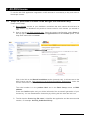
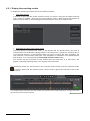
On the camera: The AX-POS application displays the live video screen with the transantion text
and the transaction value. Select the date and the time interval where you want to search. There
are two options for transaction searches:
a. Text: you can search the transaction text, the whole word or part, both uppercase and
lowercase.
b. Value: you can search the transaction text, with options: more than, equal and less than.
Once the criteria has been established press the
icon.
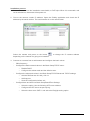
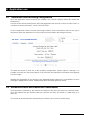
Double clic on the transaction you wanted to display, the selected video is displayed on the top
screen, to come back to live video press the button
.
To refresh the transaction screen it is neccesary to press the search button
Please ensure the time interval includes the last transactions received.
User manual - 8
.