1
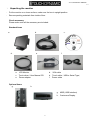
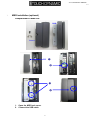
EC150 Monitor Manual V1.1 Unpacking the monitor - Put the monitor on a clean surface, make sure the box in upright position. Remove packing materials from inside of box. Check accessory Please make sure all the accessory are included: Standard Items a. b. d. c. e. f. a. LCD Monitor c. Touch driver / User Manual CD e. Power adaptor Optional Items g. b. VGA cable d. Touch cable(USB or Serial Type) f. Power cable h. g. MSR (USB Interface) h. Customers Display 4