1
Revolte PR.fm Page 3 Friday, December 11, 2009 1:13 PM
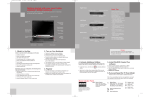
Power On/Off Button
The Power On/Off button on the port replicator performs the same functions as the
system Suspend/Resume button. The Power
On/Off button allows you to suspend notebook activity without powering off, resume
your notebook from standby mode, and
power on your system when it has been shut
down from the Windows operating system.
USB 2.0 Ports
The four USB 2.0 ports allow you to connect
USB devices such as game pads, pointing
devices, and keyboards. USB 2.0 is downward-compatible with USB 1.1 devices, so
older USB devices will work with these ports.
USB 2.0 runs 40X faster than USB 1.1.
eSATA
The external SATA (eSATA) port is used for
connecting an eSATA device. eSATA devices
are used for high-speed data transfer between
your computer and the external device.
LAN (RJ-45) Jack
The LAN jack allows you to connect a LAN to
the port replicator. Note that when the system
is attached to the port replicator, the LAN Jack
on the port replicator should be used, not the
one on the system.
3