1
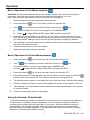
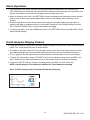
SETTINGS Menu Basics
1. Turn the analyzer ON.
2. Press and hold the
button for > 2 seconds until the Main Menu appears
3. Press F3 (SETTINGS) to view the SETTINGS menu
4. Navigate the menu and sub-menus as desired. Each menu item is explained in the next section.
SETTINGS
MAIN MENU
APO/BL
MEASURE
TIME / DATE
DATA FORMAT
SYSTEM INF
BACK
SETTINGS
BLUETOOTH
CHANNEL
EXIT
SETTINGS Menu in Detail
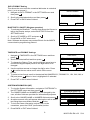
AUTO POWER OFF (APO) AND BACKLIGHT Settings
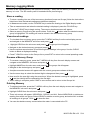
1. The APO or backlight timeout can be set in minutes.
2. Navigate to the APO/BL sub-menu in the SETTINGS menu
and press
.
APO / Backlight
APO: 5 10 20 30 OFF
Backlight: .5 1
2
5
3. Scroll to the desired setting.
4. Press
and then press EXIT or BACK when done.
Back
Exit
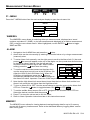
CHANNEL Setting (wireless)
Select the common channel over which the display analyzer and
sensor will communicate. If several sensors are owned, a unique
channel number can be used for each.
Note that analyzer and sensor units must be interlocked when
changing to a new matching channel number.
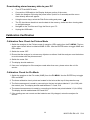
1. To set the channel, first navigate to the CHANNEL sub-menu
in the SETTINGS mode and then press
.
2. Navigate to the desired channel and then Press
Channel number will highlight.
CHANNEL SELECT
CH 0
CH 5
CH 1
CH 6
CH 2
CH 7
CH 3
CH 8
CH 4
CH 9
BACK
EXIT
. The
3. Press EXIT or BACK when finished.
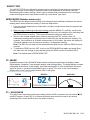
4. See Bluetooth section to turn on the wireless communication.
IMPORTANT NOTE: When two or more devices are set to the same channel, communication errors
between devices may result. Use separate channel numbers for multiple devices wherever possible.
Optional Sensor module is part number MO270-X
8
MO270-EU-EN v2.3 5/14