1
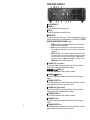
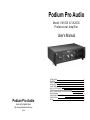
FRONT PANEL CONTROLS ① AC POWER SWITCH ② POWER LED This blue LED lights whenever the amplifier is on. ③ FAN LED This blue LED lights whenever the cooling fan is on. ④ MODE SELECT This three position switch selects one of the three available operating modes. A summary is provided here. For a detailed explanation of all MODES, see “STEREO, MONO AND BRIDGE MODES EXPLAINED” on page 6. • • • 10 STEREO In this position the amplifier operates as a normal two channel amplifier. Channel A = LEFT, channel B = RIGHT. MONO In this position the signal applied to the channel A input will be present on both A and B outputs. Each channel’s volume control (VOL) will continue to operate independently. BRIDGE In “BRIDGE” mode, the amplifier is configured to operate as a single high power channel. Connect your source to the channel A input. Connect your speaker to the center Speakon® jack or use the five-way binding posts. The RED channel A binding post = speaker (+). The RED channel B binding post = speaker (-). Use the CHANNEL A VOL control to adjust amplifier volume. ⑤ CHANNEL A VOL [ LEFT CHANNEL ] This rotary control adjusts the volume of channel A only. The control is detented, allowing a precise volume match between channel A and B. ⑥ CHANNEL A [ LEFT ] SIGNAL LED This green LED lights whenever signal is present on channel A. ⑦ CHANNEL A [LEFT ] CLIP LED This yellow LED lights whenever channel A is driven above its maximum output voltage. ⑧ CHANNEL A PROTECT LED This red LED lights whenever channel A encounters an excessive load, i.e. shorted speaker cable. When this occurs you must correct the fault. ⑨ CHANNEL B VOL [ Right Channel ] This rotary control adjusts the volume of channel B only. The control is detented, allowing a precise volume match between channel A and B. ⑩ CHANNEL B SIGNAL LED This green LED lights whenever signal is present on channel B. ⑪ CHANNEL B CLIP LED This yellow LED lights whenever channel B is driven above its maximum output voltage. ⑫ CHANNEL B PROTECT LED This red LED lights whenever channel B encounters an excessive load, i.e. shorted speaker cable. When this occurs you must correct the fault. 3