1
Section
SYSMAC-CPT Support Software
4-1
Program Transfer
When the program is transferred from the PC to the CPT with the default function
code assignments, FUN18, FUN19, FUN87, and FUN88 will be displayed as
TKY, MCMP, DSW, and 7SEG. The instructions, however, will be transferred
correctly.
An error will occur if any instructions not supported by the CPT are transferred
from the CPM2A.
When the program is transferred from the CPT to the PC, TKY, MCMP, DSW,
and 7SEG will be displayed on the CPT, but will not be executed in the CPU Unit.
They will be treated as NOP.
If expansion instructions are transferred to the PC with DM 6602 is set to the “default settings” or if instructions not supported by the CPM2A are transferred to
the PC, a message saying that expansion instructions cannot be written because DIP switch pin 4 is OFF will be displayed. Change the setting of DM 6602
to enable user settings to use expansion instructions.
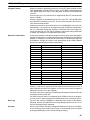
Expansion Instructions
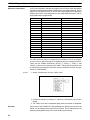
It will not be possible to transfer the program if the function codes assigned to
expansion instructions (18 instructions) have been changed from their default
settings. A message to turn ON the DIP switch of the PC and execute again will
be displayed. Change the function code assignments to the CQM1 defaults
shown in the following table before programming.
Function code
Default CPM2A Assignments
17
ASFT
ASFT
Default CQM1 Assignments
18
---
TKY
19
---
MCMP
47
RXD
RXD
48
TXD
TXD
60
CMPL
CMPL
61
INI
INI
62
PRV
PRV
63
CTBL
CTBL
64
SPED
SPED
65
PULS
PULS
66
SCL
SCL
67
BCNT
BCNT
68
BCMP
BCMP
69
STIM
STIM
87
---
DSW
88
---
7SEG
89
INT
INT
There are four CPM2A instructions (STUP(––), SYNC(––), TIML(––), and
TMHH(––)) that are not supported by the CQM1 and cannot be used. If one of
these instructions is used in the program, an error will occur when the program is
transferred from the PC to the computer.
The input word for the frequency for PWM must be between IR 000 and IR 049,
or between IR 200 and IR 252.
If a CQM1 instruction that is not supported by the CPM2A is used in the program,
an error will occur when the program is transferred from the computer to the PC.
Error Log
The error log cannot be displayed. If data has been written to DM 6569 to
DM 6599, however, this data will be incorrectly displayed as the error log. Do not
use the information that is displayed.
PC Setup
Some of the CPM2A’s PC Setup settings are different from those in the CQM1,
so not all settings can be made from the menus. These settings have to be made
by writing data directly to the word containing the setting.
85