1
Clean Lens
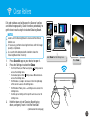
Dirt and residues can build up on the Scanner’s lens and
affect image quality. Clean the lens periodically to get
the best result using the included Cleaning Strip.
••
••
1.
2.
3.
4.
NOTES
Make sure the Cleaning Strip is clean and free of dust
before use.
Using small drops of alcohol on the cotton side of the
Cleaning Strip can help to remove dirt and the residues
easily.
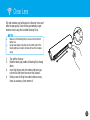
Turn off the Scanner.
Hold the foam grip handle of Cleaning Strip facing
down.
Insert the thinner end with cotton side facing up
into the Exit Slot from the rear of the Scanner.
Gently move the Strip from side to side as many
times as necessary, then remove it.
15