1
Importing an Invoice
imported.
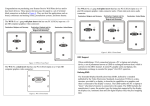
When an invoice or a group of invoices are imported, the invoices are written to
the database in a batch with an assigned batch ID. (Multiple batches of invoices
cannot be run at the same time. After one batch has completed, another may be
selected.) After the invoices are written to the database, the “Invoice Batch
Import Summary” window opens automatically, displaying the status of the
import.
Users with “Importer” rights will receive the Invoice Delivery report via email
with each batch or invoice imported.
Imported invoices may not pass validation in the staging table. Such invoices will
be returned to the “Map” category. A comment will be added to the Invoice
History section on the Header view.
Example:
The status will be displayed as Initialized, Running, Complete, or Failed.
The batch only receives the status of "Failed" if the entire process for that batch
has failed. If individual invoices have errors and can’t be imported, those invoices
will receive errors that can be viewed on the Invoice Batch Import Detail.
2.
Click View Detail to view more information about the current batch.
Click the Batch List button to open the “Batch Import List” window.
Created: 05-11-2011
Revised: 09-17-2012
Property of WPX Energy, Inc.
May Not Be Reproduced Without Written Permission
Page 52 of 66
Version: 4