1
3. Closing your session
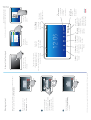
When finished with the CoViz facility, perform the following tasks using the Wacom screen:
•
Close all of your applications
•
Display the Control Panel (if not already visible)
•
In the “sound and screens” menu, select off for both left and right screens and the sound
system
•
Switch off the Wacom screen (using button at top right)