1
Using Response
29
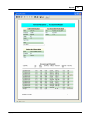
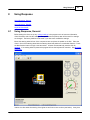
When the test session is complete click the End Session button. Then click the Report icon to view the
complete report of the session.
See Using Response, Detailed for step by step instructions.
8.2
Using Response, Detailed
Mount the steering wheel in front of the computer screen and place the pedals on the floor. Place the
client in front of the steering wheel with the steering wheel and pedals at a comfortable distance. Press
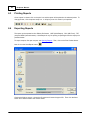
the New Session button to begin a new test series. Choose a file name or accept the default. All tests
are automatically saved to disk for reporting. See Options for how to change the client name.
Test the client as many times as necessary. Each test is saved in the report for each client. Typically
the test sequence will be:
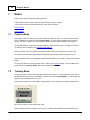
A new client who has not used the software before should use the Training Mode before testing for
reaction time.
Training Mode:
1. Click the New Session button
2. Open the Tools menu and click Training Mode.
3. Sit the client in front of the wheel and instruct them on how to use the pedals and steering wheel.
4. Click the Run button.
5. Have the client move the steering wheel and press the pedals to familiarize themselves with the
controls.
6. Press the End Session button to end the Training Mode.
Testing Mode:
1. Set the client name and instructor name using Client/Instructor Options.
2. Set the Scenario Editor Options.
3. Click the New Session button.
4. Click the Run button.
5. The client depresses the gas pedal to accelerate to about 45 mph.
6. When the light stimulus appears the client responds with the steering wheel and/or the brake pedal.
7. Each test concludes when the reaction time displays.
8. Repeat steps 4 through 7 until testing is complete.
9. End the session by clicking on the End Session button.
10. Press the View Report button to show the report.
The test will not start if the minimum speed is not reached. See Scenario Editor Options for details.
Once the minimum speed is reached, the video will start and the lights will come on at a random time.
See also Using Response, Overview.
8.3
Wheel info
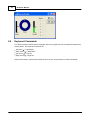
The steering wheel and pedals can be tested by selecting Wheel and Pedal info from the Tools menu. If
the wheel and pedals do not work here, see Troubleshooting.
Copyright © 2003 Vericom