1
Reforestation Standard of Alberta
Sample Selection Tool User’s Manual
May 2015
ESRD/RSA Sample Selection Tool User’s Manual
Printed documents are not controlled.
For a digital copy of this document, visit the ESRD website and use the following search term: “RSA Sample
Selection Tool”.
esrd.alberta.ca
May 6, 2015
RSA Sample Selection Tool User’s Manual
© 2015 Government of Alberta
Page 2 of 10
ESRD/RSA Sample Selection Tool User’s Manual
Suggested citation:
Alberta Environment and Sustainable Resource Development. 2015. Reforestation Standard of Alberta, RSA
Sample Selection Tool User’s Manual. Government of Alberta, Department of Sustainable Resource
Development, Edmonton, Alberta. 10 p.
Inquiries regarding this document should be directed to:
Alberta Environment and Sustainable Resource Development
Forestry and Emergency Response Division
Forest Management Branch
Forest Program Management Section
7th Floor, Great West Life Building
9920 108 Street
Edmonton, Alberta
Tel: 780.427.8474
Website: esrd.alberta.ca
General Disclaimer
Inclusion in this document of the name of any trade designation, equipment, supplier, consultant, or contractor does not
constitute an endorsement of that trade designation, equipment, supplier, consultant, or contractor to the exclusion of any
other.
May 6, 2015
RSA Sample Selection Tool User’s Manual
© 2015 Government of Alberta
Page 3 of 10
ESRD/RSA Sample Selection Tool User’s Manual
Table of Contents
1.
2.
3.
4.
Scope ............................................................................................................................................................ 5
General process ......................................................................................................................................... 5
Installation .................................................................................................................................................. 5
Usage ............................................................................................................................................................ 6
4.1 Pre Sample Selection Data Preparation .................................................................................................. 7
4.2 Clear Data ............................................................................................................................................... 8
4.3 Validate Input Data ................................................................................................................................ 8
4.4 Modify Sample Size ............................................................................................................................... 8
4.5 Generate Population Stats ...................................................................................................................... 9
4.6 Select Sample ......................................................................................................................................... 9
4.7 Calculate Inclusion Probabilities .......................................................................................................... 10
4.8 Output Data .......................................................................................................................................... 10
4.9 About .................................................................................................................................................... 10
List of Figures
Figure 1. Security warning in Microsoft Excel 2007 .............................................................................................. 6
Figure 2. Location of the Sample Selection menu in Microsoft Excel 2007 .......................................................... 6
Figure 3. Validation of input data ........................................................................................................................... 8
Figure 4. Sample Selection summary example (some fields are not shown here) .................................................. 9
Figure 5. RSA Sample Selection Tool Information Page ..................................................................................... 10
May 6, 2015
RSA Sample Selection Tool User’s Manual
© 2015 Government of Alberta
Page 4 of 10
ESRD/RSA Sample Selection Tool User’s Manual
1. Scope
This manual only details matters related to the installation and usage of the Reforestation Standard of Alberta
(RSA) Sample Selection software tool (SST)1. This version of the RSA SST User’s Manual supersedes the
previous version of the RSA SST User’s Manual.
A detailed description of the Reforestation Standard of Alberta (RSA) sample selection process can be found in
the approved RSA, which can be viewed and/or downloaded by visiting the ESRD website and using the
following search term: “Reforestation Standard of Alberta”.
esrd.alberta.ca
The chief modifications from previous versions are 1) the removal of lumping of rare strata and 2) a switch to
random sampling within each of the Alberta Planning Standard Base-10 species strata. The Monte Carlo
calculation of inclusion probability for each sample unit has been replaced by this random selection process.
However, the use and format of the SST is essentially unchanged.
2. General Process
The general overview of the RSA SST process is described below.
1. Install the RSA SST and the RSA Compiler. Installation instructions for the RSA SST are provided
below. Installation instructions for the RSA Compiler are provided in the RSA Compiler User’s Manual,
which can be viewed and/or downloaded by visiting the ESRD website and using the following search term:
“RSA Compiler”.
2. Import and validate the master opening (Opening1 or O1 dataset) and polygon (Interp1 or I1 dataset)
lists into the RSA Compiler. Once the user is satisfied that the population is correct and no errors or
warnings remain then export the master polygon dataset (Interp1 or I1 dataset) from the RSA compiler for
use in the RSA SST.
3. Open the RSA SST and Clear Data to ensure the user is starting with a clean set of worksheets.
4. Bring in the master polygon list, from above, to the input data worksheet and Validate Input Data.
5. Generate Population Statistics and review the resulting population statistics.
6. Select Sample and review the resulting sample.
7. Generate Inclusion Probabilities and review the inclusion probability worksheet.
8. Output Data into a standardized SST output file for future processing.
3. Installation
The RSA SST was developed and tested for Microsoft Excel 2002 and newer versions.
To determine the user’s version of Microsoft Excel, follow the menu: Help → About Microsoft Office Excel.
If the user cannot find the Help item on their menu, then they most likely have the latest version: Microsoft
Excel 2007.2
The installation and usage of the RSA SST is identical for Microsoft Excel 2003 and earlier versions. However,
Microsoft Excel 2007 was a major upgrade in both interface and internal architecture, therefore whenever
warranted, a short section detailing the difference is provided.
1
We acknowledge Gyula Gulyas, TECO Natural Resource Group Ltd., who assisted with the development of this
Microsoft Excel version of the RSA SST.
2
As an alternative, the user can also open a new Microsoft Excel file and type the following formula into any blank cell:
=INFO("release"). The formula returns the Microsoft Excel version number. If the version is 12.0 or higher, then the user
has Microsoft Excel 2007.
May 6, 2015
RSA Sample Selection Tool User’s Manual
© 2015 Government of Alberta
Page 5 of 10
ESRD/RSA Sample Selection Tool User’s Manual
The RSA SST does not require any special installation in Microsoft Excel 2002-2003. Upon opening the file,
the user must make sure to Enable Macros.
Microsoft Excel 2007
Unless the file is located in one of the Microsoft Excel Trusted Locations, the user will get a Security Warning
upon opening the file that is very difficult to notice. The warning is located above the formula bar and looks
like the image in Figure 1.
Figure 1. Security warning in Microsoft Excel 2007
Click the Options… button and check Enable this content… so that the macros will execute.
Note that the user may need to update their Microsoft Excel 2007 program with the Microsoft Office 2007
Service Pack 3 that has some significant bug fixes and other upgrades.
The SP3 update can be found at the following website:
http://www.microsoft.com/en-us/download/details.aspx?id=27838
4. Usage
Upon opening the RSA SST, a new menu item called Sample Selection will be installed to the left of the Help
menu item in Microsoft Excel 2002-2003.
Microsoft Excel 2007
The Sample Selection menu is located under the Add-Ins menu item as shown in Figure 2.
Figure 2. Location of the Sample Selection menu in Microsoft Excel 2007
May 6, 2015
RSA Sample Selection Tool User’s Manual
© 2015 Government of Alberta
Page 6 of 10
ESRD/RSA Sample Selection Tool User’s Manual
There are ten visible worksheets in the RSA SST:
1. Sample_Size – used to define target sample size by species composition class stratum. The user only needs
to visit this sheet if they want to increase their target sample size above those provided as minimums by the
RSA SST.
2. Input_Data – used to enter the raw population data.
3. SU_Data – Sampling unit data generated by the Generate Population Stats menu item.
4. List_of_Openings – The list of openings generated by the Generate Population Stats menu item.
5. Pop_Summary_Stats – Population summary statistics generated by the Generate Population Stats menu
item.
6. Strata – Original strata summaries. This is also generated by the Generate Population Stats menu item.
7. Final_Strata – Finalized strata summary generated by the Generate Population Stats menu item.
8. SU_SAMPLE_LIST – The list of selected samples generated by the Select Sample menu item.
9. SELECTION_SUMMARY – Summary statistics of the selected samples generated by the Select Sample
menu item.
10. INCLUSION_PROB – Inclusion probabilities for each sampling unit. This list is generated by the Calculate
Inclusion Probabilities menu item. Formerly, a 5000-sample Monte-Carlo simulation was run to generate
these when sampling of adjacent polygons was permitted. This is no longer necessary under random
sampling; however, for compatibility with the RSA Compiler, the cells in the “total_runs” and “num_sel”
columns are auto-populated with the value 5000. The cells in the “sel_weight” column is also autopopulated with the value 1, denoting random selection.
The Input_Data worksheet is used to enter data and the Sample_Size worksheet is used to define the target
sample size; all other worksheets are used to store output data and should not be manipulated.
There are eight items that can be found on the Sample Selection menu:
1. Clear Data
2. Validate Input Data
3. Modify Sample Size
4. Generate Population Stats
5. Select Sample
6. Calculate Inclusion Probabilities
7. Output Data
8. About
These menu items are described in detail below.
4.1
Pre Sample Selection Data Preparation
Before providing data to the RSA SST, the user must be sure the population of openings and the
corresponding Sampling Unit (polygon) information is correct. The RSA Compiler is designed to help
with this process. The user should first import the master opening (Opening1 dataset) and polygon
(Interp1 dataset) lists into the RSA Compiler. Once imported, a validation must be conducted on these
datasets. Any errors and warnings should then be addressed. Once the user is satisfied the population
is correct and no errors or warnings remain, then the master polygon dataset (Interp1 or I1 dataset) can
be exported from the RSA Compiler for use in the RSA SST. This exported master polygon data
should be the basis for the input data into the RSA SST.
May 6, 2015
RSA Sample Selection Tool User’s Manual
© 2015 Government of Alberta
Page 7 of 10
ESRD/RSA Sample Selection Tool User’s Manual
4.2
Clear Data
The Clear Data menu item is used to clear out the data from the Input_Data worksheet and all other
output worksheets.
The user should always use Clear Data BEFORE entering a new population. This will ensure that the
user starts the sample selection process with a clean set of worksheets.
4.3
Validate Input Data
The Validate Input Data menu item is used to validate the raw input data entered by the user. The validation
first checks if all required fields are present in the data and are named according to the Interp1 data dictionary,
as described in the RSA.
The eight (8) required fields are: OPENING, POLYGON, UNIQUE_ID, AREA_HA, HIGHER_STRAT,
SP_CL, DEN_CL, and NAA.
The RSA SST has a set of validation rules that will identify duplicate polygon records, misspelled or missing
codes, blank polygon numbers just to name a few. These validation rules are included to assist users in ensuring
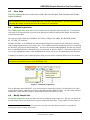
the RSA SST runs properly and meaningfully3. The errors are identified and highlighted. The data cell will also
have an embedded comment to indicate the type of error found, as shown in Figure 3. The header of the field in
error is also highlighted to ensure visual identification in case the cell in error is at the bottom of the data sheet.
Validation is an iterative process that requires the fixing of errors and re-validation until no errors are reported.
The user must always start the data in the upper left corner cell (A1). The top row must contain the
field names and should not have embedded blank cells.
Figure 3. Validation of input data
Prior to data input into the RSA SST, users are encourage to import their Opening 1 (O1)and Interp1 (I1) data
into the RSA Compiler, which has an extensive data and relational validation feature. O1 and I1 data validated
and deemed clean in the RSA Compiler, should import into the RSA SST error free.
4.4
Modify Sample Size
The Modify Sample Size menu item allows the user to modify the target sample size. The user can specify the
desired sample size for each of the base 10 species composition class strata. Target sample sizes must meet or
3
These validation rules do not constitute an audit of the input data. The timber disposition holder is responsible for
ensuring that all data is complete and accurate.
May 6, 2015
RSA Sample Selection Tool User’s Manual
© 2015 Government of Alberta
Page 8 of 10
ESRD/RSA Sample Selection Tool User’s Manual
exceed the minimum described in the RSA. A reset button is available to reset the specified sample sizes to the
defaults or RSA minimums.
4.5
Generate Population Stats
The Generate Population Stats menu item is used to generate the population statistics and list the openings and
sampling units. This step cannot be completed until the input data are validated and cleaned.
Upon successful completion of this step, the process will populate the following five worksheets: SU_Data,
List_of_Openings, Pop_Summary_Stats, Strata, and Final_Strata.
The user should always review the population summary statistics and stratification information as these contain
crucial information for the subsequent sample selection process.
4.6
Select Sample
The Select Sample menu item is used to select the Sample. This step cannot be completed unless the data was
validated, cleaned and the Generate Population Stats step was run.
Depending on the size of the population this step could take as long as a couple of minutes, however in most
cases the samples are selected in less than one minute. The Microsoft Excel status bar will indicate the number
of iterations and the number of strata left to be sampled during the run.
The sample selection process is based on a pre-determined random sequence. Re-running the process several
times within a given month and year will always yield identical results for the same population.
Upon successful completion of this step, the process will populate two worksheets: SU_SAMPLE_LIST and
SELECTION_SUMMARY.
The SU_SAMPLE_LIST worksheet contains the actual sample by strata. There are contingency sampling units
for each stratum in addition to the minimum sample size required4.
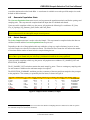
The SELECTION_SUMMARY worksheet provides a summary of the areas and plots sampled as they compare
to the population. The summary is reported by the final strata, as shown in Figure 4.
Final_Strata HIGHER_STRAT sp_cl_strata Area (ha) Polygons Sample_size su_sampled area_sampled plots_sampled
0_Hw
0 Hw
134.06
15
10
10
90.47
444
0_HwSx
0 HwSx
261.56
21
15
15
135.46
616
0_PlHw
0 PlHw
3.14
1
15
1
3.14
32
0_Sb
0 Sb
56.75
6
15
6
47.3
228
0_SbHw
0 SbHw
5.33
1
15
1
5.33
32
0_Sw
0 Sw
6.21
1
10
1
6.21
32
0_SwHw
0 SwHw
59.45
7
15
7
52.45
265
Grand Total
526.5
52
41
340.36
1649
status
COMPLETE
COMPLETE
CENSUS
CENSUS
CENSUS
CENSUS
CENSUS
Figure 4. Sample Selection summary example
4
There are no contingency sample units in cases where the number of sampling units in a stratum is less than or equal to
the minimum sample size (STATUS=CENSUS).
May 6, 2015
RSA Sample Selection Tool User’s Manual
© 2015 Government of Alberta
Page 9 of 10
ESRD/RSA Sample Selection Tool User’s Manual
4.7
Calculate Inclusion Probabilities
The Calculate Inclusion Probabilities menu item is used to generate the inclusion probabilities for all sampling
units5. The sample design for Performance surveys completed using the Aerial Stratification System is stratified
random. Thus, the need for the Monte Carlo simulation and sampling unit specific inclusion probabilities is no
longer required. However, the RSA Compiler requires the cells in the “total_runs”, “number_sel”, and
“sel_weight” columns be populated. Thus, by running the Calculate Inclusion Probabilities the cells in the
“total_runs” and “number_sel” columns are set to 5000 and the cells in the “sel_weight” are set to one (1) in all
cases.
4.8
Output Data
The Output Data menu item is used to output the Sample Selection data for submission. The default file name
is “Sample_” followed by the current date in YYYYMMDD format (for example, Sample_20140830.xls).
Ensure that all steps are completed, as described above.
The contents of the output file are a reporting requirement, as outlined in the RSA. This Excel file is also
required as an input to the RSA Compiler for determining stratum MAI for the Aerial Stratification System.
4.9
About
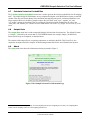
The About menu item shows the information window presented in Figure 5.
Figure 5. RSA Sample Selection Tool Information Page
5
An estimate of the inclusion probability for each sampling unit and area-weighting are necessary for compiling MAI
results from the sampling unit level to the sampling stratum level.
May 6, 2015
RSA Sample Selection Tool User’s Manual
© 2015 Government of Alberta
Page 10 of 10