1
2
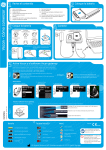
Check contents
Adapter
3
8.
9.
10.
11.
12.
Ultrasound gel
Soft case
CD-ROM Vscan gateway software
CD-ROM user manual
microSD card with factory SW
(In a sealed envelope)
13. Global ultrasound support center phone
number list
4
Charge battery
1. Select plug
UK, Hong Kong
Singapore
North America
Japan
2. Mount
Australia
New Zealand
Korea
China
Continental
Europe
Connect
Power outlet
Vscan on Docking station
GM-CHA
Vscan
10V
GE Vingmed Ultrasound
Strandpromenaden 45
N-3191 Horten Norway
GM314046-01
Indicator lamp - Amber: battery charging
- Green: battery fully charged
Charge
3. Plug
Insert battery
GM314146-01
Vscan with probe
Docking station
USB 2.0 cable
Storage microSD card
(Already installed in Vscan)
5. Battery
6. AC/DC converter & Adapter plugs
7. Quick card
Vscan Getting Started
1.
2.
3.
4.
OK
USB cable
Charge completely before first use.
5
Activate Vscan & Vscan gateway software
Scenario 1
Scenario 2
You have a computer with Internet access
and you can install the software on the
computer.
You have a computer without Internet
access but you can install the software on
the computer.
1)
2)
3)
4)
Install Vscan gateway software.
Dock Vscan and open the display.
Start Vscan gateway software (icon on desktop)
Follow instructions on screen to activate Vscan
and Vscan gateway software.
5) Perform Vscan configuration (see below).
1)
2)
3)
4)
Install Vscan gateway software.
Dock Vscan and open the display.
Start Vscan gateway software (icon on desktop)
Call your local GE Service contact
(see “Global ultrasound support center phone
numbers” included with your Vscan or in the user
manual).
5) Follow instructions provided by GE Service to
activate Vscan and Vscan gateway.
6) Perform Vscan configuration (see below).
If no Internet access:
1) Call your local GE Service contact to get the
activation key (see “Global ultrasound support
center phone numbers” included with your Vscan or
in the user manual).
2) Perform Vscan configuration and insert the
activation key (see below).
If you have Internet access:
1) Go to http://vscan.gehealthcare.com.
2) Click on "Owners" then "Activation form".
3) Fill in the form to retrieve the Vscan activation key.
4) Perform Vscan configuration and insert the
activation key (see below).
See “Online activation” in the user manual for more
details.
See “Offline activation” in the user manual for more
details.
See “Activation of the Vscan without Vscan gateway
software” in the user manual for more details.
2. Adjust time.
Vscan Activation key
3. Adjust date.
1. Insert Activation key.
GE Healt
GM200184-03
hcare
Battery
MicroSD card
Fully charged.
Vscan activation only when NOT installing the
software.
Scenario 3 only
Vscan configuration
1. Select language.
ENGLISH
Scenario 3
Follow one of the three scenarios below.
Empty
Partially discharged.
Partially full
Low: prepare to recharge.
Nearly full
Discharged: recharge.
Full: exchange or empty.
Charging
No card
Hint:
Use
if
correction is needed.
Menu
Create examination.
Make measurement.
Select preset.
United States law restricts this device to
sale or use by or on the order of a
physician.
Read and understand the user
manual before using the Vscan.
Open Gallery.
Configure.
GE Vingmed Ultrasound A/S, Strandpromenaden 45, N-3191 Horten, Norway
Contraindication: The Vscan
ultrasound unit is not intended for
ophthalmic use or any use causing
the acoustic beam to pass through
the eye.
Scanning
Apply gel
GE Hea
Scan
Depth
Freeze / Unfreeze
Auto-optimize
P re s s
Vscan Quick Card
Start
lthca
re
GE Healt
hcare
an
d
Start Color
ld
Stop Color
Color Gain
Press Menu
ho
Select Presets menu
Voice notation
Select preset
Record
n
Review & Store
Select frame
ho
y
an
sa
d
Stop recording
Press
P re s
Presets
Start recording
Ke
y
ld
Store
Freeze
Still frame
Scan
Play (Pause)
Store
Video
GE Healt
hcare
Direct Store
Video
Measure
Press Menu
Select Distance
Place first point
Place second point
Store
Return to scanning
Press
d
an
ho
ld
Gallery
Press Menu
Select Gallery
Select exam
Select file
Review other files in exam
Return to scanning
Press
d
an
ho
ld