1
SHUNHANG
DP-38A
FOREWORD
Congratulations on choosing our DP-38A 5 inch Marine GPS Navigator.
It is used the high-performance true color LCD for the product display with bright color
and stable pictures. Our imported satellite receiver suits to marine. The high-performance
32 bits ARM chip used for the product processor has fast speed and consumes less. All the
data achieves real time storage and it uses solidified storage, which is able to realize
lifelong preservation and get rid of the worry about the loss of data caused by accident
power-off. The user manual contains full information for easy operation. It has number key
for fast operation. It’s convenient and practical will bring you a new pleasure.
We also provide upgrade service for the software and chart for this unit for free. Please
contact your local SHUNHANG dealer for latest information.
Attention: This machine is mainly used to assist your navigation. The chart and
navigation data provided by this machine are for reference during your driving. For your
navigation safety during the driving, please use this machine based on the actual
circumstances observed and together with other navigation devices, relevant navigation
chart and data provided by navigation notice.
1
SHUNHANG
DP-38A
Table of Contents
FOREWORD........................................................................................................................................................ 1
1. Keypad Usage................................................................................................................................................... 4
2. Display Modes.................................................................................................................................................. 4
3. Basic Operation ................................................................................................................................................ 5
3.1 Power On/Off .............................................................................................................................................. 5
3.2 MOB Emergency Navigation ...................................................................................................................... 6
3.3 Brightness /Contrast Adjustment ................................................................................................................. 6
3.4 Screen Switch .............................................................................................................................................. 6
3.5 Menu Operation ........................................................................................................................................... 6
4. Chart Plotter Operation..................................................................................................................................... 6
4.1 Destination Navigation ................................................................................................................................ 6
4.1.1 Waypoint Name Navigation.............................................................................................................. 6
4.1.2 Route No. Navigation ....................................................................................................................... 6
4.1.3 LOG Route Navigation..................................................................................................................... 7
4.1.4 Cursor Navigation............................................................................................................................. 7
4.1.5 WPT List Navigation ........................................................................................................................ 7
4.1.6 WPT-Near Navigation....................................................................................................................... 7
4.1.7 Route List Navigation....................................................................................................................... 7
4.1.8 Off Goto Navigation ......................................................................................................................... 7
4.2 Zoom In/Out Chart ...................................................................................................................................... 7
4.3 Cursor .......................................................................................................................................................... 7
4.3.1 Cursor On ......................................................................................................................................... 7
4.3.2 Cursor Off ......................................................................................................................................... 7
4.3.3 Quick Delete the Waypoint with Cursor ........................................................................................... 7
4.3.4 Move Screen ..................................................................................................................................... 7
4.4 Quick Set Waypoint ..................................................................................................................................... 7
4.5 Quick Set Route........................................................................................................................................... 7
5. Main Menu ....................................................................................................................................................... 8
5.1 Waypoint ..................................................................................................................................................... 8
5.1.1 Waypoint List.................................................................................................................................... 8
5.1.2 Waypoint Nearest.............................................................................................................................. 8
5.2 Route............................................................................................................................................................ 8
5.3 Track............................................................................................................................................................ 9
5.4 Alarm ........................................................................................................................................................... 9
5.4.1 ARV Alarm ....................................................................................................................................... 9
5.4.2 ANC Alarm ....................................................................................................................................... 9
5.4.3 XTE Alarm...................................................................................................................................... 10
5.4.4 Clock............................................................................................................................................... 10
5.4.5 Odometer ........................................................................................................................................ 10
5.4.6 No GPS Fix..................................................................................................................................... 10
5.5 Delete......................................................................................................................................................... 10
5.6 Disp Set...................................................................................................................................................... 10
5.6.1 Set Map........................................................................................................................................... 11
5.6.2 Direction ......................................................................................................................................... 11
2
SHUNHANG
DP-38A
5.6.3 Disp Mode ...................................................................................................................................... 11
5.6.4 Lat./Long. ....................................................................................................................................... 11
5.6.5 Head Line........................................................................................................................................ 11
5.6.6 Move Mode..................................................................................................................................... 11
5.6.7 Ship Shape ...................................................................................................................................... 11
5.6.8 Fish Area......................................................................................................................................... 11
5.6.9 Depth .............................................................................................................................................. 11
5.7 Calculation................................................................................................................................................. 12
5.8 AIS ............................................................................................................................................................. 12
5.8.1 Basic Setting ................................................................................................................................... 12
5.8.2 Static Setting ................................................................................................................................... 12
5.8.3 Other Ship Track............................................................................................................................. 12
5.8.4 Send Message ................................................................................................................................. 12
5.8.5 Outbox ............................................................................................................................................ 12
5.8.6 Inbox............................................................................................................................................... 12
5.8.7 MMSI Setting ................................................................................................................................. 12
5.8.8 Show Ship On Map......................................................................................................................... 13
5.8.9 AIS Board Test................................................................................................................................ 13
5.9 Tide ............................................................................................................................................................ 13
6.0 User Display .............................................................................................................................................. 13
7.1 Smooth....................................................................................................................................................... 13
7.2 System Set ................................................................................................................................................. 13
7.2.1 Unit ................................................................................................................................................. 13
7.2.2 Language ........................................................................................................................................ 14
7.2.2 Jet Lag............................................................................................................................................. 14
7.2.3 Volume ............................................................................................................................................ 14
7.2.4 WPT Name ..................................................................................................................................... 14
7.2.5 BRG.REF......................................................................................................................................... 14
7.2.6 MAG.VAR. ..................................................................................................................................... 14
7.3 Data Transfer ............................................................................................................................................. 14
7.4 Other .......................................................................................................................................................... 15
7.4.1 Cursor Setting ................................................................................................................................. 15
7.4.2 Simulator ........................................................................................................................................ 15
7.4.3 Distance Measure............................................................................................................................ 15
7.4.4 Save Data ........................................................................................................................................ 15
7.4.4 System Version ............................................................................................................................... 15
7.4.5 Map Setting..................................................................................................................................... 15
8. Performance and Technical Specifications ..................................................................................................... 15
8.1 GPS Characteristics ................................................................................................................................... 15
8.2 Receiver Assembly .................................................................................................................................... 16
8.3 Operating Environment ............................................................................................................................. 16
8.4 Packing List ............................................................................................................................................... 16
9. Warranty ......................................................................................................................................................... 16
10. Precautions.................................................................................................................................................... 16
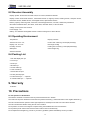
11. Mark Icon...................................................................................................................................................... 17
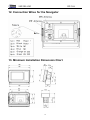
12. Connection Wires for the Navigator ............................................................................................................. 18
3
SHUNHANG
DP-38A
13. Minimum Installation Dimension Chart ....................................................................................................... 18
1. Keypad Usage
The unit has altogether 9 keys with at least one function
[
each.
● Shift between the screens
[
]
[
● Long press: Turn power off (3secs)
● When the screen is on, press [
]
● To confirm
● Short Press: Turn power on
[
] will pop up
]
● Enter main menu setting
window for the adjust brightness and Contrast. Use arrow
[
key to adjust.
[
]
]
● Zoom in the chart
]
[
● Long press: will pop up MOB window for emergency
]
● Zoom out the chart/ long press open the ais list detail
navigation.
[
]
● Short press: to create mark at ship position
[
● To select items
]
● For direction selection
● Set destination navigate modes
● Cancel navigation
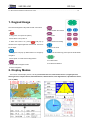
2. Display Modes
This unit has 9 main display modes, including Chart Plotter Screen1, Chart Plotter Screen 2, Highway Screen,
Steering Screen, Compass Screen, Nava Data Screen, Satellite Screen, User Digital Screen, Speedometer Screen,
shift via [DISP].
4
SHUNHANG
DP-38A
3. Basic Operation
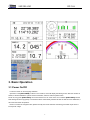
3.1 Power On/Off
Functions: Power On and Language Selection
Operation: Press [DIM POWER] to switch on the machine, and it will display the starting screen. After the machine is
started, it will first initialize the system and check the data, and then enter the plotter screen.
Power Off, long press [DIM POWER], the screen will show a 3 sec count-down. Do not release [DIM POWER] until the
Data Storage window is popped up. The machine will be automatically switched off after the data is stored. Otherwise, it
will cancel the switch off operation.
Noted: To ensure the navigation data, please normally shut off the machine. Data being processed maybe loose if
forced power outage
5
SHUNHANG
DP-38A
3.2 MOB Emergency Navigation
Functions: During the sailing, If meet emergency, long press[MARK MOB]↓
↓ OK
↓ [ENT]
key for selection
↓ use arrow
pop up a dialog for MOB setting
3.3 Brightness /Contrast Adjustment
Press [DIM POWER] and the adjustment window will appear. Use arrow key to decrease or increase the brightness and
contrast
3.4 Screen Switch
Press [DISP] can switch different display screens.
3.5 Menu Operation
]
On plotter screen, press [MENU to enter the main menu setting.
MENU
Waypoint
Route
Track
Alarm
Delete
Display Set
Calculation
Messages
Tide
User Display
Smooth
System Set
Data Transfer
Other
Main menu includes waypoint, route, track, alarm, delete, display set, calculation, messages, tide, user display, smooth,
system set, data transfer, other
4. Chart Plotter Operation
4.1 Destination Navigation
On chart plotter screen, press [GOTO] will pop up a window as follow:
Goto
WPT Name:__
WPT List?
Route No.:___(1-100)
WPT-Near?
LOG Route?
Route List?
Cursor?
Off Goto?
4.1.1 Waypoint Name Navigation
↓
Press [GOTO]
↓
WPT Name
↓ [ENT]
input waypoint name
4.1.2 Route No. Navigation
↓
Press [GOTO]
Route No.↓
↓
input waypoint name
[ENT]
6
SHUNHANG
DP-38A
4.1.3 LOG Route Navigation
↓
Press [GOTO]
LOG Route↓
↓
Forward/Reverse
[ENT]
4.1.4 Cursor Navigation
↓ press [GOTO]
↓
Turn the cursor on, move the cursor to your desire position
↓
Cursor?
[ENT]
4.1.5 WPT List Navigation
↓
Press [GOTO]
↓
WPT List
↓ [ENT]
select the waypoint number
4.1.6 WPT-Near Navigation
↓
Press [GOTO]
WPT-Near?↓
↓
select the near waypoint number
[ENT]
4.1.7 Route List Navigation
↓
Press [GOTO]
Route List↓
↓
select the route number
↓
Forward/Reverse
[ENT]
4.1.8 Off Goto Navigation
↓
Press [GOTO]
↓
Off Goto
[ENT]
4.2 Zoom In/Out Chart
On chart plotter screen, Press [
] to zoom in the screen, press [
] to zoom out the screen.
4.3 Cursor
Use arrow key to move the cursor.
4.3.1 Cursor On
When you move the cursor, on the bottom of the plotter screen will display “+ the cursor’s longitude and latitude”
4.3.2 Cursor Off
Press [DISP] the cursor will be off, and back to ship position.
4.3.3 Quick Delete the Waypoint with Cursor
↓
More the cursor to the waypoint number, when it display”0”, press [ENT]
↓
↓
1Goto / 2Modify / 3Delete / 4Quit
Delete
[ENT]
4.3.4 Move Screen
Move the cursor to the edge of the screen, the plotter screen will move.
4.4 Quick Set Waypoint
On chart plotter screen, move the arrow key to turn on the cursor, move the cursor to your desire place, and press [ENT]
to quick set a waypoint number. If you long press [ENT] to the enter the waypoint edit screen, you can change the new
waypoint number, latitude & Longitude, Icon style, Color, etc, after finish setting, select “OK” then press [ENT] to confirm.
4.5 Quick Set Route
↓ [MARK MOB]
↓
On chart plotter screen, move the cursor to your desire place
7
↓ [LOG RTE?] to set
edit the waypoint
SHUNHANG
DP-38A
a quick route. Quick setting route only keep record for the current one. The new LOG RTE is set; the old one will be
↓ [MENU]
↓ [ENT]
↓ [LOG RTE]
↓ [ENT]
↓ MOVE↓ [ENT] the LOG RTE
deleted. If you want to save the LOG RTE
will move to be saved in the route list. If you want to add more waypoints to the LOG RTE, move the cursor to your desire
↓
↓ [LOG RTE]
↓ [ENT] the waypoint is set and add to the LOG RTE. Press
place, long press [ENT]
edit the waypoint
↓
[MENU]
↓
[Route]
↓
LOG
Change then you can check the LOG RTE all waypoint number. If you want to add more
waypoint, just follow before steps.
5. Main Menu
5.1 Waypoint
The modification of the waypoint is to use as navigation. The waypoint data is used to destination navigation as well
as route navigation
~ 4999
DP-38A with 5000 waypoints, waypoint number 0001
Press [MENU] to enter the main menu. Use arrow key to select the Waypoint and edit the information.
5.1.1 Waypoint List
↓
1. Press [MENU]
↓
Waypoint
↓
[ENT]
List / Nearest↓
↓
List
[ENT]
WPTs / Marks (List)
[NEW?]
0002
0001
0003
CURSOR MOB
↓
Select NEW?
0004
START
↓
[ENT]
↓
to edit the waypoint
↓
ok
[ENT] a waypoint is created at the current ship position.
CURSOR: Means the current cursor position waypoint
MOB: Means the MOB position waypoint
START: Means the ship begin navigating waypoint
If select other waypoint number, it will display the follow window:
Modify WPT
Name: 0001
22°32.772′N
114°05.349′E
Icon
Color
↖
01-04-2015 03:51 17:01
TTG: 00H02M
ETA: 17:23
OK
LOG RTE?
TTG: Time to go
ETA: Estimated time for arrival-------this is calculated automatically
You can edit the waypoint name, latitude & longitude, icon style and color.
Route Setting
5.1.2 Waypoint Nearest
Select Nearest it will display the nearest 10 waypoints; you can modify the
waypoint as above.
Voyage Route
Interval Distance
NO. [NEW?]
LOG 0043>0049
5.2 Route
8
001
0001→0003
002
0001→0005
003
0002→0008
Stop
0.200NM
SHUNHANG
DP-38A
Route navigation means the vessel sails to destination by route navigation. The route is created by different existing
waypoints in certain order. To use the route navigation, the route must need to be created and saved first.
~ 100.
DP-38A the unit can create 100 routes of up to 100 waypoints each, route number:001
Press [MENU] to enter the main menu. Use arrow key to select the Route and edit the information.
In the route menu you can see all the routes detail and edit the route such as all the waypoint number in the route,
modify the waypoint, insert waypoint, delete the waypoint or quit.
The LOG RTE also can change the waypoint number or you can move the LOG RTE to be saved in the route list. Then
the LOG RTE will be empty route.
Voyage Route: select “Start” it will begin to set the waypoint in the LOG RTE according to the interval distance or time.
The LOG RTE can use to navigate.
5.3 Track
The direction of movement relative to a ground position also referred to as "ground track".DP-38A the unit can record
~ 12) all the tracks can
the track and display it as track line on the chart. The unit can save 12 single tracks(No.01
display simultaneously. Each track can record up to 16384 track points with adjustable colors.
Press [MENU] to enter the main menu. Use arrow key to select the Track and edit the information
Track Setting
Record Distance
Show On
Interval 0.030NM
Color
Current Track
01
Track record by Distance/Auto/Off
Show On/off
01(01-12)
Interval distance setting
141->
Color for the track setting
141/16384
Current track number
02 No Record
0/16384
5.4 Alarm
Alarm
Alarm Sound
Long
ARV/ANC
Off
0.010nm
XTE
Off
0.010nm
Clock
On
12:00
Odometer
Off
1000nm
No GPS Fix
Off
120
Sec
5.4.1 ARV Alarm
Sets an alarm to sound when you are at specified distance or time away from a destination waypoint. Enter a distance
radius or time for sounding the alarm and use the control field to set the alarm to "off”,” distance or "time"
Functions: arrival alarm on/off; alarm range setting.
↓ Alarm
↓ ARV/ANC/Off
↓
Operation: press [MENU]
↓
ARV
↓ edit the distance
↓ [ENT] to confirm
↓ [MENU]
[ENT]
back to previous menu
5.4.2 ANC Alarm
Set an alarm to sound when you are exceeded a specified drift distance. Enter a distance up to xx NM in the distance
field and use the control field to turn the alarm on and off
ANC: anchor drag alarm, you have drifted out of the specified distance range.
9
SHUNHANG
DP-38A
Functions: to set alarm for the anchor drag alarm and the alarm range.
↓ Alarm
↓ ARV/ANC/Off
↓ ANC
↓ [ENT]
↓ edit the distance
↓ [ENT] to confirm
↓ [MENU]
Operation: press [MENU]
back to previous menu.
5.4.3 XTE Alarm
Set an alarm to sound when you are off a desired course by a specified distance. Enter a distance in the distance field
and use the control field to turn the alarm on and off.
XTE: cross-track error, the XTE alarm sounds when the boat is off a desired course in either direction, left or right.
Functions: to set alarm for the cross-track error and the alarm range.
↓ Alarm
↓ XTE
↓ [ENT]
↓ edit the distance
↓ [ENT] to confirm
↓ [MENU] back to previous
Operation: press[MENU]
menu.
5.4.4 Clock
↓
Operation process: press [MENU]
↓
↓
Alarm
↓
[ENT]
↓
CLOCK
↓
[ENT]
↓
Off / On
↓
Select On
↓ [ENT]
input the time
press [MENU] back to previous menu.
5.4.5 Odometer
When the total navigation distance is longer than the setting range, the alarm will sound
↓ Alarm
↓ [ENT]
↓ Odometer
↓ [ENT]
↓ Off / On
↓ Select On
↓
Operation process: press[MENU]
↓ [ENT]
↓ press [MENU] back to precious menu.
range
input the distance
5.4.6 No GPS Fix
When the GPS is not fix or fail to pick up the GPS signal, you can set the alarm for that.
↓ No GPS Fix
↓ [ENT]
↓ Off / On
↓ edit the time. Minimum is 120 Seconds,
Alarm
↓
Operation process : press[MENU]
when you input the time, need to more than 120 seconds. If the time is less than 120 seconds, the number cannot be input.
It will remain at 120 seconds.
5.5 Delete
In this Delete menu can delete many items, such as Waypoints/Marks , Route , Track , Reset ODO , Menu Setting ,
and All Backup Data .
↓ Delete
↓
Press [MENU]
↓ Select the item [ENT] to edit the items.
[ENT]
Delete
Select “Menu Setting” all the menu data not including
Waypoints/Marks?
the waypoint/marks, route, track will be restore to factory
Route?
setting.
Track?
Select “All Backup Data” all the data will be restored to
Reset ODO?
(0118)nm
factory setting. The navigate data will be lost.
Menu Setting?
All Backup Data
MENU > Disp Set >
5.6 Disp Set
Press [MENU]↓
↓
Disp Set
to edit (Set Map,
Direction, Disp Mode, Lat./Long., Head Line, Move Mode,
Ship Shape, Fish Area, Depth)
10
Set Map
Direction
Disp Mode
Lat./Long.
Head Line
Move Mode
Ship Shape
Fish Area
Depth
SHUNHANG
DP-38A
5.6.1 Set Map
↓
Press[MENU]
↓
Set Map
Area Color↓
to edit the colors for (Land; Sand; Shallow water; Middle Water; Deep
Water; Sea Color)
5.6.2 Direction
Set the placement of map direction.
↓ Disp Set
↓ Direction
↓
Press[MENU]
to set “north-up, west-up, south-up, east-up, head-up and dest up”
When “Dest-Up” or “Head-Up” mode is selected, Move Mode will automatically select “Move Map” mode.)
5.6.3 Disp Mode
Set the display mode of map screen, shift via [ENT]
↓ Disp Set
↓ Disp Mode
↓ [ENT]
Press[MENU]
Night Mode: the screen display mode for night view
Day Mode: the screen displays mode for daytime view
Auto Mode: automatically select night mode or day mode according the present time
User Mode: the screen displays color set by user
5.6.4 Lat./Long.
On/off Latitude/Longitude
↓
Press [MENU]↓ Disp Set
Lat./Long.↓
Off / On
Noted: when select the “Dest-Up” or “Head-Up” mode, the Latitude & Longitude line will be off.
5.6.5 Head Line
Ship’s heading line on/off.
↓ Disp Set
↓
Press [MENU]
↓
Head Line
Off / On
5.6.6 Move Mode
Ship Move: means that the map is not moved, but the ship moves on the map.
Map Move: means that the ship is not moved on the map, but the map moves.
↓ Disp Set
↓ Move Mode
↓ shift via [ENT]
Press [MENU]
5.6.7 Ship Shape
Ship shape: circle icon or ship icon
↓
Press [MENU]
↓
Disp Set
↓
Ship Shape
shift via [ENT]
5.6.8 Fish Area
On/off Display fish area
↓
Press [MENU]
↓
Disp Set
↓
Fish Area
off/on
Noted: the Lat./Long. And the Fish-A cannot select on simultaneously. If you select Lat./Long. on, The Fish-A will
automatically off, vice versa.
5.6.9 Depth
Display the water depth
↓ Disp Set
↓
Press [MENU]
↓
Depth
Off / On
11
SHUNHANG
DP-38A
5.7 Calculation
To calculate the two waypoints distance or route distance, time to go , estimated arrival time, RNG, and BRG
↓ Calculation
↓ [ENT]
↓ Waypoints/Routes
↓ Waypoints↓ input the two waypoints number, it will
Press [MENU]
display the calculate results for time to go, estimated arrival time, RNG, and BRG
↓ Calculation
↓ [ENT]
↓ Waypoints/Routes
↓ Routes↓ input the route number, it will display the
Press [MENU]
calculate results for time to go, estimated arrival time, RNG, and BRG
5.8 AIS
Working frequency: 161.975MHz/162.025MHz
Output power: 5w
Channel Bandwidth: 25 KHz
Channel spacing: 25 KHz
Modulation mode: 25 KHz GMSK
Bit Rate: 9600b/s+50ppm (GMSK)
AIS receiver sensitivity: -116dBm
5.8.1 Basic Setting
Functions: Display Message on/off; Show Ship On Map on/off; Alarm Sound on/off; Interval Time; Stop Alarm; Allow
Alarm; Disappeared; Show MMSI On Map on/off
【 MENU
】 ↓ use arrow key or numeric key “AIS”
↓
Operation: Press
↓
Basic Setting
use arrow key to select
items(Display Message on/off; Show Ship On Map on/off; Alarm Sound on/off; Interval Time; Stop Alarm; Allow Alarm
(tug, large tug, dredger, submarine, naval ship, sailing ship, pleasure ship, speed ship, rescue ship, harbor
launch ,facility ship, medicine ship, passenger ship, cargo ship, tanker, other ship, all ship, shut off, ship A, ship B);
Disappeared; AIS Work Mode, AIS Work State, MET Alarm Setting.
5.8.2 Static Setting
【 MENU
】↓ AIS
↓ Static Setting
↓ (ship Name; destination; call no.; IMO; Draft; Ship type; Status;
Operation: press
↓【 SET
】↓【 ENT
】↓ Input password:201011(initial password)
↓【 ENT
】 to confirm
Length; Width)
5.8.3 Other Ship Track
【
Operation: press
】↓
MENU
↓ Other Ship Track
↓ Current Track/Track List
AIS
5.8.4 Send Message
【
Operation: press
】↓
MENU
↓
AIS
↓ 【 ENT
】 ↓ press
【 ◄
】【 ►
】 to select information type:
Send Message
↓【 ENT
】↓ use arrow key to input message
↓【 ENT
】
(ABM;BBM;SAFE ABM;SAFE BBM),Send to: Input MMSI No.
5.8.5 Outbox
Functions: to check the message already sent.
【 MENU
】↓ AIS
↓ Outbox
↓ press
【◄】【►】
Operation:
↓【
to check the messages
】
ENT
5.8.6 Inbox
Functions: to check the income message
【 MENU
】↓ AIS
↓ Inbox
↓ press
【 】
↓【
Operation:
◄【 】
► to check the messages
5.8.7 MMSI Setting
Set the own ship MMSI, The initial password: 201211
12
】
ENT
SHUNHANG
【
Operation:
】↓
MENU
DP-38A
↓ MMSI Setting
↓【
AIS
】↓
ENT
↓【
input MMSI No.
】↓
ENT
↓
set
input password:201011
Noted: only in AIS work mode: RX&TX Can set the MMSI for own ship
5.8.8 Show Ship On Map
【
Operation:
】↓
MENU
↓ Show Ship On Map
↓【
AIS
】↓
ENT
Ship Color by SOG/by AIS Type;Head Line: show shen
moving/flicker when moving; show ship on: ship name/Chinese name/mmsi/national flag
5.8.9 AIS Board Test
【
Operation:
】↓
MENU
↓ AIS Board Test
↓【
AIS
】↓
ENT
Power Test/Send MSG Test
5.9 Tide
Check the tide information in some ports of the local country.
On the map screen, move the cursor to the desired point
↓ Tide
↓ [ENT] to check the local position tide information.
Press [MENU]
6.0 User Display
To display the items you want
↓
↓
User Display
Operation process: Press [MENU]
↓ [ENT] it will display as follow:
the form
↓
[ENT]
↓
Off / Digital / COG
↓
select Digital
↓
[ENT]
select
COG
SOG
Digital
BRG
A:Power
TTG
B:SOG
ETA
C:Odometer
XTE
D:COG
A
B
C
D
Power
Odometer
POSN
Time
WPT
↓
Select “A: Power”
↓
[ENT]
COG / SOG / BRG / RNG / TTG / ETA / XTE / Power / Odometer / POSN / Time / WPT can
be selected.
7.1 Smooth
↓
Press [MENU]
↓
Press [MENU]
↓
Smooth
↓
Smooth
↓ [ENT] to edit the items ( Off / Auto / Manu↓
Speed Smooth
) [ENT]
↓
↓
Course Smooth [ENT] to edit the items( Off / Auto / Manu ) [ENT]
System Set
7.2 System Set
7.2.1 Unit
↓
Press [MENU]
↓
System Set
↓
Unit
press [ENT] to shift the distance
unit in nm,kt / km,kmt / sm,mph
13
Unit
nm,kt
Language
English
Jet Lag
+08:00
Volume
5
WPT Name
Display All
BRG.REF
True
MAG.VAR
Auto
SHUNHANG
DP-38A
7.2.2 Language
Select the unit language (based on whether the device supports).
↓ System Set
↓ Language
↓ [ENT]
Press [MENU]
7.2.2 Jet Lag
Set the time difference for the present time.
↓ System Set
↓ Jet Lag
↓ edit the time difference
↓ highlight “+” use arrow key up to change to “-”
↓
Press [MENU]
use number key to edit the time.
7.2.3 Volume
Select the volume from 0-9 levels
7.2.4 WPT Name
To set display for the waypoint name:
Display GOTO: display GOTO waypoint name
Display Route: display waypoint name in the route
Display All: display all the waypoint name.
7.2.5 BRG.REF.
Magnetic North: the direction in which the north end of a compass needle or other freely suspended magnet will point in
response to the earth's magnetic field. It deviates from true north over time and from place to place because the earth's
magnetic poles are not fixed in relation to its axis.
True North: north according to the earth's axis, not magnetic north.
There is certain deviation between the north pole of magnetic field of the earth and the north in the map. Such deviation
is called magnetic declination. The direction pointed by compass and magnetic compass is called “Magnetic North” while
the north in geography is called “True North”. The included angle between magnetic north and true north is called
magnetic deviation.
↓
Operation process: press [MENU]
↓
System Set
BRG. REF.↓
True / MAG↓
[ENT]
7.2.6 MAG.VAR.
To set MAG.VAR by auto/ by manual
7.3 Data Transfer
Functions: the waypoints, Routes, Tracks, Marks inside the unit can be transmitted between two same models.
Receriver:”2# GND”PIN connect to transmitter “2# GND”PIN
Receiver: “5#TX” PIN connect to transmitter “6# RX” PIN
【
Receiver: “6# RX” PIN connect to transmitter “5# TX” PIN
【 MENU
】↓ 10 Other
↓ 2Data Transmit
↓ Receive From PC/Navigator?
↓
Operation: Open the receiver unit, press
】 then open the transmitter unit, press
【 MENU
】↓ 10 Other
↓ 2Data Transmit
↓ Send To PC/Navigator?
↓【 ENT
】
ENT
14
SHUNHANG
DP-38A
Cover way: means the data in the receiver device will be deleted and copy the transmitter’s new data
Add way: means the data in the receiver device will be kept and add the transmitter’s new data.
【 receive from pc/navigator?
】 on the receiver device; then press
Connect the wires between the two devices. First press
【
】 On transmitter device.
send to pc/navigator?
7.4 Other
7.4.1 Cursor Setting
To edit the cursor color/shape/size
7.4.2 Simulator
Use simulator navigation to check the device. It can set some parameters for ship sailing ( Simulator on/off ; Speed ;
COG AUTO/MANU ; Latitude and Longitude ).
↓ Other
↓ Simulator
↓ select the items ( Simulator on/off ; Speed ; COG AUTO/MANU ; Latitude
Press [MENU]
and Longitude ).to edit
7.4.3 Distance Measure
Measure the distance in the chart plotter screen
↓ Other
↓ Distance Measure
↓ [ENT] to chart plotter screen
↓
Press [MENU]
use arrow key to drag your desired
↓ use
distance. It will show the distance on the screen. Press [ENT], it will display “+” the new beginning point (0.00NM)
arrow key to drag your new desired distance.
7.4.4 Save Data
Save user data information.
7.4.4 System Version
To check the system version: the program version and the map version
7.4.5 Map Setting
To check the memory capacity balance
8. Performance and Technical Specifications
8.1 GPS Characteristics
Receive channel: gps: 12 parallel channels, 12 satellite tracking
Positioning Systems: all-in-view
Accuracy GPS: position: <15m (95%); speed: 0.1m/s;time:100ns Synchronized with satellite time
Start Time: average 15 seconds (hot start); average 45seconds (warm start); average 60seconds( cold start)
Restart Time: 0.1second
Dynamics:
Altitude: 50,000m Max
Velocity: 500 m/s
Acceleration: 4g Max
15
SHUNHANG
DP-38A
8.2 Receiver Assembly
Display System: Screen size:5inch HD LCD,101.671.2mm ,Resolution 800*400
Display modes: Chart Plotter Screen1, Chart Plotter Screen 2, Highway Screen, Steering Screen, Compass Screen,
Nava Data Screen, Satellite Screen, User Digital Screen, Speedometer Screen
Memory capacity: 5000 waypoints; 100routes, max100waypoints/route; 12 tracks, 16384 track points/track
GPS Alarm: AVR/ANC alarm, XTE alarm, clock alarm, odometer alarm, no GPS fix alarm
Voltage: 2-wire power cord 10-36vdc
Power Supply: <4w
Battery: 12v 5000mAh rechargeable Lithium continue working hours: about 18hours
8.3 Operating Environment
Temperature:
Display unit:IPX5
Antenna unit:-25 to +70;
Product size: 198mm(L)*121mm(W)*67mm(D)
Display unit:-15 to +55
Net weight: 0.45kg
Humidity: 40<93%
Packing size: 272mm(L)*170mm(W)*235mm(D)
Waterproof:
Gross weight: 6kg
Antenna unit:IPX6
8.4 Packing List
1. DP-38A display unit*1pc
2. Cover*1pc
3. Knob*1pc
4. Bracket*1pc
5. Power cable*1pc
6. User manual*1pc
7. Screw PM3*12*4pcs
8. Screw (PA4*20)*4pcs
9. VHF Antenna*1pc ------Optional
10. Feeder Cable*1pc-------Optional
9. Warranty
12 Months
10. Precautions
For the Operation of the Machine:
The machine should be connected to the DC power between DC10V~ DC36V
The red line of the power should be connected to the positive electrode (+) and the black line to the negative electrode (-)
The user should avoid the operation under high temperature, and keep it from heat source and direct sunshine.
The user should avoid vibration during the use of the machine
Do not place it too close to the magnetic compass during the installation and use of the machine
Do not pull the power and the GPS antenna when it still connects to the electricity.
Do not dispatch the Navigator by yourself. If you find any problems, please immediately contact your seller.
16
SHUNHANG
DP-38A
Installation of the Antenna:
Do not distribute the cables of the antenna with that of the other devices, because they may cause electric shortcut when
mixing together;
The GPS antenna should be installed at the highest location of the ship, so that it will not shield the signal. If the object
is higher than the antenna or it is too close to the antenna, it may influence the receivable of the signal, and cause the
precision decrease of the Navigator. Therefore, the following cases should be confirmed:
To keep the machine as far as possible from metal objects
Beyond the radar beam.
At least 5 meters away from the antenna of maritime satellite.
At least 4 meters away from VHF/HF/MF transmission antenna
At least 3 meters away from the circulative antennas.
At least 4 meters away from any object its diameter is over 10 centimeters.
To keep the antenna as far as possible from the interphone antennas.
11. Mark Icon
17
SHUNHANG
DP-38A
12. Connection Wires for the Navigator
13. Minimum Installation Dimension Chart
18