1
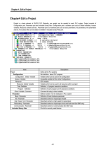
Chapter 5. Edit a Program 5.6.25. Print and Preview Print Call a LD Print Option dialog box by selecting Project-Print. In Select Range for Printing group box of LD Print Option dialog box, select the range of LD program to print. In Left Margin group box, enter the blank in mm.(Maximum size is 30mm). In Condense Label group box, enter the compression rate of content to print within the range that is from 100% to 400%. Indicates the required page number of printing the whole file and the required page number of printing the given range that user designate in Select Range for Printing. Preview 5-25