1
S E T U P
M O D E
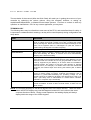
MIN SPEED – This sets the minimum speed that that is used for starting and
stopping the motor as it ramps up and/or down, 1 to 10 where 1 is 10%… 10 is
100%.. The MIN SPEED setting has no effect when ramps are not used (Min
and Max Speed = 10). Generally, this is set to the slowest speed that allows
your Rotator to turn reliably, typically 3 or 4 for Prop Pitch motors
MAX SPEED – This selects the motor speed, 1 to 11 where 1 is 10%…10 is
100%. For speeds within 1 to 10, ramp-up and ramp-down power is applied to
the Rotator. This reduces tower stress on large arrays. Speed 11 forces MIN
SPEED and MAX SPEED both to 10 for full speed with no ramp-up or rampdown conditioning.
CCW LIMIT – Selects the absolute heading for the CCW soft limit. The soft limit
may be set +/- 180 degrees from the normal CCW endpoint. (Normal endpoints
apply to systems that allow 360 degrees of rotation with mechanical stops.)
CW LIMIT – Selects the absolute heading for the CW soft limit. The soft limit
may be set +/- 180 degrees from the normal CW endpoint. (Normal endpoints
apply to systems that allow 360 degrees of rotation with mechanical stops.)
OPTION – Selects the Rotator type. Described earlier in this section.
DIVIDE HI – Selects the first two digits (high order) of the pulse divider. The
divider number is equal to the number of pulses in a 360-degree rotation. For
example, if your Rotator provides 9576 pulses in 360 degrees, the DIVIDED HI
value is set to 95.
DIVIDE LO – Selects the last two digits (low order) of the pulse divider. The
divider number is equal to the number of pulses in a 360-degree rotation. For
example, if your Rotator provides 9576 pulses in 360 degrees, the DIVIDE LO
value is set to 76. (Always set the DIVIDE HI first, then the DIVIDE LO.)
The divide ratio may be set as high as 32,600 in order to support
NOTE:
high accuracy, high ratio custom systems. If the ratio must be set higher than
9999 (HI > 99) then the SETUP UTILITY must be used to set the Divide Ratio
value instead of the front panel SETUP Mode
CAL RANGE (Available only with OPTION = POT) – This is the degree range
that the potentiometer calibrate routines will assume for the distance traveled
between the CCW and CW calibration points. This value defaults to 360
degrees and should not be changed unless you cannot rotate your antenna full
360 degrees in order to perform the potentiometer calibration. (A sidearm
application on a tower may be one example of this.) You can calibrate the
Rotator prior to physical installation, or use the CAL RANGE to set this
parameter. Refer to Section 5—Advanced Features—for a detailed sidearm
calibration procedure.
MODE – Selects the operating mode of the RT-21 controller.
13