1
User manual
Manual del Usuario
Manuel de l’utilisateur
DRC6272E22
EN
ES
FR
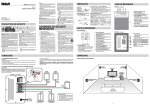
Scan for more user manual details or visit www.RCAav.com
Consulte para obtener más detalles del manual del usuario o visite
www.RCAav.com
Scanner pour détails supplémentaires indiqués dans le manuel
d’utilisation ou visiter www.RCAav.com
PRECAUCIÓN
RADIACIÓN LÁSER INVISIBLE EN
CASO DE APERTURAY DESBLOQUEO
DE CIERRE. EVITE CUALQUIER
EXPOSICIÓN AL RAYO
MISE EN GARDE
RADIATION LASER INVISIBLE, SI
L’APPAREIL EST OUVERT ET SI LE
DISPOSITIF DE VERROUILLAGE EST
NEUTRALISÉ.ÉVITER L’EXPOSITION
AU FAISCEAU LASER.
Producto láser
Clase 1
Appareil à laser
de classe 1
This product contains a low power
laser device.
Este producto contiene un dispositivo
láser de baja potencia.
Cet appareil contient un dispositif à
laser de faible puissance.
It is important to read this instruction book prior to using your new product for the first time.
Es importante que lea este libro de instrucciones antes de comenzar a usar su nuevo producto.
Il est important de lire ce manuel d’utilisation avant l’utilisation initiale de ce nouveau produit.
Safety Instructions
The lightning flash with arrowhead symbol, within an
equilateral triangle, is intended to alert the user to the
presence of uninsulated “dangerous voltage” within
the product’s enclosure that may be of sufficient magnitude
to constitute a risk of electric shock to persons.
The exclamation point within an equilateral triangle is
intended to alert the user to the presence of important
** SEE BOTTOM OF UNIT FOR GRAPHIC SYMBOLS **
operating and maintenance (servicing) instructions in
the literature accompanying the appliance.
EN WARNING:
• Should any trouble occur, disconnect the
car power adapter and refer servicing to a
qualified technician.
• TO PREVENT FIRE OR SHOCK HAZARD, DO
NOT REMOVE COVER (OR BACK). NO USERSERVICEABLE PARTS INSIDE. REFER SERVICING
TO QUALIFIED SERVICE PERSONNEL.
• TO REDUCE THE RISK OF ELECTRIC SHOCK,
DO NOT EXPOSE THIS APPLIANCE TO RAIN OR
MOISTURE. DO NOT PLACE OBJECTS FILLED
WITH LIQUIDS ON OR NEAR THIS UNIT.
• TO BE COMPLETELY DISCONNECTED FROM
THE POWER INPUT, THE UNIT’S CAR POWER
ADAPTER SHOULD BE DISCONNECTED FROM
THE VEHICLE. THE CAR POWER ADAPTER
SHOULD NOT BE OBSTRUCTED AND SHOULD
BE EASILY ACCESSIBLE DURING INTENDED
USED.
CAUTION:
• Use of controls or adjustments or performance
of procedures other than those specified may
result in hazardous radiation exposure.
• Danger of explosion if battery is incorrectly
replaced. Replace only with the same or
equivalent type.
On Placement
as vases, should be placed on the car power
adaptor and apparatus.
• The apparatus should not be exposed to
dripping or splashing and that no objects filled
with liquids, such as vases, should be placed on
apparatus.
On Safety
• When connecting or disconnecting the car
power adapter, grip the plug and not the cord
itself. Pulling the cord may damage it and
create a hazard.
• When you are not going to use the unit for a
long period of time, disconnect the car power
adapter.
On Remote Control
•
•
WARNING
DO NOT INGEST BATTERY. CHEMICAL
BURN HAZARD.
The remote control supplied with this product
contains a coin/button cell battery. If the coin/
button cell battery is swallowed, it can cause
severe internal burns in just 2 hours and can
lead to death.
Keep new and used batteries away from
children. If the battery compartment does not
close securely, stop using the product and keep
it away from children.
If you think batteries might have been
swallowed or placed inside any part of the
body, seek immediate medical attention.
Do not dispose of the battery in a fire or it may
leak and or explode.
Batteries should not be exposed to excessive
heat such as sunshine, fire or the like.
• Do not use the unit in places that are extremely
•
hot, cold, dusty or humid.
• Place the unit on a flat and even surface.
• Do not restrict the air flow of the unit by
•
placing it in a place with poor air flow, by
covering it with a cloth, or by placing it on
•
carpeting.
• To avoid magnetizing, do not place the unit
On Condensation
near speakers or magnets.
• When left in a heated room where it is warm
• Do not use this unit in direct sunlight or leave
and damp, water droplets or condensation
the unit in a closed automobile (or similar
may form inside the unit. When there is
environments) where it would be exposed to
condensation inside the unit, the unit may
high temperatures above 104°F (40°C).
not function normally. Let the unit stand for
• No naked flame sources such as lighted candles
1 to 2 hours before turning the power on, or
should be placed on the car power adapter or
gradually heat the room and allow the unit to
the unit.
dry before use.
• The car power adaptor and apparatus should
Ventilation Warning
not be exposed to splashing or dripping
• Do not block the ventilation openings or
liquids, and no objects filled with liquids, such
EN - 2
installation. This equipment generates, uses
and can radiate radio frequency energy and, if
not installed and used in accordance with the
instructions, may cause harmful interference to
radio communications.
However, there is no guarantee that interference
will not occur in a particular installation. If this
equipment does cause harmful interference
to radio or television reception, which can be
determined by turning the equipment off and
on, the user is encouraged to try to correct the
interference by one or more of the following EN
measures:
– Reorient or relocate the receiving antenna.
–
Increase the separation between the
equipment and receiver.
–Connect the equipment into an outlet on
a circuit different from that to which the
receiver is connected.
– Consult the dealer or an experienced radio/TV
technician for help.
Warning: Changes or modifications to this unit
not expressly approved by the party responsible
for compliance could void the user’s authority to
operate the equipment.
CAN ICES-003(B)
holes. If the ventilation openings or holes are
blocked by a newspaper or cloth, etc., the heat
may not be able to get out.
• Do not operate the unit in a confined space,
such as a bookcase or built-in cabinet. Allow
about 4 inches (10cm) of free space all around
the unit for adequate ventilation.
Rating Plate Location
• The rating plate is located on the bottom of
unit.
Notes on Copyright
It is forbidden by law to copy, broadcast, show,
broadcast on cable, play in public, or rent
copyrighted material without permission.
This item incorporates copy protection technology
that is protected by U.S. patents and other
intellectual property rights of Rovi Corporation.
Reverse engineering and disassembly are
prohibited.
FCC Statements
This device complies with Part 15 of the FCC
Rules. Operation is subject to the following two
conditions: (1) This device may not cause harmful
interference, and (2) This device must accept any
interference received, including interference that
may cause undesired operation.
This equipment has been tested and found to
comply with the limits for a Class B digital device,
pursuant to Part 15 of the FCC Rules. These limits
are designed to provide reasonable protection
against harmful interference in a residential
Trademark Notice
Dolby Digital
Manufactured under license from Dolby
Laboratories.
Dolby and the double-D symbol are trademarks
of Dolby Laboratories.
IMPORTANT SAFETY INSTRUCTIONS
1.
2.
3.
4.
5.
6.
7.
Read these instructions.
Keep these instructions.
Heed all warnings.
Follow all instructions.
Do not use this apparatus near water.
Clean only with a dry cloth.
Do not block any ventilation openings. Install in
accordance with the manufacturer’s instructions.
8. Do not install near any heat sources such as
radiators, heat registers, stoves, or other apparatus
(including amplifiers) that produce heat.
9. Do not defeat the safety purpose of the polarized
or grounding-type. A polarized power plug
has two blades with one wider than the other.
A grounding type power plug has two blades
and a third grounding prong. The wide blade
or the third prong is provided for your safety.
When the provided power cord does not fit into
your AC power outlet, consult an electrician for
replacement of the obsolete outlet.
10. Protect the AC power cord from being walked
on or pinched particularly at the power plug,
convenience receptacles, and the point where
they exit from the apparatus.
11. Only use attachments/accessories specified by the
manufacturer.
12.Use only with the cart,
stand,
tripod,
bracket,
or table specified by the
manufacturer, or sold with
the apparatus. When a cart
is used, use caution when
moving the cart/apparatus Portable Cart
Warning
combination to avoid injury
from tip-over.
13. Unplug this apparatus during lightning storms or
when unused for long periods of time.
14. Refer all servicing to qualified service personnel.
Servicing is required when the apparatus has been
damaged in any way, such as the AC power cord
is damaged, liquid has spilled or objects have
fallen into the apparatus, the apparatus has been
exposed to rain or moisture, does not operate
normally, or has been dropped.
EN - 3
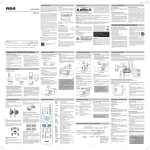
Control Reference Guide - Remote Control
EN
GREEN remote control
1
2
3
4
5
6
7
8
9
10
11
VIDEO MODE
(previous)
SEARCH
or
GOTO
ENTER
MEMORY
Number (0 - 9)
REPEAT A-B
REPEAT DISC
SETUP
MENU
(next)
STOP
PLAY
PAUSE
12 DISPLAY
13 ANGLE
14 AUDIO
15 SUBTITLE
RETURN
BLUE remote control
Press to adjust brightness, contrast or screen size.
Press to go to the previous chapter or title on a DVD, or track on a CD.
Press to fast reverse or fast forward playback.
Press to go directly to a location on a DVD or CD.
Press to navigate the setup menus or to adjust settings.
Press to turn volume down or press to turn volume up.
Press to confirm selections on the menu.
In playing mode, sets titles /chapters in a favorite order.
Press to save titles or chapters in a favorite order.
Press to repeat a specific portion (from point A to point B) of a disc.
Press to repeat a DVD current title, chapter, a CD track, or entire dics of a CD.
In stop mode, press to bring up the Setup menu.
Press to enter and exit the main DVD menu. This option works only if the DVD
has a main menu.
Press to skip forward to the next chapter or title on a DVD, or track on a CD.
Press once to stop playback. Your player remembers where you stopped. If you
press PLAY, your player starts playing at the point where you stopped.
Press twice to stop playback. If you press PLAY, your player starts playing at the
beginning of the disc. Press to start playback. When a disc is paused press to resume playback.
When a disc is playing, press to pause playback.
Press to display information about the disc, such as title, chapter number, track
number and time.
Press to switch between multiple camera angles, if available on the DVD.
Press to select the DVD audio language. This option works only if the DVD has
multiple audio languages.
Press to turn subtitles on and off, or press to select the subtitle language. This
option works only if the DVD has subtitles.
Press to return to normal operation after using the Setup menu of a DVD.
EN - 4
SIMPLE IB.indd 4
5/19/2014 14:08:02
Control Reference Guide
EN
1
OPEN
2
Press to open the disc door. Hold the front panel when open the disc
door.
(previous)
Press to go to the previous chapter, title or track during the disc
playback or to navigate left on a menu.
(next)
Press to go to the next chapter, title or track during the disc playback or
to navigate right on a menu.
PLAY/PAUSE
Press to start or pause playback.
STOP/ AV IN (in Unit
A only)
/
Press to stop disc playback
Press and hold for 3 seconds to change to AV IN or DVD mode.
Press to adjust volume up and down.
3
Headphone Jack
Plug headphones into this jack. When headphones are plugged in,
sound does not come out of your player’s speakers.
4
STANDBY / ON switch
Slide to change your DVD player to standby mode or to turn it on.
5
To Unit A / To Unit B
Connect 2 units together via the connection cable.
6
DC IN Jack
Connect the car power adapter to this jack.
7
Remote Control sensor
Receives signals from the remote control. Do not block.
Accessories
The following accessories are included.
1. Remote control (with battery).........................x 2
2. Car power adapter with splitter.......................x 1
3. Connection cable...............................................x 1
4. Mounting Straps................................................x 2
EN - 5
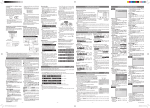
Using the Remote Controls
Remote controls have different color keys to identify which unit
they operate. The remote control with green keys operates Unit A
which has a green stripe on the front of the unit.
The remote control with blue keys operates Unit B with a similar
blue stripe on the front of the unit.
EN
Take out the plastic
sheet
before
operating
the
remote control.
Match the color in
remote control and DVD
player
Using your unit
1. Slide the STANDBY / ON switch on the side of
the unit to “ON”.
2.To watch same DVD on 2 DVD players, press
the DVD / AV IN button on the GREEN
remote control or press and hold the STOP /
AV IN button for 3 seconds on the Unit A to
select AV IN mode. “AV IN” will be shown on
the screen of Unit A for a while.
3.To watch different DVDs on 2 DVD players,
press the DVD / AV IN button on the GREEN
remote control or press and hold the STOP /
AV IN button for 3 seconds on the Unit A to
select DVD mode.
Note: Most DVDs and your player have region codes that help control illegal distribution of DVDs. The
region code of your player is 1. You can only play DVDs with a region code of 1 or ALL. The region code
for a DVD is printed on the DVD or the DVD packaging.
TIP: Press the STOP button once before turning off the car power or switching off the unit. This
will allow you to resume DVD playback at the same place the next time the unit is turned on.
EN - 6
Using in a Vehicle
Connect the connection cable and car power adapter with splitter to both units, make sure to use
correct remote for each unit (green rubber keys remote for green Unit (Unit A), blue rubber keys
remote for blue Unit (Unit B) .)
Mounting Strap
EN
Mount in the car headrest
SAFETY WARNING!
• This unit should never be used by the vehicle's driver or left unsecured in the vehicle while driving.
• If this unit is being used in your vehicle, be sure that it is secured or held safely, and does not obstruct
any safety device, including air bags or seat belts.
• All passengers should wear seat belts when using this unit in a moving vehicle.
• If in doubt, please contact your vehicle manufacturer for further advice.
EN - 7
AVC MULTIMEDIA (“AVC”) makes the following limited warranty. This limited warranty extend to the
original consumer purchaser and is limited to non-commercial use of the product.
One Year Parts & Labor Warranty
AVC products purchased in the United States are warranted to be free from defects in materials or
workmanship for a period of one year from the date of their original retail purchase. If the unit fails
to conform to this warranty, we will service the product using new or refurbished parts and products,
at AVC’s sole discretion.
During a period of one year from the effective warranty date, AVC will provide, when needed, service
labor to repair a manufacturing defect at its designated Service Center. To obtain warranty service in
the United States, you must first call our Customer Support Center at 1-800-506-5746 or 1-877-2526873, during the hours listed in the box below. The determination of service will be made by AVC
Customer Support. PLEASE DO NOT RETURN YOUR UNIT TO AVC WITHOUT PRIOR AUTHORIZATION.
EN New or remanufactured replacements for defective parts or products will be used for repairs by AVC
at its designated Service Center for one year from the effective warranty date. Such replacement parts
or products are warranted for an additional one year from the date of repair or replacement. The
Customer will be required to ship the unit to the Service Center indicated at the time Customer Support
is contacted to make the necessary repairs. The customer is responsible for all transportation charges
to the service facility.
Packaging and Shipping Instruction
When you send the product to the AVC service facility you must use the original carton box and packing
material or an equivalent as designated by AVC.
LIMITED WARRANTY
Your Responsibility
(1) You must retain the original sale receipt to provide proof of purchase.
(2) These warranties are effective only if the product is purchased and operated in the U.S.A. or Canada.
(3) Warranties extend only to defects in material or workmanship, and do not extend to any product
or parts which have been lost or discarded, or damage to product or parts caused by misuse, accident,
improper operation or maintenance, or use in violation of instructions provided with the product, or
to product which has been altered or modified without authorization of AVC, or to products or parts
thereof which have had the serial number removed or changed.
Out of Warranty
In the event your product requires repair after the limited warranty period has expired, please contact
our Customer Support Center at 1-800-506-5746, 1-877-252-6873 or www.RCAav.com
Hours: Monday–Thursday: 9am–7pm, Friday: 9am–5pm, Saturday: 9am–NOON Eastern time.
Important: You are responsible for any transportation, shipping or insurance relative to the return of
product to our Product Returns Center.
All warranties implied by state law, including the implied warranties of merchantability and fitness for
a particular purpose, are expressly limited to the duration of the limited warranties set forth above.
With the exception of any warranties implied by state law as hereby limited, the foregoing warranty
is exclusive and in lieu of all other warranties, guarantees, agreements and similar obligations of
manufacturer or seller with respect to the repair or replacement of any parts. In no event shall AVC be
liable for consequential or incidental damages.
No person, agent, distributor, dealer or company is authorized to change, modify or extend the terms of
these warranties in any manner whatsoever. The time within action must be commenced to enforce any
obligation of AVC arising under the warranty or under any statute, or law of the United States or any
state thereof, is hereby limited to one year from the date of purchase. This limitation does not apply to
implied warranties arising under state law.
This warranty gives you specific legal rights and you may also have other rights, which may vary, from
state to state. Some states do not allow limitation on how long an implied warranty lasts, when an
action may be brought, or the exclusion or limitation of incidental or consequential damages, so the
above provisions may not apply to you.
For more information on other products and services, please visit our web site at www.RCAav.com.
Important: Also keep your “Bill of Sale” as proof of purchase.
Serial no................................................................. Invoice no....................................................................
Date purchased..................................................... Dealer name ...............................................................
FOR SERVICE AND REPAIR, PLEASE VISIT www.RCAav.com
Specifications and external appearance are subject to change without notice.
EN - 8
Printed in China