1
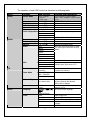
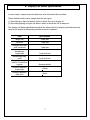
Display
Auto Sleep
30,60,90,120 Min
Closed Caption
Off
C1,C2,C3,C4,T1,T2,
TT4,and Off
V-chip
Input Password
Block MPAA Rating
Block TV Rating
Reset
HDTV
Block MPAA Unrated
Block TV None Rating
Reset to default
value.
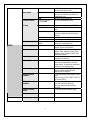
Audio Language
Time Zone
Auto Scan
Manual Scan
Channel Skip
Analog Closed
Caption
Digital Closed
Caption
Digital Caption
Style
Block Channel
On/Off
Set the timer alarm on/off.
Preset the auto sleep time. The TV will
auto go into standby state when the
preset time is up.
Set auto sleep function off.
Set the closed caption mode.
Input the 4-digit password. “0000”
Set the input source that you want to
lock.
Input the old password first, and then
input the password that you want to
change.
Block all the unrated movies.
Block all the unrated TV programs.
Reset the items in the setup menu
except the protected-items.
To set the audio language form
English, French and Spanish.
To set the Time Zone value form
Eastern Time, Indiana, Central Time,
Mountain Time, Arizona, Pacific Time,
Alaska and Hawaii.
Auto-search channels and put the
programs into memory.
Add-on mode: To search the channels
that had not searched by last time.
Range mode: To search the receivable
channels in the setting range.
If set a channel to SKIP, when scan
up/down channels the selected
channel will be skipped.
To set the analog closed caption value
form
OFF,CC1,CC2,CC3,CC4,TEXT1,TEXT2,T
EXT3 and TEXT4.
To set the digital closed caption value
form OFF, Service1, Service2,
Service3, Service4, Service5 and
Service6.
To set the values of caption style.
To setup the block channel.
18