1
Writing Device Drivers
2550 Garcia Avenue
Mountain View, CA 94043
U.S.A.
A Sun Microsystems, Inc. Business
1996 Sun Microsystems, Inc. 2550 Garcia Avenue, Mountain View, California 94043-1100 U.S.A.
All rights reserved. This product or document is protected by copyright and distributed under licenses restricting its use,
copying, distribution, and decompilation. No part of this product or document may be reproduced in any form by any means
without prior written authorization of Sun and its licensors, if any.
Portions of this product may be derived from the UNIX® system, licensed from UNIX System Laboratories, Inc., a wholly owned
subsidiary of Novell, Inc., and from the Berkeley 4.3 BSD system, licensed from the University of California. Third-party
software, including font technology in this product, is protected by copyright and licensed from Sun’s suppliers.
RESTRICTED RIGHTS LEGEND: Use, duplication, or disclosure by the government is subject to restrictions as set forth in
subparagraph (c)(1)(ii) of the Rights in Technical Data and Computer Software clause at DFARS 252.227-7013 and FAR 52.227-19.
The product described in this manual may be protected by one or more U.S. patents, foreign patents, or pending applications.
TRADEMARKS
Sun, Sun Microsystems, the Sun logo, SunSoft, the SunSoft logo, Solaris, SunOS, OpenWindows, DeskSet, ONC, ONC+, and NFS
are trademarks or registered trademarks of Sun Microsystems, Inc. in the United States and other countries. UNIX is a registered
trademark in the United States and other countries, exclusively licensed through X/Open Company, Ltd. OPEN LOOK is a
registered trademark of Novell, Inc. PostScript and Display PostScript are trademarks of Adobe Systems, Inc.
All SPARC trademarks are trademarks or registered trademarks of SPARC International, Inc. in the United States and other
countries. SPARCcenter, SPARCcluster, SPARCompiler, SPARCdesign, SPARC811, SPARCengine, SPARCprinter, SPARCserver,
SPARCstation, SPARCstorage, SPARCworks, microSPARC, microSPARC-II, and UltraSPARC are licensed exclusively to Sun
Microsystems, Inc. Products bearing SPARC trademarks are based upon an architecture developed by Sun Microsystems, Inc.
The OPEN LOOK® and Sun™ Graphical User Interfaces were developed by Sun Microsystems, Inc. for its users and licensees.
Sun acknowledges the pioneering efforts of Xerox in researching and developing the concept of visual or graphical user
interfaces for the computer industry. Sun holds a non-exclusive license from Xerox to the Xerox Graphical User Interface, which
license also covers Sun’s licensees who implement OPEN LOOK GUIs and otherwise comply with Sun’s written license
agreements.
X Window System is a trademark of X Consortium, Inc.
THIS PUBLICATION IS PROVIDED “AS IS” WITHOUT WARRANTY OF ANY KIND, EITHER EXPRESS OR IMPLIED,
INCLUDING, BUT NOT LIMITED TO, THE IMPLIED WARRANTIES OF MERCHANTABILITY, FITNESS FOR A
PARTICULAR PURPOSE, OR NON-INFRINGEMENT.
THIS PUBLICATION COULD INCLUDE TECHNICAL INACCURACIES OR TYPOGRAPHICAL ERRORS. CHANGES ARE
PERIODICALLY ADDED TO THE INFORMATION HEREIN. THESE CHANGES WILL BE INCORPORATED IN NEW
EDITIONS OF THE PUBLICATION. SUN MICROSYSTEMS, INC. MAY MAKE IMPROVEMENTS AND/OR CHANGES IN
THE PRODUCT(S) AND/OR THE PROGRAM(S) DESCRIBED IN THIS PUBLICATION AT ANY TIME.
Please
Recycle
Contents
1. The SunOS Kernel and Device Tree . . . . . . . . . . . . . . . . . . . . .
1
What is the Kernel? . . . . . . . . . . . . . . . . . . . . . . . . . . . . . . . . . . . .
1
Multithreading . . . . . . . . . . . . . . . . . . . . . . . . . . . . . . . . . . . . . . . .
2
Virtual Memory . . . . . . . . . . . . . . . . . . . . . . . . . . . . . . . . . . . . . . .
2
Virtual Addresses. . . . . . . . . . . . . . . . . . . . . . . . . . . . . . . . . . .
3
Address Spaces . . . . . . . . . . . . . . . . . . . . . . . . . . . . . . . . . . . .
3
Special Files . . . . . . . . . . . . . . . . . . . . . . . . . . . . . . . . . . . . . . . . . .
3
Dynamic Loading of Kernel Modules . . . . . . . . . . . . . . . . . . . . .
3
Overview of the Solaris 2.x DDI/DKI . . . . . . . . . . . . . . . . . . . . .
4
The Device Tree . . . . . . . . . . . . . . . . . . . . . . . . . . . . . . . . . . . . . . .
5
Example Device Tree . . . . . . . . . . . . . . . . . . . . . . . . . . . . . . . .
7
Displaying the Device Tree . . . . . . . . . . . . . . . . . . . . . . . . . . .
9
Binding a Driver to a Device Node . . . . . . . . . . . . . . . . . . . .
11
2. Hardware Overview . . . . . . . . . . . . . . . . . . . . . . . . . . . . . . . . . . .
15
SPARC Processor Issues . . . . . . . . . . . . . . . . . . . . . . . . . . . . . . . .
15
iii
iv
Data Alignment . . . . . . . . . . . . . . . . . . . . . . . . . . . . . . . . . . . .
15
Structure Member Alignment . . . . . . . . . . . . . . . . . . . . . . . .
16
Byte Ordering . . . . . . . . . . . . . . . . . . . . . . . . . . . . . . . . . . . . . .
16
Register Windows . . . . . . . . . . . . . . . . . . . . . . . . . . . . . . . . . .
16
Floating Point Operations. . . . . . . . . . . . . . . . . . . . . . . . . . . .
17
Multiply and Divide Instructions . . . . . . . . . . . . . . . . . . . . .
17
SPARC Architecture Manual . . . . . . . . . . . . . . . . . . . . . . . . .
17
x86 Processor Issues. . . . . . . . . . . . . . . . . . . . . . . . . . . . . . . . . . . .
17
Data Alignment . . . . . . . . . . . . . . . . . . . . . . . . . . . . . . . . . . . .
17
Structure Member Alignment . . . . . . . . . . . . . . . . . . . . . . . .
18
Byte Ordering . . . . . . . . . . . . . . . . . . . . . . . . . . . . . . . . . . . . . .
18
Floating Point Operations. . . . . . . . . . . . . . . . . . . . . . . . . . . .
18
x86 Architecture Manuals . . . . . . . . . . . . . . . . . . . . . . . . . . . .
18
PowerPC Processor Issues . . . . . . . . . . . . . . . . . . . . . . . . . . . . . .
18
Data Alignment . . . . . . . . . . . . . . . . . . . . . . . . . . . . . . . . . . . .
18
Structure Member Alignment . . . . . . . . . . . . . . . . . . . . . . . .
19
Byte Ordering . . . . . . . . . . . . . . . . . . . . . . . . . . . . . . . . . . . . . .
19
Floating Point Operations. . . . . . . . . . . . . . . . . . . . . . . . . . . .
19
PowerPC Architecture Manual . . . . . . . . . . . . . . . . . . . . . . .
20
Store Buffers . . . . . . . . . . . . . . . . . . . . . . . . . . . . . . . . . . . . . . . . . .
20
System Memory Model . . . . . . . . . . . . . . . . . . . . . . . . . . . . . . . . .
20
Total Store Ordering (TSO) . . . . . . . . . . . . . . . . . . . . . . . . . . .
21
Partial Store Ordering (PSO) . . . . . . . . . . . . . . . . . . . . . . . . .
21
Bus Architectures . . . . . . . . . . . . . . . . . . . . . . . . . . . . . . . . . . . . . .
21
Writing Device Drivers—May 1996
Device Identification . . . . . . . . . . . . . . . . . . . . . . . . . . . . . . . .
22
Interrupts . . . . . . . . . . . . . . . . . . . . . . . . . . . . . . . . . . . . . . . . .
22
Bus Specifics . . . . . . . . . . . . . . . . . . . . . . . . . . . . . . . . . . . . . . . . . .
23
PCI Local Bus . . . . . . . . . . . . . . . . . . . . . . . . . . . . . . . . . . . . . .
23
PCI Address Domain. . . . . . . . . . . . . . . . . . . . . . . . . . . . . . . .
25
SBus . . . . . . . . . . . . . . . . . . . . . . . . . . . . . . . . . . . . . . . . . . . . . .
28
VMEbus. . . . . . . . . . . . . . . . . . . . . . . . . . . . . . . . . . . . . . . . . . .
31
ISA Bus . . . . . . . . . . . . . . . . . . . . . . . . . . . . . . . . . . . . . . . . . . .
34
EISA Bus . . . . . . . . . . . . . . . . . . . . . . . . . . . . . . . . . . . . . . . . . .
35
MCA Bus. . . . . . . . . . . . . . . . . . . . . . . . . . . . . . . . . . . . . . . . . .
36
Device Issues . . . . . . . . . . . . . . . . . . . . . . . . . . . . . . . . . . . . . . . . .
36
Timing-Critical Sections . . . . . . . . . . . . . . . . . . . . . . . . . . . . .
36
Delays . . . . . . . . . . . . . . . . . . . . . . . . . . . . . . . . . . . . . . . . . . . .
37
Internal Sequencing Logic . . . . . . . . . . . . . . . . . . . . . . . . . . .
37
Interrupt Issues . . . . . . . . . . . . . . . . . . . . . . . . . . . . . . . . . . . .
37
Byte Ordering . . . . . . . . . . . . . . . . . . . . . . . . . . . . . . . . . . . . . .
38
Device Component Representations . . . . . . . . . . . . . . . . . . .
39
The PROM on SPARC Machines . . . . . . . . . . . . . . . . . . . . . . . . .
40
Open Boot PROM 2.x . . . . . . . . . . . . . . . . . . . . . . . . . . . . . . .
40
Reading and Writing . . . . . . . . . . . . . . . . . . . . . . . . . . . . . . . . . . .
46
3. Overview of SunOS Device Drivers . . . . . . . . . . . . . . . . . . . . .
49
What is a Device Driver?. . . . . . . . . . . . . . . . . . . . . . . . . . . . . . . .
49
Types of Device Drivers . . . . . . . . . . . . . . . . . . . . . . . . . . . . . . . .
50
Block Device Drivers . . . . . . . . . . . . . . . . . . . . . . . . . . . . . . . .
50
v
vi
Standard Character Device Drivers . . . . . . . . . . . . . . . . . . . .
50
STREAMS Drivers . . . . . . . . . . . . . . . . . . . . . . . . . . . . . . . . . .
52
Bus Address Spaces . . . . . . . . . . . . . . . . . . . . . . . . . . . . . . . . . . . .
52
Overview . . . . . . . . . . . . . . . . . . . . . . . . . . . . . . . . . . . . . . . . .
52
Address Mapping Setup . . . . . . . . . . . . . . . . . . . . . . . . . . . . .
53
Data Access Functions. . . . . . . . . . . . . . . . . . . . . . . . . . . . . . .
55
Example Device Registers. . . . . . . . . . . . . . . . . . . . . . . . . . . .
57
Device Register Structure . . . . . . . . . . . . . . . . . . . . . . . . . . . .
58
Driver Interfaces. . . . . . . . . . . . . . . . . . . . . . . . . . . . . . . . . . . . . . .
61
Entry Points . . . . . . . . . . . . . . . . . . . . . . . . . . . . . . . . . . . . . . .
61
Callback functions . . . . . . . . . . . . . . . . . . . . . . . . . . . . . . . . . . . . .
63
Interrupt Handling . . . . . . . . . . . . . . . . . . . . . . . . . . . . . . . . . . . .
64
Driver Context . . . . . . . . . . . . . . . . . . . . . . . . . . . . . . . . . . . . . . . .
65
Printing Messages . . . . . . . . . . . . . . . . . . . . . . . . . . . . . . . . . . . . .
66
Dynamic Memory Allocation . . . . . . . . . . . . . . . . . . . . . . . . . . . .
66
Software State Management . . . . . . . . . . . . . . . . . . . . . . . . . . . . .
67
State Structure . . . . . . . . . . . . . . . . . . . . . . . . . . . . . . . . . . . . .
67
State Management Routines . . . . . . . . . . . . . . . . . . . . . . . . . .
68
Properties . . . . . . . . . . . . . . . . . . . . . . . . . . . . . . . . . . . . . . . . . . . .
69
Driver Layout . . . . . . . . . . . . . . . . . . . . . . . . . . . . . . . . . . . . . . . . .
73
Header Files . . . . . . . . . . . . . . . . . . . . . . . . . . . . . . . . . . . . . . .
73
xx.c Files . . . . . . . . . . . . . . . . . . . . . . . . . . . . . . . . . . . . . . . . . .
73
driver .conf Files . . . . . . . . . . . . . . . . . . . . . . . . . . . . . . . . . . .
74
Driver Structure Overview . . . . . . . . . . . . . . . . . . . . . . . . . . . . . .
74
Writing Device Drivers—May 1996
The C Language and Compiler Modes . . . . . . . . . . . . . . . . . . . .
75
Compiler Modes . . . . . . . . . . . . . . . . . . . . . . . . . . . . . . . . . . .
75
Function Prototypes . . . . . . . . . . . . . . . . . . . . . . . . . . . . . . . .
75
New Keywords . . . . . . . . . . . . . . . . . . . . . . . . . . . . . . . . . . . .
76
4. Multithreading . . . . . . . . . . . . . . . . . . . . . . . . . . . . . . . . . . . . . . .
79
Threads . . . . . . . . . . . . . . . . . . . . . . . . . . . . . . . . . . . . . . . . . . . . . .
79
User Threads . . . . . . . . . . . . . . . . . . . . . . . . . . . . . . . . . . . . . .
79
Kernel Threads . . . . . . . . . . . . . . . . . . . . . . . . . . . . . . . . . . . . .
80
Multiprocessing Changes Since SunOS 4.x. . . . . . . . . . . . . . . . .
81
Locking Primitives . . . . . . . . . . . . . . . . . . . . . . . . . . . . . . . . . . . . .
82
Storage Classes of Driver Data. . . . . . . . . . . . . . . . . . . . . . . .
82
State Structure . . . . . . . . . . . . . . . . . . . . . . . . . . . . . . . . . . . . .
83
Mutual-Exclusion Locks . . . . . . . . . . . . . . . . . . . . . . . . . . . . .
83
Readers/Writer Locks . . . . . . . . . . . . . . . . . . . . . . . . . . . . . . .
85
Semaphores. . . . . . . . . . . . . . . . . . . . . . . . . . . . . . . . . . . . . . . .
85
Thread Synchronization . . . . . . . . . . . . . . . . . . . . . . . . . . . . . . . .
85
Condition Variables . . . . . . . . . . . . . . . . . . . . . . . . . . . . . . . . .
85
cv_timedwait( ) . . . . . . . . . . . . . . . . . . . . . . . . . . . . . . . . .
89
cv_wait_sig( ) . . . . . . . . . . . . . . . . . . . . . . . . . . . . . . . . . .
90
cv_timedwait_sig( ) . . . . . . . . . . . . . . . . . . . . . . . . . . . .
90
Choosing a Locking Scheme . . . . . . . . . . . . . . . . . . . . . . . . . . . . .
91
5. Autoconfiguration . . . . . . . . . . . . . . . . . . . . . . . . . . . . . . . . . . . . .
93
Overview. . . . . . . . . . . . . . . . . . . . . . . . . . . . . . . . . . . . . . . . . . . . .
93
State Structure . . . . . . . . . . . . . . . . . . . . . . . . . . . . . . . . . . . . . . . .
93
vii
viii
Driver Loading and Configuration . . . . . . . . . . . . . . . . . . . . . . .
94
Data Structures . . . . . . . . . . . . . . . . . . . . . . . . . . . . . . . . . . . . . . . .
95
modlinkage() . . . . . . . . . . . . . . . . . . . . . . . . . . . . . . . . . . . . .
95
modldrv() . . . . . . . . . . . . . . . . . . . . . . . . . . . . . . . . . . . . . . . .
95
dev_ops() . . . . . . . . . . . . . . . . . . . . . . . . . . . . . . . . . . . . . . . .
96
cb_ops . . . . . . . . . . . . . . . . . . . . . . . . . . . . . . . . . . . . . . . . . . .
96
Loadable Driver Interface . . . . . . . . . . . . . . . . . . . . . . . . . . . . . . .
98
Device Configuration . . . . . . . . . . . . . . . . . . . . . . . . . . . . . . . . . .
100
identify( ) . . . . . . . . . . . . . . . . . . . . . . . . . . . . . . . . . . . . .
100
probe( ) . . . . . . . . . . . . . . . . . . . . . . . . . . . . . . . . . . . . . . . . .
101
attach( ) . . . . . . . . . . . . . . . . . . . . . . . . . . . . . . . . . . . . . . . .
105
detach( ) . . . . . . . . . . . . . . . . . . . . . . . . . . . . . . . . . . . . . . . .
110
getinfo( ) . . . . . . . . . . . . . . . . . . . . . . . . . . . . . . . . . . . . . . . .
112
6. Interrupt Handlers . . . . . . . . . . . . . . . . . . . . . . . . . . . . . . . . . . . .
115
Overview. . . . . . . . . . . . . . . . . . . . . . . . . . . . . . . . . . . . . . . . . . . . .
115
Interrupt Specification. . . . . . . . . . . . . . . . . . . . . . . . . . . . . . .
116
Interrupt Number . . . . . . . . . . . . . . . . . . . . . . . . . . . . . . . . . .
117
Interrupt Block Cookies . . . . . . . . . . . . . . . . . . . . . . . . . . . . .
117
Bus-Interrupt Levels . . . . . . . . . . . . . . . . . . . . . . . . . . . . . . . .
117
High-Level Interrupts . . . . . . . . . . . . . . . . . . . . . . . . . . . . . . .
117
Types of Interrupts. . . . . . . . . . . . . . . . . . . . . . . . . . . . . . . . . . . . .
118
Vectored Interrupts . . . . . . . . . . . . . . . . . . . . . . . . . . . . . . . . .
118
Polled Interrupts . . . . . . . . . . . . . . . . . . . . . . . . . . . . . . . . . . .
119
Software Interrupts . . . . . . . . . . . . . . . . . . . . . . . . . . . . . . . . .
119
Writing Device Drivers—May 1996
Registering Interrupts . . . . . . . . . . . . . . . . . . . . . . . . . . . . . . . . . .
120
Responsibilities of an Interrupt Handler . . . . . . . . . . . . . . . . . .
121
State Structure . . . . . . . . . . . . . . . . . . . . . . . . . . . . . . . . . . . . . . . .
124
Handling High-Level Interrupts . . . . . . . . . . . . . . . . . . . . . . . . .
124
Example . . . . . . . . . . . . . . . . . . . . . . . . . . . . . . . . . . . . . . . . . .
125
7. DMA . . . . . . . . . . . . . . . . . . . . . . . . . . . . . . . . . . . . . . . . . . . . . . . .
129
The DMA Model . . . . . . . . . . . . . . . . . . . . . . . . . . . . . . . . . . . . . .
129
Types of Device DMA . . . . . . . . . . . . . . . . . . . . . . . . . . . . . . . . . .
130
DMA and DVMA . . . . . . . . . . . . . . . . . . . . . . . . . . . . . . . . . . . . . .
131
Handles, Windows and Cookies . . . . . . . . . . . . . . . . . . . . . . . . .
132
DMA Operations . . . . . . . . . . . . . . . . . . . . . . . . . . . . . . . . . . . . . .
132
DMA attributes . . . . . . . . . . . . . . . . . . . . . . . . . . . . . . . . . . . .
134
Object Locking . . . . . . . . . . . . . . . . . . . . . . . . . . . . . . . . . . . . .
139
Allocating a DMA Handle . . . . . . . . . . . . . . . . . . . . . . . . . . .
140
Allocating DMA Resources . . . . . . . . . . . . . . . . . . . . . . . . . .
141
Burst Sizes. . . . . . . . . . . . . . . . . . . . . . . . . . . . . . . . . . . . . . . . .
145
Programming the DMA Engine . . . . . . . . . . . . . . . . . . . . . . .
145
Freeing the DMA Resources . . . . . . . . . . . . . . . . . . . . . . . . . .
147
Freeing the DMA handle. . . . . . . . . . . . . . . . . . . . . . . . . . . . .
148
Cancelling DMA Callbacks. . . . . . . . . . . . . . . . . . . . . . . . . . . . . .
148
Synchronizing Memory Objects . . . . . . . . . . . . . . . . . . . . . . . . . .
150
Cache . . . . . . . . . . . . . . . . . . . . . . . . . . . . . . . . . . . . . . . . . . . . .
150
ddi_dma_sync( ) . . . . . . . . . . . . . . . . . . . . . . . . . . . . . . . . .
152
DMA Windows. . . . . . . . . . . . . . . . . . . . . . . . . . . . . . . . . . . . . . . .
153
ix
x
Allocating Private DMA Buffers . . . . . . . . . . . . . . . . . . . . . . . . .
156
ddi_dma_devalign( ) . . . . . . . . . . . . . . . . . . . . . . . . . . . .
158
8. Drivers for Character Devices. . . . . . . . . . . . . . . . . . . . . . . . . . .
161
Driver Structure Overview . . . . . . . . . . . . . . . . . . . . . . . . . . . . . .
161
Character Driver Device Access. . . . . . . . . . . . . . . . . . . . . . .
161
Entry Points . . . . . . . . . . . . . . . . . . . . . . . . . . . . . . . . . . . . . . . . . .
163
Autoconfiguration . . . . . . . . . . . . . . . . . . . . . . . . . . . . . . . . . . . . .
164
Controlling Device Access . . . . . . . . . . . . . . . . . . . . . . . . . . . . . .
165
I/O Request Handling. . . . . . . . . . . . . . . . . . . . . . . . . . . . . . . . . .
167
User Addresses . . . . . . . . . . . . . . . . . . . . . . . . . . . . . . . . . . . .
167
Vectored I/O. . . . . . . . . . . . . . . . . . . . . . . . . . . . . . . . . . . . . . .
168
Synchronous vs. Asynchronous I/O . . . . . . . . . . . . . . . . . . .
169
Data Transfer Methods . . . . . . . . . . . . . . . . . . . . . . . . . . . . . .
170
Mapping Device Memory . . . . . . . . . . . . . . . . . . . . . . . . . . . . . . .
177
Multiplexing I/O on File Descriptors . . . . . . . . . . . . . . . . . . . . .
180
Miscellaneous I/O Control . . . . . . . . . . . . . . . . . . . . . . . . . . . . . .
183
9. Drivers for Block Devices . . . . . . . . . . . . . . . . . . . . . . . . . . . . . .
187
Driver Structure Overview . . . . . . . . . . . . . . . . . . . . . . . . . . . . . .
187
Block Driver Device Access . . . . . . . . . . . . . . . . . . . . . . . . . .
187
File I/O . . . . . . . . . . . . . . . . . . . . . . . . . . . . . . . . . . . . . . . . . . . . . .
189
State Structure . . . . . . . . . . . . . . . . . . . . . . . . . . . . . . . . . . . . . . . .
189
Entry Points . . . . . . . . . . . . . . . . . . . . . . . . . . . . . . . . . . . . . . . . . .
189
Autoconfiguration . . . . . . . . . . . . . . . . . . . . . . . . . . . . . . . . . . . . .
190
Controlling Device Access . . . . . . . . . . . . . . . . . . . . . . . . . . . . . .
192
Writing Device Drivers—May 1996
Data Transfers. . . . . . . . . . . . . . . . . . . . . . . . . . . . . . . . . . . . . . . . .
195
strategy( ) . . . . . . . . . . . . . . . . . . . . . . . . . . . . . . . . . . . . .
195
The buf Structure . . . . . . . . . . . . . . . . . . . . . . . . . . . . . . . . . .
195
Synchronous Data Transfers . . . . . . . . . . . . . . . . . . . . . . . . . . . . .
197
Asynchronous Data Transfers . . . . . . . . . . . . . . . . . . . . . . . . . . .
201
Miscellaneous Entry Points. . . . . . . . . . . . . . . . . . . . . . . . . . . . . .
206
dump( ) . . . . . . . . . . . . . . . . . . . . . . . . . . . . . . . . . . . . . . . . . .
206
print( ) . . . . . . . . . . . . . . . . . . . . . . . . . . . . . . . . . . . . . . . . .
207
10. Device Context Management . . . . . . . . . . . . . . . . . . . . . . . . . . .
209
What Is A Device Context? . . . . . . . . . . . . . . . . . . . . . . . . . . . . . .
209
Context Management Model . . . . . . . . . . . . . . . . . . . . . . . . . . . .
209
Multiprocessor Considerations . . . . . . . . . . . . . . . . . . . . . . .
211
Context Management Operation . . . . . . . . . . . . . . . . . . . . . . . . .
212
State Structure . . . . . . . . . . . . . . . . . . . . . . . . . . . . . . . . . . . . .
212
Declarations and Data Structures . . . . . . . . . . . . . . . . . . . . .
213
Associating Devices with User Mappings . . . . . . . . . . . . . .
213
Managing Mapping Accesses. . . . . . . . . . . . . . . . . . . . . . . . .
216
Device Context Management Entry Points. . . . . . . . . . . . . .
217
11. SCSI Target Drivers . . . . . . . . . . . . . . . . . . . . . . . . . . . . . . . . . . .
223
Overview. . . . . . . . . . . . . . . . . . . . . . . . . . . . . . . . . . . . . . . . . . . . .
223
Reference Documents . . . . . . . . . . . . . . . . . . . . . . . . . . . . . . . . . .
224
Sun Common SCSI Architecture Overview . . . . . . . . . . . . . . . .
225
General Flow of Control . . . . . . . . . . . . . . . . . . . . . . . . . . . . .
226
SCSA Functions . . . . . . . . . . . . . . . . . . . . . . . . . . . . . . . . . . . . . . .
228
xi
xii
SCSA Compatibility Functions. . . . . . . . . . . . . . . . . . . . . . . . . . .
229
SCSI Target Drivers . . . . . . . . . . . . . . . . . . . . . . . . . . . . . . . . . . . .
229
Hardware Configuration File . . . . . . . . . . . . . . . . . . . . . . . . .
229
Declarations and Data Structures . . . . . . . . . . . . . . . . . . . . .
230
Autoconfiguration . . . . . . . . . . . . . . . . . . . . . . . . . . . . . . . . . .
233
Resource Allocation. . . . . . . . . . . . . . . . . . . . . . . . . . . . . . . . .
239
Building and Transporting a Command . . . . . . . . . . . . . . . . . . .
241
Building a Command . . . . . . . . . . . . . . . . . . . . . . . . . . . . . . .
242
Capabilities . . . . . . . . . . . . . . . . . . . . . . . . . . . . . . . . . . . . . . . .
243
Transporting a Command. . . . . . . . . . . . . . . . . . . . . . . . . . . .
243
Command Completion . . . . . . . . . . . . . . . . . . . . . . . . . . . . . .
244
Reuse of packets. . . . . . . . . . . . . . . . . . . . . . . . . . . . . . . . . . . .
245
Auto-Request Sense Mode . . . . . . . . . . . . . . . . . . . . . . . . . . .
246
12. SCSI Host Bus Adapter Drivers . . . . . . . . . . . . . . . . . . . . . . . . .
249
Overview. . . . . . . . . . . . . . . . . . . . . . . . . . . . . . . . . . . . . . . . . . . . .
249
SCSA Interface . . . . . . . . . . . . . . . . . . . . . . . . . . . . . . . . . . . . .
250
HBA Transport Layer . . . . . . . . . . . . . . . . . . . . . . . . . . . . . . .
251
SCSA HBA Interfaces . . . . . . . . . . . . . . . . . . . . . . . . . . . . . . . . . .
252
SCSA HBA Entry Point Summary . . . . . . . . . . . . . . . . . . . . .
252
SCSA HBA Data Structures . . . . . . . . . . . . . . . . . . . . . . . . . .
252
Per-Target Instance Data . . . . . . . . . . . . . . . . . . . . . . . . . . . . .
258
Transport Structure Cloning (optional). . . . . . . . . . . . . . . . .
260
SCSA HBA Functions . . . . . . . . . . . . . . . . . . . . . . . . . . . . . . .
262
HBA Driver Dependency and Configuration Issues . . . . . . . . .
262
Writing Device Drivers—May 1996
Configuration Properties . . . . . . . . . . . . . . . . . . . . . . . . . . . .
263
Declarations and Structures . . . . . . . . . . . . . . . . . . . . . . . . . .
264
Module Initialization Entry Points . . . . . . . . . . . . . . . . . . . .
266
Autoconfiguration Entry Points. . . . . . . . . . . . . . . . . . . . . . .
269
SCSA HBA Entry Points . . . . . . . . . . . . . . . . . . . . . . . . . . . . . . . .
274
Target Driver Instance Initialization . . . . . . . . . . . . . . . . . . .
275
Resource Allocation. . . . . . . . . . . . . . . . . . . . . . . . . . . . . . . . .
277
Command Transport . . . . . . . . . . . . . . . . . . . . . . . . . . . . . . . .
288
Capability Management . . . . . . . . . . . . . . . . . . . . . . . . . . . . .
295
Abort and Reset Management . . . . . . . . . . . . . . . . . . . . . . . .
301
Driver Installation . . . . . . . . . . . . . . . . . . . . . . . . . . . . . . . . . . . . .
304
Hardware Configuration File . . . . . . . . . . . . . . . . . . . . . . . . .
304
Installing the Driver . . . . . . . . . . . . . . . . . . . . . . . . . . . . . . . .
304
x86 Target Driver Configuration Properties . . . . . . . . . . . . .
305
13. Loading and Unloading Drivers. . . . . . . . . . . . . . . . . . . . . . . . .
307
Preparing for Installation . . . . . . . . . . . . . . . . . . . . . . . . . . . . . . .
307
Module Naming. . . . . . . . . . . . . . . . . . . . . . . . . . . . . . . . . . . .
307
Compile and Link the Driver . . . . . . . . . . . . . . . . . . . . . . . . .
308
Write a Hardware Configuration File . . . . . . . . . . . . . . . . . .
308
Installing and Removing Drivers. . . . . . . . . . . . . . . . . . . . . . . . .
309
Copy the Driver to a Module Directory . . . . . . . . . . . . . . . .
309
Run add_drv(1M) . . . . . . . . . . . . . . . . . . . . . . . . . . . . . . . . . .
309
Removing the Driver . . . . . . . . . . . . . . . . . . . . . . . . . . . . . . . . . . .
310
Loading Drivers . . . . . . . . . . . . . . . . . . . . . . . . . . . . . . . . . . . . . . .
310
xiii
xiv
Getting the Driver Module’s ID . . . . . . . . . . . . . . . . . . . . . . . . . .
310
Unloading Drivers . . . . . . . . . . . . . . . . . . . . . . . . . . . . . . . . . . . . .
311
14. Debugging . . . . . . . . . . . . . . . . . . . . . . . . . . . . . . . . . . . . . . . . . . .
313
Machine Configuration . . . . . . . . . . . . . . . . . . . . . . . . . . . . . . . . .
313
Setting Up a tip(1) Connection. . . . . . . . . . . . . . . . . . . . . . .
313
Preparing for the Worst. . . . . . . . . . . . . . . . . . . . . . . . . . . . . .
315
Coding Hints . . . . . . . . . . . . . . . . . . . . . . . . . . . . . . . . . . . . . . . . .
319
Process Layout . . . . . . . . . . . . . . . . . . . . . . . . . . . . . . . . . . . . .
319
System Support . . . . . . . . . . . . . . . . . . . . . . . . . . . . . . . . . . . .
320
Conditional Compilation and Variables . . . . . . . . . . . . . . . .
321
volatile and _depends_on. . . . . . . . . . . . . . . . . . . . . . .
323
Debugging Tools . . . . . . . . . . . . . . . . . . . . . . . . . . . . . . . . . . . . . .
323
/etc/system . . . . . . . . . . . . . . . . . . . . . . . . . . . . . . . . . . . . .
323
moddebug . . . . . . . . . . . . . . . . . . . . . . . . . . . . . . . . . . . . . . . . .
324
modload and modunload . . . . . . . . . . . . . . . . . . . . . . . . . . .
325
Saving System Core Dumps . . . . . . . . . . . . . . . . . . . . . . . . . .
325
adb and kadb. . . . . . . . . . . . . . . . . . . . . . . . . . . . . . . . . . . . . .
327
Example: adb on a Core Dump . . . . . . . . . . . . . . . . . . . . . . .
340
Example: kadb on a Deadlocked Thread . . . . . . . . . . . . . . .
343
Testing . . . . . . . . . . . . . . . . . . . . . . . . . . . . . . . . . . . . . . . . . . . . . . .
346
Configuration Testing . . . . . . . . . . . . . . . . . . . . . . . . . . . . . . .
346
Functionality Testing . . . . . . . . . . . . . . . . . . . . . . . . . . . . . . . .
347
Error Handling . . . . . . . . . . . . . . . . . . . . . . . . . . . . . . . . . . . . .
347
Stress, Performance, and Interoperability Testing . . . . . . . .
348
Writing Device Drivers—May 1996
DDI/DKI Compliance Testing . . . . . . . . . . . . . . . . . . . . . . . .
348
Installation and Packaging Testing . . . . . . . . . . . . . . . . . . . .
349
Testing Specific Types of Drivers . . . . . . . . . . . . . . . . . . . . . .
349
A. Converting a 4.x Device Driver to SunOS 5.5 . . . . . . . . . . . . .
353
Before Starting the Conversion . . . . . . . . . . . . . . . . . . . . . . . . . .
353
Review Existing Functionality . . . . . . . . . . . . . . . . . . . . . . . .
353
Read the Manual . . . . . . . . . . . . . . . . . . . . . . . . . . . . . . . . . . .
353
ANSI C . . . . . . . . . . . . . . . . . . . . . . . . . . . . . . . . . . . . . . . . . . .
354
Development Environment . . . . . . . . . . . . . . . . . . . . . . . . . . . . .
354
DDI/DKI. . . . . . . . . . . . . . . . . . . . . . . . . . . . . . . . . . . . . . . . . .
354
Things to Avoid . . . . . . . . . . . . . . . . . . . . . . . . . . . . . . . . . . . .
354
System V Release 4 . . . . . . . . . . . . . . . . . . . . . . . . . . . . . . . . .
355
Development Tools . . . . . . . . . . . . . . . . . . . . . . . . . . . . . . . . .
355
Debugging Tools . . . . . . . . . . . . . . . . . . . . . . . . . . . . . . . . . . .
356
ANSI C . . . . . . . . . . . . . . . . . . . . . . . . . . . . . . . . . . . . . . . . . . .
356
Header Files . . . . . . . . . . . . . . . . . . . . . . . . . . . . . . . . . . . . . . .
357
Overview of Changes . . . . . . . . . . . . . . . . . . . . . . . . . . . . . . . . . .
357
Autoconfiguration . . . . . . . . . . . . . . . . . . . . . . . . . . . . . . . . . .
357
/devices . . . . . . . . . . . . . . . . . . . . . . . . . . . . . . . . . . . . . . . . .
358
/dev . . . . . . . . . . . . . . . . . . . . . . . . . . . . . . . . . . . . . . . . . . . . .
359
Multithreading . . . . . . . . . . . . . . . . . . . . . . . . . . . . . . . . . . . . .
359
Locking . . . . . . . . . . . . . . . . . . . . . . . . . . . . . . . . . . . . . . . . . . .
360
Interrupts . . . . . . . . . . . . . . . . . . . . . . . . . . . . . . . . . . . . . . . . .
364
DMA . . . . . . . . . . . . . . . . . . . . . . . . . . . . . . . . . . . . . . . . . . . . .
365
xv
xvi
Conversion Notes. . . . . . . . . . . . . . . . . . . . . . . . . . . . . . . . . . . . . .
366
SunOS 4.1.x to SunOS 5.5 Differences . . . . . . . . . . . . . . . . . .
371
B. Interface Transition List. . . . . . . . . . . . . . . . . . . . . . . . . . . . . . . .
379
Data Access Methods . . . . . . . . . . . . . . . . . . . . . . . . . . . . . . .
379
DMA Data Access . . . . . . . . . . . . . . . . . . . . . . . . . . . . . . . . . .
379
SCSI HBA DMA Management . . . . . . . . . . . . . . . . . . . . . . . .
379
Device Memory Mapping . . . . . . . . . . . . . . . . . . . . . . . . . . . .
379
Open Boot PROM Device Properties. . . . . . . . . . . . . . . . . . .
380
Data Access Methods. . . . . . . . . . . . . . . . . . . . . . . . . . . . . . . . . . .
380
Device Access Attributes Structure . . . . . . . . . . . . . . . . . . . .
380
CPU Device Access . . . . . . . . . . . . . . . . . . . . . . . . . . . . . . . . .
380
Device Access Functions . . . . . . . . . . . . . . . . . . . . . . . . . . . . .
380
Common Device Access Functions . . . . . . . . . . . . . . . . . . . .
382
Other Device Access Functions . . . . . . . . . . . . . . . . . . . . . . .
383
DMA Device Access . . . . . . . . . . . . . . . . . . . . . . . . . . . . . . . . . . .
383
DMA Attributes Structure . . . . . . . . . . . . . . . . . . . . . . . . . . .
383
DMA Memory Access . . . . . . . . . . . . . . . . . . . . . . . . . . . . . . .
383
DMA Device Binding . . . . . . . . . . . . . . . . . . . . . . . . . . . . . . .
384
SCSI HBA DMA Management . . . . . . . . . . . . . . . . . . . . . . . . . . .
385
Device Memory Mapping . . . . . . . . . . . . . . . . . . . . . . . . . . . . . . .
385
Device Context Management . . . . . . . . . . . . . . . . . . . . . . . . .
385
Open Boot PROM Device Properties . . . . . . . . . . . . . . . . . . . . . .
386
Property Access Functions . . . . . . . . . . . . . . . . . . . . . . . . . . .
386
C. Summary of Solaris 2.5 DDI/DKI Services. . . . . . . . . . . . . . . .
387
Writing Device Drivers—May 1996
buf(9S) Handling. . . . . . . . . . . . . . . . . . . . . . . . . . . . . . . . . . . . . .
388
Copying Data . . . . . . . . . . . . . . . . . . . . . . . . . . . . . . . . . . . . . . . . .
391
Device Access . . . . . . . . . . . . . . . . . . . . . . . . . . . . . . . . . . . . . . . . .
392
Device Configuration . . . . . . . . . . . . . . . . . . . . . . . . . . . . . . . . . .
393
Device Information . . . . . . . . . . . . . . . . . . . . . . . . . . . . . . . . . . . .
394
DMA Handling . . . . . . . . . . . . . . . . . . . . . . . . . . . . . . . . . . . . . . .
395
Flow of Control . . . . . . . . . . . . . . . . . . . . . . . . . . . . . . . . . . . . . . .
405
Interrupt Handling . . . . . . . . . . . . . . . . . . . . . . . . . . . . . . . . . . . .
406
Kernel Statistics . . . . . . . . . . . . . . . . . . . . . . . . . . . . . . . . . . . . . . .
408
Memory Allocation . . . . . . . . . . . . . . . . . . . . . . . . . . . . . . . . . . . .
410
Common Device Access Functions . . . . . . . . . . . . . . . . . . . . . . .
414
Polling . . . . . . . . . . . . . . . . . . . . . . . . . . . . . . . . . . . . . . . . . . . . . . .
417
Printing System Messages . . . . . . . . . . . . . . . . . . . . . . . . . . . . . .
417
Process Signaling . . . . . . . . . . . . . . . . . . . . . . . . . . . . . . . . . . . . . .
418
Properties . . . . . . . . . . . . . . . . . . . . . . . . . . . . . . . . . . . . . . . . . . . .
419
Register and Memory Mapping . . . . . . . . . . . . . . . . . . . . . . . . . .
423
PCI Configuration . . . . . . . . . . . . . . . . . . . . . . . . . . . . . . . . . . . . .
427
I/O Port Access . . . . . . . . . . . . . . . . . . . . . . . . . . . . . . . . . . . . . . .
427
SCSI and SCSA . . . . . . . . . . . . . . . . . . . . . . . . . . . . . . . . . . . . . . . .
431
Soft State Management . . . . . . . . . . . . . . . . . . . . . . . . . . . . . . . . .
439
String Manipulation. . . . . . . . . . . . . . . . . . . . . . . . . . . . . . . . . . . .
440
System Information . . . . . . . . . . . . . . . . . . . . . . . . . . . . . . . . . . . .
441
Thread Synchronization . . . . . . . . . . . . . . . . . . . . . . . . . . . . . . . .
441
Timing . . . . . . . . . . . . . . . . . . . . . . . . . . . . . . . . . . . . . . . . . . . . . . .
446
xvii
xviii
uio(9S) Handling. . . . . . . . . . . . . . . . . . . . . . . . . . . . . . . . . . . . . .
447
Utility Functions . . . . . . . . . . . . . . . . . . . . . . . . . . . . . . . . . . . . . .
448
D. Sample Driver Source Code Listings. . . . . . . . . . . . . . . . . . . . .
453
E. Driver Code Layout Structure. . . . . . . . . . . . . . . . . . . . . . . . . . .
455
Header Files . . . . . . . . . . . . . . . . . . . . . . . . . . . . . . . . . . . . . . . . . .
455
xx.c Files . . . . . . . . . . . . . . . . . . . . . . . . . . . . . . . . . . . . . . . . . . . . .
456
driver .conf Files. . . . . . . . . . . . . . . . . . . . . . . . . . . . . . . . . . . . . . .
460
F. Advanced Topics . . . . . . . . . . . . . . . . . . . . . . . . . . . . . . . . . . . . . .
461
Multithreading . . . . . . . . . . . . . . . . . . . . . . . . . . . . . . . . . . . . . . . .
461
Lock Granularity . . . . . . . . . . . . . . . . . . . . . . . . . . . . . . . . . . .
461
Avoiding Unnecessary Locks . . . . . . . . . . . . . . . . . . . . . . . . .
462
Locking Order . . . . . . . . . . . . . . . . . . . . . . . . . . . . . . . . . . . . .
462
Scope of a Lock. . . . . . . . . . . . . . . . . . . . . . . . . . . . . . . . . . . . .
463
Potential Panics . . . . . . . . . . . . . . . . . . . . . . . . . . . . . . . . . . . .
464
Sun Disk Device Drivers . . . . . . . . . . . . . . . . . . . . . . . . . . . . . . . .
465
Disk I/O Controls . . . . . . . . . . . . . . . . . . . . . . . . . . . . . . . . . .
465
Disk Performance. . . . . . . . . . . . . . . . . . . . . . . . . . . . . . . . . . .
466
SCSA . . . . . . . . . . . . . . . . . . . . . . . . . . . . . . . . . . . . . . . . . . . . . . . .
467
Global Data Definitions. . . . . . . . . . . . . . . . . . . . . . . . . . . . . .
467
Tagged Queueing . . . . . . . . . . . . . . . . . . . . . . . . . . . . . . . . . . .
468
Untagged Queueing . . . . . . . . . . . . . . . . . . . . . . . . . . . . . . . .
469
Index . . . . . . . . . . . . . . . . . . . . . . . . . . . . . . . . . . . . . . . . . . . . . . . . . . . . .
471
Writing Device Drivers—May 1996
Figures
Figure 1-1
Possible device tree configurations. . . . . . . . . . . . . . . . . . . . . . .
6
Figure 1-2
Example device tree . . . . . . . . . . . . . . . . . . . . . . . . . . . . . . . . . . .
8
Figure 1-3
Device node names . . . . . . . . . . . . . . . . . . . . . . . . . . . . . . . . . . . .
11
Figure 1-4
Driver Node Binding. . . . . . . . . . . . . . . . . . . . . . . . . . . . . . . . . . .
13
Figure 2-1
Machine block diagram . . . . . . . . . . . . . . . . . . . . . . . . . . . . . . . .
24
Figure 2-2
Host and bus address domains . . . . . . . . . . . . . . . . . . . . . . . . . .
25
Figure 2-3
PCI Configuration address space . . . . . . . . . . . . . . . . . . . . . . . .
26
Figure 2-4
Base address registers for Memory and I/O . . . . . . . . . . . . . . .
27
Figure 2-5
SPARCserver 600 VMEbus address spaces . . . . . . . . . . . . . . . .
33
Figure 2-6
Byte ordering and data ordering host bus dependencies . . . .
39
Figure 3-1
Device driver roadmap. . . . . . . . . . . . . . . . . . . . . . . . . . . . . . . . .
74
Figure 4-1
Threads and lightweight processes. . . . . . . . . . . . . . . . . . . . . . .
80
Figure 4-2
SunOS 4.x kernels on a multiprocessor . . . . . . . . . . . . . . . . . . .
81
Figure 4-3
SunOS 5.x on a multiprocessor . . . . . . . . . . . . . . . . . . . . . . . . . .
82
Figure 5-1
Autoconfiguration roadmap . . . . . . . . . . . . . . . . . . . . . . . . . . . .
94
Figure 6-1
IRQ Lines . . . . . . . . . . . . . . . . . . . . . . . . . . . . . . . . . . . . . . . . . . . .
116
xix
xx
Figure 7-1
CPU and system I/O caches . . . . . . . . . . . . . . . . . . . . . . . . . . . .
151
Figure 8-1
Character driver roadmap . . . . . . . . . . . . . . . . . . . . . . . . . . . . . .
162
Figure 9-1
Block driver roadmap . . . . . . . . . . . . . . . . . . . . . . . . . . . . . . . . . .
188
Figure 10-1
Device context management . . . . . . . . . . . . . . . . . . . . . . . . . . . .
210
Figure 10-2
Device context switched to user process A . . . . . . . . . . . . . . . .
211
Figure 11-1
SCSA Block Diagram. . . . . . . . . . . . . . . . . . . . . . . . . . . . . . . . . . .
225
Figure 12-1
SCSA interface . . . . . . . . . . . . . . . . . . . . . . . . . . . . . . . . . . . . . . . .
250
Figure 12-2
Transport layer flow . . . . . . . . . . . . . . . . . . . . . . . . . . . . . . . . . . .
251
Figure 12-3
HBA transport structures . . . . . . . . . . . . . . . . . . . . . . . . . . . . . . .
259
Figure 12-4
Cloning transport operation . . . . . . . . . . . . . . . . . . . . . . . . . . . .
261
Figure 12-5
scsi_pkt(9S) structure pointers . . . . . . . . . . . . . . . . . . . . . . . .
278
Writing Device Drivers—May 1996
Tables
Table 2-1
Devices Physical space in the SPARCstation 20 . . . . . . . . . . . .
29
Table 2-2
SPARCstation 20 SBus address bits . . . . . . . . . . . . . . . . . . . . . .
30
Table 2-3
Devices physical space in the SPARCserver 600. . . . . . . . . . . .
31
Table 2-4
Generic VMEbus (full set) . . . . . . . . . . . . . . . . . . . . . . . . . . . . . .
32
Table 2-5
ISA bus address space. . . . . . . . . . . . . . . . . . . . . . . . . . . . . . . . . .
34
Table 2-6
EISA bus address space . . . . . . . . . . . . . . . . . . . . . . . . . . . . . . . .
35
Table 2-7
MCA address space. . . . . . . . . . . . . . . . . . . . . . . . . . . . . . . . . . . .
36
Table 2-8
SBus physical addresses . . . . . . . . . . . . . . . . . . . . . . . . . . . . . . . .
45
Table 3-1
Property interface uses . . . . . . . . . . . . . . . . . . . . . . . . . . . . . . . . .
70
Table 4-1
Mutex routines . . . . . . . . . . . . . . . . . . . . . . . . . . . . . . . . . . . . . . . .
83
Table 4-2
Condition variable routines . . . . . . . . . . . . . . . . . . . . . . . . . . . . .
86
Table 5-1
Possible node types . . . . . . . . . . . . . . . . . . . . . . . . . . . . . . . . . . . .
109
Table 5-2
Example of functions with callbacks that can be cancelled. . .
111
Table 7-1
DMA Resource Allocation Interfaces . . . . . . . . . . . . . . . . . . . . .
141
Table 8-1
Character driver autoconfiguration routines and entry points
163
Table 9-1
Block Driver Entry Points. . . . . . . . . . . . . . . . . . . . . . . . . . . . . . .
189
xxi
xxii
Table 11-1
Standard SCSA Functions . . . . . . . . . . . . . . . . . . . . . . . . . . . . . .
228
Table 11-2
SCSA Compatibility Functions . . . . . . . . . . . . . . . . . . . . . . . . . .
229
Table 12-1
SCSA HBA Entry Point Summary . . . . . . . . . . . . . . . . . . . . . . .
252
Table 12-2
SCSA HBA Functions . . . . . . . . . . . . . . . . . . . . . . . . . . . . . . . . . .
262
Table 12-3
SCSA entry points arranged in functional groups . . . . . . . . . .
274
Table A-1
SunOS 4.1.x and SunOS 5.4 Kernel Support Routines . . . . . . .
371
Table B-1
Transition list for device access attributes structure . . . . . . . .
380
Table B-2
Transition list for CPU device access functions . . . . . . . . . . . .
380
Table B-3
Transition list for device access functions . . . . . . . . . . . . . . . . .
380
Table B-4
Transition list for common device access functions . . . . . . . . .
382
Table B-5
Transition list for other device access functions . . . . . . . . . . . .
383
Table B-6
Transition list for DMA attributes structure . . . . . . . . . . . . . . .
383
Table B-7
Transition list for DMA memory access. . . . . . . . . . . . . . . . . . .
383
Table B-8
Transition list for DMA device binding . . . . . . . . . . . . . . . . . . .
384
Table B-9
Transition list for SCSI HBA DMA management . . . . . . . . . . .
385
Table B-10
Transition list for default context management . . . . . . . . . . . .
385
Table B-11
Transition list for custom context management . . . . . . . . . . . .
385
Table B-12
Transition list for property access functions . . . . . . . . . . . . . . .
386
Table D-1
Sample driver source code listings . . . . . . . . . . . . . . . . . . . . . . .
453
Table F-1
Mandatory Sun Disk I/O Controls . . . . . . . . . . . . . . . . . . . . . . .
465
Table F-2
Optional Sun Disk Ioctls . . . . . . . . . . . . . . . . . . . . . . . . . . . . . . . .
465
Table F-3
SCSA Options. . . . . . . . . . . . . . . . . . . . . . . . . . . . . . . . . . . . . . . . .
467
Writing Device Drivers—May 1996
Preface
Writing Device Drivers describes how to develop device drivers for characteroriented devices, block-oriented devices, and Small Computer System Interface
(SCSI) target devices. A common driver programming approach is taken so
that drivers can be written without concern for platform-specific issues such as
endianness and data ordering.
Who Should Read This Book
The audience for this book is UNIX programmers familiar with UNIX device
drivers. Several overview chapters at the beginning of the book provide
background information for the detailed technical chapters that follow, but
they are not intended as a general tutorial or text on device drivers.
How This Book Is Organized
This book discusses the development of a dynamically loadable and
unloadable, multithreaded reentrant device driver applicable to all
architectures that conform to the Solaris 2.x DDI/DKI.
Chapter Overview
•
Chapter 1, “The SunOS Kernel and Device Tree,” provides an overview of
the SunOS kernel and the manner in which it represents devices as nodes in
a device tree.
xxiii
xxiv
•
Chapter 2, “Hardware Overview,” discusses multiplatform hardware issues
related to device drivers.
•
Chapter 3, “Overview of SunOS Device Drivers,” gives an outline of the
kinds of device drivers and their basic structure. It points out the common
data access routines and concludes with an illustrated roadmap of common
driver entry points and structures.
•
Chapter 4, “Multithreading,” describes the mechanisms of the SunOS
multithreaded kernel that are of interest to driver writers.
•
Chapter 5, “Autoconfiguration,” describes the support a driver must
provide for autoconfiguration.
•
Chapter 6, “Interrupt Handlers,” describes the interrupt handling
mechanisms. These include registering, servicing, and removing interrupts.
•
Chapter 7, “DMA,” describes direct memory access (DMA) and the DMA
interfaces.
•
Chapter 8, “Drivers for Character Devices,” describes the structure and
functions of a driver for a character-oriented device.
•
Chapter 9, “Drivers for Block Devices,” describes the structure and
functions of a driver for a block-oriented device.
•
Chapter 10, “Device Context Management” describes the set of interfaces
that allow device drivers to manage the context of user processes accessing
a device.
•
Chapter 11, “SCSI Target Drivers,” outlines the Sun Common SCSI
Architecture and describes the additional requirements of SCSI target
drivers.
•
Chapter 12, “SCSI Host Bus Adapter Drivers” explains how to write a SCSI
Host Bus Adapter (HBA) driver using the Sun Common SCSI Architecture
(SCSA).
•
Chapter 13, “Loading and Unloading Drivers,” shows the steps for
compiling and linking a driver, and for installing it in the system.
•
Chapter 14, “Debugging,” gives coding suggestions, debugging hints, a
simple adb/kadb tutorial, and some hints on testing the driver.
•
Appendix A, “Converting a 4.x Device Driver to SunOS 5.5,” gives hints on
converting SunOS 4.x drivers to SunOS 5.5.
Writing Device Drivers—May 1996
•
Appendix B, “Interface Transition List” presents a list of DDI/DKI data
access interface functions that have changed from Solaris 2.4 to Solaris 2.5. It
also presents data access functions new to Solaris 2.5.
•
Appendix C, “Summary of Solaris 2.5 DDI/DKI Services,” summarizes, by
topic, the kernel functions device driver can use.
•
Appendix D, “Sample Driver Source Code Listings” displays a list of
sample drivers, and the location of the sample code in the DDK.
•
Appendix E, “Driver Code Layout Structure” presents header files and an
outline of xx.c source code samples for a typical driver.
•
Appendix F, “Advanced Topics,” presents a collection of optional topics.
Related Books
For more detailed reference information about the device driver interfaces, see
sections 9, 9E (entry points), 9F (functions), and 9S (structures) of the Solaris 2.5
Reference Manual AnswerBook.
xxv
Typographic Conventions
The following table describes the meanings of the typefaces used in this book:
Typographic Conventions
xxvi
Typeface
Meaning
Example
constant width
C language
symbol or UNIX
command
ddi_add_intr()
registers a device
interrupt with the
system.
add_drv adds a
driver to the
system.
italic
Placeholder for a
value that the
driver must supply
inumber is the
number of the
interrupt to
register.
italic
Book title, a new
word or term, or
an emphasized
word
See chapter 9 of the
STREAMS
Programmer’s
Guide.
A mutual exclusion
lock is...
Any device
interrupts must be
registered with the
system.
Writing Device Drivers—May 1996
The SunOS Kernel and Device Tree
1
This chapter provides an overview of the SunOS kernel and the manner in
which it represents devices as nodes in a device tree. It covers general kernel
structure and function, kernel and user threads, relevant aspects of the virtual
memory (VM) system, and the Solaris 2.x DDI/DKI.
A device tree with bus nexus and leaf nodes is also illustrated. Finally, driver
binding to device nodes is discussed in relation to both specific and generic
device names.
What is the Kernel?
The SunOS kernel is a program that manages system resources. It insulates
applications from the system hardware and provides them with essential
system services such as input/output (I/O) management, virtual memory and
scheduling. The kernel consists of object modules that are dynamically loaded
into memory when needed. The kernel is divided into two modules:
•
•
/kernel/genunix
/platform/‘uname -i‘/kernel/unix
/kernel/genunix is the platform-independent module and
/platform/‘uname -i‘/kernel/unix is the platform-specific module.
The kernel provides a set of interfaces for applications to use called system calls.
System calls are documented in the Solaris 2.5 Reference Manual AnswerBook (see
Intro(2)).
1
1
The function of some system calls is to invoke a device driver to perform I/O.
Device drivers are loadable modules that insulate the kernel from device
hardware and manage data transfers.
Platform dependent device drivers reside in:
• /platform/‘uname -i‘/kernel
Platform independent drivers reside in:
• /usr/kernel or /kernel
See Chapter 13, “Loading and Unloading Drivers,” for the details of compiling
and installing device drivers.
Multithreading
In most UNIX systems, the process is the unit of execution. In SunOS 5.x, a
thread is the unit of execution. A thread is a sequence of instructions executed
within a program. A process consists of one or more threads. There are two
types of threads: application threads, which run in user space, and kernel
threads, which run in kernel space.
The kernel is multithreaded (MT). Many kernel threads can be running kernel
code, and may be doing so concurrently on a multiprocessor (MP) machine.
Kernel threads may also be preempted by other kernel threads at any time.
This is a departure from the traditional UNIX model where only one process
can be running kernel code at any one time, and that process is not
preemptable (though it is interruptible).
The multithreading of the kernel imposes some additional restrictions on the
device drivers. For more information on multithreading considerations, see
Chapter 4, “Multithreading” and Appendix F, “Advanced Topics.”
Virtual Memory
A complete overview of the SunOS virtual memory (VM) system is beyond the
scope of this book, but two virtual memory terms of special importance are
used when discussing device drivers: virtual addresses and address spaces.
2
Writing Device Drivers—May 1996
1
Virtual Addresses
A virtual address is an address that is mapped by the memory management unit
(MMU) to a physical hardware address. All addresses accessed directly by the
driver are kernel virtual addresses; they refer to the kernel address space.
Address Spaces
An address space is a set of virtual address segments, each of which is a
contiguous range of virtual addresses. Each user process has an address space
called the user address space. The kernel has its own address space called the
kernel address space.
Special Files
In UNIX, devices are treated as files. They are represented in the file system by
special files. These files are advertised by the device driver and maintained by
the drvconfig(1M) program. Special files commonly reside in the /devices
directory hierarchy.
Special files may be of type block or character. The type indicates which kind of
device driver operates the device.
Associated with each special file is a device number. This consists of a major
number and a minor number. The major number identifies the device driver
associated with the special file. The minor number is created and used by the
device driver to further identify the special file. Usually, the minor number is
an encoding that identifies the device the driver should access and the type of
access to perform. The minor number, for example, could identify a tape device
requiring backup and also specify whether the tape needs to be rewound when
the backup operation completes.
Dynamic Loading of Kernel Modules
Kernel modules are loaded dynamically as references are made to them. For
example, when a device special file is opened (see open(2)), the corresponding
driver is loaded if it is not already in memory. Device drivers must provide
support for dynamic loading. See Chapter 5, “Autoconfiguration,” for more
details about the loadable module interface.
The SunOS Kernel and Device Tree
3
1
Overview of the Solaris 2.x DDI/DKI
In System V Release 4 (SVR4), the interface between device drivers and the rest
of the UNIX kernel has been standardized and documented in Section 9 of the
of the Solaris 2.5 Reference Manual AnswerBook. The reference manual
documents driver entry points, driver-callable functions and kernel data
structures used by device drivers. These interfaces, known collectively as the
Solaris 2.x Device Driver Interface/Driver-Kernel Interface (Solaris 2.x
DDI/DKI), are divided into the following subdivisions:
•
Device Driver Interface/Driver Kernel Interface (DDI/DKI)
Includes architecture-independent interfaces supported on all
implementations of System V Release 4 (SVR4).
•
Solaris DDI
Includes architecture-independent interfaces specific to Solaris.
•
Solaris SPARC DDI
Includes SPARC Instruction Set Architecture (ISA) interfaces specific to
Solaris.
•
Solaris x86 DDI
Includes x86 Instruction Set Architecture (ISA) interfaces specific to Solaris.
•
Device Kernel Interface (DKI).
Includes DKI-only architecture-independent interfaces specific to SVR4.
These interfaces may not be supported in future releases of System V. Only
two interfaces belong to this group: segmap(9E) and hat_getkpfnum(9F).
The Solaris 2.x DDI/DKI, like its SVR4 counterpart, is intended to standardize
and document all interfaces between device drivers and the kernel. In addition,
the Solaris 2.x DDI/DKI is designed to allow source compatibility for drivers
on any SunOS 5.x-based machine, regardless of the processor architecture
(such as SPARC or x86). It is also intended to provide binary compatibility for
drivers running on any SunOS 5.x-based processor, regardless of the specific
platform architecture (sun4, sun4c, sun4d, sun4e, Sun4m, i86pc). Drivers using
only kernel facilities that are part of the Solaris 2.x DDI/DKI are known as
Solaris 2.x DDI/DKI-compliant device drivers.
4
Writing Device Drivers—May 1996
1
The Solaris 2.x DDI/DKI allows platform-independent device drivers to be
written for SunOS 5.x based machines. These shrink-wrapped (binary
compatible) drivers allow third-party hardware and software to be more easily
integrated into SunOS 5.x-based machines. The Solaris 2.x DDI/DKI is
designed to be architecture independent and allow the same driver to work
across a diverse set of machine architectures.
Platform independence is accomplished in the design of DDI portions of the
Solaris 2.x DDI/DKI. The following main areas are addressed:
•
•
•
•
Interrupt handling
Accessing the device space from the kernel or a user process (register
mapping and memory mapping)
Accessing kernel or user process space from the device (DMA services)
Managing device properties
The Device Tree
The kernel uses a tree structure to represent various physical machine
configurations. Each node in the tree structure is described by a deviceinformation structure. Standard device drivers and their devices are associated
with leaf nodes. These drivers are called leaf drivers. Bus drivers are associated
with bus nexus nodes and are called bus nexus drivers. This book documents
writing leaf drivers and one type of nexus driver, a SCSI Host Bus Adapter
driver. This manual does not document any other type of bus nexus driver.
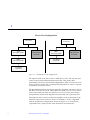
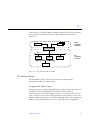
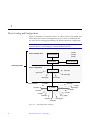
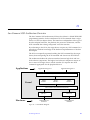
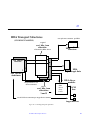
Figure 1-1 on page 6 illustrates two possible device tree configurations.
The SunOS Kernel and Device Tree
5
1
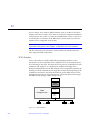
Device Tree Configurations
root node
PCI
bus nexus node
root node
onboard uart
SBus
bus nexus node
leaf node
SBus
bus nexus node
onboard uart
leaf node
xyz device
leaf node
xyz device
leaf node
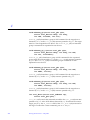
Figure 1-1
Possible device tree configurations
The topmost node in the device tree is called the root node. The tree structure
creates a parent-child relationship between nodes. This parent-child
relationship is the key to architectural independence. When a leaf or bus nexus
driver requires a service that is architecturally dependent in nature, it requests
its parent to provide the service.
The intermediate nodes in the tree are generally associated with buses, such as
the SBus, SCSI, and PCI buses. These nodes are called bus nexus nodes and the
drivers associated with them are called bus nexus drivers. Bus nexus drivers
encapsulate the architectural dependencies associated with a particular bus.
This approach allows drivers to function regardless of the architecture of the
machine or the processor.The xyz driver, for example, is source compatible
with the architectural configurations shown in Figure 1-1; it can be binary
compatible if the system uses the same Instruction Set Architecture.
6
Writing Device Drivers—May 1996
1
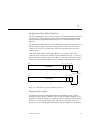
Additionally, in Figure 1-1, the bus nexus driver associated with the PCI-toSBus adapter card handles all of the architectural dependencies of the interface.
The xyz driver only needs to know that it is connected to a SBus.
Example Device Tree
In this example, the system builds a tree structure that contains information
about the devices connected to the machine at boot time. The system uses this
information to create a dependency tree with bus nexus nodes and leaf nodes.
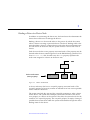
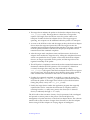
Figure 1-2 on page 8 illustrates a sample device tree for a frame buffer
(SUNW,ffb), a pseudo bus nexus node, and several PCI devices associated
with a PCI bus nexus node.
The SunOS Kernel and Device Tree
7
1
Device Tree
root node
PCI bus
nexus node
pseudo
nexus node
ebus
fdthree
SUNW,CS4231
Leaf Nodes
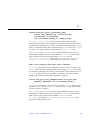
Figure 1-2
hme
SUNW,ffb
leaf node
glm
se
sd0
sd6
Example device tree
In Figure 1-2, the SUNW,ffb leaf node represents a system frame buffer. The
pseudo bus nexus node is the parent node of any pseudo device drivers
(drivers without hardware). The PCI bus nexus node is the parent node for the
following children:
•
•
•
8
ebus—the ebus bus nexus node
hme—the Ethernet driver
glm—the SCSI HBA (host bus adapter) nexus node
Writing Device Drivers—May 1996
1
The ebus nexus node is both the child of the PCI bus nexus node and the
parent node of the following leaf nodes: fdthree (a floppy disk device);
SUNW,CS4231 (an audio device); and se (a serial device). The Ethernet driver
(hme) is a leaf node and therefore has no children. The SCSI HBA node (glm)
has a number of disk devices as leaf nodes.
Device Drivers
Associated with each leaf or bus nexus node may be a device driver. Each
driver has associated with it a device operations structure (see dev_ops(9S))
that defines the operations that the device driver can perform. The device
operations structure contains function pointers for generic operations such as
getinfo(9E) and attach(9E). It also contains a pointer to operations specific
to bus nexus drivers and a pointer to operations specific to leaf drivers.
Displaying the Device Tree
The device tree can be displayed in two ways:
•
The prtconf(1M) command displays all of the device nodes in the device
tree.
•
The /devices hierarchy is a representation of the device tree; ls(1) can be
used to view it.
Note – /devices only displays devices that have drivers configured into the
system. prtconf(1M) shows all driver nodes regardless of whether a driver
for the device exists on the system or not.
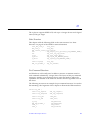
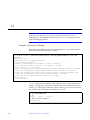
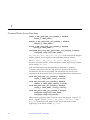
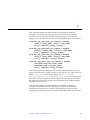
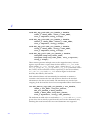
prtconf(1M)
The prtconf(1M) command (abbreviated example output below) displays all
the devices in the system:
SUNW,SPARCstation-fusion
pci, instance #0
pci, instance #1
ebus, instance #0
The SunOS Kernel and Device Tree
9
1
auxio (driver not attached)
power (driver not attached)
sc (driver not attached)
se, instance #0
su, instance #0
su, instance #1
ecpp (driver not attached)
fdthree, instance #0
SUNW,CS4231 (driver not attached)
eeprom (driver not attached)
flashprom (driver not attached)
hme, instance #0
glm, instance #0
disk (driver not attached)
tape (driver not attached)
sd, instance #0
sd, instance #1 (driver not attached)
sd, instance #2 (driver not attached)
sd, instance #3 (driver not attached)
sd, instance #4 (driver not attached)
sd, instance #5 (driver not attached)
sd, instance #6
SUNW,UltraSPARC (driver not attached)
SUNW,ffb, instance #0
pseudo, instance #0
/devices
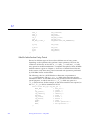
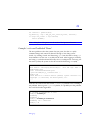
The /devices hierarchy provides a name space that represents the device tree.
Following is an abbreviated listing of the /devices name space. The sample
output corresponds to the example device tree and prtconf(1M) output
shown previously.
/devices
/devices/pseudo
/devices/pci@1f,4000
/devices/pci@1f,4000/ebus@1
/devices/pci@1f,4000/ebus@1/se@14,400000:a
/devices/pci@1f,4000/ebus@1/se@14,400000:b
/devices/pci@1f,4000/ebus@1/fdthree@14,3023f0:b
/devices/pci@1f,4000/ebus@1/SUNW,CS4231@14,200000:sound,audio
/devices/pci@1f,4000/glm@3
/devices/pci@1f,4000/glm@3/sd@0,0:a
/devices/pci@1f,4000/glm@3/sd@6,0:a
/devices/pci@1f,2000 /devices/SUNW,ffb@1e,0:ffb0
10
Writing Device Drivers—May 1996
1
Binding a Driver to a Device Node
In addition to constructing the device tree, the kernel must also determine the
drivers that will be used to manage the devices.
Binding a driver to a device node refers to the process by which the system
selects a driver to manage a particular device. The driver binding name is the
name that links a driver to a unique device node in the device information tree.
For each device in the device tree, the system chooses a driver from a list of
drivers.
Each device node has a name property associated with it. This property may be
derived either from an external agent such as the PROM during system boot or
from a driver.conf file. In either case, the name property represents the
node name assigned to a device in the device tree.
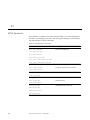
device node names
(name property)
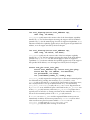
Figure 1-3
SUNW, CS4231
fdthree
se
Device node names
A device node may also have a compatible property associated with it. The
compatible property (if it exists) contains an ordered list of one or more possible
driver names for the device.
The system uses both the name and the compatible properties to select a driver
for the device. The system first attempts to match the contents of the device
name property to a driver on the system. If this fails, the system checks for the
existence of a compatible property. The compatible property is simply a listing of
possible driver names from which the system can determine the specific driver
binding name for the device.
The SunOS Kernel and Device Tree
11
1
Beginning with the first driver name on the compatible property list, the system
attempts to match the driver name to a known driver on the system. It
processes each entry on the list until either a match is found or the end of the
list is reached.
If the contents of either the name property or the compatible property match a
driver on the system, then that driver is bound to the device node. If no match
is found, no driver is bound to the device node.
Generic Device Names
Some devices with a compatible property use a Generic Device Name as the value
for the name property. Generic device names describe the function of a device
without actually identifying a specific driver for the device. For example, a
SCSI HBA may have a generic device name of scsi. An ethernet device may
have a generic device name of ethernet.
The compatible property allows the system to determine alternate driver names
(like glm for scsi HBA device drivers or hme for ethernet device drivers) for
devices with a generic device name.
Devices with a generic device names must support a compatible property.
Note – A complete description of generic device names may be found in the IEEE
1275 Open Firmware Boot Standard.
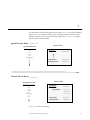
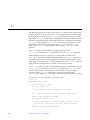
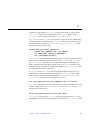
Figure 1-4 on page 13 shows two device nodes: one node uses a specific device
name and the other uses a generic device name.
For the device node with a specific device name, the driver binding name
SUNW,ffb is the same name as the device node name.
12
Writing Device Drivers—May 1996
1
For the device node with the generic device name display, the driver binding
name SUNW,ffb is the first name on the compatible property driver list that
matches a driver on the system driver list. In this case, display is a generic
device name for frame buffers.
Specific Device Name (SUNW,ffb)
Device Node
System Driver List
esp
isp
cgsix
sd
SUNW,ffb
st
pci
properties :
name =
SUNW,ffb
node name :
binding name :
SUNW,ffb
SUNW,ffb
Generic Device Name (display)
Device Node
System Driver List
esp
isp
cgsix
sd
SUNW,ffb
st
pci
Figure 1-4
properties :
name =
compatible =
display
node name :
binding name :
display
SUNW,ffb
fast_fb
SUNW,ffb
slow_fb
Driver Node Binding
The SunOS Kernel and Device Tree
13
1
14
Writing Device Drivers—May 1996
Hardware Overview
2
This chapter discusses some general issues about the hardware that SunOS 5.x
runs on. This includes issues related to the processor, bus architectures, and
memory models supported by Solaris 2.x, various device issues, and the PROM
used in Sun platforms.
Note – The information presented here is for informational purposes only and
may be of help during driver debugging. However, the Solaris 2.x DDI/DKI
hides many of these implementation details from device drivers.
SPARC Processor Issues
This section describes a number of SPARC processor-specific topics including
data alignment, byte ordering, register windows, and availability of floating
point instructions. For information on X86 processor-specific topics, see “x86
Processor Issues” on page 17. For information on PowerPC processor-specific
topics, see “PowerPC Processor Issues” on page 18
Data Alignment
All quantities must be aligned on their natural boundaries. Using standard C
data types:
•
•
short integers are aligned on 16-bit boundaries.
long integers are aligned on 32-bit boundaries.
15
2
•
long long integers are aligned on 64-bit boundaries.
Usually, alignment issues are handled by the compiler. Driver writers are more
likely to be concerned about alignment as they must use the proper data types
to access their device. Since device registers are commonly accessed through a
pointer reference, drivers must ensure that pointers are properly aligned when
accessing the device. See “Data Access Functions” on page 55 for more
information about accessing device registers.
Structure Member Alignment
Because of the data alignment restrictions imposed by the SPARC processor, C
structures also have alignment requirements. Structure alignment requirements
are imposed by the most strictly-aligned structure component. For example, a
structure containing only characters has no alignment restrictions, while a
structure containing a long long member must be constructed to guarantee
that this member falls on a 64-bit boundary. See “Structure Padding” on
page 59 for more information on how this relates to device drivers.
Byte Ordering
The SPARC processor uses big endian byte ordering; in other words, the most
significant byte of an integer is stored at the lowest address of the integer.
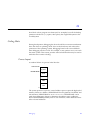
Byte 0
Byte 1
MSB
Byte 2
Byte 3
LSB
Register Windows
SPARC processors use register windows. Each register window is comprised of
8 in registers, 8 local registers, and 8 out registers (which are the in registers of
the next window). There are also 8 global registers. The number of register
windows ranges from 2 to 32 depending on the processor implementation.
16
Writing Device Drivers—May 1996
2
Because drivers are normally written in C, the fact that register windows are
used is usually hidden by the compiler. However, it may be necessary to use
them when debugging the driver. See “Debugging Tools” on page 323 for more
information on how register windows are used when debugging.
Floating Point Operations
Drivers should not perform floating point operations, since they are not
supported in the kernel.
Multiply and Divide Instructions
The Version 7 SPARC processors do not have multiply or divide instructions.
These instructions are emulated in software and should be avoided. Since a
driver cannot tell whether it is running on a Version 7 or Version 8 processor,
intensive integer multiplication and division should be avoided if possible.
Instead, use bitwise left and right shifts to multiply and divide by powers of
two.
SPARC Architecture Manual
The SPARC Architecture Manual, Version 8, contains more specific information
on the SPARC CPU.
x86 Processor Issues
This section describes a number of x86 processor-specific topics including data
alignment, byte ordering and floating point instructions.
Data Alignment
There are no alignment restrictions on data types. However, extra memory
cycles may be required for the x86 processor to properly handle misaligned
data transfers.
Hardware Overview
17
2
Structure Member Alignment
See “Structure Padding” on page 59 for more information on how this relates
to device drivers.
Byte Ordering
The x86 processor uses little endian byte ordering. The least significant byte of
an integer is stored at the lowest address of the integer.
Byte 0
Byte 1
LSB
Byte 2
Byte 3
MSB
Floating Point Operations
Drivers should not perform floating point operations, since they are not
supported in the kernel.
x86 Architecture Manuals
Intel Corporation publishes a number of books on the x86 family of processors.
80386 Programmer’s Reference Manual, Intel Corporation, 1986. ISBN 1-55512022-9.
i486 Microprocessor Hardware Reference Manual, Intel Corporation, 1990. ISBN 155512-112-8.
Pentium Processor User’s Manual - Volume 3: Architecture and Programming
Manual, Intel corporation, 1993. ISBN 1-55512-195-0.
PowerPC Processor Issues
Data Alignment
All quantities must be aligned on their natural boundaries. Using standard C
data types:
18
Writing Device Drivers—May 1996
2
•
•
•
short integers are aligned on 16-bit boundaries.
long integers are aligned on 32-bit boundaries.
long long integers are aligned on 64-bit boundaries.
Usually, alignment issues are handled by the compiler. Driver writers are more
likely to be concerned about alignment as they must use the proper data types
to access their device. Since device registers are commonly accessed through a
pointer reference, drivers must ensure that pointers are properly aligned when
accessing the device. See “Data Access Functions” on page 55 for more
information about accessing device registers.
Structure Member Alignment
Because of the data alignment restrictions imposed by the PowerPC (TM)
microprocessor-based system, C structures also have alignment requirements.
Structure alignment requirements are imposed by the most strictly-aligned
structure component. For example, a structure containing only characters has
no alignment restrictions, while a structure containing a long long member
must be constructed to guarantee that this member falls on a 64-bit boundary.
See “Structure Padding” on page 59 for more information on how this relates
to device drivers.
Byte Ordering
The PowerPC processor uses little endian byte ordering. The least significant
byte of an integer is stored at the lowest address of the integer.
Byte 0
LSB
Byte 1
Byte 2
Byte 3
MSB
Floating Point Operations
Drivers should not perform floating point operations, since they are not
supported in the kernel.
Hardware Overview
19
2
PowerPC Architecture Manual
The PowerPC(TM) Architecture: A Specification or a New Family of RISC Processors,
Edited by Cathy May, Ed Silha, Rick Simpson, Hank Warren. Morgan Kaufman
Publishers, Inc., San Francisco. Second Edition, May, 1994.
Store Buffers
To improve performance, the CPU uses internal store buffers to temporarily
store data. This may affect the synchronization of device I/O operations.
Therefore, the driver needs to take explicit steps to make sure that writes to
registers complete at the proper time.
For example, when access to device space (such as registers or a frame buffer)
is synchronized by a lock, the driver needs to make sure that the store to the
device space has actually completed before releasing the lock. Releasing the
lock does not guarantee the flushing of I/O buffers.
When acknowledging an interrupt, to give another example, the driver usually
sets or clears a bit in a device control register. The driver must ensure that the
write to the control register has reached the device before the interrupt handler
returns. Similarly, if the device requires a delay (the driver busy-waits) after
writing a command to the control register, the driver must ensure that the
write has reached the device before delaying.
If the device registers can be read without undesirable side effects, verification
of a write can be as simple as reading the register immediately after writing to
it. If that particular register cannot be read without undesirable side effects,
another device register in the same register set can be used.
Note – On PowerPC, the SYNC instruction ensures that the effects of any stores
are applied in program order before the sync completes. Releasing a lock (a
mutex) executes a SYNC instruction, thereby guaranteeing the flushing of
stores to I/O buffers.
System Memory Model
The system memory model defines the semantics of memory operations such
as load and store and specifies how the order in which these operations are
issued by a processor is related to the order in which they reach memory. The
20
Writing Device Drivers—May 1996
2
memory model applies to both uniprocessors and shared-memory
multiprocessors. Two memory models are supported: Total Store Ordering
(TSO) and Partial Store Ordering (PSO).
Total Store Ordering (TSO)
TSO guarantees that the sequence in which store, FLUSH, and atomic loadstore instructions appear in memory for a given processor is identical to the
sequence in which they were issued by the processor.
Both x86 and SPARC processors support TSO.
Partial Store Ordering (PSO)
PSO makes no guarantee that the sequence in which store, FLUSH, and atomic
load-store instructions appear in memory for a given processor is identical to
the sequence in which they were issued by the processor. The processor can
reorder the stores so that the sequence of stores in memory is not the same as
the sequence of stores in the CPU.
SPARC and PowerPC processors support PSO; x86 processors do not.
For SPARC processors, conformance between issuing order and memory order is
provided by the system framework using the STBAR instruction: if two of the
above instructions are separated by a STBAR in the issuing order of a
processor, or if they reference the same location, then the memory order of the
two instructions is the same as the issuing order.
See Chapter 6, Appendix J, and Appendix K of The SPARC Architecture Manual,
Version 8 for more details on the SPARC memory model.
For PowerPC, the EIEIO instruction assures that all memory references issued
before the EIEIO become visible to other processors and mechanisms (such as
DMA) before any references issued after the EIEIO. The SYNC instruction
ensures not only the ordering, but the completion of the references before the
SYNC.
Bus Architectures
This section describes a number of bus-specific topics including device
identification, device addressing, and interrupts.
Hardware Overview
21
2
Device Identification
Device identification is the process of determining which devices are present in
the system.
Self-Identifying Devices
Some devices are self-identifying—the device itself provides information to the
system so that it can identify the device driver that needs to be used. The
device usually provides additional information to the system in the form of
name-value (name=value) pairs that can be retrieved using the property
interfaces. See “Properties” on page 69 for more information on properties.
SBus and PCI Local bus devices are examples of self-identifying devices. On
SBus, the information is usually derived from a small FORTH program stored
in the FCode PROM on the device. PCI devices provide a configuration space
containing device configuration information. See sbus(4) and pci(4) for more
information.
Non-Self-Identifying Devices
Devices that do not provide information to the system to identify themselves
are called non-self-identifying devices. Drivers for these devices must have a
probe(9E) routine which determines whether the device is really there. In
addition, information about the device must be provided in a hardware
configuration file (see driver.conf(4)), so that the system can provide
probe(9E) with the information it needs to contact the device. See probe(9E)
for more information.
VMEbus, ISA, EISA, and MicroChannel devices are examples of non-selfidentifying devices. See vme(4), isa(4), eisa(4), and mca(4) for more
information.
Interrupts
SunOS supports polling interrupts and vectored interrupts.The Solaris 2.x
DDI/DKI interrupt model is the same for both. See “Types of Interrupts” on
page 118,” for more information about interrupt handling.
22
Writing Device Drivers—May 1996
2
Bus Specifics
This section covers addressing and device configuration issues specific to the
buses that SunOS supports.
PCI Local Bus
The PCI Local Bus is a high performance bus designed for high-speed data
transfer. The PCI bus usually resides on the system board and operates at
speeds close to those of the host processor. The PCI bus is normally used as an
interconnect mechanism between highly integrated peripheral components,
peripheral add-on boards and process/memory systems. The processor, main
memory and the high speed PCI bus itself are connected through a PCI host
bridge, as shown in Figure 2-1 on page 24.
A tree structure of interconnected I/O buses is supported through a series of
PCI bus bridges. Subordinate PCI bus bridges can be extended underneath the
PCI host bridge to allow a single bus system to be expanded into a complex
system with multiple secondary buses. PCI devices can be connected to one of
these secondary buses. In addition, other bus bridges like SBus, ISA-bus, etc.
can be connected.
Every PCI device has a unique vendor ID and device ID. Multiple devices of
the same kind are further identified by their unique device numbers on the bus
where they reside.
Hardware Overview
23
2
Typical PCI devices include SCSI adaptors, graphics/ display adaptors,
network controllers, etc.
RAM
CPU
PCI Host
Bridge
Bus 0
Vendor-id = 8006
Device-id = 4a3
Device # = 3
PCI Bus
Graphics
Adapter
Vendor-id = 1020
Device-id = 3
Device # = 1
PCI Bus
Bridge
Vendor-id = 8080
Device-id = 520
Device # = 2
LAN
Adapter
Vendor-id = 1001
Device-id = 4b
Device # = 3
Bus 1
SCSI HBA
Figure 2-1
Vendor-id = 1000
Device-id = 4
Device # = 1
Machine block diagram
The PCI host bridge provides an interconnect between the processor and
peripheral components. Through the PCI host bridge, the processor can
directly access main memory independent of other PCI bus masters. For
example, while the CPU is fetching data from the cache controller in the host
bridge, other PCI devices can also access the system memory through the host
bridge. The advantage of this architecture lies in its separation of the I/O bus
from the processor’s host bus.
The PCI host bridge also provides data access mappings between the CPU and
peripheral I/O devices. It maps every peripheral device to the host address
domain so that the processor can access the device through memory mapped I/O
or special I/O instructions. On the local bus side, the PCI host bridge maps the
24
Writing Device Drivers—May 1996
2
system memory to the PCI address domain so that PCI device can access the
host memory as a bus master. The two address domains are shown in
Figure 2-2.
CPU
RAM
HOST
ADDRESS
DOMAIN
LAN
Adapter
PCI
ADDRESS
DOMAIN
PCI Host Bridge
Bus 0
PCI Bus
Bridge
Graphics
Adapter
Bus 1
SCSI HBA
Figure 2-2
Host and bus address domains
PCI Address Domain
The PCI address domain consists of three distinct address spaces:
Configuration, Memory and I/O space.
Configuration Address Space
Configuration space is defined geographically; in other words, the location of a
peripheral device is determined by its physical location within an
interconnected tree of PCI bus bridges. A device is usually located by its bus
number and device (slot) number. Each peripheral device contains a set of welldefined configuration registers in its PCI configuration space. The registers are
used not only to identify devices but also to provide device configuration
Hardware Overview
25
2
through system software. For example, base address registers in the device
Configuration space must be allocated before a device can respond to data
access. The Configuration space registers are illustrated in Figure 2-3.
I/O
Memory
Configuration
Configuration Registers
Device ID
Vendor ID
Status
Command
Class Code
Base Address 1
Base Address 2
..
Base Address 6
Expansion ROM base
Int
Pin
Figure 2-3
Int
Line
PCI Configuration address space
The method for generating configuration cycles is host dependent. In x86
machines, special I/O ports are used. In other Instruction Set Architectures, the
PCI configuration space may be memory-mapped to certain address locations
corresponding to the PCI host bridge in the host address domain. When a
device configuration register is accessed by the processor, the request will be
routed to the PCI host bridge. The bridge then translates the access into proper
configuration cycles on the bus.
26
Writing Device Drivers—May 1996
2
Configuration Base Address Registers
The PCI Configuration space consists of up to six 32-bit base address registers
for each device. These registers provide both size and data type information.
System firmware assigns base addresses in the PCI address domain to these
registers.
The firmware identifies the size of each addressable region by writing all 1’s to
the base address register and then reading back the value. The device will
return 0’s in all don’t-care address bits, effectively specifying the size of the
address space.
Each addressable region can be either Memory or I/O space. The value
contained in bit 0 of the base address register identifies the type. A value of 0
in bit 0 indicates a Memory space and value of 1 indicates an I/O space. Figure
9 shows two base address registers: one for Memory; the other for I/O types.
4
31
Base Address
3
2 1
Type
0
0
Base Address Register for Memory
space indicator
2
31
Base Address
0
1
Resv
1
Base Address Register for I/O
Figure 2-4
Base address registers for Memory and I/O
Memory Address Space
PCI supports both 32-bit and 64-bit addresses for Memory space. System
firmware assigns regions of Memory space in the PCI address domain to PCI
peripherals. The base address of a region is stored in the base address register
of the device’s PCI configuration space. The size of each region must be a
power of two, and the assigned base address must be aligned on a boundary
Hardware Overview
27
2
equal to the size of the region. Device addresses in Memory space are memorymapped into the host address domain so that data access to any device can be
performed by the processor’s native load/store instructions.
I/O Address Space
PCI supports 32-bit I/O space. I/O space may be accessed differently in
different Instruction Set Architectures. Processors with special I/O instructions,
like the Intel processor family, access the I/O space with in and out
instructions. Machines with no special I/O instructions are usually memorymapped to the address locations corresponding to the PCI host bridge in the
host address domain. When the processor accesses the memory-mapped
addresses, an I/O request will be sent to the PCI host bridge. It then translates
the addresses into I/O cycles and puts them on the PCI bus. Memory-mapped I/
O is performed by the native load/store instructions of the processor. For
example, reading from or writing to a memory mapped data register can be
done by a load or store instruction to that register’s I/O address.
Hardware Configuration Files
Hardware configuration files should be unnecessary for PCI Local bus devices.
However, on some occasions drivers for PCI devices may need to use hardware
configuration files to augment the driver private information. See
driver.conf(4) and pci(4) for further details.
SBus
Typical SBus systems consist of a motherboard (containing the CPU and SBus
interface logic), a number of SBus devices on the motherboard itself, and a
number of SBus expansion slots. An SBus can also be connected to other types
of buses through an appropriate bus bridge.
The SBus is geographically addressed; each SBus slot exists at a fixed physical
address in the system. An SBus card has a different address depending on
which slot it is plugged into. Moving an SBus device to a new slot causes the
system to treat it as a new device. See “Persistent Instances” on page 101 for
more information.
28
Writing Device Drivers—May 1996
2
The SBus uses polling interrupts. When an SBus device interrupts, the system
only knows which of several devices might have issued the interrupt. The
system interrupt handler must ask the driver for each device whether it is
responsible for the interrupt.
Following is a discussion of how the SBus is implemented on various
SPARCstations.
Physical Address Space
The physical address space layout of the SPARCstation 20 is shown in
Table 2-1. A physical address on the SPARCstation 20 consists of 36 bits. The
36-bit physical address space is further broken down into 16 32-bit address
spaces identified by PA(35:32).
Table 2-1
Devices Physical space in the SPARCstation 20
PA(35:32)
32-bit space
Usage
0x0
0x00000000 - 0xFFFFFFFF
Main Memory
0x1-0xD
Not used on SS20
Not used on SS20
0xE
0x00000000
0x10000000
0x20000000
0x30000000
0xE0000000
0xF0000000
0xF
0x00000000 - 0xFFFFFFFF
Hardware Overview
-
0x0FFFFFFF
0x1FFFFFFF
0x2FFFFFFF
0x3FFFFFFF
0xEFFFFFFF
0xFFFFFFFF
SBus
SBus
SBus
SBus
SBus
SBus
Slot
Slot
Slot
Slot
Slot
Slot
0
1
2
3
E
F
Control space
29
2
Physical SBus Addresses
The SBus has 32 address bits, as described in the SBus Specification. In the
SPARCstation 20, the address bits are used as described in Table 2-2:
Table 2-2
SPARCstation 20 SBus address bits
Bits
Description
0 - 27
These bits are the SBus address lines used by a SBus card to
address the contents of the card.
28 - 31
Used by the CPU to select one of the SBus slots. These bits
generate the SlaveSelect lines.
This addressing scheme yields the SPARCstation 20 addresses shown earlier in
Table 2-1. Other implementations may use a different number of address bits.
The SPARCstation 20 has six SBus slots, four of which are physical. Slots 0
through 3 are available for SBus cards. Slots 4-13 are reserved. The slots are
used in the following way:
•
•
Slots 0—3 are physical slots that have DMA-master capability.
Slot E and F are not actual physical slots, but refer to the on-board DMA,
SCSI, Ethernet and Audio controllers. For convenience, these are viewed as
being plugged into Slot E and F.
Note – Some SBus slots are slave-only slots, such as slot 3 on the
SPARCstation1. Drivers that require DMA capability should use
ddi_slaveonly(9F) to determine if their device is in a DMA-capable slot. For
an example of this function, see “attach( )” on page 105.
Hardware Configuration Files
Hardware configuration files are normally unnecessary for SBus devices.
However, on some occasions drivers for SBus devices may need to use
hardware configuration files to augment the information provided by the SBus
card. See driver.conf(4) and sbus(4) for further details.
30
Writing Device Drivers—May 1996
2
VMEbus
The VMEbus supports multiple address spaces. Appropriate entries in the
driver.conf(4) file should be made for the address spaces used by the device
For DMA devices, the address space that the board uses for its DMA transfers
must be known by the driver (this is usually a 32- or 24-bit space).
A VMEbus card has its own address, possibly configurable by jumpers. A
VMEbus card has the same address no matter which slot it is plugged into.
Changing the address of a VME card causes the system to treat it as a new
device.
The VMEbus uses vectored interrupts. When a VMEbus device interrupts, the
system can identify which device is interrupting and call the correct device
driver directly.
Following is a discussion of how the VMEbus is implemented in the
SPARCserver 600.
Physical Address Space
The physical address space layout of the SPARCserver 600 is shown in
Table 2-3. A physical address on the SPARCserver 600 consists of 36 bits. The
36-bit physical address space is further broken down into 16 32-bit address
spaces identified by PA(35:32).
Table 2-3
Devices physical space in the SPARCserver 600
PA(35:32)
32-bit space
Usage
0x0
0x00000000 - 0xFFFFFFFF
Main Memory
0x1-0x9
Not used on SS600
Not used on SS600
0xA
0xB
0xC
0xD
0x00000000
0x00000000
0x00000000
0x00000000
VME
VME
VME
VME
0xE
0x00000000 - 0xFFFFFFFF
SBus space
0xF
0x00000000 - 0xFFFFFFFF
Control space
Hardware Overview
-
0xFFFFFFFF
0xFFFFFFFF
0xFFFFFFFF
0xFFFFFFFF
User 16-bit
User 32-bit
Supervisor 16-bit
Supervisor 32-bit
31
2
Physical VME Addresses
The SPARCserver 600 has a full 32-bit VMEbus. Table 2-4 contains a listing of
the VMEbus address types supported by the generic VMEbus.
Table 2-4
Generic VMEbus (full set)
VMEbus Space
Name
Address
Size
Data Transfer
Size
Physical Address
Range
vme32d16
32 bits
16 bits
0x0 – 0xFFFFFFFF
vme24d16
24 bits
16 bits
0x0 – 0xFFFFFF
vme16d16
16 bits
16 bits
0x0 – 0xFFFF
vme32d32
32 bits
32 bits
0x0 – 0xFFFFFFFF
vme24d32
24 bits
32 bits
0x0 – 0xFFFFFF
vme16d32
16 bits
32 bits
0x0 – 0xFFFF
Not all of these address spaces are commonly used; nevertheless, they are all
supported on the SPARCserver 600.
When a smaller VME space overlays a larger VME space, it steals memory
from the larger space and is considered by the MMU to be part of the larger
address space. There is no way to physically access VMEbus addresses above
0xFF000000 in 32-bit VMEbus space, or above 0xFFFF0000 in 24-bit
VMEbus space.
32
Writing Device Drivers—May 1996
2
Figure 2-5 illustrates the overlaying of VMEbus address spaces.
Type
0xB, 0xD
vme32d32
PA(35:32)
CPU
32
bits
vme16d32
4 bits
MMU
32 bits
vme24d32
0xA, 0xC
vme32d16
Virtual
Address
(CPU or DVMA)
vme16d16
0xF
Control
Space
0x0
Main
Memory
0xE
SBus
Space
Physical
Address
Figure 2-5
vme24d16
SPARCserver 600 VMEbus address spaces
Caution – There are restrictions on device addressing. The lower ranges of the
32-bit and 24-bit VME space are reserved for DMA. For example, devices must
not be present in the low megabyte of VME address space or the system will
not boot. In addition, there may be devices on the bus with addresses that
conflict. These can be determined by examining the hardware configuration
files.
Hardware Overview
33
2
Hardware Configuration Files
Most VME devices require hardware configuration files to inform the system
that the device hardware may be present. The configuration file must specify
the device addresses on the VMEbus and any interrupt capabilities that the
device has.
Configuration files for VMEbus devices should identify the parent bus driver
implicitly using the class key word and specifying class “vme.” This removes
the dependency on the name of the particular bus driver involved since the
driver may be named differently on different platforms. See driver.conf(4)
and vme(4) for further details.
ISA Bus
Memory and I/O Space
Two address spaces are provided: memory address space and I/O address
space. Depending on the device, registers may appear in one or both of these
address spaces.
Table 2-5
ISA bus address space
ISA Space
Name
Address
Size
Data Transfer
Size
Physical Address
Range
Main Memory
24
16
0x0-0xffffff
I/O
—
8/16
0x0-0xfff
Registers can be mapped in memory address space and used by the driver as
normal memory (see “Memory Space Access” on page 56).
Registers in I/O space are accessed through I/O port numbers using separate
kernel routines. See “I/O Space Access” on page 57 for more information.
Hardware Configuration Files
ISA bus devices require hardware configuration files to inform the system that
the hardware may be present. The configuration file must specify any device I/
O port addresses, any interrupt capabilities that the device may have, and any
memory-mapped addresses it may occupy.
34
Writing Device Drivers—May 1996
2
Configuration files for these devices should normally identify the parent bus
driver as “isa”. However, since the EISA bus is a super set of the ISA bus, all
ISA devices can also be configured to run in an EISA bus slot. In this case,
instead of implicitly specifying a particular parent in the configuration file,
driver writers can use the class key word and specify the class as “sysbus.”
This removes the dependency on the name of a particular bus driver. See
driver.conf(4) and isa(4) for further details.
EISA Bus
Memory and I/O Space
Two address spaces are provided: memory address space and I/O address
space. Depending on the device, registers may appear in one or both of these
address spaces.
Table 2-6
EISA bus address space
EISA Space
Name
Address
Size
Data Transfer
Size
Physical Address
Range
Main Memory
32
32
0x0-0xffffffff
I/O
—
8/16/32
0x0-0xffff
Registers can be mapped in memory address space and used by the driver as
normal memory (see “Memory Space Access” on page 56).
Registers in I/O space are accessed through I/O port numbers using separate
kernel routines. See “I/O Space Access” on page 57) for more information.
Hardware Configuration Files
EISA bus devices require hardware configuration files to inform the system
that the hardware may be present. The configuration file must specify any
device I/O port addresses, any interrupt capabilities that the device may have,
and any memory-mapped addresses it may occupy.
Configuration files for these devices should normally identify the parent bus
driver as “eisa”. See driver.conf(4) and eisa(4) for further details.
Hardware Overview
35
2
MCA Bus
Memory and I/O Space
Two address spaces are provided: memory address space and I/O address
space. Depending on the device, registers may appear in one or both of these
address spaces.
Table 2-7
MCA address space
MCA Space
Name
Address
Size
Data Transfer
Size
Physical Address
Range
Main Memory
32
32
0x0-0xffffffff
I/O
—
8/16/32
0x0-0xfff
Registers can be mapped in memory address space and used by the driver as
normal memory (see “Memory Mapping” on page 51).
Registers in I/O space are accessed through I/O port numbers using separate
kernel routines. See “I/O Space Access” on page 57) for more information.
Hardware Configuration Files
MCA bus devices require hardware configuration files to inform the system
that the hardware may be present. The configuration file must specify any
device I/O port addresses, any interrupt capabilities that the device may have,
and any memory-mapped addresses it may occupy.
Configuration files for these devices should normally identify the parent bus
driver as “mca”. See driver.conf(4) and mca(4) for further details.
Device Issues
Timing-Critical Sections
While most driver operations can be performed without synchronization and
protection mechanisms beyond those provided by the locking primitives
described in “Locking Primitives” on page 82, some devices require that a
sequence of events happen in order without interruption. In conjunction with
36
Writing Device Drivers—May 1996
2
the locking primitives, the function ddi_enter_critical(9F) asks the
system to guarantee, to the best of its ability, that the current thread will
neither be preempted nor interrupted. This stays in effect until a closing call to
ddi_exit_critical(9F) is made. See ddi_enter_critical(9F) for details.
Delays
Many chips specify that they can be accessed only at specified intervals. For
example, the Zilog Z8530 SCC has a “write recovery time” of 1.6 microseconds.
This means that a delay must be enforced with drv_usecwait(9F) when
writing characters with an 8530. In some instances, it is unclear what delays are
needed; in such cases, they must be determined empirically.
Internal Sequencing Logic
Devices with internal sequencing logic map multiple internal registers to the
same external address. There are various kinds of internal sequencing logic:
•
•
•
The Intel 8251A and the Signetics 2651 alternate the same external register
between two internal mode registers. Writing to the first internal register is
accomplished by writing to the external register. This write, however, has
the side effect of setting up the sequencing logic in the chip so that the next
read/write operation refers to the second internal register.
The NEC PD7201 PCC has multiple internal data registers. To write a byte
into a particular register, two steps must be performed. The first step is to
write into register zero the number of the register into which the following
byte of data will go. The data is then written to the specified data register.
The sequencing logic automatically sets up the chip so that the next byte
sent will go into data register zero.
The AMD 9513 timer has a data pointer register that points at the data
register into which a data byte will go. When sending a byte to the data
register, the pointer is incremented. The current value of the pointer register
cannot be read.
Interrupt Issues
The following are some common interrupt-related issues:
Hardware Overview
37
2
•
A controller interrupt does not necessarily indicate that both the controller
and one of its slave devices are ready. For some controllers, an interrupt may
indicate that either the controller is ready or one of its devices is ready, but
not both.
•
Not all devices power up with interrupts disabled and then start
interrupting only when told to do so.
•
Some devices do not provide a way to determine that the board has
generated an interrupt.
•
Not all interrupting boards shut off interrupts when told to do so or after a
bus reset.
Byte Ordering
To achieve the goal of multiple platform, multiple Instruction Set Architecture
portability, host/bus dependencies were removed from the drivers. The first
dependency issue to be addressed was the endian-ness (or byte ordering) of the
processor. For example, the x86 processor family is little endian while the
SPARC architecture is big endian.
Bus architectures display the same endian-ness types as processors. The PCI
local bus, for example, is little endian, the SBus is big endian, the ISA-bus is
little endian and so on.
To maintain portability between processors and buses, DDI-compliant drivers
must be endian neutral. Although drivers could conceivably manage their
endian-ness by runtime checks or by preprocessor directives like #ifdef
_LITTLE_ENDIAN or _BIG_ENDIAN statements in the source code, long term
maintenance would be troublesome. The Solaris 2.5 DDI solution hides the
endian-ness issues from the drivers as illustrated in Figure 2-6 on page 39. In
some cases, the DDI framework performs the byte swapping using a software
approach. In other cases, where byte swapping can be done by hardware (as in
38
Writing Device Drivers—May 1996
2
MMU page-level swapping or by special machine instructions), the DDI
framework will take advantage of the hardware features to improve
performance.
A) Byte Ordering
b0 27
a9
Data = 0xfea927b0
fe
SWAP
little endian host
fe
a9
fe
CPU
a9
27 b0
big endian device
27 b0
big endian host
B) Data Ordering
ff
Figure 2-6
00
aa
ee
CPU
ff
00
ff
00
00
aa
aa
ee
strict order
aa
ee
data merging
ee
ff
data reordering
Byte ordering and data ordering host bus dependencies
Along with being endian-neutral, portable drivers must also be independent
from data ordering of the processor. Under most circumstances, data must be
transferred in the sequence instructed by the driver. However, sometimes data
can be merged, batched or reordered to streamline the data transfer, as
illustrated in Figure 3B (Data Ordering). For example, data merging may be
applied to accelerate graphics display on frame buffers. Drivers have the
option to advise the DDI environment to use other optimal data transfer
mechanisms during the transfer.
Device Component Representations
Device component (or device-related) information may be represented with a
name=value pair notation called a property.
For example, a reg property is used to represent device registers and onboard
memory. The reg property is a software abstraction that describes device
hardware registers; its value encodes the device register address location and
size. Drivers use the reg property to access device registers.
Hardware Overview
39
2
An interrupt property is a software abstraction used to represent the device
interrupt; its value encodes the device interrupt pin number.
The PROM on SPARC Machines
Some platforms have a PROM monitor that provides support for debugging a
device without an operating system. This section describes how to use the
PROM on SPARC machines to map device registers so that they can be
accessed. Usually, the device can be exercised enough with PROM commands
to determine if the device is working correctly.
The PROM has several purposes; it serves to:
•
Bring the machine up from power on, or from a hard reset PROM reset
command.
•
Provide an interactive tool for examining and setting memory, device
registers, and memory mappings.
•
Boot SunOS or the kernel debugger kadb(1M).
Simply powering up the computer and attempting to use its PROM to examine
device registers will likely fail. While the device may be correctly installed,
those mappings are SunOS specific and do not become active until SunOS is
booted. Upon power up, the PROM maps only essential system devices, such
as the keyboard.
Examples in this section use a bwtwo (monochrome) frame buffer on a
SPARCstation IPC. Using PROM commands to modify video memory on this
frame buffer provides a visual indication that something is happening when
PROM commands are executed.
Open Boot PROM 2.x
For complete documentation on the Open Boot PROM, see the Open Boot
PROM Toolkit User’s Guide and monitor(1M). The examples in this section
refer to a Sun-4c; other architectures may require new commands to map
memory, among other things.
40
Writing Device Drivers—May 1996
2
The Open Boot PROM is currently used on Sun machines with an SBus. The
Open Boot PROM uses an “ok” prompt rather than the “>” prompt used by
SunMon. However, many Open Boot PROM machines present the old-style
interface by default. The ‘n’ command switches an OBP from the old mode to
the new mode.
Type b (boot), c (continue), or n (new command mode)
>n
Type help for more information
ok
Note – If the PROM is in secure mode (the security-mode parameter is not set
to none) the PROM password may be required (set in the securitypassword parameter).
The printenv command displays all parameters and their values.
Help
Help is available with the help command.
History
EMACS-style command-line history is available. Use Control-N (next) and
Control-P (previous) to walk the history list.
Forth Commands
The Open Boot PROM uses the Forth programming language. This is a stackbased language; arguments must be pushed on the stack before running the
desired command (called a word), and the result is left on the stack.
To place a number on the stack, type its value.
ok 57
ok 68
Hardware Overview
41
2
To add the two top values on the stack, use the + operator.
ok +
The result is left on the stack. The stack is shown with the .s word.
ok .s
bf
The default base is hexadecimal. The hex and decimal words can be used to
switch bases.
ok decimal
ok .s
191
See the Forth User’s Guide for more information.
Walking the PROMs Device Tree
The SunOS-like commands pwd, cd, and ls walk the PROM device tree to get
to the device. The cd command must be used to establish a position in the tree
before pwd will work. This example is from a SPARCstation IPC.
ok cd /
42
Writing Device Drivers—May 1996
2
To see the devices attached to the current node in the tree, use ls.
ok ls
ffec8760
ffec5ce0
ffebab64
ffeba958
ffeb9084
ffeb9020
ffeb8fb8
ffeb8f54
ffeb8ed0
ffeb8e5c
ffeb8de8
ffeb8cf8
ffeb8c54
ffeb8c04
ffeb7b5c
options
fd@1,f7200000
virtual-memory@0,0
memory@0,0
sbus@1,f8000000
auxiliary-io@1,f7400003
interrupt-enable@1,f5000000
memory-error@1,f4000000
counter-timer@1,f3000000
eeprom@1,f2000000
audio@1,f7201000
zs@1,f0000000
zs@1,f1000000
openprom
packages
The full node name can be used:
ok cd sbus@1,f8000000
ok ls
ffecd450 bwtwo@3,0
ffecc2f0 le@0,c00000
ffec9b38 esp@0,800000
ffec9af4 dma@0,400000
Rather than using the full node name in the previous example, you could have
used an abbreviation. The abbreviated command line entry looks like this:
ok cd sbus
The name is actually device@slot,offset (for SBus devices). The bwtwo device is in
slot 3 and starts at offset 0. If an SBus device shows up in this tree, the device
has been recognized by the PROM.
Hardware Overview
43
2
The.attributes command displays the PROM properties of a device. These
can be examined to determine what properties the device exports (this is useful
later to ensure that the driver is looking for the correct hardware properties).
These are the same properties that can be retrieved with ddi_getprop(9F).
See sbus(4) and “Properties” on page 69 for related information.
ok cd bwtwo
ok .attributes
monitor-sense
intr
reg
device_type
model
...
00 00 00 03
00 00 00 07 00 00 00 00
00 00 00 03 00 00 00 00 01 00 00 00
display
SUNW,501-1561
The reg property defines an array of register description structures, containing
the following fields:
u_int
u_int
u_int
bustype;
addr;
size;
/* cookie for related bus type*/
/* address of reg relative to bus */
/* size of this register set */
For the bwtwo example, the address is 0.
Mapping the Device
To test the device, it must be mapped into memory. The PROM can then be
used to verify proper operation of the device by using data-transfer commands
to transfer bytes, words, and long words. If the device can be operated from
the PROM, even in a limited way, the driver should also be able to operate the
device.
To set up the device for initial testing perform the following three steps:
44
Writing Device Drivers—May 1996
2
1. Determine the physical address of the SBus slot the device is in. Table 2-8
displays the physical addresses of various SBus slots on a SPARCstation 1
and SPARCstation 1+:
Table 2-8
SBus physical addresses
SBus Slot Number
Physical Address Space
SBus slot #0
0 (internal slot)
SBus slot #1
0x2000000
SBus slot #2
0x4000000
SBus slot #3
0x6000000
In this example, the bwtwo device is located in slot 3. Consequently, the
physical address space for the device is 0x6000000.
2. Determine the offset within the physical address space used by the device.
The offset used is specific to the device. In the bwtwo example, the video
memory happens to start at offset 0x800000 within the bwtwo space. As a
result, the actual offset to be mapped is 0x6800000.
3. Use the map-sbus word to map the device in.
The map-sbus word takes an offset and a size as arguments to map. Like the
offset, the size of the byte transfer is specific to the device. In the bwtwo
example, the size is set to 20000 bytes.
In the code example below, the offset and size values for the frame buffer are
displayed as arguments to the map-sbus word. Notice that the virtual
address to use is left on top of the stack. The stack is then shown using the .s
word. It can be assigned a name with the constant operation.
ok 6800000 20000 map-sbus
ok .s
ffe7f000
ok constant fb
Hardware Overview
45
2
Reading and Writing
The PROM provides a variety of 8-bit, 16-bit, and 32-bit operations. In general,
a c (character) prefix indicates an 8-bit (one byte) operation; a w (word) prefix
indicates a 16-bit (two byte) operation; and an L (longword) prefix indicates a
32-bit (four byte) operation.
A suffix of ! is used to indicate a write operation. The write operation takes the
first two items off the stack; the first item is the address, and the second item is
the value.
ok 55 ffe8000 c!
A suffix of @ is used to indicate a read operation. The read operation takes one
argument (the address) off the stack.
ok ffe80000 c@
ok .s
77
A suffix of ? is used to display the value, without affecting the stack.
ok ffe80000 c?
77
46
Writing Device Drivers—May 1996
2
Be careful when trying to query the device. If the mappings are not set up
correctly, trying to read or write could cause errors. There are special words
provided to handle these cases. cprobe, wprobe, and lprobe, for example,
read from the given address but return zero if the location does not respond, or
nonzero if it does.
ok ffee0000
Data Access
ok ffee0000
ok .s
0
ok ffe80000
ok .s
0 ffffffff
c@
Exception
cprobe
cprobe
A region of memory can be shown with the dump word. This takes an address
and a length, and displays the contents of the memory region in bytes.
In the following example the fill word is used to fill video memory with a
pattern. fill takes the address, the number of bytes to fill, and the byte to use
(there is also a wfill and an Lfill for words and longwords). This causes the
bwtwo to display simple patterns based on the byte passed.
ok
ok
ok
ok
ok
ok
ok
ok
6800000 20000 map-sbus
constant fb
fb 20000 ff fill
fb 20000 0 fill
fb 18000 55 fill
fb 15000 3 fill
fb 10000 5 fill
fb 5000 f9 fill
Interrupts
Certain machine-specific interrupt levels are ignored when the Open Boot
PROM controls the machine.
Hardware Overview
47
2
48
Writing Device Drivers—May 1996
Overview of SunOS Device Drivers
3
This chapter gives an overview of SunOS device drivers. It discusses what a
device driver is and the types of device drivers that Solaris 2.5 supports. It also
provides a general discussion of the routines that device drivers must
implement and points out compiler-related issues.
What is a Device Driver?
A device driver is a kernel module containing subroutines and data responsible
for managing low-level I/O operations for a particular hardware device.
Device drivers can also be software-only, emulating a device that exists only in
software, such as a RAM disk or a pseudo-terminal. Such device drivers are
called pseudo device drivers and cannot perform functions requiring hardware
(such as DMA).
A device driver contains all the device-specific code necessary to communicate
with a device and provides a standard I/O interface to the rest of the system.
This interface protects the kernel from device specifics just as the system call
interface protects application programs from platform specifics. Application
programs and the rest of the kernel need little (if any) device-specific code to
address the device. In this way, device drivers make the system more portable
and easier to maintain.
49
3
Types of Device Drivers
There are several kinds of device drivers, each handling a different kind of
I/O. Block device drivers manage devices with physically addressable storage
media, such as disks. All other devices are considered character devices. There
are two types of character device drivers: standard character device drivers
and STREAMS device drivers.
Block Device Drivers
Devices that support a file system are known as block devices. Drivers written
for these devices are known as block device drivers. Block device drivers take
a file system request (in the form of a buf(9S) structure) and make the device
transfer the specified block. The main interface to the file system is the
strategy(9E) routine. See Chapter 9, “Drivers for Block Devices” for more
information.
Block device drivers can also provide a character driver interface that allows
utility programs to bypass the file system and access the device directly. This
device access is commonly referred to as the raw interface to a block device.
Standard Character Device Drivers
Character device drivers normally perform I/O in a byte stream. They can also
provide additional interfaces not present in block drivers, such as I/O control
(ioctl(9E)) commands, memory mapping, and device polling. See Chapter 8,
“Drivers for Character Devices” for more information.
Byte-Stream I/O
The main job of any device driver is to perform I/O, and many character
device drivers do what is called bytestream or character I/O. The driver
transfers data to and from the device without using a specific device address.
This is in contrast to block device drivers, where part of the file system request
identifies a specific location on the device.
The read(9E) and write(9E) entry points handle bytestream I/O for standard
character drivers. See “I/O Request Handling” on page 167 for more
information.
50
Writing Device Drivers—May 1996
3
I/O Control
Many devices have characteristics and behavior that can be configured or
tuned. The ioctl(2) system call and the ioctl(9E) driver entry point provide
a mechanism for application programs to change and determine the status of a
driver’s configurable characteristics. The baud rate of a serial communications
port, for example, is usually configurable in this way.
The I/O control interface is open ended, allowing device drivers to define
special commands for the device. The definition of the commands is entirely
up to the driver and is restricted only by the requirements of the application
programs using the device and the device itself.
Certain classes of devices such as frame buffers or disks must support standard
sets of I/O control requests. These standard I/O control interfaces are
documented in the Solaris 2.5 Reference Manual AnswerBook. For example,
fbio(7I) documents the I/O controls that frame buffers must support, and
dkio(7I) documents standard disk I/O controls. See “Miscellaneous I/O
Control” on page 183 for more information on I/O control.
Note – The I/O control commands are not covered in this manual.
Memory Mapping
For certain devices, such as frame buffers, it is more efficient for application
programs to have direct access to device memory. Applications can map device
memory into their address spaces using the mmap(2) system call. To support
memory mapping, device drivers implement segmap(9E) and mmap(9E) entry
points. See Chapter 10, “Device Context Management” for details.
Drivers that define an mmap(9E) entry point usually do not define read(9E)
and write(9E) entry points, since application programs perform I/O directly
to the devices after calling mmap(2). See Chapter 10, “Device Context
Management”, for more information on I/O control.
Device Polling
The poll(2) system call allows application programs to monitor or poll a set of
file descriptors for certain conditions or events. poll(2) is used to find out
whether data are available to be read from the file descriptors or whether data
Overview of SunOS Device Drivers
51
3
may be written to the file descriptors without delay. Drivers referred to by
these file descriptors must provide support for the poll(2) system call by
implementing a chpoll(9E) entry point.
Drivers for communication devices such as serial ports should support polling
since they are used by applications that require synchronous notification of
changes in read and write status. Many communications devices, however, are
better implemented as STREAMS drivers.
STREAMS Drivers
STREAMS is a separate programming model for writing a character driver.
Devices that receive data asynchronously (such as terminal and network
devices) are suited to a STREAMS implementation. STREAMS device drivers
must provide the loading and autoconfiguration support described in
Chapter 5, “Autoconfiguration.” See the STREAMS Programming Guide for
additional information on how to write STREAMS drivers.
Bus Address Spaces
Overview
There are three types of bus address space: memory space, I/O space and
configuration space. The device driver usually accesses memory space through
memory mapping and I/O space through I/O ports. The Configuration
address space is accessed primarily during system initialization.
The preferred method depends on the device; it is generally not softwareconfigurable. For example, SBus and VMEbus devices do not provide I/O
ports or Configuration space, but some PCI devices may provide all three.
The data format of the host may also have different endian characteristics than
the data format of the device. If this is the case, data transferred between the
host and the device needs to be byte swapped to conform to the data format
requirements of the destination location. Other devices may have the same
endian characteristics as their host. In this case, no byte swapping is required.
The DDI framework performs any required byte swapping on behalf of the
driver. The driver simply needs to specify the endianness of the device to the
framework.
52
Writing Device Drivers—May 1996
3
Address Mapping Setup
The bus address spaces must first be set up using ddi_regs_map_setup(9F).
The device can then be accessed by passing the mapping address base returned
from ddi_regs_map_setup(9F) to one of the ddi_getb(9F) or ddi_putb(9F)
family of routines.
One of the arguments required by ddi_regs_map_setup(9F) is a pointer to a
device access attributes structure, ddi_device_acc_attr(9S). The
ddi_device_acc_attr(9S) structure describes the data access characteristics
and requirements of the device. The ddi_device_acc_attr(9S) structure
contains the following members:
typedef struct ddi_device_acc_attr {
ushort_t
devacc_attr_version;
uchar_t
devacc_attr_endian_flags;
uchar_t
devacc_attr_dataorder;
} ddi_device_acc_attr_t;
devacc_attr_version member identifies the version number of this
structure. The current version number is: DDI_DEVICE_ATTR_V0.
devacc_attr_endian_flags member describes the endian characteristics of
the device. If DDI_NEVERSWAP_ACC is set, data access with no byte
swapping is indicated. This flag should be set when no byte swapping is
required. For example, if a device does byte stream I/O, no byte swapping is
required. If DDI_STRUCTURE_BE_ACC is set, the device data format is big
endian. If DDI_STRUCTURE_LE_ACC is set, the device data format is little
endian.
The framework will do any required byte swapping on behalf of the driver
based on the flags indicated in devacc_attr_endian_flags and the host's
data format endian characteristics.
devacc_attr_dataorder describes the order in which the CPU will
reference data. Certain hosts may load/store data in certain orders to pipeline
performance. The data ordering may be programmed to execute in one of the
following five ways:
•
Strong data ordering
If DDI_STRICTORDER_ACC is set, the CPU must issue the references in
order, as specified by the programmer. This is the default behavior.
•
Reordering
Overview of SunOS Device Drivers
53
3
If DDI_UNORDERED_OK_ACC is set, the CPU may recorder the data
reference. This includes all kinds of reordering (i.e. a load followed by a
store may be replaced by a store followed by a load).
•
Data merging
If DDI_MERGING_OK_ACC is set, the CPU may merge individual stores to
consecutive locations. For example, the CPU may turn two consecutive byte
stores into one halfword store. It may also batch individual loads. For
example, the CPU may turn two consecutive byte loads into one halfword
load. DDI_MERGING_OK_ACC also implies reordering.
•
Cache loading
If DDI_LOADCACHING_OK_ACC is set, the CPU may cache the data it
fetches and reuse it until another store occurs. The default behavior is to
fetch new data on every load. DDI_LOADCACHING_OK_ACC also
implies merging and reordering.
•
Cache storing
If DDI_STORECACHING_OK_ACC is set, the CPU may keep the data in
the cache and push it to the device (perhaps with other data) at a later time.
The default behavior is to push the data right away.
DDI_STORECACHING_OK_ACC also implies load caching, merging, and
reordering.
Note – The restriction to the hosts diminishes while moving from strong data
ordering to cache storing in terms of data accesses by the driver.
The values assigned to devacc_attr_dataorder are advisory, not
mandatory. For example, data can be ordered without being merged or cached,
even though a driver requests unordered, merged and cached together.
A driver for a big-endian device that requires strict data ordering during data
accesses would encode the ddi_device_acc_attr structure as follows:
static ddi_device_acc_attr_t access_attr = {
DDI_DEVICE_ATTR_V0,/* version number */
DDI_STRUCTURE_BE_ACC, /* big endian */
DDI_STRICTORDER_ACC/* strict ordering */
}
54
Writing Device Drivers—May 1996
3
The system will use the information stored in the ddi_device_acc_attr
structure and other system specific information to encode an opaque data
handle as one of the returned parameters from ddi_map_regs_setup(9F).
The returned data handle is used as a parameter to the data access routines
(such as ddi_putb(9F), ddi_getb(9F)) during subsequent accesses to the
mapped registers. The driver must never attempt to interpret the contents of
the data handle.
If successful, ddi_regs_map_setup(9F) also returns a bus address base. The
address base may be used as a base reference address in deriving the effective
address of other registers by adding the appropriate offset.
Note – Drivers should not directly dereference the returned address base. A
driver must access the device through one of the data access functions (such as
ddi_putb(9F), ddi_getb(9F)).
Data Access Functions
Data access functions allow drivers to transfer data to and from devices
without directly referencing the hardware registers.
ddi_regs_map_setup(9F) creates a bus address space mapping for the device
register set. The driver then transfers data to (or receives data from) the device
using the desired family of data access routines — such as the ddi_putb(9F)
or the ddi_getb(9F) family of routines — to access the mapped registers. See
Appendix B, “Interface Transition List" for more information on data access
functions
The ddi_putb(9F) family of routines allow a driver to write data to the device.
These routines allow a driver to write data in quantities of 8 bits
(ddi_putb(9F)), 16 bits (ddi_putw(9F)), 32 bits (ddi_putl(9F)), and 64 bits
(ddi_putll(9F)). A similar set of functions (the ddi_getb(9F) family) exists
for reading from a device. Multiple values may be written or read by using the
ddi_rep_putb(9F) or ddi_rep_getb(9F) family of routines, respectively.
Note – These routines may be applied to any address base returned from
ddi_regs_map_setup(9F) regardless of the address space the register resides
in (such as Memory, I/O, or Configuration space).
Overview of SunOS Device Drivers
55
3
The use of ddi_regs_map_setup(9F) and ddi_putb(9F) to access device
registers is illustrated below.
Code Example 3-1
Accessing device registers
static ddi_device_acc_attr_t access_attr = {
DDI_DEVICE_ATTR_V0,/* version number */
DDI_STRUCTURE_BE_ACC, /* big endian */
DDI_STRICTORDER_ACC/* strict ordering */
}
volatile caddr_t reg_addr;
ddi_acc_handle_t data_access_handle;
ddi_regs_map_setup(..., ®_addr, ..., &access_attr,
&data_access_handle);
When ddi_regs_map_setup(9F) returns, reg_addr contains the address
base and data_access_handle contains the opaque data handle to be used
in subsequent data accesses.
The driver may now access the mapped registers. The following example
writes one byte to the first mapped location.
ddi_putb(data_access_handle, (uchar_t *) reg_addr, 0x10);
Similarly, ddi_getb(9F) could have been used to read data from the mapped
device registers.
Memory Space Access
In memory mapped access, device registers appear in memory address space
and are treated as normal memory. The driver must call
ddi_regs_map_setup(9F) to set up the mapping. The device registers can
then be accessed using one of the ddi_putb(9F) or ddi_getb(9F) family of
routines.
Memory space may also be accessed using the ddi_mem_putb(9F) and
ddi_mem_getb(9F) family of routines. These functions may be more efficient
on some platforms. Use of these routines, however, may limit the ability of the
driver to remain portable across different bus versions of the device.
56
Writing Device Drivers—May 1996
3
I/O Space Access
In I/O space access, the device registers appear in I/O space. Each addressable
element of the I/O address is called an I/O port. Device registers are accessed
through I/O port numbers. These port numbers can refer to 8, 16, or 32-bit
registers. The driver must call ddi_regs_map_setup(9F) to set up the
mapping. The I/O port can then be accessed using one of the ddi_putb(9F) or
ddi_getb(9F) family of routines.
I/O space may also be accessed using the ddi_io_putb(9F) and
ddi_io_getb(9F) family of routines. These functions may be more efficient
on some platforms. Use of these routines, however, may limit the ability of the
driver to remain portable across different bus versions of the device.
Configuration Space Access
Configuration space is used primarily during device initialization. It is used to
determine the location and size of register sets and memory buffers located on
the device. The configuration space may be accessed using the
ddi_regs_map_setup(9F) and ddi_putb(9F)/ddi_getb(9F) functions as
described above.
Note – For PCI local bus devices, an alternative set of routines exist.
pci_config_setup(9F) may be used in place of ddi_regs_map_setup(9F)
to configure access to the Configuration address space. The family of routines
pci_config_getb(9F) and pci_config_putb(9F) may be used in place of
the generic routines ddi_getb(9F) and ddi_putb(9F). These functions
provide equivalent Configuration space access as defined in the PCI bus
binding for the IEEE 1275 specifications for FCode drivers. However, use of
these routines may limit the ability of the driver to remain portable across
different bus versions of the device.
Example Device Registers
Most of the examples in this manual use a fictitious device that has an 8-bit
command/status register (csr), followed by an 8-bit data register. The
command/status register is so called because writes to it go to an internal
command register, and reads from it are directed to an internal status register.
Overview of SunOS Device Drivers
57
3
The command register looks like this:
Enable Interrupts
Clear Interrupt
Start Transfer
The status register looks like this:
Interrupt Pending
Interrupts Enabled
Device Busy
Error Occurred
Transfer Complete
Many drivers provide macros for the various bits in their registers to make the
code more readable. The examples in this manual use the following names for
the bits in the command register:
#define ENABLE_INTERRUPTS
#define CLEAR_INTERRUPT
#define START_TRANSFER
0x10
0x08
0x04
For the bits in the status register, the following macros are used:
#define
#define
#define
#define
#define
INTERRUPTS_ENABLED
INTERRUPTING
DEVICE_BUSY
DEVICE_ERROR
TRANSFER_COMPLETE
0x10
0x08
0x04
0x02
0x01
Device Register Structure
Using pointer accesses to communicate with the device results in unreadable
code. For example, the code that reads the data register when a transfer has
completed might look like this:
uchar_t data;
uchar_t status;
/* get status */
status = ddi_getb(data_access_handle, (uchar_t *) reg_addr);
if (status & TRANSFER_COMPLETE) {
58
Writing Device Drivers—May 1996
3
data = ddi_getb(data_access_handle,
(uchar_t *) reg_addr + 1); /* read data */
}
To make the code more readable, it is common to define a structure that
matches the layout of the devices registers. In this case, the structure could
look like this:
struct device_reg {
volatile uchar_t csr;
volatile uchar_t data;
};
The driver then maps the registers into memory and refers to them through a
pointer to the structure:
struct device_reg *regp;
...
ddi_regs_map_setup(..., (caddr_t *)®p, ... ,
&access_attributes, &data_access_handle);
...
The code that reads the data register upon a completed transfer now looks like
this:
uchar_t data;
uchar_t status;
/* get status */
status = ddi_getb(data_access_handle, ®p->csr);
if (status & TRANSFER_COMPLETE) {
/* read data */
data = ddi_getb(data_access_handle, ®p->data); }
Structure Padding
A device that has a one-byte command/status register followed by a four-byte
data register might lead to the following structure layout:
struct device_reg {
uchar_t
csr;
uint_t
data;
};
Overview of SunOS Device Drivers
59
3
This structure is not correct, because the compiler places padding between the
two fields. For example, the SPARC processor requires each type to be on its
natural boundary, which is byte-alignment for the csr field, but four-byte
alignment for the data field. This results in three unused bytes between the
two fields. When the driver accesses a data register, it will be three bytes off.
Consequently, this structure should not be used.
Finding Padding
The ANSI C offsetof(3C) macro may be used in a test program to determine
the offset of each element in the structure. Knowing the offset and the size of
each element, the location and size of any padding can be determined.
Code Example 3-2
Structure padding
#include <sys/types.h>
#include <stdio.h>
#include <stddef.h>
struct device_reg {
uchar_t
csr;
uint_t
data;
};
int main(void)
{
printf("The offset of csr is %d, its size is %d.\n",
offsetof(struct device_reg, csr), sizeof (u_char));
printf("The offset of data is %d, its size is %d.\n",
offsetof(struct device_reg, data), sizeof (u_int));
return (0);
}
Here is a sample compilation with SPARCompilers 2.0.1 and a subsequent run
of the program:
test% cc -Xa c.c
test% a.out
The offset of csr is 0, its size is 1.
The offset of data is 4, its size is 4.
Driver developers should be aware that padding is dependent not only on the
processor but also on the compiler.
60
Writing Device Drivers—May 1996
3
Driver Interfaces
The kernel expects device drivers to provide certain routines that must
perform certain operations; these routines are called entry points. This is similar
to the requirement that application programs have a _start( ) entry point or
that C applications have the more familiar main( ) routine.
Entry Points
Each device driver defines a standard set of functions called entry points, which
are defined in the Solaris 2.5 Reference Manual AnswerBook. Drivers for different
types of devices have different sets of entry points according to the kinds of
operations the devices perform. A driver for a memory-mapped characteroriented device, for example, supports an mmap(9E) entry point, while a block
driver does not.
Some operations are common to all drivers, such as the functions that are
required for module loading (_init(9E), _info(9E), and _fini(9E)), and the
required autoconfiguration entry points identify(9E), attach(9E), and
getinfo(9E)). Drivers may also support the optional autoconfiguration entry
points for probe(E) and detach(9E). All device drivers must support the
entry point getinfo(9E). Most drivers have open(9E) and close(9E) entry
points to control access to their devices. See Chapter 8, “Drivers for Character
Devices,” Chapter 9, “Drivers for Block Devices,” and Chapter 5,
“Autoconfiguration,” for details about these entry points.
Traditionally, all driver function and variable names have some prefix added to
them. Usually, this is the name of the driver, such as xxopen() for the open(9E)
routine of driver xx. In subsequent examples, xx is used as the driver prefix.
Note – In SunOS 5.x, only the loadable module routines must be visible outside
the driver object module. Everything else can have the storage class static.
Loadable Module Routines
int _init(void);
int _info(struct modinfo *modinfop);
int _fini(void);
Overview of SunOS Device Drivers
61
3
All drivers must implement the _init(9E), _fini(9E) and _info(9E) entry
points to load, unload and report information about the driver module. The
driver is single-threaded when the kernel calls _init. No other thread will
enter a driver routine until mod_install(9F) returns success.
Any resources global to the device driver should be allocated in _init(9E)
before calling mod_install(9F) and should be released in _fini(9E) after
calling mod_remove(9F).
These routines have kernel context.
Note – Drivers must use these names, and they must not be declared static,
unlike the other entry points where the names and storage classes are up to the
driver.
Autoconfiguration Routines
static
static
static
static
static
int
int
int
int
int
xxidentify(dev_info_t *dip);
xxprobe(dev_info_t *dip);
xxattach(dev_info_t *dip, ddi_attach_cmd_t cmd);
xxdetach(dev_info_t *dip, ddi_detach_cmd_t cmd);
xxgetinfo(dev_info_t *dip,ddi_info_cmd_t infocmd,
void *arg, void **result);
The driver is single-threaded on a per-device basis when the kernel calls these
routines, with the exception of getinfo(9E). The kernel may be in a
multithreaded state when calling getinfo(9E), which can occur at any time.
No calls to attach(9E) will occur on the same device concurrently. However,
calls to attach(9E) on different devices that the driver handles may occur
concurrently.
Any per-device resources should be allocated in attach(9E) and released in
detach(9E). No resources global to the driver should be allocated in
attach(9E).
These routines have kernel context.
Block Driver Entry Points
int xxopen(dev_t *devp, int flag, int otyp, cred_t *credp);
int xxclose(dev_t dev, int flag, int otyp, cred_t *credp);
int xxstrategy(struct buf *bp);
62
Writing Device Drivers—May 1996
3
int xxprint(dev_t dev, char *str);
int xxdump(dev_t dev, caddr_t addr, daddr_t blkno, int nblk);
int xxprop_op(dev_t dev, dev_info_t *dip, ddi_prop_op_t prop_op,
int mod_flags, char *name, caddr_t valuep,
int *length);
These routines have kernel context.
Character Driver Entry Points
int
int
int
int
int
int
int
int
int
int
int
xxopen(dev_t *devp, int flag, int otyp, cred_t *credp);
xxclose(dev_t dev, int flag, int otyp, cred_t *credp);
xxread(dev_t dev, struct uio *uiop, cred_t *credp);
xxwrite(dev_t dev, struct uio *uiop, cred_t *credp);
xxioctl(dev_t dev, int cmd, int arg, int mode,
cred_t *credp, int *rvalp);
xxmmap(dev_t dev, off_t off, int prot);
xxsegmap(dev_t dev, off_t off, struct as *asp,
caddr_t *addrp, off_t len, unsigned int prot,
unsigned int maxprot, unsigned int flags,
cred_t *credp);
xxchpoll(dev_t dev, short events, int anyyet,
short *reventsp, struct pollhead **phpp);
xxprop_op(dev_t dev, dev_info_t *dip,
ddi_prop_op_t prop_op, int mod_flags,
char *name, caddr_t valuep, int *length);
xxaread(dev_t dev, struct aio_req *aio, cred_t *credp);
xxawrite(dev_t dev, struct aio_req *aio, cred_t *credp);
With the exception of prop_op(9E), all these routines have user context.
prop_op(9E) has kernel context.
Callback functions
Some routines provide a callback mechanism. This is a way to schedule a
function to be called when a condition is met. Typical conditions for which
callback functions are set up include:
•
•
•
When a transfer has completed
When a resource might become available
When a timeout period has expired
Transfer completion callbacks perform the tasks usually done in an interrupt
service routine.
Overview of SunOS Device Drivers
63
3
In some sense, callback functions are similar to entry points. The functions that
allow callbacks expect the callback function do to certain things. In the case of
DMA routines, a callback function must return a value indicating whether the
callback function wants to be rescheduled in case of a failure.
Callback functions execute as a separate thread. They must consider all the
usual multithreading issues.
Note – All scheduled callback functions must be canceled before a device is
detached.
Interrupt Handling
The Solaris 2.x DDI/DKI addresses these aspects of device interrupt handling:
•
•
Registering device interrupts with the system
Removing device interrupts from the system
Interrupt information is contained in a property called interrupts (or intr on x86
platforms, see isa(4)), which is either provided by the PROM of a selfidentifying device or in a hardware configuration file. See sbus(4), vme(4),
pci(4) and “Properties” on page 69 for more information.
Since the internal implementation of interrupts is an architectural detail,
special interrupt cookies are used to allow drivers to perform interrupt-related
tasks. The types of cookies for interrupts are:
•
•
Device interrupt cookies
Block interrupt cookies
Device-Interrupt Cookies
Defined as type ddi_idevice_cookie_t, this cookie is a data structure
containing information used by a driver to program the interrupt-request level
(or the equivalent) for a programmable device. See ddi_add_intr(9F),
ddi_idevice_cookie(9S) and “Registering Interrupts Overview” on
page 107 for more information.
64
Writing Device Drivers—May 1996
3
Interrupt-Block Cookies
Defined as type ddi_iblock_cookie_t this cookie is used by a driver to
initialize the mutual exclusion locks it uses to protect data. This cookie should
not be interpreted by the driver in any way. See
ddi_get_iblock_cookie(9F) in the Solaris 2.5 Reference Manual AnswerBook
for more information.
Driver Context
There are four contexts in which driver code executes:
•
•
•
•
user
kernel
interrupt
high-level interrupt
The following sections point out the context in which driver code can execute.
The driver context determines which kernel routines the driver is permitted to
call. For example, in kernel context the driver must not call copyin(9F). The
manual pages in section 9F document the allowable contexts for each function.
User Context
A driver entry point has user context if it was directly invoked because of a user
thread. The read(9E) entry point of the driver, invoked by a read(2) system
call, has user context.
Kernel Context
A driver function has kernel context if was invoked by some other part of the
kernel. In a block device driver, the strategy(9E) entry point may be called
by the pageout daemon to write pages to the device. Since the page daemon
has no relation to the current user thread, strategy(9E) has kernel context in
this case.
Interrupt Context
Interrupt context is a more restrictive form of kernel context. Driver interrupt
routines operate in interrupt context and have an interrupt level associated
with them. See Chapter 6, “Interrupt Handlers” for more information.
Overview of SunOS Device Drivers
65
3
High-level Interrupt Context
High-level interrupt context is a more restricted form of interrupt context. If
ddi_intr_hilevel(9F) indicates that an interrupt is high-level, driver
interrupt routines added for that interrupt with ddi_add_intr(9F) run in
high-level interrupt context. See “Handling High-Level Interrupts” on
page 124 for more information.
Printing Messages
Device drivers do not usually print messages. Instead, the entry points should
return error codes so that the application can determine how to handle the
error. If the driver really needs to print a message, it can use cmn_err(9F) to
do so. This is similar to the C function printf(3S), but only prints to the
console, to the message buffer displayed by dmesg(1M), or both.
void cmn_err(int level, char *format, ...);
format is similar to the printf(3S) format string, with the addition of the
format %b which prints bit fields. level indicates what label will be printed:
CE_NOTE
NOTICE: format\n
CE_WARN
WARNING:format\n
CE_CONT
format
CE_PANIC panic: format\n
CE_PANIC has the side-effect of crashing the system. This level should only be
used if the system is in such an unstable state that to continue would cause
more problems. It can also be used to get a system core dump when
debugging.
The first character of the format string is treated specially. See cmn_err(9F) for
more detail.
Dynamic Memory Allocation
Device drivers must be prepared to simultaneously handle all attached devices
that they claim to drive. There should be no driver limit on the number of
devices that the driver handles, and all per-device information must be
dynamically allocated.
66
Writing Device Drivers—May 1996
3
void *kmem_alloc(size_t size, int flag);
The standard kernel memory allocation routine is kmem_alloc(9F). It is
similar to the C library routine malloc(3C), with the addition of the flag
argument. The flag argument can be either KM_SLEEP or KM_NOSLEEP,
indicating whether the caller is willing to block if the requested size is not
available. If KM_NOSLEEP is set, and memory is not available, kmem_alloc(9F)
returns NULL.
kmem_zalloc(9F) is similar to kmem_alloc(9F), but also clears the contents of
the allocated memory.
Note – Kernel memory is a limited resource, not pageable, and competes with
user applications and the rest of the kernel for physical memory. Drivers that
allocate a large amount of kernel memory may cause application performance
to degrade.
void kmem_free(void *cp, size_t size);
Memory allocated by kmem_alloc(9F) or by kmem_zalloc(9F) is returned to
the system with kmem_free(9F). This is similar to the C library routine
free(3C), with the addition of the size argument. Drivers must keep track of
the size of each object they allocate in order to call kmem_free(9F) later.
Software State Management
State Structure
For each device that the driver handles, the driver must keep some state
information. At the minimum, this consists of a pointer to the dev_info node
for the device (required by getinfo(9E)). The driver can define a structure
that contains all the information needed about a single device:
struct xxstate {
dev_info_t *dip;
};
This structure will grow as the device driver evolves. Additional useful fields
might be:
•
A pointer to each of the devices mapped registers
Overview of SunOS Device Drivers
67
3
•
Flags (such as busy)
The initial state structure the examples in this book use is given in
Code Example 3-3:
Code Example 3-3
Initial State Structure
struct xxstate {
dev_info_t *dip;
struct device_reg *regp;
};
Subsequent chapters may require new fields. Each chapter will list any
additions to the state structure.
State Management Routines
To assist device driver writers in allocating state structures, the Solaris 2.x
DDI/DKI provides a set of memory management routines called the software
state routines (also known as the soft state routines). These routines dynamically
allocate, retrieve, and destroy memory items of a specified size, and hide all
the details of list management in a multithreaded kernel. An item number is
used to identify the desired memory item; this can be (and usually is) the
instance number assigned by the system.
The driver must provide a state pointer, which is used by the soft state system
to create the list of memory items:
static void *statep;
Routines are provided to:
•
•
•
•
•
Initialize the provided state pointer - ddi_soft_state_init(9F)
Allocate space for a certain item - ddi_soft_state_zalloc(9F)
Retrieve a pointer to the indicated item - ddi_get_soft_state(9F)
Free the memory item - ddi_soft_state_free(9F)
Finish using the state pointer - ddi_soft_state_fini(9F)
When the module is loaded, the driver calls ddi_soft_state_init(9F) to
initialize the driver state pointer, passing a hint indicating how many items to
pre-allocate. If more items are needed, they will be allocated as necessary. The
driver must call ddi_soft_state_fini(9F) when the driver is unloaded.
68
Writing Device Drivers—May 1996
3
To allocate an instance of the soft state structure, the driver calls
ddi_soft_state_zalloc(9F), then ddi_get_soft_state(9F) to retrieve a
pointer to the allocated structure. This is usually performed when the device is
attached, and the inverse operation, ddi_soft_state_free(9F), is
performed when the device is detached.
Once the item is allocated, the driver only needs to call
ddi_get_soft_state(9F) to retrieve the pointer.
See “Loadable Driver Interface” on page 98 for an example use of these
routines.
Properties
Properties define arbitrary characteristics of the device or device driver.
Properties may be defined by the FCode of a self-identifying device, by a
hardware configuration file (see driver.conf(4)), or by the driver itself using
the ddi_prop_update(9F) family of routines.
A property is a name-value pair. The name is a string that identifies the
property with an associated value. Examples of properties are the height and
width of a frame buffer, or the number of blocks in a partition of a block device
or the name of a device. The value of a property may be one of five types:
•
A byte array that has an arbitrary length and whose value is a series of
bytes.
•
•
•
•
An integer property whose value is an integer.
An integer array property whose value is a pointer to an array of integers.
A string property whose value is a pointer to a NULL terminated string.
A string array property whose value is a NULL-terminated array of pointers
to NULL-terminated strings
A property that has no value is known as a Boolean property. It is considered
to be true if it exists and false if it doesn’t.
Note – Strictly speaking, DDI/DKI software property names are not restricted
in any way; however, there are certain recommended uses. As defined in IEEE
1275-1994 (the Standard for Boot Firmware), a property "is a human readable
text string consisting of one to thirty-one printable characters. Property names
shall not contain upper case characters or the characters "/", "\", ":", "[", "]" and
Overview of SunOS Device Drivers
69
3
"@". Property names beginning with the character "+" are reserved for use by
future revisions of IEEE 1275-1994." By convention, underscores are not used in
property names; use a hyphen (-) instead. Also by convention, property names
ending with the question mark character (auto-boot?) contain values that are
strings, typically true or false.
A driver can request a property from its parent, which in turn may ask its
parent. The driver can control whether the request can go higher than its
parent.
For example, the “esp” driver maintains an integer property for each target
called target x-sync-speed where "x" is the target number. The
prtconf(1M) command in its verbose mode displays driver properties. The
following example shows a partial listing for the “esp” driver:
test% prtconf -v
...
esp, instance #0
Driver software properties:
name <target2-sync-speed> length <4>
value <0x00000fa0>.
...
Several uses of property interfaces are displayed in Table 3-1.
Table 3-1
Family
Property interface uses
Property Interfaces
Description
ddi_prop_exists(9F)
Looks up property and returns success if one
exists. Returns failure if one does not exist.
ddi_prop_get_int(9F)
Looks up and returns an integer property
ddi_prop_lookup_int_array(9F)
Looks up and returns an integer array
property
ddi_prop_lookup_string(9F)
Looks up and returns a string property
ddi_prop_lookup_string_array(9F)
Looks up and returns a string array property
ddi_prop_lookup_byte_array(9F)
Looks up and returns a byte array property
ddi_prop_lookup
ddi_prop_update
70
Writing Device Drivers—May 1996
3
Table 3-1
Family
Property interface uses
Property Interfaces
Description
ddi_prop_update_int(9F)
Updates an integer property
ddi_prop_update_int_array(9F)
Updates an integer array property
ddi_prop_update_string(9F)
Updates a string property
ddi_prop_update_string_array(9F)
Updates an string array property
ddi_prop_update_byte_array(9F)
Updates a byte array property
ddi_prop_remove(9F)
Removes a property
ddi_prop_remove_all(9F)
Removes all properties associated with a
device.
ddi_prop_remove
prop_op( )
The prop_op(9E) entry point reports the values of device properties to the
system. In many cases, the ddi_prop_op(9F) routine may be used as the
driver’s prop_op(9E) entry point in the cb_ops(9S) structure.
ddi_prop_op(9F) performs all of the required processing and is sufficient for
drivers that do not need to perform any special processing when handling a
device property request.
However, there are cases when it is necessary for the driver to provide a
prop_op(9E) entry point. For example, if a driver maintains a property whose
value changes frequently, updating the property with ddi_prop_update(9F)
each time it changes may not be efficient. Instead, the driver can maintain a
local copy of the property in a C variable. The driver updates the C variable
when the value of the property changes and does not call one of the
ddi_prop_update(9F) routines. In this case, the prop_op(9E) entry point
would need to intercept requests for this property and call one of the
ddi_prop_update(9F) routines to update the value of the property before
passing the request to ddi_prop_op(9F) to process the property request. See
Code Example 3-4 on page 72.
Here is the prop_op(9E) prototype:
int xxprop_op(dev_t dev, dev_info_t *dip,
ddi_prop_op_t prop_op, int flags, char *name,
caddr_t valuep, int *lengthp);
Overview of SunOS Device Drivers
71
3
This section describes a simple implementation of the prop_op(9E) routine
that intercepts property requests then uses the existing software property
routines to update property values. For a complete description of all the
parameters to prop_op(9E), see the manual page.
In Code Example 3-4, the prop_op(9E) intercepts requests for the
temperature property. The driver updates a variable in the state structure
whenever the property changes but only updates the property when a request
is made. It then uses the system routine ddi_prop_op(9F) to process the
property request. If the property request is not specific to a device, the driver
does not intercept the request. This is indicated when the value of the dev
parameter is equal to DDI_DEV_T_ANY (the wildcard device number).
State Structure
This section adds the following field to the state structure. See “State
Structure” on page 67 for more information.
int
temperature; /* current device temperature */
Code Example 3-4
prop_op(9E) routine
static int
xxprop_op(dev_t dev, dev_info_t *dip, ddi_prop_op_t prop_op,
int flags, char *name, caddr_t valuep, int *lengthp)
{
int
instance;
struct xxstate *xsp;
if (dev == DDI_DEV_T_ANY)
goto skip;
instance = getminor(dev);
xsp = ddi_get_soft_state(statep, instance);
if (xsp == NULL)
return (DDI_PROP_NOTFOUND);
if (strcmp(name, "temperature") == 0) {
ddi_prop_update_int(dev, dip, name, temperature);
}
other cases
skip:
return (ddi_prop_op(dev, dip, prop_op, flags, name,
valuep, lengthp));
}
72
Writing Device Drivers—May 1996
3
Driver Layout
Driver code is usually divided into the following files:
•
•
•
Headers (.h files)
Source files (.c files)
Optional configuration file (driver.conf file)
Note – These files represent a typical driver layout. They are not absolutely
required for a driver, as only the final object module matters to the system.
Header Files
Header files define data structures specific to the device (such as a structure
representing the device registers), data structures defined by the driver for
maintaining state information, defined constants (such as those representing
the bits of the device registers), and macros (such as those defining the static
mapping between the minor device number and the instance number).
Some of this information, such as the state structure, may only be needed by
the device driver. This information should go in private headers. These header
files are only included by the device driver itself.
Any information that an application might require, such as the I/O control
commands, should be in public header files. These are included by the driver
and any applications that need information about the device.
There is no standard for naming private and public files. One possible
convention is to name the private header file xximpl.h and the public header
file xxio.h. See Appendix E, “Driver Code Layout Structure" for more
information.
xx.c Files
A.c file for a device driver contains the data declarations and the code for the
entry points of the driver. It contains the #include statements the driver
needs, declares extern references, declares local data, sets up the cb_ops and
dev_ops structures, declares and initializes the module configuration section,
makes any other necessary declarations, and defines the driver entry points.
See Appendix E, “Driver Code Layout Structure" for more information.
Overview of SunOS Device Drivers
73
3
driver .conf Files
See driver.conf(4), sbus(4), pci(4). isa(4), eisa(4) and vme(4).
Driver Structure Overview
Figure 3-1 shows data structures and routines that may define the structure of
a character or block device driver. Such drivers typically include the following:
•
•
•
Device loadable driver section
Device configuration section
Device access section
Device loadable driver
_init(9E)
modlinkage(9S)
_info(9E)
_fini(9E)
mod_driverops
modldrv(9S)
Device configuration
dev_ops(9S)
probe(9E)
getinfo(9E)
attach(9E)
identify(9E)
detach(9E)
chpoll(9E)
Device access
dump(9E)
ioctl(9E)
cb_ops(9S)
open(9E)
segmap(9E)
mmap(9E)
close(9E)
print(9E)
read(9E)
aread(9E)
prop_op(9E)
write(9E)
strategy(9E)
awrite(9E)
Figure 3-1
74
Device driver roadmap
Writing Device Drivers—May 1996
3
Note – The first two sections in Figure 3-1 are discussed in Chapter 5,
“Autoconfiguration"; the third section is discussed in Chapter 8, “Drivers for
Character Devices” and Chapter 9, “Drivers for Block Devices”.
The C Language and Compiler Modes
The SPARCworks 2.0.1 and ProWorks 2.0.1 C compilers are ANSI C compilers.
They support several compilation modes, a number of new keywords and
function prototypes.
Compiler Modes
The following compiler modes are of interest to driver writers:
-Xt (Transition Mode)
This mode accepts ANSI C and Sun C compatibility extensions. In case of a
conflict between ANSI and Sun C, a warning is issued and Sun C semantics are
used. This is the default mode.
-Xa (ANSI C Mode)
This mode accepts ANSI C and Sun C compatibility extensions. In case of a
conflict between ANSI and Sun C, the compiler issues a warning and uses
ANSI C interpretations. This will be the default mode in the future.
Function Prototypes
Function prototypes specify the following information to the compiler:
•
•
•
The type returned by the function
The number of the arguments to the function
The type of each argument
Code Example 3-5
Function prototypes
static int
xxgetinfo(dev_info_t *dip, ddi_info_cmd_t cmd, void *arg,
void **result)
Overview of SunOS Device Drivers
75
3
{
/* definition */
}
static int
xxopen(dev_t *devp, int flag, int otyp, cred_t *credp)
{
/* definition */
}
This allows the compiler to do more type checking and also to promote the
types of the parameters to the type expected by the function. For example, if
the compiler knows a function takes a pointer, casting NULL to that pointer
type is no longer necessary. Prototypes are provided for most Solaris 2.x
DDI/DKI functions, provided the driver includes the proper header file
(documented in the manual page for the function).
New Keywords
There are a few new keywords available in ANSI C. The following keywords
are of interest to driver writers:
const
The const keyword can be used to define constants instead of using #define:
const int
count=5;
However, it is most useful when combined with function prototypes. Routines
that should not be modifying parameters can define the parameters as
constants, and the compiler will then give errors if the parameter is modified.
Since C passes parameters by value, most parameters don’t need to be declared
as constants. If the parameter is a pointer, though, it can be declared to point to
a constant object:
int strlen(const char *s)
{
...
}
Any attempt to change the string by strlen() is an error, and the compiler
will now catch it.
76
Writing Device Drivers—May 1996
3
volatile
The correct use of volatile is necessary to prevent elusive bugs. It instructs
the compiler to use exact semantics for the declared objects—in particular, do
not optimize away or reorder accesses to the object. There are two instances
where device drivers must use the volatile qualifier:
1. When data refers to an external hardware device register (memory that has
side effects other than just storage)
2. When data refers to global memory that is accessible by more than one
thread, is not protected by locks, and therefore is relying on the sequencing
of memory accesses
In general, drivers should not qualify a variable as volatile if it is merely
accessible by more than one thread and protected from conflicting access by
synchronization routines.
Following is an example of the use of volatile. A busy flag is used to prevent a
thread from continuing while the device is busy and the flag is not protected
by a lock:
while (busy) {
do something else
}
The testing thread will continue when another thread turns off the busy flag:
busy = 0;
However, since busy is accessed frequently in the testing thread, the compiler
may optimize the test by placing the value of busy in a register, then test the
contents of the register without reading the value of busy in memory before
every test. The testing thread would never see busy change and the other
thread would only change the value of busy in memory, resulting in deadlock.
The busy flag should be declared volatile, forcing its value to be read before
each test.
Note – It would probably be preferable to use a condition variable mutex,
discussed under “Condition Variables” on page 77 instead of the busy flag in
this example.
It is also recommended that the volatile qualifier be used in such a way as
to avoid the risk of accidental omission. For example, this code
Overview of SunOS Device Drivers
77
3
struct device_reg {
volatile u_char csr;
volatile u_char data;
};
struct device_reg *regp;
is recommended over:
struct device_reg {
u_char csr;
u_char data;
};
volatile struct device_reg *regp;
Although the two examples are functionally equivalent, the second one
requires the writer to ensure that volatile is used in every declaration of
type struct device_reg. The first example results in the data being treated
as volatile in all declarations and is therefore preferred.
78
Writing Device Drivers—May 1996
Multithreading
4
This chapter describes the locking primitives and thread synchronization
mechanisms of the SunOS multithreaded kernel.
Threads
A thread of control, or thread, is a sequence of instructions executed within a
program. A thread can share data and code with other threads and can run
concurrently with other threads. There are two kinds of threads: user threads and
kernel threads. See Multithreaded Programming Guide for more information on
threads.
User Threads
Each process in the SunOS operating system has an address space that contains
one or more lightweight processes (LWPs), each of which in turn runs one or
more user threads. Figure 4-1 shows the relationship between threads, LWPs
and processes. An LWP schedules its user threads and runs one user thread at
a time, though multiple LWPs may run concurrently. User threads are handled
in user space.
The LWP is the interface between user threads and the kernel. The LWP can be
thought of as virtual CPU that schedules user thread execution. When a user
thread issues a system call, the LWP running the thread calls into the kernel
and remains bound to the thread at least until the system call completes. When
79
4
an LWP is running in the kernel, executing a system call on behalf of a user
thread, it runs one kernel thread. Each LWP is therefore associated with exactly
one kernel thread.
Kernel Threads
There are two types of kernel threads: those bound to an LWP and those not
associated with an LWP. Threads not associated with LWPs are system threads,
such as those created to handle hardware interrupts. For those threads bound
to an LWP, there is one and only one kernel thread per LWP. On a
multiprocessor system, several kernel threads can run simultaneously. Even on
uniprocessors, running kernel threads can be preempted at any time to run
other threads. Drivers are mainly concerned with kernel threads as most device
driver routines run as kernel threads. Figure 4-1 illustrates the relationship
between threads and lightweight processes.
Process 1
Process 2
Process 3
Process 4
User
Threads
Kernel
Kernel
Threads
CPU
Threads
LWP
CPU
CPU
Hardware
Figure 4-1
80
CPU
CPU
Threads and lightweight processes
Writing Device Drivers—May 1996
CPU
4
A multithreaded kernel requires programmers to consider two issues: locking
primitives and thread synchronization.
Multiprocessing Changes Since SunOS 4.x
Here is a simplified view of how the earlier releases of the SunOS kernel ran on
multiprocessors; only one processor could run kernel code at any one time, and
this was enforced by using a master lock around the entire kernel. When a
processor wanted to execute kernel code, it acquired the master lock, blocking
other processors from accessing kernel code. It released the lock on exiting the
kernel.
CPU0
CPU1
CPU2
CPU3
User
User
User
User
Kernel
Kernel
Kernel
Kernel
CPU 1
Acquire master_lock;
Run code;
Release master_lock;
Figure 4-2
SunOS 4.x kernels on a multiprocessor
In Figure 4-2 CPU1 executes kernel code. All other processors are locked out of
the kernel; the other processors could, however, run user code.
In SunOS 5.x, instead of one master lock, there are many locks that protect
smaller regions of code or data. In the example shown in Figure 4-3, there is a
kernel lock that controls access to data structure A, and another that controls
Multithreading
81
4
access to data structure B. Using these locks, only one processor at a time can
be executing code dealing with data structure A, but another could be
accessing data within structure B. This allows a greater degree of concurrency.
CPU0
CPU1
CPU2
CPU3
User
User
User
User
Kernel
Kernel
Kernel
Kernel
CPU 1
Acquire lock_A;
Modify A;
Release lock_A;
Figure 4-3
CPU 3
Acquire lock_B;
Modify B;
Release lock_B;
SunOS 5.x on a multiprocessor
In Figure 4-3 CPU1 and CPU3 are executing kernel code simultaneously.
Locking Primitives
In traditional UNIX systems, any section of kernel code runs until it explicitly
gives up the processor by calling sleep() or is interrupted by hardware. This
is not true in SunOS 5.x! A kernel thread can be preempted at any time to run
another thread. Since all kernel threads share kernel address space, and often
need to read and modify the same data, the kernel provides a number of
locking primitives to prevent threads from corrupting shared data. These
mechanisms include mutual exclusion locks, readers/writer locks and semaphores.
Storage Classes of Driver Data
The storage class of data is a guide to whether the driver may need to take
explicit steps to control access to the data.
Automatic (Stack) Data
Since every thread has a private stack, drivers never need to lock automatic
variables.
82
Writing Device Drivers—May 1996
4
Global and Static Data
Global and static data can be shared by any number of threads in the driver;
the driver may need to lock this type of data at times.
Kernel Heap Data
Kernel heap data, such as data allocated by kmem_alloc(9F), may be shared
by any number of threads in the driver. If this data is shared, the driver may
need to protect it at times.
State Structure
This section adds the following field to the state structure. See “State
Structure” on page 55 for more information.
int
busy;
kmutex_t
mu;
kcondvar_t cv;
/* device busy flag */
/* mutex to protect state structure */
/* threads wait for access here */
Mutual-Exclusion Locks
A mutual-exclusion lock, or mutex, is usually associated with a set of data and
regulates access to that data. Mutexes provide a way to allow only one thread
at a time access to that data.
Table 4-1
Mutex routines
Name
Description
mutex_init(9F)
Initialize a mutex.
mutex_destroy(9F)
Release any associated storage.
mutex_enter(9F)
Acquire mutex.
mutex_tryenter(9F)
Acquire mutex if available; but do not block.
mutex_exit(9F)
Release mutex.
mutex_owned(9F)
Test if the mutex is held by the current thread. To
be used in ASSERT(9F) only.
Multithreading
83
4
Setting Up Mutexes
Device drivers usually allocate a mutex for each driver data structure. The
mutex is typically a field in the structure and is of type kmutex_t.
mutex_init(9F) is called to prepare the mutex for use. This is usually done at
attach(9E) time for per-device mutexes and _init(9E) time for global driver
mutexes.
For example,
struct xxstate *xsp;
...
mutex_init(&xsp->mu, “xx mutex”, MUTEX_DRIVER, NULL);
...
For a more complete example of mutex initialization see Chapter 5,
“Autoconfiguration.”
The driver must destroy the mutex with mutex_destroy(9F) before being
unloaded. This is usually done at detach(9E) time for per-device mutexes and
_fini(9E) time for global driver mutexes.
Using Mutexes
Every section of the driver code that needs to read or write the shared data
structure must do the following:
•
•
•
Acquire the mutex.
Access the data.
Release the mutex
For example, to protect access to the busy flag in the state structure:
...
mutex_enter(&xsp->mu);
xsp->busy = 0;
mutex_exit(&xsp->mu);
....
The scope of a mutex—the data it protects—is entirely up to the programmer.
A mutex protects some particular data structure because the programmer chooses
to do so and uses it accordingly. A mutex protects a data structure only if every
code path that accesses the data structure does so while holding the mutex. For
additional guidelines on using mutexes see Appendix B, “Advanced Topics.”
84
Writing Device Drivers—May 1996
4
Readers/Writer Locks
A readers/writer lock regulates access to a set of data. The readers/writer lock is
so called because many threads can hold the lock simultaneously for reading,
but only one thread can hold it for writing.
Most device drivers do not use readers/writer locks. These locks are slower
than mutexes and provide a performance gain only when protecting data that
is not frequently written but is commonly read by many concurrent threads. In
this case, contention for a mutex could become a bottleneck, so using a
readers/writer lock might be more efficient. See rwlock(9F) for more
information.
Semaphores
Counting semaphores are available as an alternative primitive for managing
threads within device drivers. See semaphore(9F) for more information.
Thread Synchronization
In addition to protecting shared data, drivers often need to synchronize
execution among multiple threads.
Condition Variables
Condition variables are a standard form of thread synchronization. They are
designed to be used with mutexes. The associated mutex is used to ensure that
a condition can be checked atomically, and that the thread can block on the
associated condition variable without missing either a change to the condition
or a signal that the condition has changed. Condition variables must be
initialized by calling cv_init(9F) and must be destroyed by calling
cv_destroy(9F).
Note – Condition variable routines are approximately equivalent to the
routines sleep() and wakeup() used in SunOS 4.x.
Multithreading
85
4
Table 4-2 lists the condvar(9F) interfaces. The four wait routines –
cv_wait(9F), cv_timedwait(9F), cv_wait_sig(9F), and
cv_timedwait_sig(9F) – take a pointer to a mutex as an argument.
Table 4-2
Condition variable routines
Name
Description
cv_init(9F)
Initialize a condition variable.
cv_destroy(9F)
Destroy a condition variable.
cv_wait(9F)
Wait for condition.
cv_timedwait(9F)
Wait for condition or timeout.
cv_wait_sig(9F)
Wait for condition or return zero on receipt of a signal.
cv_timedwait_sig(9F)
Wait for condition or timeout or signal.
cv_signal(9F)
Signal one thread waiting on the condition variable
cv_broadcast(9F)
Signal all threads waiting on the condition variable
Initializing Condition Variables
Declare a condition variable (type kcondvar_t) for each condition. Usually,
this is done in the driver’s soft-state structure. Use cv_init(9F) to initialize
each one. Similar to mutexes, condition variables are usually initialized at
attach(9E) time. For example,
...
cv_init(&xsp->cv, “xx cv”, CV_DRIVER, NULL);
...
For a more complete example of condition variable initialization see Chapter 5,
“Autoconfiguration.”
Using Condition Variables
On the code path waiting for the condition take the following steps:
•
•
86
Acquire the mutex guarding the condition.
Test the condition.
Writing Device Drivers—May 1996
4
•
•
•
If the test results do not allow the thread to continue, use cv_wait(9F) to
block the current thread on the condition. cv_wait(9F) releases the mutex
before blocking. Upon return from cv_wait(9F) (which will reacquire the
mutex before returning), repeat the test.
Once the test allows the thread to continue, set the condition to its new
value. For example, set a device flag to busy.
Release the mutex.
On the code path signaling the condition take the following steps:
•
•
•
•
Acquire the mutex guarding the condition.
Set the condition.
Signal the blocked thread with cv_signal(9F).
Release the mutex.
Code Example 4-1 uses a busy flag, mutex and condition variables to force the
read(9E) routine to wait until the device is no longer busy before starting a
transfer:
Code Example 4-1
Using mutexes and condition variables
static int
xxread(dev_t dev, struct uio *uiop, cred_t *credp)
{
struct xxstate *xsp;
...
mutex_enter(&xsp->mu);
while (xsp->busy)
cv_wait(&xsp->cv, &xsp->mu);
xsp->busy = 1;
mutex_exit(&xsp->mu);
perform the data access
}
static u_int
xxintr(caddr_t arg);
{
struct xxstate *xsp = (caddr_t) arg;
mutex_enter(&xsp->mu);
xsp->busy = 0;
cv_broadcast(&xsp->cv);
mutex_exit(&xsp->mu);
}
Multithreading
87
4
In Code Example 4-1, xxintr( ) always calls cv_signal(9F), even if there are
no threads waiting on the condition. This extra call can be avoided by using a
want flag in the state structure. Before a thread blocks on the condition variable
(such as because the device is busy), it sets the want flag, indicating that it
wants to be signalled when the condition occurs. When the condition occurs
(the device finishes the transfer), the call to cv_broadcast(9F) is made only if
the want flag is set.
Code Example 4-2
Using a want flag
static int
xxread(dev_t dev, struct uio *uiop, cred_t *credp)
{
struct xxstate *xsp;
...
mutex_enter(&xsp->mu);
while (xsp->busy) {
xsp->want = 1;
cv_wait(&xsp->cv, &xsp->mu);
}
xsp->busy = 1;
mutex_exit(&xsp->mu);
perform error recovery
}
static u_int
xxintr(caddr_t arg);
{
struct xxstate *xsp = (caddr_t) arg;
mutex_enter(&xsp->mu);
xsp->busy = 0;
if (xsp->want) {
xsp->want = 0;
cv_broadcast(&xsp->cv);
}
mutex_exit(&xsp->mu);
}
88
Writing Device Drivers—May 1996
4
cv_timedwait( )
If a thread blocks on a condition with cv_wait(9F), and that condition does
not occur, it may wait forever. One way to prevent this is to establish a callback
with timeout(9F). This callback sets a flag indicating that the condition did
not occur normally, and then unblocks the thread. The notified thread then
notices that the condition did not occur and can return an error (such as device
broken).
A better solution is to use cv_timedwait(9F). An absolute wait time is passed
to cv_timedwait(9F), which returns -1 if the time is reached and the event
has not occurred. It returns nonzero otherwise. This saves a lot of work setting
up separate timeout(9F) routines and avoids having threads get stuck in the
driver.
cv_timedwait(9F) requires an absolute wait time expressed in clock ticks
since the system was last rebooted. This can be determined by retrieving the
current value with drv_getparm(9F). The drv_getparm(9F) function takes an
address to store a value and an indicator of which kernel parameter to retrieve.
In this case, LBOLT is used to get the number of clock ticks since the last
reboot. The driver, however, usually has a maximum number of seconds or
microseconds to wait, so this value is converted to clock ticks with
drv_usectohz(9F) and added to the value from drv_getparm(9F).
Code Example 4-3 shows how to use cv_timedwait(9F) to wait up to five
seconds to access the device before returning EIO to the caller.
Code Example 4-3
clock_t
Using cv_timedwait(9F)
cur_ticks, to;
mutex_enter(&xsp->mu);
while (xsp->busy) {
drv_getparm(LBOLT, &cur_ticks);
to = cur_ticks + drv_usectohz(5000000); /* 5 seconds from now */
if (cv_timedwait(&xsp->cv, &xsp->mu, to) == -1) {
/*
* The timeout time ’to’ was reached without the
* condition being signalled.
*/
tidy up and exit
Multithreading
89
4
mutex_exit(&xsp->mu);
return (EIO);
}
}
xsp->busy = 1;
mutex_exit(&xsp->mu);
cv_wait_sig( )
There is always the possibility that either the driver accidentally waits for a
condition that will never occur (as described in “cv_timedwait( )” on page 89)
or that the condition will not happen for a long time. In either case, the user
may want to abort the thread by sending it a signal. Whether the signal causes
the driver to wake up depends on the driver.
cv_wait_sig(9F) allows a signal to unblock the thread. This allows the user
to break out of potentially long waits by sending a signal to the thread with
kill(1) or by typing the interrupt character. cv_wait_sig(9F) returns zero if
it is returning because of a signal, or nonzero if the condition occurred.
Code Example 4-4
Using cv_wait_sig(9F)
mutex_enter(&xsp->mu);
while (xsp->busy) {
if (cv_wait_sig(&xsp->cv, &xsp->mu) == 0) {
/* Signalled while waiting for the condition. */
tidy up and exit
mutex_exit(&xsp->mu);
return (EINTR);
}
}
xsp->busy = 1;
mutex_exit(&xsp->mu);
cv_timedwait_sig( )
cv_timedwait_sig(9F) is similar to cv_timedwait(9F) and
cv_wait_sig(9F), except that it returns -1 without the condition being
signaled after a timeout has been reached, or 0 if a signal (for example,
kill(2)) is sent to the thread.
90
Writing Device Drivers—May 1996
4
For both cv_timedwait(9F) and cv_timedwait_sig(9F), time is measured
in absolute clock ticks since the last system reboot.
Choosing a Locking Scheme
The locking scheme for most device drivers should be kept straightforward.
Using additional locks may allow more concurrency but increase overhead.
Using fewer locks is cheaper but allows less concurrency. Generally, use one
mutex per data structure, a condition variable for each event or condition the
driver must wait for, and a mutex for each major set of data global to the
driver. Avoid holding mutexes for long periods of time.
For more information on locking schemes, see Appendix F, “Advanced
Topics”. Also see the Multithreaded Programming Guide for more detail on
multithreading operations.
Multithreading
91
4
92
Writing Device Drivers—May 1996
Autoconfiguration
5
This chapter describes the support a driver must provide for
autoconfiguration.
Overview
Autoconfiguration is the process of getting the driver’s code and static data
loaded into memory and registered with the system. Autoconfiguration also
involves configuring (attaching) individual device instances that are controlled
by the driver. These processes are discussed in more detail in “Loadable Driver
Interface” on page 98 and “Device Configuration” on page 100. The
autoconfiguration process includes both of these processes and begins when
the device is put into use.
State Structure
This section adds the following fields to the state structure. See “State
Structure” on page 67 for more information.
int
instance;
ddi_iblock_cookie_t
ddi_idevice_cookie_t
ddi_acc_handle_t
iblock_cookie;
idevice_cookie;
data_access_handle;
93
5
Driver Loading and Configuration
Figure 5-1 illustrates a structural overview of a device driver. The shaded area
of this figure shows the autoconfiguration process, which is subdivided into
two parts: driver loading (performed by the kernel) and driver configuration.
Note – The third section (device access) is discussed in Chapter 8, “Drivers for
Character Devices” and Chapter 9, “Drivers for Block Devices.
_init(9E)
Device loadable driver
modlinkage(9S)
_info(9E)
_fini(9E)
mod_driverops
modldrv(9S)
Autoconfiguration
Device configuration
dev_ops(9S)
probe(9E)
getinfo(9E)
attach(9E)
identify(9E)
detach(9E)
chpoll(9E)
Device access
dump(9E)
ioctl(9E)
cb_ops(9S)
open(9E)
segmap(9E)
mmap(9E)
close(9E)
print(9E)
read(9E)
aread(9E)
prop_op(9E)
write(9E)
strategy(9E)
awrite(9E)
Figure 5-1
94
Autoconfiguration roadmap
Writing Device Drivers—May 1996
5
Data Structures
The data structures illustrated in Figure 5-1 must be provided and initialized
correctly for the driver to load and for its routines to be called. If an operation
is not supported by the driver, the address of the routine nodev(9F) can be
used to fill it in. If the driver supports the entry point, but does not need to do
anything except return success, the address of the routine nulldev(9F) can be
used.
Note – These structures should be initialized at compile-time. They should not
be accessed or changed by the driver at any other time.
modlinkage()
int
void
ml_rev;
*ml_linkage[4];
The modlinkage(9S) structure is exported to the kernel when the driver is
loaded. The ml_rev field indicates the revision number of the loadable
module system, which should be set to MODREV_1. Drivers can only support
one module, so only the first element of ml_linkage should be set to the
address of a modldrv(9S) structure. ml_linkage[1] should be set to NULL.
modldrv()
struct mod_ops
char
struct dev_ops
*drv_modops;
*drv_linkinfo;
*drv_dev_ops;
This structure describes the module in more detail. The drv_modops field
points to a structure describing the module operations, which is
&mod_driverops for a device driver. The drv_linkinfo field is displayed
by the modinfo(1M) command and should be an informative string
identifying the device driver. The drv_dev_ops field points to the next
structure in the chain, the dev_ops(9S) structure.
Autoconfiguration
95
5
dev_ops()
int
int
int
devo_rev;
devo_refcnt;
(*devo_getinfo)(dev_info_t *dip,ddi_info_cmd_t infocmd,
void *arg, void **result);
int
(*devo_identify)(dev_info_t *dip);
int
(*devo_probe)(dev_info_t *dip);
int
(*devo_attach)(dev_info_t *dip, ddi_attach_cmd_t cmd);
int
(*devo_detach)(dev_info_t *dip, ddi_detach_cmd_t cmd);
int
(*devo_reset)(dev_info_t *dip, ddi_reset_cmd_t cmd);
struct cb_ops *devo_cb_ops;
struct bus_ops *devo_bus_ops;
The dev_ops(9S) structure allows the kernel to find the autoconfiguration
entry points of the device driver. The devo_rev field identifies the revision
number of the structure itself, and must be set to DEVO_REV. The
devo_refcnt field must be initialized to zero. The function address fields
should be filled in with the address of the appropriate driver entry point
exceptions:
•
•
•
If a probe(9E) routine is not needed, use nulldev(9F).
nodev(9F) can be used in devo_detach to prevent the driver from being
unloaded.
devo_reset should be set to nodev(9F).
The devo_cb_ops member should contain the address of the cb_ops(9S)
structure. The devo_bus_ops field must be set to NULL.
cb_ops
int
int
int
int
int
int
int
int
int
96
(*cb_open)(dev_t *devp, int flag, int otyp,
cred_t *credp);
(*cb_close)(dev_t dev, int flag, int otyp,
cred_t *credp);
(*cb_strategy)(struct buf *bp);
(*cb_print)(dev_t dev, char *str);
(*cb_dump)(dev_t dev, caddr_t addr, daddr_t blkno,
int nblk);
(*cb_read)(dev_t dev, struct uio *uiop, cred_t *credp);
(*cb_write)(dev_t dev, struct uio *uiop, cred_t *credp);
(*cb_ioctl)(dev_t dev, int cmd, int arg, int mode,
cred_t *credp, int *rvalp);
(*cb_devmap)();
Writing Device Drivers—May 1996
5
int
int
(*cb_mmap)(dev_t dev, off_t off, int prot);
(*cb_segmap)(dev_t dev, off_t off, struct as *asp,
addr_t *addrp, off_t len, unsigned int prot,
unsigned int maxprot, unsigned int flags,
cred_t *credp);
int
(*cb_chpoll)(dev_t dev, short events, int anyyet,
short *reventsp, struct pollhead **phpp);
int
(*cb_prop_op)(dev_t dev, dev_info_t *dip,
ddi_prop_op_t prop_op, int mod_flags,
char *name, caddr_t valuep, int *length);
struct streamtab
*cb_str;
/* STREAMS information */
int
cb_flag;
int
cb_rev;
int
(*cb_aread)(dev_t dev, struct aio_req *aio,
cred_t *credp);
int
(*cb_awrite)(dev_t dev, struct aio_req *aio,
cred_t *credp);
The cb_ops(9S) structure contains the entry points for the character and block
operations of the device driver. Any entry points the driver does not support
should be initialized to nodev(9F). For example, character device drivers
should set all the block-only fields (such as cb_stategy to nodev(9F).
The cb_str field is used to determine if this is a STREAMS-based driver. The
device drivers discussed in this book are not STREAMS-based. For a nonSTREAMS-based driver, cb_str must be set to NULL.
The cb_flag member indicates whether the driver is safe for multithreading
(D_MP) and whether it is a new-style driver (D_NEW). All drivers are new-style
drivers, and should properly handle the multithreaded environment, so
cb_flag should be set to both (D_NEW | D_MP).
If the driver properly handles 64-bit offsets, it should also set the D_64BIT flag
in the cb_flag field. This specifies that the driver will use the uio_loffset
field of the uio(9S) structure.
cb_rev is the cb_ops(9S) structure revision number. This field must be set to
CB_REV.
Autoconfiguration
97
5
Loadable Driver Interface
Device drivers must be dynamically loadable and should be unloadable to help
conserve memory resources. Drivers that can be unloaded are also easier to test
and debug.
Each device driver has a section of code that defines a loadable interface. This
code section defines a static pointer for the soft state routines, the structures
described in “Data Structures” on page 95 and the routines involved in loading
the module.
Code Example 5-1
Loadable interface section
static void *statep;
/* for soft state routines */
static struct cb_ops xx_cb_ops;
/* forward reference */
static struct dev_ops xx_ops = {
DEVO_REV,
0,
xxgetinfo,
xxidentify,
xxprobe,
xxattach,
xxdetach,
nodev,
&xx_cb_ops,
(struct bus_ops *) NULL
};
static struct modldrv modldrv = {
&mod_driverops,
"xx driver v1.0",
&xx_ops
};
static struct modlinkage modlinkage = {
MODREV_1,
&modldrv,
NULL
};
int
_init(void)
{
int error;
98
Writing Device Drivers—May 1996
5
ddi_soft_state_init(&statep, sizeof (struct xxstate),
estimated number of instances);
further per-module initialization if necessary
error = mod_install(&modlinkage);
if (error) != 0 {
undo any per-module initialization done earlier
ddi_soft_state_fini(&statep);
}
return (error);
}
int
_fini(void)
{
int error;
error = mod_remove(&modlinkage);
if (error == 0) {
release per-module resources if any were allocated
ddi_soft_state_fini(&statep);
}
return (error);
}
int
_info(struct modinfo *modinfop)
{
return (mod_info(&modlinkage, modinfop));
}
Any one-time resource allocation or data initialization should be performed
during driver loading in _init(9E). For example, any mutexes global to the
driver should be initialized here. Do not, however, use _init(9E) to allocate or
initialize anything that has to do with a particular instance of the device.
Per-instance initialization must be done in attach(9E). For example, if a
driver for a printer can drive more than one printer at the same time, allocate
resources specific to each printer instance in attach(9E).
Similarly, in _fini(9E), release only those resources allocated by _init(9E).
Note – Once _init(9E) has called mod_install(9F), none of the data
structures hanging off of the modlinkage(9S) structure should be changed by
the driver, as the system may make copies of them or change them.
Autoconfiguration
99
5
Device Configuration
Each driver must provide five entry points that are used by the kernel for
device configuration. They are:
•
•
•
•
•
identify(9E)
probe(9E)
attach(9E)
detach(9E)
getinfo(9E)
Every device driver must have an identify(9E), attach(9E) and
getinfo(9E) routine. probe(9E) is only required for non self-identifying
devices. For self-identifying devices an explicit probe routine may be provided
or nulldev(9F) may be specified in the dev_ops structure for the probe(9E)
entry point.
identify( )
The system calls identify(9E) to find out whether the driver drives the
device specified by dip.
Code Example 5-2
identify(9E) routine
static int
xxidentify(dev_info_t *dip)
{
if (strcmp(ddi_get_name(dip), “xx”) == 0)
return (DDI_IDENTIFIED);
else
return (DDI_NOT_IDENTIFIED);
}
If the device is known by several different names, identify(9E) should check
for a match with each name before failing. The names must also have been
passed with aliases to add_drv(1M) when the driver was installed. See
Chapter 13, “Loading and Unloading Drivers.”
identify(9E) should not maintain a device count, since the system does not
guarantee that identify(9E) will be called for all device instances before
attach(9E) is called for any device instance, nor does the system make any
guarantees about the number of times identify(9E) will be called for any
given device.
100
Writing Device Drivers—May 1996
5
Instance Numbers
The system assigns an instance number to each device. The driver may not
reliably predict the value of the instance number assigned to a particular
device. The driver should retrieve the particular instance number that has been
assigned by calling ddi_get_instance(9F). See Code Example 5-5 on
page 105 for an example.
Instance numbers are derived in an implementation- specific manner from
different properties for the different device types. The following properties are
used to derive instance numbers:
The reg property is used for SBus, PCI, VMEbus, ISA, EISA, and MCA
devices. Non-self-identifying device drivers provide this in the hardware
configuration file. See sbus(4), pci(4), isa(4) and vme(4).
The target and lun properties are used for SCSI target devices. These are
provided in the hardware configuration file. See scsi(4).
The instance property is used for pseudo-devices. This is provided in the
hardware configuration file. See pseudo(4).
Persistent Instances
Once an instance number has been assigned to a particular physical device by
the system, it stays the same even across reconfiguration and reboot. Because
of this, instance numbers seen by a driver may not appear to be in consecutive
order.
probe( )
This entry point is not required for self-identifying devices such as SBus or PCI
devices. nulldev(9F) may be used instead.
For non self-identifying devices (see “Device Identification” on page 22) this
entry point should determine whether the hardware device is present on the
system and return:
DDI_PROBE_SUCCESS
if the probe was successful
DDI_PROBE_FAILURE
if the probe failed
Autoconfiguration
101
5
DDI_PROBE_DONTCARE
if the probe was unsuccessful, yet attach(9E)
should still be called OR
DDI_PROBE_PARTIAL
if the instance is not present now, but may be
present in the future
For a given device instance, attach(9E) will not be called before probe(9E)
has succeeded at least once on that device.
It is important that probe(9E) free all the resources it allocates, because it may
be called multiple times; however, attach(9E) will not necessarily be called
even if probe(9E) succeeds.
For probe to determine whether the instance of the device is present,
probe(9E) may need to do many of the things also commonly done by
attach(9E). In particular, it may need to map the device registers.
Probing the device registers is device-specific. The driver probably has to
perform a series of tests of the hardware to assure that the hardware is really
there. The test criteria must be rigorous enough to avoid misidentifying
devices. It may, for example, appear that the device is present when in fact it is
not, because a different device appears to behave like the expected device.
When the driver’s probe(9E) routine is called, it does not know if the device
being probed exists on the bus. Therefore, it is possible that the driver may
attempt to access device registers for a non-existent device. A bus fault may be
generated on some busses as a result.
Buses such as ISA, EISA, and MCA do not generate bus faults as a result of
such accesses. Code Example 5-3 is an sample probe(9E) routine for devices on
these buses.
Code Example 5-3
probe(9E) routine
static int
xxprobe(dev_info_t *dip)
{
int
instance;
volatile caddr_t reg_addr;
ddi_acc_handle_t data_access_handle;
/* define device attributes */
ddi_device_acc_attr_t access_attr = {
DDI_DEVICE_ATTR_V0,
DDI_STRUCTURE_BE_ACC,
102
Writing Device Drivers—May 1996
5
DDI_STRICTORDER_ACC
};
if (ddi_dev_is_sid(dip) == DDI_SUCCESS) /* no need to probe */
return (DDI_PROBE_DONTCARE);
instance = ddi_get_instance(dip); /* assigned instance */
if (ddi_intr_hilevel(dip, inumber)) {
cmn_err(CE_CONT,
“?xx driver does not support high level interrupts.”
“ Probe failed.”);
return (DDI_PROBE_FAILURE);
}
/* Map device registers and try to contact device.*/
if (ddi_regs_map_setup(dip, rnumber, ®_addr, offset, len,
&access_attr, &data_access_handle) != DDI_SUCCESS)
return (DDI_PROBE_FAILURE);
if (ddi_getb(data_access_handle, (uchar_t *)reg_addr) !=
some_value)
goto failed;
free allocated resources
ddi_regs_map_free(&data_access_handle);
if (device is present and ready for attach)
return (DDI_PROBE_SUCCESS);
else if (device is present but not ready for attach)
return (DDI_PROBE_PARTIAL);
else
/* device is not present */
return (DDI_PROBE_FAILURE);
failed:
free allocated resources
ddi_regs_map_free(&data_access_handle);
return (DDI_PROBE_FAILURE);
}
The string printed in the high-level interrupt case begins with a ‘?’ character.
This causes the message to be printed only if the kernel was booted with the
verbose (-v) flag. (See kernel(1M)). Otherwise the message only goes into
the message log, where it can be seen by running dmesg(1M).
ddi_dev_is_sid(9F) may be used in a driver’s probe(9E) routine to
determine if the device is self-identifying. This is useful in drivers written for
self-identifying and non self-identifying versions of the same device.
Autoconfiguration
103
5
For VME device drivers, a fault may occur as a result of attempting to access
device registers for a device that is not present. In this case, the ddi_peek(9F)
and ddi_poke(9F) family of routines must be used to access the device
registers. Code Example 5-4 shows a probe(9E) routine that uses
ddi_peek(9F) and ddi_poke(9F) to check for the existence of the device.
Code Example 5-4
probe(9E) routine using ddi_peek(9F)
static int
xxprobe(dev_info_t *dip)
{
int
instance;
volatile caddr_t reg_addr;
if (ddi_dev_is_sid(dip) == DDI_SUCCESS) /* no need to probe */
return (DDI_PROBE_DONTCARE);
instance = ddi_get_instance(dip); /* assigned instance */
if (ddi_intr_hilevel(dip, inumber)) {
cmn_err(CE_CONT,
“?xx driver does not support high level interrupts.”
“ Probe failed.”);
return (DDI_PROBE_FAILURE);
}
/*
* Map device registers and try to contact device.
*/
if (ddi_map_regs(dip, rnumber, ®_addr, offset, len) != 0)
return (DDI_PROBE_FAILURE);
if (ddi_peekc(dip, reg_addr, NULL) != DDI_SUCCESS)
goto failed;
free allocated resources
ddi_unmap_regs(dip, rnumber, ®_addr, offset, len);
if (device is present and ready for attach)
return (DDI_PROBE_SUCCESS);
else if (device is present but not ready for attach)
return (DDI_PROBE_PARTIAL);
else
/* device is not present */
return (DDI_PROBE_FAILURE);
failed:
free allocated resources
ddi_unmap_regs(dip, rnumber, ®_addr, offset, len);
return (DDI_PROBE_FAILURE);
}
104
Writing Device Drivers—May 1996
5
In this example, ddi_map_regs(9F) is used to map the device registers.
ddi_peekc(9F) reads a single character from the location reg_addr.
attach( )
The system calls attach(9E) to attach a device instance to the system. The
responsibilities of the DDI_ATTACH case of attach(9E) include:
•
•
•
•
•
Optionally allocating a soft state structure for the instance
Registering an interrupt handler
Mapping device registers
Initializing per- instance mutexes and condition variables
Creating minor device nodes for the instance
Code Example 5-5 is an example of an attach(9E) routine.
Code Example 5-5
attach(9E) routine
static int
xxattach(dev_info_t *dip, ddi_attach_cmd_t cmd)
{
struct xxstate *xsp;
int
instance;
/* define device attributes */
ddi_device_acc_attr_t access_attr = {
DDI_DEVICE_ATTR_V0,
DDI_STRUCTURE_BE_ACC,
DDI_STRICTORDER_ACC
};
switch (cmd) {
case DDI_ATTACH:
/* get assigned instance number */
instance = ddi_get_instance(dip);
if (ddi_soft_state_zalloc(statep, instance) != 0)
return (DDI_FAILURE);
xsp = ddi_get_soft_state(statep, instance);
/* retrieve interrupt block cookie */
if (ddi_get_iblock_cookie(dip, inumber,
&xsp->iblock_cookie) != DDI_SUCCESS) {
Autoconfiguration
105
5
ddi_soft_state_free(statep, instance);
return (DDI_FAILURE);
}
/* initialize locks. Note that mutex_init wants a */
/* ddi_iblock_cookie, not the _address_ of one, */
/* as the fourth argument.*/
mutex_init(&xsp->mu, "xx mutex", MUTEX_DRIVER,
(void *)xsp->iblock_cookie);
cv_init(&xsp->cv, "xx cv", CV_DRIVER, NULL);
/* set up interrupt handler for the device */
if (ddi_add_intr(dip, inumber, NULL,
&xsp->idevice_cookie, NULL, intr_handler,intr_handler_arg)
!= DDI_SUCCESS) {
ddi_soft_state_free(statep, instance);
return (DDI_FAILURE);
}
/* map device registers */
if (ddi_regs_map_setup(dip, rnumber, &xsp->regp,
offset, sizeof(struct device_reg), &access_attr,
&xsp->data_access_handle) != DDI_SUCCESS) {
ddi_remove_intr(dip, inumber, xsp->iblock_cookie);
ddi_soft_state_free(statep, instance);
return (DDI_FAILURE);
}
xsp->dip = dip;
initialize the rest of the software state structure;
make device quiescent;
/* device-specific */
/*
* for devices with programmable bus interrupt level
*/
program device interrupt level using xsp->idevice_cookie;
if (ddi_create_minor_node(dip, "minor name", S_IFCHR,
minor_number, node_type, 0) != DDI_SUCCESS)
goto failed;
initialize driver data, prepare for a later open of the device;/*device-specific */
ddi_report_dev(dip);
return (DDI_SUCCESS);
default:
return (DDI_FAILURE);
}
106
Writing Device Drivers—May 1996
5
failed:
free allocated resources
ddi_regs_map_free(&xsp->data_access_handle);
ddi_remove_intr(dip, inumber, xsp->iblock_cookie);
cv_destroy(&xsp->cv);
mutex_destroy(&xsp->mu);
ddi_soft_state_free(statep, instance);
return (DDI_FAILURE);
}
attach(9E) first checks for the DDI_ATTACH command, which is the only one
it handles. Future releases may support additional commands; consequently, it
is important that drivers return DDI_FAILURE for all the commands they do
not recognize. attach(9E) then calls ddi_get_instance(9F) to get the
instance number the system has assigned to the dev_info node indicated by
dip.
Since the driver must be able to return a pointer to its dev_info node for each
instance, attach(9E) must save dip, usually in a field of a per-instance state
structure. The example also requires DMA capability, so ddi_slaveonly(9F)
is called to check if the slot is capable of DMA. See Chapter 2, “Hardware
Overview” for more information on SBus.
The section discusses one example of such SBus hardware.
If any of the resource allocation routines fail, the code at the failed label
should free any resources that had already been allocated before returning
DDI_FAILURE. This can be done with a series of checks that look like this:
if (xsp->regp)
ddi_regs_map_free(&xsp->data_access_handle);
There should be such a check and a deallocation operation for each allocation
operation that may have been performed.
Registering Interrupts Overview
In the call to ddi_add_intr(9F), inumber specifies which of several possible
interrupt specifications is to be handled by intr_handler. For example, if the
device interrupts at only one level, pass 0 for inumber.The interrupt
specifications being referred to by inumber are described by the interrupts
property (see driver.conf(4), isa(4), eisa(4), mca(4), sysbus(4), vme(4),
and sbus(4)). intr_handler is a pointer to a function, in this case xxintr(), to
Autoconfiguration
107
5
be called when the device issues the specified interrupt. intr_handler_arg is an
argument of type caddr_t to be passed to intr_handler. intr_handler_arg may
be a pointer to a data structure representing the device instance that issued the
interrupt. ddi_add_intr(9F) returns a device cookie in xsp>idevice_cookie for use with devices having programmable bus-interrupt
levels. The device cookie contains the following fields:
u_short
u_short
idev_vector;
idev_priority;
The idev_priority field of the returned structure contains the bus interrupt
priority level, and the idev_vector field contains the vector number for vectored
bus architectures such as VMEbus.
Note – There is a potential race condition in attach(9E). The interrupt routine
is eligible to be called as soon as ddi_add_intr(9F) returns. This may result
in the interrupt routine being called before any mutexes have been initialized
with the interrupt block cookie. If the interrupt routine acquires the mutex
before it has been initialized, undefined behavior may result. See “Registering
Interrupts” on page 120 for a solution to this problem.
Mapping Device Drivers
In the ddi_regs_map_setup(9F) call, dip is the dev_info pointer passed to
attach(9E). rnumber specifies which register set to map if there is more than
one. For devices with only one register set, pass 0 for rnumber.The register
specifications referred to by rnumber are described by the reg property (see
driver.conf(4), isa(4), eisa(4), mca(4), sysbus(4), vme(4), sbus(4) and
pci(4)). ddi_regs_map_setup(9F) maps a device register set (register
specification) and returns a bus address base in xsp->regp. This address is
offset bytes from the base of the device register set, and the mapping extends
sizeof(struct device_reg) bytes beyond that. To map all of a register
set, pass zero for offset and the length.
Minor Device Nodes
A minor device node contains the information exported by the device that the
system uses to create a special file for the device under /devices in the
filesystem.
108
Writing Device Drivers—May 1996
5
In the call to ddi_create_minor_node(9F), the minor name is the character
string that is the last part of the base name of the special file to be created for
this minor device number; for example, "b,raw" in
"fd@1,f7200000:b,raw". S_IFCHR means create a character special file.
Finally, the node type is one of the following system macros, or any string
constant that does not conflict with the values of these macros (See
ddi_create_minor_node(9F) for more information).
Table 5-1
Possible node types
Constant
Description
DDI_NT_SERIAL
Serial port
DDI_NT_SERIAL_DO
Dialout ports
DDI_NT_BLOCK
Hard disks
DDI_NT_BLOCK_CHAN
Hard disks with channel or target numbers
DDI_NT_CD
ROM drives (CDROM)
DDI_NT_CD_CHAN
ROM drives with channel or target numbers
DDI_NT_FD
Floppy disks
DDI_NT_TAPE
Tape drives
DDI_NT_NET
Network devices
DDI_NT_DISPLAY
Display devices
DDI_PSEUDO
General pseudo devices
The node types DDI_NT_BLOCK, DDI_NT_BLOCK_CHAN, DDI_NT_CD and
DDI_NT_CD_CHAN causes disks(1M) to identify the device instance as a disk
and to create a symbolic link in the /dev/dsk or /dev/rdsk directory
pointing to the device node in the /devices directory tree.
The node type DDI_NT_TAPE causes tapes(1M) to identify the device instance
as a tape and to create a symbolic link from the /dev/rmt directory to the
device node in the /devices directory tree.
The node type DDI_NT_SERIAL causes ports(1M) to identify the device
instance as a serial port and to create symbolic links from the /dev/term and
/dev/cua directories to the device node in the /devices directory tree and to
add a new entry to /etc/inittab.
Autoconfiguration
109
5
Vendor supplied strings should include an identifying value to make them
unique, such as their name or stock symbol (if appropriate). The string (along
with the other node types not consumed by disks(1M), tapes(1M), or
ports(1M) can be used in conjunction with devlinks(1M) and
devlink.tab(4) to create logical names in /dev.
Deferred Attach
open(9E) might be called before attach(9E) has succeeded. open(9E) must
then return ENXIO, which will cause the system to attempt to attach the device.
If the attach succeeds, the open is retried automatically.
detach( )
detach(9E) is the inverse operation to attach(9E). It is called for each device
instance, receiving a command of DDI_DETACH, when the system attempts to
unload a driver module. The system only calls the DDI_DETACH case of
detach(9E) for a device instance if the device instance is not open. No calls to
other driver entry points for that device instance occurs during detach(9E),
although interrupts and time-outs may occur.
The main purpose of detach(9E) is to free resources allocated by attach(9E)
for the specified device. For example, detach(9E) should unmap any mapped
device registers, remove any interrupts registered with the system, and free the
soft state structure for this device instance.
If the detach(9E) routine entry in the dev_ops(9S) structure is initialized to
nodev, it implies that detach(9E) always fails, and the driver will not be
unloaded. This is the simplest way to specify that a driver is not unloadable.
Code Example 5-6
detach(9E) routine
static int
xxdetach(dev_info_t *dip, ddi_detach_cmd_t cmd)
{
struct xxstate *xsp;
int
instance;
switch (cmd) {
case DDI_DETACH:
instance = ddi_get_instance(dip);
xsp = ddi_get_soft_state(statep, instance);
110
Writing Device Drivers—May 1996
5
make device quiescent;
/* device-specific */
ddi_remove_minor_node(dip, NULL);
ddi_regs_map_free(&xsp->data_access_handle);
ddi_remove_intr(dip, inumber, xsp->iblock_cookie);
mutex_destroy(&xsp->mu);
cv_destroy(&xsp->cv);
ddi_soft_state_free(statep, instance);
return (DDI_SUCCESS);
default:
return (DDI_FAILURE);
}
}
In the call to ddi_regs_map_free(9F), xsp->data_access_handle is the
data access handle previously allocated by the call to
ddi_regs_map_setup(9F) in attach(9E). Similarly, in the call to
ddi_remove_intr(9F), inumber is the same value that was passed to
ddi_add_intr(9F).
Callbacks
The detach(9E) routine must not return DDI_SUCCESS while it has callback
functions pending. This is only critical for callbacks registered for device
instances that are not currently open, since the DDI_DETACH case is not
entered if the device is open.
There are two types of callback routines of interest: callbacks that can be
cancelled, and callbacks that must run to completion.
Callbacks that can be cancelled do not pose a problem; just remember to cancel
the callback before detach(9E) returns DDI_SUCCESS. Each of the callback
cancellation routines in Table 5-2 atomically cancels callbacks so that a callback
routine does not run while it is being cancelled.
Table 5-2
Example of functions with callbacks that can be cancelled.
Function
Cancelling function
timeout(9F)
untimeout(9F)
bufcall(9F)
unbufcall(9F)
esbbcall(9F)
unbufcall(9F)
Autoconfiguration
111
5
Some callbacks cannot be cancelled—for these it is necessary to wait until the
callback has been called. In some cases, such as ddi_dma_setup(9F), the
callback must also be prevented from rescheduling itself. See “Cancelling DMA
Callbacks” on page 148 for an example.
Following is a list of some functions that may establish callbacks that cannot be
cancelled:
•
•
•
•
•
•
•
•
esballoc(9F)
ddi_dma_setup(9F)
ddi_dma_addr_setup(9F)
ddi_dma_buf_setup(9F)
scsi_dmaget(9F)
scsi_resalloc(9F)
scsi_pktalloc(9F)
scsi_init_pkt(9F)
getinfo( )
The system calls getinfo(9E) to obtain configuration information that only
the driver knows. The mapping of minor numbers to device instances is
entirely under the control of the driver. The system sometimes needs to ask the
driver which device a particular dev_t represents.
getinfo(9E) is called during module loading and at other times during the
life of the driver. It can take one of two commands as its infocmd argument:
DDI_INFO_DEVT2INSTANCE, which asks for a device’s instance number, and
DDI_INFO_DEVT2DEVINFO, which asks for pointer to the device’s dev_info
structure.
In the DDI_INFO_DEVT2INSTANCE case, arg is a dev_t, and getinfo(9E)
must translate the minor number to an instance number. In the following
example, the minor number is the instance number, so it simply passes back
the minor number. In this case, the driver must not assume that a state
structure is available, since getinfo(9E) may be called before attach(9E).
The mapping the driver defines between minor device number and instance
number does not necessarily follow the mapping shown in the example. In all
cases, however, the mapping must be static.
112
Writing Device Drivers—May 1996
5
In the DDI_INFO_DEVT2DEVINFO case, arg is again a dev_t, so getinfo(9E)
first decodes the instance number for the device. It then passes back the
dev_info pointer saved in the driver’s soft state structure for the appropriate
device. This is shown in the following code sample.
static int
xxgetinfo(dev_info_t *dip, ddi_info_cmd_t infocmd, void *arg,
void **result)
{
struct xxstate *xsp;
dev_t dev;
int
instance, error;
switch (infocmd) {
case DDI_INFO_DEVT2INSTANCE:
dev = (dev_t) arg;
*result = (void *) getminor(dev);
error = DDI_SUCCESS;
break;
case DDI_INFO_DEVT2DEVINFO:
dev = (dev_t) arg;
instance = getminor(dev);
xsp = ddi_get_soft_state(statep, instance);
if (xsp == NULL)
return (DDI_FAILURE);
*result = (void *) xsp->dip;
error = DDI_SUCCESS;
break;
default:
error = DDI_FAILURE;
break;
}
return (error);
}
Autoconfiguration
113
5
114
Writing Device Drivers—May 1996
Interrupt Handlers
6
This chapter describes the interrupt handling mechanisms of the Solaris 2.x
DDI/DKI. These mechanisms include registering, servicing, and removing
interrupts.
Overview
An interrupt is a hardware signal from a device to the CPU. It tells the CPU
that the device needs attention and that the CPU should drop whatever it is
doing and respond to the device. If the CPU is available (it is not doing
something with higher priority, such as servicing a higher priority interrupt) it
suspends the current thread and eventually invokes the interrupt handler for
that device. The job of the interrupt handler is to service the device and stop it
from interrupting. Once the handler returns, the CPU resumes whatever it was
doing before the interrupt occurred.
The Solaris 2.x DDI/DKI provides a bus-architecture independent interface for
registering and servicing interrupts. Drivers must register their device
interrupts before they can receive and service interrupts.
Example Hardware Interrupt Implementation
On x86 platforms, a device requests an interrupt by asserting an interrupt
request line (IRQ) on the system bus. The bus implements multiple IRQ lines,
and a particular device may be able to generate interrupts on one or more of
them. Multiple devices may share a common IRQ line.
115
6
The bus IRQ lines are connected to an interrupt controller that arbitrates
between interrupt requests. The kernel programs the interrupt controller to
select those interrupts that should be enabled at any particular time. When the
interrupt controller determines that an interrupt should be delivered, it raises a
request to the CPU. If processor interrupts are enabled, the CPU acknowledges
the interrupt and causes the kernel to begin interrupt handler processing. Each
interrupt source of a device has a specific interrupt handler.
intr
ctrl
0
1
2
3
4
IREQ
IACK
CPU
8
9
10
13
14
15
Device0
Device1
Figure 6-1
Device2
IRQ Lines
Interrupt Specification
The interrupt specification is the information the system needs in order to link
the device interrupt source with a specific device interrupt handler. It describes
the information provided by the hardware to the system when making an
interrupt request. Since an interrupt specification is bus specific, the
information it contains will vary from bus to bus.
Interrupt specifications typically include a bus-interrupt level. For vectored
interrupts the specifications include an interrupt vector. On x86 platforms the
interrupt specification defines the relative interrupt priority of the device. Since
interrupt specifications are bus specific, see isa(4), eisa(4), mca(4),sbus(4),
vme(4), and pci(4) for information on interrupt specifications for these buses.
116
Writing Device Drivers—May 1996
6
Interrupt Number
When registering interrupts the driver must provide the system with an
interrupt number. This interrupt number identifies the interrupt specification
(with bus-specific interrupt information) for which the driver is registering a
handler. Most devices have one interrupt—interrupt number equals zero.
However, there are devices that have different interrupts for different events. A
communications controller may have one interrupt for receive ready and one for
transmit ready. The device driver normally knows how many interrupts the
device has, but if the driver has to support several variations of a controller, it
can call ddi_dev_nintrs(9F) to find out the number of device interrupts. For
a device with n interrupts, the interrupt numbers range from 0 to n-1
Interrupt Block Cookies
The iblock cookie is an opaque data structure that is returned from either
ddi_get_iblock_cookie() or ddi_add_intr(). These interfaces use an
interrupt number to return the iblock cookie associated with a specific
interrupt source.
The iblock cookie gives the system information on how to block interrupts. It is
passed to mutex_init() when allocating driver mutexes to be used in the
interrupt routine. See mutex_init(9F) for more information
Bus-Interrupt Levels
Buses prioritize device interrupts at one of several bus-interrupt levels. These
bus interrupt levels are then mapped to different processor-interrupt levels.
For example, SBus devices that interrupt at SBus level 7 interrupt at SPARC
level 9 on SPARCstation 2 systems.
High-Level Interrupts
A bus-interrupt level that maps to a CPU interrupt priority level above the
scheduler priority level is called a high-level interrupt. High-level interrupts
must be handled without using system services that manipulate threads. In
particular, the only kernel routines that high-level interrupt handlers are
allowed to call are:
Interrupt Handlers
117
6
•
mutex_enter(9F) and mutex_exit(9F) on a mutex initialized with an
interrupt block cookie associated with the high-level interrupt.
•
ddi_trigger_softintr(9F).
A bus-interrupt level by itself does not determine whether a device interrupts
at high level: a given bus-interrupt level may map to a high-level interrupt on
one platform, but map to an ordinary interrupt on another platform.
The driver can choose whether or not to support devices that have high-level
interrupts, but it always has to check —it cannot assume that its interrupts are
not high-level. The function ddi_intr_hilevel(9F), given an interrupt
number, returns a value indicating whether the interrupt is high level. For
information on checking for high-level interrupts see “Registering Interrupts”
on page 120.
Types of Interrupts
There are two common ways in which buses implement interrupts: vectored
and polled. Both methods commonly supply a bus-interrupt priority level.
However, vectored devices also supply an interrupt vector; polled devices do
not.
Vectored Interrupts
Devices that use vectored interrupts are assigned an interrupt vector. This is a
number that identifies a particular interrupt handler. This vector may be fixed,
configurable (using jumpers or switches), or programmable. In the case of
programmable devices, an interrupt device cookie is used to program the
device interrupt vector. When the interrupt handler is registered, the kernel
saves the vector in a table.
When the device interrupts, the system enters the interrupt acknowledge cycle,
asking the interrupting device to identify itself. The device responds with its
interrupt vector. The kernel then uses this vector to find the responsible
interrupt handler.
The VMEbus supports vectored interrupts.
118
Writing Device Drivers—May 1996
6
Polled Interrupts
In polled (or autovectored) devices, the only information the system has about a
device interrupt is either the bus interrupt priority level (IPL, on a SBus in a
SPARC machine, for example) or the interrupt request number (IRQ on an ISA
bus in an x86 machine, for example).
When an interrupt handler is registered, the system adds the handler to a list
of potential interrupt handlers for each IPL or IRQ. Once the interrupt occurs,
the system must determine which device, of all the devices associated with a
given IPL or IRQ, actually interrupted. It does this by calling all the interrupt
handlers for the designated IPL or IRQ, until one handler claims the interrupt.
The SBus, ISA, EISA, MCA, and PCI buses are capable of supporting polled
interrupts.
Software Interrupts
The Solaris 2.x DDI/DKI supports software interrupts, also known as soft
interrupts. Soft interrupts are not initiated by a hardware device; they are
initiated by software. Handlers for these interrupts must also be added to and
removed from the system. Soft interrupt handlers run in interrupt context and
therefore can be used to do many of the tasks that belong to an interrupt
handler.
Commonly, hardware interrupt handlers are supposed to perform their tasks
quickly, since they may suspend other system activity while running. This is
particularly true for high-level interrupt handlers, which operate at priority
levels greater than that of the system scheduler. High-level interrupt handlers
mask the operations of all lower priority interrupts—including those of the
system clock. Consequently, the interrupt handler must be very careful not to
involve itself in an activity (such as acquiring a mutex) that might cause it to
sleep.
If the handler sleeps, then the system may hang since the clock is masked and
incapable of scheduling the sleeping process. For this reason, high-level
interrupt handlers normally perform a minimum amount of work at high
priority levels and delegate remaining tasks to software interrupts. which run
below the priority level of the high-level interrupt handler. Since software
interrupt handlers run below the priority level of the system scheduler, they
Interrupt Handlers
119
6
can do the work that the high-level interrupt handler was incapable of doing.
For more information on high-level interrupts, see “Handling High-Level
Interrupts” on page 124.
Note – Drivers have the option of using a high-level mutex to protect shared
data between the high-level interrupt handler and the soft interrupt handler.
See “High-level Mutexes” on page 125.
Software interrupt handlers must not assume that they have work to do when
they run, since (like hardware interrupt handlers) they can run because some
other driver triggered a soft interrupt. For this reason, the driver must indicate
to the soft interrupt handler that it should do work before triggering the soft
interrupt.
Registering Interrupts
Before a device driver can receive and service interrupts, it must register them
with the system by calling ddi_add_intr(9F). This provides the system with
a way to associate an interrupt handler with an interrupt specification. This
interrupt handler is called when the device might have been responsible for
the interrupt. It is the handlers responsibility to determine if it should handle
the interrupt and, if so, claim it.
The following steps are usually performed in attach(9E):
•
Test for high-level interrupts.
Call ddi_intr_hilevel(9F) to find out if the interrupt specification maps
to a high-level interrupt. If it does, one possibility is to post a message to
that effect and return DDI_FAILURE. Code Example 6-1 on page 121 does
this.
•
•
Get the iblock cookie by calling ddi_get_iblock_cookie(9F).
•
Register the interrupt handler by calling ddi_add_intr(9F).
Initialize any associated mutexes with the iblock cookie by calling
mutex_init().
Note – There is a potential race condition between adding the interrupt
handler and initializing mutexes. The interrupt routine is eligible to be called
as soon as ddi_add_intr(9F) returns, as another device might interrupt and
120
Writing Device Drivers—May 1996
6
cause the handler to be invoked. This may result in the interrupt routine being
called before any mutexes have been initialized with the returned interrupt
block cookie. If the interrupt routine acquires the mutex before it has been
initialized, undefined behavior may result. To ensure that this race condition
does not occur, always initialize mutexes and any other data used in the
interrupt handler before adding the interrupt.
Code Example 6-1
attach(9E) routine with temporary interrupt handler
static int
xxattach(dev_info_t *dip, ddi_attach_cmd_t cmd)
{
struct xxstate *xsp;
if (cmd != DDI_ATTACH)
return (DDI_FAILURE);
...
if (ddi_intr_hilevel(dip, inumber) != 0){
cmn_err(CE_CONT,
“xx: high-level interrupts are not supported\n”);
return (DDI_FAILURE);
}
ddi_get_iblock_cookie(dip, inumber, &xsp->iblock_cookie);
mutex_init(&xsp->mu, "xx mutex", MUTEX_DRIVER,
(void *) xsp->iblock_cookie);
cv_init(&xsp->cv, "xx cv", CV_DRIVER, NULL);
if (ddi_add_intr(dip, inumber, &xsp->iblock_cookie,
&xsp->idevice_cookie, xxintr, (caddr_t)xsp) != DDI_SUCCESS){
cmn_err(CE_WARN, "xx: cannot add interrupt handler.");
goto failed;
}
return (DDI_SUCCESS);
failed:
remove interrupt handler if necessary, destroy mutex and condition variable
return (DDI_FAILURE);
}
Responsibilities of an Interrupt Handler
The interrupt handler has a set of responsibilities to perform. Some are
required by the framework, and some are required by the device. All interrupt
handlers are required to do the following:
Interrupt Handlers
121
6
1. Determine if the device is interrupting and possibly reject the interrupt.
The interrupt handler must first examine the device and determine if it has
issued the interrupt. If it has not, the handler must return
DDI_INTR_UNCLAIMED. This step allows the implementation of device
polling: it tells the system whether this device, among a number of devices at
the given interrupt priority level, has issued the interrupt.
2. Inform the device that it is being serviced.
This is a device-specific operation, but is required for the majority of
devices. For example, SBus devices are required to interrupt until the driver
tells them to stop. This guarantees that all SBus devices interrupting at the
same priority level will be serviced.
Most vectored devices, on the other hand, stop interrupting after the bus
interrupt acknowledge cycle; however, their internal state still indicates that
they have interrupted but have not been serviced yet.
3. Perform any I/O request related processing.
Devices interrupt for different reasons, such as transfer done or transfer error.
This step may involve using data access functions to read the device’s data
buffer, examine the device’s error register, and set the status field in a data
structure accordingly.
Interrupt dispatching and processing is relatively expensive. The following
points apply to interrupt processing:
• Do only what absolutely requires interrupt context.
• Do any additional processing that could save another interrupt, for
example, read the next data from the device.
4. Return DDI_INTR_CLAIMED.
Code Example 6-2
Interrupt routine
static u_int
xxintr(caddr_t arg, int type)
{
struct xxstate *xsp = (struct xxstate *) arg;
u_char
status, temp;
/*
* Claim or reject the interrupt.This example assumes
* that the device’s CSR includes this information.
*/
122
Writing Device Drivers—May 1996
6
mutex_enter(&xsp->high_mu);
/* use data access routines to read status */
status = ddi_getb(xsp->data_access_handle,
(uchar_t *)&xsp->regp->csr);
if (!(status & INTERRUPTING)) {
mutex_exit(&xsp->high_mu);
return (DDI_INTR_UNCLAIMED); /* dev not interrupting */
}
/*
* Inform the device that it is being serviced, and re-enable
* interrupts. The example assumes that writing to the
* CSR accomplishes this. The driver must ensure that this data
* access operation makes it to the device before the interrupt
* service routine returns. For example, using the data access
* functions to read the CSR, if it does not result in unwanted
* effects, can ensure this.
*/
ddi_putb(xsp->data_access_handle,(uchar_t *)&xsp->regp->csr,
CLEAR_INTERRUPT | ENABLE_INTERRUPTS);
temp = ddi_getb(xsp->data_access_handle,
(uchar_t *) &xsp->regp->csr);
perform any I/O related and synchronization processing
signal waiting threads (biodone(9F) or cv_signal(9F)
mutex_exit(&xsp->mu);
return (DDI_INTR_CLAIMED);
}
When the system detects an interrupt on a bus architecture that does not
support vectored hardware, it calls the driver interrupt handler function for
each device that could have issued the interrupt. The interrupt handler must
determine whether the device it handles issued an interrupt.
On architectures supporting vectored interrupts, this step is unnecessary, but
not harmful, and it enhances portability. The syntax and semantics of the
interrupt handling routine therefore can be the same for both vectored
interrupts and polling interrupts.
In the model presented here, the argument passed to xxintr() is a pointer to
the state structure for the device that may have issued the interrupt. This was
set up by passing a pointer to the state structure as the intr_handler_arg
argument to ddi_add_intr(9F) in attach(9E).
Interrupt Handlers
123
6
Most of the steps performed by the interrupt routine depend on the specifics of
the device itself. Consult the hardware manual for the device to determine the
cause of the interrupt, detect error conditions, and access the device data
registers.
State Structure
This section adds the following fields to the state structure. See “State
Structure” on page 67 for more information.
ddi_iblock_cookie_t
ddi_idevice_cookie_t
kmutex_t
int
ddi_iblock_cookie_t
kmutex_t
ddi_softintr_t
high_iblock_cookie;
high_idevice_cookie;
high_mu;
softint_running;
low_iblock_cookie;
low_mu;
id;
Handling High-Level Interrupts
High-level interrupts are those that interrupt at the level of the scheduler and
above. This level does not allow the scheduler to run; therefore, high-level
interrupt handlers cannot be preempted by the scheduler, nor can they rely on
the scheduler (cannot block)—they can only use mutual exclusion locks for
locking.
Because of this, the driver must use ddi_intr_hilevel(9F) to determine if it
uses high-level interrupts. If ddi_intr_hilevel(9F) returns true, the driver
can fail to attach; or it can use a two-level scheme to handle interrupts.
Properly handling high-level interrupts is the preferred solution.
Note – By writing the driver as if it always uses high level interrupts, a
separate case can be avoided. However, this does result in an extra (software)
interrupt for each hardware interrupt.
The suggested method is to add a high-level interrupt handler, which just
triggers a lower-priority software interrupt to handle the device. The driver
should allow more concurrency by using a separate mutex for protecting data
from the high-level handler.
124
Writing Device Drivers—May 1996
6
High-level Mutexes
A mutex initialized with the interrupt block cookie that represents a high-level
interrupt is known as a high-level mutex. While holding a high-level mutex, the
driver is subject to the same restrictions as a high-level interrupt handler. The
only routines it can call are:
•
•
mutex_exit(9F) to release the high-level mutex.
ddi_trigger_softintr(9F) to trigger a soft interrupt.
Example
In the model presented here, the high-level mutex (xsp->high_mu) is only
used to protect data shared between the high-level interrupt handler and the
soft interrupt handler. This includes a queue that the high-level interrupt
handler appends data to (and the low-level handler removes data from), and a
flag that indicates the low-level handler is running. A separate low-level mutex
(xsp->low_mu) is used to protect the rest of the driver from the soft interrupt
handler.
Code Example 6-3
attach(9E) routine handling high-level interrupts
static int
xxattach(dev_info_t *dip, ddi_attach_cmd_t cmd)
{
struct xxstate *xsp;
...
if (ddi_intr_hilevel(dip, inumber)) {
ddi_get_iblock_cookie(dip, inumber,
&xsp->high_iblock_cookie);
mutex_init(&xsp->high_mu, "xx high mutex", MUTEX_DRIVER,
(void *)xsp->high_iblock_cookie);
if (ddi_add_intr(dip, inumber, &xsp->high_iblock_cookie,
&xsp->high_idevice_cookie, xxhighintr, (caddr_t) xsp)
!= DDI_SUCCESS)
goto failed;
ddi_get_soft_iblock_cookie(dip, DDI_SOFTINT_HI,
&xsp->low_iblock_cookie);
mutex_init(&xsp->low_mu, "xx low mutex", MUTEX_DRIVER,
(void *) xsp->low_iblock_cookie);
Interrupt Handlers
125
6
if (ddi_add_softintr(dip, DDI_SOFTINT_HI, &xsp->id,
&xsp->low_iblock_cookie, NULL,
xxlowintr, (caddr_t)xsp)) != DDI_SUCCESS)
goto failed;
} else {
add normal interrupt handler
}
cv_init(&xsp->cv, "xx condvar", CV_DRIVER, NULL);
...
return (DDI_SUCCESS);
failed:
free allocated resources, remove interrupt handlers
return (DDI_FAILURE);
}
The high-level interrupt routine services the device, and enqueues the data.
The high-level routine triggers a software interrupt if the low-level routine is
not running.
Code Example 6-4
High-level interrupt routine
static u_int
xxhighintr(caddr_t arg, int type)
{
struct xxstate *xsp = (struct xxstate *)arg;
u_char status, temp;
int
need_softint;
mutex_enter(&xsp->high_mu);
/* read status */
status = ddi_getb(xsp->data_access_handle,
(uchar_t *)&xsp->regp->csr);
if (!(status & INTERRUPTING)) {
mutex_exit(&xsp->high_mu);
return (DDI_INTR_UNCLAIMED); /* dev not interrupting */
}
ddi_putb(xsp->data_access_handle,(uchar_t *) &xsp->regp->csr,
CLEAR_INTERRUPT | ENABLE_INTERRUPTS);
temp = ddi_getb(xsp->data_access_handle,
(uchar_t *)&xsp->regp->csr);
read data from device and queue the data for the low-level interrupt handler;
126
Writing Device Drivers—May 1996
6
if (xsp->softint_running)
need_softint = 0;
else
need_softint = 1;
mutex_exit(&xsp->high_mutex);
/* read-only access to xsp->id, no mutex needed */
if (need_softint)
ddi_trigger_softintr(xsp->id);
return (DDI_INTR_CLAIMED);
}
The low-level interrupt routine is started by the high-level interrupt routine
triggering a software interrupt. Once running, it should continue to do so until
there is nothing left to process.
Code Example 6-5
Low-level interrupt routine
static u_int
xxlowintr(caddr_t arg)
{
struct xxstate *xsp = (struct xxstate *) arg;
....
mutex_enter(&xsp->low_mu);
mutex_enter(&xsp->high_mu);
if (queue empty || xsp->softint_running) {
mutex_exit(&xsp->high_mu);
mutex_exit(&xsp->low_mu);
return (DDI_INTR_UNCLAIMED);
}
xsp->softint_running = 1;
while (data on queue) {
ASSERT(mutex_owned(&xsp->high_mu);
dequeue data from high level queue;
mutex_exit(&xsp->high_mu);
normal interrupt processing
mutex_enter(&xsp->high_mu);
}
xsp->softint_running = 0;
mutex_exit(&xsp->high_mu);
mutex_exit(&xsp->low_mu);
return (DDI_INTR_CLAIMED);
}
Interrupt Handlers
127
6
128
Writing Device Drivers—May 1996
DMA
7
Many devices can temporarily take control of the bus and perform data
transfers to (and from) main memory or other devices. Since the device is
doing the work without the help of the CPU, this type of data transfer is
known as a direct memory access (DMA). DMA transfers can be performed
between two devices, between a device and memory, or between memory and
memory. This chapter describes transfers between a device and memory only.
The DMA Model
The Solaris 2.x DDI/DKI provides a high-level, architecture-independent
model for DMA. This allows the framework (the DMA routines) to hide
architecture-specific details such as:
•
•
•
Setting up DMA mappings
Building scatter-gather lists.
Ensuring I/O and CPU caches are consistent.
There are several abstractions that are used in the DDI/DKI to describe aspects
of a DMA transaction. These include:
•
DMA Object
Memory that is the source or destination of a DMA transfer.
•
DMA Handle
129
7
An opaque object returned from a successful
ddi_dma_alloc_handle(9F)call. The DMA handle is used in successive
DMA subroutine calls to refer to the DMA object.
•
DMA Cookie
A ddi_dma_cookie(9S) structure (ddi_dma_cookie_t) describes a
contiguous portion of a DMA object that is entirely addressable by the
device. It contains DMA addressing information required to program the
DMA engine.
Rather than knowing that a platform needs to map an object (typically a
memory buffer) into a special DMA area of the kernel address space, device
drivers instead allocate DMA resources for the object. The DMA routines then
perform any platform-specific operations needed to set the object up for DMA
access. The driver receives a DMA handle to identify the DMA resources
allocated for the object. This handle is opaque to the device driver; the driver
must save the handle and pass it in subsequent calls to DMA routines, but
should not interpret it in any way.
Operations are defined on a DMA handle that provide the following services:
•
•
•
Manipulating DMA resources
Synchronizing DMA objects
Retrieving attributes of the allocated resources
Types of Device DMA
Devices may perform one of the following three types of DMA:
Bus Master DMA
If the device is capable of acting as a true bus master (where the DMA engine
resides on the device board), the driver should program the device’s DMA
registers directly. The transfer address and count is obtained from the DMA
cookie and given to the device.
Devices on current SPARC platforms use this form of DMA exclusively.
130
Writing Device Drivers—May 1996
7
Third-party DMA
Third-party DMA utilizes a system DMA engine resident on the main system
board, which has several DMA channels available for use by devices. The
device relies on the system’s DMA engine to perform the data transfers
between the device and memory. The driver uses DMA engine routines (see
ddi_dmae(9F)) to initialize and program the DMA engine. For each DMA data
transfer, the driver programs the DMA engine and then gives the device a
command to initiate the transfer in cooperation with that engine.
First-party DMA
Under first-party DMA, the device drives its own DMA bus cycles using a
channel from the system’s DMA engine. The ddi_dmae_1stparty(9F)
function is used to configure this channel in a cascade mode such that the
DMA engine will not interfere with the transfer.
DMA and DVMA
The platform that the device operates on may provide one of two types of
memory access: Direct Memory Access (DMA) or Direct Virtual Memory
Access (DVMA).
On platforms that support DMA, the device is provided with a physical
address by the system in order to perform transfers. In this case, one logical
transfer may actually consist of a number of physically discontiguous transfers.
An example of this occurs when an application transfers a buffer that spans
several contiguous virtual pages that map to physically discontiguous pages.
In order to deal with the discontiguous memory, devices for these platforms
usually have some kind of scatter/gather DMA capability. Typically the system
that supports x86 platforms provides physical addresses for direct memory
transfers.
On platforms that support DVMA, the device is provided with a virtual
address by the system in order to perform transfers. In this case, the
underlying platform provides some form of MMU which translates device
accesses to these virtual addresses into the proper physical addresses. The
device transfers to and from a contiguous virtual image that may be mapped to
discontiguous virtual pages. Devices that operate in these platforms don’t need
scatter/gather DMA capability. Typically the system which supports SPARC
platforms provides virtual addresses for direct memory transfers.
DMA
131
7
Handles, Windows and Cookies
A DMA handle is an opaque pointer representing an object (usually a memory
buffer or address) where a device can perform DMA transfer. The handle is
used in several different calls to DMA routines to identify the DMA resources
allocated for the object.
An object represented by a DMA handle is completely covered by one or more
DMA cookies. A DMA cookie represents a contiguous piece of memory to or
from which the DMA engine can transfer data.The system uses the information
in the DMA attribute structure, and the memory location and alignment of the
target object, to decide how to divide an object into multiple cookies.
If the object is too big to fit the request within system resource limitations, it
has to be broken up into multiple DMA windows. Only one window is activated
at one time and has resources allocated. The ddi_dma_getwin(9F) function is
used to position between windows within an object. Each DMA window
consists of one or more DMA cookies.
Scatter/Gather
Some DMA engines may be able to accept more than one cookie. Such engines
can perform scatter/gather I/O without the help of the system. In this case, it
is most efficient if the driver uses ddi_dma_nextcookie(9F) to get as many
cookies as the DMA engine can handle and program them all into the engine.
The device can then be programmed to transfer the total number of bytes
covered by all these DMA cookies combined.
DMA Operations
The steps involved in a DMA transfer are similar among the types of DMA.
Bus-master DMA
In general, here are the steps that must be followed to perform bus-master
DMA.
1. Describe the DMA attributes. This allows the routines to ensure that the
device will be able to access the buffer.
2. Allocate a DMA handle.
132
Writing Device Drivers—May 1996
7
3. Lock the DMA object in memory (see physio(9F)).
Note – This step is not necessary in block drivers for buffers coming from the
file system, as the file system has already locked the data in memory.
4. Allocate DMA resources for the object.
5. Program the DMA engine on the device and start it (this is device-specific).
When the transfer is complete, continue the bus master operation:
6. Perform any required object synchronizations.
7. Release the DMA resources.
8. Free the DMA handle.
First-party DMA
In general, here are the steps that must be performed to perform first-party
DMA.
1. Allocate a DMA channel.
2. Configure the channel with ddi_dmae_1stparty(9F).
3. Lock the DMA object in memory (see physio(9F)).
Note – This step is not necessary in block drivers for buffers coming from the
file system, as the file system has already locked the data in memory.
4. Allocate DMA resources for the object.
5. Program the DMA engine on the device and start it (this is device-specific).
When the transfer is complete, continue the bus master operation:
6. Perform any required object synchronizations.
7. Release the DMA resources.
8. Deallocate the DMA channel.
9. Free the DMA handle.
DMA
133
7
Third-party DMA
In general, here are the steps that must be performed for third-party DMA.
1. Allocate a DMA channel.
2. Retrieve the system’s DMA engine attributes with ddi_dmae_getattr(9F).
3. Lock the DMA object in memory (see physio(9F)).
Note – This step is not necessary in block drivers for buffers coming from the
file system, as the file system has already locked the data in memory.
4. Allocate DMA resources for the object.
5. Program the system DMA engine to perform the transfer with
ddi_dmae_prog(9F).
6. Perform any required object synchronizations.
7. Stop the DMA engine with ddi_dmae_stop(9F).
8. Release the DMA resources.
9. Deallocate the DMA channel.
10. Free the DMA handle.
Certain hardware platforms may restrict DMA capabilities in a bus-specific
way. Drivers should use ddi_slaveonly(9F) to determine if the device is in a
slot in which DMA is possible. For an example, see “attach( )” on page 105.
DMA attributes
DMA attributes describe the built-in attributes and limits of a DMA engine.
These include:
•
•
•
134
Limits on addresses the device can access
Maximum transfer count
Address alignment restrictions
Writing Device Drivers—May 1996
7
To ensure that DMA resources allocated by the system can be accessed by the
device’s DMA engine, device drivers must inform the system of their DMA
engine limitations using a ddi_dma_attr(9S) structure. The system may
impose additional restrictions on the device attributes, but it never removes
any of the driver-supplied restrictions.
ddi_dma_attr(9S)
All DMA resource-allocation routines take a pointer to a DMA attribute
structure as an argument (see Code Example 7-1 on page 144). The DMA
attribute structure has the following members:
uint_t
unsigned
unsigned
unsigned
unsigned
uint_t
uint_t
unsigned
unsigned
int
uint_t
int
long
long
long
long
long
long
long
long
long long
long long
dma_attr_version;/* version number of this structure */
dma_attr_addr_lo;/* lower bound of bus address range */
dma_attr_addr_hi;/* inclusive upper bound of range */
dma_attr_count_max;/* max DMA transfer count - 1 */
dma_attr_align;/* DMA address aligment */
dma_attr_burstsizes;/* DMA burstsize */
dma_attr_minxfer;/* minimum DMA transfer size */
dma_attr_maxxfer;/* max transfer sizeof a single I/O */
dma_attr_seg;/* segment boundary restriction */
dma_attr_sgllen;/* length of DMA scatter/gather list *
dma_attr_granular;/* granularity of transfer count */
dma_attr_flags;/* set to 0 */
dma_attr_addr_lo is the lowest bus address that the DMA engine can
access.
dma_attr_addr_hi is the highest bus address that the DMA engine can
access.
dma_attr_count_max specifies the maximum transfer count that the DMA
engine can handle in one cookie. The limit is expressed as the maximum count
minus one. It is used as a bit mask, so it must also be one less than a power of
two.
dma_attr_align specifies additional alignment requirements for any
allocated DMA resources. This field can be used to force more restrictive
alignment than implicitly specified by other DMA attributes such as alignment
on a page boundary.
dam_attr_burstsizes specifies the burst sizes that the device supports. A
burst size is the amount of data the device can transfer before relinquishing the
bus. This member is a binary encoding of burst sizes, assumed to be powers of
DMA
135
7
two. For example, if the device is capable of doing 1, 2, 4, and 16 byte bursts,
this field should be set to 0x17. The system also uses this field to determine
alignment restrictions.
dma_attr_minxfer is the minimum effective transfer size the device can
perform. It also influences alignment and padding restrictions.
dma_attr_maxxfer describes the maximum number of bytes that the DMA
engine can transmit or receive in one I/O command. This limitation is only
significant if it is less than (dma_attr_count_max + 1) * dma_attr_seg.
If the DMA engine has no particular limitation, this field should be set to
0xFFFFFFFF.
dma_attr_seg is the upper bound of the DMA engine’s address register. This
is often used where the upper 8 bits of an address register are a latch
containing a segment number, and the lower 24 bits are used to address a
segment. In this case, dma_attr_seg would be set to 0xFFFFFF, and prevents
the system from crossing a 24-bit segment boundary when allocating resources
for the object.
dma_attr_sgllen specifies the maximum number of entries in the
scatter/gather list. It is the number of segments or cookies that the DMA
engine can consume in one I/O request to the device. If the DMA engine has
no scatter/gather list, this field should be set to one.
dma_attr_granular field describes the granularity of the device’s DMA
transfer ability, in units of bytes. This value is used to specify, for example, the
sector size of a mass storage device. DMA requests will be broken into
multiples of this value. If there is no scatter/gather capability, then the size of
each DMA transfer will be a multiple of this value. If there is scatter/gather
capability, then a single segment will not be smaller than the minimum transfer
value, but may be less than the granularity; however the total transfer length of
the scatter/gather list will be a multiple of the granularity value.
dma_attr_flags is reserved for future use. It must be set to 0.
SBus—Example One
A DMA engine on a SBus in a SPARC machine has the following attributes:
•
•
•
136
It can only access addresses ranging from 0xFF000000 to 0xFFFFFFFF.
It has a 32-bit DMA counter register
It can handle byte aligned transfers
Writing Device Drivers—May 1996
7
•
•
•
•
•
It supports 1, 2 and 4-byte burst sizes.
It has a minimum effective transfer size of 1 byte.
It has a 32-bit address register.
It doesn’t have a scatter/gather list.
The device operates on sectors only [eg a tape]
The resulting attribute structure is:
static ddi_dma_attr_t
DMA_ATTR_V0,
/*
0xFF000000,
/*
0xFFFFFFFF,
/*
0xFFFFFFFF,
/*
1,
/*
0x7,
/*
0x1,
/*
0xFFFFFFFF,
/*
0xFFFFFFFF,
/*
1,
/*
512,
/*
0,
/*
};
attributes = {
Version number */
low address */
high address */
counter register max */
byte alignment */
burst sizes: 0x1 | 0x2 | 0x4 */
minimum transfer size */
max xfer size */
address register max */
no scatter/gather */
device operates on sectors */
attr flag: set to 0 */
VMEbus—Example Two
A DMA engine on a VMEbus in a SPARC machine has the following attributes:
•
•
•
•
•
•
•
•
It can address the full 32-bit range.
It has a 32-bit DMA counter register.
It can handle byte aligned transfers.
It supports 2 to 256-byte burst sizes, and all powers of 2 in between.
It has a minimum effective transfer size of 2 bytes.
It has a 24-bit address register
It has a 17 element scatter/gather list.
The device operates on sectors only.
The resulting attribute structure is:
static ddi_dma_attr_t
DMA_ATTR_V0,
/*
0x00000000,
/*
0xFFFFFFFF,
/*
0xFFFFFFFF,
/*
1,
/*
0x1FE,
/*
DMA
attributes = {
Version number */
low address */
high address */
counter register max */
byte alignment */
burst sizes */
137
7
0x2,
0xFFFFFFFF,
0xFFFFFF,
17,
512,
0,
/*
/*
/*
/*
/*
/*
minimum transfer size */
max xfer size */
address register max */
no scatter/gather */
device operates on sectors */
attr flag: set to 0 */
};
ISAbus—Example Three
A DMA engine on an ISA bus in an x86 machine has the following attributes:
•
•
•
•
•
•
•
It
It
It
It
It
It
It
only access the first 16 megabytes of memory
can perform transfers to segments up to 32k in size
has a 16 bit counter register
can handle byte aligned transfers
supports 1, 2 and 4-byte burst sizes.
has a minimum effective transfer size of 1 byte.
can hold up to 17 scatter/gather transfers.
The resulting attribute structure is:
static ddi_dma_attr_t
DMA_ATTR_V0,
/*
0x00000000,
/*
0x00FFFFFF,
/*
0xFFFF,
/*
1,
/*
0x7,
/*
0x1,
/*
0xFFFFFFFF,
/*
0x00007FFF,
/*
17,
/*
512,
/*
0,
/*
};
attributes = {
Version number */
low address */
high address */
counter register max */
byte alignment */
burst sizes */
minimum transfer size */
max xfer size */
address register max */
no scatter/gather */
device operates on sectors */
attr flag: set to 0 */
Example Four
A DMA engine on a PCI bus in a PowerPC machine has the following
attributes:
•
138
It can address the full 32-bit range.
Writing Device Drivers—May 1996
7
•
•
•
•
•
It
It
It
It
It
has a 32-bit DMA counter register.
can handle byte aligned transfers
supports 1, 2 and 4-byte burst sizes.
has a minimum effective transfer size of 1 byte.
can hold up to 17 scatter/gather transfers.
The resulting attribute structure is:
static ddi_dma_attr_t
DMA_ATTR_V0,
/*
0x00000000,
/*
0xFFFFFFFF,
/*
0xFFFFFFFF,
/*
1,
/*
0x7,
/*
0x1,
/*
0xFFFFFFFF,
/*
0xFFFFFFFF,
/*
17,
/*
512,
/*
0,
/*
};
attributes = {
Version number */
low address */
high address */
counter register max */
byte alignment */
burst sizes */
minimum transfer size */
max xfer size */
address register max */
17 scatter/gather entries*/
device operates on sectors */
attr flag: set to 0 */
Object Locking
Before allocating the DMA resources for a memory object, the object must be
prevented from moving. If it is not, the system may remove the object from
memory while the device is writing to it, causing the data transfer to fail and
possibly corrupting the system. The process of preventing memory objects
from moving during a DMA transfer is known as locking down the object.
Note – Locking objects in memory is not related to the type of locking used to
protect data.
The following object types do not require explicit locking:
•
•
Buffers coming from the file system through strategy(9E). These buffers
are already locked by the file system.
Kernel memory allocated within the device driver, such as that allocated by
ddi_dma_mem_alloc(9F).
DMA
139
7
For other objects (such as buffers from user space), physio(9F) must be used
to lock down the objects. This is usually performed in the read(9E) or
write(9E) routines of a character device driver. See “Data Transfer Methods”
on page 170 for an example.
Allocating a DMA Handle
A DMA handle is an opaque object that is used as a reference to subsequently
allocated DMA resources. It is usually allocated in the driver’s attach entry
point using ddi_dma_alloc_handle(9F). ddi_dma_alloc_handle(9F)
takes the device information referred to by dip and the device's DMA
attributes described by a ddi_dma_attr(9S) structure as parameters.
int ddi_dma_alloc_handle(dev_info_t *dip, ddi_dma_attr_t *attr,
int (*callback)(void *), void *arg,
ddi_dma_handle_t *handlep);
dip is a pointer to the device’s dev_info structure.
attr is a pointer to a ddi_dma_attr(9S) structure as described in “DMA
attributes” on page 134.
waitfp is the address of callback function for handling resource allocation
failures.
arg is the argument to pass to the callback function.
handlep is a pointer to DMA handle (to store the returned handle).
140
Writing Device Drivers—May 1996
7
Handling Resource Allocation Failures
The resource-allocation routines provide the driver several options when
handling allocation failures. The waitfp argument indicates whether the
allocation routines will block, return immediately, or schedule a callback.
waitfp
Indicated Action
DDI_DMA_DONTWAIT
Driver does not wish to wait for resources to become
available.
DDI_DMA_SLEEP
Driver is willing to wait indefinitely for resources to
become available.
Other values
The address of a function to be called when resources
are likely to be available.
Allocating DMA Resources
Two interfaces are provided for allocating DMA resources:
•
•
ddi_dma_buf_bind_handle(9F) — Used with buffer structures.
ddi_dma_addr_bind_handle(9F) — Used with virtual addresses.
Table 7-1 lists the appropriate DMA resource allocation interfaces for different
classes of DMA objects.
Table 7-1
DMA Resource Allocation Interfaces
Type of Object
Resource Allocation
Interface
Memory allocated within the driver using
ddi_dma_mem_alloc(9F)
ddi_dma_addr_bind_handl
e(9F)
Requests from the file system through
strategy(9E)
ddi_dma_buf_bind_handle
(9F)
Memory in user space that has been locked down
using physio(9F)
ddi_dma_buf_bind_handle
(9F)
DMA
141
7
DMA resources are usually allocated in the driver’s xxstart( ) routine, if one
exists. See “Asynchronous Data Transfers” on page 201 for discussion of
xxstart( ).
int ddi_dma_addr_bind_handle(ddi_dma_handle_t handle,
struct as *as, caddr_t addr,
uint_t len, uint_t flags, int (*waitfp)(caddr_t),
caddr_t arg, ddi_dma_cookie_t *cookiep, uint_t *ccountp);
int ddi_dma_buf_bind_handle(ddi_dma_handle_t handle,
struct buf *bp, uint_t flags,
int (*waitfp)(caddr_t), caddr_t arg,
ddi_dma_cookie_t *cookiep, uint_t *ccountp);
ddi_dma_addr_bind_handle(9F) and ddi_dma_buf_bind_handle(9F)
take the following arguments:
handle is a DMA handle.
The object to allocate resources for. For ddi_dma_addr_bind_handle(9F),
the object is described by an address range:
as is a pointer to an address space structure (this must be NULL).
addr is the base kernel address of the object.
len is the length of the object in bytes.
For ddi_dma_buf_bind_handle(9F), the object is described by a buf(9S)
structure:
bp is a pointer to a buf(9S) structure.
flags is a set of flags indicating the transfer direction and other attributes.
DDI_DMA_READ indicates a data transfer from device to memory;
DDI_DMA_WRITE indicates a data transfer from memory to device. See
ddi_dma_addr_bind_handle(9F) or ddi_dma_buf_bind_handle(9F)
for a complete discussion of the allowed flags.
waitfp is the address of callback function for handling resource allocation
failures. [XXX See ddi_dma_alloc_handle()]
arg is the argument to pass to the callback function.
cookiep is a pointer to the first DMA cookie for this object
ccountp is a pointer to the number of DMA cookies for this object
142
Writing Device Drivers—May 1996
7
State Structure
This section adds the following fields to the state structure. See “State
Structure” on page 67 for more information.
struct buf
ddi_dma_handle_t
struct xxiopb
ddi_dma_handle_t
*bp;
/* current transfer */
handle;
*iopb_array;/* for I/O Parameter Blocks */
iopb_handle;
Device Register Structure
Devices that do DMA have more registers than have been used in previous
examples. This section adds the following fields to the device register structure
to support DMA-capable device examples:
For DMA engines without Scatter/gather support
volatile caddr_t
volatile u_int
dma_addr;
dma_size;
/* starting address for DMA */
/* amount of data to transfer */
For DMA engines with Scatter/gather support
struct sglentry {
volatile caddr_t
volatile u_int
} sglist[SGLLEN];
volatile caddr_t
dma_addr;
dma_size;
iopb_addr; /* When written informs device of the next */
/* command’s parameter block address. */
/* When read after an interrupt, contains */
/* the address of the completed command. */
Callback Example
In Code Example 7-1 xxstart( ) is used as the callback function and the perdevice state structure is given as its argument. xxstart( ) attempts to start the
command. If the command cannot be started because resources are not
available, xxstart( ) is scheduled to be called sometime later, when resources
might be available.
Since xxstart( ) is used as a DMA callback, it must follow these rules
imposed on DMA callbacks:
DMA
143
7
•
•
It must not assume that resources are available (it must try to allocate them
again).
It must indicate to the system whether allocation succeed by returning
DDI_DMA_CALLBACK_RUNOUT if it fails to allocate resources (and needs to
be called again later) or DDI_DMA_CALLBACK_DONE indicating success (so
no further callback is necessary).
Code Example 7-1
Allocating DMA resources
static int
xxstart(caddr_t arg)
{
struct xxstate *xsp = (struct xxstate *) arg;
struct device_reg *regp;
int flags;
mutex_enter(&xsp->mu);
if (xsp->busy) {
/* transfer in progress */
mutex_exit(&xsp->mu);
return (0);
}
xsp->busy = 1;
mutex_exit(&xsp->mu);
regp = xsp->regp;
if (transfer is a read) {
flags = DDI_DMA_READ;
} else {
flags = DDI_DMA_WRITE;
}
if (ddi_dma_buf_bind_handle(xsp->handle,xsp->bp,flags,xxstart,
(caddr_t)xsp, &cookie, &ccount) != DDI_DMA_MAPPED) {
/* really should check all return values in a switch */
return (DDI_DMA_CALLBACK_RUNOUT);
}
...
program the DMA engine
...
return (DDI_DMA_CALLBACK_DONE);
}
144
Writing Device Drivers—May 1996
7
Burst Sizes
Drivers specify the burst sizes their device supports in the
dma_attr_burstsizes field of the ddi_dma_attr(9S) structure. This is a
bitmap of the supported burst sizes. However, when DMA resources are
allocated, the system might impose further restrictions on the burst sizes that
may actually be used by the device. The ddi_dma_burstsizes(9F) routine
can be used to obtain the allowed burst sizes. It returns the appropriate burst
size bitmap for the device. When DMA resources are allocated, a driver can ask
the system for appropriate burst sizes to use for its DMA engine.
#define BEST_BURST_SIZE 0x20 /* 32 bytes */
if (ddi_dma_buf_bind_handle(xsp->handle,xsp->bp,flags, xxstart,
(caddr_t)xsp, &cookie, &ccount) != DDI_DMA_MAPPED) {
/* error handling */
return (0);
}
burst = ddi_dma_burstsizes(xsp->handle);
/* check which bit is set and choose one burstsize to program the DMA engine */
if (burst & BEST_BURST_SIZE) {
program DMA engine to use this burst size
} else {
other cases
}
Programming the DMA Engine
When the resources have been successfully allocated, the device must be
programmed. Although programming a DMA engine is device-specific, all
DMA engines require a starting address and a transfer count. Device drivers
retrieve these two values from the DMA cookie returned by a successful call
from ddi_dma_addr_bind_handle(9F), ddi_dma_buf_bind_handle(9F) or
ddi_dma_getwin(9F). The latter functions all return the first DMA cookie and
a cookie count indicating whether the DMA object consists of more than one
cookie. If the cookie count N is greater than 1, ddi_dma_nextcookie(9F) has
to be called N-1 times to retrieve all the remaining cookies.
A cookie is of type ddi_dma_cookie(9S) and has the following fields:
DMA
145
7
unsigned long
u_int
u_int
dmac_address;
dmac_size;
dmac_type;
/* unsigned 32 bit address */
/* unsigned 32 bit size */
/* bus-specific type bits */
The dmac_address field of the cookie contains the DMA transfer’s starting
address and dmac_size contains the transfer count. Depending on the bus
architecture, the third field in the cookie may be required by the driver. The
driver should not perform any manipulations, such as logical or arithmetic, on
the cookie.
For example:
ddi_dma_cookie_t
cookie;
if (ddi_dma_buf_bind_handle(xsp->handle,xsp->bp,flags, xxstart,
(caddr_t)xsp, &cookie, &xsp->ccount) != DDI_DMA_MAPPED) {
/* error handling */
return (0);
}
sglp = regp->sglist;
for (cnt = 1; cnt <= SGLLEN; cnt++, sglp++) {
/* store the cookie parms into the S/G list */
ddi_putl(xsp->access_hdl, sglp->dma_size,
(ulong)cookie.dmac_size);
ddi_putl(xsp->access_hdl, sglp->dma_addr,
(caddr_t)cookie.dmac_address);
/* Check for end of cookie list */
if (cnt == xsp->ccount)
break;
/* Get next DMA cookie */
(void) ddi_dma_nextcookie(xsp->handle, &cookie);
}
/* start DMA transfer */
ddi_putl(xsp->access_hdl, regp->csr,
ENABLE_INTERRUPTS | START_TRANSFER);
Note – ddi_dma_buf_bind_handle(9F) may return more DMA cookies than
fit into the Scatter/gather list. In this case, the driver has to continue the
transfer in the interrupt routine and reprogram the Scatter/gather list with the
remaining DMA cookies.
146
Writing Device Drivers—May 1996
7
Freeing the DMA Resources
After a DMA transfer completes (usually in the interrupt routine), the DMA
resources may be released by calling ddi_dma_unbind_handle(9F).
As described in “Synchronizing Memory Objects” on page 150,”
ddi_dma_unbind_handle(9F) calls ddi_dma_sync(9F), eliminating the need
for any explicit synchronization. After calling ddi_dma_unbind_handle(9F),
the DMA resources become invalid, and further references to them have
undefined results. Code Example 7-2 shows how to use
ddi_dma_unbind_handle(9F).
Code Example 7-2
Freeing DMA resources
static u_int
xxintr(caddr_t arg)
{
struct xxstate *xsp = (struct xxstate *)arg;
u_char status, temp;
mutex_enter(&xsp->mu);
/* read status */
status = ddi_getl(xsp->access_hdl, xsp->regp->csr);
if (!(status & INTERRUPTING)) {
mutex_exit(&xsp->mu);
return (DDI_INTR_UNCLAIMED);
}
ddi_putl(xsp->access_hdl, xsp->regp->csr, CLEAR_INTERRUPT;);
/* for store buffers */
temp = ddi_getl(xsp->access_hdl, xsp->regp->csr);
ddi_dma_unbind_handle(xsp->handle);
...
check for errors
...
xsp->busy = 0;
mutex_exit(&xsp->mu);
if (pending transfers) {
(void) xxstart((caddr_t) xsp);
}
return (DDI_INTR_CLAIMED);
}
DMA
147
7
The DMA resources should be released and reallocated if a different object will
be used in the next transfer. However, if the same object is always used, the
resources may be allocated once and continually reused as long as there are
intervening calls to ddi_dma_sync(9F).
Freeing the DMA handle
When the driver gets unloaded the DMA handle must be freed.
ddi_dma_free_handle(9F) destroys the DMA handle and any residual
resources the system may be caching on the handle. Any further references of
the DMA handle will have undefined results.
void ddi_dma_free_handle(ddi_dma_handle_t *handlep);
handlep is a pointer to the DMA handle.
Cancelling DMA Callbacks
DMA callbacks cannot be cancelled. This requires some additional code in the
drivers detach(9E) routine, since it must not return DDI_SUCCESS if there are
any outstanding callbacks. When DMA callbacks occur, the detach(9E)
routine must wait for the callback to run and must prevent it from
rescheduling itself. This can be done using additional fields in the state
structure:
int
cancel_callbacks;
int
callback_count;
kmutex_t
callback_mutex;
kcondvar_t callback_cv;
Code Example 7-3
/*
/*
/*
/*
/*
/*
/*
/*
/*
/*
detach(9E) sets this to */
prevent callbacks from */
rescheduling themselves */
number of outstanding
callbacks */
protects callback_count and */
cancel_callbacks. */
condition is that
callback_count is zero*/
detach(9E) waits on it */
Cancelling DMA callbacks
static int
xxdetach(dev_info_t *dip, ddi_detach_cmd_t cmd)
{
...
mutex_enter(&xsp->callback_mutex);
148
Writing Device Drivers—May 1996
7
xsp->cancel_callbacks = 1;
while (xsp->callback_count > 0) {
cv_wait(&xsp->callback_cv, &xsp->callback_mutex);
}
mutex_exit(&xsp->callback_mutex);
...
}
static int
xxstrategy(struct buf *bp)
{
...
mutex_enter(&xsp->callback_mutex);
xsp->bp = bp;
error = ddi_dma_buf_bind_handle(xsp->handle, xsp->bp, flags,
xxdmacallback, (caddr_t)xsp, &cookie, &ccount);
if (error == DDI_DMA_NORESOURCES)
xsp->callback_count++;
mutex_exit(&xsp->callback_mutex);
...
}
static int
xxdmacallback(caddr_t callbackarg)
{
struct xxstate *xsp = (struct xxstate *)callbackarg;
...
mutex_enter(&xsp->callback_mutex);
if (xsp->cancel_callbacks) {
/* do not reschedule, in process of detaching */
xsp->callback_count--;
if (xsp->callback_count == 0)
cv_signal(&xsp->callback_cv);
mutex_exit(&xsp->callback_mutex);
return (DDI_DMA_CALLBACK_DONE);/* don’t reschedule it */
}
/*
* Presumably at this point the device is still active
* and will not be detached until the DMA has completed.
* A return of 0 means try again later
*/
error = ddi_dma_buf_bind_handle(xsp->handle, xsp->bp, flags,
DDI_DMA_DONTWAIT, NULL, &cookie, &ccount);
if (error == DDI_DMA_MAPPED) {
...
program the DMA engine
DMA
149
7
...
xsp->callback_count--;
mutex_exit(&xsp->callback_mutex);
return (DDI_DMA_CALLBACK_DONE);
}
if (error != DDI_DMA_NORESOURCES) {
xsp->callback_count--;
mutex_exit(&xsp->callback_mutex);
return (DDI_DMA_CALLBACK_DONE);
}
mutex_exit(&xsp->callback_mutex);
return (DDI_DMA_CALLBACK_RUNOUT);
}
Synchronizing Memory Objects
At various points when the memory object is accessed (including the time of
removal of the DMA resources), the driver may need to synchronize the
memory object with respect to various caches. This section gives guidelines on
when and how to synchronize memory objects.
Cache
Cache is a very high-speed memory that sits between the CPU and the
system’s main memory (CPU cache), or between a device and the system’s
main memory (I/O cache).This is illustrated in Figure 7-1.
150
Writing Device Drivers—May 1996
7
Memory
CPU Cache
System I/O Cache
CPU
Bus Extender
I/O Cache
I/O Device
Figure 7-1
CPU and system I/O caches
When an attempt is made to read data from main memory, the associated cache
first checks to see if it contains the requested data. If so, it very quickly satisfies
the request. If the cache does not have the data, it retrieves the data from main
memory, passes the data on to the requestor, and saves the data in case that
data is requested again.
Similarly, on a write cycle, the data is stored in the cache very quickly and the
CPU or device is allowed to continue executing (transferring). This takes much
less time than it otherwise would if the CPU or device had to wait for the data
to be written to memory.
An implication of this model is that after a device transfer has completed, the
data may still be in the I/O cache but not yet in main memory. If the CPU
accesses the memory, it may read the wrong data from the CPU cache. To
ensure a consistent view of the memory for the CPU, the driver must call a
synchronization routine to write the data from the I/O cache to main memory
and update the CPU cache with the new data. Similarly, a synchronization step
is required if data modified by the CPU is to be accessed by a device.
DMA
151
7
There may also be additional caches and buffers in between the device and
memory, such as caches associated with bus extenders or bridges.
ddi_dma_sync(9F) is provided to synchronize all applicable caches.
ddi_dma_sync( )
If a memory object has multiple mappings—such as for a device (through the
DMA handle), and for the CPU—and one mapping is used to modify the
memory object, the driver needs to call ddi_dma_sync(9F) to ensure that the
modification of the memory object is complete before accessing the object
through another mapping. ddi_dma_sync(9F) may also inform other
mappings of the object that any cached references to the object are now stale.
Additionally, ddi_dma_sync(9F) flushes or invalidates stale cache
references as necessary.
Generally, the driver has to call ddi_dma_sync(9F) when a DMA transfer
completes. The exception to this is that deallocating the DMA resources
(ddi_dma_unbind_handle(9F)) does an implicit ddi_dma_sync(9F) on
behalf of the driver.
int ddi_dma_sync(ddi_dma_handle_t handle, off_t off,
u_int length, u_int type);
If the object is going to be read by the DMA engine of the device, the device’s
view of the object must be synchronized by setting type to
DDI_DMA_SYNC_FORDEV. If the DMA engine of the device has written to the
memory object, and the object is going to be read by the CPU, the CPU’s view
of the object must be synchronized by setting type to DDI_DMA_SYNC_FORCPU.
Here is an example of synchronizing a DMA object for the CPU:
if (ddi_dma_sync(xsp->handle, 0, length, DDI_DMA_SYNC_FORCPU)
== DDI_SUCCESS) {
/* the CPU can now access the transferred data */
...
} else {
error handling
}
If the only mapping that concerns the driver is one for the kernel (such as
memory allocated by ddi_dma_mem_alloc(9F)), the flag
DDI_DMA_SYNC_FORKERNEL can be used. This is a hint to the system that if it
can synchronize the kernel’s view faster than the CPU’s view, it can do so;
otherwise, it acts the same as DDI_DMA_SYNC_FORCPU.
152
Writing Device Drivers—May 1996
7
DMA Windows
It may not be possible for the system to allocate resources for a large object. If
this happens, the transfer must be broken into a series of smaller ones. The
driver can either do this itself, or let the system allocate resources for only part
of the object (creating a series of DMA windows). Allowing the system to do it
is the preferred solution, as the system can manage the resources more
effectively than the driver.
A DMA window has attributes offset (from the beginning of the object) and
length. After a partial allocation, only a range of length bytes starting at offset
has resources allocated for it.
A DMA window is requested by specifying the DDI_DMA_PARTIAL flag as a
parameter to ddi_dma_buf_bind_handle(9F) or
ddi_dma_addr_bind_handle(9F). Both functions return
DDI_DMA_PARTIAL_MAP if a window can be established. However, the system
may decide to allocate resources for the entire object (less overhead) in which
case DDI_DMA_MAPPED is returned. The driver should check the return value
(see Code Example 7-4) to determine if DMA windows are in use.
State Structure
This section adds the following fields to the state structure. See “State
Structure” on page 67 for more information.
int partial;
int nwin;
int windex;
Code Example 7-4
/* DMA object partially mapped, use windows */
/* number of DMA windows for this object */
/* index of the current active window */
Setting up DMA Windows
static int
xxstart (caddr_t arg)
{
struct xxstate *xsp = (struct xxstate *) arg;
struct device_reg *regp = xsp->reg;
ddi_dma_cookie_t cookie;
int status;
mutex_enter(&xsp->mu);
if (xsp->busy) {
/* transfer in progress */
DMA
153
7
mutex_exit(&xsp->mu);
return (0);
}
xsp->busy = 1;
mutex_exit(&xsp->mu);
if (transfer is a read) {
flags = DDI_DMA_READ;
} else {
flags = DDI_DMA_WRITE;
}
flags |= DDI_DMA_PARTIAL;
status = ddi_dma_buf_bind_handle(xsp->handle, xsp->bp,
flags, xxstart, (caddr_t) xsp, &cookie, &ccount);
if (status != DDI_DMA_MAPPED &&
status != DDI_DMA_PARTIAL_MAP)
return (0);
if (status == DDI_DMA_PARTIAL_MAP) {
(void) ddi_dma_numwin(xsp->handle, &xsp->nwin);
xsp->partial = 1;
xsp->windex = 0;
} else {
xsp->partial = 0;
}
...
program the DMA engine
...
return (1);
}
There are two functions operating with DMA windows. The first,
ddi_dma_numwin(9F), returns the number of DMA windows for a particular
DMA object. The other function, ddi_dma_getwin(9F), allows repositioning
(reallocation of system resources) within the object. It shifts the current
window to a new window within the object. Because ddi_dma_getwin(9F)
reallocates system resources to the new window, the previous window
becomes invalid.
Caution – It is a severe error to call ddi_dma_getwin(9F) before transfers into
the current window are complete.
154
Writing Device Drivers—May 1996
7
ddi_dma_getwin(9F) is normally called from an interrupt routine; see
Code Example 7-5. The first DMA transfer is initiated as a result of a call to the
driver. Subsequent transfers are started from the interrupt routine.
The interrupt routine examines the status of the device to determine if the
device completed the transfer successfully. If not, normal error recovery occurs.
If the transfer was successful, the routine must determine if the logical transfer
is complete (the entire transfer specified by the buf(9S) structure) or if this was
only one DMA window. If it was only one window, it moves the window with
ddi_dma_getwin(9F), retrieves a new cookie, and starts another DMA
transfer.
If the logical request has completed, the interrupt routine checks for pending
requests and starts a transfer if necessary. Otherwise, it returns without
invoking another DMA transfer. The usual flow control is illustrated in
Code Example 7-5:
Code Example 7-5
Interrupt handler using DMA windows
static u_int
xxintr(caddr_t arg)
{
struct xxstate *xsp = (struct xxstate *)arg;
u_char status, temp;
mutex_enter(&xsp->mu);
/* read status */
status = ddi_getl(xsp->access_hdl, xsp->regp->csr);
if (!(status & INTERRUPTING)) {
mutex_exit(&xsp->mu);
return (DDI_INTR_UNCLAIMED);
}
ddi_putl(xsp->access_hdl, xsp->regp->csr, CLEAR_INTERRUPT);
/* for store buffers */
temp = ddi_getl(xsp->access_hdl, xsp->regp->csr);
if (an error occurred during transfer) {
bioerror(xsp->bp, EIO);
xsp->partial = 0;
} else {
xsp->bp->b_resid -= amount transferred;
}
DMA
155
7
if (xsp->partial && (++xsp->windex < xsp->nwin)) {
/* device still marked busy to protect state */
mutex_exit(&xsp->mu);
(void) ddi_dma_getwin(xsp->handle, xsp->windex,
&offset, &len, &cookie, &ccount);
program the DMA engine with the new cookie(s)
...
return (DDI_INTR_CLAIMED);
}
ddi_dma_unbind_handle(xsp->handle);
biodone(xsp->bp);
xsp->busy = 0;
xsp->partial = 0;
mutex_exit(&xsp->mu);
if (pending transfers) {
(void) xxstart((caddr_t)xsp);
}
return (DDI_INTR_CLAIMED);
}
Allocating Private DMA Buffers
Some device drivers may need to allocate memory for DMA transfers to or
from a device, in addition to doing transfers requested by user threads and the
kernel. Examples of this are setting up shared memory for communication with
the device and allocating intermediate transfer buffers.
ddi_dma_mem_alloc(9F) is provided for allocating memory for DMA
transfers.
int ddi_dma_mem_alloc(ddi_dma_handle_t handle, uint_t length,
ddi_device_acc_attr_t *accattrp, ulong_t xfermodes,
int (*callback)(void *), void *arg, caddr_t *kaddrp,
uint_t *real_length, ddi_acc_handle_t *handlep);
handle is a DMA handle.
length is the length in bytes of the desired allocation.
accattrp is a pointer to a device access attribute structure.
xfermodes are data transfer mode flags.
callback is the address of callback function for handling resource
allocation failures. [XXX See ddi_dma_alloc_handle()]
156
Writing Device Drivers—May 1996
7
arg is the argument to pass to the callback function.
kaddrp is a pointer (on a successful return) that contains the address of the
allocated storage.
real_length is the length in bytes that was allocated.
handlep is a pointer to a data access handle.
xfermodes should be set to DDI_DMA_CONSISTENT if the device accesses in a
non-sequential fashion, or if synchronization steps using ddi_dma_sync(9F)
should be as lightweight as possible (due to frequent use on small objects).
This type of access is commonly known as consistent access. I/O parameter
blocks that are used for communication between a device and the driver are set
up this way.
On x86 systems, DDI_DMA_CONSISTENT can be used to allocate memory that
is physically contiguous as well as consistent.
Code Example 7-6 is an example of how to allocate IOPB memory and the
necessary DMA resources to access it. DMA resources must still be allocated,
and the DDI_DMA_CONSISTENT flag must be passed to the allocation function.
Code Example 7-6
Using ddi_dma_mem_alloc(9F)
if (ddi_dma_mem_alloc(xsp->iopb_handle, size, &accattr,
DDI_DMA_CONSISTENT, DDI_DMA_SLEEP, NULL, &xsp->iopb_array,
&real_length, &xsp->acchandle) != DDI_SUCCESS) {
error handling
goto failure;
}
if (ddi_dma_addr_bind_handle(xsp->iopb_handle, NULL,
xsp->iopb_array, real_length,
DDI_DMA_READ | DDI_DMA_CONSISTENT, DDI_DMA_SLEEP,
NULL, &cookie, &count) != DDI_DMA_MAPPED) {
error handling
ddi_dma_mem_free(&xsp->acchandle);
goto failure;
}
xfermodes should be set to DDI_DMA_STREAMING if the device is doing
sequential, unidirectional, block-sized and block-aligned transfers to or from
memory. This type of access is commonly known as streaming access.
DMA
157
7
For example, if an I/O transfer can be sped up by using an I/O cache, which at
a minimum transfers (flushes) one cache line, ddi_dma_mem_alloc(9F) will
round the size to a multiple of the cache line to avoid data corruption.
ddi_dma_mem_alloc(9F) returns the actual size of the allocated memory
object. Because of padding and alignment requirements the actual size might
be larger than the requested size. ddi_dma_addr_bind_handle(9F) requires
the actual length.
ddi_dma_mem_free(9F) is used to free the memory allocated by
ddi_dma_mem_alloc(9F).
Note – If the memory is not properly aligned, the transfer will succeed but the
system will pick a different (and possibly less efficient) transfer mode that
requires less restrictions. For this reason, ddi_dma_mem_alloc(9F) is
preferred over kmem_alloc(9F) when allocating memory for the device to
access.
ddi_dma_devalign( )
After allocating DMA resources for private data buffers,
ddi_dma_devalign(9F) should be used to determine the minimum required
data alignment and minimum effective transfer size.
Although the starting address for the DMA transfer will be aligned properly,
the offset passed to ddi_dma_htoc(9F) allows the driver to start a transfer
anywhere within the object, eventually bypassing alignment restrictions. The
driver should therefore check the alignment restrictions prior to initiating a
transfer and align the offset appropriately.
The driver should also check the minimum effective transfer size. The
minimum effective transfer size indicates, for writes, how much of the mapped
object will be affected by the minimum access. For reads it indicates how much
of the mapped object will be accessed.
For memory allocated with ddi_iopb_alloc(9F), the minimum transfer size
will usually be one byte. This means that positioning randomly within the
mapped object is possible. For memory allocated with ddi_mem_alloc(9F),
the minimum transfer size is usually larger as caches might be activated that
only operate on entire cache lines (line size granularity).
158
Writing Device Drivers—May 1996
7
Example
if (ddi_dma_devalign(xsp->handle, &align, &mineffect) ==
DDI_FAILURE) {
error handling
goto failure;
}
align = max(align, mineffect);
/* adjust offset for ddi_dma_htoc(9F) */
DMA
159
7
160
Writing Device Drivers—May 1996
Drivers for Character Devices
8
This chapter describes the structure of a character device driver. The entry
points of a character device driver are the main focus. In addition, the use of
physio(9F)—in read(9E) and write(9E)—and aphysio(9F)—in aread(9E)
and awrite(9E)—are discussed in the context of synchronous and
asynchronous I/O transfers.
Driver Structure Overview
Figure 8-1 on page 162 shows data structures and routines that define the
structure of a character device driver. Device drivers typically include the
following:
•
•
•
Device loadable driver section
Device configuration section
Device access section
Character Driver Device Access
The shaded device access section in Figure 8-1 illustrates character driver entry
points.
Note – For a description of block drivers and block driver device access, see
Chapter 9, “Drivers for Block Devices”.
161
8
Character Device Driver
_init(9E)
Device loadable driver
modlinkage(9S)
_info(9E)
_fini(9E)
modldrv(9S)
mod_driverops
Device configuration
dev_ops(9S)
probe(9E)
getinfo(9E)
attach(9E)
identify(9E)
detach(9E)
Device access
cb_ops(9S)
open(9E)
close(9E)
Character Driver
Entry Points
segmap(9E)
read(9E)
prop_op(9E)
aread(9E)
ioctl(9E)
write(9E)
awrite(9E)
Figure 8-1
162
chpoll(9E)
mmap(9E)
Character driver roadmap
Writing Device Drivers—May 1996
8
Entry Points
Associated with each device driver is a dev_ops(9S) structure, which in turn
refers to a cb_ops(9S) structure. These structures contain pointers to the driver
entry points and must be set by the driver. Table 8-1 lists the character device
driver autoconfiguration routines and entry points.
Table 8-1
Character driver autoconfiguration routines and entry points
Entry Point
Description
_init(9E)
Initializes the loadable driver module.
_info(9E)
Returns the loadable driver module information.
_fini(9E)
Prepares a loadable driver module for unloading.
identify(9E)
Identifies whether the device driver supports a physical
device.
probe(9E)
Determines if a device is present.
attach(9E)
Performs device-specific initialization.
detach(9E)
Removes device-specific state.
getinfo(9E)
Gets device driver information.
open(9E)
Gains access to a device.
close(9E)
Relinquishes access to a device.
read(9E)
Reads data from device.
aread(9E)
Reads data asynchronously from device.
write(9E)
Writes data to device.
awrite(9E)
Writes data asynchronously to device.
ioctl(9E)
Performs arbitrary operations.
prop_op(9E)
Manages arbitrary driver properties.
mmap(9E)
Checks virtual mapping for a memory mapped device.
segmap(9E)
Maps device memory into user space.
chpoll(9E)
Polls device for events.
Note – Some of these entry points may be replaced by nodev(9F) or
nulldev(9F) as appropriate.
Drivers for Character Devices
163
8
Autoconfiguration
The attach(9E) routine should perform the common initialization tasks that
all devices require. Typically, these tasks include:
•
•
•
•
•
Allocating per-instance state structures
Registering device interrupts
Mapping the device’s registers
Initializing mutex and condition variables
Creating minor nodes
See “attach( )” on page 105 for code examples of these tasks.
Character device drivers create minor nodes of type S_IFCHR. This causes a
character special file representing the node to eventually appear in the
/devices hierarchy.
Code Example 8-1
Character driver attach(9E) routine
static int
xxattach(dev_info_t *dip, ddi_attach_cmd_t cmd)
{
switch (cmd) {
case DDI_ATTACH:
allocate a state structure and initialize it.
map the device’s registers.
add the device driver’s interrupt handler(s).
initialize any mutexes and condition variables.
/*
* Create the device’s minor node. Note that the node_type
* argument is set to DDI_NT_TAPE.
*/
if (ddi_create_minor_node(dip, “minor_name”, S_IFCHR,
minor_number, DDI_NT_TAPE, 0) == DDI_FAILURE) {
free resources allocated so far.
/* Remove any previously allocated minor nodes */
ddi_remove_minor_node(dip, NULL);
return (DDI_FAILURE);
}
...
return (DDI_SUCCESS);
164
Writing Device Drivers—May 1996
8
default:
return (DDI_FAILURE);
}
}
Controlling Device Access
Access to a device by one or more application programs is controlled through
the open(9E) and close(9E) entry points. The open(9E) routine of a character
driver is always called whenever an open(2) system call is issued on a special
file representing the device. For a particular minor device, open(9E) may be
called many times, but the close(9E) routine is called only when the final
reference to a device is removed. If the device is accessed through file
descriptors, this is by a call to close(2) or exit(2). If the device is accessed
through memory mapping, this could also be by a call to munmap(2).
open( )
int xxopen(dev_t *devp, int flag, int otyp, cred_t *credp);
The primary function of open(9E) is to verify that the open request is allowed.
Code Example 8-2
Character driver open(9E) routine.
static int
xxopen(dev_t *devp, int flag, int otyp, cred_t *credp)
{
int
instance;
if (getminor(*devp) is invalid)
return (EINVAL);
instance = getminor(*devp); /* one-to-one example mapping */
/* Is the instance attached? */
if (ddi_get_soft_state(statep, instance) == NULL)
return (ENXIO);
/* verify that otyp is appropriate */
if (otyp != OTYP_CHR)
return (EINVAL);
if ((flag & FWRITE) && drv_priv(credp) == EPERM)
return (EPERM);
Drivers for Character Devices
165
8
return (0);
}
devp is a pointer to a device number. The open(9E) routine is passed a pointer
so that the driver can change the minor number. This allows drivers to
dynamically create minor instances of the device. An example of this might be
a pseudo-terminal driver that creates a new pseudo-terminal whenever the
driver is opened. A driver that chooses the minor number dynamically,
normally creates only one minor device node in attach(9E) with
ddi_create_minor_node(9F), then changes the minor number component of
*devp using makedevice(9F) and getmajor(9F):
*devp = makedevice(getmajor(*devp), new_minor);
The driver must keep track of available minor numbers internally.
otyp indicates how open(9E) was called. The driver must check that the value
of otyp is appropriate for the device. For character drivers, otyp should be
OTYP_CHR (see the open(9E) manual page).
flag contains bits indicating whether the device is being opened for reading
(FREAD), writing (FWRITE), or both. User threads issuing the open(2) system
call can also request exclusive access to the device (FEXCL) or specify that the
open should not block for any reason (FNDELAY), but it is up to the driver to
enforce both cases. A driver for a write-only device such as a printer might
consider an open for reading invalid.
credp is a pointer to a credential structure containing information about the
caller, such as the user ID and group IDs. Drivers should not examine the
structure directly, but should instead use drv_priv(9F) to check for the
common case of root privileges. In this example, only root is allowed to open
the device for writing.
close( )
int xxclose(dev_t dev, int flag, int otyp, cred_t *credp);
close(9E) should perform any cleanup necessary to finish using the minor
device, and prepare the device (and driver) to be opened again. For example,
the open routine might have been invoked with the exclusive access (FEXCL)
flag. A call to close(9E) would allow further opens to continue. Other
functions that close(9E) might perform are:
•
166
Wait for I/O to drain from output buffers before returning.
Writing Device Drivers—May 1996
8
•
•
Rewind a tape (tape device).
Hang up the phone line (modem device).
I/O Request Handling
This section gives the details of I/O request processing: from the application to
the kernel, the driver, the device, the interrupt handler, and back to the user.
User Addresses
When a user thread issues a write(2) system call, it passes the address of a
buffer in user space:
char buffer[] = “python”;
count = write(fd, buffer, strlen(buffer) + 1);
The system builds a uio(9S) structure to describe this transfer by allocating an
iovec(9S) structure and setting the iov_base field to the address passed to
write(2); in this case, buffer. The uio(9S) structure is what is passed to the
driver write(9E) routine (see “Vectored I/O” below for more information
about the uio(9S) structure).
A problem is that this address is in user space, not kernel space, and so is not
guaranteed to be currently in memory. It is not even guaranteed to be a valid
address. In either case, accessing a user address directly from the device driver
or from the kernel could crash the system, so device drivers should never
access user addresses directly. Instead, they should always use one of the data
transfer routines in the Solaris 2.x DDI/DKI that transfer data into or out of the
kernel; see “Copying Data” on page 391 and “uio(9S) Handling” on page 447
for a summary of the available routines. These routines are able to handle page
faults, either by bringing the proper user page in and continuing the copy
transparently, or by returning an error on an invalid access.
Two routines commonly used are copyout(9F) to copy data from kernel space
to user space and copyin(9F) to copy data from user space to kernel space.
ddi_copyout(9F) and ddi_copyin(9F) operate similarly but are to be used in
the ioctl(9E) routine. copyin(9F) and copyout(9F) can be used on the buffer
described by each iovec(9S) structure, or uiomove(9F) can perform the entire
transfer to or from a contiguous area of driver (or device) memory.
Drivers for Character Devices
167
8
Vectored I/O
In character drivers, transfers are described by a uio(9S) structure. The
uio(9S) structure contains information about the direction and size of the
transfer, plus an array of buffers for one end of the transfer (the other end is
the device). Below is a list of uio(9S) structure members that are important to
character drivers.
uio( )
The uio structure contains the following members:
iovec_t
int
off_t
offset_t
int
*uio_iov;
/*
/*
uio_iovcnt; /*
uio_offset; /*
/*
uio_loffset/*
/*
uio_resid; /*
/*
base address of the iovec buffer */
description array */
the number of iovec structures */
offset into device where data is */
transferred from or to */
64-bit offset into file where data */
is transferred from or to. */
amount (in bytes) not transferred on */
completion */
A uio(9S) structure is passed to the driver read(9E) and write(9E) entry
points. This structure is generalized to support what is called gather-write and
scatter-read. When writing to a device, the data buffers to be written do not
have to be contiguous in application memory. Similarly, when reading from a
device into memory, the data comes off the device in a contiguous stream but
can go into noncontiguous areas of application memory. See readv(2),
writev(2), pread(2) and pwrite(2) for more information on scatter/gather
I/O.
Each buffer is described by an iovec(9S) structure. This structure contains a
pointer to the data area and the number of bytes to be transferred.
caddr_t
int
iov_base;
iov_len;
/* address of buffer */
/* amount to transfer */
The uio structure contains a pointer to an array of iovec(9S) structures. The
base address of this array is held in uio_iov, and the number of elements is
stored in uio_iovcnt.
The uio_offset field contains the 32-bit offset into the device at which the
application wants to begin the transfer. uio_loffset is used for 64-bit file
offsets. If the device does not support the notion of an offset these fields can be
168
Writing Device Drivers—May 1996
8
safely ignored. The driver should interpret either uio_offset or
uio_loffset (but not both). If the driver has set the D_64BIT flag in the
cb_ops(9S) structure, it should use uio_loffset.
The uio_resid field starts out as the number of bytes to be transferred (the
sum of all the iov_len fields in uio_iov) and must be set by the driver to the
number of bytes not transferred before returning. The read(2) and write(2)
system calls use the return value from the read(9E) and write(9E) entry
points to determine if the transfer failed (and then return -1). If the return
value indicates success, the system calls return the number of bytes requested
minus uio_resid. If uio_resid is not changed by the driver, the read(2)
and write(2) calls will return 0 (indicating end-of-file), even though all the
data was transferred.
The support routines uiomove(9F), physio(9F) and aphysio(9F) update the
uio(9S) structure directly. If they are used, no driver adjustments are
necessary.
Synchronous vs. Asynchronous I/O
Data transfers can be synchronous or asynchronous depending on whether the
entry point scheduling the transfer returns immediately or waits until the I/O
is complete.
The read(9E) and write(9E) entry points are synchronous entry points; they
must not return until the I/O is complete. Upon return from the routines, the
process knows whether the transfer has succeeded or not.
The aread(9E) and awrite(9E) entry points are asynchronous entry points.
They schedule the I/O and return immediately. Upon return, the process
issuing the request knows that the I/O has been scheduled and that the status
of the I/O must be determined later. In the meantime, the process may perform
other operations.
When an asynchronous I/O request is made to the kernel by a user process, the
process is not required to wait while the I/O is in process. A process can
perform multiple I/O requests and let the kernel handle the data transfer
details. This is useful in applications such as transaction processing where
concurrent programming methods may take advantage of asynchronous kernel
I/O operations to increase performance or response time. Any boost in
performance for applications using asynchronous I/O, however, comes at the
expense of greater programming complexity.
Drivers for Character Devices
169
8
Data Transfer Methods
Data can be transferred using either programmed I/O or DMA. These data
transfer methods may be used by either synchronous or asynchronous entry
points, depending on the capabilities of the device.
Programmed I/O Transfers
Programmed I/O devices rely on the CPU to perform the data transfer.
Programmed I/O data transfers are identical to other device register read and
write operations. Various data access routines are used to read or store values
to device memory. See “Data Access Functions” on page 55 for more
information.
uiomove( )
uiomove(9F) may be used to transfer data to some programmed I/O devices.
uiomove(9F) transfers data between the user space (defined by the uio(9S)
structure) and the kernel. uiomove(9F) can handle page faults so the memory
to which data is transferred need not be locked down. It also updates the
uio_resid field in the uio(9S) structure. The following example is one way
to write a ramdisk read(9E) routine. It uses synchronous I/O and relies on the
presence of the following fields in the ramdisk state structure:
caddr_t
int
Code Example 8-3
ram;
ramsize;
/* base address of ramdisk */
/* size of the ramdisk */
Ramdisk read(9E) routine using uiomove(9F)
static int
rd_read(dev_t dev, struct uio *uiop, cred_t *credp)
{
int instance;
rd_devstate_t *rsp;
instance = getminor(dev);
rsp = ddi_get_soft_state(rd_statep, instance);
if (rsp == NULL)
return (ENXIO);
if (uiop->uio_offset >= rsp->ramsize)
return (EINVAL);
/*
* uiomove takes the offset into the kernel buffer,
* the data transfer count (minimum of the requested and
170
Writing Device Drivers—May 1996
8
* the remaining data), the UIO_READ flag, and a pointer
* to the uio structure.
*/
return (uiomove(rsp->ram + uiop->uio_offset,
min(uiop->uio_resid, rsp->ramsize - uiop->uio_offset),
UIO_READ, uiop));
}
uwritec( )and ureadc( )
Another example of programmed I/O might be a driver writing data one byte
at a time directly to the device’s memory. Each byte is retrieved from the
uio(9S) structure using uwritec(9F), then sent to the device. read(9E) can use
ureadc(9F) to transfer a byte from the device to the area described by the
uio(9S) structure.
Code Example 8-4
Programmed I/O write(9E) routine using uwritec(9F)
static int
xxwrite(dev_t dev, struct uio *uiop, cred_t *credp)
{
int
instance;
int
value;
struct xxstate *xsp;
instance = getminor(dev);
xsp = ddi_get_soft_state(statep, instance);
if (xsp == NULL)
return (ENXIO);
while (uiop->uio_resid > 0) {
/*
* do the programmed I/O access
*/
value = uwritec(uiop);
if (value == -1)
return (EFAULT);
ddi_putb(xsp->data_access_handle, xsp->regp->data,
(u_char)value);
ddi_putb(xsp->data_access_handle, xsp->regp->csr,
START_TRANSFER);
regp->data = (u_char)value;
regp->csr = START_TRANSFER;
/* this device requires a ten microsecond delay */
Drivers for Character Devices
171
8
/* between writes */
drv_usecwait(10);
}
return (0);
}
DMA Transfers (Synchronous)
Most character drivers use physio(9F) to do most of the setup work for DMA
transfers in read(9E) and write(9E).
int physio(int (*strat)(struct buf *), struct buf *bp,
dev_t dev, int rw, void (*mincnt)(struct buf *),
struct uio *uio);
physio(9F) requires the driver to provide the address of a strategy(9E)
routine. physio(9F) ensures that memory space is locked down (cannot be
paged out) for the duration of the data transfer. This is necessary for DMA
transfers because they cannot handle page faults. physio(9F) also provides an
automated way of breaking a larger transfer into a series of smaller, more
manageable ones. See “minphys( )” on page 175 for more information.
Code Example 8-5
read(9E) and write(9E) routines using physio(9F)
static int
xxread(dev_t dev, struct uio *uiop, cred_t *credp)
{
int instance;
struct xxstate *xsp;
instance = getminor(dev);
xsp = ddi_get_soft_state(statep, instance);
if (xsp == NULL)
return (ENXIO);
return (physio(xxstrategy, NULL, dev, B_READ, xxminphys, uiop));
}
static int
xxwrite(dev_t dev, struct uio *uiop, cred_t *credp)
{
int instance;
struct xxstate *xsp;
instance = getminor(dev);
xsp = ddi_get_soft_state(statep, instance);
172
Writing Device Drivers—May 1996
8
if (xsp == NULL)
return (ENXIO);
return (physio(xxstrategy, NULL, dev, B_WRITE,
xxminphys,*uiop));
}
In the call to physio(9F), xxstrategy is a pointer to the driver strategy
routine. Passing NULL as the buf(9S) structure pointer tells physio(9F) to
allocate a buf(9S) structure. If it is necessary for the driver to provide
physio(9F) with a buf(9S) structure, getrbuf(9F) should be used to allocate
one. physio(9F) returns zero if the transfer completes successfully, or an error
number on failure. After calling strategy(9E), physio(9F) calls biowait(9F)
to block until the transfer completes or fails. The return value of physio(9E) is
determined by the error field in the buf(9S) structure set by bioerror(9F).
DMA Transfers (Asynchronous)
Character drivers supporting aread(9E) and awrite(9E) use aphysio(9F)
instead of physio(9F)..
int aphysio(int (*strat)(struct buf *), int (*cancel)(struct buf *),
dev_t dev, int rw, void (*mincnt)(struct buf *),
struct aio_req *aio_reqp);
Note – The address of anocancel(9F) is the only value that can currently be
passed as the second argument to aphysio(9F).
aphysio(9F) requires that the driver pass the address of a strategy(9E)
routine. aphysio(9F) ensures that memory space is locked down (cannot be
paged out) for the duration of the data transfer. This is necessary for DMA
transfers because they cannot handle page faults. aphysio(9F) also provides
an automated way of breaking a larger transfer into a series of smaller, more
manageable ones. See “minphys( )” on page 175 for more information. Code
examples 8-6 and 8-7 demonstrate that the aread(9E) and awrite(9E) entry
points differ only slightly from the read(9E) and write(9E) entry points; the
difference lies mainly in their use of aphysio(9F) instead of physio(9F).
Drivers for Character Devices
173
8
Code Example 8-6
aread(9E) and awrite(9E) routines using aphysio(9F)
static int
xxaread(dev_t dev, struct aio_req *aio, cred_t *cred_p)
{
int instance;
struct xxstate *xsp;
instance = getminor(dev);
xsp = ddi_get_soft_state(statep, instance);
if (xsp == NULL)
return (ENXIO);
return (aphysio(xxstrategy, anocancel, dev, B_READ, xxminphys,
aio));
}
static int
xxawrite(dev_t dev, struct aio_req *aio, cred_t *cred_p)
{
int instance;
struct xxstate *xsp;
instance = getminor(dev);
xsp = ddi_get_soft_state(statep, instance);
if (xsp == NULL)
return (ENXIO);
return (aphysio(xxstrategy, anocancel, dev, B_WRITE, xxminphys,
aio));
}
In the call to aphysio(9F), xxstrategy is a pointer to the driver strategy
routine. Passing NULL as the buf(9S) structure pointer tells aphysio(9F) to
allocate a buf(9S) structure. If it is necessary for the driver to provide
aphysio(9F) with a buf(9S) structure, getrbuf(9F) should be used to allocate
one. aio_reqp is passed as a parameter to aphysio. It is a pointer to the
aio_req(9S) structure and is also passed to aread(9E) and awrite(9F).
aio_reqp(9S) describes where data is to be stored in user space. aphysio(9F)
174
Writing Device Drivers—May 1996
8
returns zero if the I/O request is scheduled successfully or an error number on
failure. After calling strategy, aphysio(9F) returns without waiting for the I/O
to complete or fail.
minphys( )
xxminphys is a pointer to a function to be called by physio(9F) or
aphysio(9F) to ensure that the size of the requested transfer does not exceed a
driver-imposed limit. If the user requests a larger transfer, strategy(9E) will
be called repeatedly, requesting no more than the imposed limit at a time. This
is important because DMA resources are limited. Drivers for slow devices,
such as printers, should be careful not to tie up resources for a long time.
Usually, a driver passes the address of the kernel function minphys(9F), but
the driver can define its own xxminphys() routine instead. The job of
xxminphys() is to keep the b_bcount field of the buf(9S) structure below a
driver limit. There may be additional system limits that the driver should not
circumvent, so the driver xxminphys() routine should call the system
minphys(9F) routine after setting the b_bcount field and before returning.
Code Example 8-7
minphys(9F) routine
#define XXMINVAL (124 << 10)
static void
xxminphys(struct buf *bp)
{
if (bp->b_bcount > XXMINVAL);
bp->b_bcount = XXMINVAL
minphys(bp);
}
strategy( )
The strategy(9E) routine originated in block drivers and is so called because
it can implement a strategy for efficient queuing of I/O requests to a block
device. A driver for a character-oriented device can also use a strategy(9E)
routine. In the character I/O model presented here, strategy(9E) does not
maintain a queue of requests, but rather services one request at a time.
Drivers for Character Devices
175
8
In this example, the strategy(9E) routine for a character-oriented DMA
device allocates DMA resources for synchronous data transfer and starts the
command by programming the device register (see Chapter 7, “DMA,” for a
detailed description).
Note – strategy(9E) does not receive a device number (dev_t) as a
parameter; instead, this is retrieved from the b_edev field of the buf(9S)
structure passed to strategy(9E).
Code Example 8-8
strategy(9E) routine
static int
xxstrategy(struct buf *bp)
{
int
instance;
struct xxstate *xsp;
ddi_dma_cookie_t
cookie;
instance = getminor(bp->b_edev);
xsp = ddi_get_soft_state(statep, instance);
...
set up DMA resources with ddi_dma_alloc_handle(9F) and
ddi_dma_buf_bind_handle(9F)
xsp->bp = bp; /* remember bp */
program DMA engine and start command
return (0);
}
Note – Although strategy(9E) is declared to return an int, it must always
return zero.
On completion of the DMA transfer, the device generates an interrupt, causing
the interrupt routine to be called. In this example, xxintr() receives a pointer
to the state structure for the device that might have generated the interrupt.
176
Writing Device Drivers—May 1996
8
Code Example 8-9
Interrupt routine
static u_int
xxintr(caddr_t arg)
{
struct xxstate *xsp = (struct xxstate *)arg;
if (device did not interrupt) {
return (DDI_INTR_UNCLAIMED);
}
if (error) {
error handling
}
release any resources used in the transfer, such as DMA resources
(ddi_dma_alloc_handle(9F) and ddi_dma_buf_bind_handle(9F))
))
/* notify threads that the transfer is complete */
biodone(xsp->bp);
return (DDI_INTR_CLAIMED);
}
The driver indicates an error by calling bioerror(9F). The driver must call
biodone(9F) when the transfer is complete or after indicating an error with
bioerror(9F).
Mapping Device Memory
Some devices, such as frame buffers, have memory that is directly accessible to
user threads by way of memory mapping. Drivers for these devices typically
do not support the read(9E) and write(9E) interfaces. Instead, these drivers
support memory mapping with the mmap(9E) entry point. A typical example is
a frame buffer driver that implements the mmap(9E) entry point to allow the
frame buffer to be mapped in a user thread.
segmap( )
int xxsegmap(dev_t dev, off_t off, struct as *asp, caddr_t *addrp,
off_t len, unsigned int prot, unsigned int maxprot,
unsigned int flags, cred_t *credp);
segmap(9E) is the entry point responsible for actually setting up a memory
mapping requested by the system on behalf of an mmap(2) system call. Drivers
for many memory-mapped devices may use ddi_segmap(9F) as the entry
Drivers for Character Devices
177
8
point rather than define their own segmap(9E) routine. Drivers that need to
manage multiple user contexts for a device can provide their own sepmap(9E)
routine. See Chapter 10, “Device Context Management” for more information.
mmap( )
int xxmmap(dev_t dev, off_t off, int prot);
This routine is called as a result of an mmap(2) system call, and also as the
result of a page fault. mmap(9E) is called to translate the device offset off to
the corresponding page frame number. Code Example 8-10 allows a user
thread to memory map the device registers.
Code Example 8-10 mmap(9E) routine
static int
xxmmap(dev_t dev, off_t off, int prot)
{
int
instance;
struct xxstate *xsp;
if (prot & PROT_WRITE)
return (-1);
instance = getminor(dev);
xsp = ddi_get_soft_state(statep, instance);
if (xsp == NULL)
return (-1);
if (off is invalid)
return (-1);
return (hat_getkpfnum(xsp->regp->csr + off));
}
dev is the device number and off is the offset into the device’s memory. prot
specifies the kind of access requested, such as PROT_READ and PROT_WRITE. A
value of PROT_WRITE for prot would be invalid on a read-only device. See
mmap(9E) and mmap(2).
hat_getkpfnum(9F) returns the page frame number for the memory that
should be mapped. xsp->regp->csr is the memory address base of the
device memory determined in attach(9E) by calling
ddi_regs_map_setup(9F) and stored in the state structure.
178
Writing Device Drivers—May 1996
8
In Code Example 8-10 the whole address range up to off must be mapped
using ddi_regs_map_setup(9F). This can use a lot of system resources for
devices that have a large mappable memory area and is a waste of resources if
the driver only needs the mapping so it can call hat_getkpfnum(9F). A better
way to get the page frame number for a given offset is to just map that
individual page, retrieve the page frame number, then unmap the page before
returning. Since the page frame number refers to a page on the device, it will
not change when the page is unmapped.
Code Example 8-11 mmap(9E) routine using fewer resources
static int
xxmmap(dev_t dev, off_t off, int prot)
{
int
kpfn = -1;
caddr_t kva;
ddi_device_acc_attr_t = {
DDI_DEVICE_ATTR_V0,
DDI_STRUCTURE_BE_ACC,
DDI_STRICTORDER_ACC
};
ddi_acc_handle_t handle;
...
if (ddi_regs_map_setup(xsp->dip, rnumber, &kva, (offset_t) off,
(offset_t) ptob(1), &attr, &handle) ==
DDI_SUCCESS) {
kpfn = hat_getkpfnum(kva);
ddi_regs_map_free(&handle);
}
return (kpfn);
}
If the mappable memory of the device is physically contiguous, converting off
to the number of pages and adding it to the base page frame number will give
the same result as getting the page frame number of a mapped page. In this
case, only the first page of the device’s memory needs to be mapped:
return (hat_getkpfnum(xsp->regp->csr + btop(off));
Drivers for Character Devices
179
8
Multiplexing I/O on File Descriptors
A thread sometimes wants to handle I/O on more than one file descriptor. One
example is an application program that wants to read the temperature from a
temperature sensing device and then report the temperature to an interactive
display. If the program makes a read request and there is no data available, it
should not block waiting for the temperature before interacting with the user
again.
The poll(2) system call provides users with a mechanism for multiplexing
I/O over a set of file descriptors that reference open files. poll(2) identifies
those file descriptors on which a program can send or receive data without
blocking, or on which certain events have occurred.
To allow a program to poll a character driver, the driver must implement the
chpoll(9E) entry point.
State Structure
This section adds the following field to the state structure. See “State
Structure” on page 67 for more information.
struct pollhead pollhead; /* for chpoll(9E)/pollwakeup(9F) */
chpoll( )
int xxchpoll(dev_t dev, short events, int anyyet, short *reventsp,
struct pollhead **phpp);
The system calls chpoll(9E) when a user process issues a poll(2) system call
on a file descriptor associated with the device. The chpoll(9E) entry point
routine is used by non-STREAMS character device drivers that wish to support
polling.
In chpoll(9E), the driver must follow the following rules:
•
Implement the following algorithm when the chpoll(9E) entry point is
called:
if (events are satisfied now) {
*reventsp = mask of satisfied events;
} else {
*reventsp = 0;
if (!anyyet)
180
Writing Device Drivers—May 1996
8
*phpp = & local pollhead structure;
}
return (0);
xxchpoll( ) should check to see if certain events have occurred; see
chpoll(9E). It should then return the mask of satisfied events by setting the
return events in *reventsp.
If no events have occurred, the return field for the events is cleared. If the
anyyet field is not set, the driver must return an instance of the pollhead
structure. It is usually allocated in a state structure and should be treated as
opaque by the driver. None of its fields should be referenced.
•
Call pollwakeup(9F) whenever a device condition of type events, listed in
Code Example 8-12, occurs. This function should be called only with one
event at a time. pollwakeup(9F) might be called in the interrupt routine
when the condition has occurred.
The following two examples show how to implement the polling discipline
and how to use pollwakeup(9F).
Code Example 8-12 chpoll(9E) routine
static int
xxchpoll(dev_t dev, short events, int anyyet,
short *reventsp,struct pollhead **phpp)
{
int
instance;
u_char status;
short revent;
struct xxstate *xsp;
instance = getminor(dev);
xsp = ddi_get_soft_state(statep, instance);
if (xsp == NULL)
return (ENXIO);
revent = 0;
/*
* Valid events are:
* POLLIN | POLLOUT | POLLPRI | POLLHUP | POLLERR
* This example checks only for POLLIN and POLLERR.
*/
status = ddi_getb(xsp->data_access_handle, xsp->regp->csr);
Drivers for Character Devices
181
8
if ((events &
revent |=
}
if ((events &
revent |=
}
POLLIN) && data available to read) {
POLLIN;
POLLERR) && (status & DEVICE_ERROR)) {
POLLERR;
/* if nothing has occurred */
if (revent == 0) {
if (!anyyet) {
*phpp = &xsp->pollhead;
}
}
*reventsp = revent;
return (0);
}
In this example, the driver can handle the POLLIN and POLLERR events (see
chpoll(9E) for a detailed discussion of the available events). The driver first
reads the status register to determine the current state of the device. The
parameter events specifies which conditions the driver should check. If the
appropriate conditions have occurred, the driver sets that bit in *reventsp. If
none of the conditions have occurred and anyyet is not set, the address of the
pollhead structure is returned in *phpp.
Code Example 8-13 Interrupt routine supporting chpoll(9E)
static u_int
xxintr(caddr_t arg)
{
struct xxstate *xsp = (struct xxstate *) arg;
u_char status;
normal interrupt processing
...
status = ddi_getb(xsp->data_access_handle, xsp->regp->csr);
if (status & DEVICE_ERROR) {
pollwakeup(&xsp->pollhead, POLLERR);
}
if (just completed a read) {
pollwakeup(&xsp->pollhead, POLLIN);
}
...
return (DDI_INTR_CLAIMED);
}
182
Writing Device Drivers—May 1996
8
pollwakeup(9F) is usually called in the interrupt routine when a supported
condition has occurred. The interrupt routine reads the status from the status
register and checks for the conditions. It then calls pollwakeup(9F) for each
event to possibly notify polling threads that they should check again. Note that
pollwakeup(9F) should not be called with any locks held, since it could cause
the chpoll(9E) routine to be entered, causing deadlock if that routine tries to
grab the same lock.
Miscellaneous I/O Control
The ioctl(9E) routine is called when a user thread issues an ioctl(2) system
call on a file descriptor associated with the device. The I/O control mechanism
is a catchall for getting and setting device-specific parameters. It is frequently
used to set a device-specific mode, either by setting internal driver software
flags or by writing commands to the device. It can also be used to return
information to the user about the current device state. In short, it can do
whatever the application and driver need it to do.
ioctl(9E)
int xxioctl(dev_t dev, int cmd, int arg, int mode,
cred_t *credp, int *rvalp);
The cmd parameter indicates which command ioctl(9E) should perform. By
convention, I/O control commands indicate the driver they belong to in bits 815 of the command (usually given by the ASCII code of a character
representing the driver), and the driver-specific command in bits 0-7. They are
usually created in the following way:
#define XXIOC
(‘x’ << 8) /* ‘x’ is a character representing /*
/* device xx */
#define XX_GET_STATUS (XXIOC | 1) /* get status register */
#define XX_SET_CMD
(XXIOC | 2) /* send command */
The interpretation of arg depends on the command. I/O control commands
should be documented (in the driver documentation, or a manual page) and
defined in a public header file, so that applications know the names, what they
do, and what they accept or return as arg. Any data transfer of arg (into or
out of the driver) must be performed by the driver.
ioctl(9E) is usually a switch statement with a case for each supported
ioctl(9E) request.
Drivers for Character Devices
183
8
Code Example 8-14 ioctl(9E) routine
static int
xxioctl(dev_t dev, int cmd, int arg, int mode,
cred_t *credp,int *rvalp)
{
int
instance;
u_char
csr;
struct xxstate *xsp;
instance = getminor(dev);
xsp = ddi_get_soft_state(statep, instance);
if (xsp == NULL) {
return (ENXIO);
}
switch (cmd) {
case XX_GET_STATUS:
csr = ddi_getb(xsp->data_access_handle, xsp->regp->csr);
if (ddi_copyout(&csr, (caddr_t) arg, sizeof(u_char),
mode) != 0) {
return (EFAULT);
}
break;
case XX_SET_CMD:
if (ddi_copyin((caddr_t) arg, &csr, sizeof(u_char),
mode) != 0) {
return (EFAULT);
}
ddi_putb(xsp->data_access_handle, xsp->regp->csr, csr);
break;
default:
/* generic “ioctl unknown” error */
return (ENOTTY);
}
return (0);
}
The cmd variable identifies a specific device control operation. If arg contains
a user virtual address, ioctl(9E) must call ddi_copyin(9F) or
ddi_copyout(9F) to transfer data between the data structure in the
application program pointed to by arg and the driver. In Code Example 8-14,
for the case of an XX_GET_STATUS request the contents of xsp->regp->csr
is copied to the address in arg. When a request succeeds, ioctl(9E) can store
in *rvalp any integer value to be the return value of the ioctl(2) system call
184
Writing Device Drivers—May 1996
8
that made the request. Negative return values, such as -1, should be avoided,
as they usually indicate the system call failed, and many application programs
assume negative values indicate failure.
An application that uses the I/O controls above could look like the following:
Code Example 8-15 Using ioctl(2)
#include <sys/types.h>
#include “xxio.h”/* contains device’s ioctl cmds and arguments */
int main(void)
{
u_char status;
/*
* read the device status
*/
if (ioctl(fd, XX_GET_STATUS, &status) == -1) {
error handling
}
printf("device status %x\n", status);
exit(0);
}
Drivers for Character Devices
185
8
186
Writing Device Drivers—May 1996
Drivers for Block Devices
9
This chapter describes the structure of block device drivers. The kernel views a
block device as a set of randomly accessible logical blocks. The file system
buffers the data blocks between a block device and the user space using a list
of buf(9S) structures. Only block devices can support a file system. For
information on writing disk drivers that support SunOS disk commands (such
as format(1M)) see Appendix F, “Advanced Topics.”
Driver Structure Overview
Figure 9-1 on page 188 shows data structures and routines that define the
structure of a block device driver. Device drivers typically include the
following:
•
•
•
Device loadable driver section
Device configuration section
Device access section
Block Driver Device Access
The shaded device access section in Figure 9-1 illustrates block driver entry
points.
Note – For a description of character drivers and character driver device
access, see Chapter 8, “Drivers for Character Devices”.
187
9
Block Device Driver
Device loadable driver
_init(9E)
modlinkage(9S)
_info(9E)
_fini(9E)
modldrv(9S)
mod_driverops
Device configuration
dev_ops(9S)
probe(9E)
getinfo(9E)
attach(9E)
identify(9E)
detach(9E)
Device access
cb_ops(9S)
open(9E)
dump(9E)
Block Driver
Entry Points
close(9E)
print(9E)
prop_op(9E)
Figure 9-1
188
Block driver roadmap
Writing Device Drivers—May 1996
strategy(9E)
9
File I/O
A file system is a tree-structured hierarchy of directories and files. Some file
systems, such as the UNIX File System (UFS), reside on block-oriented devices.
File systems are created by mkfs(1M) and newfs(1M).
When an application issues a read(2) or write(2) system call to an ordinary
file on the UFS file system, the file system may call the device driver
strategy(9E) entry point for the block device on which the file resides. The
file system code may call strategy(9E) several times for a single read(2) or
write(2) system call.
It is the file system code that determines the logical device address, or logical
block number, for each block and builds a block I/O request in the form of a
buf(9S) structure. The driver strategy(9E) entry point then interprets the
buf(9S) structure and completes the request.
State Structure
This chapter adds the following fields to the state structure. See “State
Structure” on page 67 for more information.
int
nblocks;
int
open;
int
nlayered;
struct buf *list_head;
struct buf *list_tail;
/*
/*
/*
/*
/*
size of device */
flag indicating device is open */
count of layered opens */
head of transfer request list */
tail of transfer request list */
Entry Points
Associated with each device driver is a dev_ops(9S) structure, which in turn
refers to a cb_ops(9S) structure. See Chapter 5, “Autoconfiguration,” for
details regarding driver data structures. Table 9-1 lists the block driver entry
points.
Table 9-1
Block Driver Entry Points
Entry Point
Description
_init(9E)
Initialize a loadable driver module.
_info(9E)
Return information on a loadable driver module.
_fini(9E)
Prepare a loadable driver module for unloading.
Drivers for Block Devices
189
9
Table 9-1
Block Driver Entry Points
Entry Point
Description
identify(9E)
Determine if the device driver supports a given physical device.
probe(9E)
Determine if a device is present.
attach(9E)
Perform device-specific initialization.
detach(9E)
Remove device-specific state.
getinfo(9E)
Get device driver information.
dump(9E)
Dump memory to the device during system failure.
open(9E)
Gain access to a device.
close(9E)
Relinquish access to a device.
prop_op(9E)
Manage arbitrary driver properties.
print(9E)
Print error message on driver failure.
strategy(9E)
I/O interface for block data.
Note – Some of the above entry points may be replaced by nodev(9F) or
nulldev(9F) as appropriate.
Autoconfiguration
attach(9E) should perform the common initialization tasks for each instance
of a device. Typically, these tasks include:
•
•
•
•
•
Allocating per-instance state structures
Mapping the device’s registers
Registering device interrupts
Initializing mutex and condition variables
Creating minor nodes
Block device drivers create minor nodes of type S_IFBLK. This causes a block
special file representing the node to eventually appear in the /devices
hierarchy.
Logical device names for block devices appear in the /dev/dsk directory, and
consist of a controller number, bus-address number, disk number, and slice
number. These names are created by the disks(1M) program if the node type
190
Writing Device Drivers—May 1996
9
is set to DDI_NT_BLOCK or DDI_NT_BLOCK_CHAN. DDI_NT_BLOCK_CHAN
should be specified if the device communicates on a channel (a bus with an
additional level of addressability), such as SCSI disks, and causes a busaddress field (tN) to appear in the logical name. DDI_NT_BLOCK should be
used for most other devices.
For each minor device (which corresponds to each partition on the disk), the
driver must also create an nblocks property. This is an integer property
giving the number of blocks supported by the minor device expressed in units
of DEV_BSIZE (512 bytes). The file system uses the nblocks property to
determine device limits. See “Properties” on page 69 for details.
Code Example 9-1 shows a typical attach(9E) entry point with emphasis on
creating the device’s minor node and the nblocks property.
Code Example 9-1
Block driver attach(9E) routine
static int
xxattach(dev_info_t *dip, ddi_attach_cmd_t cmd)
{
switch (cmd) {
case DDI_ATTACH:
allocate a state structure and initialize it
map the devices registers
add the device driver’s interrupt handler(s)
initialize any mutexs and condition variables
read label information if the device is a disk
/*
* Create the device minor node. Note that the node_type
* argument is set to DDI_NT_BLOCK.
*/
if (ddi_create_minor_node(dip, “minor_name”, S_IFBLK,
minor_number, DDI_NT_BLOCK, 0) == DDI_FAILURE) {
free resources allocated so far
/* Remove any previously allocated minor nodes */
ddi_remove_minor_node(dip, NULL);
return (DDI_FAILURE);
}
/*
* Create driver properties like “nblocks”. If the device
* is a disk, the nblocks property is usually calculated from
* information in the disk label.
*/
xsp->nblocks = size of device in 512 byte blocks;
Drivers for Block Devices
191
9
if (ddi_prop_update_int(makedevice(DDI_MAJOR_T_UNKNOWN,
instance), dip, “nblocks”, xsp->nblocks)
!= DDI_PROP_SUCCESS) {
cmn_err(CE_CONT, “%s: cannot create nblocks property\n”,
ddi_get_name(dip));
free resources allocated so far
return (DDI_FAILURE);
}
xsp->open = 0;
xsp->nlayered = 0;
...
return (DDI_SUCCESS);
default:
return (DDI_FAILURE);
}
}
Properties are associated with device numbers. In Code Example 9-1,
attach(9E) builds a device number using makedevice(9F). At this point,
however, only the minor number component of the device number is known,
so it must use the special major number DDI_MAJOR_T_UNKNOWN to build the
device number.
Controlling Device Access
This section describes aspects of the open(9E) and close(9E) entry points that
are specific to block device drivers. See Chapter 8, “Drivers for Character
Devices,” for more information on open(9E) and close(9E).
open( )
int xxopen(dev_t *devp, int flag, int otyp, cred_t *credp)
The open(9E) entry point is used to gain access to a given device. The open(9E)
routine of a block driver is called when a user thread issues an open(2) or
mount(2) system call on a block special file associated with the minor device,
or when a layered driver calls open(9E). See “File I/O” on page 189 for more
information.
The open(9E) entry point should make the following checks:
•
192
The device can be opened: for example, it is on-line and ready.
Writing Device Drivers—May 1996
9
•
•
The device can be opened as requested: the device supports the operation,
and the device’s current state does not conflict with the request.
The caller has permission to open the device.
Code Example 9-2
Block driver open(9E) routine
static int
xxopen(dev_t *devp, int flags, int otyp, cred_t *credp)
{
int
instance;
struct xxstate *xsp;
instance = getminor(*devp);
xsp = ddi_get_soft_state(statep, instance);
if (xsp == NULL)
return (ENXIO);
mutex_enter(&xsp->mu);
/*
* only honor FEXCL. If a regular open or a layered open
* is still outstanding on the device, the exclusive open
* must fail.
*/
if ((flags & FEXCL) && (xsp->open || xsp->nlayered)) {
mutex_exit(&xsp->mu);
return (EAGAIN);
}
switch (otyp) {
case OTYP_LYR:
xsp->nlayered++;
break;
case OTYP_BLK:
xsp->open = 1;
break;
default:
mutex_exit(&xsp->mu);
return (EINVAL);
}
mutex_exit(&xsp->mu);
return (0);
}
The otyp argument is used to specify the type of open on the device.
OTYP_BLK is the typical open type for a block device. A device may be opened
several times with otyp set to OTYP_BLK, although close(9E) will be called
Drivers for Block Devices
193
9
only once when the final close of type OTYP_BLK has occurred for the device.
otyp is set to OTYP_LYR if the device is being used as a layered device. For
every open of type OTYP_LYR, the layering driver issues a corresponding close
of type OTYP_LYR. The example keeps track of each type of open so the driver
can determine when the device is not being used in close(9E). See the
open(9E) manual page for more details about the otyp argument.
close( )
int xxclose(dev_t dev, int flag, int otyp, cred_t *credp)
The arguments of the close(9E) entry point are identical to arguments of
open(9E), except that dev is the device number, as opposed to a pointer to the
device number.
The close(9E) routine should verify otyp in the same way as was described
for the open(9E) entry point. In the example, close(9E) must determine when
the device can really be closed based on the number of block opens and
layered opens.
Code Example 9-3
Block device close(9E) routine
static int
xxclose(dev_t dev, int flag, int otyp, cred_t *credp)
{
int
instance;
struct xxstate *xsp;
instance = getminor(dev);
xsp = ddi_get_soft_state(statep, instance);
if (xsp == NULL)
return (ENXIO);
mutex_enter(&xsp->mu);
switch (otyp) {
case OTYP_LYR:
xsp->nlayered--;
break;
case OTYP_BLK:
xsp->open = 0;
break;
default:
mutex_exit(&xsp->mu);
return (EINVAL);
194
Writing Device Drivers—May 1996
9
}
if (xsp->open || xsp->nlayered) {
/* not done yet */
mutex_exit(&xsp->mu);
return (0);
}
/* cleanup (rewind tape, free memory, etc.) */
/* wait for I/O to drain */
mutex_exit(&xsp->mu);
return (0);
}
Data Transfers
strategy( )
int xxstrategy(struct buf *bp)
The strategy(9E) entry point is used to read and write data buffers to and
from a block device. The name strategy comes from the fact that this entry point
may implement some optimal strategy for ordering requests to the device.
strategy(9E) can be written to process one request at a time (synchronous
transfer), or to queue multiple requests to the device (asynchronous transfer).
When choosing a method, the abilities and limitations of the device should be
taken into account.
The strategy(9E) routine is passed a pointer to a buf(9S) structure. This
structure describes the transfer request, and contains status information on
return. buf(9S) and strategy(9E) are the focus of block device operations.
The buf Structure
Below is a list of buf structure members that are important to block drivers:
int
struct buf
struct buf
unsigned int
union {
caddr_t
} b_un;
Drivers for Block Devices
b_flags;
*av_forw;
*av_back;
b_bcount;
/*
/*
/*
/*
Buffer Status */
Driver work list link */
Driver work lists link */
# of bytes to transfer */
b_addr;
/* Buffer’s virtual address */
195
9
daddr_t
diskaddr_t
unsigned int
int
void
dev_t
b_blkno;
b_lblkno;
b_resid;
/*
/*
/*
/*
b_error;
/*
*b_private; /*
b_edev;
/*
Block number on device */
Expanded block number on device */
# of bytes not transferred */
after error */
Expanded error field */
“opaque” driver private area */
expanded dev field */
b_flags contains status and transfer attributes of the buf structure. If B_READ
is set, the buf structure indicates a transfer from the device to memory,
otherwise it indicates a transfer from memory to the device. If the driver
encounters an error during data transfer, it should set the B_ERROR field in the
b_flags member and provide a more specific error value in b_error. Drivers
should use bioerror(9F) in preference to setting B_ERROR.
Caution – Drivers should never clear b_flags.
av_forw and av_back are pointers that the driver can use to manage a list of
buffers by the driver. See “Asynchronous Data Transfers” on page 201 for a
discussion of the av_forw and av_back pointers.
b_bcount specifies the number of bytes to be transferred by the device.
b_un.b_addr is the kernel virtual address of the data buffer.
b_blkno is the starting 32-bit logical block number on the device for the data
transfer, expressed in DEV_BSIZE (512 bytes) units. The driver should use
either b_blkno or b_lblkno, but not both.
b_lblkno is the starting 64-bit logical block number on the device for the data
transfer, expressed in DEV_BSIZE (512 bytes) units. The driver should use
either b_blkno or b_lblkno, but not both.
b_resid is set by the driver to indicate the number of bytes that were not
transferred due to an error. See Code Example 9-8 on page 204 for an example
of setting b_resid. The b_resid member is overloaded: it is also used by
disksort(9F).
b_error is set to an error number by the driver when a transfer error occurs.
It is set in conjunction with the b_flags B_ERROR bit. See Intro(9E) for details
regarding error values. Drivers should use bioerror(9F) in preference to
setting b_error directly.
196
Writing Device Drivers—May 1996
9
b_private is for exclusive use by the driver to store driver-private data.
b_edev contains the device number of the device involved in the transfer.
bp_mapin( )
When a buf structure pointer is passed into the device driver’s strategy(9E)
routine, the data buffer referred to by b_un.b_addr is not necessarily mapped
in the kernel’s address space. This means that the data is not directly accessible
by the driver. Most block-oriented devices have DMA capability, and therefore
do not need to access the data buffer directly. Instead, they use the DMA
mapping routines to allow the device’s DMA engine to do the data transfer.
For details about using DMA, see Chapter 7, “DMA.”
If a driver needs to directly access the data buffer (as opposed to having the
device access the data), it must first map the buffer into the kernel’s address
space using bp_mapin(9F). bp_mapout(9F) should be used when the driver no
longer needs to access the data directly.
Synchronous Data Transfers
This section discusses a simple method for performing synchronous I/O
transfers. It is assumes that the hardware is a simple disk device that can
transfer only one data buffer at a time using DMA. The device driver’s
strategy(9E) routine waits for the current request to complete before
accepting a new one. The device interrupts when the transfer completes or
when an error occurs.
1. Check for invalid buf(9S) requests
Check the buf(9S) structure passed to strategy(9E) for validity. All
drivers should check to see if:
a. The request begins at a valid block. The driver converts the b_blkno
field to the correct device offset and then determines if the offset is valid
for the device.
b. The request does not go beyond the last block on the device.
c. Device-specific requirements are met.
Drivers for Block Devices
197
9
If an error is encountered, the driver should indicate the appropriate error
with bioerror(9F) and complete the request by calling biodone(9F).
biodone(9F) notifies the caller of strategy(9E) that the transfer is
complete (in this case, because of an error).
2. Check if the device is busy
Synchronous data transfers allow single-threaded access to the device. The
device driver enforces this by maintaining a busy flag (guarded by a mutex),
and by waiting on a condition variable with cv_wait(9F) when the device
is busy.
If the device is busy, the thread waits until a cv_broadcast(9F) or
cv_signal(9F) from the interrupt handler indicates that the device is no
longer busy. See Chapter 4, “Multithreading,” for details on condition
variables.
When the device is no longer busy, the strategy(9E) routine marks it as
busy and prepares the buffer and the device for the transfer.
3. Set up the buffer for DMA
Prepare the data buffer for a DMA transfer by allocating a DMA handle
using ddi_dma_alloc_handle(9F) and binding the data buffer to the
handle using ddi_dma_buf_bind_handle(9F). See Chapter 7, “DMA,” for
information on setting up DMA resources and related data structures.
4. Begin the Transfer
At this point, a pointer to the buf(9S) structure is saved in the state
structure of the device. This is so that the interrupt routine can complete the
transfer by calling biodone(9F).
The device driver then accesses device registers to initiate a data transfer. In
most cases, the driver should protect the device registers from other threads
by using mutexes. In this case, because strategy(9E) is single-threaded,
guarding the device registers is not necessary. See Chapter 4,
“Multithreading,” for details about data locks.
Once the executing thread has started the device’s DMA engine, the driver
can return execution control to the calling routine.
198
Writing Device Drivers—May 1996
9
Code Example 9-4
Synchronous block driver strategy(9E) routine
static int
xxstrategy(struct buf *bp)
{
struct xxstate *xsp;
struct device_reg *regp;
int
instance;
ddi_dma_cookie_t cookie;
instance = getminor(bp->b_edev);
xsp = ddi_get_soft_state(statep, instance);
if (xsp == NULL) {
bioerror(bp, ENXIO);
biodone(bp);
return (0);
}
/* validate the transfer request */
if ((bp->b_blkno >= xsp->nblocks) || (bp->b_blkno < 0)) {
bioerror(bp, EINVAL);
biodone(bp);
return (0);
}
/*
* Hold off all threads until the device is not busy.
*/
mutex_enter(&xsp->mu);
while (xsp->busy) {
cv_wait(&xsp->cv, &xsp->mu);
}
xsp->busy = 1;
mutex_exit(&xsp->mu);
Set up DMA resources with ddi_dma_alloc_handle(9F)
and ddi_dma_buf_bind_handle(9F).
Retrieve the DMA cookie from the handle returned.
xsp->bp = bp;
ddi_putl(xsp->data_access_handle, xsp->regp->dma_addr,
(ulong_t)cookie.dmac_address);
ddi_putl(xsp->data_access_handle, xsp->regp->dma_size,
cookie.dmac_size);
ddi_putb(xsp->data_access_handle, xsp->regp->csr,
ENABLE_INTERRUPTS | START_TRANSFER);
return (0);
}
Drivers for Block Devices
199
9
5. Handle the interrupting device
When the device finishes the data transfer it generates an interrupt, which
eventually results in the driver’s interrupt routine being called. Most drivers
specify the state structure of the device as the argument to the interrupt
routine when registering interrupts (see ddi_add_intr(9F) and
“Registering Interrupts” on page 120). The interrupt routine can then access
the buf(9S) structure being transferred, plus any other information available
from the state structure.
The interrupt handler should check the device’s status register to determine
if the transfer completed without error. If an error occurred, the handler
should indicate the appropriate error with bioerror(9F). The handler
should also clear the pending interrupt for the device and then complete the
transfer by calling biodone(9F).
As the final task, the handler clears the busy flag and calls cv_signal(9F)
or cv_broadcast(9F) on the condition variable, signaling that the device is
no longer busy. This allows other threads waiting for the device (in
strategy(9E)) to proceed with the next data transfer.
Code Example 9-5
Synchronous block driver interrupt routine
static u_int
xxintr(caddr_t arg)
{
struct xxstate *xsp = (struct xxstate *)arg;
struct buf *bp;
u_char status;
mutex_enter(&xsp->mu);
status = ddi_getb(xsp->data_access_handle, xsp->regp->csr);
if (!(status & INTERRUPTING)) {
mutex_exit(&xsp->mu);
return (DDI_INTR_UNCLAIMED);
}
/* Get the buf responsible for this interrupt */
bp = xsp->bp;
xsp->bp = NULL;
/*
* This example is for a simple device which either
* succeeds or fails the data transfer, indicated in the
* command/status register.
*/
200
Writing Device Drivers—May 1996
9
if (status & DEVICE_ERROR) {
/* failure */
bp->b_resid = bp->b_bcount;
bioerror(bp, EIO);
} else {
/* success */
bp->b_resid = 0;
}
ddi_putb(xsp->data_access_handle, xsp->regp->csr,
CLEAR_INTERRUPT);
/* The transfer has finished, successfully or not */
biodone(bp);
release any resources used in the transfer, such as DMA resources
(ddi_dma_unbind_handle(9F) and ddi_dma_free_handle(9F) )
/* Let the next I/O thread have access to the device */
xsp->busy = 0;
cv_signal(&xsp->cv);
mutex_exit(&xsp->mu);
return (DDI_INTR_CLAIMED);
}
Asynchronous Data Transfers
This section discusses a method for performing asynchronous I/O transfers.
The driver queues the I/O requests, and then returns control to the caller.
Again, the assumption is that the hardware is a simple disk device that allows
one transfer at a time. The device interrupts when a data transfer has
completed or when an error occurs.
1. Check for invalid buf(9S) requests
As in the synchronous case, the device driver should check the buf(9S)
structure passed to strategy(9E) for validity. See “Synchronous Data
Transfers” on page 197 for more details.
2. Enqueue the request
Unlike synchronous data transfers, a driver does not wait for an asynchronous
request to complete. Instead, it adds the request to a queue. The head of the
queue can be the current transfer, or a separate field in the state structure can
be used to hold the active request (as in this example). If the queue was
initially empty, then the hardware is not busy, and strategy(9E) starts the
Drivers for Block Devices
201
9
transfer before returning. Otherwise, whenever a transfer completes and the
queue is non-empty, the interrupt routine begins a new transfer. This example
actually places the decision of whether to start a new transfer into a separate
routine for convenience.
The av_forw and the av_back members of the buf(9S) structure can be used
by the driver to manage a list of transfer requests. A single pointer can be used
to manage a singly linked list, or both pointers can be used together to build a
doubly-linked list. The driver writer can determine from a hardware
specification which type of list management (such as insertion policies) will
optimize the performance of the device. The transfer list is a per-device list, so
the head and tail of the list are stored in the state structure.
This example is designed to allow multiple threads access to the driver shared
data, so it is extremely important to identify any such data (such as the transfer
list) and protect it with a mutex. See Chapter 4, “Multithreading,” for more
details about mutex locks.
Code Example 9-6
Asynchronous block driver strategy(9E) routine.
static int
xxstrategy(struct buf *bp)
{
struct xxstate *xsp;
int
instance;
instance = getminor(bp->b_edev);
xsp = ddi_get_soft_state(statep, instance);
...
validate transfer request
...
Add the request to the end of the queue. Depending on the device, a sorting algorithm
such as disksort(9F) may be used if it improves the performance of the device.
mutex_enter(&xsp->mu);
bp->av_forw = NULL;
if (xsp->list_head) {
/* Non-empty transfer list */
xsp->list_tail->av_forw = bp;
xsp->list_tail = bp;
} else {
/* Empty Transfer list */
xsp->list_head = bp;
202
Writing Device Drivers—May 1996
9
xsp->list_tail = bp;
}
mutex_exit(&xsp->mu);
/* Start the transfer if possible */
(void) xxstart((caddr_t) xsp);
return (0);
}
3. Start the first transfer.
Device drivers that implement queuing usually have a start( ) routine.
start( ) is so called because it is this routine that dequeues the next request
and starts the data transfer to or from the device. In this example all
requests, regardless of the state of the device (busy or free), are processed by
start( ).
Note – start( ) must be written so that it can be called from any context, since
it can be called by both the strategy routine (in kernel context) and the
interrupt routine (in interrupt context).
start( ) is called by strategy( ) every time it queues a request so that an idle
device can be started. If the device is busy, start( ) returns immediately.
start( ) is also called by the interrupt handler before it returns from a claimed
interrupt so that a non-empty queue can be serviced. If the queue is empty,
start( ) returns immediately.
Since start( ) is a private driver routine, it can take any arguments and return
any type. The example is written as if it will also be used as a DMA callback
(although that portion is not shown), so it must take a caddr_t as an
argument and return an int. See “Handling Resource Allocation Failures” on
page 141 for more information about DMA callback routines.
Code Example 9-7
Block driver start() routine.
static int
xxstart(caddr_t arg)
{
struct xxstate *xsp = (struct xxstate *)arg;
struct buf *bp;
mutex_enter(&xsp->mu);
Drivers for Block Devices
203
9
/*
* If there is nothing more to do, or the device is
* busy, return.
*/
if (xsp->list_head == NULL || xsp->busy) {
mutex_exit(&xsp->mu);
return (0);
}
xsp->busy = 1;
/* Get the first buffer off the transfer list */
bp = xsp->list_head;
/* Update the head and tail pointer */
xsp->list_head = xsp->list_head->av_forw;
if (xsp->list_head == NULL)
xsp->list_tail = NULL;
bp->av_forw = NULL;
mutex_exit(&xsp->mu);
Set up DMA resources with ddi_dma_alloc_handle(9F)
and ddi_dma_buf_bind_handle(9F).
xsp->bp = bp;
ddi_putl(xsp->data_access_handle, xsp->regp->dma_addr,
(ulong_t)cookie.dmac_address);
ddi_putl(xsp->data_access_handle, xsp->regp->dma_size,
cookie.dmac_size);
ddi_putb(xsp->data_access_handle, xsp->regp->csr,
ENABLE_INTERRUPTS | START_TRANSFER);
return (0);
}
4. Handle the interrupting Device
The interrupt routine is very similar to the asynchronous version, with the
addition of the call to start() and the removal of the call to
cv_signal(9F).
Code Example 9-8
Asynchronous block driver interrupt routine.
static u_int
xxintr(caddr_t arg)
{
struct xxstate *xsp = (struct xxstate *)arg;
struct buf *bp;
u_char status;
204
Writing Device Drivers—May 1996
9
mutex_enter(&xsp->mu);
status = ddi_getb(xsp->data_access_handle, xsp->regp->csr);
if (!(status & INTERRUPTING)) {
mutex_exit(&xsp->mu);
return (DDI_INTR_UNCLAIMED);
}
/* Get the buf responsible for this interrupt */
bp = xsp->bp;
xsp->bp = NULL;
/*
* This example is for a simple device which either
* succeeds or fails the data transfer, indicated in the
* command/status register.
*/
if (status & DEVICE_ERROR) {
/* failure */
bp->b_resid = bp->b_bcount;
bioerror(bp, EIO);
} else {
/* success */
bp->b_resid = 0;
}
ddi_putb(xsp->data_access_handle, xsp->regp->csr,
CLEAR_INTERRUPT);
/* The transfer has finished, successfully or not */
biodone(bp);
release any resources used in the transfer, such as DMA resources
(ddi_dma_unbind_handle(9F) and ddi_dma_free_handle(9F) )
/* Let the next I/O thread have access to the device */
xsp->busy = 0;
mutex_exit(&xsp->mu);
(void) xxstart((caddr_t) xsp);
return (DDI_INTR_CLAIMED);
}
Drivers for Block Devices
205
9
Miscellaneous Entry Points
dump( )
The dump(9E) entry point is used to copy a portion of virtual address space
directly to the specified device in the case of a system failure.
int xxdump(dev_t dev, caddr_t addr, daddr_t blkno, int nblk)
dev is the device number of the device to dump to, addr is the base kernel
virtual address at which to start the dump, blkno is the first block to dump,
and nblk is the number of blocks to dump. The dump depends on the existing
driver working properly. It creates a buf(9S) request to pass to strategy(9E).
Code Example 9-9
Block driver dump(9E) routine.
static int
xxdump(dev_t dev, caddr_t addr, daddr_t blkno, int nblk)
{
int error;
struct buf *bp;
/* Allocate a buf structure to perform the dump */
bp = getrbuf(KM_NOSLEEP);
if (bp == NULL)
return (EIO);
/*
* Set the appropriate fields in the buf structure.
* This is OK since the driver knows what its strategy
* routine will examine.
*/
bp->b_un.b_addr = addr;
bp->b_edev = dev;
bp->b_bcount = nblk * DEV_BSIZE;
bp->b_flags = B_WRITE|B_BUSY;
bp->b_blkno = blkno;
(void) xxstrategy(bp);
/*
* Wait here until the driver performs a biodone(9F)
* on the buffer being transferred.
*/
error = biowait(bp);
freerbuf(bp);
return (error);
}
206
Writing Device Drivers—May 1996
9
print( )
int xxprint(dev_t dev, char *str)
The print(9E) entry is called by the system to display a message about an
exception it has detected. print(9E) should call cmn_err(9F) to post the
message to the console on behalf of the system. Here is an example:
static int
xxprint(dev_t dev, char *str)
{
cmn_err(CE_CONT, “xx: %s\n”, str);
return (0);
}
Drivers for Block Devices
207
9
208
Writing Device Drivers—May 1996
Device Context Management
10
Some device drivers, such as those for graphics hardware, provide user
processes with direct access to the device. These devices often require that only
one process at a time accesses the device.
This chapter describes the set of interfaces that allow device drivers to manage
access to such devices.
What Is A Device Context?
The context of a device is the current state of the device hardware. The device
context for a process is managed by the device driver on behalf of the process.
The device driver must maintain a separate device context for each process
that accesses the device. It is the device driver’s responsibility to restore the
correct device context when a process accesses the device.
Context Management Model
An accelerated frame buffer is an example of a device that allows user
processes (such as graphics applications) to directly manipulate the control
registers of the device through memory-mapped access. Since these processes
are not using the traditional I/O system calls (read(2), write(2), and
ioctl(2)), the device driver is no longer called when a process accesses the
device. However, it is important that the device driver be notified when a
process is about to access a device so that it can restore the correct device
context and provide any needed synchronization.
209
10
To resolve this problem, the device context management interfaces allow a
device driver to be notified when a user processes accesses memory-mapped
regions of the device and to control accesses to the device’s hardware.
Synchronization and management of the various device contexts is the
responsibility of the device driver. When a user process accesses a mapping,
the device driver must restore the correct device context for that process.
A device driver will be notified whenever one of the following events occurs
on a mapping:
•
•
•
Access to a mapping by a user process
Duplication of a mapping by a user process
Freeing of a mapping by a user process
Figure 10-1 is a snapshot of multiple user processes that have memory mapped
a device. Process B has been granted access to the device by the driver, and the
driver is no longer notified of accesses by process B. However, the driver is still
notified if either process A or process C access the device.
Current Context
User Processes
Process A
Hardware
Process B
Device
Figure 10-1 Device context management
210
Writing Device Drivers—May 1996
Process C
10
At some point in the future, process A accesses the device. The device driver is
notified of this and blocks future access to the device by process B. It then
saves the device context for process B, restores the device context of process A,
and grants access to process A. This is illustrated in Figure 10-2. At this point,
the device driver will be notified if either process B or process C access the
device.
Current Context
User Processes
Process A
Hardware
Process B
Process C
Device
Figure 10-2 Device context switched to user process A
Multiprocessor Considerations
On a multiprocessor machine, multiple processes could be attempting to access
the device at the same time. This can cause thrashing. The kernel prevents this
from happening by guaranteeing that once a device driver has granted access
to a process, no other process will be allowed to request access to the same
device for at least one clock tick.
However, some devices require more time to restore a device context than
others. To prevent more CPU time from being used to restore a device context
than to actually use that device context, the time that a process needs to have
access to the device must be increased. If more time than one click tick is
Device Context Management
211
10
required, the driver can block new access to the device for an additional
predetermined amount of time using the standard thread synchronization
function calls. See “Thread Synchronization” on page 77 for more information.
Context Management Operation
In general, here are the steps for performing device context management:
1. Define a ddi_mapdev_ctl(9S) structure.
2. Allocate space to save device context if necessary.
3. Set up user mappings to the device and driver notifications with
ddi_mapdev(9F) and ddi_mapdev_set_device_acc_attr(9F)
4. Manage user access to the device with ddi_mapdev_intercept(9F) and
ddi_mapdev_nointercept(9F).
5. Free the device context structure if needed.
State Structure
This section adds the following fields to the state structure. See “State
Structure” on page 67 for more information.
kmutex_t
struct xxctx
ctx_lock;
*current_ctx;
The structure xxctx is the driver private device context structure for the
examples used in this section. It looks like this:
struct xxctx {
ddi_mapdev_handle_t
char
struct xxstate
};
handle;
context[XXCTX_SIZE];
*xsp;
The context field stores the actual device context. In this case, it is simply a
chunk of memory; in other cases, it may actually be a series of structure fields
corresponding to device registers.
212
Writing Device Drivers—May 1996
10
Declarations and Data Structures
Device drivers that use the device context management interfaces must include
the following declaration:
char _depends_on[] = “misc/seg_mapdev”;
ddi_mapdev_ctl
The device driver must allocate and initialize a ddi_mapdev_ctl(9S) structure
to inform the system of its device context management entry point routines.
This structure contains the following fields:
struct ddi_mapdev_ctl {
int mapdev_rev;
int (*mapdev_access)(ddi_mapdev_handle_t handle,
void *private, off_t offset);
void (*mapdev_free)(ddi_mapdev_handle_t handle, void
*private);
int (*mapdev_dup)(ddi_mapdev_handle_t oldhandle,
void *oldprivate, ddi_mapdev_handle_t newhandle,
void **newprivate);
};
mapdev_rev is the version number of the ddi_mapdev_ctl(9S) structure. It
must be set to MAPDEV_REV.
mapdev_access must be set to the address of the driver’s
mapdev_access(9E) entry point.
mapdev_free must be set to the address of the driver’s mapdev_free(9E)
entry point.
mapdev_dup must be set to the address of the driver’s mapdev_dup(9E) entry
point.
Associating Devices with User Mappings
When a user process requests a mapping to a device with mmap(2), the device‘s
segmap(9E) entry point is called. The device must use ddi_mapdev(9F) and
ddi_mapdev_set_device_acc_attr(9F) when setting up the memory
mapping if it wants to manage device contexts. Otherwise the device driver
Device Context Management
213
10
must use ddi_segmap_setup(9F) to set up the mapping. See Chapter 9,
“Drivers for Block Devices” for more information. A ddi_segmap_setup(9E)
entry point must be defined before ddi_mapdev(9F) can be used.
ddi_mapdev
int ddi_mapdev(dev_t dev, off_t offset, struct as *asp,
caddr_t *addrp, off_t len, u_int prot, u_int maxprot,
u_int flags, cred_t *cred, struct ddi_mapdev_ctl *m_ops,
ddi_mapdev_handle_t *handlep, void *private_data);
ddi_mapdev(9F) is similar to ddi_segmap_setup(9F) in that they both
allow a user to map device space. In addition to establishing a mapping,
ddi_mapdev(9F) informs the system of the ddi_mapdev_ctl(9S) entry points
and creates a mapping handle to the mapping in *handlep. This mapping
handle can be used to invalidate and validate the mapping translations. If the
driver invalidates the mapping translations, it will be notified of any future
access to the mapping. If the driver validates the mapping translations, it will
no longer be notified of accesses to the mapping. Mappings are always created
with the mapping translations invalidated so that the driver will be notified on
first access to the mapping.
To ensure that a device driver can distinguish between the various user
processes that have memory-mapped the device, only mappings of type
MAP_PRIVATE can be used with ddi_mapdev(9F).
The dev, offset, asp, addrp, len, prot, maxprot, flags, and cred
arguments are passed into the segmap(9E) entry point and should be passed
on to ddi_mapdev(9F) unchanged. ddi_mapdev(9F) also takes the driverdefined structure ddi_mapdev_ctl(9S) and a pointer to device private data.
This pointer is passed into each entry point and is usually a pointer to the
device context structure.
ddi_mapdev_set_device_acc_attr
int ddi_mapdev_set_device_acc_attr(
ddi_mapdev_handle_t mapping_handle, off_t offset, off_t len,
ddi_device_acc_attr_t *accattrp, unit_t rnumber);
This routine assigns device access attributes to a range of device memory in the
register set given by rnumber.
214
Writing Device Drivers—May 1996
10
*accattrp defines the device access attributes. See
ddi_device_acc_att(9S) for more information.
mapping_handle is a mapping handle returned from a call to
ddi_mapdev(9F)
Requests affect the entire page containing the offset and all the pages up to
and including the entire page containing the last byte as indicated by offset
+ len. The device driver must make sure that for each page of device memory
being mapped only one process has valid translations at any one time.
Code Example 10-2 shows how to set up a mapping using the device context
management interfaces.
Code Example 10-1 segmap(9E) entry point
static struct ddi_mapdev_ctl xx_mapdev_ctl = {
MAPDEV_REV,
xxmapdev_access,
xxmapdev_free,
xxmapdev_dup
};
static int
xxsegmap(dev_t dev, off_t off, struct as *asp, caddr_t *addrp,
off_t len, unsigned int prot, unsigned int maxprot,
unsigned int flags, cred_t *credp)
{
int
int
struct
struct
struct
error;
instance = getminor(dev);
xxstate *xsp = ddi_get_soft_state(statep, instance);
xxctx *newctx;
ddi_device_acc_attr xxaccattr;
/* Setup data access attribute structure */
xxaccattr_devacc_attr_version = DDI_DEVICE_ATTR_V0
xxaccattr_devacc_attr_endian_flags = DDI_NEVERSWAP_ACC
xxaccattr_devacc_attr_dataorder = DDI_STRICTORDER_ACC
/* Create a new context for this mapping */
newctx = kmem_alloc(sizeof (struct xxctx), KM_SLEEP);
newctx->xsp = xsp;
/* Set up mapping */
error = ddi_mapdev(dev, off, asp, addrp, len, prot,
maxprot, flags, credp, &xx_mapdev_ctl, &newctx->handle,
Device Context Management
215
10
newctx);
if (error)
kmem_free(newctx, sizeof (struct xxctx));
error = ddi_mapdev_set_device_acc_attr(newctx->handle, off,
len, &xxaccattr, 0);
if (error)
kmem_free(newctx, sizeof (struct xxctx));
return (error);
}
Managing Mapping Accesses
The device driver is notified when a user process accesses an address in the
memory-mapped region that does not have valid mapping translations. When
the access event occurs, the mapping translations of the process that currently
has access to the device must be invalidated. The device context of the process
requesting access to the device must be restored, and the translations of the
mapping of the process requesting access must be validated.
The functions ddi_mapdev_intercept(9F) and
ddi_mapdev_nointercept(9F) are used to invalidate and validate mapping
translations.
ddi_mapdev_intercept()
int ddi_mapdev_intercept(ddi_mapdev_handle_t handle,
off_t offset, off_t len);
ddi_mapdev_intercept(9F) invalidates the mapping translations for the
pages of the mapping specified by handle, offset, and len. By invalidating
the mapping translations for these pages, the device driver is telling the system
to intercept accesses to these pages of the mapping and notify the device driver
the next time these pages of the mapping are accessed by calling the
mapdev_access(9E) entry point.
216
Writing Device Drivers—May 1996
10
ddi_mapdev_nointercept()
int ddi_mapdev_nointercept(ddi_mapdev_handle_t handle,
off_t offset, off_t len);
ddi_mapdev_nointercept(9F) validates the mapping translations for the
pages of the mapping specified by handle, offset, and len. By validating
the mapping translations for these pages, the driver is telling the system not to
intercept accesses to these pages of the mapping and allow accesses to proceed
without notifying the device driver.
ddi_mapdev_nointercept(9F) must be called with the offset and the handle
of the mapping that generated the access event for the access to complete. If
ddi_mapdev_nointercept(9F) is not called on this handle, the mapping
translations will not be validated and the process will receive a SIGBUS.
For both functions, requests affect the entire page containing the offset and
all the pages up to and including the entire page containing the last byte as
indicated by offset + len. The device driver must make sure that for each
page of device memory being mapped only one process has valid translations
at any one time.
Both functions return zero if they are successful. If, however, there was an error
in validating or invalidating the mapping translations, that error is returned to
the device driver. It is the device driver’s responsibility to return this error to
the system.
Device Context Management Entry Points
The following device driver entry points are used to manage device context:
mapdev_access()
int xxmapdev_access(ddi_mapdev_handle_t handle, void *devprivate,
off_t offset);
This entry point is called when an access is made to a mapping whose
translations are invalid. Mapping translations are invalidated when the
mapping is created with ddi_mapdev(9F) in response to mmap(2), duplicated
by fork(2), or explicitly invalidated by a call to ddi_mapdev_intercept(9F).
handle is the mapping handle of the mapping that was accessed by a user
process.
Device Context Management
217
10
devprivate is a pointer to the driver private data associated with the
mapping.
offset is the offset within the mapping that was accessed.
In general, mapdev_access(9E) should call ddi_mapdev_intercept(9F),
with the handle of the mapping that currently has access to the device, to
invalidate the translations for that mapping. This ensures that a call to
mapdev_access(9E) occurs for the current mapping the next time it is
accessed. To validate the mapping translations for the mapping that caused the
access event to occur, the driver must restore the device context for the process
requesting access and call ddi_mapdev_nointercept(9F) on the handle of
the mapping that generated the call to this entry point.
Accesses to portions of mappings that have had their mapping translations
validated by a call to ddi_mapdev_nointercept(9F) do not generate a call to
mapdev_access(9E). A subsequent call to ddi_mapdev_intercept(9F) will
invalidate the mapping translations and allow mapdev_access(9E) to be
called again.
If either ddi_mapdev_intercept(9F) or ddi_mapdev_nointercept(9F)
return an error, mapdev_access(9E) should immediately return that error. If
the device driver encounters a hardware failure while restoring a device
context, a -1 should be returned. Otherwise, after successfully handling the
access request, mapdev_access(9E) should return zero. A return of other than
zero from mapdev_access(9E) will cause a SIGBUS or SIGSEGV to be sent to
the process.
Code Example 10-2 shows how to manage a one-page device context.
Code Example 10-2 mapdev_access(9E) routine
static int
xxmapdev_access(ddi_mapdev_handle_t handle, void *devprivate,
off_t offset)
{
int error;
struct xxctx
*ctxp = devprivate;
struct xxstate *xsp = ctxp->xsp;
mutex_enter(&xsp->ctx_lock);
/* enable access callback for the current mapping */
if (xsp->current_ctx != NULL) {
if ((error = ddi_mapdev_intercept(xsp->current_ctx->handle,
offset, 0)) != 0) {
218
Writing Device Drivers—May 1996
10
xsp->current_ctx = NULL;
mutex_exit(&xsp->ctx_lock);
return (error);
}
}
/* Switch device context - device dependent*/
if (xxctxsave(xsp->current_ctx) < 0) {
xsp->current_ctx = NULL;
mutex_exit(&xsp->ctx_lock);
return (-1);
}
if (xxctxrestore(ctxp) < 0){
xsp->current_ctx = NULL;
mutex_exit(&xsp->ctx_lock);
return (-1);
}
xsp->current_ctx = ctxp;
/* Disable access callback for handle and return */
error = ddi_mapdev_nointercept(handle, offset, 0);
if (error)
xsp->current_ctx = NULL;
mutex_exit(&xsp->ctx_lock);
return(error);
}
Note – xxctxsave and xxctxrestore are device dependent context save and
restore functions. xxctxsave reads data from the registers using the Solaris
2.5 DDI/DKI data access routines and saves it in the soft state structure.
xxctxrestore takes data saved in the soft state structure and writes it to
device registers using the Solaris DDI/DKI 2.5 data access routines.
mapdev_free()
void xxmapdev_free(ddi_mapdev_handle_t handle, void *devprivate);
This entry point is called when a mapping is unmapped. This can be caused by
a user process exiting or calling the munmap(2) system call. Partial unmappings
are not supported and will cause the munmap(2) system call to fail with
EINVAL.
handle is the mapping handle of the mapping being freed.
Device Context Management
219
10
devprivate is a pointer to the driver private data associated with the
mapping.
The mapdev_free(9E) routine is expected to free any driver-private resources
that were allocated when this mapping was created, either by ddi_mapdev(9F)
or by mapdev_dup(9E).
There is no need to call ddi_mapdev_intercept(9F) on the handle of the
mapping being freed even if it is the mapping with the valid translations.
However, to prevent future problems in mapdev_access(9E), the device
driver should make sure that its representation of the current mapping is set to
“no current mapping”.
Code Example 10-3 mapdev_free(9E) routine
static void
xxmapdev_free(ddi_mapdev_handle_t handle, void *devprivate)
{
struct xxctx
*ctxp = devprivate;
struct xxstate *xsp = ctxp->xsp;
mutex_enter(&xsp->ctx_lock);
if (xsp->current_ctx == ctxp)
xsp->current_ctx = NULL;
mutex_exit(&xsp->ctx_lock);
kmem_free(ctxp, sizeof (struct xxctx));
}
mapdev_dup()
int xxmapdev_dup(ddi_mapdev_handle_t handle, void *devprivate,
ddi_mapdev_handle_t new_handle, void **new_devprivate);
This entry point is called when a device mapping is duplicated, for example,
by a user process calling fork(2). The driver is expected to generate new
driver private data for the new mapping.
handle is the mapping handle of the mapping being duplicated
new_handle is the mapping handle of the mapping that was duplicated
devprivate is a pointer to the driver private data associated with the
mapping being duplicated
220
Writing Device Drivers—May 1996
10
*new_devprivate should be set to point to the new driver-private data for
the new mapping.
Mappings created with mapdev_dup(9E) will, by default, have their mapping
translations invalidated. This will force a call to the mapdev_access(9E) entry
point the first time the mapping is accessed.
Code Example 10-4 mapdev_dup(9E) routine
static int
xxmapdev_dup(ddi_mapdev_handle_t handle, void *devprivate,
ddi_mapdev_handle_t new_handle, void **new_devprivate)
{
struct xxctx *ctxp = devprivate;
struct xxstate *xsp = ctxp->xsp;
struct xxctx *newctx;
/* Create a new context for the duplicated mapping */
newctx = kmem_alloc(sizeof (struct xxctx),KM_SLEEP);
mutex_enter(&xsp->ctx_lock);
newctx->xsp = xsp;
bcopy(ctxp->context, newctx->context, XXCTX_SIZE);
newctx->handle = new_handle;
*new_devprivate = newctx;
mutex_exit(&xsp->ctx_lock);
return(0);
}
Device Context Management
221
10
222
Writing Device Drivers—May 1996
SCSI Target Drivers
11
This chapter describes how to write a SCSI target driver using the interfaces
provided by the Sun Common SCSI Architecture (SCSA). Overviews of SCSI
and SCSA are presented, followed by the details of implementing a target
driver.
Note – Target driver developers may be interested in SCSI HBA driver
information. See Chapter 12, “SCSI Host Bus Adapter Drivers”.
Overview
The Solaris 2.5 DDI/DKI divides the software interface to SCSI devices into
two major parts: target drivers and host bus adapter (HBA) drivers. Target refers
to a driver for a device on a SCSI bus, such as a disk or a tape drive. host bus
adapter refers to the driver for the SCSI controller on the host machine, such as
the “esp” driver on a SPARCstation. SCSA defines the interface between these
two components. This chapter discusses target drivers only. See SCSI HBA
Drivers for information on host bus adapter drivers.
Note – The terms “host bus adapter” or “HBA” used in this manual are
equivalent to the phrase “host adapter” as defined in SCSI specifications.
223
11
Target drivers can be either character or block device drivers, depending on the
device. Drivers for tape drives are usually character device drivers, while disks
are handled by block device drivers. This chapter describes how to write a
SCSI target driver and discusses the additional requirements that SCSA places
on block and character drivers for SCSI target devices.
Reference Documents
The following reference documents provide supplemental information needed
by the designers of target drivers and host bus adapter drivers.
Small Computer System Interface (SCSI) Standard, ANSI X3.131-1986 American
National Standards Institute
Sales Department
1430 Broadway, New York, NY 10018
Phone (212) 642-4900)
Small Computer System Interface 2 (SCSI-2) Standard, document X3.131-1994
Global Engineering Documents
15 Inverness Way, East Englewood, CO 80112-5704
Phone: 800-854-7179 or 303-792-2181
FAX: 303-792-2192
Basics of SCSI
ANCOT Corporation
Menlo Park, California 94025
Phone (415) 322-5322
FAX: (415) 322-0455
Also, refer to the SCSI command specification for the target device, provided
by the hardware vendor.
For information on setting global SCSI options see Appendix F, “Advanced
Topics.”
For a pointer to SCSI driver sample code see Appendix D, “Sample Driver
Source Code Listings”.
224
Writing Device Drivers—May 1996
11
Sun Common SCSI Architecture Overview
The Sun Common SCSI Architecture (SCSA) is the Solaris 2.x SPARC DDI/DKI
programming interface for the transmission of SCSI commands from a target
driver to a host bus adapter driver. This interface is independent of the type of
host bus adapter hardware, the platform, the processor architecture, and the
SCSI command that is being transported across the interface.
By conforming to the SCSA, the target driver can pass any SCSI command to a
target device without knowledge of the hardware implementation of the host
bus adapter.
The SCSA conceptually separates building the SCSI command (by the target
driver) from transporting the SCSI command and data across the SCSI bus.
The architecture defines the software interface between high-level and lowlevel software components. The higher level software component consists of
one or more SCSI target drivers, which translate I/O requests into SCSI
commands appropriate for the peripheral device.
Applications
Application Program 1
Application Program 2
System Calls
Target
Driver 1
Kernel
Target
Driver 2
Target
Driver 3
Sun Common SCSI Architecture (SCSA)
Hardware
Host Bus Adapter
Driver 1
Host Bus Adapter
Driver 2
SCSI Hardware
Interface
SCSI Hardware
Interface
Figure 11-1 SCSA Block Diagram
SCSI Target Drivers
225
11
The lower-level software component consists of a SCSA interface layer and one
or more host bus adapter drivers. The host bus adapter driver has several
responsibilities. It must:
•
•
•
•
•
•
•
Manage host bus adapter hardware
Accept SCSI commands from the SCSI target driver
Transport the commands to the specified SCSI target device
Perform any data transfers that the command requires
Collect status
Handle auto-request sense (optional)
Inform the target driver of command completion (or failure)
Note – See Chapter 12, “SCSI Host Bus Adapter Drivers” for more information.
The target driver is completely responsible for the generation of the proper
SCSI commands required to execute the desired function.
General Flow of Control
When transferring data to or from a user address space (using the read(9E) or
write(9E) entry points) SCSI target character device drivers must use
physio(9F), which locks down memory, prepares a buf(9S) structure, and
calls the driver’s strategy(9E) routine.
physio(9F) locks down the user buffer into memory before issuing a SCSI
command. The file system locks down memory for block device drivers. See
Chapter 9, “Drivers for Block Devices”, for more information on writing a
strategy(9E) entry point and Chapter 8, “Drivers for Character Devices”, for
more information on using physio(9F).
Assuming no transport errors occur, the following steps describe the general
flow of control for a read or write request starting from the call to the target
driver’s strategy routine:
1. The target driver’s strategy(9E) routine checks the request and allocates a
scsi_pkt(9S) using scsi_init_pkt(9F). The target driver initializes the
packet and sets the SCSI CDB using the makecom(9F) function. The target
driver also specifies a timeout and provides a pointer to a callback function,
which is called by the host bus adapter driver on completion of the
command. The buf(9S) pointer should be saved in the scsi packet’s targetprivate space.
226
Writing Device Drivers—May 1996
11
2. The target driver submits the packet to the host bus adapter driver using
scsi_transport(9F). The target driver is then free to accept other
requests. The target driver should not access the packet while it is in
transport. If either the host bus adapter driver or the target support
queueing, new requests can be submitted while the packet is in transport.
3. As soon as the SCSI bus is free and the target not busy, the host bus adapter
driver selects the target and passes the CDB. The target executes the
command and performs the requested data transfers. The target controls the
SCSI bus phase transitions. The host bus adapter just responds to these
transitions until the command completes.
4. After the target sends completion status and disconnects, the host bus
adapter driver notifies the target driver by calling the completion function
which was specified in the scsi packet. At this time the host bus adapter
driver is no longer responsible for the packet, and the target driver has
regained ownership of the packet.
5. The SCSI packet’s completion routine analyzes the returned information and
determines whether the SCSI operation was successful. If a failure has
occurred, the target driver may retry the command by calling
scsi_transport(9F) again. If the host bus adapter driver does not support
auto request sense, the target driver must submit a request sense packet in
order to retrieve the sense data in the event of a check condition.
6. If either the command completed successfully or cannot be retried, the
target driver calls scsi_destroy_pkt(9F) which synchronizes the data
and frees the packet. If the target driver needs to access the data before
freeing the packet, it may call scsi_sync_pkt(9F)
7. Finally, the target driver notifies the application program that originally
requested the read or write that the transaction is complete, either by
returning from the read(9E) entry point in the driver (for a character
device) or indirectly through biodone(9F).
The SCSA allows the execution of many of such operations, both overlapped
and queued at various points in the process. The model places the
management of system resources on the host bus adapter driver. The software
interface allows the execution of target driver functions on host bus adapter
drivers using SCSI bus adapters of varying degrees of intelligence.
SCSI Target Drivers
227
11
SCSA Functions
SCSA defines a number of functions, listed in Table 11-1, which manage the
allocation and freeing of resources, the sensing and setting of control states,
and the transport of SCSI commands:
Table 11-1 Standard SCSA Functions
Function Name
Category
scsi_init_pkt(9F)
Resource management
scsi_sync_pkt(9F)
scsi_dmafree(9F)
scsi_destroy_pkt(9F)
scsi_alloc_consistent_buf(9F)
scsi_free_consistent_buf(9F)
scsi_transport(9F)
Command transport
scsi_ifgetcap(9F)
Transport information and control
scsi_ifsetcap(9F)
scsi_abort(9F)
Error handling
scsi_reset(9F)
scsi_poll(9F)
Polled I/O
scsi_probe(9F)
Probe functions
scsi_unprobe(9F)
makecom_g0(9F)
makecom_g1(9F)
makecom_g0_s(9F)
makecom_g5(9F)
228
Writing Device Drivers—May 1996
CDB initialization functions
11
SCSA Compatibility Functions
The functions listed in Table 11-2 are maintained for both source and binary
compatibility with previous releases. However, new drivers should use the
new functions listed in Table 11-1.
Table 11-2 SCSA Compatibility Functions
Function Name
Category
scsi_resalloc(9F)
Resource management
scsi_resfree(9F)
scsi_pktalloc(9F)
scsi_pktfree(9F)
scsi_dmaget(9F)
get_pktiopb(9F)
free_pktiopb(9F)
scsi_slave(9F)
Probe functions
scsi_unslave(9F)
SCSI Target Drivers
Hardware Configuration File
Since SCSI devices are not self-identifying, a hardware configuration file is
required for a target driver (see driver.conf(4) and scsi(4) for details). A
typical configuration file looks like this:
name=”xx” class=”scsi” target=2 lun=0;
The system reads the file during autoconfiguration and uses the class property
to identify the driver’s possible parent. The system then attempts to attach the
driver to any parent driver that is of class scsi. All host bus adapter drivers are
of this class. Using the class property rather than the parent property allows the
target driver to be attached to any host bus adapter driver that finds the
expected device at the specified target and lun ids. The target driver is
responsible for verifying this in its probe(9E) routine.
SCSI Target Drivers
229
11
Declarations and Data Structures
Target drivers must include the header file <sys/scsi/scsi.h>.
SCSI target drivers must also include this declaration:
char _depends_on[] = ”misc/scsi”;
scsi_device Structure
The host bus adapter driver allocates and initializes a scsi_device(9S)
structure for the target driver before either the probe(9E) or attach(9E)
routine is called. This structure stores information about each SCSI logical unit,
including pointers to information areas that contain both generic and device
specific information. There is one scsi_device(9S) structure for each logical
unit attached to the system. The target driver can retrieve a pointer to this
structure by calling ddi_get_driver_private(9F).
Caution – Because the host bus adapter driver uses the private field in the
target device’s dev_info structure, target drivers should not use
ddi_set_driver_private(9F).
The scsi_device(9S) structure contains the following fields:
struct scsi_address
dev_info_t
kmutex_t
struct scsi_inquiry
struct scsi_extended_sense
caddr_t
sd_address;
*sd_dev;
sd_mutex;
*sd_inq;
*sd_sense;
sd_private;
sd_address is a data structure that is passed to the SCSI resource allocation
routines.
sd_dev is a pointer to the target’s dev_info structure.
sd_mutex is a mutex for use by the target driver. This is initialized by the host
bus adapter driver and can be used by the target driver as a per-device mutex.
Do not hold this mutex across a call to scsi_transport(9F) or
scsi_poll(9F). See Chapter 4, “Multithreading” for more information on
mutexes.
230
Writing Device Drivers—May 1996
11
sd_inq is a pointer for the target device’s SCSI Inquiry data. The
scsi_probe(9F) routine allocates a buffer, fills it in, and attaches it to this
field.
sd_sense is a pointer to a buffer to contain SCSI Request Sense data from the
device. The target driver must allocate and manage this buffer itself; see
“attach( )” on page 236.
sd_private is a pointer field for use by the target driver. It is commonly used
to store a pointer to a private target driver state structure.
scsi_pkt Structure
This structure contains the following fields:
struct scsi_address
pkt_address;
opaque_t
pkt_private;
void
(*pkt_comp)(struct scsi_pkt *pkt);
long
pkt_flags;
u_long
pkt_time;
u_char
*pkt_scbp;
u_char
*pkt_cdbp;
long
pkt_resid;
u_long
pkt_state;
u_long
pkt_statistics;
u_char
pkt_reason;
pkt_address is the target device’s address set by scsi_init_pkt(9F)
pkt_private is a place to store private data for the target driver. It is
commonly used to save the buf(9S) pointer for the command.
pkt_comp is the address of the completion routine. The host bus adapter
driver calls this routine when it has transported the command. This does not
mean that the command succeeded; the target might have been busy or may
not have responded before the time-out time elapsed (see the description for
pkt_time field). The target driver must supply a valid value in this field,
though it can be NULL if the driver does not want to be notified.
SCSI Target Drivers
231
11
Note – There are two different SCSI callback routines. The pkt_comp field
identifies a completion callback routine, called when the host bus adapter
completes its processing. There is also a resource callback routine, called when
currently unavailable resources are likely to be available (as in
scsi_init_pkt(9F)).
pkt_flags provides additional control information, for example, to transport
the command without disconnect privileges (FLAG_NODISCON) or to disable
callbacks (FLAG_NOINTR). See scsi_pkt(9S) for details.
pkt_time is a timeout value (in seconds). If the command does not complete
within this time, the host bus adapter calls the completion routine with
pkt_reason set to CMD_TIMEOUT. The target driver should set this field to
longer than the maximum time the command might take. If the timeout is zero,
no timeout is requested. Timeout starts when the command is transmitted on
the SCSI bus.
pkt_scbp is a pointer to the SCSI Status completion block; this is filled in by
the host bus adapter driver.
pkt_cdbp is a pointer to the SCSI Command Descriptor Block, the actual
command to be sent to the target device. The host bus adapter driver does not
interpret this field. The target driver must fill it in with a command that the
target device understands.
pkt_resid is the residual of the operation. When allocating DMA resources
for a command scsi_init_pkt(9F), pkt_resid indicates the number of
bytes for which DMA resources could not be allocated due to DMA hardware
scatter/gather or other device limitations. After command transport,
pkt_resid indicates the number of data bytes not transferred; this is filled in
by the host bus adapter driver before the completion routine is called.
pkt_state indicates the state of the command. The host bus adapter driver
fills in this field as the command progresses. One bit is set in this field for each
of the five following command states:
• STATE_GOT_BUS - Acquired the bus
• STATE_GOT_TARGET - Selected the target
• STATE_SENT_CMD - Sent the command
• STATE_XFERRED_DATA - Transferred data (if appropriate)
• STATE_GOT_STATUS - Received status from the device
232
Writing Device Drivers—May 1996
11
pkt_statistics contains transport-related statistics, set by the host bus
adapter driver.
pkt_reason gives the reason the completion routine was called. The main
function of the completion routine is to decode this field and take the
appropriate action. If the command completed—in other words, if there were
no transport errors—this field is set to CMD_CMPLT; other values in this field
indicate an error. After a command completes, the target driver should
examine the pkt_scbp field for a check condition status. See scsi_pkt(9S)
for more information.
State Structure
This section adds the following fields to the state structure. See “State
Structure” on page 67 for more information.
struct
struct
struct
struct
scsi_pkt
buf
scsi_pkt
scsi_device
*rqs;
*rqsbuf;
*pkt;
*sdp;
/*
/*
/*
/*
/*
Request Sense packet */
buf for Request Sense */
packet for current command */
pointer to device’s */
scsi_device(9S) structure. */
rqs is a pointer to a SCSI Request Sense command scsi_pkt(9S) structure,
allocated in the attach(9E) routine. This packet is preallocated because the
Request Sense command is small and may be used in time-critical areas of the
driver (such as when handling errors).
Autoconfiguration
SCSI target drivers must implement the standard autoconfiguration routines
_init(9E), _fini(9E), _info(9E), and identify(9E). See Chapter 5,
“Autoconfiguration,” for more information.
probe(9E), attach(9E), and getinfo(9E) are also required, but they must
perform SCSI (and SCSA) specific processing.
probe( )
SCSI target devices are not self-identifying, so target drivers must have a
probe(9E) routine. This routine must determine whether or not the expected
type of device is present and responding.
SCSI Target Drivers
233
11
The general structure and return codes of the probe(9E) routine are the same
as those of other device drivers. See probe() on page 87 for more information.
SCSI target drivers must use the scsi_probe(9F) routine in their probe(9E)
entry point. scsi_probe(9F) sends a SCSI Inquiry command to the device and
returns a code indicating the result. If the SCSI Inquiry command is successful,
scsi_probe(9F) allocates a scsi_inquiry(9S) structure and fills it in with
the device’s Inquiry data. Upon return from scsi_probe(9F), the sd_inq
field of the scsi_device(9S) structure points to this scsi_inquiry(9S)
structure.
Since probe(9E) must be stateless, the target driver must call
scsi_unprobe(9F) before probe(9E) returns, even if scsi_probe(9F) fails.
Code Example 11-1 shows a typical probe(9E) routine. It retrieves its
scsi_device(9S) structure from the private field of its dev_info structure. It
also retrieves the device’s SCSI target and logical unit numbers so that it can
print them in messages. The probe(9E) routine then calls scsi_probe(9F) to
verify that the expected device (a printer in this case) is present.
If scsi_probe(9F) succeeds, it has attached the device’s SCSI Inquiry data in
a scsi_inquiry(9S) structure, to the sd_inq field of the scsi_device(9S)
structure. The driver can then check to see if the device type is a printer
(reported in the inq_dtype field). If it is, the type is reported with
scsi_log(9F), using scsi_dname(9F) to convert the device type into a string.
Code Example 11-1 SCSI target driver probe(9E) routine
static int
xxprobe(dev_info_t *dip)
{
struct scsi_device *sdp;
int rval, target, lun;
/*
* Get a pointer to the scsi_device(9S) structure
*/
sdp = (struct scsi_device *)ddi_get_driver_private(dip);
target = sdp->sd_address.a_target;
lun = sdp->sd_address.a_lun;
/*
* Call scsi_probe(9F) to send the Inquiry command. It will
* fill in the sd_inq field of the scsi_device structure.
*/
switch (scsi_probe(sdp, NULL_FUNC)) {
234
Writing Device Drivers—May 1996
11
case SCSIPROBE_FAILURE:
case SCSIPROBE_NORESP:
case SCSIPROBE_NOMEM:
/*
* In these cases, device may be powered off,
* in which case we may be able to successfully
* probe it at some future time - referred to
* as ‘deferred attach’.
*/
rval = DDI_PROBE_PARTIAL;
break;
case SCSIPROBE_NONCCS:
default:
/*
* Device isn’t of the type we can deal with,
* and/or it will never be useable.
*/
rval = DDI_PROBE_FAILURE;
break;
case SCSIPROBE_EXISTS:
/*
* There is a device at the target/lun address. Check
* inq_dtype to make sure that it is the right device
* type. See scsi_inquiry(9S)for possible device types.
*/
switch (sdp->sd_inq->inq_dtype) {
case DTYPE_PRINTER:
scsi_log(sdp, “xx”, SCSI_DEBUG,
“found %s device at target%d, lun%d\n”,
scsi_dname((int)sdp->sd_inq->inq_dtype),
target, lun);
rval = DDI_PROBE_SUCCESS;
break;
case DTYPE_NOTPRESENT:
default:
rval = DDI_PROBE_FAILURE;
break;
}
}
scsi_unprobe(sdp);
return (rval);
}
SCSI Target Drivers
235
11
A more thorough probe(9E) routine could also check other fields of the
scsi_inquiry(9S) structure as necessary to make sure that the device is of
the type expected by a particular driver.
attach( )
After the probe(9E) routine has verified that the expected device is present,
attach(9E) is called. This routine allocates and initializes any per-instance
data and creates minor device node information. See “attach( )” on page 105
for details of this. In addition to these steps, a SCSI target driver again calls
scsi_probe(9F) to retrieve the device’s Inquiry data and also creates a SCSI
Request Sense packet. If the attach is successful, the attach function should not
call scsi_unprobe.
Three routines are used to create the Request Sense packet:
scsi_alloc_consistent_buf(9F), scsi_init_pkt(9F), and
makecom_g0(9F). scsi_alloc_consistent_buf(9F) allocates a buffer
suitable for consistent DMA and returns a pointer to a buf(9S) structure. The
advantage of a consistent buffer is that no explicit syncing of the data is
required. In other words, the target driver can access the data after the
callback. The sd_sense element of the device’s scsi_device(9S) structure
must be initialized with the address of the sense buffer. scsi_init_pkt(9F)
creates and partially initializes a scsi_pkt(9S) structure. makecom_g0(9F)
creates a SCSI Command Descriptor Block (CDB), in this case creating a SCSI
Request Sense command.
Code Example 11-2 SCSI target driver attach(9E) routine.
static int
xxattach(dev_info_t *dip, ddi_attach_cmd_t cmd)
{
struct xxstate
*xsp;
struct scsi_pkt
*rqpkt = NULL;
struct scsi_device *sdp;
struct buf
*bp = NULL;
int
instance;
instance = ddi_get_instance(dip);
allocate a state structure and initialize it
...
xsp = ddi_get_soft_state(statep, instance);
sdp = (struct scsi_device *) ddi_get_driver_private(dip);
236
Writing Device Drivers—May 1996
11
/*
* Cross-link the state and scsi_device(9S) structures.
*/
sdp->sd_private = (caddr_t) xsp;
xsp->sdp = sdp;
call scsi_probe(9F) again to get and validate inquiry data
/*
* Allocate a request sense buffer. The buf(9S) structure
* is set to NULL to tell the routine to allocate a new
* one. The callback function is set to NULL_FUNC to tell
* the routine to return failure immediately if no
* resources are available.
*/
bp = scsi_alloc_consistent_buf(&sdp->sd_address, NULL,
SENSE_LENGTH, B_READ, NULL_FUNC, NULL);
if (bp == NULL)
goto failed;
/*
* Create a Request Sense scsi_pkt(9S) structure.
*/
rqpkt = scsi_init_pkt(&sdp->sd_address, NULL, bp,
CDB_GROUP0, 1, 0, PKT_CONSISTENT, NULL_FUNC, NULL);
if (rqpkt == NULL)
goto failed;
/*
* scsi_alloc_consistent_buf(9F) returned a buf(9S) structure.
* The actual buffer address is in b_un.b_addr.
*/
sdp->sd_sense = (struct scsi_extended_sense *) bp->b_un.b_addr;
/*
* Create a Group0 CDB for the Request Sense command
*/
makecom_g0(rqpkt, devp, 0, SCMD_REQUEST_SENSE,
0, SENSE_LENGTH);
/*
* Fill in the rest of the scsi_pkt structure.
* xxcallback() is the private command completion routine.
*/
rqpkt->pkt_comp = xxcallback;
rqpkt->pkt_time = 30; /* 30 second command timeout */
rqpkt->pkt_flags |= FLAG_SENSING;
xsp->rqs = rqpkt;
xsp->rqsbuf = bp;
SCSI Target Drivers
237
11
create minor nodes, report device, and do any other initialization
xsp->open = 0;
return (DDI_SUCCESS);
failed:
if (bp)
scsi_free_consistent_buf(bp);
if (rqpkt)
scsi_destroy_pkt(rqpkt);
sdp->sd_private = (caddr_t) NULL;
sdp->sd_sense = NULL;
scsi_unprobe(sdp);
free any other resources, such as the state structure
return (DDI_FAILURE);
}
detach( )
The detach(9E) entry point is the inverse of attach(9E); it must free all
resources that were allocated in attach(9E). If successful, the detach should
call scsi_unprobe.
Code Example 11-3 SCSI target driver detach(9E) routine
static int
xxdetach(dev_info_t *dip, ddi_detach_cmd_t cmd)
{
struct xxstate *xsp;
normal detach(9E) operations, such as getting a pointer to the state structure
...
scsi_free_consistent_buf(xsp->rqsbuf);
scsi_destroy_pkt(xsp->rqs);
xsp->sdp->sd_private = (caddr_t) NULL;
xsp->sdp->sd_sense = NULL;
scsi_unprobe(xsp->sdp);
remove minor nodes
free resources, such as the state structure
return (DDI_SUCCESS);
}
238
Writing Device Drivers—May 1996
11
getinfo ( )
The getinfo(9E) routine for SCSI target drivers is much the same as for other
drivers; see “getinfo( )” on page 112 for more information on
DDI_INFO_DEVT2INSTANCE case. However, in the
DDI_INFO_DEVT2DEVINFO case of the getinfo(9E) routine, the target driver
must return a pointer to its dev_info node. This can be saved in the driver
state structure or can be retrieved from the sd_dev field of the
scsi_device(9S) structure.
Code Example 11-4 Alternative SCSI target driver getinfo(9E) code fragment
...
case DDI_INFO_DEVT2DEVINFO:
dev = (dev_t) arg;
instance = getminor(dev);
xsp = ddi_get_soft_state(statep, instance);
if (xsp == NULL)
return (DDI_FAILURE);
*result = (void *) xsp->sdp->sd_dev;
return (DDI_SUCCESS);
...
Resource Allocation
To send a SCSI command to the device, the target driver must create and
initialize a scsi_pkt(9S) structure and pass it to the host bus adapter driver.
scsi_init_pkt( )
The scsi_init_pkt(9F) routine allocates and zeros a scsi_pkt(9S)
structure; it also sets pointers to pkt_private, *pkt_scbp, *pkt_cdbp.
Additionally, it provides a callback mechanism to handle the case where
resources are not available. This structure contains the following fields:
struct scsi_pkt *scsi_init_pkt(struct scsi_address *ap,
struct scsi_pkt *pktp, struct buf *bp, int cmdlen,
int statuslen, int privatelen, int flags,
int (*callback)(caddr_t), caddr_t arg)
ap is a pointer to a scsi_address structure. This is the sd_address field of
the device’s scsi_device(9S) structure.
SCSI Target Drivers
239
11
pktp is a pointer to the scsi_pkt(9S) structure to be initialized. If this is set to
NULL, a new packet is allocated.
bp is a pointer to a buf(9S) structure. If this is non-NULL and contains a valid
byte count, DMA resources are allocated.
cmdlen is the length of the SCSI Command Descriptor Block (CDB) in bytes.
statuslen is the required length of the SCSI status completion block, in
bytes.
privatelen is the number of bytes to allocate for the pkt_private field. To
store a pointer, specify the size of the pointer here (such as sizeof(struct
xxstate *) when storing a pointer to the state structure).
flags is a set of flags. Possible bits include:
• PKT_CONSISTENT
This must be set if the DMA buffer was allocated using
scsi_alloc_consistent_buf(9F). In this case, the host bus adapter
driver guarantees that the data transfer is properly synchronized before
performing the target driver’s command completion callback.
• PKT_DMA_PARTIAL
This may be set if the driver can accept a partial DMA mapping. If set,
scsi_init_pkt(9F) allocates DMA resources with the
DDI_DMA_PARTIAL dmar_flag set. The pkt_resid(9E) field of the
scsi_pkt(9S) structure may be returned with a non-zero residual,
indicating the number of bytes for which scsi_init_pkt() was unable
to allocate DMA resources.
callback specifies the action to take if resources are not available. If set to
NULL_FUNC, scsi_init_pkt(9F) returns immediately (returning NULL). If set
to SLEEP_FUNC, it does not return until resources are available. Any other
valid kernel address is interpreted as the address of a function to be called
when resources are likely to be available.
arg is the parameter to pass to the callback function.
The scsi_init_pkt(9F) routine synchronizes the data prior to transport. If
the driver needs to access the data after transport, the scsi_sync_pkt(9F)
routine can be used to synchronize any cached data.
240
Writing Device Drivers—May 1996
11
The scsi_destroy_pkt(9F) routine synchronizes any remaining cached data
associated with the packet, if necessary, and then frees the packet and
associated command, status, and target driver private data areas. This routine
should be called in the command completion routine (see scsi_pkt structure
on page 193).
If the target driver wants to resubmit the packet after changing the data,
scsi_sync_pkt(9F) must be called before calling scsi_transport(9F).
However, if the target driver does not need to access the data, there is no need
to call scsi_sync_pkt(9F) after the transport.
scsi_alloc_consistent_buf( )
For most I/O requests, the data buffer passed to the driver entry points is not
accessed directly by the driver, it is just passed on to scsi_init_pkt(9F). If a
driver sends SCSI commands which operate on buffers the driver examines
itself (such as the SCSI Request Sense command), the buffers should be DMA
consistent. The scsi_alloc_consistent_buf(9F) routine allocates a
buf(9S) structure and a data buffer suitable for DMA consistent operations.
The HBA will perform any necessary synchronization of the buffer before
performing the command completion callback.
Caution – scsi_alloc_consistent_buf(9F) uses scarce system resources; it
should be used sparingly.
scsi_free_consistent_buf(9F) releases a buf(9S) structure and the
associated data buffer allocated with scsi_alloc_consistent_buf(9F). See
“attach( )” on page 236 and “detach( )” on page 238 for examples.
Building and Transporting a Command
The host bus adapter driver is responsible for transmitting the command to the
device and taking care of the low-level SCSI protocol. The
scsi_transport(9F) routine hands a packet to the host bus adapter driver
for transmission. It is the target driver’s responsibility to create a valid
scsi_pkt(9S) structure.
SCSI Target Drivers
241
11
Building a Command
The routine scsi_init_pkt(9F) allocates space for a SCSI CDB, allocates
DMA resources if necessary, and sets the pkt_flags field:
pkt = scsi_init_pkt(&sdp->sd_address, NULL, bp,
CDB_GROUP0, 1, 0, 0, SLEEP_FUNC, NULL);
This example creates a new packet and allocates DMA resources as specified in
the passed buf(9S) structure pointer. A SCSI CDB is allocated for a Group 0 (6
byte) command, the pkt_flags field is set to zero, but no space is allocated
for the pkt_private field. This call to scsi_init_pkt(9F), because of the
SLEEP_FUNC parameter, waits indefinitely for resources if none are currently
available.
The next step is to initialize the SCSI CDB, using the makecom(9F) family of
functions:
makecom_g0(pkt, sdp, flags, SCMD_READ, bp->b_blkno,
bp->b_bcount >> DEV_BSHIFT);
This example builds a Group 0 Command Descriptor Block and fills in the
pkt_cdbp field as follows:
•
•
•
•
•
The command itself (byte 0) is set from the fourth parameter (SCMD_READ).
The target device’s logical unit number (bits 5-7 of byte 1) is set using
sd_address field of sdp.
The pkt_flags field is set from the flags parameter.
The address field (bits 0-4 of byte 1 and bytes 2 and 3) is set from
bp->b_blkno.
The count field (byte 4) is set from the last parameter. In this case it is set to
bp->b_bcount >> DEV_BSHIFT, where DEV_BSHIFT is the byte count of
the transfer converted to the number of blocks.
After initializing the SCSI CDB, initialize three other fields in the packet and
store as a pointer to the packet in the state structure.
pkt->pkt_private = (opaque_t) bp;
pkt->pkt_comp = xxcallback;
pkt->pkt_time = 30;
xsp->pkt = pkt;
The buf(9S) pointer is saved in the pkt_private field for later use in the
completion routine.
242
Writing Device Drivers—May 1996
11
Capabilities
The target drivers use scsi_ifsetcap(9F) to set the capabilities of the host
adapter driver. A cap is a name-value pair whose name is a null terminated
character string and whose value is an integer. The current value of a capability
can be retrieved using scsi_ifgetcap(9F). scsi_ifsetcap(9F) allows
capabilities to be set for all targets on the bus.
In general, however, setting capabilities of targets that are not owned by the
target driver is not recommended and is not universally supported by HBA
drivers. Some capabilities (such as disconnect and synchronous) may be set by
default by the HBA driver but others may need to be explicitly set by the target
driver (wide-xfer or tagged-queing, for example).
Transporting a Command
After creating and filling in the scsi_pkt(9S) structure, the final step is to
hand it to the host bus adapter driver:
if (scsi_transport(pkt) != TRAN_ACCEPT) {
bp->b_resid = bp->b_bcount;
bioerror(bp, EIO);
biodone(bp);
}
The other return values from scsi_transport(9F) are:
•
•
•
TRAN_BUSY - There is already a command in progress for the specified
target.
TRAN_BADPKT - The DMA count in the packet was too large, or the host
adapter driver rejected this packet for other reasons.
TRAN_FATAL_ERROR - The host adapter driver is unable to accept this
packet.
Warning – The mutex sd_mutex in the scsi_device(9S) structure must not
be held across a call to scsi_transport(9F).
If scsi_transport(9F) returns TRAN_ACCEPT, the packet is the responsibility
of the host bus adapter driver and should not be accessed by the target driver
until the command completion routine is called.
SCSI Target Drivers
243
11
Synchronous scsi_transport(9F)
If FLAG_NOINTR is set in the packet, then scsi_transport(9F) will not
return until the command completes and no callback will be performed.
Note – FLAG_NOINTR should never be used in interrupt context.
Command Completion
Once the host bus adapter driver has done all it can with the command, it
invokes the packet’s completion callback routine, passing a pointer to the
scsi_pkt(9S) structure as a parameter. The completion routine decodes the
packet and takes the appropriate action.
A very simple completion callback routine is given in Code Example 11-5, This
code checks for transport failures and gives up rather than retry the command.
If the target is busy, extra code is required to resubmit the command at a later
time.
If the command results in a check condition, the target driver needs to send a
request sense command, unless auto request sense has not been enabled.
Note – Normally the target driver's callback function is called in interrupt
context. Consequently, the callback function should never sleep.
Code Example 11-5 SCSI driver completion routine
static void
xxcallback(struct scsi_pkt *pkt)
{
struct buf
*bp;
struct xxstate *xsp;
int
instance;
struct scsi_status *ssp;
/*
* Get a pointer to the buf(9S) structure for the command
* and to the per-instance data structure.
*/
244
Writing Device Drivers—May 1996
11
bp = (struct buf *) pkt->pkt_private;
instance = getminor(bp->b_edev);
xsp = ddi_get_soft_state(statep, instance);
/*
* Figure out why this callback routine was called
*/
if (pkt->pkt_reason != CMP_CMPLT) {
bp->b_resid = bp->b_bcount;
bioerror(bp, EIO);
scsi_destroy_pkt(pkt); /* release resources */
biodone(bp);
/* notify waiting threads */ ;
} else {
/*
* Command completed, check status.
* See scsi_status(9S)
*/
ssp = (struct scsi_status *) pkt->pkt_scbp;
if (ssp->sts_busy) {
error, target busy or reserved
} else if (ssp->sts_chk) {
send a request sense command
} else {
bp->b_resid = pkt->pkt_resid; /*packet completed OK */
scsi_destroy_pkt(pkt);
biodone(bp);
}
}
}
Otherwise, the command succeeded. If this is the end of processing for the
command, it destroys the packet and calls biodone(9F).
In the event of a transport error (such as a bus reset or parity problem), the
target driver may resubmit the packet using scsi_transport(9E). There is
no need to change any values in the packet prior to resubmitting.
This example does not attempt to retry incomplete commands. See
Appendix D, “Sample Driver Source Code Listings” for information about
sample SCSI drivers. Also see Appendix F, “Advanced Topics” for further
information.
Reuse of packets
A target driver may reuse packets in the following ways:
SCSI Target Drivers
245
11
•
•
•
•
Resubmit the packet unchanged
Use scsi_sync_pkt(9F) to sync the data, then process the data in the
driver and resubmit
Free DMA resources, using scsi_dma_free(9F), and pass the pkt pointer
to scsi_init_pkt(9F) for binding to a new bp. The target driver is
responsible for reinitializing the packet. The CDB has to have the same
length as the previous CDB.
If partial DMA was allocated during the first call to scsi_init_pkt(9F),
subsequent calls to scsi_init_pkt(9F)may be made for the same packet
and bp to adjust the DMA resources to the next portion of the transfer
Auto-Request Sense Mode
Auto-request sense mode is most desirable if tagged or untagged queueing is
used. A contingent allegiance condition is cleared by any subsequent
command and, consequently, the sense data is lost. Most HBA drivers will start
the next command before performing the target driver callback. Other HBA
drivers may use a separate and lower priority thread to perform the callbacks,
which may increase the time it takes to notify the target driver that the packet
completed with a check condition. In this case, the target driver may not be
able to submit a request sense command in time to retrieve the sense data.
To avoid this loss of sense data, the HBA driver, or controller, should issue a
request sense command as soon as a check condition has been detected; this
mode is known as auto-request sense mode. Note that not all HBA drivers are
capable of auto-request sense mode, and some can only operate with autorequest-sense mode enabled.
A target driver enables auto-request-sense mode by using
scsi_ifsetcap(9F). Code Example 11-6 is an example of enabling auto
request sense.
Code Example 11-6 Enabling auto request sense
static int
xxattach(dev_info_t *dip, ddi_attach_cmd_t cmd)
{
struct xxstate *xsp;
struct scsi_device *sdp = (struct scsi_device *)
ddi_get_driver_private(dip);
...
246
Writing Device Drivers—May 1996
11
/*
* enable auto-request-sense; an auto-request-sense cmd may fail
* due to a BUSY condition or transport error. Therefore, it is
* recommended to allocate a separate request sense packet as
* well.
* Note that scsi_ifsetcap(9F) may return -1, 0, or 1
*/
xsp->sdp_arq_enabled =
((scsi_ifsetcap(ROUTE, “auto-rqsense”, 1, 1) == 1) ? 1 : 0);
/*
* if the HBA driver supports auto request sense then the
* status blocks should be sizeof (struct scsi_arq_status); else
* one byte is sufficient
*/
xsp->sdp_cmd_stat_size = (xsp->sdp_arq_enabled ?
sizeof (struct scsi_arq_status) : 1);
...
}
When a packet is allocated using scsi_init_pkt(9F) and auto request sense
is desired on this packet then the target driver must request additional space
for the status block to hold the auto request sense structure (as
Code Example 11-7 illustrates). The sense length used in the request sense
command is sizeof (struct scsi_extended_sense).
The scsi_arq_status structure contains the following members:
struct scsi_status sts_status;
struct scsi_status sts_rqpkt_status;
u_char
sts_rqpkt_reason;/* reason completion */
u_char
sts_rqpkt_resid;/* residue */
u_long
sts_rqpkt_state;/* state of command */
u_long
sts_rqpkt_statistics;/* statistics */
struct scsi_extended_sense sts_sensedata;
Auto request sense can be disabled per individual packet by just allocating
sizeof (struct scsi_status) for the status block.
Code Example 11-7 Allocating a packet with auto request sense
pkt = scsi_init_pkt(ROUTE, NULL, bp, CDB_GROUP1,
xsp->sdp_cmd_stat_size, PP_LEN, 0, func, (caddr_t) xsp);
SCSI Target Drivers
247
11
The packet is submitted using scsi_transport(9F) as usual. When a check
condition occurs on this packet, the host adapter driver:
•
•
•
•
•
Issues a request sense command if the controller doesn’t have auto-requestsense capability.
Obtains the sense data
Fills in the scsi_arq_status information in the packet’s status block
Sets STATE_ARQ_DONE in the packet’s pkt_state field.
Calls the packet’s callback handler (pkt_comp)
The target driver’s callback routine should verify that sense data is available
by checking the STATE_ARQ_DONE bit in pkt_state which implies that a
check condition has occurred and a request sense has been performed. If autorequest-sense has been temporarily disabled in a packet, there is no guarantee
that the sense data can be retrieved at a later time.
The target driver should then verify whether the auto request sense command
completed successfully and decode the sense data.
Code Example 11-8 Checking for auto request sense
static void
xxcallback(struct scsi_pkt *pkt)
{
...
if (pkt->pkt_state & STATE_ARQ_DONE) {
/*
* The transport layer successfully completed an
* auto-request-sense.
* Decode the auto request sense data here
*/
....
}
...
}
See Appendix D, “Sample Driver Source Code Listings” for more information
about scsi drivers.
248
Writing Device Drivers—May 1996
SCSI Host Bus Adapter Drivers
12
This chapter contains information on creating SCSI Host Bus Adapter (HBA)
drivers and provides sample code illustrating the use of the HBA driver
interfaces provided by the Sun Common SCSI Architecture (SCSA).
Note – Understanding SCSI target drivers is an essential prerequisite to writing
effective SCSI HBA drivers. Refer to Chapter 11, “SCSI Target Drivers”, for
more information. Target driver developers will also benefit from reading this
chapter.
Overview
As described in Chapter 11, “SCSI Target Drivers”, the Solaris 2.x DDI/DKI
divides the software interface to SCSI devices into two major parts:
•
•
target devices and drivers
host bus adapter devices and drivers
Target device refers to a device on a SCSI bus, such as a disk or a tape drive.
Target driver refers to a software component installed as a device driver. Each
target device on a SCSI bus is controlled by one instance of the target driver.
249
12
Host bus adapter device refers to HBA hardware, such as an SBus or ISA SCSI
adapter card. Host bus adapter driver refers to a software component installed as
a device driver, such as the esp driver on a SPARCstation or the aha driver on
an x86 machine. An instance of the HBA driver controls each of its host bus
adapter devices configured in the system.
Note – The terms “host bus adapter” or “HBA” used in this manual are
equivalent to the phrase “host adapter” as defined in the SCSI standards.
The Sun Common SCSI Architecture (SCSA) defines the interface between
these target and HBA components.
SCSA Interface
SCSA is the Solaris 2.x SPARC DDI/DKI programming interface for the
transmission of SCSI commands from a target driver to a host adapter driver.
By conforming to the SCSA, the target driver can pass any combination of SCSI
commands and sequences to a target device without knowledge of the
hardware implementation of the host adapter. SCSA conceptually separates the
building of a SCSI command (by the target driver) from the transporting of the
command to and data to and from the SCSI bus (by the HBA driver) for the
appropriate target device. SCSA manages the connections between the target
and HBA drivers through a HBA transport layer.
Target Driver
SCSA
Interface
HBA
Transport Layer
HBA
Driver
HBA
Device
disk
Target
tape
Devices
Figure 12-1 SCSA interface
250
Writing Device Drivers—May 1996
SCSI
Bus
disk
Target
tape
Devices
12
HBA Transport Layer
The HBA transport layer is a software and hardware layer responsible for
transporting a SCSI command to a SCSI target device. The HBA driver
provides resource allocation, DMA management and transport services in
response to requests made by SCSI target drivers through SCSA. The host
adapter driver also manages the host adapter hardware and the SCSI protocols
necessary to perform the commands. When a command has completed, the
HBA driver calls the target driver’s SCSI pkt command completion routine.
An illustration of this flow, with emphasis placed on the transfer of
information from target drivers to SCSA to HBA drivers, is displayed in
Figure 12-2. Typical transport entry points and function calls are included.
TARGET DRIVER
Target Driver Request
Allocate scsi_pkt(9S)
Transport Layer Flow
SCSA INTERFACE
HBA DRIVER
scsi_init_pkt(9F)
tran_init_pkt(9E)
scsi_transport(9F)
tran_start(9E)
Build SCSI Command
Transport Command
Command Completion
Callback Handling
Free scsi_pkt(9S)
scsi_destroy_pkt(9F)
tran_destroy_pkt(9E)
Request Completion
Figure 12-2 Transport layer flow
SCSI Host Bus Adapter Drivers
251
12
SCSA HBA Interfaces
SCSA HBA interfaces include HBA entry points, HBA data structures and an
HBA framework.
SCSA HBA Entry Point Summary
SCSA defines a number of HBA driver entry points, listed in Table 12-1. These
entry points are called by the system when configuring a target driver instance
connected to the HBA driver, or when the target driver makes a SCSA request.
See “SCSA HBA Entry Points” on page 274 for more information.
Table 12-1 SCSA HBA Entry Point Summary
Function Name
Called as a Result of:
tran_tgt_init(9E)
System attaching target device instance
tran_tgt_probe(9E)
Target driver calling scsi_probe(9F)
tran_tgt_free(9E)
System detaching target device instance
tran_start(9E)
Target driver calling scsi_transport(9F)
tran_reset(9E)
Target driver calling scsi_reset(9F)
tran_abort(9E)
Target driver calling scsi_abort(9F)
tran_getcap(9E)
Target driver calling scsi_ifgetcap(9F)
tran_setcap(9E)
Target driver calling scsi_ifsetcap(9F)
tran_init_pkt(9E)
Target driver calling scsi_init_pkt(9F)
tran_destroy_pkt(9E)
Target driver calling scsi_destroy_pkt(9F)
tran_dmafree(9E)
Target driver calling scsi_dmafree(9F)
tran_sync_pkt(9E)
Target driver calling scsi_sync_pkt(9F)
tran_reset_notify(9E)
Target driver calling scsi_reset_notify(9F)
SCSA HBA Data Structures
SCSA defines data structures to enable the exchange of information between
the target and HBA drivers. These data structures include:
•
•
252
scsi_hba_tran(9S)
scsi_address(9S)
Writing Device Drivers—May 1996
12
•
•
scsi_device(9S)
scsi_pkt(9S)
scsi_hba_tran
Each instance of an HBA driver must allocate a scsi_hba_tran(9S) structure
using scsi_hba_tran_alloc(9F) in the attach(9E) entry point.
scsi_hba_tran_alloc(9S) zeroes the scsi_hba_tran(9S) structure before
it returns. The HBA driver must initialize specific vectors in the transport
structure to point to entry points within the HBA driver. Once initialized, the
HBA driver exports the transport structure to SCSA by calling
scsi_hba_attach_setup(9F).
Caution – Because SCSA keeps a pointer to the transport structure in the
driver private field on the dev_info(9S) structure, HBA drivers must not use
ddi_set_driver_private(9F). They may, however, use
ddi_get_driver_private(9F) to retrieve the pointer to the transport
structure.
The scsi_hba_tran(9S) structure contains the following fields:
dev_info_t *tran_hba_dip;
/* HBA dev_info_t ptr */
void
*tran_hba_private;
/* HBA softstate */
void
*tran_tgt_private;
/* target-specific info */
struct scsi_device*tran_sd;
/* scsi_device, if clone */
int
(*tran_tgt_init)();
/* target initialization */
int
(*tran_tgt_probe)();
/* target probing */
void
(*tran_tgt_free)();
/* target free */
int
(*tran_start)();;
/* command transport */
int
(*tran_reset)();
/* target/bus reset */
int
(*tran_abort)();
/* command abort */
int
(*tran_getcap)();
/* get capability */
int
(*tran_setcap)();
/* set capability */
struct scsi_pkt*(*tran_init_pkt)();/* allocate scsi pkt */
void
(*tran_destroy_pkt)();
/* free scsi pkt */
void
(*tran_dmafree)();
/* free dma resources */
void
(*tran_sync_pkt)();
/* sync data after dma */
void
(*tran_reset_notify)();
/* bus reset notification */
SCSI Host Bus Adapter Drivers
253
12
Note – Code fragments presented later in this chapter use these fields to
describe practical HBA driver operations. See “SCSA HBA Entry Points” on
page 274 for more information.
tran_hba_dip is a pointer to the HBA device instance dev_info structure.
This field is set by the function scsi_hba_attach_setup(9F).
tran_hba_private is a pointer to private data maintained by the HBA
driver. Usually, tran_hba_private contains a pointer to the state structure of
the HBA driver.
tran_tgt_private is a pointer to private data maintained by the HBA driver
when using cloning. By specifying SCSI_HBA_TRAN_CLONE when calling
scsi_hba_attach_setup(9F), the scsi_hba_tran(9S) structure is cloned
once per target, permitting the HBA to initialize this field to point to a pertarget instance data structure in the tran_tgt_init(9E) entry point. If
SCSI_HBA_TRAN_CLONE is not specified, tran_tgt_private is NULL and
must not be referenced. Refer to “Transport Structure Cloning (optional)” on
page 260 for more information.
tran_sd is a pointer to a per-target instance scsi_device(9S) structure used
when cloning. If SCSI_HBA_TRAN_CLONE is passed to
scsi_hba_attach_setup(9F), tran_sd is initialized to point to the pertarget scsi_device structure before any HBA functions are called on behalf
of that target. If SCSI_HBA_TRAN_CLONE is not specified, tran_sd is NULL
and must not be referenced. Refer to “Transport Structure Cloning (optional)”
on page 260 for more information.
tran_tgt_init is a pointer to the HBA driver entry point called when
initializing a target device instance. If no per-target initialization is required,
the HBA may leave tran_tgt_init set to NULL.
tran_tgt_probe is a pointer to the HBA driver entry point called when a
target driver instance calls scsi_probe(9F) to probe for the existence of a
target device. If no target probing customization is required for this HBA, the
HBA should set tran_tgt_probe to scsi_hba_probe(9F).
tran_tgt_free is a pointer to the HBA driver entry point called when a
target device instance is destroyed. If no per-target deallocation is necessary,
the HBA may leave tran_tgt_free set to NULL.
254
Writing Device Drivers—May 1996
12
tran_start is a pointer to the HBA driver entry point called when a target
driver calls scsi_transport(9F).
tran_reset is a pointer to the HBA driver entry point called when a target
driver calls scsi_reset(9F).
tran_abort is a pointer to the HBA driver entry point called when a target
driver calls scsi_abort(9F).
tran_getcap is a pointer to the HBA driver entry point called when a target
driver calls scsi_getcap(9F).
tran_setcap is a pointer to the HBA driver entry point called when a target
driver calls scsi_setcap(9F).
tran_init_pkt is a pointer to the HBA driver entry point called when a
target driver calls scsi_init_pkt(9F).
tran_destroy_pkt is a pointer to the HBA driver entry point called when a
target driver calls scsi_destroy_pkt(9F).
tran_dmafree is a pointer to the HBA driver entry point called when a target
driver calls scsi_dmafree(9F).
tran_sync_pkt is a pointer to the HBA driver entry point called when a
target driver calls scsi_sync_pkt(9F).
tran_reset_notify is a pointer to the HBA driver entry point called when
a target driver calls tran_reset_notify9F).
scsi_address
The scsi_address(9S) structure provides transport and addressing
information for each SCSI command allocated and transported by a target
driver instance.
The scsi_address(9S) structure contains the following fields:
scsi_hba_tran_t *a_hba_tran;
u_short
a_target;
u_char
a_lun;
SCSI Host Bus Adapter Drivers
/* HBA transport vectors */
/* Target on SCSI bus */
/* Lun on that Target */
255
12
a_hba_tran is a pointer to the scsi_hba_tran(9S) structure, as allocated
and initialized by the HBA driver. If SCSI_HBA_TRAN_CLONE was specified as
the flag to scsi_hba_attach_setup(9F), a_hba_tran points to a copy of
that structure.
a_target identifies the SCSI target on the SCSI bus.
a_lun identifies the SCSI logical unit on the SCSI target.
scsi_device
The HBA framework allocates and initializes a scsi_device(9S) structure for
each instance of a target device before calling an HBA driver’s
tran_tgt_init(9E) entry point. This structure stores information about each
SCSI logical unit, including pointers to information areas that contain both
generic and device-specific information. There is one scsi_device(9S)
structure for each target device instance attached to the system.
If the per-target initialization is successful (in other words, if either
tran_tgt_init(9E) returns success or the vector is NULL), the HBA
framework will set the target driver’s per-instance private data to point to the
scsi_device(9S) structure, using ddi_set_driver_private(9F).
The scsi_device(9S) structure contains the following fields:
struct scsi_address
sd_address;/* routing information */
dev_info_t
*sd_dev; /* device dev_info node */
kmutex_t
sd_mutex; /* mutex used by device */
struct scsi_inquiry
*sd_inq;
struct scsi_extended_sense*sd_sense;
caddr_t
sd_private;/* for driver’s use */
sd_address is a data structure that is passed to the SCSI resource allocation
routines.
sd_dev is a pointer to the target’s dev_info structure.
sd_mutex is a mutex for use by the target driver. This is initialized by the
HBA framework and can be used by the target driver as a per-device mutex.
This mutex should not be held across a call to scsi_transport(9F) or
scsi_poll(9F). See Chapter 4, “Multithreading,” for more information on
mutexes.
256
Writing Device Drivers—May 1996
12
sd_inq is a pointer for the target device’s SCSI Inquiry data. The
scsi_probe(9F) routine allocates a buffer, fills it in, and attaches it to this
field.
sd_sense is a pointer to a buffer to contain Request Sense data from the
device. The target driver must allocate and manage this buffer itself; see the
target driver’s attach(9E) routine in “attach( )” on page 236 for more
information.
sd_private is a pointer field for use by the target driver. It is commonly used
to store a pointer to a private target driver state structure.
scsi_pkt
To execute SCSI commands, a target driver must first allocate a scsi_pkt(9S)
structure for the command, specifying its own private data area length, the
command status and the command length. The HBA driver is responsible for
implementing the packet allocation in the tran_init_pkt(9E) entry point.
The HBA driver is also responsible for freeing the packet in its
tran_destroy_pkt(9E) entry point. See scsi_pkt(9S) in Chapter 11, “SCSI
Target Drivers” for more information.
The scsi_pkt(9S) structure contains these fields:
opaque_t
pkt_ha_private;/*
struct scsi_address*pkt_address; /*
opaque_t
pkt_private;
/*
void
(*pkt_comp)(); /*
long
pkt_flags;
/*
long
pkt_time;
/*
u_char
*pkt_scbp;
/*
u_char
*pkt_cdbp;
/*
long
pkt_resid;
/*
u_long
pkt_state;
/*
u_long
pkt_statistics;/*
u_char
pkt_reason;
/*
HBA private data */
destination address */
target driver private */
pkt completion routine */
flags */
completion timeout */
ptr to status block */
ptr to command block */
bytes not transferred*/
state of command */
statistics */
pkt completion reason */
The following fields must be modified by the HBA driver during transport:
•
•
•
•
pkt_resid
pkt_state;
pkt_statistics
pkt_reason
SCSI Host Bus Adapter Drivers
257
12
pkt_ha_private is a pointer to per-command HBA-driver private data.
pkt_address is a pointer to the scsi_address(9S) structure providing
address information for this command.
pkt_private is a pointer to per-packet target-driver private data.
pkt_comp is a pointer to the target driver completion routine called by the
HBA driver when the transport layer has completed this command.
pkt_flags are the flags for the command.
pkt_time specifies the completion timeout in seconds for the command.
pkt_scbp is a pointer to the status completion block for the command.
pkt_cdbp is a pointer to the command descriptor block (CDB) for the
command.
pkt_resid is a count of the data bytes not transferred when the command has
been completed or the amount of data for which resources have not been
allocated.
pkt_state is the state of the command.
pkt_statistics provides a history of what events the command
experienced while in the transport layer.
pkt_reason is the reason for command completion.
Per-Target Instance Data
An HBA driver must allocate a scsi_hba_tran(9S) structure during
attach(9E) and initialize the vectors in this transport structure to point to the
required HBA driver entry points. This scsi_hba_tran(9S) structure is then
passed into scsi_hba_attach_setup(9F).
The scsi_hba_tran(9S) structure contains a tran_hba_private field,
which may be used to refer to the HBA driver’s per-instance state.
Each scsi_address(9S) structure contains a pointer to the
scsi_hba_tran(9S) structure and also provides the target (a_target) and
logical unit (a_lun) addresses for the particular target device. Since every
HBA driver entry point is passed a pointer to the scsi_address(9S)
258
Writing Device Drivers—May 1996
12
structure, either directly or indirectly through the scsi_device(9S) structure,
the HBA driver can reference its own state and can identify the target device
being addressed.
The HBA data structures for transport operations are illustrated in Figure 12-3
on page 259.
HBA Transport Structures
HBA soft state
structure
Per HBA device
instance
HBA private
data pointer
scsi_address
structure
1
scsi_device
structure
Per target device
instance
transport
vectors
2
scsi_hba_tran
structure
Per HBA device
instance
HBA driver
entry
points
SCSI
bus
HBA driver module
one SCSI device structure per target device instance
1
2
target devices
Figure 12-3 HBA transport structures
SCSI Host Bus Adapter Drivers
259
12
Transport Structure Cloning (optional)
Cloning may be useful if an HBA driver wants to maintain per-target private
data in the scsi_hba_tran(9S) structure, or if it wishes to maintain a more
complex address than is provided in the scsi_address(9S) structure.
When cloning, the HBA driver must still allocate a scsi_hba_tran(9S)
structure at attach(9E) time, and the tran_hba_private soft state pointer
and HBA entry point vectors must be initialized as before. The difference
occurs when the framework begins to connect an instance of a target driver to
the HBA driver. Before calling the HBA driver’s tran_tgt_init(9E) entry
point, the framework duplicates (clones) the scsi_hba_tran(9S) structure
associated with that instance of the HBA. This means that each
scsi_address(9S) structure, allocated and initialized for a particular target
device instance, points to a per-target instance copy of the scsi_hba_tran(9S)
structure, not to the scsi_hba_tran(9S) structure allocated by the HBA
driver at attach(9E) time.
Two important pointers that an HBA driver may use when it has specified
cloning are contained in the scsi_hba_tran(9S) structure.The first pointer is
the tran_tgt_private field, which may be used to point to per-target HBA
private data. This is useful, for example, if an HBA driver needs to maintain a
more complex address than the a_target and a_lun fields in the
scsi_address(9S) structure allow. The second pointer is the tran_sd field,
which is a pointer to the scsi_device(9S) structure referring to the particular
target device.
When specifying cloning, the HBA driver must allocate and initialize the pertarget data and initialize the tran_tgt_private field to point to this data
during its tran_tgt_init(9E) entry point. The HBA driver must free this
per-target data during its tran_tgt_free(9E) entry point.
When cloning, the tran_sd field is initialized by the framework to point to the
scsi_device(9S) structure before the HBA driver tran_tgt_init(9E) entry
point is called.
Cloning is requested by passing the SCSI_HBA_TRAN_CLONE flag to
scsi_hba_attach_setup(9F).
HBA data structures for cloning transport operations are illustrated in
Figure 12-4 on page 261.
260
Writing Device Drivers—May 1996
12
HBA Transport Structures
one soft state structure per HBA
(CLONING EXAMPLE)
original
scsi_hba_tran
structure
HBA soft state
structure
allocated by HBA driver
scsi_address
structure
1
2
HBA
per-target data
1
scsi_device
structures
2
HBA driver
module
back pointers to scsi
device structures
cloned
scsi_hba_tran
structures
1 and 2
one SCSI device structure per target device instance
HBA
Driver
Entry
Points
SCSI
bus
1
2
target devices
Figure 12-4 Cloning transport operation
SCSI Host Bus Adapter Drivers
261
12
SCSA HBA Functions
SCSA also provides a number of functions, listed in Table 12-2, intended for
use by HBA drivers.
Table 12-2 SCSA HBA Functions
Function Name
Called by Driver Entry Point
scsi_hba_init(9F)
_init(9E)
scsi_hba_fini(9F)
_fini(9E)
scsi_hba_attach_setup(9F)
attach(9E)
scsi_hba_detach(9F)
detach(9E)
scsi_hba_tran_alloc(9F)
attach(9E)
scsi_hba_tran_free(9F)
detach(9E)
scsi_hba_probe(9F)
tran_tgt_probe(9E)
scsi_hba_pkt_alloc(9F)
tran_init_pkt(9E)
scsi_hba_pkt_free(9F)
tran_destroy_pkt(9E)
scsi_hba_lookup_capstr(9F)
tran_getcap(9E) and tran_setcap(9E)
HBA Driver Dependency and Configuration Issues
In addition to incorporating SCSA HBA entry points, structures and functions
into a driver, HBA driver developers must also concern themselves with issues
surrounding driver dependency and configuration. These issues are
summarized in the following list:
•
•
•
•
•
262
Configuration properties
Dependency declarations
State structure and per-command structure
Module initialization entry points
Autoconfiguration entry points
Writing Device Drivers—May 1996
12
Configuration Properties
When attaching an instance of an HBA device, scsi_hba_attach_setup(9F)
creates a number of SCSI configuration parameter properties for that HBA
instance. A particular property is only created if there is no existing property of
the same name already attached to the HBA instance, permitting a default
property value to be overridden in an HBA configuration file.
An HBA driver must use ddi_prop_get_int(9F) to retrieve each property.
The HBA driver then modifies (or accepts the default value of) the properties
to configure its specific operation.
scsi-reset-delay
The scsi-reset-delay property is an integer specifying the SCSI bus or
device reset delay recovery time in milliseconds.
scsi-options
The scsi-options property is an integer specifying a number of options
through individually defined bits. The bits in scsi_options are:
•
SCSI_OPTIONS_DR (0x008)
If not set, the HBA should not grant disconnect privileges to a target device.
•
SCSI_OPTIONS_LINK (0x010)
If not set, the HBA should not enable linked commands.
•
SCSI_OPTIONS_SYNC (0x020)
If not set, the HBA should not negotiate synchronous data transfer, and
should reject any attempt to negotiate synchronous data transfer initiated by
a target.
•
SCSI_OPTIONS_PARITY (0x040)
If not set, the HBA should run the SCSI bus without parity.
•
SCSI_OPTIONS_TAG (0x080)
If not set, the HBA should not operate in Command Tagged Queuing mode.
•
SCSI_OPTIONS_FAST (0x100)
SCSI Host Bus Adapter Drivers
263
12
If not set, the HBA should not operate the bus in FAST SCSI mode.
•
SCSI_OPTIONS_WIDE (0x200)
If not set, the HBA should not operate the bus in WIDE SCSI mode.
Per-target scsi-options
An HBA driver may support a per-target scsi-options feature in the
following format:
target<n>-scsi-options=<hex value>
In this example,< n> is the target ID. If the per-target scsi-options property
is defined for a particular target, the HBA driver uses the value of the pertarget scsi-options property for that target rather than the per-HBA driver
instance scsi-options property. This can provide more fine-grained control
if, for example, synchronous data transfer needs to be disabled for just one
particular target device. The per-target scsi-options property may be
defined in the driver.conf(4) file.
Here is an example of a per-target scsi-options property definition to disable
synchronous data transfer for target device 3:
target3-scsi-options=0x2d8
Declarations and Structures
HBA drivers must include the following header files, along with a declaration
of dependency upon the scsi module:
#include <sys/scsi/scsi.h>
#include <sys/ddi.h>
#include <sys/sunddi.h>
char _depends_on[] = "misc/scsi";
This declaration informs the system that the module depends on SCSA
routines (see “SCSA HBA Interfaces” on page 252 for more information). This
construct is used only for SCSI drivers and should not be used elsewhere.
Code fragments are presented below that illustrate the structure of a typical
HBA driver. The code samples are derived from a simplified isp driver for the
QLogic Intelligent SCSI Peripheral device. The complete isp source code is
available as a sample driver on the DDK.
264
Writing Device Drivers—May 1996
12
The isp driver supports WIDE SCSI, with up to 15 target devices and 8 logical
units (LUNs) per target.
State Structure
This chapter adds the following fields to the state structure. See “State
Structure” on page 67 of the WDD for more information.
scsi_hba_tran_t
*isp_tran;
dev_info_t
*isp_dip;
ddi_iblock_cookie_tisp_iblock;
int
isp_target_scsi_options[N_ISP_TARGETS_WIDE];
int
isp_scsi_tag_age_limit;
u_int
isp_scsi_reset_delay;
u_short
isp_cap[N_ISP_TARGETS_WIDE];
u_short
isp_synch[N_ISP_TARGETS_WIDE];
struct ispregs
ddi_acc_handle_t
*isp_reg;
isp_acc_handle;
Per-Command Structure
An HBA driver will usually need to define a structure to maintain state for
each command submitted by a target driver. The layout of this per-command
structure is entirely up to the device driver writer and needs to reflect the
capabilities and features of the hardware and the software algorithms used in
the driver.
The following structure is an example of a per-command structure. It is used in
the remaining code fragments of this chapter to illustrate the HBA interfaces:
struct isp_cmd {
struct isp_request
struct isp_response
struct scsi_pkt
struct isp_cmd
u_long
ddi_dma_handle_t
uint_t
uint_t
SCSI Host Bus Adapter Drivers
cmd_isp_request;
cmd_isp_response;
*cmd_pkt;
*cmd_forw;
cmd_dmacount;
cmd_dmahandle;
cmd_cookie;
cmd_ncookies;
265
12
uint_t
uint_t
uint_t
off_t
uint_t
ddi_dma_cookie_t
cmd_cookiecnt;
cmd_nwin;
cmd_curwin;
cmd_dma_offset;
cmd_dma_len;
cmd_dmacookies[ISP_NDATASEGS];
u_long
cmd_flags;
u_short
u_int
u_int
cmd_slot;
cmd_cdblen;
cmd_scblen;
};
Module Initialization Entry Points
Drivers for different types of devices have different sets of entry points,
depending on the operations they perform. Some operations, however, are
common to all drivers, such as the as _init(9E), _info(9E) and _fini(9E)
entry points for module initialization. A complete description of these loadable
module routines is given in Chapter 3, “Overview of SunOS Device Drivers”.
In this section, only those entry points associated with operations performed
by SCSI HBA drivers are described.
The following code for a SCSI HBA driver illustrates a representative
dev_ops(9S) structure. The devo_bus_ops field in this structure must be
initialized to NULL. A SCSI HBA driver may provide leaf driver interfaces for
special purposes, in which case the devo_cb_ops field may point to a
cb_ops(9S) structure. In this example, no leaf driver interfaces are exported, so
the devo_cb_ops field is initialized to NULL.
static struct dev_ops isp_dev_ops = {
DEVO_REV,
/* devo_rev */
0,
/* refcnt */
isp_getinfo,
/* getinfo */
isp_identify,
/* identify */
nulldev,
/* probe */
isp_attach,
/* attach */
isp_detach,
/* detach */
nodev,
/* reset */
NULL,
/* driver operations */
NULL,
/* bus operations */
};
266
Writing Device Drivers—May 1996
12
_init()
The _init(9E) function initializes a loadable module and is called before any
other routine in the loadable module.
In a SCSI HBA, the _init() function must call scsi_hba_init(9F) to inform
the framework of the existence of the HBA driver before calling
mod_install(9F). If scsi_hba_init(9F) returns a non-zero value,
_init(9E) should return this value. Otherwise, _init(9E) must return the
value returned by mod_install(9F).
Any global state required by the driver should be initialized before calling
mod_install(9F).
Should mod_install(9F) fail, the _init(9E) function must free any global
resources allocated and must call scsi_hba_fini(9F) before returning.
The following code sample uses a global mutex to show how to allocate data
that is global to all instances of a driver. The code declares global mutex and
soft-state structure information. The global mutex and soft state are initialized
during _init(9E).
/*
* Local static data
*/
static kmutex_t
isp_global_mutex;
static void
*isp_state;
The _init(9E) function in the following code example shows how a SCSI HBA
driver initializes a global mutex.
/*
* Loadable module initialization entry point
*/
int
_init(void)
{
int
err;
if ((err = ddi_soft_state_init(&isp_state,
sizeof (struct isp), 0)) != 0) {
return (err);
}
if ((err = scsi_hba_init(&modlinkage)) == 0) {
mutex_init(&isp_global_mutex, "isp global mutex",
MUTEX_DRIVER, NULL);
SCSI Host Bus Adapter Drivers
267
12
if ((err = mod_install(&modlinkage)) != 0) {
mutex_destroy(&isp_global_mutex);
scsi_hba_fini(&modlinkage);
ddi_soft_state_fini(&isp_state);
}
}
return (err);
}
_fini()
The _fini(9E) function is called when the system is about to try to unload the
SCSI HBA driver. The _fini(9E) function must call mod_remove(9F) to
determine if the driver can be unloaded. If mod_remove(9F) returns 0, the
module can be unloaded, and the HBA driver must deallocate any global
resources allocated in _init(9E) and must call scsi_hba_fini(9F).
_fini(9E) must return the value returned by mod_remove(9F).
Note – The HBA driver must not free any resources or call
scsi_hba_fini(9F) unless mod_remove(9F) returns 0.
The _fini(9E) function in the following code example shows how a SCSI HBA
driver deallocates a global mutex initialized in _init(9E)
/* Module unloading entry point */
int
_fini(void)
{
int
err;
if ((err = mod_remove(&modlinkage)) == 0) {
mutex_destroy(&isp_global_mutex);
scsi_hba_fini(&modlinkage);
ddi_soft_state_fini(&isp_state);
}
return (err);
}
268
Writing Device Drivers—May 1996
12
Autoconfiguration Entry Points
Associated with each device driver is a dev_ops(9S) structure, which allows
the kernel to locate the autoconfiguration entry points of the driver. A
complete description of these autoconfiguration routines is given in Chapter 5,
“Autoconfiguration”. In this section, only those entry points associated with
operations performed by SCSI HBA drivers are described. These include
attach(9E), detach(9E), getinfo(9E) and identify(9E).
attach()
The attach(9E) entry point for a SCSI HBA driver must perform a number of
tasks to configure and attach an instance of the driver for the device. For a
typical driver of real devices, the following operating system and hardware
concerns must be addressed:
•
•
•
•
•
•
•
•
Soft state structure
DMA
Transport structure
Attaching an HBA driver
Register mapping
Interrupt specification
Interrupt handling
Report attachment status
Soft State Structure
The driver should allocate the per-device-instance soft state structure, being
careful to clean up properly if an error occurs.
instance = ddi_get_instance(dip);
if (ddi_soft_state_zalloc(isp_state,
instance) != DDI_SUCCESS) {
return (DDI_FAILURE);
}
isp = ddi_get_soft_state(isp_state, instance);
DMA
If the driver provides DMA, for example, it must specify DMA attributes
describing the capabilities and limitations of its DMA engine.
SCSI Host Bus Adapter Drivers
269
12
Note – In Solaris 2.5, the HBA driver must provide DMA.
static ddi_dma_attr_t
DMA_ATTR_V0,
0,
0xffffffff,
0x00ffffff,
1,
1,
1,
0xffffffff,
(1<<24)-1,
1,
512,
0
};
isp_dma_attr = {
/* ddi_dma_attr version */
/* low address */
/* high address */
/* counter upper bound */
/* alignment requirements */
/* burst sizes */
/* minimum DMA access */
/* maximum DMA access */
/* segment boundary restrictions */
/* scatter/gather list length */
/* segment granularity */
/* flags - must be 0 */
The driver, if providing DMA, should also check that its hardware is installed
in a DMA-capable slot:
if (ddi_slaveonly(dip) == DDI_SUCCESS) {
return (DDI_FAILURE);
}
Transport Structure
The driver should further allocate and initialize a transport structure for this
instance. The tran_hba_private field is set to point to this instance's softstate structure. tran_tgt_probe may be set to NULL to achieve the default
behavior, if no special probe customization is needed.
tran = scsi_hba_tran_alloc(dip, SCSI_HBA_CANSLEEP);
270
isp->isp_tran
isp->isp_dip
= tran;
= dip;
tran->tran_hba_private
tran->tran_tgt_private
tran->tran_tgt_init
tran->tran_tgt_probe
tran->tran_tgt_free
=
=
=
=
=
tran->tran_start
tran->tran_abort
tran->tran_reset
= isp_scsi_start;
= isp_scsi_abort;
= isp_scsi_reset;
Writing Device Drivers—May 1996
isp;
NULL;
isp_tran_tgt_init;
scsi_hba_probe;
(void (*)())NULL;
12
tran->tran_getcap
tran->tran_setcap
tran->tran_init_pkt
tran->tran_destroy_pkt
tran->tran_dmafree
tran->tran_sync_pkt
tran->tran_reset_notify
=
=
=
=
=
=
=
isp_scsi_getcap;
isp_scsi_setcap;
isp_scsi_init_pkt;
isp_scsi_destroy_pkt;
isp_scsi_dmafree;
isp_scsi_sync_pkt;
isp_scsi_reset_notify;
Attaching an HBA Driver
The driver should attach this instance of the device and perform error cleanup
if necessary.
i = scsi_hba_attach_setup(dip, &isp_dma_attr, tran, 0);
if (i != DDI_SUCCESS) {
do error recovery
return (DDI_FAILURE);
}
Register Mapping
The driver should map in its device's registers, specifying the index of the
register set, the data access characteristics of the device and the size of the
register set to be mapped.
ddi_device_acc_attr_tdev_attributes;
dev_attributes.devacc_attr_version = DDI_DEVICE_ATTR_V0;
dev_attributes.devacc_attr_dataorder = DDI_STRICTORDER_ACC;
dev_attributes.devacc_attr_endian_flags = DDI_STRUCTURE_LE_ACC;
if (ddi_regs_map_setup(dip, 0, (caddr_t *)&isp->isp_reg,
0, sizeof (struct ispregs), &dev_attributes,
&isp->isp_acc_handle) != DDI_SUCCESS) {
do error recovery
return (DDI_FAILURE);
}
Adding an Interrupt Handler
The driver should determine if a high-level interrupt handler is required. If a
high-level handler is required and the driver is not coded to provide one, the
driver must be rewritten to either include a high-level interrupt or fail the
attach.
SCSI Host Bus Adapter Drivers
271
12
In the following example, a high-level interrupt is required but not provided
by the driver. Consequently, the driver fails the attach.
if (ddi_intr_hilevel(dip, 0) != 0) {
return (DDI_FAILURE);
}
The driver must first obtain the iblock cookie to initialize mutexes used in the
driver handler. Only after those mutexes have been initialized can the interrupt
handler be added.
i = ddi_get_iblock_cookie(dip, 0, &isp->iblock_cookie};
if (i != DDI_SUCCESS) {
do error recovery
return (DDI_FAILURE);
}
mutex_init(&isp->mutex, "isp_mutex", MUTEX_DRIVER,
(void *)isp->iblock_cookie);
i = ddi_add_intr(dip, 0, &isp->iblock_cookie,
0, isp_intr, (caddr_t)isp);
if (i != DDI_SUCCESS) {
do error recovery
return (DDI_FAILURE);
}
Report Attachment Status
Finally, the driver should report that this instance of the device is attached and
return success.
ddi_report_dev(dip);
return (DDI_SUCCESS);
detach()
The Solaris 2.5 DDI/DKI does not support detaching an HBA driver, although
target driver children of an HBA can detach. For the present, it’s recommended
that the HBA driver fail a detach request. It’s better to fail the detach than to
include code here that cannot be tested.
The following code provides an example of the xx_detach(9E) function.
static int
isp_detach(dev_info_t *dip, ddi_detach_cmd_t cmd)
{
272
Writing Device Drivers—May 1996
12
switch (cmd) {
case DDI_DETACH:
/*
* At the present, detaching HBA drivers is not supported
*/
return (DDI_FAILURE);
default:
return (DDI_FAILURE);
}
}
SCSI Host Bus Adapter Drivers
273
12
SCSA HBA Entry Points
For an HBA driver to work with target drivers using the SCSA interface, each
HBA driver must supply a number of entry points, callable through the
scsi_hba_tran(9S)structure.These entry points fall into five functional
groups:
•
•
•
•
•
Target driver instance initialization
Resource allocation
Command transport
Capability management
Abort and reset
Table 12-3 SCSA entry points arranged in functional groups
Function Groups
Entry Points within Group
Description
Target Driver Instance
Initialization
tran_tgt_init(9E)
Perform per-target initialization (optional)
tran_tgt_probe(9E)
Probe SCSI bus for existence of a target
(optional)
tran_tgt_free(9E)
Perform per-target deallocation (optional)
tran_init_pkt(9E)
Allocate SCSI packet and DMA resources
tran_destroy_pkt(9E)
Free SCSI packet and DMA resources
tran_sync_pkt(9E)
Synchronize memory before/after DMA
tran_dmafree(9E)
Free DMA resources
Command Transport
tran_start(9E)
Transport a SCSI command
Capability Management
tran_getcap(9E)
Inquire about a capability's value
tran_setcap(9E)
Set a capability's value
tran_abort(9E)
Abort one or all outstanding SCSI commands
tran_reset(9E)
Reset a target device or the SCSI bus
tran_reset_notify(9E)
Request to notify target of bus reset (optional)
Resource Allocation
Abort and Reset
274
Writing Device Drivers—May 1996
12
Target Driver Instance Initialization
tran_tgt_init()
The tran_tgt_init(9E) entry point allows the HBA to allocate and/or
initialize any per-target resources. It also allows the HBA to qualify the
device’s address as valid and supportable for that particular HBA. By
returning DDI_FAILURE, the instance of the target driver for that device will
not be probed or attached.
This entry point is not required, and if none is supplied, the framework will
attempt to probe and attach all possible instances of the appropriate target
drivers.
static int
isp_tran_tgt_init(
dev_info_t
*hba_dip,
dev_info_t
*tgt_dip,
scsi_hba_tran_t
*tran,
struct scsi_device *sd)
{
return ((sd->sd_address.a_target < N_ISP_TARGETS_WIDE &&
sd->sd_address.a_lun < 8) ? DDI_SUCCESS : DDI_FAILURE);
}
tran_tgt_probe()
The tran_tgt_probe(9E) entry point allows the HBA to customize the
operation of scsi_probe(9F), if necessary. This entry point is called only
when the target driver calls scsi_probe(9F).
The HBA driver can retain the normal operation of scsi_probe(9F) by calling
scsi_hba_probe(9F) and returning its return value.
This entry point is not required, and if not needed, the HBA driver should set
the tran_tgt_probe vector in the scsi_hba_tran(9S) structure to point to
scsi_hba_probe(9F).
scsi_probe(9F) allocates a scsi_inquiry(9S) structure and sets the sd_inq
field of the scsi_device(9S) structure to point to the data in
scsi_inquiry(9S). scsi_hba_probe(9F) handles this automatically.
scsi_unprobe(9F) then frees the scsi_inquiry(9S) data.
SCSI Host Bus Adapter Drivers
275
12
Other than during the allocation of scsi_inquiry(9S) data, normally handled
by scsi_hba_probe(9F), tran_tgt_probe(9E) must be stateless, since it
may be called multiple times from the same scsi device.
Note – The allocation of the scsi_inquiry(9S) structure is handled
automatically by scsi_hba_probe(9F). This is only of concern if custom
scsi_probe(9F) handling is desired.
static int
isp_tran_tgt_probe(
struct scsi_device*sd,
int
(*callback)())
{
Perform any special probe customization needed.
/*
* Normal probe handling
*/
return (scsi_hba_probe(sd, callback));
}
tran_tgt_free()
The tran_tgt_free(9E) entry point allows the HBA to perform any
deallocation or clean-up procedures for an instance of a target. This entry point
is optional.
static void
isp_tran_tgt_free(
dev_info_t
*hba_dip,
dev_info_t
*tgt_dip,
scsi_hba_tran_t
*hba_tran,
struct scsi_device
*sd)
{
Undo any special per-target initialization done earlier in tran_tgt_init(9F) and
tran_tgt_probe(9F).
}
276
Writing Device Drivers—May 1996
12
Resource Allocation
tran_init_pkt()
The tran_init_pkt(9E) entry point is the HBA driver function that allocates
and initializes, on behalf of the target driver, a scsi_pkt(9S) structure and
DMA resources for a target driver request.
The tran_init_pkt(9E) entry point is called when the target driver calls the
SCSA function scsi_init_pkt(9F).
Each call of the tran_init_pkt(9E) entry point is a request to perform one or
more of three possible services:
•
•
•
Allocation and initialization of a scsi_pkt(9S) structure
Allocation of DMA resources for data transfer
Reallocation of DMA resources for the next portion of the data transfer
Allocation and Initialization of a scsi_pkt(9S) Structure
The tran_init_pkt(9E) entry point must allocate a scsi_pkt(9S) structure
if pkt is NULL through scsi_hba_pkt_alloc(9F).
scsi_hba_pkt_alloc(9F) allocates the following:
•
•
•
•
•
a
a
a
a
a
scsi_pkt(9S)
SCSI CDB of length cmdlen
SCSI status completion area of length statuslen
per-packet target driver private data area of length tgtlen
per-packet HBA driver private data area of length hbalen
The scsi_pkt(9S) structure members, as well as the pkt itself, must be
initialized to zero except for the following members: pkt_scbp (status
completion), pkt_cdbp (CDB), pkt_ha_private (HBA driver private data),
SCSI Host Bus Adapter Drivers
277
12
pkt_private (target driver private data). These members are pointers to
memory space where the values of the fields are stored. This is illustrated in
Figure 12-5. For more information refer to “scsi_pkt” on page 257.
scsi_address
CDB
pkt_cdbp
pkt_scbp
STATUS
pkt_private
pkt_ha_private
TGT DRIVER
PER PKT DATA
scsi_pkt structure
HBA DRIVER
PER PKT DATA
Figure 12-5 scsi_pkt(9S) structure pointers
static struct scsi_pkt
isp_scsi_init_pkt(
struct scsi_address
struct scsi_pkt
struct buf
int
int
int
int
int
caddr_t
{
struct isp_cmd
struct isp
struct scsi_pkt
*
*ap,
*pkt,
*bp,
cmdlen,
statuslen,
tgtlen,
flags,
(*callback)(),
arg)
*sp;
*isp;
*new_pkt;
ASSERT(callback == NULL_FUNC || callback == SLEEP_FUNC);
278
Writing Device Drivers—May 1996
12
isp = (struct isp *)ap->a_hba_tran->tran_hba_private;
/*
* First step of isp_scsi_init_pkt: pkt allocation
*/
if (pkt == NULL) {
pkt = scsi_hba_pkt_alloc(isp->isp_dip, ap, cmdlen,
statuslen, tgtlen, sizeof (struct isp_cmd),
callback, arg);
if (pkt == NULL) {
return (NULL);
}
sp = (struct isp_cmd *)pkt->pkt_ha_private;
/*
* Initialize the new pkt
*/
sp->cmd_pkt
= pkt;
sp->cmd_flags
= 0;
sp->cmd_scblen
= statuslen;
sp->cmd_cdblen
= cmdlen;
sp->cmd_dmahandle = NULL;
sp->cmd_ncookies
= 0;
sp->cmd_cookie
= 0;
sp->cmd_cookiecnt = 0;
sp->cmd_nwin
= 0;
pkt->pkt_address
= *ap;
pkt->pkt_comp
= (void (*)())NULL;
pkt->pkt_flags
= 0;
pkt->pkt_time
= 0;
pkt->pkt_resid
= 0;
pkt->pkt_statistics= 0;
pkt->pkt_reason
= 0;
new_pkt = pkt;
} else {
sp = (struct isp_cmd *)pkt->pkt_ha_private;
new_pkt = NULL;
}
/*
* Second step of isp_scsi_init_pkt:
*/
if (bp && bp->b_bcount != 0) {
if (sp->cmd_dmahandle == NULL) {
SCSI Host Bus Adapter Drivers
dma allocation/move
279
12
if (isp_i_dma_alloc(isp, pkt, bp,
flags, callback) == 0) {
if (new_pkt) {
scsi_hba_pkt_free(ap, new_pkt);
}
return ((struct scsi_pkt *)NULL);
}
} else {
ASSERT(new_pkt == NULL);
if (isp_i_dma_move(isp, pkt, bp) == 0) {
return ((struct scsi_pkt *)NULL);
}
}
}
return (pkt);
}
Allocation of DMA Resources
If bp is not NULL and bp->b_bcount is not zero and DMA resources have
not yet been allocated for this scsi_pkt, the tran_init_pkt(9E) entry
point must allocate DMA resources for a data transfer. The HBA driver needs
to keep track of whether DMA resources have been allocated for a particular
command with a flag bit or a DMA handle in the per-packet HBA driver
private data.
By setting the PKT_DMA_PARTIAL flag in the pkt, the target driver indicates
it can accept breaking up the data transfer into multiple SCSI commands to
accommodate the complete request. This may be necessary if the HBA
hardware scatter/gather capabilities or system DMA resources are insufficient
to accommodate the complete request in a single SCSI command.
If the PKT_DMA_PARTIAL flag is set, the HBA driver may set the
DDI_DMA_PARTIAL flag when allocating DMA resources (using, for example,
ddi_dma_buf_bind_handle(9F)) for this SCSI command. The DMA
attributes used when allocating the DMA resources should accurately describe
any constraints placed on the ability of the HBA hardware to perform DMA. If
the system can only allocate DMA resources for part of the request,
ddi_dma_buf_bind_handle(9F) will return DDI_DMA_PARTIAL_MAP.
The tran_init_pkt(9E) entry point must return the amount of DMA
resources not allocated for this transfer in the field pkt_resid.
280
Writing Device Drivers—May 1996
12
A target driver may make one request to tran_init_pkt(9E) to
simultaneously allocate both a scsi_pkt(9S) structure and DMA resources for
that pkt. In this case, if the HBA driver is unable to allocate DMA resources, it
must free the allocated scsi_pkt before returning. The scsi_pkt must be
freed by calling scsi_hba_pkt_free(9F).
The target driver may first allocate the scsi_pkt(9S) and allocate DMA
resources for this pkt at a later time. In this case, if the HBA driver is unable to
allocate DMA resources, it must not free pkt. The target driver in this case is
responsible for freeing the pkt.
static int
isp_i_dma_alloc(
struct isp
*isp,
struct scsi_pkt*pkt,
struct buf
*bp,
int
flags,
int
(*callback)())
{
struct isp_cmd*sp = (struct isp_cmd *)pkt->pkt_ha_private;
int
dma_flags;
ddi_dma_attr_t tmp_dma_attr;
int
(*cb)(caddr_t);
int
i;
ASSERT(callback == NULL_FUNC || callback == SLEEP_FUNC);
if (bp->b_flags & B_READ) {
sp->cmd_flags &= ~CFLAG_DMASEND;
dma_flags = DDI_DMA_READ;
} else {
sp->cmd_flags |= CFLAG_DMASEND;
dma_flags = DDI_DMA_WRITE;
}
if (flags & PKT_CONSISTENT) {
sp->cmd_flags |= CFLAG_CMDIOPB;
dma_flags |= DDI_DMA_CONSISTENT;
}
if (flags & PKT_DMA_PARTIAL) {
dma_flags |= DDI_DMA_PARTIAL;
}
tmp_dma_attr = isp_dma_attr;
tmp_dma_attr.dma_attr_burstsizes = isp->isp_burst_size;
SCSI Host Bus Adapter Drivers
281
12
cb = (callback == NULL_FUNC) ? DDI_DMA_DONTWAIT : DDI_DMA_SLEEP;
if ((i = ddi_dma_alloc_handle(isp->isp_dip, &tmp_dma_attr,
cb, 0, &sp->cmd_dmahandle)) != DDI_SUCCESS) {
switch (i) {
case DDI_DMA_BADATTR:
bioerror(bp, EFAULT);
return (0);
case DDI_DMA_NORESOURCES:
bioerror(bp, 0);
return (0);
}
}
i = ddi_dma_buf_bind_handle(sp->cmd_dmahandle, bp, dma_flags,
cb, 0, &sp->cmd_dmacookies[0], &sp->cmd_ncookies);
switch (i) {
case DDI_DMA_PARTIAL_MAP:
if (ddi_dma_numwin(sp->cmd_dmahandle, &sp->cmd_nwin) ==
DDI_FAILURE) {
cmn_err(CE_PANIC, "ddi_dma_numwin() failed\n");
}
if (ddi_dma_getwin(sp->cmd_dmahandle, sp->cmd_curwin,
&sp->cmd_dma_offset, &sp->cmd_dma_len,
&sp->cmd_dmacookies[0], &sp->cmd_ncookies) ==
DDI_FAILURE) {
cmn_err(CE_PANIC, "ddi_dma_getwin() failed\n");
}
goto get_dma_cookies;
case DDI_DMA_MAPPED:
sp->cmd_nwin = 1;
sp->cmd_dma_len = 0;
sp->cmd_dma_offset = 0;
get_dma_cookies:
i = 0;
sp->cmd_dmacount = 0;
for (;;) {
sp->cmd_dmacount += sp->cmd_dmacookies[i++].dmac_size;
if (i == ISP_NDATASEGS || i == sp->cmd_ncookies)
282
Writing Device Drivers—May 1996
12
break;
ddi_dma_nextcookie(sp->cmd_dmahandle,
&sp->cmd_dmacookies[i]);
}
sp->cmd_cookie = i;
sp->cmd_cookiecnt = i;
sp->cmd_flags |= CFLAG_DMAVALID;
pkt->pkt_resid = bp->b_bcount - sp->cmd_dmacount;
return (1);
case DDI_DMA_NORESOURCES:
bioerror(bp, 0);
break;
case DDI_DMA_NOMAPPING:
bioerror(bp, EFAULT);
break;
case DDI_DMA_TOOBIG:
bioerror(bp, EINVAL);
break;
case DDI_DMA_INUSE:
cmn_err(CE_PANIC, "ddi_dma_buf_bind_handle:"
" DDI_DMA_INUSE impossible\n");
default:
cmn_err(CE_PANIC, "ddi_dma_buf_bind_handle:"
" 0x%x impossible\n", i);
}
ddi_dma_free_handle(&sp->cmd_dmahandle);
sp->cmd_dmahandle = NULL;
sp->cmd_flags &= ~CFLAG_DMAVALID;
return (0);
}
Reallocation of DMA Resources for Next Portion of Data Transfer
For a previously allocated packet with data remaining to be transferred, the
tran_init_pkt(9E) entry point must reallocate DMA resources when the
following conditions apply:
•
partial DMA resources have already been allocated
SCSI Host Bus Adapter Drivers
283
12
•
•
•
a non-zero pkt_resid was returned in the previous call to
tran_init_pkt(9E)
bp is not NULL
bp->b_bcount is not 0
When reallocating DMA resources to the next portion of the transfer,
tran_init_pkt(9E) must return the amount of DMA resources not allocated
for this transfer in the field pkt_resid.
If an error occurs while attempting to move DMA resources,
tran_init_pkt(9E) must not free the scsi_pkt. The target driver in this
case is responsible for freeing the pkt.
If the callback parameter is NULL_FUNC, the tran_init_pkt(9E) entry point
must not sleep or call any function which may sleep. If the callback parameter
is SLEEP_FUNC and resources are not immediately available, the
tran_init_pkt(9E) entry point should sleep until resources are available,
unless the request is impossible to satisfy.
static int
isp_i_dma_move(
struct isp
*isp,
struct scsi_pkt
*pkt,
struct buf
*bp)
{
struct isp_cmd *sp = (struct isp_cmd *)pkt->pkt_ha_private;
int
i;
ASSERT(sp->cmd_flags & CFLAG_COMPLETED);
sp->cmd_flags &= ~CFLAG_COMPLETED;
/*
* If there are no more cookies remaining in this window,
* must move to the next window first.
*/
if (sp->cmd_cookie == sp->cmd_ncookies) {
/*
* For small pkts, leave things where they are
*/
if (sp->cmd_curwin == sp->cmd_nwin && sp->cmd_nwin == 1)
return (1);
/*
* At last window, cannot move
*/
284
Writing Device Drivers—May 1996
12
if (++sp->cmd_curwin >= sp->cmd_nwin)
return (0);
if (ddi_dma_getwin(sp->cmd_dmahandle, sp->cmd_curwin,
&sp->cmd_dma_offset, &sp->cmd_dma_len,
&sp->cmd_dmacookies[0], &sp->cmd_ncookies) ==
DDI_FAILURE)
return (0);
sp->cmd_cookie = 0;
} else {
/*
* Still more cookies in this window - get the next one
*/
ddi_dma_nextcookie(sp->cmd_dmahandle,
&sp->cmd_dmacookies[0]);
}
/*
* Get remaining cookies in this window, up to our maximum
*/
i = 0;
for (;;) {
sp->cmd_dmacount += sp->cmd_dmacookies[i++].dmac_size;
sp->cmd_cookie++;
if (i == ISP_NDATASEGS ||
sp->cmd_cookie == sp->cmd_ncookies)
break;
ddi_dma_nextcookie(sp->cmd_dmahandle,
&sp->cmd_dmacookies[i]);
}
sp->cmd_cookiecnt = i;
pkt->pkt_resid = bp->b_bcount - sp->cmd_dmacount;
return (1);
}
tran_destroy_pkt()
The tran_destroy_pkt(9E) entry point is the HBA driver function which
deallocates scsi_pkt(9S) structures.
The tran_destroy_pkt(9E) entry point is called when the target driver calls
scsi_destroy_pkt(9F).
SCSI Host Bus Adapter Drivers
285
12
The tran_destroy_pkt(9E) entry point must free any DMA resources
allocated for the packet. Freeing the DMA resources causes an implicit DMA
sync if any cached data remained after the completion of the transfer. The
tran_destroy_pkt(9E) entry point frees the scsi packet itself by calling
scsi_hba_pkt_free(9F).
static void
isp_scsi_destroy_pkt(
struct scsi_address*ap,
struct scsi_pkt*pkt)
{
struct isp_cmd *sp = (struct isp_cmd *)pkt->pkt_ha_private;
/*
* Free the DMA, if any
*/
if (sp->cmd_flags & CFLAG_DMAVALID) {
sp->cmd_flags &= ~CFLAG_DMAVALID;
(void) ddi_dma_unbind_handle(sp->cmd_dmahandle);
ddi_dma_free_handle(&sp->cmd_dmahandle);
sp->cmd_dmahandle = NULL;
}
/*
* Free the pkt
*/
scsi_hba_pkt_free(ap, pkt);
}
tran_sync_pkt()
The tran_sync_pkt(9E) entry point is the HBA driver function which
synchronizes the DMA object allocated for the scsi_pkt(9S) structure before
or after a DMA transfer.
The tran_sync_pkt(9E) entry point is called when the target driver calls
scsi_sync_pkt(9F).
If the data transfer direction is a DMA read from device to memory,
tran_sync_pkt(9E) must synchronize the CPU’s view of the data. If the data
transfer direction is a DMA write from memory to device,
tran_sync_pkt(9E) must synchronize the device’s view of the data.
static void
isp_scsi_sync_pkt(
286
Writing Device Drivers—May 1996
12
struct scsi_address*ap,
struct scsi_pkt*pkt)
{
struct isp_cmd *sp = (struct isp_cmd *)pkt->pkt_ha_private;
if (sp->cmd_flags & CFLAG_DMAVALID) {
(void)ddi_dma_sync(sp->cmd_dmahandle, sp->cmd_dma_offset,
sp->cmd_dma_len,
(sp->cmd_flags & CFLAG_DMASEND) ?
DDI_DMA_SYNC_FORDEV : DDI_DMA_SYNC_FORCPU);
}
}
}
tran_dmafree()
The tran_dmafree(9E) entry point is the HBA driver function which
deallocates DMA resources allocated for a scsi_pkt(9S) structure.
The tran_dmafree(9E) entry point is called when the target driver calls
scsi_dmafree(9F).
tran_dmafree(9E) must free only DMA resources allocated for a scsi_pkt
structure, not the scsi_pkt itself. Freeing the DMA resources implicitly
performs a DMA sync.
Note – The scsi_pkt will be freed in a separate request to
tran_destroy_pkt(9E). Since tran_destroy_pkt(9E) must also free DMA
resources, it is important that the HBA driver keep accurate note of whether
scsi_pkt structures have DMA resources allocated.
static void
isp_scsi_dmafree(
struct scsi_address*ap,
struct scsi_pkt*pkt)
{
struct isp_cmd *sp = (struct isp_cmd *)pkt->pkt_ha_private;
if (sp->cmd_flags & CFLAG_DMAVALID) {
sp->cmd_flags &= ~CFLAG_DMAVALID;
(void)ddi_dma_unbind_handle(sp->cmd_dmahandle);
ddi_dma_free_handle(&sp->cmd_dmahandle);
SCSI Host Bus Adapter Drivers
287
12
sp->cmd_dmahandle = NULL;
}
}
Command Transport
As part of command transport, the HBA driver accepts a command from the
target driver, issues the command to the device hardware, services any
interrupts that occur, and manages timeouts.
tran_start()
The tran_start(9E) entry point for a SCSI HBA driver is called to transport a
SCSI command to the addressed target. The SCSI command is described
entirely within the scsi_pkt structure, which the target driver allocated
through the HBA driver’s tran_init_pkt(9E) entry point. If the command
involves a data transfer, DMA resources must also have been allocated for the
scsi_pkt(9S) structure.
The tran_start(9E) entry point is called when a target driver calls
scsi_transport(9F).
tran_start(9E) should perform basic sanity checks along with whatever
initialization the command requires, queue the command for execution on the
HBA hardware, and return without blocking. If the hardware is idle, the
command may be started immediately.
For commands with the FLAG_NOINTR bit set in the pkt_flags field of the
scsi_packet(9S) structure, tran_start(9E) should not return until the
command has completed, and the HBA driver should not call the pkt
completion routine.
The following sample code demonstrates how to handle the tran_start(9E)
entry point. The ISP hardware provides a queue per target device. For devices
which can only manage one active outstanding command, the driver itself is
typically required to manage a per-target queue and starts up a new command
upon completion of the current command in a round-robin fashion.
static int
isp_scsi_start(
struct scsi_address
struct scsi_pkt
288
Writing Device Drivers—May 1996
*ap,
*pkt)
12
{
struct isp_cmd
struct isp
struct isp_request
u_long
int
int
int
*sp;
*isp;
*req;
cur_lbolt;
xfercount;
rval= TRAN_ACCEPT;
i;
sp = (struct isp_cmd *)pkt->pkt_ha_private;
isp = (struct isp *)ap->a_hba_tran->tran_hba_private;
sp->cmd_flags = (sp->cmd_flags & ~CFLAG_TRANFLAG) |
CFLAG_IN_TRANSPORT;
pkt->pkt_reason = CMD_CMPLT;
/*
* set up request in cmd_isp_request area so it is ready to
* go once we have the request mutex
*/
req = &sp->cmd_isp_request;
req->req_header.cq_entry_type = CQ_TYPE_REQUEST;
req->req_header.cq_entry_count = 1;
req->req_header.cq_flags= 0;
req->req_header.cq_seqno = 0;
req->req_reserved = 0;
req->req_token = (opaque_t)sp;
req->req_target = TGT(sp);
req->req_lun_trn = LUN(sp);
req->req_time = pkt->pkt_time;
ISP_SET_PKT_FLAGS(pkt->pkt_flags, req->req_flags);
/*
* Set up dma transfers data segments.
*/
if (sp->cmd_flags & CFLAG_DMAVALID) {
if (sp->cmd_flags & CFLAG_CMDIOPB) {
(void) ddi_dma_sync(sp->cmd_dmahandle,
sp->cmd_dma_offset, sp->cmd_dma_len,
DDI_DMA_SYNC_FORDEV);
}
ASSERT(sp->cmd_cookiecnt > 0 &&
sp->cmd_cookiecnt <= ISP_NDATASEGS);
SCSI Host Bus Adapter Drivers
289
12
xfercount = 0;
req->req_seg_count = sp->cmd_cookiecnt;
for (i = 0; i < sp->cmd_cookiecnt; i++) {
req->req_dataseg[i].d_count =
sp->cmd_dmacookies[i].dmac_size;
req->req_dataseg[i].d_base =
sp->cmd_dmacookies[i].dmac_address;
xfercount +=
sp->cmd_dmacookies[i].dmac_size;
}
for (; i < ISP_NDATASEGS; i++) {
req->req_dataseg[i].d_count = 0;
req->req_dataseg[i].d_base = 0;
}
pkt->pkt_resid = xfercount;
if (sp->cmd_flags & CFLAG_DMASEND) {
req->req_flags |= ISP_REQ_FLAG_DATA_WRITE;
} else {
req->req_flags |= ISP_REQ_FLAG_DATA_READ;
}
} else {
req->req_seg_count = 0;
req->req_dataseg[0].d_count = 0;
}
/*
* Set up cdb in the request
*/
req->req_cdblen = sp->cmd_cdblen;
bcopy((caddr_t)pkt->pkt_cdbp, (caddr_t)req->req_cdb,
sp->cmd_cdblen);
/*
* Start the cmd. If NO_INTR, must poll for cmd completion.
*/
if ((pkt->pkt_flags & FLAG_NOINTR) == 0) {
mutex_enter(ISP_REQ_MUTEX(isp));
rval = isp_i_start_cmd(isp, sp);
mutex_exit(ISP_REQ_MUTEX(isp));
} else {
rval = isp_i_polled_cmd_start(isp, sp);
}
290
Writing Device Drivers—May 1996
12
return (rval);
}
Interrupt Handler and Command Completion
The interrupt handler must check the status of the device to be sure the device
is generating the interrupt in question. It must also check for any errors that
may have occurred and service any interrupts generated by the device.
If data was transferred, the hardware should be checked to determine how
much data was actually transferred, and the pkt_resid field in the
scsi_pkt(9S) structure should be set to the residual of the transfer.
For commands marked with the PKT_CONSISTENT flag when DMA resources
were allocated via tran_init_pkt(9E), the HBA driver must ensure that the
data transfer for the command is correctly synchronized before the target
driver's command completion callback is performed.
Once a command has completed, there are two requirements:
•
start a new command (if one is queued up) on the hardware as quickly as
possible
•
call the command completion callback as set up in the scsi_pkt(9S)
structure by the target driver to notify the target driver that the command is
now complete
It is important to start a new command on the hardware, if possible, before
calling the PKT_COMP command completion callback. The command
completion handling may take considerable time, as the target driver will
typically call functions such as biodone(9F) and possibly
scsi_transport(9F) to begin a new command.
The interrupt handler must return DDI_INTR_CLAIMED if this interrupt is
claimed by this driver; otherwise, the handler returns DDI_INTR_UNCLAIMED.
The following sample code shows an interrupt handler for the SCSI HBA isp
driver. The caddr_t argument is the parameter set up when the interrupt
handler was added in attach(9E) and is typically a pointer to the state
structure allocated per instance.
static u_int
isp_intr(caddr_t arg)
SCSI Host Bus Adapter Drivers
291
12
{
struct isp_cmd
struct isp_cmd
u_short
struct isp_response
struct isp
struct isp_slot
int
*sp;
*head, *tail;
response_in;
*resp;
*isp = (struct isp *)arg;
*isp_slot;
n;
if (ISP_INT_PENDING(isp) == 0) {
return (DDI_INTR_UNCLAIMED);
}
do {
again:
/*
* head list collects completed packets for callback later
*/
head = tail = NULL;
/*
* Assume no mailbox events (e.g. mailbox cmds, asynch
* events, and isp dma errors) as common case.
*/
if (ISP_CHECK_SEMAPHORE_LOCK(isp) == 0) {
mutex_enter(ISP_RESP_MUTEX(isp));
/*
* Loop through completion response queue and post
* completed pkts. Check response queue again
* afterwards in case there are more
*/
isp->isp_response_in =
response_in = ISP_GET_RESPONSE_IN(isp);
/*
* Calculate the number of requests in the queue
*/
n = response_in - isp->isp_response_out;
if (n < 0) {
n = ISP_MAX_REQUESTS isp->isp_response_out + response_in;
}
while (n-- > 0) {
ISP_GET_NEXT_RESPONSE_OUT(isp, resp);
292
Writing Device Drivers—May 1996
12
sp = (struct isp_cmd *)resp->resp_token;
/*
* copy over response packet in sp
*/
isp_i_get_response(isp, resp, sp);
}
if (head) {
tail->cmd_forw = sp;
tail = sp;
tail->cmd_forw = NULL;
} else {
tail = head = sp;
sp->cmd_forw = NULL;
}
}
ISP_SET_RESPONSE_OUT(isp);
ISP_CLEAR_RISC_INT(isp);
mutex_exit(ISP_RESP_MUTEX(isp));
if (head) {
isp_i_call_pkt_comp(isp, head);
}
} else {
if (isp_i_handle_mbox_cmd(isp) != ISP_AEN_SUCCESS) {
return (DDI_INTR_CLAIMED);
}
/*
* if there was a reset then check the response
* queue again
*/
goto again;
}
} while (ISP_INT_PENDING(isp));
return (DDI_INTR_CLAIMED);
}
static void
isp_i_call_pkt_comp(
struct isp
struct isp_cmd
{
SCSI Host Bus Adapter Drivers
*isp,
*head)
293
12
struct
struct
struct
struct
u_char
isp
*isp;
isp_cmd
*sp;
scsi_pkt
*pkt;
isp_response*resp;
status;
while (head) {
sp = head;
pkt = sp->cmd_pkt;
head = sp->cmd_forw;
ASSERT(sp->cmd_flags & CFLAG_FINISHED);
resp = &sp->cmd_isp_response;
pkt->pkt_scbp[0] = (u_char) resp->resp_scb;
pkt->pkt_state = ISP_GET_PKT_STATE(resp->resp_state);
pkt->pkt_statistics = (u_long)
(ISP_GET_PKT_STATS(resp->resp_status_flags));
pkt->pkt_resid = (long)resp->resp_resid;
/*
* if data was xferred and this is a consistent pkt,
* we need to do a dma sync
*/
if ((sp->cmd_flags & CFLAG_CMDIOPB) &&
(pkt->pkt_state & STATE_XFERRED_DATA)) {
(void) ddi_dma_sync(sp->cmd_dmahandle,
sp->cmd_dma_offset, sp->cmd_dma_len,
DDI_DMA_SYNC_FORCPU);
}
sp->cmd_flags = (sp->cmd_flags & ~CFLAG_IN_TRANSPORT) |
CFLAG_COMPLETED;
/*
* Call packet completion routine if FLAG_NOINTR is not set.
*/
if (((pkt->pkt_flags & FLAG_NOINTR) == 0) &&
pkt->pkt_comp) {
(*pkt->pkt_comp)(pkt);
}
}
}
294
Writing Device Drivers—May 1996
12
Timeout Handler
The HBA driver should be prepared to time out the command if it does not
complete within a specified time unless a zero timeout was specified in the
scsi_pkt(9S) structure,
When a command times out, the HBA driver should mark the scsi_pkt(9S)
with pkt_reason set to CMD_TIMEOUT and pkt_statistics OR’d with
STAT_TIMEOUT. The HBA driver should also attempt to recover the target
and/or bus and, if this recovery can be performed successfully, mark the
scsi_pkt with pkt_statistics OR’d with either STAT_BUS_RESET or
STAT_DEV_RESET.
Once the command has timed out and the target/bus recovery attempt has
completed, the HBA driver should call the command completion callback.
Note – If recovery was unsuccessful or not attempted, the target driver may
attempt to recover from the timeout by calling scsi_reset(9F).
The ISP hardware manages command timeout directly and returns timed-out
commands with the necessary status, so the isp sample driver timeout handler
checks active commands for timeout state only once every 60 seconds.
The isp sample driver uses the timeout(9F) facility to arrange for the kernel to
call the timeout handler every 60 seconds. The caddr_t argument is the
parameter set up when the timeout is initialized at attach(9E) time. In this
case, the caddr_t argument is a pointer to the state structure allocated per
driver instance.
If the driver discovers timed-out commands that have not been returned as
timed-out by the ISP hardware, the hardware is not functioning correctly and
needs to be reset.
Capability Management
tran_getcap()
The tran_getcap(9E) entry point for a SCSI HBA driver is called when a
target driver calls scsi_ifgetcap(9F) to determine the current value of one
of a set of SCSA-defined capabilities.
SCSI Host Bus Adapter Drivers
295
12
The target driver may request the current setting of the capability for a
particular target by setting the whom parameter to nonzero. A whom value of 0
means the request is for the current setting of the capability for the SCSI bus or
for adapter hardware in general.
tran_getcap(9E) should return -1 for undefined capabilities or the current
value of the requested capability.
The HBA driver may use the function scsi_hba_lookup_capstr(9F) to
compare the capability string against the canonical set of defined capabilities.
static int
isp_scsi_setcap(
struct scsi_address*ap,
char
*cap,
int
whom)
{
struct isp
*isp;
int
rval = 0;
u_char
tgt = ap->a_target;
/*
* We don't allow getting capabilities for other targets
*/
if (cap == NULL || whom == 0){
return (-1);
}
isp = (struct isp *)ap->a_hba_tran->tran_hba_private;
ISP_MUTEX_ENTER(isp);
switch (scsi_hba_lookup_capstr(cap)) {
case SCSI_CAP_DMA_MAX:
rval = 1 << 24; /* Limit to 16MB max transfer */
break;
case SCSI_CAP_MSG_OUT:
rval = 1;
break;
case SCSI_CAP_DISCONNECT:
if ((isp->isp_target_scsi_options[tgt] &
SCSI_OPTIONS_DR) == 0) {
break;
} else if (
296
Writing Device Drivers—May 1996
12
(isp->isp_cap[tgt] & ISP_CAP_DISCONNECT) == 0) {
break;
}
rval = 1;
break;
case SCSI_CAP_SYNCHRONOUS:
if ((isp->isp_target_scsi_options[tgt] &
SCSI_OPTIONS_SYNC) == 0) {
break;
} else if (
(isp->isp_cap[tgt] & ISP_CAP_SYNC) == 0) {
break;
}
rval = 1;
break;
case SCSI_CAP_WIDE_XFER:
if ((isp->isp_target_scsi_options[tgt] &
SCSI_OPTIONS_WIDE) == 0) {
break;
} else if (
(isp->isp_cap[tgt] & ISP_CAP_WIDE) == 0) {
break;
}
rval = 1;
break;
case SCSI_CAP_TAGGED_QING:
if ((isp->isp_target_scsi_options[tgt] &
SCSI_OPTIONS_DR) == 0 ||
(isp->isp_target_scsi_options[tgt] &
SCSI_OPTIONS_TAG) == 0) {
break;
} else if (
(isp->isp_cap[tgt] & ISP_CAP_TAG) == 0) {
break;
}
rval = 1;
break;
case SCSI_CAP_UNTAGGED_QING:
rval = 1;
break;
case SCSI_CAP_PARITY:
if (isp->isp_target_scsi_options[tgt] &
SCSI_OPTIONS_PARITY) {
rval = 1;
}
break;
SCSI Host Bus Adapter Drivers
297
12
case SCSI_CAP_INITIATOR_ID:
rval = isp->isp_initiator_id;
break;
case SCSI_CAP_ARQ:
if (isp->isp_cap[tgt] & ISP_CAP_AUTOSENSE) {
rval = 1;
}
break;
case SCSI_CAP_LINKED_CMDS:
break;
case SCSI_CAP_RESET_NOTIFICATION:
rval = 1;
break;
case SCSI_CAP_GEOMETRY:
rval = (64 << 16) | 32;
break;
default:
rval = -1;
break;
}
ISP_MUTEX_EXIT(isp);
return (rval);
}
tran_setcap()
The tran_setcap(9E) entry point for a SCSI HBA driver is called when a
target driver calls scsi_ifsetcap(9F) to change the current one of a set of
SCSA-defined capabilities.
The target driver may request that the new value be set for a particular target
by setting the whom parameter to nonzero. A whom value of 0 means the
request is to set the new value for the SCSI bus or for adapter hardware in
general.
tran_setcap(9E) should return -1 for undefined capabilities, 0 if the HBA
driver cannot set the capability to the requested value, or 1 if the HBA driver
is able to set the capability to the requested value.
The HBA driver may use the function scsi_hba_lookup_capstr(9F) to
compare the capability string against the canonical set of defined capabilities.
298
Writing Device Drivers—May 1996
12
static int
isp_scsi_setcap(
struct scsi_address*ap,
char
*cap,
int
value,
int
whom)
{
struct isp
*isp;
int
rval = 0;
u_char
tgt = ap->a_target;
int
update_isp = 0;
/*
* We don't allow setting capabilities for other targets
*/
if (cap == NULL || whom == 0) {
return (-1);
}
isp = (struct isp *)ap->a_hba_tran->tran_hba_private;
ISP_MUTEX_ENTER(isp);
switch (scsi_hba_lookup_capstr(cap)) {
case SCSI_CAP_DMA_MAX:
case SCSI_CAP_MSG_OUT:
case SCSI_CAP_PARITY:
case SCSI_CAP_UNTAGGED_QING:
case SCSI_CAP_LINKED_CMDS:
case SCSI_CAP_RESET_NOTIFICATION:
/*
* None of these are settable via
* the capability interface.
*/
break;
case SCSI_CAP_DISCONNECT:
if ((isp->isp_target_scsi_options[tgt] &
SCSI_OPTIONS_DR) == 0) {
break;
} else {
if (value) {
isp->isp_cap[tgt] |= ISP_CAP_DISCONNECT;
} else {
isp->isp_cap[tgt] &= ~ISP_CAP_DISCONNECT;
SCSI Host Bus Adapter Drivers
299
12
}
}
rval = 1;
break;
case SCSI_CAP_SYNCHRONOUS:
if ((isp->isp_target_scsi_options[tgt] &
SCSI_OPTIONS_SYNC) == 0) {
break;
} else {
if (value) {
isp->isp_cap[tgt] |= ISP_CAP_SYNC;
} else {
isp->isp_cap[tgt] &= ~ISP_CAP_SYNC;
}
}
rval = 1;
break;
case SCSI_CAP_TAGGED_QING:
if ((isp->isp_target_scsi_options[tgt] &
SCSI_OPTIONS_DR) == 0 ||
(isp->isp_target_scsi_options[tgt] &
SCSI_OPTIONS_TAG) == 0) {
break;
} else {
if (value) {
isp->isp_cap[tgt] |= ISP_CAP_TAG;
} else {
isp->isp_cap[tgt] &= ~ISP_CAP_TAG;
}
}
rval = 1;
break;
case SCSI_CAP_WIDE_XFER:
if ((isp->isp_target_scsi_options[tgt] &
SCSI_OPTIONS_WIDE) == 0) {
break;
} else {
if (value) {
isp->isp_cap[tgt] |= ISP_CAP_WIDE;
} else {
isp->isp_cap[tgt] &= ~ISP_CAP_WIDE;
}
}
rval = 1;
break;
case SCSI_CAP_INITIATOR_ID:
300
Writing Device Drivers—May 1996
12
if (value < N_ISP_TARGETS_WIDE) {
struct isp_mbox_cmd mbox_cmd;
isp->isp_initiator_id = (u_short) value;
/*
* set Initiator SCSI ID
*/
isp_i_mbox_cmd_init(isp, &mbox_cmd, 2, 2,
ISP_MBOX_CMD_SET_SCSI_ID,
isp->isp_initiator_id,
0, 0, 0, 0);
if (isp_i_mbox_cmd_start(isp, &mbox_cmd) == 0) {
rval = 1;
}
}
break;
case SCSI_CAP_ARQ:
if (value) {
isp->isp_cap[tgt] |= ISP_CAP_AUTOSENSE;
} else {
isp->isp_cap[tgt] &= ~ISP_CAP_AUTOSENSE;
}
rval = 1;
break;
default:
rval = -1;
break;
}
ISP_MUTEX_EXIT(isp);
return (rval);
}
Abort and Reset Management
tran_abort()
The tran_abort(9E) entry point for a SCSI HBA driver is called to abort one
or all of the commands currently in transport for a particular target.
SCSI Host Bus Adapter Drivers
301
12
The tran_abort(9E) entry point is called when a target driver calls
scsi_abort(9E).
The tran_abort(9E) entry point should attempt to abort the command
denoted by the pkt parameter. If the pkt parameter is NULL, tran_abort(9E)
should attempt to abort all outstanding commands in the transport layer for
the particular target/ logical unit.
Each command successfully aborted must be marked with pkt_reason
CMD_ABORTED and pkt_statistics OR'd with STAT_ABORTED.
tran_reset()
The tran_reset(9E) entry point for a SCSI HBA driver is called to reset either
the SCSI bus or a particular SCSI target device.
The tran_reset(9E) entry point is called when a target driver calls
scsi_reset(9F).
The tran_reset(9E) entry point must reset the SCSI bus if level is
RESET_ALL. If level is RESET_TARGET, just the particular target/logical unit
must be reset.
Active commands affected by the reset must be marked with pkt_reason
CMD_RESET, and with pkt_statistics OR’d with either STAT_BUS_RESET
or STAT_DEV_RESET, depending on the type of reset.
Commands in the transport layer, but not yet active on the target, must be
marked with pkt_reason CMD_RESET, and with pkt_statistics OR’d
with either STAT_ABORTED.
tran_reset_notify()
The tran_reset_notify(9E) entry point for a SCSI HBA driver is called to
request that the HBA driver notify the target driver via callback when a SCSI
bus reset occurs.
isp_scsi_reset_notify(
struct scsi_address
int
void
caddr_t
302
Writing Device Drivers—May 1996
*ap,
flag,
(*callback)(caddr_t),
arg)
12
{
struct isp
*isp;
struct isp_reset_notify_entry *p, *beforep;
int
rval = DDI_FAILURE;
isp = (struct isp *)ap->a_hba_tran->tran_hba_private;
mutex_enter(ISP_REQ_MUTEX(isp));
/*
* Try to find an existing entry for this target
*/
p = isp->isp_reset_notify_listf;
beforep = NULL;
while (p) {
if (p->ap == ap)
break;
beforep = p;
p = p->next;
}
if ((flag & SCSI_RESET_CANCEL) && (p != NULL)) {
if (beforep == NULL) {
isp->isp_reset_notify_listf = p->next;
} else {
beforep->next = p->next;
}
kmem_free((caddr_t)p, sizeof (struct
isp_reset_notify_entry));
rval = DDI_SUCCESS;
} else if ((flag & SCSI_RESET_NOTIFY) && (p == NULL)) {
p = kmem_zalloc(sizeof (struct isp_reset_notify_entry),
KM_SLEEP);
p->ap = ap;
p->callback = callback;
p->arg = arg;
p->next = isp->isp_reset_notify_listf;
isp->isp_reset_notify_listf = p;
rval = DDI_SUCCESS;
}
mutex_exit(ISP_REQ_MUTEX(isp));
SCSI Host Bus Adapter Drivers
303
12
return (rval);
}
Driver Installation
Hardware Configuration File
SCSI HBA drivers have configuration requirements similar to those for
standard device drivers. See Chapter 2, “Hardware Overview” for more
information.
Installing the Driver
Before an HBA driver can be used, it must first be properly installed on the
system. The add_drv(1M) utility must be used to correctly install the HBA
driver.
For example, to install the isp sample driver, first copy the driver to the
/kernel/drv directory as displayed below:
$ su
Password:
# cp isp /kernel/drv
# cp isp.conf /kernel/drv
Next, run add_drv(1M) to install the driver. For SCSI HBA drivers, specify
class as scsi to permit SCSI target drivers to use the HBA driver to
communicate with a target device.
# add_drv -m" * 0666 root root" -i'"pci1077,1020"' -c scsi isp
Once the HBA driver is installed, a reconfiguration boot is necessary in order
to create and attach driver instances for target devices attached on the SCSI bus
controlled by the HBA device.
Refer to “Installing and Removing Drivers” on page 309 of the WDD for more
information about driver installation.
304
Writing Device Drivers—May 1996
12
x86 Target Driver Configuration Properties
Some SunSoft x86 SCSI target drivers (such as the cmdk disk target driver) use
the following configuration properties:
• disk
• queue
• flow_control
When using the cmdk sample driver to write an HBA driver for an x86
platform, one or more of these properties (as appropriate to the HBA driver
and hardware) may need to be defined in the driver.conf(4) file.
Note – These property definitions should only appear in an HBA driver’s
driver.conf(4) file. The HBA driver itself should not inspect or attempt to
interpret these properties in any way. These properties are advisory only and
serve as an adjunct to the cmdk driver. They should not be relied upon in any
way. The property definitions may or may not be used in future releases.
The disk property may be used to define the type of disk supported by cmdk.
For a SCSI HBA, the only possible value for the disk property is:
•
disk=”scdk”
Disk type is a SCSI disk.
The queue property defines how the disk driver sorts the queue of incoming
requests during strategy(9E). There are two possible values:
•
queue=”qsort”
One-way elevator queueing model, provided by disksort(9F)
•
queue=”qfifo”
FIFO (first in, first out) queuing model
The flow_control property defines how commands are transported to the
HBA driver. There are three possible values:
•
flow_control=”dsngl”
Single command per HBA driver
•
flow_control=”dmult”
SCSI Host Bus Adapter Drivers
305
12
Multiple commands per HBA driver—when the HBA queue is full, the
driver returns TRAN_BUSY
•
flow_control=”duplx”
The HBA can support separate read and write queues, with multiple
commands per queue. FIFO ordering is used for the write queue; the
queueing model used for the read queue is described by the queue property.
When an HBA queue is full, the driver returns TRAN_BUSY.
Here is an example of a driver.conf(4) file for use with an x86 HBA PCI
device designed for use with the cmdk sample driver:
#
# config file for ISP 1020 SCSI HBA driver
#
flow_control="dsngl" queue="qsort" disk="scdk"
scsi-initiator-id=7;
306
Writing Device Drivers—May 1996
Loading and Unloading Drivers
13
This chapter describes the procedure for installing a device driver in the
system, and for dynamically loading and unloading a device driver during
testing and development.
Preparing for Installation
Before the driver is actually installed, all necessary files must be prepared. The
drivers module name must either match the name of the device nodes, or the
system must be informed that other names should be managed by this driver.
The driver must then be properly compiled, and a configuration file must be
created if necessary.
Module Naming
The system maintains a one-to-one association between the name of the driver
module and the name of the dev_info node. For example, a dev_info node
for a device named wombat is handled by a driver module called wombat in a
subdirectory called drv (resulting in drv/wombat) found in the module path.
If the driver should manage dev_info nodes with different names, the
add_drv(1M) utility can create aliases. The "-i" flag specifies the names of
other dev_info nodes that the driver handles.
307
13
Compile and Link the Driver
Compile each driver source file and link the resulting object files into a driver
module. For a driver called xx that has two C-language source files the
following commands are appropriate:
test% cc -D_KERNEL -c xx1.c
test% cc -D_KERNEL -c xx2.c
test% ld -r -o xx xx1.o xx2.o
The _KERNEL symbol must be defined while compiling kernel (driver) code.
No other symbols (such as sun4c or sun4m) should be defined, other than
driver private symbols. DEBUG may also be defined to enable any calls to
ASSERT(9F). There is also no need to use the -I flag for the standard headers.
Once the driver is stable, optimization flags can be used. For SPARCompilers
2.0.1 and ProCompilers 2.0.1, the normal -O flag, or its equivalent -xO2, may
be used. Note that -xO2 is the highest level of optimization device drivers
should use (see cc(1)).
Note – Running ld -r is necessary even if there is only one object module.
Write a Hardware Configuration File
If the device is non-self-identifying, the kernel requires a hardware
configuration file for it. If the driver is called xx, the hardware configuration
file for it should be called xx.conf. See driver.conf(4), isa(4), pseudo(4),
sbus(4), scsi(4) and vme(4) for more information on hardware configuration
files.
Arbitrary properties can be defined in hardware configuration files by adding
entries of the form property=value, where property is the property name, and
value is its initial value. This allows devices to be configured by changing the
property values.
308
Writing Device Drivers—May 1996
13
Installing and Removing Drivers
Before a driver can be used, the system must be informed that it exists. The
add_drv(1M) utility must be used to correctly install the device driver. Once
the driver is installed, it can be loaded and unloaded from memory without
using add_drv(1M) again.
Copy the Driver to a Module Directory
The driver and its configuration file must be copied to a drv directory in the
module path. Usually, this is /usr/kernel/drv:
$ su
# cp xx /usr/kernel/drv
# cp xx.conf /usr/kernel/drv
During development, it may be convenient to add the development directory
to the module path that the kernel searches by adding a line to /etc/system:
moddir: /kernel:/usr/kernel:/new-mod-dir
Optionally Edit /etc/devlink.tab
If the driver creates minor nodes that do not represent disks, tapes, or ports
(terminal devices), /etc/devlink.tab can be modified to cause
devlinks(1M) to create logical device names in /dev. See devlink.tab(4)
for a description of the syntax of this file.
Alternatively, logical names can be created by a program run at driver
installation time.
Run add_drv(1M)
Run add_drv(1M) to install the driver in the system. If the driver installs
successfully, add_drv(1M) will run disks(1M), tapes(1M), ports(1M), and
devlinks(1M) to create the logical names in /dev.
# add_drv xx
Loading and Unloading Drivers
309
13
This is a simple case in which the device identifies itself as xx and the device
special files will have default ownership and permissions (0600 root sys).
add_drv(1M) also allows additional names for the device (aliases) to be
specified. See add_drv(1M) to determine how to add aliases and set file
permissions explicitly.
Note – add_drv(1M) should not be run when installing a STREAMS module.
See the STREAMS Programming Guide for details.
Removing the Driver
To remove a driver from the system, use rem_drv(1M), then delete the driver
module and configuration file from the module path. The driver cannot be
used again until it is reinstalled with add_drv(1M).
Loading Drivers
Opening a special file associated with the device driver causes the driver to be
loaded. modload(1M) can also be used to load the driver into memory, but
does not call any routines in the module. Opening the device is the preferred
method.
Getting the Driver Module’s ID
Individual drivers can be unloaded by module id. To determine the module id
assigned to a driver, use modinfo(1M). Find the driver’s name in the output.
The first column of that entry is the driver’s module ID
# modinfo
Id Loadaddr
...
124 ff211000
Size
Info
Rev
Module Name
1df4
101
1
xx (xx driver v1.0)
The number in the Info field is the major number chosen for the driver.
310
Writing Device Drivers—May 1996
13
Unloading Drivers
Normally, the system automatically unloads device drivers when they are no
longer in use. During development, it may be necessary to use
modunload(1M) to unload the driver before installing a new version. In order
for modunload(1M) to be successful, the device driver must not be active;
there must be no outstanding references to the device, such as through open(2)
or mmap(2).
Use modunload(1M) like this to unload a driver from the system:
# modunload -i module_id
In addition to being inactive, the driver must have working detach(9E) and
_fini(9E) routines for modunload(1M) to succeed.
To unload all currently unloadable modules, specify module ID zero:
# modunload -i 0
Loading and Unloading Drivers
311
13
312
Writing Device Drivers—May 1996
Debugging
14
This chapter describes how to debug a device driver. This includes how to set
up a tip(1) connection to the test machine, how to prepare for a crash, and
how to use debugging tools to test and code device drivers.
Machine Configuration
Setting Up a tip(1) Connection
A serial connection can be made between a test system (the machine executing
the code to be debugged) and a host system using tip(1). This allows a
window on the host system, called a tip window, to be used as the console of the
test machine. See tip(1) for additional information.
Note – A second machine is not required to debug a Solaris 2.x device driver. It
is only required for the use of tip(1).
Using a tip window confers the following advantages:
•
•
Interactions with the test system or kadb can be monitored. For example, the
window can keep a log of the session for use if the driver crashes the test
system.
The test machine can be accessed remotely by logging into a host machine
(often called a tip host) and using tip(1) to connect to the test machine.
313
14
Setting Up the Host System
To setup the host system do the following:
1. Connect the host system to the test machine using serial port A on both
machines. This connection must be made with a null modem cable.
2. On the host system, make an entry in /etc/remote for the connection if it
is not already there (see remote(4)). The terminal entry must match the
serial port being used. Solaris 2.x comes with the correct entry for serial port
B, but a terminal entry must be added for serial port A:
debug:\
:dv=/dev/term/a:br#9600:el=^C^S^Q^U^D:ie=%$:oe=^D:
Note – The baud rate must be set to 9600.
3. In a shell window on the host, run tip(1) and specify the name of the entry:
test% tip debug
connected
The shell window is now a tip window connected to the console of the test
machine.
Caution – Do not use L1-A (for SPARC machines) or CTRL-ALT-D (for x86
machines) on the host machine to send a break to stop the test machine. This
actually stops the host machine. To send a break to the test machine, type ~# in
the tip window. Tilde commands such as this are recognized only if they are
the first characters on a line, so press the Return key or Control-U first if there
is no effect.
314
Writing Device Drivers—May 1996
14
Setting Up the Test System
SPARC Platform
A quick way to set up the test machine is to unplug the keyboard before
turning the machine on. It then automatically uses serial port A as the console.
Another way to do this is to use boot PROM commands to make serial port A
the console:
On the test machine, at the boot PROM ok prompt. direct console I/O to the
serial line. To make the test machine always come up with serial port A as the
console, set the environment variables input-device and output-device.
ok setenv input-device ttya
ok setenv output-device ttya
x86 Platforms
On x86 platforms set console = 1 needs to be added to the
/etc/system file on the test machine before rebooting. This causes the
console to switch to port A (COM1) during reboot.
Note – Unlike SPARC machines, where the tip connection maintains console
control throughout the boot process, x86 machines don’t transfer console
control to the tip connection until an early stage in the boot process.
Preparing for the Worst
It is possible for a driver to render the system incapable of booting. To avoid
system reinstallation in this event, some advance work must be done.
Critical System Files
There are a number of driver-related system files that are difficult, if not
impossible, to reconstruct. Files such as /etc/name_to_major,
/etc/driver_aliases, /etc/driver_classes, and
/etc/minor_perm can be corrupted if the driver crashes the system during
installation (see add_drv(1M)).
Debugging
315
14
To be safe, once the test machine is in the proper configuration, make a backup
copy of the root filesystem.
Booting an Alternate Kernel
A kernel other than /platform/*/kernel/unix can be booted by specifying
it as the boot file. In fact, backup copies of all the system drivers in
/platform/* can be made and used if the original drivers fail (this is
probably more useful if more than one driver is being debugged). For example:
# cp -r /platform/sun4c/kernel /platform/sun4c/kernel.orig
To boot the original system, boot kernel.orig/unix. By default, the first
module directory in the module directory path is the one the kernel resides in.
By booting kernel.orig/unix, the module directory path becomes
/platform/sun4c/kernel.orig /kernel /usr/kernel.
Note – During testing, the new driver should be placed in
/platform/sun4c/kernel (and not in /kernel or /usr/kernel) so that,
the driver is not loaded if the system is booted out of kernel.orig.
Alternatively, the module path can be changed by booting with the ask
(-a) option.
ok boot kernel.orig/unix
...
Rebooting with command: kernel.orig/unix
Boot device: /sbus/esp@0,800000/sd@1,0
File and args:kernel.orig/unix
SunOS Release 5.5 Version Generic [UNIX(R) System V Release 4.0]
Copyright (c) 1983-1995, Sun Microsystems, Inc.
...
316
Writing Device Drivers—May 1996
14
For more complete control, boot with the ask (-a) option; this allows an
alternate boot parameters to be specified (such as /etc/system.orig if that
is the saved original system file) that was copied earlier.
ok boot -a
...
Rebooting with command: disk1 -a
Boot device: /sbus/esp@0,800000/sd@1,0
File and args: -a
Enter filename [/kernel/unix]: kernel.orig/unix
Enter default directory for modules
[/platform/SUNW,Sun_4_75/kernel.orig /kernel /usr/kernel]:<CR>
SunOS Release 5.5 Version Generic [UNIX(R) System V Release 4.0]
Copyright (c) 1983-1995, Sun Microsystems, Inc.
Name of system file [etc/system]: etc/system.orig
root filesystem type [ufs]: <CR>
Enter physical name of root device
[/sbus@1,f8000000/esp@0,800000/sd@1,0:a]: <CR>
Booting Off the Network or CD-ROM
If the system is attached to a network, the test machine can be added as a client
of a server. If a problem occurs, the system can be booted off the network. The
local disks can then be mounted and fixed. Alternatively, the system can be
booted directly from the Solaris 2.x CD-ROM
Recreating /devices and /dev
If the /devices or /dev directories are damaged—most likely to occur if the
driver crashes during attach(9E))—they may be recreated by booting the
system and running fsck(1M) to repair the damaged root filesystem. The root
filesystem can then be mounted and /devices recreated by running
drvconfig(1M) and specifying the directory of the /devices on the mounted
disk. The /dev directory can be repaired by running devlinks(1M),
disks(1M), tapes(1M), and ports(1M) on the dev directory of the mounted
disk.
Debugging
317
14
On SPARC, for example, if the damaged disk is /dev/dsk/c0t3d0s0, and an
alternate boot disk is /dev/dsk/c0t1d0s0, do the following:
ok boot disk1
...
Rebooting with command: disk1
Boot device: /sbus/esp@0,800000/sd@1,0
File and args:
SunOS Release 5.5 Version Generic [UNIX(R) System V Release 4.0]
Copyright (c) 1983-1995, Sun Microsystems, Inc.
...
# fsck /dev/dsk/c0t3d0s0
** /dev/dsk/c0t3d0s0
** Last Mounted on /
** Phase 1 - Check Blocks and Sizes
** Phase 2 - Check Pathnames
** Phase 3 - Check Connectivity
** Phase 4 - Check Reference Counts
** Phase 5 - Check Cyl groups
1478 files, 9922 used, 29261 free(141 frags, 3640 blocks, 0.4% fragmentation)
# mount /dev/dsk/c0t3d0s0 /mnt
# drvconfig -r /mnt/devices
# devlinks -r /mnt
# disks -r /mnt
# tapes -r /mnt
# ports -r /mnt
Caution – Fixing /devices and /dev may allow the system to boot, but other
parts of the system may still be corrupted. This may only be a temporary fix to
allow saving of information (such as system core dumps) before reinstalling
the system.
Booting Off a Backup Root Partition
One way to deal with this is to have another bootable root file system. Use
format(1M) to make a partition the exact size of the original, then use dd(1M)
to copy it. After making a copy, run fsck(1M) on the new file system to ensure
its integrity.
Later, if the system cannot boot from the original root partition, boot the
backup partition and use dd(1M) to copy the backup partition onto the original
one. If the system will not boot but the root file system is undamaged (just the
318
Writing Device Drivers—May 1996
14
boot block or boot program was destroyed, for example), boot off the backup
partition with the ask (-a) option, then specify the original filesystem as the
root filesystem.
Coding Hints
During development, debugging the driver should be a constant consideration.
Since the driver is operating much closer to the hardware, and without the
protection of the operating system, debugging kernel code is more difficult
than debugging user-level code. For example, a stray pointer access can crash
the entire system. This section provides some information that may be used to
make the driver easier to debug.
Process Layout
A standard Solaris 2.x process looks like this:
0xFFFFFFFF
System
KERNELBASE
Stack
Data
Text
0
The system portion of a process’ virtual address space occupies the high end of
memory. Solaris 2.x defines a KERNELBASE for each platform. On SPARC and
x86 machines, KERNELBASE is set to 0xE0000000.KERNELBASE can be
used when debugging drivers to determine the address space. Addresses
below KERNELBASE probably refer to user addresses, while addresses above
refer to kernel addresses.
Debugging
319
14
System Support
The system provides a number of routines that can aid in debugging; these are
documented in Section 9 of the Solaris 2.5 Reference Manual AnswerBook.
cmn_err()
cmn_err(9F) is used to print messages to the console from within the device
driver. cmn_err(9F) provides additional format characters (such as %b) to print
device register bits. See cmn_err(9F) and “Printing Messages” on page 66 for
more information.
Note – Though printf() and uprintf() currently exist, they should not be
used if the driver is to be Solaris DDI-compliant.
ASSERT( )
void ASSERT(int expression)
ASSERT(9F) can be used to assure that a condition is true at some point in the
program. It is a macro whose use varies depending on whether or not the
symbol DEBUG is defined. If DEBUG is not defined, the macro expands to
nothing and the expression is not evaluated. If DEBUG is defined, the
expression is evaluated and, if the value is zero, a message is printed to the
system console and the system panics.
For example, if a driver pointer should be non-NULL and is not, the following
assertion could be used to check the code:
ASSERT(ptr != NULL);
If compiled with DEBUG defined and the assertion fails, a message is printed to
the console and the system panics:
panic: assertion failed: ptr != NULL, file: driver.c, line: 56
Note – Because ASSERT(9F) uses DEBUG, it is suggested that any conditional
debugging code also be based on DEBUG, rather than on a driver symbol (such
as MYDEBUG). Otherwise, for ASSERT(9F) to function properly, DEBUG must be
defined whenever MYDEBUG is defined.
Assertions are an extremely valuable form of active documentation.
320
Writing Device Drivers—May 1996
14
mutex_owned( )
int mutex_owned(kmutex_t *mp);
A significant portion of driver development involves properly handling
multiple threads. Comments should always be used when a mutex is acquired,
and are even more useful when an apparently necessary mutex is not acquired.
To determine if a mutex is held by a thread, use mutex_owned(9F) within
ASSERT(9F):
void helper(void)
{
/* this routine should always be called with the mutex held */
ASSERT(mutex_owned(&xsp->mu));
...
}
Future releases of Solaris may only support the use of mutex_owned(9F)
within ASSERT(9F) by not defining mutex_owned(9F) unless the
preprocessor symbol DEBUG is defined.
Conditional Compilation and Variables
Debugging code can be placed in a driver by conditionally compiling code
based on a preprocessor symbol such as DEBUG or by using a global variable.
Conditional compilation has the advantage that unnecessary code can be
removed in the production driver. Using a variable allows the amount of
debugging output to be chosen at run time. This can be accomplished by
setting a debugging level at run time with an I/O control or through a
debugger. Commonly, these two methods are combined.
Debugging
321
14
The following example relies on the compiler to remove unreachable code (the
code following the always-false test of zero), and also provides a local variable
that can be set in /etc/system or patched by a debugger.
#ifdef DEBUG
comments on values of xxdebug and what they do
static int xxdebug;
#define dcmn_err if (xxdebug) cmn_err
#else
#define dcmn_err if (0) cmn_err
#endif
...
dcmn_err(CE_NOTE, “Error!\n”);
This method handles the fact that cmn_err(9F) has a variable number of
arguments. Another method relies on the macro having one argument, a
parenthesized argument list for cmn_err(9F), which the macro removes. It also
removes the reliance on the optimizer by expanding the macro to nothing if
DEBUG is not defined.
#ifdef DEBUG
comments on values of xxdebug and what they do
static int xxdebug;
#define dcmn_err(X) if (xxdebug) cmn_err X
#else
#define dcmn_err(X) /* nothing */
#endif
...
/* Note:double parentheses are required when using dcmn_err. */
dcmn_err((CE_NOTE, “Error!”));
This can be extended in many ways, such as by having different messages from
cmn_err(9F) depending on the value of xxdebug, but be careful not to
obscure the code with too much debugging information.
Another common scheme is to write an xxlog() function, which uses
vsprintf(9F) or vcmn_err(9F) to handle variable argument lists.
322
Writing Device Drivers—May 1996
14
volatile and _depends_on
volatile is a keyword that must be used when declaring any variable that
will reference a device register. If this is not done, the optimizer may optimize
important accesses away. This is very important; neglecting to use volatile
can result in bugs that are very difficult to track down. See “volatile” on
page 77 for more information.
Note – _depends_on must not be declared a static variable; if it is, the
compiler may optimize it out of the device driver code.
Debugging Tools
This section describes some programs and files that can be used to debug the
driver at run time.
/etc/system
The /etc/system file is read once while the kernel is booting. It is used to set
various kernel options. After modifying this file, the system must be rebooted
for the changes to take effect. If a change in the file causes the system not to
work, boot with the ask (-a) option and specify /dev/null as the system
file.
The path the kernel uses when looking for modules can be set by changing the
moddir variable in the system file. If the driver module is in a working area
(such as /home/driver) moddir: /kernel /usr/kernel
/home/driver must be added to the /etc/system before rebooting.
Add the following set commands to the /etc/system file:
•
To set module variables, the module name must also be specified:
set module_name:variable=value
•
To set the variable xxdebug in the driver xx, use the following set
command:
set xx:xxdebug=1
•
To set a kernel integer variable, omit the module name. Other assignments
are also supported, such as bitwise OR’ing a value into an existing value:
Debugging
323
14
set moddebug | 0x80000000
See system(4) for more information.
Note – Most kernel variables are not guaranteed to be present in subsequent
releases.
moddebug
moddebug is a kernel variable that controls the module loading process. The
possible values are:
0x80000000 – Print messages to the console when loading/unloading
modules.
0x40000000 – Give more detailed error messages
0x20000000 – Print more detail when loading/unloading (such as
including the address and size).
0x00001000 – No autounloading drivers: the system will not attempt to
unload the device driver when the system resources
become low.
0x00000080 – No autounloading streams: the system will not attempt to
unload the streams module when the system resources
become low.
324
0x00000010-
No autounloading of drivers of any type. Module loading
is disabled.
0x00000004 -
Not ok to page out symbol table. Prevents kernel from
(possibly) paging out the driver's symbol table. It should
be assumed that kadb requires access to the symbol table in
order to operate properly.
0x00000001
If running with kadb, moddebug causes a breakpoint to be
executed and a return to kadb immediately before each
modules _init() routine is called. Also generates
additional debug messages when the module's _info and
_fini routines are executed.
Writing Device Drivers—May 1996
14
modload and modunload
Since the kernel automatically loads needed modules, and unloads unused
ones, these two commands are now obsolete. However, they can be used for
debugging.
modload(1M) can be used to force a module into memory. The kernel may
subsequently unload it, but modload(1M) may be used to ensure that the
driver has no unresolved references when loaded.
modunload(1M) can be used to unload a module, given a module ID (which
can be determined with modinfo(1M)). Unloading a module does not
necessarily remove it from memory. To unload all unloadable modules and
forcibly remove them from memory (so that they will be reloaded from the
actual object file), use module ID zero:
# modunload -i 0
Note – modload(1M) and modunload(1M) may be removed in a future release.
Saving System Core Dumps
When the system panics, it writes the memory image to the dump device
(generally the swap device). This is a system core dump, similar to core dumps
generated by applications.
There must be enough space in the swap area to contain the core dump. To be
safe, the primary swap area should be at least the size of main memory.
Debugging
325
14
savecore(1M) is used to copy the system‘s core image to a file. Normally, the
system does not examine the swap area for core dumps when it boots. This
must be enabled in /etc/init.d/sysetup. Change the lines that read:
##
## Default is to not do a savecore
##
#if [ ! -d /var/crash/`uname -n` ]
#then mkdir -p /var/crash/`uname -n`
#fi
#
echo ‘checking for crash dump...\c ‘
#savecore /var/crash/`uname -n`
#
echo ‘’
To:
##
## Default is to not do a savecore
##
if [ ! -d /var/crash/`uname -n` ]
then mkdir -p /var/crash/`uname -n`
fi
echo ‘checking for crash dump...\c ‘
savecore /var/crash/`uname -n`
echo ‘’
Note – It is not necessary to use /var/crash if sufficient disk space is not
available. In this case, choose a directory where disk space is at least as large as
physical memory.
When savecore(1M) runs, it makes a copy of the kernel that was running
(called unix.n) and dumps a core file (called vmcore.n) in the specified
directory, normally /var/crash/machine_name. There must be enough space
in /var/crash to contain the core dump or it will be truncated. Since the file
contains holes, it will appear larger than actual size; avoid copying it. adb(1)
can then be used on the core dump and the saved kernel.
326
Writing Device Drivers—May 1996
14
Note – savecore(1M) can be prevented from filling the file system if there is
a file called minfree in the directory in which the dump will be saved. This
file contains a number of kilobytes to remain free after savecore(1M) has run.
However, if not enough space is available, the core file is not saved.
adb and kadb
adb(1) can be used to debug applications or the kernel, though it cannot debug
the kernel interactively (such as by setting breakpoints). To interactively debug
the kernel, use kadb(1M). Both adb(1) and kadb(1M) share a common
command set.
Starting adb
The command for starting adb(1) to debug a kernel core dump is:
% adb -k /var/crash/hostname/unix.n /var/crash/hostname/vmcore.n
Note – Best results are obtained when using adb on the same architecture
(such as Sun4m) that generated the core image.
To start adb on a live system, use (as root):
# adb -k /dev/ksyms /dev/mem
/dev/ksyms is a special driver that provides an image of the kernel’s symbol
table to adb(1).
When adb(1) responds with physmem xxx, it is ready for a command.
Note – If the -p option of adb is used, an input prompt is displayed.
Debugging
327
14
Starting kadb
The system must be booted under kadb(1M) before kadb(1M) can be used.
ok boot kadb
...
Boot device: /sbus/esp@0,800000/sd@3,0
File and args: kadb
kadb: kernel/unix
Size: 191220+114284+12268 Bytes
/platform/SUNW,Sun_4_75/kernel/unix loaded - 0x70000 bytes used
SunOS Release 5.5 Version Generic [UNIX(R) System V Release 4.0]
Copyright (c) 1983-1995, Sun Microsystems, Inc.
...
By default, kadb(1M) boots (and debugs) kernel/unix. It can be passed a file
name as an argument to boot a different kernel, or -d can be passed to have
kadb(1M) prompt for the kernel name. The -d flag also causes kadb(1M) to
provide a prompt after it has loaded the kernel, so breakpoints can be set.
ok boot kadb -d
...
Boot device: /sbus/esp@0,800000/sd@3,0
File and args: kadb -d
kadb: kernel/unix
kadb: kernel/unix
Size: 191220+114284+12268 Bytes
/platform/SUNW,Sun_4_75/kernel/unix loaded - 0x70000 bytes used
kadb[0]:
Note – Modules are dynamically loaded. Consequently, driver symbols are not
available until the driver is loaded. In addition, it may be difficult to set
breakpoints in the driver during module loading.
At this point you can set break points or continue with the :c command.
kadb(1M) passes any kernel flags to the booted kernel. For example, the flags
-r, -s and -a can be passed to kernel/unix with the command:
boot kadb -ras.
328
Writing Device Drivers—May 1996
14
Once the system is booted, sending a break passes control to kadb(1M). A
break is generated with L1-A (on the console of SPARC machines) , or by CTRALT-D (on the console of x86 machines) or ~# (if the console is connected
through a tip window).
...
The system is ready.
test console login: ~stopped at 0xfbd01028: ta
kadb[0]:
0x7d
The number in brackets is the CPU that kadb(1M) is currently executing on;
the remaining CPUs are halted. The CPU number is zero on a uniprocessor.
Warning – Before rebooting or shutting off the power, always halt the system
cleanly (with init 0 or shutdown). Buffers may not be flushed otherwise. If
the shutdown must occur from the boot PROM prompt, make sure to flush
buffers with sync.
To return control to the operating system, use :c.
kadb[0]: :c
test console login:
Exiting
To exit either adb(1M) or kadb(1M), use $q.
kadb[0]: $q
Type ‘go’ to resume
ok
On SPARC machines, kadb(1M) can be resumed by typing go at the ok
prompt. On x86 machines, kadb(1M) cannot be resumed.
Debugging
329
14
Warning – No other commands can be performed from the PROM if the
system is to be resumed. PROM commands other than go may change system
state that Solaris 2.x depends on.
Staying at the kadb(1M) prompt for too long may cause the system to lose
track of the time of day, and cause network connections to time out.
Commands
Note – See kadb(1M) Quick Reference Guide.
The general form of an adb(1M)/kadb(1M) command is:
[ address ] [ ,count ] command [;]
If address is omitted, the current location is used (‘.’ could also be used to
represent the current location). The address can be a kernel symbol. If count is
omitted, it defaults to 1.
Commands to adb consist of a verb followed by a modifier or list of modifiers.
Verbs can be:
?
Print locations starting at address in the executable.
/
Print locations starting at address in the core file.
=
Print the value of address itself.
>
Assign a value to a variable or register.
<
Read a value from a variable or register.
RETURN
Repeat the previous command with a count of 1. Increment
‘.’ (the current location).
With ?, /, and =, output format specifiers can be used. Lowercase letters
normally print 2 bytes, uppercase letters print 4 bytes:
330
o, O
2, 4 byte octal
d,D
2, 4 byte decimal
x,X
2, 4 byte hexadecimal
Writing Device Drivers—May 1996
14
u,U
2, 4 byte unsigned decimal
f,F
4, 8 byte floating point
c
Print the addressed character
C
Print the addressed character using ^ escape notation.
s
Print the addressed string.
S
Print the addressed string using ^ escape notation.
i
Print as machine instructions (disassemble)
a
Print the value of ‘.’ in symbolic form.
w,W
2, 4 byte write
Note – Understand exactly what sizes the objects are, and what effects
changing them might have, before making any changes.
For example, to set a bit in the moddebug variable when debugging the driver,
first examine the value of moddebug, then set it to the desired bit.
kadb[0]: moddebug/X
moddebug:
moddebug: 0x00001000
kadb[0]: moddebug/W 0x80001000
moddebug:
0x00001000 = 0x80001000
Routines can be disassembled with the ‘i’ command. For example, to print the
first four examples of the strcmp function:
Debugging
331
14
This is useful when tracing crashes, since the only information may be the
program counter at the time of the crash. The output has been formatted for
readability:
kadb[0]: kmem_alloc,4?i
kmem_alloc:
kmem_alloc: save
%sp, -0x60, %sp
sub
%i0, 0x1, %l6
sra
%l6, 0x3, %i5
tst
%i5
To show the addresses also, specify symbolic notation with the ‘a’ command:
kadb[0]: kmem_alloc,4?ai
kmem_alloc:
kmem_alloc:
save
kmem_alloc+4:
sub
%i0, 0x1, %l6
kmem_alloc+8:
sra
%l6, 0x3, %i5
kmem_alloc+0xc: tst
%i5
%sp, -0x60, %sp
Register Identifiers
Machine or kadb(1M) internal registers are identified with the ‘<‘ command,
followed by the register of interest. On SPARC, the following register names
are recognized:
.
dot, the current location
i0-7
Input registers to current function
o0-7
Output registers for current function
l0-7
Local registers
g0-7
Global registers
psr
Processor Status Register
tbr
Trap Base Register
wim
Window Invalid Mask.
On x86 machines, the following register names are recognized:
332
Writing Device Drivers—May 1996
14
For more information on how these registers are normally used, see the System
V Application Binary Interface, SPARC Processor Supplement.
Note – The remaining examples in this chapter are for use on SPARC machines
only. For specific register information relating to x86 machines, see the System
V Application Binary Interface, x86 Processor Supplement
The following command displays the PSR as a 4-byte hexadecimal value:
kadb[0]: <psr=X
400cc3
.Display and Control Commands
The following commands display and control the status of adb(1)/kadb(1M):
$b
Display all breakpoints
$c
Display stack trace
$d
Change default radix to value of dot
$q
Quit
$r
Display registers
$M
Display built-in macros.
‘$c’ is very useful with crash dumps: it shows the call trace and arguments at
the time of the crash. It is also useful in kadb(1M) when a breakpoint is
reached, but is usually not useful if kadb(1M) is entered at a random time. The
number of arguments to print can be passed following the ‘$c’ (‘$c 2’ for two
arguments).
Breakpoints
In kadb(1M), breakpoints can be set, which will automatically drop back into
kadb when reached. The standard form of a breakpoint command is:
addr [, count]:b [command]
Debugging
333
14
addr is the address at which the program will be stopped and the debugger
will receive control, count is the number of times that the breakpoint address
occurs before stopping, and command is almost any adb(1) command. Other
breakpoint commands are:
:c
continue execution
:d
delete breakpoint
:s
single step
:e
single step, but step over function calls
:u
stop after return to caller of current function
:z
delete all breakpoints
debug_enter()
Device drivers can generate a breakpoint by calling the function
debug_enter(). Calling debug_enter() causes the system to act as if a break
(L1-A on SPARC, CTL-ALT-D on x86, or ~# using tip) had been typed at the
console. If the system was booted with kadb(1M), control is returned to kadb.
Without kadb, the system either halts (on x86 machines) or enters the
Openboot PROM (on SPARC machines).
debug_enter() takes the address of an ASCII string which it prints before
entering kadb(1M). Pass a NULL (0) value if no message is to be printed.
Following is an example that sets a breakpoint in scsi_transport(9F), a
commonly used routine. Upon reaching the breakpoint, ‘$c’ is used to get a
stack trace. The top of stack is the first function printed. Note that kadb(1M)
does not know how many arguments were passed to the function; it always
prints six.
334
Writing Device Drivers—May 1996
14
kadb[0]: scsi_transport:b
kadb[0]: :c
test console login: root
Password:
breakpoint scsi_transport: save %sp, -0x60, %sp
kadb[0]: $c
scsi_transport(0xff15dc00,0xff15dd68,0xff15de24,0x0,0xff15dc00,0xff571228)
sdstrategy(0xff571228,0x6,0xff15dc78,0x1a190,0xff15dd5c,0xff15dc00) + 474
bdev_strategy(0xff571228,0x80059,0x3ffff,0x80001e,0x80001e,0xff3ba9bc) + d8
ufs_startio(0xff80cd30,0x1a190,0xff571228,0x2000,0xff4c4e00,0x40) + 2b0
ufs_getpage_miss(0xff80cd38,0x0,0xf0286870,0xff40dfa0,0xffcd2000,0xf03f0820) + 200
ufs_getpage(0xff80cd38,0xffcd2000,0x0,0x1000,0x1000,0xf03f0820) + 5b8
segmap_fault(0xff181000,0xff40dfa0,0xffcd2000,0x1000,0x0,0x1) + f8
segmap_getmapflt(0xff14ac16,0xffcd2000,0xffcd2000,0xff14ac08,0x1,0xffcd2000) + 400
rdip(0x0,0xf03f09e0,0x0,0x0,0x4,0x4468) + 328
ufs_read(0xff4c4e00,0xf03f09e0,0x0,0xff34dc68,0xff80cd98,0xff80cd30) + d0
vn_rdwr(0x0,0xff80cd38,0xf03f0a8c,0x0,0x0,0x1) + cc
gexec(0xff80cd38,0xf03f0c90,0xf03f0b4c,0x0,0x0,0x0) + 88
exece(0xf03f0c90,0xf03f0c00,0x0,0xff77d268,0x0,0xff71ad10) + 1ec
syscall_ap(0x52b20) + 6c
syscall_trap(?) + 150
Syssize(0x52b20) + 145bc
Syssize(0x52a54,0x2,0xfffffffc,0x52a50,0x2,0x52a66) + 14574
Syssize(0x52a24,0x33f92,0x0,0x33fb3,0x1,0x0) + 16488
Syssize(0x0,0x51b88,0x0,0xefffffda,0x303cf5e4,0x303cf471) + eab0
Syssize(0x51c00,0x0,0x0,0x1,0x4bc00,0x0) + e7f8
kadb[0]: :s
stopped at scsi_transport+4: ld [%i0 + 0x14], %o3
kadb[0]: $b
breakpoints
count bkpt
command
1
scsi_transport
kadb[0]: scsi_transport:d
kadb[0]: :c
Debugging
335
14
Conditional Breakpoints
Following is the general syntax of conditional breakpoints:
address,count:b command
In this example, address is the address at which to set the breakpoint. count
is the number of times the breakpoint should be ignored (note that 0 means
break only when the command returns 0). command is the adb(1) command to
execute.
Breakpoints can also be set to occur only if a certain condition is met. By
providing a command, the breakpoint will be taken only if the count is reached
or the command returns zero. For example, a breakpoint that occurs only on
certain I/O controls could be set in the driver’s ioctl(9E) routine. Here is an
example of breaking only in the sdioctl() routine if the DKIOGVTOC (get
volume table of contents) I/O control occurs.
kadb[0]: sdioctl+4,0:b <i1-0x40B
kadb[0]: $b
breakpoints
count bkpt
command
0
sdioctl+4 <i1-0x40B
kadb[0]: :c
Adding four to sdioctl skips to the second instruction in the routine,
bypassing the save instruction that establishes the stack. The ‘<i1’ refers to
the first input register, which is the second parameter to the routine (the cmd
argument of ioctl(9E)). The count of zero is impossible to reach, so it stops
only when the command returns zero, which is when ‘i1 - 0x40B’ is true. This
means i1 contains 0x40B (the value of the ioctl command, determined by
examining the ioctl definition).
336
Writing Device Drivers—May 1996
14
To force the breakpoint to be reached, the prtvtoc(1M) command is used. It is
known to issue this I/O control:
# prtvtoc /dev/rdsk/c0t3d0s0
breakpoint
sdioctl+4:
st
%i5, [%fp + 0x58]
breakpoint sdioctl+4: mov %i0, %o0
kadb[0]: $c
sdioctl(0x800018,0x40b,0xeffffc04,0x5,0xff34dc68,0xf03f0c00) + 4
ioctl(0xf03f0c90,0xf03f0c00,0x3,0x18,0xff445f5c,0xff7a09e0) + 270
syscall_ap(0x3) + 6c
syscall_trap(?) + 150
Syssize(0x3) + 20458
Syssize(0x3,0x22f70,0xeffffc04,0x1,0x4,0xefffff6c) + fc14
Syssize(0xefffff6c,0xffffffff,0x1,0x1,0x3,0x22f70) + f5b4
Syssize(0x2,0xeffffec4,0xeffffed0,0x22c00,0x0,0x1) + ebe4
kadb(1M) cannot always determine where the bottom of the stack is. In the
previous example, the call to Syssize is not part of the stack.
Macros
adb(1) and kadb(1M) support macros. adb(1) macros are in /usr/lib/adb and
/usr/platform/‘uname -i‘/lib/adb, while kadb(1M)’s macros are builtin and can be displayed with $M. Most of the existing macros are for private
kernel structures. New macros for adb can be created with adbgen(1M).
Macros are used in the form:
[ address ] $<macroname
Debugging
337
14
threadlist is a useful macro that displays the stacks of all the threads in the
system. Since this macro does not take an address and can generate a lot of
output, be ready to use Control-S and Control-Q to start/stop if
necessary—this is another good reason to use a tip window. Control-C can be
used to abort the listing.:
kadb[0]: $<threadlist
thread_id f0202000
?(?) + fbd46740
main(0x0,0x2,0x3c,0x2,0xf021e758,0xf0202000)
systrap_enter(0xf0004000,0xf021d400,0xf02480e0,0xf021d40,0xf021f800 + 208
thread_id f0301ec0
?(0xfbd01000,0x1,0x44,0xf40f,0x80,0xff46bb10) + fbd46740
zs_high_intr(0xff231b9c) + 78
_level1(0xf0301ec0) + 414
idle(0x1,0x0,0xf021e758,0xf021e758,0xf021cec0,0xf021cf08) + 48
thread_id f0322ec0
?(?) + fbd46740
cv_wait(0xf0245000,0xf0245000,0x80000000,0xf0245bcc,0xf0245bcc,0xf0245bcc)
callout_thread(0x0,0x0,0xf021e758,0xf021e758,0xf0245014,0xf0245000) + 1c
thread_id f0325ec0
?(?) + fbd46740
cv_wait(0xf0245000,0xf0245000,0x80000000,0xf0245bc0,0xf0245bc0,0xf0245bc0)
callout_thread(0x0,0x0,0xf021e758,0xf021e758,0xf0245014,0xf0245000) + 1c
...
338
Writing Device Drivers—May 1996
14
Another useful macro is thread. Given a thread ID, this macro prints the
corresponding thread structure. This can be used to look at a certain thread
found with the threadlist macro, to look at the owner of a mutex, or to look
at the current thread.
kadb[0]: <g7$<thread
0xf0301ec0:
link
0
0xf0301ecc:
bound
f021cec0
0xf0301ed4:
flag
8
0xf0301ee0:
pri
-1
0xf0301eec:
wchan0
0
0xf0301f00:
cldata
0
0xf0301f10:
nofault
0
0xf0301f20:
intr
...
stk
f0301e60
affcnt
1
procflag
0
epri
0
wchan
0
ctx
0
swap
f0301000
bind_cpu
-1
schedflag
11
pc
f000c030
cid
0
state
4
sp
f031fed0
clfuncs
f0225f88
lofault
0
onfault
0
lock
cpu
f021cec0
ff
delay_cv
Note – There is no type information kept in the kernel, so using a macro on an
inappropriate object will result in garbage output.
Macros do not necessarily output all the fields of the structures, nor is the
output necessarily in the order given in the structure definition. Occasionally,
memory may need to be dumped for certain structures and then matched with
the structure definition in the kernel header files.
Debugging
339
14
Warning – Drivers should never reference header files and structures not listed
in Section 9S of the Solaris 2.5 Reference Manual AnswerBook. However,
examining non ddi-compliant structures (such as thread structures) can be
useful in debugging drivers.
Example: adb on a Core Dump
During the development of the example ramdisk driver, the system crashes
with a data fault when running mkfs(1M).
test# mkfs -F ufs -o nsect=8,ntrack=8,free=5 /devices/pseudo/ramdisk:0,raw 1024
BAD TRAP
mkfs: Data fault
kernel read fault at addr=0x4, pme=0x0
Sync Error Reg 80<INVALID>
pid=280, pc=0xff2f88b0, sp=0xf01fe750, psr=0xc0, context=2
g1-g7: ffffff98, 8000000, ffffff80, 0, f01fe9d8, 1, ff1d4900
Begin traceback... sp = f01fe750
Called from f0098050,fp=f01fe7b8,args=1180000 f01fe878 ff1ed280 ff1ed280 2 ff2f8884
Called from f0097d94,fp=f01fe818,args=ff24fd40 f01fe878 f01fe918 0 0 ff2c9504
Called from f0024e8c,fp=f01fe8b0,args=f01fee90 f01fe918 2 f01fe8a4 f01fee90 3241c
Called from f0005a28,fp=f01fe930,args=f00c1c54 f01fe98c 1 f00b9d58 0 3
Called from 15c9c,fp=effffca0,args=5 3241c 200 0 0 7fe00
End traceback...
panic: Data fault
savecore(1M) was not enabled. After enabling it (See “Saving System Core
Dumps” on page 325), the system is rebooted. The crash is then recreated by
running mkfs(1M) again. When the system comes up, it saves the kernel and
the core file, which can then be examined with adb(1):
# cd /var/crash/test
# ls
bounds
unix.0
vmcore.0
# adb -k unix.0 vmcore.0
physmem 1ece
340
Writing Device Drivers—May 1996
14
The first step is to examine the stack to determine where the system was when
it crashed:
$c
complete_panic(0x0,0x1,0xf00b6c00,0x7d0,0xf00b6c00,0xe3) + 114
do_panic(0xf00be7ac,0xf0269750,0x4,0xb,0xb,0xf00b6c00) + 1c
die(0x9,0xf0269704,0x4,0x80,0x1,0xf00be7ac) + 5c
trap(0x9,0xf0269704,0x4,0x80,0x1,0xf02699d8) + 6b4
This stack trace is not very helpful initially, since the ramdisk routines are not
on the stack trace. However, there is a useful bit of information: the call to
trap(). The first argument to trap() is the trap type. The second argument
to trap() is a pointer to a regs structure containing the state of the registers at
the time of the trap. See The SPARC Architecture Manual, Version 8 for more
information.
0xf0269704$<regs
0xf0269704: psr
pc
npc
c0
ff2dd8b0
ff2dd8b4
0xf0269710: y
g1
g2
e0000000
ffffff98
8000000
0xf0269720: g4
g5
g6
0
f02699d8
1
0xf0269730: o0
o1
o2
f02697a0
ff080000
19000
0xf0269740: o4
o5
o6
8000
0
f0269750
g3
ffffff80
g7
ff22c800
o3
ef709000
o7
7fffffff
Note that the pc (program counter) in the previous example was ff2dd8b0
when the trap occurred. The next step is to determine which routine its in:
ff2dd8b0/i
rd_write+0x2c: ld [%o2 + 0x4], %o3
The pc corresponds to rd_write(), which is a routine in the ramdisk driver.
The bug is in the ramdisk write routine, and occurs during an ld (load)
instruction. This load instruction is dereferencing the value of o2+4, so the
next step is to determine the value of o2.
Debugging
341
14
Note – Using the $r command to examine the registers is inappropriate
because the registers have been reused in the trap routine. Instead, examine
the value of o2 from the regs structure.
o2 has the value 19000 in the regs structure. Valid kernel addresses are
constrained to be above KERNELBASE by the ABI, so this address is probably
a user one. The ramdisk does not deal with user addresses; consequently, the
ramdisk write routine should not be dereferencing an address below
KERNELBASE.
In order to match the assembly language with the C code, the routine is
disassembled up to the problem instruction. Each instruction is 4 bytes in size,
so 2c/4 or 0xb additional instructions should be displayed:
rd_write,c/i
rd_write:
rd_write: sethi
add
save
st
st
st
ld
call
nop
st
ld
ld
%hi(0xfffffc00), %g1
%g1, 0x398, %g1 ! ffffff98
%sp, %g1, %sp
%i0, [%fp + 0x44]
%i1, [%fp + 0x48]
%i2, [%fp + 0x4c]
[%fp + 0x44], %o0
getminor
%o0, [%fp - 0x4]
[%fp - 0x8], %o2
[%o2 + 0x4], %o3
The crash occurs a few instructions after a call to getminor(9F). If the
ramdisk.c source file is examined, the following lines stand out in
rd_write:
int instance = getminor(dev);
rd_devstate_t *rsp;
if (uiop->uio_offset >= rsp->ramsize)
return (EINVAL);
Notice that rsp is never initialized. This is the problem. It is fixed by including
the correct call to ddi_get_soft_state(9F) (since the ramdisk driver uses
the soft state routines to do state management):
342
Writing Device Drivers—May 1996
14
int instance = getminor(dev);
rd_devstate_t *rsp = ddi_get_soft_state(rd_state, instance);
if (uiop->uio_offset >= rsp->ramsize)
return (EINVAL);
Note – Many data fault panics are the result of bad pointer references.
Example: kadb on a Deadlocked Thread
The next problem is that the system does not panic, but the mkfs(1M)
command hangs and cannot be aborted. Though a core dump can be
forced—by sending a break and then using sync from the OBP or using ‘g 0’
from SunMon—in this case kadb(1M) will be used. After logging in remotely
and using ps (which indicated that only the mkfs(1M) process was hung, not
the entire system) the system is shut down and booted using kadb(1M).
ok boot kadb -d
Boot device: /sbus/esp@0,800000/sd@3,0
File and args: kadb -d
kadb:kernel/unix
Size: 673348+182896+46008 bytes
/platform/SUNW,Sun_4_75/kernel/unix ...
kadb[0]::c
SunOS Release 5.5 Version Generic [UNIX(R) System V Release 4.0]
Copyright (c) 1983-1995, Sun Microsystems, Inc.
...
After the rest of the kernel has loaded, moddebug is patched to see if loading is
the problem. Since it got to rd_write() before, it is probably not the problem,
but it will be checked regardless.
# ~stopped at 0xfbd01028: ta 0x7d
kadb[0]: moddebug/X
moddebug:
moddebug: 0
kadb[0]: moddebug/W 0x80000000
moddebug: 0x0 = 0x80000000
kadb[0]: :c
Debugging
343
14
modload(1M) is used to load the driver, to separate module loading from the
real access:
# modload /home/driver/drv/ramdisk
load ‘/usr/kernel/drv/ramdisk’ id 61 loaded @ 0xff335000 size 3304
installing ramdisk, module id 61.
It loads fine, so loading is not the problem. The condition is recreated with
mkfs(1M).
# mkfs -F ufs -o nsect=8,ntrack=8,free=5 /devices/pseudo/ramdisk@0:c,raw 1024
ramdisk0: misusing 524288 bytes of memory
It hangs. At this point, kadb(1M) is entered and the stack examined:
~stopped at 0xfbd01028: ta 0x7d
kadb[0]: $c
_end() + bc1eb40
debug_enter(0xfbd01000,0xff1a7054,0x0,0x0,0xb,0xff1a7000) + 88
zs_high_intr(0xff1a0230) + 19c
_level1(0xf0141ee0) + 404
idle(0x0,0x0,0x0,0xf0171ee0,0x0,0x1) + 28
344
Writing Device Drivers—May 1996
14
In the previous example, the presence of idle on the current thread stack
indicates that this thread is not the cause of the deadlock. To determine the
deadlocked thread, the entire thread list is checked:
kadb[0]: $<threadlist
thread_id f0141ee0
?(0xfbd01000,0xff1a7054,0x0,0x0,0xb,0xff1a7000)+ 1e
zs_high_intr(0xff1a0230) + 19c
_level1(0xf0141ee0) + 404
idle(0x0,0x0,0x0,0xf0171ee0,0x0,0x1) + 28
thread_id f0165ee0
?(?) + 1e
cv_wait(0xf00e24e0,0xf00e24e0,0xff004000,0xb,0x0,0x4000e4)
callout_thread(0xff004090,0xf00d7d9a,0xf00e24e0,0xf00ac6c0,0x0,0xff004000) + 2c
thread_id f016bee0
...
thread_id ff11c600
?(?) + 1e
biowait(0xf01886d0,0x0,0x7fe00,0x200,0xf00e085c,0x3241c)
physio(0xff196120,0xf01886d0,0xf01888a4,0x3241c,0x0,0xf0188878)+ 338
rd_write(0x1180000,0xf0188878,0xff19b680,0xff19b680,0x2,0xff335884) + 8c
rdwr(0xff1505c0,0xf0188878,0xf0188918,0x0,0x0,0xff24dd04) + 138
rw(0xf0188e90,0xf0188918,0x2,0xf01888a4,0xf0188e90,0x3241c) + 11c
syscall(0xf00c1c54) + 4d4
Of all the threads, only one has a stack trace that references the ramdisk driver.
It happens to be the last one. It seems that the process running mkfs(1M) is
blocked in biowait(9F). After a call to physio(9F), biowait(9F) takes a
buf(9S) structure as a parameter. The next step is to examine the buf(9S)
structure:
kadb[0]: f01886d0$<buf
0xf01886d0: flags
129
0xf01886d4: forw
back
ff24dd04
72616d64
0xf01886e8: count
bufsize
512
770
0xf01886ec: addr
blkno
3241c
3ff
0xf0188714: iodone
vp
0
f01888a4
Debugging
av_forw
69736b3a
error
0
resid
0
pages
efffff68
av_back
302c7261
edev
1180000
proc
ff26f000
345
14
The resid field is 0, which indicates that the transfer is complete. physio(9F)
is still blocked, however. The reference for physio(9F) in the Solaris 2.5
Reference Manual AnswerBook points out that biodone(9F) should be called to
unblock biowait(9F). This is the problem;
rd_strategy( ) did not call biodone(9F). Adding a call to biodone(9F)
before returning fixes this problem.
Testing
Once a device driver is functional, it should be thoroughly tested before it is
distributed. In addition to the testing done to traditional UNIX device drivers,
Solaris 2.x drivers require testing of Solaris 2.x features such as dynamic
loading and unloading of drivers and multithreading.
Configuration Testing
A driver’s ability to handle multiple configurations is very important and is a
part of the test process. Once the driver is working on a simple, or default,
configuration, additional configurations should be tested. Depending on the
device, this may be accomplished by changing jumpers or DIP switches. If the
number of possible configurations is small, all of them should be tried. If the
number is large, various classes of possible configurations should be defined,
and a sampling of configurations from each class should be tested. The
designation of such classes depends on how the different configuration
parameters might interact, which in turn depends on the device and on how
the driver was written.
For each configuration, the basic functions must be tested, which include
loading, opening, reading, writing, closing, and unloading the driver. Any
function that depends on the configuration deserves special attention. For
example, changing the base memory address of device registers is not likely to
affect the behavior of most driver functions; if the driver works well with one
address, it is likely to work as well with a different address, providing the
configuration code allows it to work at all. On the other hand, a special I/O
control call may have different effects depending on the particular device
configuration.
346
Writing Device Drivers—May 1996
14
Loading the driver with varying configurations assures that the probe(9E) and
attach(9E) entry points can find the device at different addresses. For basic
functional testing, using regular UNIX commands such as cat(1) or dd(1M) is
usually sufficient for character devices. Mounting or booting may be required
for block devices.
Functionality Testing
After a driver has been run through configuration testing, all of its
functionality should be thoroughly tested. This requires exercising the
operation of all of the driver’s entry points. In addition to the basic functional
tests done in configuration testing, full functionality testing requires testing the
rest of the entry points and functions to obtain confidence that the driver can
correctly perform all of its functions.
Many drivers will require custom applications to test functionality, but basic
drivers for devices such as disks, tapes, or asynchronous boards can be tested
using standard system utilities. All entry points should be tested in this
process, including mmap(9E), poll(9E) and ioctl(9E), if applicable. The
ioctl(9E) tests may be quite different for each driver, and for nonstandard
devices a custom testing application will be required.
Error Handling
A driver may perform correctly in an ideal environment, but fail to handle
cases where a device encounters an error or an application specifies erroneous
operations or sends bad data to the driver. Therefore, an important part of
driver testing is the testing of its error handling.
All of a driver’s possible error conditions should be exercised, including error
conditions for actual hardware malfunctions. Some hardware error conditions
may be difficult to induce, but an effort should be made to cause them or to
simulate them if possible. It should always be assumed that all of these
conditions will be encountered in the field. Cables should be removed or
loosened, boards should be removed, and erroneous user application code
should be written to test those error paths.
Debugging
347
14
Stress, Performance, and Interoperability Testing
To help ensure that the driver performs well, it should be subjected to vigorous
stress testing. Running single threads through a driver will not test any of the
locking logic and might not test condition variable waits. Device operations
should be performed by multiple processes at once in order to cause several
threads to execute the same code simultaneously. The way this should be done
depends on the driver; some drivers will require special testing applications,
but starting several UNIX commands in the background will be suitable for
others. It depends on where the particular driver uses locks and condition
variables. Testing a driver on a multiprocessor machine is more likely to
expose problems than testing on a single processor machine.
Interoperability between drivers must also be tested, particularly because
different devices can share interrupt levels. If possible, configure another
device at the same interrupt level as the one being tested. Then stress test the
driver to determine if it correctly claims its own interrupts and otherwise
operates according to expectations. Stress tests should be run on both devices
at once. Even if the devices do not share an interrupt level, this test can still be
valuable; for example, if serial communication devices start to experience
errors while a network driver is being tested, this could indicate that the
network driver is causing the rest of the system to encounter interrupt latency
problems.
Driver performance under these stress tests should be measured using UNIX
performance measuring tools. This can be as simple as using the time(1)
command along with commands used for stress tests.
DDI/DKI Compliance Testing
To assure compatibility with later releases and reliable support for the current
release, every driver should be Solaris 2.5 DDI/DKI compliant. One way to
determine if the driver is compliant is by inspection. The driver can be visually
inspected to ensure that only kernel routines and data structures specified in
Sections 9F and 9S of the Solaris 2.5 Reference Manual AnswerBook are used.
The Solaris 2.5 Driver Developer Kit (DDK) now includes a DDI compliance
tool (DDICT) that checks device driver C source code for non-DDI/DKI
compliance and issues either error or warning messages when it finds noncompliant code. SunSoft recommends that all drivers be written to pass
DDICT. After the DDK has been installed, the DDICT can be found in:
348
Writing Device Drivers—May 1996
14
/opt/SUNWddk/driver_dev/bin/ddict
A new manual page describing DDICT is available in:
/opt/SUNWddk/driver_dev/ddict/man/man1/ddict.1
Installation and Packaging Testing
Drivers are delivered to customers in packages. A package can be added and
removed from the system using a standard, documented mechanism (see the
Solaris 2.5 Driver Developer Kit Installation Guide.
Test that the driver has been correctly packaged to ensure that the end user
will be able to add it to and remove it from a system. In testing, the package
should be installed and removed from every type of media on which it will be
released and on several system configurations. Packages must not make
unwarranted assumptions about the directory environment of the target
system. Certain valid assumptions, however, may be made about where
standard kernel files are kept. It is a good idea to test the adding and removing
of packages on newly-installed machines that have not been modified for a
development environment. It is a common packaging error for a package to
use a tool or file that exists only in a development environment, or only on the
driver writer’s own development system. For example, no tools from Source
Compatibility package, SUNWscpu, should be used in driver installation
programs.
The driver installation must be tested on a minimal Solaris system without any
of the optional packages installed.
Testing Specific Types of Drivers
Since each type of device is different, it is difficult to describe how to test them
all specifically. This section provides some information about how to test
certain types of standard devices.
Tape Drivers
Tape drivers should be tested by performing several archive and restore
operations. The cpio(1) and tar(1) commands may be used for this purpose.
The dd(1M) command can be used to write an entire disk partition to tape,
which can then be read back and written to another partition of the same size,
Debugging
349
14
and the two copies compared. The mt(1) command will exercise most of the
I/O controls that are specific to tape drivers (see mtio(7i)); all of the options
should be attempted. The error handling of tape drivers can be tested by
attempting various operations with the tape removed, attempting writes with
the write protect on, and removing power during operations. Tape drivers
typically implement exclusive-access open(9E) calls, which should be tested by
having a second process try to open the device while a first process already has
it open.
Disk Drivers
Disk drivers should be tested in both the raw and block device modes. For
block device tests, a new file system should be created on the device and
mounted. Multiple file operations can be performed on the device at this time.
Note – The file system uses a page cache, so reading the same file over and
over again will not really be exercising the driver. The page cache can be forced
to retrieve data from the device by memory mapping the file (with mmap(2)),
and using msync(2) to invalidate the in-memory copies.
Another (unmounted) partition of the same size can be copied to the raw
device and then commands such as fsck(1M) can be used to verify the
correctness of the copy. The new partition can also be mounted and compared
to the old one on a file-by-file basis.
Asynchronous Communication Drivers
Asynchronous drivers can be tested at the basic level by setting up a login
line to the serial ports. A good start is if a user can log in on this line. To
sufficiently test an asynchronous driver, however, all of the I/O control
functions must be tested, and many interrupts at high speed must occur. A test
involving a loopback serial cable and high data transfer rates will help
determine the reliability of the driver. Running uucp(1C) over the line also
provides some exercise; however, since uucp(1C) performs its own error
handling, it is important to verify that the driver is not reporting excessive
numbers of errors to the uucp(1C) process.
These types of devices are usually STREAMS based.
350
Writing Device Drivers—May 1996
14
Network Drivers
Network drivers may be tested using standard network utilities. ftp(1) and
rcp(1) are useful because the files can be compared on each end of the
network. The driver should be tested under heavy network loading, so various
commands should be run by multiple processes. Heavy network loading
means:
•
•
There is a lot of traffic to the test machine.
There is heavy traffic among all machines on the network.
Network cables should be unplugged while the tests are executing, and the
driver should recover gracefully from the resulting error conditions. Another
important test is for the driver to receive multiple packets in rapid succession
(back-to-back packets). In this case, a relatively fast host on a lightly-loaded
network should send multiple packets in quick succession to the test machine.
It should be verified that the receiving driver does not drop the second and
subsequent packets.
These types of devices are usually STREAMS based.
Note – For additional information on debugging drivers, see the Sun
whitepaper entitled Hints for Driver Writers. This paper is included in the
Driver Development Kit (DDK).
Debugging
351
14
352
Writing Device Drivers—May 1996
Converting a 4.x Device Driver to
SunOS 5.5
A
This chapter is a guide to the differences between SunOS 4.x and SunOS 5.x
device drivers. It can be used by developers to update relatively simple drivers
intended to operate on the same platform under SunOS 5.5 that they operated
on under SunOS 4.x.
Drivers that need to operate on multiple platforms, or drivers that intend to
take advantage of features such as multithreading must be rethought and
rewritten along the lines specified in the collective chapters of this manual.
Before Starting the Conversion
Review Existing Functionality
Make sure the driver’s current functionality is well understood: the way it
manages the hardware, and the interfaces it provides to applications (ioctl(2)
states the device is put in for example). Maintain this functionality in the new
driver.
Read the Manual
This chapter is not a substitute for the rest of this book. Make sure you have
access to the SunOS 5.5 Reference Manuals.
353
A
ANSI C
The unbundled Sun C compiler is now ANSI C compliant. Most ANSI C
changes are beyond the scope of this book. There are a number of good ANSI
C books available from local bookstores. The following two books are good
references:
•
•
Kernighan and Ritchie, The C Language, Second Edition, 1988, Prentice-Hall
Harbison and Steele, C: A Reference Manual, Second Edition, 1987,
Prentice-Hall
Development Environment
DDI/DKI
The DDI/DKI is a new name for the routines formerly called “kernel support
routines” in the SunOS 4.x Writing Device Drivers manual, and for the “wellknown” entry points in the SunOS 4.x cdevsw and bdevsw structures. The
intent is to specify a set of interfaces for drivers that provide a binary and
source code interface. If a driver uses only kernel routines and structures
described in Section 9 of the Solaris 2.5 Reference Manual AnswerBook, it is called
Solaris 2.5 DDI/DKI-compliant. A Solaris 2.5 DDI/DKI-compliant driver is
likely to be binary compatible across Sun Solaris platforms with the same
processor, and binary compatible with future releases of Solaris on platforms
the driver works on.
Things to Avoid
Many architecture-specific features have been hidden from driver writers
behind DDI/DKI interfaces. Specific examples are elements of the dev_info
structure, user structure, proc structure, and page tables. If the driver has
been using unadvertised interfaces, it must be changed to use DDI/DKI
interfaces that provide the required functionality. If the driver continues to use
unadvertised interfaces, it loses all the source and binary compatibility features
of the DDI/DKI. For example, previous releases had an undocumented routine
called as_fault( ) that could be used to lock down user pages in memory.
This routine still exists, but is not part of the DDI/DKI, so it should not be
used. The only documented way to lock down user memory is to use
physio(9F).
354
Writing Device Drivers—May 1996
A
Do not use any undocumented fields of structures. Documented fields are in
Section 9S of the Solaris 2.5 Reference Manual AnswerBook. Do not use fields,
structures, variables, or macros just because they are in a header file.
Dynamically allocate structures whenever possible. If buf(9S) structure is
needed, do not declare one. Instead, declare a pointer to one, and call
getrbuf(9F) to allocate it.
Note – Even using kmem_alloc(sizeof(struct buf)) is not allowed,
since the size of a buf(9S) structure may change in future releases.
System V Release 4
SunOS 5.x is the Sun version of AT&T’s System V Release 4 (SVR4). The system
administration model is different from those in previous SunOS releases, which
were more like 4.3 BSD. Differences important to device driver writers are:
•
•
•
Halting and booting the machine (see the Solaris 1.x to 2.x Transition Guide).
Kernel configuration (see Chapter 5, “Autoconfiguration”).
Software packaging (see the Application Packaging Developer’s Guide).
For general SVR4 system administration information see the Solaris 1.x to 2.x
Transition Guide.
Development Tools
The only compiler that should be used to compile SunOS 5.x device drivers is
the unbundled Sun C compiler. This is either part of SPARCworks 2.0.1 (for
SPARC systems) or ProWorks 2.0.1 (for x86 systems). See Chapter 13, “Loading
and Unloading Drivers” for information on how to compile and load a driver.
Note that the compiler’s bin directory (possibly /opt/SUNWspro/bin) and
the supporting tools directory (/usr/ccs/bin) should be prepended to the
PATH. When compiling a driver, use the -Xa and -D_KERNEL options.
When building a loadable driver module from the object modules, use ld(1)
with the -r flag.
Converting a 4.x Device Driver to SunOS 5.5
355
A
Debugging Tools
adb(1), kadb(1M), and crash(1M) are essentially the same as they were in
SunOS 4.x, though there are new macros. To debug a live kernel, use
/dev/ksyms (see ksyms(7)) instead of the kernel name (which used to be
/vmunix):
# adb -k /dev/ksyms /dev/mem
See “Debugging Tools” on page 323, for more information.
ANSI C
The unbundled Sun C compiler is now ANSI C compliant. Two important
ANSI C features device driver writers should use are the volatile keyword
and function prototyping.
volatile
volatile is a new ANSI C keyword. It is used to prevent the optimizer from
removing what it thinks are unnecessary accesses to objects. All device
registers should be declared volatile. As an example, if the device has a
control register that requires two consecutive writes to get it to do something,
the optimizer could decide that the first write is unnecessary since the value is
unused if there is no intervening read access.
Note – It is not an error to declare something volatile unnecessarily.
Function Prototypes
ANSI C provides function prototypes. This allows the compiler to check the
type and number of arguments to functions, and avoids default argument
promotions. To prototype functions, declare the type and name of each
function in the function definition. Then, provide a prototype declaration
(including at least the types) before the function is called.
Prototypes are provided for most DDI/DKI functions so many potentially fatal
errors are now caught at compile time.
356
Writing Device Drivers—May 1996
A
Header Files
For Solaris 2.x DDI/DKI compliance, drivers are allowed to include only the
kernel header files listed in the synopsis sections of Section 9 of the Solaris 2.5
Reference Manual AnswerBook. All allowed kernel header files are now located
in the /usr/include/sys directory.
New header files all drivers must include are <sys/ddi.h> and
<sys/sunddi.h>. These two headers must appear last in the list of kernel
header include files.
Overview of Changes
Autoconfiguration
Under SunOS 4.1.2 or later, the system initialized all the drivers in the system
before starting init(8). The advent of loadable module technology allowed
some device drivers to be added and removed manually at later times in the
life of the system.
SunOS 5.X extends this idea to make every driver loadable, and to allow the
system to automatically configure itself continually in response to the needs of
applications. This, plus the unification of the “mb” style and Open Boot style
autoconfiguration, has meant some significant changes to the identify(9E),
probe(9E), and attach(9E) routines, and has added detach(9E).
Because all device drivers are loadable, the kernel no longer needs to be
recompiled and relinked to add a driver. The config(8) program has been
replaced by Open Boot PROM information and supplemented by information
in hardware configuration files (see driver.conf(4)).
Changes to Routines
•
The xxinit( ) routine for loadable modules in SunOS 4.x has been split into
three routines. The VDLOAD case has become _init(9E), the VDUNLOAD case
has become _fini(9E), and the VDSTAT case has become _info(9E).
•
It is no longer guaranteed that identify(9E) is called once before
attach(9E). It may now be called any number of times, and may be called
at any time. Do not count device units. See ddi_get_instance(9F) for more
information.
Converting a 4.x Device Driver to SunOS 5.5
357
A
•
The SunOS 5.x probe(9E) is not the same as probe(9E) in SunOS 4.x. It is
called before attach(9E), and may be called any number of times, so it
must be stateless. If it allocates resources before it probes the device, it must
deallocate them before returning (regardless of success or failure).
attach(9E) will not be called unless probe(9E) succeeds.
•
attach(9E) is called to allocate any resources the driver needs to operate
the device. The system now assigns the instance number (previously known
as the unit number) to the device.
The reason the rules are so stringent is that the implementation will change. If
driver routines follow these rules, they will not be affected by changes to the
implementation. If, however, they assume that the autoconfiguration routines
are called only in a certain order (first identify(9E), then probe(9E), then
attach(9E) for example), these drivers will break in some future release.
Instance Numbers
In SunOS 4.x, drivers used to count the number of devices that they found, and
assign a unit number to each (in the range 0 to the number of units found less
one). Now, these are called instance numbers, and are assigned to devices by
the system.
Instances can be thought of as a shorthand name for a particular instance of a
device (foo0 could name instance 0 of device foo). They are assigned and
remembered by the system, even after any number of reboots. This is because
at open(2) time all the system has is a dev_t. To determine which device is
needed (since it may need to be attached), the system needs to get the instance
number (which the driver retrieves from the minor number).
The mapping between instance numbers and minor numbers (see
getinfo(9E)) should be static. The driver should not require any state
information to do the translation, since that information may not be available
(the device may not be attached).
/devices
All devices in the system are represented by a data structure in the kernel
called the device tree. The /devices hierarchy is a representation of this tree
in the file system.
358
Writing Device Drivers—May 1996
A
In SunOS 4.x, special device files were created using mknod (or by an
installation script running mknod) by the administrator. Now, entries are
advertised to the kernel by device drivers calling
ddi_create_minor_node(9F) once they have determined a particular device
exists. drvconfig(1M) actually maintains the file system nodes. This results in
names that completely identify the device.
/dev
In SunOS 4.x, device special files lived (by convention) in /dev. Now that the
/devices directory is used for special files, /dev is used for logical device
names. Usually, these are symbolic links to the real names in /devices.
Logical names can be used for backwards compatibility with SunOS 4.X
applications, a shorthand for the real /devices name, or a way to identify a
device without having to know where it is in the /devices tree (/dev/fb
could refer to a cgsix, cgthree, or bwtwo framebuffer, but the application
does not need to know this).
See disks(1M), tapes(1M), ports(1M), devlinks(1M), and
/etc/devlink.tab for system supported ways of creating these links. See
Chapter 5, “Autoconfiguration” and Application Packaging Developer’s Guide for
more information.
Multithreading
SunOS 5.x supports multiple threads in the kernel, and multiple CPUs. A
thread is a sequence of instructions being executed by a program. In SunOS
5.x, there are application threads, and there are kernel threads. Kernel threads
are used to execute kernel code, and are the threads of concern to the driver
writer.
Interrupts are also handled as threads. Because of this, there is less of a
distinction between the top-half and bottom-half of a driver than there was in
SunOS 4.x. All driver code is executed by a thread, which may be running in
parallel with threads in other (or the same) part of a driver. The distinction
now is whether these threads have user context.
See Chapter 4, “Multithreading,” for more information.
Converting a 4.x Device Driver to SunOS 5.5
359
A
Locking
Under SunOS 4.1.2 or later, only one processor can be in the kernel at any one
time. This is accomplished by using a master lock around the entire kernel.
When a processor wants to execute kernel code, it needs to acquire the lock
(this excludes other processors from running the code protected by the lock)
and then release the lock when it is through. Because of this master lock,
drivers written for uniprocessor systems did not change for multiprocessor
systems. Two processors could not execute driver code at the same time.
In SunOS 5.x, instead of one master lock, there are many smaller locks that
protect smaller regions of code. For example, there may be a kernel lock that
protects access to a particular vnode, and one that protects an inode. Only one
processor can be running code dealing with that vnode at a time, but another
could be accessing an inode. This allows a greater degree of concurrency.
However, because the kernel is multithreaded, the possibility exists that two
(or more) threads are in driver code at the same time.
1. One thread could be in an entry point, and another in the interrupt routine.
The driver had to deal with this in SunOS 4.x, but with the restriction that
the interrupt routine blocked the user context routine while it ran.
2. Two threads could be in a routine at the same time. This could not happen
in SunOS 4.x.
Both of these cases are similar to situations present in SunOS 4.x, but now
these threads could run at the same time on different CPUs. The driver must be
prepared to handle these types of occurrences.
Mutual Exclusion Locks
In SunOS 4.x, a driver had to be careful when accessing data shared between
the top-half and the interrupt routine. Since the interrupt could occur
asynchronously, the interrupt routine could corrupt data or simply hang. To
prevent this, portions of the top half of the driver would raise, using the
various spl routines, the interrupt priority level of the CPU to block the
interrupt from being handled:
s = splr(pritospl(6));
/* access shared data */
(void)splx(s);
360
Writing Device Drivers—May 1996
A
In SunOS 5.x, this no longer works. Changing the interrupt priority level of
one CPU does not necessarily prevent another CPU from handling the
interrupt. Also, two top-half routines may be running simultaneously with the
interrupt running on a third CPU.
To solve this, SunOS 5.x provides:
1. A uniform module of execution—even interrupts run as threads. This blurs
the distinction between the top-half and the bottom-half, as effectively every
routine is a bottom-half routine.
2. A number of locking mechanisms – a common mechanism is to use mutual
exclusion locks (mutexes):
mutex_enter(&mu);
/* access shared data */
mutex_exit(&mu);
A subtle difference from SunOS 4.X is that, because everything is run by kernel
threads, the interrupt routine needs to explicitly acquire and release the mutex.
In SunOS 4.x, this was implicit since the interrupt handler automatically ran at
an elevated priority.
See “Locking Primitives” on page 82 for more information on locking.
Condition Variables
In SunOS 4.X, when the driver wanted the current process to wait for
something (such as a data transfer to complete), it called sleep( ), specifying
a channel and a dispatch priority. The interrupt routine then called wakeup( )
on that channel to notify all processes waiting on that channel that something
happened. Since the interrupt could occur at any time, the interrupt priority
was usually raised to ensure that the wakeup could not occur until the process
was asleep.
Code Example 14-1 SunOS 4.x synchronization method
int
busy; /* global device busy flag */
int xxread(dev, uio)
dev_t dev;
struct uio *uio;
{
int
s;
Converting a 4.x Device Driver to SunOS 5.5
361
A
s = splr(pritospl(6));
while (busy)
sleep(&busy, PRIBIO + 1);
busy = 1;
(void)splx(s);
/* do the read */
}
int xxintr()
{
busy = 0;
wakeup(&busy);
}
SunOS 5.X provides similar functionality with condition variables. Threads are
blocked on condition variables until they are notified that the condition has
occurred. The driver must acquire a mutex which protects the condition
variable before blocking the thread. The mutex is then released before the
thread is blocked (similar to blocking/unblocking interrupts in SunOS 4.X)
Code Example 14-2 Synchronization in SunOS 5.x similar to SunOS 4.x
int
busy;
kmutex_t
busy_mu;
kcondvar_t busy_cv;
/* global device busy flag */
/* mutex protecting busy flag */
/* condition variable for busy flag */
static int
xxread(dev_t dev, struct uio *uiop, cred_t *credp)
{
mutex_enter(&busy_mu);
while (busy)
cv_wait(&busy_cv, &busy_mu);
busy = 1;
mutex_exit(&busy_mu);
/* do the read */
}
static u_int
xxintr(caddr_t arg)
{
mutex_enter(&busy_mu);
busy = 0;
cv_broadcast(&busy_cv);
mutex_exit(&busy_mu);
}
362
Writing Device Drivers—May 1996
A
Like wakeup(), cv_broadcast(9F) unblocks all threads waiting on the
condition variable. To wake up one thread, use cv_signal(9F) (there was no
documented equivalent for cv_signal(9F) in SunOS 4.x).
Note – There is no equivalent to the dispatch priority passed to sleep( ).
Though the sleep() and wakeup() calls exist, please do not use them, since
the result would be an MT-unsafe driver.
See “Thread Synchronization” on page 85 for more information.
Catching Signals
There is always the possibility that either the driver accidentally waits for an
event that will never occur, or the event will not happen for a long time. In
either case, the user may want to abort the process by sending it a signal (or
typing a character that causes a signal to be sent to the process). Whether the
signal causes the driver to wake up depends on the driver.
In SunOS 4.x, whether the sleep( ) was signal-interruptible depended on the
dispatch priority passed to sleep( ). If the priority was greater than PZERO,
the driver was signal-interruptible, otherwise the driver would not be
awakened by a signal. Normally, a signal interrupt caused sleep( ) to return
back to the user, without letting the driver know the signal had occurred.
Drivers that needed to release resources before returning to the user passed the
PCATCH flag to sleep( ), then looked at the return value of sleep( ) to
determine why they awoke:
while (busy) {
if (sleep(&busy, PCATCH | (PRIBIO + 1))) {
/* awakened because of a signal */
/* free resources */
return (EINTR);
}
}
In SunOS 5.x, the driver can use cv_wait_sig(9F) to wait on the condition
variable, but be signal interruptible. Note that cv_wait_sig(9F) returns zero
to indicate the return was due to a signal, but sleep( ) in SunOS 4.x returned
a nonzero value:
Converting a 4.x Device Driver to SunOS 5.5
363
A
while (busy) {
if (cv_wait_sig(&busy_cv, &busy_mu) == 0) {
/* returned because of signal */
/* free resources */
return (EINTR);
}
}
cv_timedwait( )
Another solution drivers used to avoid blocking on events that would not
occur was to set a timeout before the call to sleep. This timeout would occur far
enough in the future that the event should have happened, and if it did run it
would awaken the blocked process. The driver would then see if the timeout
function had run, and return some sort of error.
This can still be done in SunOS 5.x, but the same thing may be accomplished
with cv_timedwait(9F). An absolute time to wait for is passed to
cv_timedwait(9F), and which will return zero if the time is reached and the
event has not occurred. See Code Example 4-3 on page 89 for an example usage
of cv_timedwait(9F). Also see “Using cv_wait_sig(9F)” on page 90 for
information on cv_timedwait_sig(9F).
Other Locks
Semaphores and readers/writers locks are also available. See semaphore(9F)
and rwlock(9F).
Lock Granularity
Generally, start with one, and add more depending on the abilities of the
device. See “Choosing a Locking Scheme” on page 91 and Appendix F,
“Advanced Topics,” for more information.
Interrupts
In SunOS 4.x, two distinct methods were used for handling interrupts.
•
364
Polled, or autovectored, interrupts were handled by calling the xxpoll( )
routine of the device driver. This routine was responsible for checking all
drivers’ active units.
Writing Device Drivers—May 1996
A
•
Vectored interrupt handlers were called directly in response to a particular
hardware interrupt on the basis of the interrupt vector number assigned to
the device.
In SunOS 5.x, the interrupt handler model has been unified. The device driver
registers an interrupt handler for each device instance, and the system either
polls all the handlers for the currently active interrupt level, or calls that
handler directly (if it is vectored). The driver no longer needs to care which
type of interrupt mechanism is in use (in the handler).
ddi_add_intr(9F) is used to register a handler with the system. A driverdefined argument of type caddr_t to pass to the interrupt handler. The
address of the state structure is a good choice. The handler can then cast the
caddr_t to whatever was passed. See “Registering Interrupts” on page 120
and “Responsibilities of an Interrupt Handler” on page 121 for more
information.
DMA
In SunOS 4.x, to do a DMA transfer the driver mapped a buffer into the DMA
space, retrieved the DMA address and programed the device, did the transfer,
then freed the mapping. This was accomplished in a sequence like:
1. mb_mapalloc( ) - map buffer into DMA space
2. MBI_ADDR( ) - retrieve address from returned cookie
3. program the device and start the DMA
4. mb_mapfree( ) - free mapping when DMA is complete
The first three usually occurred in a start( ) routine, and the last in the
interrupt routine.
The SunOS 5.x DMA model is similar, but it has been extended. The goal of the
new DMA model is to abstract the platform dependent details of DMA away
from the driver. A sliding DMA window has been added for drivers that want
to do DMA to large objects, and the DMA routines can be informed of device
limitations (such as 24-bit addressing).
The sequence for DMA is as follows: Allocate a DMA handle using
ddi_dma_alloc_handle(9F). The DMA handle can be reused for subsequent
DMA transfers. Then commit DMA resources using either
Converting a 4.x Device Driver to SunOS 5.5
365
A
ddi_dma_buf_bind_handle(9F) or ddi_dma_addr_bind_handle(9F),
retrieve the DMA address from the DMA cookie to do the DMA, then free the
mapping with ddi_dma_unbind_handle(9F). The new sequence is something
like this:
1. ddi_dma_alloc_handle(9F) - allocate a DMA handle
2. ddi_dma_buf_bind_handle(9F) - allocate DMA resources and retrieve
address from the returned cookie
3. program the device and start the DMA
4. Perform the transfer.
Note – If the transfer involves several windows, you can call
ddi_dma_getwin(9F) to move to subsequent windows.
5. ddi_dma_unbind_handle(9F) - free mapping when DMA is complete
6. ddi_dma_free_handle(9F) - free DMA handle [when no longer needed]
Additional routines have been added to synchronize any underlying caches
and buffers, and handle IOPB memory. See Chapter 7, “DMA” for details.
In addition, in SunOS 4.x, the driver had to inform the system that it might do
DMA, either through the mb_driver structure or with a call to adddma( ). This
was needed because the kernel might want to block interrupts to prevent
DMA, but needed to know the highest interrupt level to block. Because the
new implementation uses mutexes, this is no longer needed.
Conversion Notes
identify()
SunOS 4.x:
int xxidentify(name)
char *name;
SunOS 5.x
int xxidentify(dev_info_t *dip)
366
Writing Device Drivers—May 1996
A
The name property is no longer passed to identify(9E). ddi_get_name(9F)
must be used to retrieve the name from the dev_info_t pointer argument.
Note – The unit counting is now handled by the framework. To get the unit
number in any routine, call ddi_get_instance(9F). Do not count units
anywhere.
identify(9E) is no longer guaranteed to be called for all units before
attach(9E) is ever called. However, identify(9E) is guaranteed be called
before attach(9E) on a per-instance basis.
probe()
SunOS 4.x:
int xxprobe(reg, unit)
caddr_t reg;
int
unit;
SunOS 5.x
int xxprobe(dev_info_t *dip)
probe(9E) is still expected to determine if a device is there or not, but now it
may be called any number of times, so it must be stateless (free anything it
allocates).
attach()
SunOS 4.x: VMEbus
int xxattach(md)
struct mb_device *md;
SBus
int xxattach(devinfo)
struct dev_info *devinfo;
SunOS 5.x
int xxattach(dev_info_t *dip, ddi_attach_cmd_t cmd)
As noted in identify(9E), drivers are not allowed to count instances
anywhere. Use ddi_get_instance(9F) to get the assigned instance number.
new_kmem_alloc( ) and new_kmem_zalloc( ) have become kmem_alloc(9F)
and kmem_zalloc(9F). In SunOS 4.x sleep flags were KMEM_SLEEP and
KMEM_NOSLEEP; now they are KM_SLEEP and KM_NOSLEEP. Consider using
Converting a 4.x Device Driver to SunOS 5.5
367
A
KM_SLEEP only on small requests, as larger requests could deadlock the driver
if there is not (or there will not be) enough memory. Instead, use KM_NOSLEEP,
possibly shrink the request, and try again.
Any required memory should be dynamically allocated, as the driver should
handle all occurrences of its device rather than a fixed number of them (if
possible). Instead of statically allocating an array of controller state structures,
each should now be allocated dynamically.
Remember to call ddi_create_minor_node(9F) for each minor device name
that should be visible to applications.
The module loading process turns the information in any driver.conf(4) file
into properties. Information which used to pass in the config file (such as
flags) should now be passed as properties.
getinfo()
SunOS 5.x:
int xxgetinfo(dev_info_t *dip, ddi_info_cmd_t cmd,
void *arg, void **resultp)
Make sure that the minor number to instance number and the reverse
translation is static, since getinfo(9E) may be called when the device is not
attached. For example:
#define XXINST(dev) (getminor(dev) >> 3)
This is a required entry point; it cannot be replaced with nulldev(9F) or
nodev(9F).
open()
SunOS 4.x:
int xxopen(dev, flag)
dev_t dev;
int
flag;
SunOS 5.x
int xxopen(dev_t *devp, int flag, int otyp, cred_t *credp)
The first argument to open(9E) is a pointer to a dev_t. The rest of the
cb_ops(9S) routines receive a dev_t.
368
Writing Device Drivers—May 1996
A
Verify that the open type is one that the driver actually supports. This is
normally OTYP_CHR for character devices, or OTYP_BLK for block devices. This
prevents the driver from allowing future open types that it does not support.
If the driver used to check for root privileges using suser(), it should now use
driv_priv(9F) instead on the passed credential pointer.
psize()
This entry point does not exist. Instead, block devices should support the
nblocks property. This property may be created in attach(9E) if its value will
not change. A prop_op(9E) entry point may be required if the value cannot be
determined at attach time (such as if the device supports removable media).
See “Properties” on page 69 for more information.
read() and write()
SunOS 4.x:
int xxread(dev, uio)
int xxwrite(dev, uio)
dev_t dev;
struct uio *uio;
SunOS 5.x
int xxread(dev_t dev, uio_t *uiop, cred_t *credp);
int xxwrite(dev_t dev, uio_t *uiop, cred_t *credp);
physio(9F) should no longer be called with the address of a statically
allocated buf(9S) structure. Instead, pass a NULL pointer as the second
argument, which causes physio(9F) to allocate a buf structure. The address of
the allocated buf structure should always be saved in strategy(9E), since it
is needed to call biodone(9F). An alternative is to use getrbuf(9F) to allocate
the buf(9S) structure, and freerbuf(9F) to free it.
ioctl()
SunOS 4.x:
int xxioctl(dev, cmd, data, flag)
dev_t dev;
int
cmd, flag;
caddr_t data;
SunOS 5.x
Converting a 4.x Device Driver to SunOS 5.5
369
A
int xxioctl(dev_t dev, int cmd, int arg, int mode,
cred_t *credp, int *rvalp);
In SunOS 4.x, ioctl( ) command arguments were defined as follows:
#define XXIOCTL1
_IOR(m, 1, u_int)
The _IOR( ), _IOW( ), and _IOWR( ) macros used to encode the direction and
size of the data transfer. The kernel would then automatically copy the data
into or out of the kernel. This is no longer the case. To do a data transfer, the
driver is now required to use ddi_copyin(9F) and ddi_copyout(9F)
explicitly. Do not dereference arg directly.
In addition, use the new method of a left-shifted letter OR-ed with number:
#define XXIOC
#define XXIOCTL1
(‘x’<<8)
(XXIOC | 1)
The credential pointer can be used to check credentials on the call (with
drv_priv(9F)), and the return value pointer can be used to return a value
which means something (as opposed to the old method of always getting zero
back for success). This number should be positive to avoid confusion with
applications that check for ioctl(2) returning a negative value for failure.
strategy()
SunOS 4.x:
int xxstrategy(buf)
struct buf *bp;
SunOS 5.x
int xxstrategy(struct buf *bp);
Retrieving the minor number from the b_dev field of the buf(9S) structure no
longer works (or will work occasionally, and fail in new and interesting ways
at other times). Use the b_edev field instead.
If the driver used to allocate buffers uncached, it should now use
ddi_dma_sync(9F) whenever consistent view of the buffer is required.
mmap()
SunOS 4.x:
370
Writing Device Drivers—May 1996
A
int xxmmap(dev, off, prot)
dev_t dev;
off_t off;
int
prot;
SunOS 5.x
int xxmmap(dev_t dev, off_t off, int prot);
Building a page table entry manually is no longer allowed. The driver must
use hat_getkpfnum(9F) to retrieve the PTE information from a virtual
address. See “Mapping Device Memory” on page 177 for more information.
If the driver used to check for root privileges using suser(), it should now use
drv_priv(9F). Because there is no credential pointer passed to mmap(9E), the
driver must use ddi_get_cred(9F) to retrieve the credential pointer.
chpoll()
chpoll(9E) is similar in operation to select( ), but there are more conditions
that can be examined. See “Multiplexing I/O on File Descriptors” on page 180,
for details.
SunOS 4.1.x to SunOS 5.5 Differences
This table compares device driver routines on SunOS 4.1.x versus SunOS 5.5. It
is not a table of equivalences. That is, simply changing from the function in
column one to the function (or group of functions) in column two is not always
sufficient. If the 4.1.x driver used a function in column one, read about the
function in column two before changing any code.
Table A-1 SunOS 4.1.x and SunOS 5.4 Kernel Support Routines
SunOS 4.1.x
SunOS 5.5
Description
ASSERT()
ASSERT()
expression verification
CDELAY()
-
conditional busy-wait
DELAY()
drv_usecwait()
busy-wait for specified interval
OTHERQ()
OTHERQ()
get pointer to queue’s partner queue
RD()
RD()
get pointer to the read queue
WR()
WR()
get pointer to the write queue
Converting a 4.x Device Driver to SunOS 5.5
371
A
Table A-1 SunOS 4.1.x and SunOS 5.4 Kernel Support Routines
372
SunOS 4.1.x
SunOS 5.5
Description
add_intr()
ddi_add_intr()
add an interrupt handler
adjmsg()
adjmsg()
trim bytes from a message
allocb()
allocb()
allocate a message block
backq()
backq()
get pointer to queue behind the current
queue
bcmp()
bcmp()
compare two byte arrays
bcopy()
bcopy()
copy data between address locations in
kernel
biodone()
iodone()
biodone()
indicate I/O is complete
biowait()
iowait()
biowait()
wait for I/O to complete
bp_mapin()
bp_mapin()
allocate virtual address space
bp_mapout()
bp_mapout()
deallocate virtual address space
brelse()
brelse()
return buffer to the free list
btodb()
-
convert bytes to disk sectors
btop()
btop()
ddi_btop()
convert size in bytes to size in pages
(round down)
btopr()
btopr()
ddi_btopr()
convert size in bytes to size in pages
(round up)
bufcall()
bufcall()
call a function when a buffer becomes
available
bzero()
bzero()
zero out memory
canput()
canput()
test for room in a message queue
clrbuf()
clrbuf()
erase the contents of a buffer
copyb()
copyb()
copy a message block
copyin()
ddi_copyin()
copy data from a user program to a
driver buffer
copymsg()
copymsg()
copy a message
Writing Device Drivers—May 1996
A
Table A-1 SunOS 4.1.x and SunOS 5.4 Kernel Support Routines
SunOS 4.1.x
SunOS 5.5
Description
copyout()
ddi_copyout()
copy data from a driver to a user
program
datamsg()
datamsg()
test whether a message is a data message
delay()
delay()
delay execution for a specified number of
clock ticks
disksort()
disksort()
single direction elevator seek sort for
buffers
dupb()
dupb()
duplicate a message block descriptor
dupmsg()
dupmsg()
duplicate a message
enableok()
enableok()
reschedule a queue for service
esballoc()
esballoc()
allocate a message block using callersupplied buffer
esbbcall()
esbbcall()
call function when buffer is available
ffs()
ddi_ffs()
find first bit set in a long integer
fls()
ddi_fls()
find last bit set in a long integer
flushq()
flushq()
remove messages from a queue
free_pktiopb()
scsi_free_consistent_buf()
free a SCSI packet in the iopb map
freeb()
freeb()
free a message block
freemsg()
freemsg()
free all message blocks in a message
get_pktiopb()
scsi_alloc_consistent_buf(
)
allocate a SCSI packet in the iopb map
geterror()
geterror()
get buffer’s error number
getlongprop()
ddi_getlongprop()
get arbitrary size property information
getprop()
ddi_getprop()
get boolean and integer property
information
getproplen()
ddi_getproplen()
get property information length
getq()
getq()
get the next message from a queue
gsignal()
-
send signal to process group
hat_getpkfnum()
hat_getkpfnum()
get page frame number for kernel
address
Converting a 4.x Device Driver to SunOS 5.5
373
A
Table A-1 SunOS 4.1.x and SunOS 5.4 Kernel Support Routines
374
SunOS 4.1.x
SunOS 5.5
Description
index()
strchr()
return pointer to first occurrence of
character in string
insq()
insq()
insert a message into a queue
kmem_alloc()
kmem_alloc()
allocate space from kernel free memory
kmem_free()
kmem_free()
free previously allocated kernel memory
kmem_zalloc()
kmem_zalloc()
allocate and clear space from kernel free
memory
linkb()
linkb()
concatenate two message blocks
log()
strlog()
log kernel errors
machineid()
-
get host ID from EPROM
major()
getmajor()
get major device number
makecom_g0()
makecom_g0()
make packet for SCSI group 0 commands
makecom_g0_s()
makecom_g0_s()
make packet for SCSI group 0 sequential
commands
makecom_g1()
makecom_g1()
make packet for SCSI group 1 commands
makecom_g5()
makecom_g5()
make packet for SCSI group 5 commands
mapin()
map_regs()
ddi_regs_map_setup()
map physical to virtual space
mapout()
unmap_regs()
ddi_regs_map_free()
remove physical to virtual mappings
max()
max()
return the larger of two integers
mb_mapalloc()
ddi_dma_buf_bind_handle()
setup system DMA resources and
retrieve DMA address
mb_mapfree()
ddi_dma_unbind_handle()
release system DMA resources
mballoc()
-
allocate a main bus buffer
mbrelse()
-
free main bus resources
mbsetup()
-
set up use of main bus resources
min()
min()
return the lesser of two integers
minor()
getminor()
get minor device number
Writing Device Drivers—May 1996
A
Table A-1 SunOS 4.1.x and SunOS 5.4 Kernel Support Routines
SunOS 4.1.x
SunOS 5.5
Description
minphys()
minphys()
limit transfer request size to system
maximum
mp_nbmapalloc()
ddi_dma_addr_bind_handle()
setup system DMA resources and
retrieve DMA address
MBI_ADDR()
-
retrieve DMA address
msgdsize()
msgdsize()
return the number of bytes in a message
nodev()
nodev()
error function returning ENXIO
noenable()
noenable()
prevent a queue from being scheduled
nulldev()
nulldev()
function returning zero
ovbcopy()
-
copy overlapping byte memory regions
panic()
cmn_err()
reboot at fatal error
peek()
ddi_peeks()
read a short value from a location
peekc()
ddi_peekc()
read a byte value from a location
peekl()
ddi_peekl()
read a long value from a location
physio()
physio()
limit transfer request size
pkt_transport()
scsi_transport()
request by a SCSI target driver to start a
command
poke()
ddi_pokes()
write a short value to a location
pokec()
ddi_pokec()
write a byte value to a location
pokel()
ddi_pokel()
write a long value to a location
printf()
cmn_err()
display an error message or panic the
system
pritospl()
-
convert priority level
psignal()
-
send a signal to a process
ptob()
ptob()
ddi_ptob()
convert size in pages to size in bytes
pullupmsg()
pullupmsg()
concatenate bytes in a message
put()
put()
call a STREAMS put procedure
putbq()
putbq()
place a message at the head of a queue
Converting a 4.x Device Driver to SunOS 5.5
375
A
Table A-1 SunOS 4.1.x and SunOS 5.4 Kernel Support Routines
376
SunOS 4.1.x
SunOS 5.5
Description
putctl()
putctl()
send a control message to a queue
putctl1()
putctl1()
send a control message with one-byte
parameter to a queue
putnext()
putnext()
send a message to the next queue
putq()
putq()
put a message on a queue
qenable()
qenable()
enable a queue
qreply()
qreply()
send a message on a stream in the
reverse direction
qsize()
qsize()
find the number of messages on a queue
remintr()
ddi_remove_intr()
remove an interrupt handler
report_dev()
ddi_report_dev()
announce a device
rmalloc()
rmallocmap()
rmalloc()
allocate resource map
allocate space from a resource map
rmalloc(iopbmap)
ddi_iopb_alloc()
allocate consistent memory
rmfree()
rmfreemap()
rmfree()
free resource map
free space back into a resource map
rmfree(iopbmap)
ddi_iopb_free()
free consistent memory
rmvb()
rmvb()
remove a message block from a message
rmvq()
rmvq()
remove a message from a queue
scsi_abort()
scsi_abort()
abort a SCSI command
scsi_dmafree()
scsi_destroy_pkt()
free DMA resources for SCSI command
scsi_dmaget()
scsi_init_pkt()
allocate DMA resources for SCSI
command
scsi_ifgetcap()
scsi_ifgetcap()
get SCSI transport capability
scsi_ifsetcap()
scsi_ifsetcap()
set SCSI transport capability
scsi_pktalloc()
scsi_pktalloc()
allocate packet resources for SCSI
command
scsi_pktfree()
scsi_pktfree()
free packet resources for SCSI command
scsi_poll()
scsi_poll()
run a polled SCSI command
Writing Device Drivers—May 1996
A
Table A-1 SunOS 4.1.x and SunOS 5.4 Kernel Support Routines
SunOS 4.1.x
SunOS 5.5
Description
scsi_resalloc()
scsi_init_pkt()
prepare a complete SCSI packet
scsi_reset()
scsi_reset()
reset a SCSI bus or target
scsi_resfree()
scsi_destroy_pkt()
free an allocated SCSI packet
scsi_slave()
scsi_probe()
probe for a SCSI target
selwakeup()
pollwakeup()
inform a process that an event has
occurred
slaveslot()
ddi_slaveonly()
tell if device is installed in a slave-only
slot
sleep()
cv_wait()
suspend calling thread and exit mutex
atomically
spln()
mutex_enter()
set CPU priority level
splr()
splx()
mutex_exit()
reset priority level
splstr()
-
set processor level for STREAMS
strcmp()
strcmp()
compare two null-terminated strings
strcpy()
strcmp()
copy a string from one location to
another
suser()
drv_priv()
verify superuser
swab()
swab()
swap bytes in 16-bit halfwords
testb()
testb()
check for an available buffer
timeout()
timeout()
execute a function after a specified length
of time
uiomove()
uiomove()
copy kernel data using uio(9S) structure
unbufcall()
unbufcall()
cancel an outstanding bufcall request
unlinkb()
unlinkb()
remove a message block from the head of
a message
untimeout()
untimeout()
cancel previous timeout function call
uprintf()
cmn_err()
kernel print to controlling terminal
ureadc()
ureadc()
add character to a uio structure
Converting a 4.x Device Driver to SunOS 5.5
377
A
Table A-1 SunOS 4.1.x and SunOS 5.4 Kernel Support Routines
378
SunOS 4.1.x
SunOS 5.5
Description
useracc()
useracc()
verify whether user has access to
memory
usleep()
drv_usecwait
busy-wait for specified interval
uwritec()
uwritec()
remove a character from a uio structure
wakeup()
cv_broadcast()
signal condition and wake all blocked
threads
Writing Device Drivers—May 1996
Interface Transition List
B
This appendix presents a list of DDI/DKI data access interface functions that
have changed from Solaris 2.4 to Solaris 2.5. The Solaris 2.4 interfaces are
maintained for binary and source compatibility. The appedix also presents data
access functions new to Solaris 2.5. The functions are grouped as follows:
Data Access Methods
• Device Access Attributes Structure
• CPU Device Access
• Device Access Functions
• Common Device Access Functions
• Other Device Access Functions
DMA Data Access
• DMA Attributes Structure
• DMA Memory Access
• DMA Device Binding‘
SCSI HBA DMA Management
Device Memory Mapping
• Default Context Management
• Custom Context Management
379
B
Open Boot PROM Device Properties
• Property Access Functions
Data Access Methods
Device Access Attributes Structure
Table B-1 Transition list for device access attributes structure
Solaris 2.4 Interface
—
Solaris 2.5 Interface
ddi_device_acc_attr(9S)
CPU Device Access
Table B-2 Transition list for CPU device access functions
Solaris 2.4 Interface
Solaris 2.5 Interface
ddi_map_regs(9F)
ddi_regs_map_setup(9F)
ddi_unmap_regs(9F)
ddi_regs_map_free(9F)
—
pci_config_setup(9F)
—
pci_config_teardown(9F)
Device Access Functions
Table B-3 Transition list for device access functions
380
Solaris 2.4 Interface
Solaris 2.5 Interface
native processor load instruction
pci_config_getb(9F)
native processor load instruction
pci_config_getw(9F)
native processor load instruction
pci_config_getl(9F)
native processor load instruction
pci_config_getll(9F)
native processor store instruction
pci_config_putb(9F)
native processor store instruction
pci_config_utw(9F)
native processor store instruction
pci_config_putl(9F)
native processor store instruction
pci_config_putll(9F)
Writing Device Drivers—May 1996
B
Table B-3 Transition list for device access functions
Solaris 2.4 Interface
Solaris 2.5 Interface
inb(9F)
ddi_io_getb(9F)
inw(9F)
ddi_io_getw(9F)
inl(9F)
ddi_io_getl(9F)
outb(9F)
ddi_io_putb(9F)
outw(9F)
ddi_io_putw(9F)
outl(9F)
ddi_io_putl(9F)
repinsb(9F)
ddi_io_rep_getb(9F)
repinsw(9F)
ddi_io_rep_getw(9F)
repinsd(9F)
ddi_io_rep_getl(9F)
repoutsb(9F)
ddi_io_rep_putb(9F)
repoutsw(9F)
ddi_io_rep_putw(9F)
repoutsd(9F)
ddi_io_rep_putl(9F)
native processor load instruction
ddi_mem_getb(9F)
native processor load instruction
ddi_mem_getw(9F)
native processor load instruction
ddi_mem_getl(9F)
native processor load instruction
ddi_mem_getll(9F)
native processor store instruction
ddi_mem_putb(9F)
native processor store instruction
ddi_mem_putw(9F)
native processor store instruction
ddi_mem_putl(9F)
native processor store instruction
ddi_mem_putll(9F)
native processor load instructions
ddi_mem_rep_getb(9F)
native processor load instructions
ddi_mem_rep_getw(9F)
native processor load instructions
ddi_mem_rep_getl(9F)
native processor load instructions
ddi_mem_rep_getll(9F)
Interface Transition List
381
B
Table B-3 Transition list for device access functions
Solaris 2.4 Interface
Solaris 2.5 Interface
native processor store instructions
ddi_mem_rep_putb(9F)
native processor store instructions
ddi_mem_rep_putw(9F)
native processor store instructions
ddi_mem_rep_putl(9F)
native processor store instructions
ddi_mem_rep_putll(9F)
Common Device Access Functions
Table B-4 Transition list for common device access functions
382
Solaris 2.4 Interface
Solaris 2.5 Interface
native processor load instruction
ddi_getb(9F)
native processor load instruction
ddi_getw(9F)
native processor load instruction
ddi_getl(9F)
native processor load instruction
ddi_getll(9F)
native processor store instruction
ddi_putb(9F)
native processor store instruction
ddi_putw(9F)
native processor store instruction
ddi_putl(9F)
native processor store instruction
ddi_putll(9F)
native processor load instructions
ddi_rep_getb(9F)
native processor load instructions
ddi_rep_getw(9F)
native processor load instructions
ddi_rep_getl(9F)
native processor load instructions
ddi_rep_getll(9F)
native processor store instructions
ddi_rep_putb(9F)
native processor store instructions
ddi_rep_putw(9F)
native processor store instructions
ddi_rep_putl(9F)
native processor store instructions
ddi_rep_putll(9F)
Writing Device Drivers—May 1996
B
Other Device Access Functions
Table B-5 Transition list for other device access functions
Solaris 2.4 Interface
Solaris 2.5 Interface
native processor load and store instructions
ddi_device_copy(9F)
native processor store instruction
ddi_device_zero(9F)
DMA Device Access
DMA Attributes Structure
Table B-6 Transition list for DMA attributes structure
Solaris 2.4 Interface
Solaris 2.5 Interface
ddi_dma_lim(9S)
ddi_dma_attr(9S)
ddi_dma_lim_sparc(9S)
ddi_dma_attr(9S)
ddi_dma_lim_x86(9S)
ddi_dma_attr(9S)
ddi_dmae_getlim(9F)
ddi_dmae_getattr(9F)
DMA Memory Access
Table B-7 Transition list for DMA memory access
Solaris 2.4 Interface
Solaris 2.5 Interface
ddi_iopb_alloc(9F)
ddi_dma_mem_alloc(9F)
ddi_dma_alloc_handle(9F)
ddi_iopb_free(9F)
ddi_dma_mem_free(9F)
ddi_dma_free_handle(9F)
ddi_mem_alloc(9F)
ddi_dma_alloc_handle(9F)
ddi_dma_mem_alloc(9F)
ddi_mem_free(9F)
ddi_dma_mem_free(9F)
ddi_dma_free_handle(9F)
Interface Transition List
383
B
DMA Device Binding
Table B-8 Transition list for DMA device binding
Solaris 2.4 Interface
Solaris 2.5 Interface
ddi_dma_addr_setup(9F)
ddi_dma_addr_bind_handle(9F)
ddi_dma_alloc_handle(9F)
ddi_dma_set_sbus64(9F)
ddi_dma_htoc(9F)
ddi_dma_alloc_handle(9F)
ddi_dma_buf_setup(9F)
ddi_dma_buf_bind_handle(9F)
ddi_dma_set_sbus64(9F)
ddi_dma_htoc(9F)
ddi_dma_free(9F)
ddi_dma_unbind_handle(9F)
ddi_dma_free_handle(9F)
ddi_dma_req(9S)
—
ddi_dma_setup(9F)
—
ddi_dma_nextwin(9F)
ddi_dma_numwin(9F)
ddi_dma_nextwin(9F)
di_dma_getwin(9F)
ddi_dma_nextseg(9F)
ddi_dma_segtocookie(9F)
384
Writing Device Drivers—May 1996
ddi_dma_nextcookie(9F)
B
SCSI HBA DMA Management
Table B-9 Transition list for SCSI HBA DMA management
Solaris 2.4 Interface
Solaris 2.5 Interface
scsi_hba_attach(9F)
scsi_hba_attach_setup(9F)
Device Memory Mapping
Device Context Management
Default Context Management
Table B-10 Transition list for default context management
Solaris 2.4 Interface
Solaris 2.5 Interface
ddi_segmap(9F)
ddi_segmap_setup(9F)
Custom Context Management
Table B-11 Transition list for custom context management
Solaris 2.4 Interface
Solaris 2.5 Interface
ddi_mapdev(9F)
ddi_mapdev(9F)
ddi_mapdev_set_device_acc_attr(9F)
Interface Transition List
385
B
Open Boot PROM Device Properties
Property Access Functions
Table B-12 Transition list for property access functions
Solaris 2.4 Interface
Solaris 2.5 Interface
ddi_getprop(9F)
ddi_prop_exists(9F)
ddi_getprop(9F)
ddi_prop_get_int(9F)
ddi_prop_create(9F)
ddi_prop_update_byte_array(9F)
ddi_prop_update_int(9F)
ddi_prop_update_int_array(9F)
ddi_prop_update_string(9F)
ddi_prop_update_string_array(9F)
ddi_prop_modify(9F)
ddi_prop_update_byte_array(9F)
ddi_prop_update_int(9F)
ddi_prop_update_int_array(9F)
ddi_prop_update_string(9F)
ddi_prop_update_string_array(9F)
ddi_getlongprop(9F)
ddi_prop_lookup_byte_array(9F)
ddi_prop_lookup_int_array(9F)
ddi_prop_lookup_string(9F)
ddi_prop_lookup_string_array(9F)
kmem.free(9F)—This function is only
ddi_prop_free(9F)
deprecated when used with property retrieval
functions.
386
ddi_getlongprop_buf(9F)
—
ddi_prop_undefine(9F)
—
ddi_getproplen(9F)
—
ddi_prop_op(9F)
—
Writing Device Drivers—May 1996
Summary of Solaris 2.5
DDI/DKI Services
C
This chapter discusses, by category, the interfaces provided by the Solaris 2.5
DDI/DKI. After each category is introduced, each function in that category is
listed with a brief description. These descriptions should not be considered
complete or definitive, nor do they provide a thorough guide to usage. The
descriptions are intended to describe what the functions do in general terms,
and what the arguments and return values mean. See the manual pages for
more detailed information. The categories are:
buf(9S) Handling
page 388
Copying Data
page 391
Device Access
page 392
Device Configuration
page 393
Device Information
page 394
DMA Handling
page 395
Flow of Control
page 405
Interrupt Handling
page 406
Kernel Statistics
page 405
Memory Allocation
page 410
Polling
page 417
Printing System Messages
page 417
Process Signaling
page 418
Properties
page 419
Register and Memory Mapping
page 423
387
C
I/O Port Access
page 423
SCSI and SCSA
page 431
Soft State Management
page 439
String Manipulation
page 440
System Information
page 441
Thread Synchronization
page 441
Timing
page 446
uio(9S) Handling
page 447
Utility Functions
page 448
STREAMS interfaces are not discussed here; to learn more about network
drivers, see the STREAMS Programming Guide.
buf(9S) Handling
These interfaces manipulate the buf(9S) data structure. It is used to encode
block I/O transfer requests, but some character drivers also use buf(9S) to
encode character I/O requests with physio(9F). Drivers that use buf(9S) as
their primary means of encoding I/O requests have to implement a
strategy(9E) routine. See Chapter 9, “Drivers for Block Devices,” and
Chapter 8, “Drivers for Character Devices” for more information.
void biodone(struct buf *bp);
biodone(9F) marks the I/O described by the buf(9S) structure pointed to by
bp as complete by setting the B_DONE flag in bp->b_flags. biodone(9F)
then notifies any threads waiting in biowait(9F) for this buffer. Call
biodone(9F) on bp when the I/O request it encodes is finished.
void bioerror(struct buf *bp, int error);
bioerror(9F) marks the error bits in the I/O described by the buf(9S)
structure pointed to by bp with error.
388
Writing Device Drivers—May 1996
C
void bioreset(struct buf *bp);
bioreset(9F) is used to reset the buf(9S) structure pointed to by bp
allowing a device driver to reuse privately allocated buffers. bioreset(9F)
resets the buffer header to its initially allocated state.
int biowait(struct buf *bp);
biowait(9F) suspends the calling thread until the I/O request described by bp
completes. A call to biodone(9F) unblocks the waiting thread. Usually, if a
driver does synchronous I/O, it calls biowait(9F) in its strategy(9E)
routine, and calls biodone(9F) in its interrupt handler when the request is
complete.
biowait(9F) is usually not called by the driver, instead it is called by
physio(9F), or by the file system after calling strategy(9F). The driver is
responsible for calling biodone(9F) when the I/O request is complete.
void bp_mapin(struct buf *bp);
bp_mapin(9F) maps the data buffer associated with the buf(9S) structure
pointed to by bp into the kernel virtual address space so the driver can access
it. Programmed I/O device drivers often use bp_mapin(9F) because they have
to transfer data explicitly between the buf(9S) structure’s buffer and a device
buffer. See “bp_mapin( )” on page 179 for more information.
void bp_mapout(struct buf *bp);
bp_mapout(9F) unmaps the data buffer associated with the buf(9S) structure
pointed to by bp. The buffer must have been mapped previously by
bp_mapin(9F). bp_mapout(9F) can only be called from user or kernel context.
void clrbuf(struct buf *bp);
clrbuf(9F) zeroes bp->b_bcount bytes starting at bp->b_un.b_addr.
Summary of Solaris 2.5 DDI/DKI Services
389
C
void disksort(struct diskhd *dp, struct buf *bp);
disksort(9F) implements a queueing strategy for block I/O requests to blockoriented devices. dp is a pointer to a diskhd structure that represents the head
of the request queue for a the disk. disksort(9F) sorts bp into this queue in
ascending order of cylinder number. The cylinder number is stored in the
b_resid field of the buf(9S) structure. This strategy minimizes seek time for
some disks.
void freerbuf(struct buf *bp);
freerbuf(9F) frees the buf(9S) structure pointed to by bp. The structure must
have been allocated previously by getrbuf(9F).
int geterror(struct buf *bp);
geterror(9F) returns the error code stored in bp if the B_ERROR flag is set in
bp->b_flags. It returns zero if no error occurred.
struct buf *getrbuf(long sleepflag);
getrbuf(9F) allocates a buf(9S) structure and returns a pointer to it.
sleepflag should be either KM_SLEEP or KM_NOSLEEP, depending on
whether getrbuf(9F) should wait for a buf(9S) structure to become available
if one cannot be allocated immediately.
int physio(int (*strat)(struct buf *), struct buf *bp,
dev_t dev, int rw, void (*mincnt)(struct buf *),
struct uio *uio);
physio(9F) translates a read or write I/O request encoded in a uio(9S)
structure into a buf(9S) I/O request. strat is a pointer to a strategy(9E)
routine which physio(9F) calls to handle the I/O request. If bp is NULL,
physio(9F) allocates a private buf(9S) structure.
Before calling strategy(9E), physio(9F) locks down the memory referred to by
the buf(9S) structure (initialized from the uio(9S) structure). For this reason,
many drivers which do DMA must use physio(9F) as it is the only way to lock
down memory.
390
Writing Device Drivers—May 1996
C
In most block device drivers, read(9E) and write(9E) handle raw I/O
requests, and consist of little more than a call to physio(9F).
void minphys(struct buf *bp);
minphys(9F) can be passed as the mincnt argument to physio(9F). This
causes physio(9F) to make I/O requests to the strategy routine that are no
larger than the system default maximum data transfer size. If the original
uio(9S) I/O request is to transfer a greater amount of data than minphys(9F)
allows, physio(9F) calls strategy(9E) repeatedly.
Copying Data
These interfaces are data copying utilities, used both for copying data within
the kernel, and for copying data between the kernel and an application
program.
void bcopy(caddr_t from, caddr_t to, size_t bcount);
bcopy(9F) copies count bytes from the location pointed to by from to the
location pointed to by to.
int copyin(caddr_t userbuf, caddr_t driverbuf,
size_t cn);
copyin(9F) copies data from an application program’s virtual address space to
the kernel virtual address space, where the driver can address the data. The
driver developer must ensure that adequate space is allocated for driverbuf.
int copyout(caddr_t driverbuf, caddr_t userbuf,
size_t cn);
copyout(9F) copies data from the kernel virtual address space to an
application program’s virtual address space.
Summary of Solaris 2.5 DDI/DKI Services
391
C
int ddi_copyin(caddr_t buf, caddr_t driverbuf,
size_t cn, int flags);
This routine is designed for use in driver ioctl (9E) routines. It copies data
from a source address to a driver buffer. The driver developer must ensure that
adequate space is allocated for the destination address.
The flags argument is used to determine the address space information about
buf. If the FKIOCTL flag is set, it indicates that buf is a kernel address, and
ddi_copyin (9F) behaves like bcopy (9F). Otherwise buf is interpreted as a
user buffer address, and ddi_copyin (9F) behaves like copyin(9F).
The value of the flags argument to ddi_copyin (9F) should be passed
through directly from the mode argument of ioctl (9E) untranslated.
int ddi_copyout(caddr_t driverbuf, caddr_t buf,
size_t cn, int flags);
This routine is designed for use in driver ioctl (9E) routines for drivers that
support layered I/O controls. ddi_copyout (9F) copies data from a driver
buffer to a destination address, buf.
The flags argument is used to determine the address space information about
buf. If the FKIOCTL flag is set, it indicates that buf is a kernel address, and
ddi_copyout (9F) behaves like bcopy (9F). Otherwise buf is interpreted as a
user buffer address, and ddi_copyin (9F) behaves like copyout(9F).
The value of the flags argument to ddi_copyout(9F) should be passed
through directly from the mode argument of ioctl (9E) untranslated.
Device Access
These interfaces verify the credentials of application threads making system
calls into drivers. They are sometimes used in the open(9E) entry point to
restrict access to a device, though this is usually achieved with the permissions
on the special files in the file system.
392
Writing Device Drivers—May 1996
C
int drv_priv(cred_t *credp);
drv_priv(9F) returns zero if the credential structure pointed to by credp is
that of a privileged thread. It returns EPERM otherwise. Only use
drv_priv(9F) in place of calls to the obsolete suser() function and when
making explicit checks of a calling thread’s UID.
Device Configuration
These interfaces are used in setting up a driver and preparing it for use. Some
of these routines handle the dynamic loading of device driver modules into the
kernel, and some manage the minor device nodes in /devices that are the
interface to a device for application programs. All of these routines are
intended to be called in the driver’s _init(9E), _fini(9E), _info(9E),
attach(9E), detach(9E), and probe(9E) entry points.
int ddi_create_minor_node(dev_info_t *dip, char *name,
int spec_type, int minor_num, char *node_type,
int is_clone);
ddi_create_minor_node(9F) advertises a minor device node, which will
eventually appear in the /devices directory and refer to the device specified
by dip.
void ddi_remove_minor_node(dev_info_t *dip,
char *name);
ddi_remove_minor_node(9F) removes the minor device node name for the
device dip from the system. name is assumed to have been created by
ddi_create_minor_node(9F). If name is NULL, all minor node information is
removed.
int mod_install(struct modlinkage *modlinkage);
mod_install(9F) links the calling driver module into the system and prepares
the driver to be used. modlinkage is a pointer to the modlinkage structure
defined in the driver. mod_install(9F) must be called from the _init(9E)
entry point.
Summary of Solaris 2.5 DDI/DKI Services
393
C
int mod_remove(struct modlinkage *modlinkage);
mod_remove(9F) unlinks the calling driver module from the system.
modlinkage is a pointer to the modlinkage structure defined in the driver.
mod_remove(9F) must be called from the _fini(9E) entry point.
int mod_info(struct modlinkage *modlinkage,
struct modinfo *modinfop);
mod_info(9F) reports the status of a dynamically loadable driver module. It
must be called from the _info(9E) entry point.
Device Information
These interfaces provide information to the driver about a device, such as
whether the device is self-identifying, what instance number the system has
assigned to a device instance, the name of the dev_info node for the device,
and the dev_info node of the device’s parent.
int ddi_dev_is_sid(dev_info_t *dip);
ddi_dev_is_sid(9F) returns DDI_SUCCESS if the device identified by dip is
self-identifying (see “Device Identification” on page 14). Otherwise, it returns
DDI_FAILURE.
int ddi_get_instance(dev_info_t *dip);
ddi_get_instance(9F) returns the instance number assigned by the system
for the device instance specified by dip.
char *ddi_get_name(dev_info_t *dip);
ddi_get_name(9F) returns a pointer to a character string that is the name of
the dev_info tree node specified by dip. ddi_get_name(9F) should be
called in the identify(9E) entry point and the result compared to the name of
the device.
394
Writing Device Drivers—May 1996
C
dev_info_t *ddi_get_parent(dev_info_t *dip);
ddi_get_parent(9F) returns the dev_info_t pointer for the parent
dev_info node of the passed node, identified by dip.
int ddi_slaveonly(dev_info_t *dip);
ddi_slaveonly(9F) returns DDI_SUCCESS if the device indicated by dip is
installed in a slave access only bus slot. It returns DDI_FAILURE otherwise.
DMA Handling
These interfaces allocate and release DMA resources for devices capable of
directly accessing system memory. The family of setup functions are all
wrappers around the main setup function, ddi_dma_setup(9F). The wrappers
make it easier to allocate DMA resources for use with kernel virtual addresses
(ddi_dma_addr_setup(9F)), and buf(9S) structures
(ddi_dma_buf_setup(9F)). The setup functions pass back a pointer to a DMA
handle, which identifies the allocated DMA resources in future calls to other
DMA handling functions.
The DMA setup functions take a pointer to a DMA limits structure as an
argument. The DMA limits structure allows any constraints which the device’s
DMA controller may impose on DMA transfers to be specified, such as a
limited transfer size.
The DMA setup functions also provide a callback mechanism where a function
can be specified to be called later if the requested mapping can’t be set up
immediately.
The DMA window functions allow resources to be allocated for a large object.
The resources can be moved from one part of the object to another by moving
the DMA window.
The DMA engine functions allow drivers to manipulate the system DMA
engine, if there is one. These are currently used on x86 systems.
Summary of Solaris 2.5 DDI/DKI Services
395
C
int ddi_dma_addr_setup(dev_info_t *dip,
struct as *as, caddr_t addr, u_int len,
u_int flags, int (*waitfp)(caddr_t),
caddr_t arg, ddi_dma_lim_t *lim,
ddi_dma_handle_t *handlep);
ddi_dma_addr_setup(9F) allocates resources for an object of length len at
kernel address addr, subject to any constraints specified by lim. waitfp is a
pointer to a callback function to be called later if the DMA resources cannot be
allocated right away. If the resources are allocated successfully,
ddi_dma_addr_setup(9F) passes back the DMA handle for the mapping in
the location pointed to by handlep. NULL should be passed for as.
int ddi_dma_buf_setup(dev_info_t *dip, struct buf *bp,
u_int flags, int (*waitfp)(caddr_t),
caddr_t arg, ddi_dma_lim_t *lim,
ddi_dma_handle_t *handlep);
ddi_dma_buf_setup(9F) allocates resources for an object described by a
buf(9F) structure pointed to by bp, subject to constraints specified by lim.
waitfp is a pointer to a callback function to be called later if the DMA
resources cannot be allocated right away. If the resources are allocated
successfully, ddi_dma_buf_setup(9F) passes back the DMA handle for the
resources in the location pointed to by handlep.
int ddi_dma_burstsizes(ddi_dma_handle_t handle);
ddi_dma_burstsizes(9F) returns an integer that encodes the allowed burst
sizes for the DMA resources specified by handle. Allowed power of two burst
sizes are bit-encoded in the return value. For a mapping that allows only twobyte bursts, for example, the return value would be 0x2. For a mapping that
allows 1, 2, 4, and 8 byte bursts, the return value would be 0xf.
396
Writing Device Drivers—May 1996
C
int ddi_dma_coff(ddi_dma_handle_t handle,
ddi_dma_cookie_t *cookiep, off_t *offp);
ddi_dma_coff(9F) passes back, in the location pointed to by offp, an offset
into a DMA object. The mapping is specified by handle, and the offset offp is
derived from the DMA cookie referred to by cookiep. ddi_dma_coff(9F)
can be used after a DMA transfer is complete to find out where the DMA
controller stopped.
int ddi_dma_curwin(ddi_dma_handle_t handle,
off_t *offp, u_int *lenp);
ddi_dma_curwin(9F) passes back the offset and length of the current DMA
window in the locations pointed to by offp and lenp, respectively.
int ddi_dma_devalign(ddi_dma_handle_t handle,
u_int *alignment, u_int *minxfr);
ddi_dma_devalign(9F) passes back, in the location pointed to by
alignment, the required alignment for the beginning of a DMA transfer using
the resources identified by handle. The alignment will be a power of two.
ddi_dma_devalign(9F) also passes back in the location pointed to by
minxfr the minimum number of bytes of the mapping that will be read or
written in a single transfer.
int ddi_dma_htoc(ddi_dma_handle_t handle, off_t off,
ddi_dma_cookie_t *cookiep);
ddi_dma_htoc(9F) passes back a DMA cookie in the location pointed to by
cookiep that represents a DMA transfer starting at off in the DMA resources
identified by handle. The DMA cookie is described in ddi_dma_cookie(9S)
that contains information about a potential DMA transfer. The field
dmac_address contains the transfer address for the DMA controller.
Summary of Solaris 2.5 DDI/DKI Services
397
C
int ddi_dma_movwin(ddi_dma_handle_t handle,
off_t *offp, u_int *lenp,
ddi_dma_cookie_t *cookiep);
ddi_dma_movwin(9F) moves the current DMA window in the mapping
identified by handle. The new window offset and length are passed back in
the locations pointed to by offp and lenp, respectively. If a pointer to a DMA
cookie structure is passed in cookiep, ddi_dma_movwin(9F) calls
ddi_dma_htoc(9F) passes back a new DMA cookie in the location pointed to
by cookiep.
int ddi_dma_nextseg(ddi_dma_win_t win,
ddi_dma_seg_t seg, ddi_dma_seg_t *nseg);
ddi_dma_nextseg(9F) gets the next DMA segment within the specified
window win. If the current segment is NULL, the first DMA segment within
the window is returned.
int ddi_dma_nextwin(ddi_dma_handle_t handle,
ddi_dma_win_t win, ddi_dma_win_t *nwin);
ddi_dma_nextwin(9F) shifts the current DMA window win within the object
referred to by handle to the next DMA window nwin. If the current window
is NULL, the first window within the object is returned.
int ddi_dma_segtocookie(ddi_dma_seg_t seg,
off_t *offp, off_t *lenp,
ddi_dma_cookie_t *cookiep);
ddi_dma_segtocookie(9F) takes a DMA segment and fills in the cookie
pointed to by cookiep with the appropriate address, length, and bus type to
be used to program the DMA engine. ddi_dma_segtocookie(9F) also fills in
*offp and *lenp, which specify the range within the object.
398
Writing Device Drivers—May 1996
C
int ddi_dma_setup(dev_info_t *dip,
struct ddi_dma_req *dmareqp,
ddi_dma_handle_t *handlep);
ddi_dma_setup(9F) is the main DMA resource allocation function. It allocates
resources based on the DMA request structure pointed to by dmareqp, and
passes back a DMA handle that identifies the mapping in the location pointed
to by handlep.
int ddi_dma_free(ddi_dma_handle_t handle);
ddi_dma_free(9F) calls ddi_dma_sync(9F) and frees the resources
associated with the DMA mapping identified by handle.
int ddi_dma_sync(ddi_dma_handle_t handle, off_t off,
u_int length, u_int type);
ddi_dma_sync(9F) assures that any CPU and the device see the same data
starting at off bytes into the DMA resources identified by handle and
continuing for len bytes. type should be:
•
•
•
DDI_DMA_SYNC_FORDEV to make sure the device sees any changes made by
a CPU.
DDI_DMA_SYNC_FORCPU to make sure all CPUs see any changes made by
the device.
DDI_DMA_SYNC_FORKERNEL, similar to DDI_DMA_SYNC_FORCPU, except
that only the kernel view of the object is synchronized.
int
ddi_dmae_alloc(dev_info_t *dip, int chnl,
int (*dmae_waitfp)(), caddr_t arg);
ddi_dmae_alloc(9F) allocates a DMA channel from the system DMA engine.
It must be called prior to any operation on a channel.
int ddi_dmae_release(dev_info_t *dip, int chnl);
ddi_dmae_release(9F) releases a previously allocated DMA channel.
Summary of Solaris 2.5 DDI/DKI Services
399
C
int ddi_dmae_prog(dev_info_t *dip,
struct ddi_dmae_req *dmaereqp,
ddi_dma_cookie_t *cookiep, int chnl);
The ddi_dmae_prog(9F) function programs the DMA channel for an
operation. This function allows access to various capabilities of the DMA
engine hardware. It disables the channel prior to setup, and enables the
channel before returning.
The DMA address and count are specified by passing ddi_dmae_prog(9F)
a cookie obtained from ddi_dma_segtocookie(9F). Other DMA engine
parameters are specified by the DMA engine request structure passed in
through dmaereqp. The fields of that structure are documented in
ddi_dmae_req(9S).
int ddi_dmae_disable(dev_info_t *dip, int chnl);
The ddi_dmae_disable(9F) function disables the DMA channel so that it no
longer responds to a device’s DMA service requests.
int ddi_dmae_enable(dev_info_t *dip, int chnl);
The ddi_dmae_enable(9F) function enables the DMA channel for
operation. This may be used to re-enable the channel after a call to
ddi_dmae_disable(9F). The channel is automatically enabled after successful
programming by ddi_dmae_prog(9F).
int ddi_dmae_stop(dev_info_t *dip, int chnl);
The ddi_dmae_stop(9F) function disables the channel and terminates any
active operation.
int ddi_dmae_getcnt(dev_info_t *dip, int chnl,
int *countp);
The ddi_dmae_getcnt(9F) function examines the count register of the DMA
channel and sets (*countp) to the number of bytes remaining to be transferred.
The channel is assumed to be stopped.
400
Writing Device Drivers—May 1996
C
int ddi_dmae_1stparty(dev_info_t *dip, int chnl);
The ddi_dmae_1stparty(9F) function is used, by device drivers using firstparty DMA, to configure a channel in the system’s DMA engine to operate in a
‘‘slave’’ mode.
int ddi_dmae_getlim(dev_info_t *dip,
ddi_dma_lim_t *limitsp);
The ddi_dmae_getlim(9F) function fills in the DMA limit structure, pointed
to by limitsp, with the DMA limits of the system DMA engine. This limit
structure must be passed to the DMA setup routines so that they will know
how to break the DMA request into windows and segments. If the device has
any particular restrictions on transfer size or granularity (for example, a disk
sector size), the driver should further restrict the values in the structure
members before passing them to the DMA setup routines. The driver must not
relax any of the restrictions embodied in the structure after it is filled in by
ddi_dmae_getlim(9F).
int ddi_iomin(dev_info_t *dip, int initial,
int streaming);
ddi_iomin(9F) returns an integer that encodes the required alignment and the
minimum number of bytes that must be read or written by the DMA controller
of the device identified by dip. ddi_iomin(9F) is like
ddi_dma_devalign(9F), but the memory object is assumed to be primary
memory, and the alignment is assumed to be equal to the minimum possible
transfer.
int ddi_iopb_alloc(dev_info_t *dip,
ddi_dma_lim_t *limits, u_int length,
caddr_t *iopbp);
ddi_iopb_alloc(9F) allocates a block of length bytes of memory, subject to
constraints specified by limits. A block of memory so allocated is commonly
called an “I/O parameter block”, or IOPB, and is usually used to encode a
device command. This block of consistent memory can be directly accessed by
the device. A pointer to the allocated IOPB is passed back in the location
pointed to by iopbp.
Summary of Solaris 2.5 DDI/DKI Services
401
C
void ddi_iopb_free(caddr_t iopb);
ddi_iopb_free(9F) frees the I/O parameter block pointed to by iopb, which
must have been allocated previously by ddi_iopb_alloc(9F).
int ddi_dma_alloc_handle(dev_info_t *dip,
ddi_dma_attr_t *attr, int (*callback)(caddr_t),
caddr_t arg, ddi_dma_handle_t *handlep);
ddi_dma_alloc_handle() allocates a new DMA handle. A DMA handle is
an opaque object used as a reference to subsequently allocated DMA
resources. ddi_dma_alloc_handle() accepts as parameters the device
information referred to by dip and the device's DMA attributes described
by a ddi_dma_attr(9S) structure. A successful call to
ddi_dma_alloc_handle() fills in the value pointed to by handlep. A
DMA handle must only be used by the device for which it was allocated and is
only valid for one I/O transaction at a time.
If callback is set to DDI_DMA_DONTWAIT, then the caller does not care if the
allocation fails, and can handle an allocation failure appropriately. If callback is
set to DDI_DMA_SLEEP, then the caller wishes to have the allocation routines
wait for resources to become available. If any other value is set, and a DMA
resource allocation fails, this value is assumed to be a function to call at a later
time when resources may become available. When the specified function is
called, it is passed arg as an argument. The specified callback function
must return either DDI_DMA_CALLBACK_RUNOUT or
DDI_DMA_CALLBACK_DONE.
DDI_DMA_CALLBACK_RUNOUT indicates that the callback routine
attempted to allocate DMA resources but failed to do so, in which case the
callback function is put back on a list to be called again later.
DDI_DMA_CALLBACK_DONE indicates either success at allocating DMA
resources or the driver no longer available.
402
Writing Device Drivers—May 1996
C
int ddi_dma_mem_alloc(ddi_dma_handle_t handle,
uint_t length, ddi_device_acc_attr_t *accattrp,
ulong_t flags, int (*waitfp)(caddr_t),
caddr_t arg,caddr_t *kaddrp,
uint_t *real_length,ddi_acc_handle_t *handlep);
ddi_dma_mem_alloc() allocates memory for DMA transfers to or from a
device. The allocation will obey the alignment, padding constraints and device
granularity as specified by the DMA attributes (see ddi_dma_attr(9S))
passed to ddi_dma_alloc_handle(9F) and the more restrictive attributes
imposed by the system.
void ddi_dma_mem_free(ddi_acc_handle_t *handlep);
ddi_dma_mem_free() deallocates the memory acquired by
ddi_dma_mem_alloc(9F). In addition, it destroys the data access handle
handlep associated with the memory.
void ddi_dma_free_handle(ddi_dma_handle_t *handle);
ddi_dma_free_handle() destroys the DMA handle pointed to by handle.
Any further references to the DMA handle will have undefined results. Note
that ddi_dma_unbind_handle(9F) must be called prior to
ddi_dma_free_handle() to free any resources the system may be caching on
the handle.
int ddi_dma_addr_bind_handle(ddi_dma_handle_t handle,
struct as *as, caddr_t addr, uint_t len,
uint_t flags, int (*callback)(caddr_t),
caddr_t arg, ddi_dma_cookie_t *cookiep,
uint_t *ccountp);
ddi_dma_addr_bind_handle() allocates DMA resources for a memory object
such that a device can perform DMA to or from the object. DMA resources are
allocated considering the device's DMA attributes as expressed by
ddi_dma_attr(9S) (see ddi_dma_alloc_handle(9F)).
Summary of Solaris 2.5 DDI/DKI Services
403
C
ddi_dma_addr_bind_handle() fills in the first DMA cookie pointed to by
cookiep with the appropriate address, length, and bus type. *ccountp is set to
the number of DMA cookies representing this DMA object. Subsequent DMA
cookies must be retrieved by calling ddi_dma_nextcookie(9F)
*countp - 1 times.
When a DMA transfer completes, the driver should free up system DMA
resources by calling ddi_dma_unbind_handle(9F).
int ddi_dma_set_sbus64(ddi_dma_handle_t handle,
uint_t burstsizes);
ddi_dma_set_sbus64() informs the system that the device wishes to perform
64 bit data transfers on the SBus. The driver must first allocate a DMA
handle using ddi_dma_alloc_handle(9F) with a ddi_dma_attr(9S)
structure describing the DMA attributes for a 32 bit transfer mode.
int ddi_dma_buf_bind_handle(ddi_dma_handle_t handle,
struct buf *bp, uint_t flags,
int (*callback)(caddr_t),caddr_t arg,
ddi_dma_cookie_t *cookiep, uint_t *ccountp);
ddi_dma_buf_bind_handle() allocates DMA resources for a system buffer
such that a device can perform DMA to or from the buffer. DMA resources are
allocated considering the device's DMA attributes as expressed by
ddi_dma_attr(9S) (see ddi_dma_alloc_handle(9F)).
int ddi_dma_unbind_handle(ddi_dma_handle_t handle);
ddi_dma_unbind_handle() frees all DMA resources associated with an
existing DMA handle. When a DMA transfer completes, the driver should call
ddi_dma_unbind_handle() to free system DMA resources established by
a call to ddi_dma_buf_bind_handle(9F) or
ddi_dma_addr_bind_handle(9F).
ddi_dma_unbind_handle() does an implicit ddi_dma_sync(9F) making
further synchronization steps unnecessary.
404
Writing Device Drivers—May 1996
C
int ddi_dma_numwin(ddi_dma_handle_t handle,
uint_t *nwinp);
ddi_dma_numwin() returns the number of DMA windows for a DMA object if
partial resource allocation was permitted.
int ddi_dma_getwin(ddi_dma_handle_t handle,
uint_t win, off_t *offp,uint_t *lenp,
ddi_dma_cookie_t *cookiep, uint_t *ccountp);
ddi_dma_getwin() activates a new DMA window. If a DMA resource
allocation request returns DDI_DMA_PARTIAL_MAP indicating that resources
for less than the entire object were allocated, the current DMA window can be
changed by a call to ddi_dma_getwin().
void ddi_dma_nextcookie(ddi_dma_handle_t handle,
ddi_dma_cookie_t *cookiep);
ddi_dma_nextcookie() retrieves subsequent DMA cookies for a DMA
object. ddi_dma_nextcookie() fills in the ddi_dma_cookie(9S) structure
pointed to by cookiep. The ddi_dma_cookie(9S) structure must be allocated
prior to calling ddi_dma_nextcookie().
Flow of Control
These interfaces influence the flow of program control in a driver. These are
mostly callback mechanisms, functions that schedule another function to run at
a later time. Many drivers schedule a function to run every so often to check on
the status of the device, and possibly issue an error message if some strange
condition is detected.
Note – The detach(9E) entry point must assure that no callback functions are
pending in the driver before returning successfully. See Chapter 5,
“Autoconfiguration.”
Summary of Solaris 2.5 DDI/DKI Services
405
C
int timeout(void (*ftn)(caddr_t), caddr_t arg,
long ticks);
timeout(9F) schedules the function pointed to by ftn to be run after ticks
clock ticks have elapsed. arg is passed to the function when it is run.
timeout(9F) returns a “timeout ID” that can be used to cancel the timeout
later.
int untimeout(int id);
untimeout(9F) cancels the timeout indicated by the timeout ID id. If the
number of clock ticks originally specified to timeout(9F) have not elapsed, the
callback function will not be called.
Interrupt Handling
These interfaces manage device interrupts and software interrupts. The basic
model is to register with the system an interrupt handling function to be called
when a device interrupts or a software interrupt is triggered.
int ddi_add_intr(dev_info_t *dip, u_int inumber,
ddi_iblock_cookie_t *iblock_cookiep,
ddi_idevice_cookie_t *idevice_cookiep,
u_int (*int_handler)(caddr_t),
caddr_t int_handler_arg);
ddi_add_intr(9F) tells the system to call the function pointed to by
int_handler when the device specified by dip issues the interrupt identified
by inumber. ddi_add_intr(9F) passes back an interrupt block cookie in the
location pointed to by iblock_cookiep, and an interrupt device cookie in
the location pointed to by idevice_cookiep. The interrupt block cookie is
used to initialize mutual exclusion locks (mutexes) and other synchronization
variables. The device interrupt cookie is used to program the level at which the
device interrupts, for those devices that support such programming.
406
Writing Device Drivers—May 1996
C
void ddi_remove_intr(dev_info_t *dip, u_int inumber,
ddi_iblock_cookie_t iblock_cookie);
ddi_remove_intr(9F) tells the system to stop calling the interrupt handler
registered for the interrupt inumber on the device identified by dip.
iblock_cookie is the interrupt block cookie that was returned by
ddi_add_intr(9F) when the interrupt handler was set up. Device interrupts
must be disabled before calling ddi_remove_intr(9F), and always call
ddi_remove_intr(9F) in the detach(9E) entry point before returning
successfully (if any interrupts handlers were added).
int ddi_add_softintr(dev_info_t *dip, int preference,
ddi_softintr_t *idp, ddi_iblock_cookie_t *ibcp,
ddi_idevice_cookie_t *idcp,
u_int (*int_handler)(caddr_t),
caddr_t int_handler_arg);
ddi_add_softintr(9F) tells the system to call the function pointed to by
int_handler when a certain software interrupt is triggered.
ddi_add_softintr(9F) returns a software interrupt ID in the location
pointed to by idp. This ID is later used by ddi_trigger_softintr(9F) to
trigger the software interrupt.
void ddi_trigger_softintr(ddi_softintr_t id);
ddi_trigger_softintr(9F) triggers the software interrupt identified by id.
The interrupt handling function that was set up for this software interrupt by
ddi_add_softintr(9F) is then called.
void ddi_remove_softintr(ddi_softintr_t id);
ddi_remove_softintr(9F) tells the system to stop calling the software
interrupt handler for the software interrupt identified by id. If the driver has
soft interrupts registered, it must call ddi_remove_softintr(9F) in the
detach(9E) entry point before returning successfully.
Summary of Solaris 2.5 DDI/DKI Services
407
C
int ddi_dev_nintrs(dev_info_t *dip, int *result);
ddi_dev_nintr(9F) passes back in the location pointed to by result the
number of different interrupt specifications that the device indicated by dip
can generate. This is useful when dealing with a device that can interrupt at
more than one level.
int ddi_intr_hilevel(dev_info_t *dip, u_int inumber);
ddi_intr_hilevel(9F) returns non-zero if the system considers the interrupt
specified by inumber on the device identified by dip to be high level.
Otherwise, it returns zero.
Kernel Statistics
These interfaces allow device drivers to store statistics about the device in the
kernel for later retrieval by applications.
kstat_t *kstat_create(char *module, int instance,
char *name, char *class, uchar_t type,
ulong_t ndata, uchar_t ks_flag);
kstat_create(9F) allocates and performs necessary system initialization of
a kstat(9S) structure. After a successful call to kstat_create(9F) the
driver must perform any necessary initialization of the data structure and then
use kstat_install(9F) to make the kstat(9S) structure accessible to
user land applications.
void kstat_delete(kstat_t *ksp);
kstat_delete(9F) removes the kstat(9S) structure pointed to by ksp
from the kernel statistics data and frees associated system resources.
void kstat_install(kstat_t *ksp);
kstat_install(9F) allows the kstat(9S) structure pointed to by ksp to
be accessible by the user land applications.
408
Writing Device Drivers—May 1996
C
void kstat_named_init(kstat_named_t *knp, char *name,
uchar_t data_type);
kstat_named_init(9F) associates the name pointed to by name and the
type specified in data_type with the kstat_named(9S) structure pointed
to by knp.
void kstat_waitq_enter(kstat_io_t *kiop);
kstat_waitq_enter(9F) is used to update the kernel_io(9S) structure
pointed to by kiop indicating that a request has arrived but has not yet be
processed.
void kstat_waitq_exit(kstat_io_t *kiop);
kstat_waitq_exit(9F) is used to update the kernel_io(9S) structure
pointed to by kiop indicating that the request is about to be serviced.
void kstat_runq_enter(kstat_io_t *kiop);
kstat_runq_enter(9F) is used to update the kernel_io(9S) structure
pointed to by kiop indicating that the request is in the process of being
serviced. kstat_runq_enter(9F) is generally invoked after a call to
kstat_waitq_exit(9F).
void kstat_runq_exit(kstat_io_t *kiop);
kstat_runq_exit(9F)is used to update the kernel_io(9S) structure
pointed to by kiop indicating that the request is serviced.
void kstat_waitq_to_runq(kstat_io_t *kiop);
kstat_waitq_to_runq(9F) is used to update the kernel_io(9S) structure
pointed to by kiop indicating that the request is transitioning from one state to
the next. kstat_waitq_to_runq(9F) is used when a driver would normally
call kstat_waitq_exit(9F) followed immediately by
kstat_runq_enter(9F).
Summary of Solaris 2.5 DDI/DKI Services
409
C
void kstat_runq_to_waitq(kstat_io_t *kiop);
kstat_runq_to_waitq(9F) is used to update the kernel_io(9S) structure
pointed to by kiop indicating that the request is transitioning from one state to
the next. kstat_runq_to_waitq(9F) is used when a driver would normally
call kstat_runq_exit(9F) followed immediately by a call to
kstat_waitq_enter(9F).
Memory Allocation
These interfaces dynamically allocate memory for the driver to use.
void *kmem_alloc(size_t size, int flag);
kmem_alloc(9F) allocates a block of kernel virtual memory of length size and
returns a pointer to it. If flag is KM_SLEEP, kmem_alloc(9F) may block waiting
for memory to become available. If flag is KM_NOSLEEP, kmem_alloc(9F)
returns NULL if the request cannot be satisfied immediately.
void kmem_free(void *cp, size_t size);
kmem_free(9F) releases a block of memory of length size starting at address
addr that was previously allocated by kmem_alloc(9F). size must be the
original amount allocated.
void *kmem_zalloc(size_t size, int flags);
kmem_zalloc(9F) calls kmem_alloc(9F) to allocate a block of memory of
length size, and calls bzero(9F) on the block to zero its contents before
returning its address.
410
Writing Device Drivers—May 1996
C
uchar_t ddi_mem_getb(ddi_acc_handle_t handle,
uchar_t *dev_addr);
ushort_t ddi_mem_getw(ddi_acc_handle_t handle,
ushort_t *dev_addr);
ulong_t ddi_mem_getl(ddi_acc_handle_t handle,
ulong_t *dev_addr);
unsigned long long ddi_mem_getll(ddi_acc_handle_t
handle,unsigned long long *dev_addr);
These routines generate a read of various sizes from memory space or
allocated DMA memory. The ddi_mem_getb(), ddi_mem_getw(),
ddi_mem_getl(), and ddi_mem_getll() functions read 8 bits, 16 bits, 32 bits
and 64 bits of data, respectively, from the device address, dev_addr,in
memory space.
Each individual datum will automatically be translated to maintain a
consistent view between the host and the device based on the encoded
information in the data access handle. The translation may involve byteswapping if the host and the device have incompatible endian characteristics.
void ddi_mem_putb(ddi_acc_handle_t handle,
uchar_t *dev_addr, uchar_t value);
void ddi_mem_putw(ddi_acc_handle_t handle,
ushort_t *dev_addr, ushort_t value)
void ddi_mem_putl(ddi_acc_handle_t handle,
ulong_t *dev_addr, ulong_t value);
void ddi_mem_putll(ddi_acc_handle_t handle,
unsigned long long *dev_addr,
unsigned long long value);
These routines generate a write of various sizes to memory space or allocated
DMA memory. The ddi_mem_putb(), ddi_mem_putw(), ddi_mem_putl(),
and ddi_mem_putll() functions write 8 bits, 16 bits, 32 bits and 64 bits of
data, respectively, to the device address, dev_addr, in memory space.
Each individual datum will automatically be translated to maintain a
consistent view between the host and the device based on the encoded
information in the data access handle. The translation may involve byteswapping if the host and the device have incompatible endian characteristics.
Summary of Solaris 2.5 DDI/DKI Services
411
C
void ddi_mem_rep_getb(ddi_acc_handle_t handle,
uchar_t *host_addr, uchar_t *dev_addr,
uint_t repcount, ulong_t flags);
void ddi_mem_rep_getw(ddi_acc_handle_t handle,
ushort_t *host_addr, ushort_t *dev_addr,
uint_t repcount, ulong_t flags);
void ddi_mem_rep_getl(ddi_acc_handle_t handle,
ulong_t *host_addr, ulong_t *dev_addr,
uint_t repcount, ulong_t flags);
void ddi_mem_rep_getll(ddi_acc_handle_t handle,
unsigned long long *host_addr,
unsigned long long *dev_addr,
uint_t repcount ulong_t flags);
These routines generate multiple reads from memory space or allocated DMA
memory. repcount data is copied from the device address, dev_addr, in
memory space to the host address, host_addr. For each input datum, the
ddi_mem_rep_getb(), ddi_mem_rep_getw(), ddi_mem_rep_getl(), and
ddi_mem_rep_getll() functions read 8 bits, 16 bits, 32 bits and 64 bits of
data, respectively, from the device address, dev_addr. dev_addr and
host_addr must be aligned to the datum boundary described by the function.
Each individual datum will automatically be translated to maintain a
consistent view between the host and the device based on the encoded
information in the data access handle. The translation may involve byteswapping if the host and the device have incompatible endian characteristics.
412
Writing Device Drivers—May 1996
C
void ddi_mem_rep_putb(ddi_acc_handle_t handle,
uchar_t *host_addr, uchar_t *dev_addr,
uint_t repcount, ulong_t flags);
void ddi_mem_rep_putw(ddi_acc_handle_t handle,
ushort_t *host_addr, ushort_t *dev_addr,
uint_t repcount, ulong_t flags);
void ddi_mem_rep_putl(ddi_acc_handle_t handle,
ulong_t *host_addr, ulong_t *dev_addr,
uint_t repcount,ulong_t flags);
void ddi_mem_rep_putll(ddi_acc_handle_t handle,
unsigned long long *host_addr,
unsigned long long *dev_addr,
uint_t repcount,ulong_t flags);
These routines generate multiple writes to memory space or allocated DMA
memory. repcount data is copied from the host address, host_addr, to the
device address, dev_addr, in memory space. For each input datum, the
ddi_mem_rep_putb(), ddi_mem_rep_putw(), ddi_mem_rep_putl(), and
ddi_mem_rep_putll() functions write 8 bits, 16 bits, 32 bits and 64 bits of
data, respectively, to the device address. dev_addr and host_addr must be
aligned to the datum boundary described by the function.
Each individual datum will automatically be translated to maintain a
consistent view between the host and the device based on the encoded
information in the data access handle. The translation may involve byteswapping if the host and the device have incompatible endian characteristics.
Summary of Solaris 2.5 DDI/DKI Services
413
C
Common Device Access Functions
uchar_t ddi_getb(ddi_acc_handle_t handle,
uchar_t *dev_addr);
ushort_t ddi_getw(ddi_acc_handle_t handle,
ushort_t *dev_addr);
ulong_t ddi_getl(ddi_acc_handle_t handle,
ulong_t *dev_addr);
unsigned long long ddi_getll(ddi_acc_handle_t handle,
unsigned long long *dev_addr);
ddi_getb, ddi_getw, ddi_getl, ddi_getll read data from the mapped
memory address, device register or allocated DMA memory address.
The ddi_getb(), ddi_getw(), ddi_getl(), and ddi_getll()
functions read 8 bits, 16 bits, 32 bits and 64 bits of data, respectively, from the
device address, dev_addr.
Each individual datum will automatically be translated to maintain a
consistent view between the host and the device based on the encoded
information in the data access handle. The translation may involve byteswapping if the host and the device have incompatible endian characteristics.
void ddi_putb(ddi_acc_handle_t handle,
uchar_t *dev_addr,uchar_t value);
void ddi_putw(ddi_acc_handle_t handle,
ushort_t *dev_addr,ushort_t value);
void ddi_putl(ddi_acc_handle_t handle,
ulong_t *dev_addr, ulong_t value);
void ddi_putll(ddi_acc_handle_t handle,
unsigned long long *dev_addr,
unsigned long long value);
These routines generate a write of various sizes to the mapped memory or
device register. The ddi_putb(), ddi_putw(), ddi_putl(), and
ddi_putll() functions write 8 bits, 16 bits, 32 bits and 64 bits of data,
respectively, to the device address, dev_addr.
414
Writing Device Drivers—May 1996
C
Each individual datum will automatically be translated to maintain a
consistent view between the host and the device based on the encoded
information in the data access handle. The translation may involve byteswapping if the host and the device have incompatible endian characteristics.
void ddi_rep_getb(ddi_acc_handle_t handle,
uchar_t *host_addr, uchar_t *dev_addr,
uint_t repcount,ulong_t flags);
void ddi_rep_getw(ddi_acc_handle_t handle,
ushort_t *host_addr, ushort_t *dev_addr,
uint_t repcount, ulong_t flags);
void ddi_rep_getl(ddi_acc_handle_t handle,
ulong_t *host_addr, ulong_t *dev_addr,
uint_t repcount, ulong_t flags);
void ddi_rep_getll(ddi_acc_handle_t handle,
unsigned long long *host_addr,
unsigned long long *dev_addr,
uint_t repcount,ulong_t flags);
These routines generate multiple reads from the mapped memory or device
register. repcount data is copied from the device address, dev_addr, to the host
address, host_addr. For each input datum, the ddi_rep_getb(),
ddi_rep_getw(), ddi_rep_getl(), and ddi_rep_getll() functions read 8
bits, 16 bits, 32 bits and 64 bits of data, respectively, from the device address,
dev_addr. dev_addr and host_addr must be aligned to the datum boundary
described by the function.
Each individual datum will automatically be translated to maintain a
consistent view between the host and the device based on the encoded
information in the data access handle. The translation may involve byteswapping if the host and the device have incompatible endian characteristics.
Summary of Solaris 2.5 DDI/DKI Services
415
C
void ddi_rep_putb(ddi_acc_handle_t handle,
uchar_t *host_addr, uchar_t *dev_addr,
uint_t repcount,ulong_t flags);
void ddi_rep_putw(ddi_acc_handle_t handle,
ushort_t *host_addr, ushort_t *dev_addr,
uint_t repcount, ulong_t flags);
void ddi_rep_putl(ddi_acc_handle_t handle,
ulong_t *host_addr, ulong_t *dev_addr,
uint_t repcount,ulong_t flags);
void ddi_rep_putll(ddi_acc_handle_t handle,
unsigned long long *host_addr,
unsigned long long *dev_addr, uint_t repcount,
ulong_t flags);
These routines generate multiple writes to the mapped memory or device
register. repcount data is copied from the host address, host_addr, to the
device address, dev_addr. For each input datum, the ddi_rep_putb(),
ddi_rep_putw(), ddi_rep_putl(), and ddi_rep_putll() functions write 8
bits, 16 bits, 32 bits and 64 bits of data, respectively, to the device address,
dev_addr. dev_addr and host_addr must be aligned to the datum
boundary described by the function.
Each individual datum will automatically be translated to maintain a
consistent view between the host and the device based on the encoded
information in the data access handle. The translation may involve byteswapping if the host and the device have incompatible endian characteristics.
int ddi_device_copy(ddi_acc_handle_t src_handle,
caddr_t src_addr, long src_advcnt,
ddi_acc_handle_t dest_handle,
caddr_t dest_addr,long dest_advcnt,
size_t bytecount, ulong_t dev_datasz);
The attributes encoded in the access handles, src_handle and dest_handle,
govern how data is actually copied from the source to the destination. Only
matching data sizes between the source and destination are supported.
416
Writing Device Drivers—May 1996
C
Data will automatically be translated to maintain a consistent view between
the source and the destination. The translation may involve byte-swapping if
the source and the destination devices have incompatible endian
characteristics.
void ddi_device_zero(ddi_acc_handle_t handle,
caddr_t dev_addr, size_t bytecount,
long dev_advcnt,ulong_t dev_datasz);
ddi_device_zero() function fills the given bytecount with the number of
bytes of zeroes to the device register or memory.
The dev_advcnt argument determines the value of the device address,
dev_addr, on each access. A value of 0 will use the same device address,
dev_addr, on every access. A positive value increments the device address in
the next access while a negative value decrements the address. The device
address is incremented/decremented in dev_datasz units.
Polling
These interfaces support the poll(2) system call, which provides a mechanism
for application programs to “poll” character-oriented devices, inquiring about
their readiness to perform certain I/O operations. See the poll(2) manual page
for details.
int nochpoll(dev_t dev, short events, int anyyet,
short *reventsp, struct pollhead **pollhdrp);
Use nochpoll(9F) as the chpoll entry in the cb_ops(9S) structure if the
driver does not support polling.
void pollwakeup(struct pollhead *php, short event);
If the driver does implement a chpoll(9E) entry point to support polling, it
should call pollwakeup(9F) whenever the event occurs.
Printing System Messages
These interfaces are functions that display messages on the system console.
Summary of Solaris 2.5 DDI/DKI Services
417
C
void cmn_err(int level, char *format, ...);
cmn_err(9F) is the mechanism for printing messages on the system console.
level may be one of CE_NOTE, CE_WARN, CE_CONT, or CE_PANIC. CE_NOTE
indicates a purely informational message. CE_WARN indicates a warning to the
user. CE_CONT continues a previous message. And CE_PANIC issues a fatal
error and crashes the system. Use CE_PANIC only for unrecoverable system
errors!
Whenever possible, CE_CONT should be used to print system messages. Note
that CE_PANIC, CE_NOTE, and CE_WARN cause cmn_err(9F) to always append
a new line to the message.
void ddi_report_dev(dev_info_t *dip);
ddi_report_dev(9F) possibly prints a message announcing the presence of a
device on the system. Call this function before returning from a successful
attach(9E).
char *sprintf(char *buf, const char *fmt, ...);
sprintf(9F) is just like the C library’s sprintf(3). Use it to format a message
and place it in buf.
void vcmn_err(int level, char *format, va_list ap);
vcmn_err(9F) is a version of cmn_err(9F) that uses varargs (see the
stdarg(5) manual page).
char *vsprintf(char *buf, const char *fmt, va_list ap);
vsprintf(9F) is a version of sprintf(9F) that uses varargs (see the
stdarg(5) manual page).
Process Signaling
These interfaces allow a device driver to send signals to a process in a
multithread safe manner.
418
Writing Device Drivers—May 1996
C
void *proc_ref(void);
proc_ref(9F) retrieves an unambiguous reference to the process of the
current thread for signalling purposes.
int proc_signal(void *pref, int sig);
proc_signal(9F) sends the signal indicated in sig to the process defined by
pref that has been referenced by proc_ref(9F).
void proc_unref(void *pref);
proc_unref(9F) unreferences the process defined by pref.
Properties
Properties are name-value pairs defined by the PROM or the kernel at boot
time, by hardware configuration files, or by calls to ddi_prop_create(9F).
These interfaces handle creating, modifying, retrieving, and reporting
properties.
int ddi_prop_create(dev_t dev, dev_info_t *dip,
int flags, char *name, caddr_t valuep,
int length);
ddi_prop_create(9F) creates a property of the name pointed to by name and
the value pointed to by valuep.
int ddi_prop_modify(dev_t dev, dev_info_t *dip,
int flags, char *name, caddr_t valuep,
int length);
ddi_prop_modify(9F) changes the value of the property identified by name
to the value pointed to by valuep.
Summary of Solaris 2.5 DDI/DKI Services
419
C
int ddi_prop_update_int_array(dev_t dev,
dev_info_t *dip,char *name, int *data,
u_int nelements);
int ddi_prop_update_int(dev_t dev, dev_info_t *dip,
char *name, int data);
int ddi_prop_update_string_array(dev_t dev,
dev_info_t *dip, char *name, char **data,
u_int nelements);
int ddi_prop_update_string(dev_t dev, dev_info_t *dip,
char *name, char *data);
int ddi_prop_update_byte_array(dev_t dev,
dev_info_t *dip, char *name, u_char *data,
u_int nelements);
The property update routines search for and, if found, modify the value of a
given property. Properties are searched for based on the dip, name, dev, and
the type of the data (integer, string or byte). The driver software properties list
is searched. If the property is found, it is updated with the supplied value. If
the property is not found on this list, a new property is created with the value
supplied.
For example, if a driver attempts to update the foo property, a property named
foo is searched for on the driver's software property list. If foo is found, the
value is updated. If foo is not found, a new property named foo is created on
the driver's software property list with the supplied value even if a foo
property exists on another property list (such as a PROM property list).
For the routines ddi_prop_update_int_array(),
ddi_prop_update_string_array(), ddi_prop_update_string(), and
ddi_prop_update_byte_array() data is a pointer which points to memory
containing the value of the property. In each case data points to a different type
of property value.
int ddi_prop_remove(dev_t dev, dev_info_t *dip,
char *name);
ddi_prop_remove(9F) frees the resources associated with the property
identified by name.
420
Writing Device Drivers—May 1996
C
void ddi_prop_remove_all(dev_info_t *dip);
ddi_prop_remove_all(9F) frees the resources associated with all properties
belonging to dip. ddi_prop_remove_all(9F) should be called in the
detach(9E) entry point if the driver defines properties.
int ddi_prop_undefine(dev_t dev, dev_info_t *dip,
int flags, char *name);
ddi_prop_undefine(9F) marks the value of the property identified by name
as temporarily undefined. The property continues to exist, however, and may
be redefined later using ddi_prop_modify(9F).
int ddi_prop_op(dev_t dev, dev_info_t *dip,
ddi_prop_op_t prop_op, int flags, char *name,
caddr_t valuep, int *lengthp);
ddi_prop_op(9F) is the generic interface for retrieving properties.
ddi_prop_op(9F) should be used as the prop_op(9E) entry in the
cb_ops(9S) structure if the driver does not have a prop_op(9E) routine. See
“Properties” on page 57 for more information.
int ddi_getprop(dev_t dev, dev_info_t *dip, int flags,
char *name, int defvalue);
ddi_getprop(9F) is a wrapper around ddi_prop_op(9F). It can be used to
retrieve boolean and integer sized properties.
int ddi_prop_exists(dev_t match_dev, dev_info_t *dip,
u_int flags, char *name);
ddi_prop_exists() checks for the existence of a property regardless of the
property value data type.
int ddi_prop_get_int(dev_t match_dev, dev_info_t *dip,
u_int flags, char *name, int defvalue);
ddi_prop_get_int() searches for an integer property and, if found, returns
the value of the property.
Summary of Solaris 2.5 DDI/DKI Services
421
C
int ddi_getlongprop(dev_t dev, dev_info_t *dip,
int flags, char *name, caddr_t valuep,
int *lengthp);
ddi_getlongprop(9F) is a wrapper around ddi_prop_op(9F). It is used to
retrieve properties having values of arbitrary length. The value returned is
stored in a buffer allocated by kmem_alloc(9F), which the driver must free
with kmem_free(9F) when the value is no longer needed.
int ddi_getlongprop_buf(dev_t dev, dev_info_t *dip,
int flags, char *name, caddr_t valuep,
int *lengthp);
ddi_getlongprop_buf(9F) is a wrapper around ddi_prop_op(9F). It is used
retrieve a property having a value of arbitrary length and to copy that value
into a buffer supplied by the driver. valuep must point to this buffer.
int ddi_prop_lookup_int_array(dev_t match_dev,
dev_info_t *dip,u_int flags, char *name,
int **datap, u_int *nelementsp);
int ddi_prop_lookup_string_array(dev_t match_dev,
dev_info_t *dip, u_int flags, char *name,
char **datap, u_int *nelementsp);
int ddi_prop_lookup_string(dev_t match_dev,
dev_info_t *dip, u_int flags, char *name,
char **datap);
int ddi_prop_lookup_byte_array(dev_t match_dev,
dev_info_t *dip,u_int flags, char *name,
u_char **datap, u_int *nelementsp);
void ddi_prop_free(void *data);
The property look up routines search for and, if bound, returns the value of a
given property. Properties are searched for based on the dip, name,
match_dev, and the type of the data (integer, string or byte). The property
search order is as follows:
1. Search software properties created by the driver.
422
Writing Device Drivers—May 1996
C
2. Search the software properties created by the system (or nexus nodes in the
device info tree).
3. Search the driver global properties list.
4. If DDI_PROP_NOTPROM is not set, search the PROM properties (if they
exist).
5. If DDI_PROP_DONTPASS is not set, pass this request to the parent device
information node.
6. Return DDI_PROP_NOT_FOUND.
int ddi_getproplen(dev_t dev, dev_info_t *dip,
int flags, char *name, int *lengthp);
ddi_getproplen(9F) is a wrapper around ddi_prop_op(9F) that passes back
in the location pointed to by lengthp the length of the property identified by
name.
Register and Memory Mapping
These interfaces support the mapping of device memory and device registers
into kernel memory so a device driver can address them.‘
int ddi_segmap(dev_t dev, off_t offset, struct as *as,
caddr_t *addrp, off_t len, u_int prot,
u_int maxprot, u_int flags, cred_t *credp);
ddi_segmap(9F) supports the mmap(2) system call, which allows application
programs to map device memory into their address spaces. ddi_segmap(9F)
should be used as the segmap(9E) entry in the cb_ops(9S) structure.
Summary of Solaris 2.5 DDI/DKI Services
423
C
int ddi_mapdev(dev_t dev, off_t offset, struct as *as,
caddr_t *addrp, off_t len, u_int prot,
u_int maxprot, u_int flags, cred_t *credp,
struct ddi_mapdev_ctl *ctl,
ddi_mapdev_handle_t *handle, void *devprivate);
ddi_mapdev(9F) sets up user mappings to device space in the same manner as
ddi_segmap(9F). However, unlike mappings created with ddi_segmap(9F),
mappings created with ddi_mapdev(9F) have a set of driver entry points and
a mapping handle associated with them. The driver is notified via these entry
points in response to user events on the mappings.
int ddi_mapdev_intercept(ddi_mapdev_handle_t *handle,
off_t offset, off_t len);
int ddi_mapdev_nointercept(ddi_mapdev_handle_t
*handle, off_t offset, off_t len);
ddi_mapdev_intercept(9F) and ddi_mapdev_nointercept(9F) control
whether or not user accesses to the device mappings created by
ddi_mapdev(9F) in the specified range will generate an access event
notification to the device driver.
ddi_mapdev_intercept(9F) tells the system to intercept mapping accesses
and invalidates the mapping translations. ddi_mapdev_nointercept(9F)
prevents the system from intercepting mapping accesses and validates the
mapping translations.
int ddi_mapdev_set_device_acc_attr
(ddi_mapdev_handle_t mapping_handle,
off_t offset,off_t len,
ddi_device_acc_attr_t *accattrp, uint_t rnumber);
ddi_mapdev_set_device_acc_attr() assigns device access attributes to a
range of device memory in the register set given by rnumber.
int ddi_dev_nregs(dev_info_t *dip, int *resultp);
ddi_dev_nregs(9F) passes back in the location pointed to by resultp the
number of register specifications a device has.
424
Writing Device Drivers—May 1996
C
int ddi_dev_regsize(dev_info_t *dip, u_int rnumber,
off_t *resultp);
ddi_dev_regsize(9F) passes back in the location pointed to by resultp the
size of the register set identified by rnumber on the device identified by dip.
int ddi_map_regs(dev_info_t *dip, u_int rnumber,
caddr_t *kaddrp, off_t offset, off_t len);
ddi_map_regs(9F) maps the register specification identified by rnumber on
the device identified by dip into kernel memory starting at offset bytes from
the base of the register specification. ddi_map_regs(9F) then passes back in
the location pointed to by kaddrp a pointer to the base of the register
specification plus offset.
int ddi_regs_map_setup(dev_info_t *dip, uint_t
rnumber, caddr_t *addrp, offset_t offset,
offset_t len, ddi_device_acc_attr_t *accattrp,
ddi_acc_handle_t *handlep);
ddi_regs_map_setup() maps in the register set given by rnumber. The
register number determines which register set is mapped if more than one
exists.
int ddi_segmap(dev_t dev, off_t offset,
struct as *asp,caddr_t *addrp, off_t len,
u_int prot, u_int maxprot, u_int flags,
cred_t *credp);
int ddi_segmap_setup(dev_t dev, off_t offset,
struct as *asp, caddr_t *addrp, off_t len,
u_int prot, u_int maxprot, u_int flags,
cred_t *credp, ddi_device_acc_attr_t *accattrp,
uint_t rnumber);
ddi_segmap() and ddi_segmap_setup() provide the driver with the default
kernel segment driver and set up user mappings to the device space.
When an address in the mapping faults, the driver's mmap() entry point is
called to retrieve the page frame number. The mapping translations for the
page are then loaded on behalf of the driver.
Summary of Solaris 2.5 DDI/DKI Services
425
C
void ddi_unmap_regs(dev_info_t *dip, u_int rnumber,
caddr_t *kaddrp, off_t offset, off_t len);
ddi_unmap_regs(9F) unmaps the register specification identified by rnumber
on the device identified by dip. The associated mapping resources are freed,
and the driver may no longer address the registers.
void ddi_regs_map_free(ddi_acc_handle_t *handle);
ddi_regs_map_setup() frees the mapping represented by the data access
handle. This function is provided for drivers preparing to detach themselves
from the system, allowing them to release allocated system resources
represented in the handle.
int pci_config_setup(dev_info_t *dip,
ddi_acc_handle_t *handle);
void pci_config_teardown(ddi_acc_handle_t *handle);
pci_config_setup() sets up the necessary resources for enabling subsequent
data accesses to the PCI Local Bus Configuration space.
pci_config_teardown() reclaims and removes those resources represented
by the data access handle returned from pci_config_setup().
426
Writing Device Drivers—May 1996
C
PCI Configuration
uchar_t pci_config_getb(ddi_acc_handle_t handle,
ulong_t offset);
ushort_t pci_config_getw(ddi_acc_handle_t handle,
ulong_t offset);
ulong_t pci_config_getl(ddi_acc_handle_t handle,
ulong_t offset);
unsigned long pci_config_getll
(ddi_acc_handle_t handle, ulong_t offset);
void pci_config_putb(ddi_acc_handle_t handle,
ulong_t offset, uchar_t value);
void pci_config_putw(ddi_acc_handle_t handle,
ulong_t offset, ushort_t value);
void pci_config_putl(ddi_acc_handle_t handle,
ulong_t offset, ulong_t value);
void pci_config_putll(ddi_acc_handle_t handle,
ulong_t offset, unsigned long long value);
These routines read/write a single datum of various sizes from/to the PCI
Local Bus Configuration space. The pci_config_getb(),
pci_config_getw(), pci_config_getl(), and pci_config_getll()
functions read 8 bits, 16 bits, 32 bits, and 64 bits of data, respectively. The
pci_config_putb(), pci_config_putw(), pci_config_putl(), and
pci_config_putll() functions write 8 bits, 16 bits, 32 bits, and 64 bits of
data, respectively. The offset argument must be a multiple of the datum size.
Since the PCI Local Bus Configuration space is represented in little endian data
format, these functions translate the data from/to native host format to/from
little endian format.
pci_config_setup(9F) must be called before invoking these functions.
I/O Port Access
These interfaces support the accessing of device registers from the device
driver.
Summary of Solaris 2.5 DDI/DKI Services
427
C
unsigned char inb(int port);
unsigned short inw(int port);
unsigned long inl(int port);
void repinsb(int port, unsigned char *addr, int count);
void repinsw(int port, unsigned short *addr,
int count);
void repinsd(int port, unsigned long *addr, int count);
These routines read data of various sizes from the I/O port with the address
specified by port.
The inb(9F), inw(9F), and inl(9F) functions read 8 bits, 16 bits, and 32 bits of
data respectively, returning the resulting values.
The repinsb(9F), repinsw(9F), and repinsd(9F) functions read multiple 8bit, 16-bit, and 32-bit values, respectively. count specifies the number of values
to be read. addr is a pointer to a buffer that will receive the input data. The
buffer must be long enough to hold count values of the requested size.
uchar_t ddi_io_getb(ddi_acc_handle_t handle,
int dev_port);
ushort_t ddi_io_getw(ddi_acc_handle_t handle,
int dev_port);
ulong_t ddi_io_getl(ddi_acc_handle_t handle,
int dev_port);
These routines generate a read of various sizes from the device port, developer,
in I/O space. The ddi_io_getb(), ddi_io_getw(), and ddi_io_getl()
functions read 8 bits, 16 bits, and 32 bits of data, respectively, from the device
port, dev_port.
Each individual datum will automatically be translated to maintain a
consistent view between the host and the device based on the encoded
information in the data access handle.
The translation may involve byte-swapping if the host and the device have
incompatible endian characteristics.
428
Writing Device Drivers—May 1996
C
void ddi_io_rep_getb(ddi_acc_handle_t handle,
uchar_t *host_addr, int dev_port,
uint_t repcount);
void ddi_io_rep_getw(ddi_acc_handle_t handle,
ushort_t *host_addr, int dev_port,
uint_t repcount);
void ddi_io_rep_getl(ddi_acc_handle_t handle,
ulong_t *host_addr, int dev_port,
uint_t repcount);
These routines generate multiple reads from the device port, dev_port, in I/O
space, repcount data is copied from the device port, dev_port, to the host
address, host_addr. For each input datum, the ddi_io_rep_getb(),
ddi_io_rep_getw(), and ddi_io_rep_getl() functions read 8 bits, 16 bits,
and 32bits of data, respectively, from the device port. host_addr must be
aligned to the datum boundary described by the function.
Each individual datum will automatically be translated to maintain a
consistent view between the host and the device based on the encoded
information in the data access handle. The translation may involve byteswapping if the host and the device have incompatible endian characteristics.
void
void
void
void
outb(int port, unsigned char value);
outw(int port, unsigned short value);
outl(int port, unsigned long value);
repoutsb(int port, unsigned char *addr,
int count);
void repoutsw(int port, unsigned short *addr,
int count);
void repoutsd(int port, unsigned long *addr,
int count);
These routines write data of various sizes to the I/O port with the address
specified by port.
The outb(9F), outw(9F), and outl(9F) functions write 8 bits, 16 bits, and 32
bits of data respectively, writing the data specified by value.
Summary of Solaris 2.5 DDI/DKI Services
429
C
The repoutsb(9F), repoutsw(9F), and repoutsd(9F) functions write multiple
8-bit, 16-bit, and 32-bit values, respectively. count specifies the number of
values to be written. addr is a pointer to a buffer from which the output values
are fetched.
void ddi_io_putb(ddi_acc_handle_t handle,
int dev_port, uchar_t value);
void ddi_io_putw(ddi_acc_handle_t handle,
int dev_port,ushort_t value);
void ddi_io_putl(ddi_acc_handle_t handle,
int dev_port, ulong_t value);
These routines generate a write of various sizes to the device port, dev_port, in
I/O space. The ddi_io_putb(), ddi_io_putw(), and ddi_io_putl()
functions write 8 bits, 16 bits, and 32 bits of data, respectively, to the device
port, dev_port.
Each individual datum will automatically be translated to maintain a
consistent view between the host and the device based on the encoded
information in the data access handle. The translation may involve byteswapping if the host and the device have incompatible endian characteristics.
void ddi_io_rep_putb(ddi_acc_handle_t handle,
uchar_t *host_addr, int dev_port,
uint_t repcount);
void ddi_io_rep_putw(ddi_acc_handle_t handle,
ushort_t *host_addr, int dev_port,
uint_t repcount);
void ddi_io_rep_putl(ddi_acc_handle_t handle,
ulong_t *host_addr, int dev_port,
uint_t repcount);
These routines generate multiple writes to the device port, dev_port, in I/O
space. repcount data is copied from the host address, host_addr, to the
device port, dev_port. For each input datum, the ddi_io_rep_putb(),
ddi_io_rep_putw(), and ddi_io_rep_putl() functions write 8 bits, 16 bits,
and 32 bits of data, respectively, to the device port. host_addr must be
aligned to the datum boundary described by the function.
430
Writing Device Drivers—May 1996
C
Each individual datum will automatically be translated to maintain a
consistent view between the host and the device based on the encoded
information in the data access handle. The translation may involve byteswapping if the host and the device have incompatible endian characteristics.
SCSI and SCSA
These interfaces are part of the Sun Common SCSI Interface, routines that
support the writing of “target drivers” to drive SCSI devices. Most of these
routines handle allocating SCSI command “packets”, formulating SCSI
commands within those packets, and “transporting” the packets to the host
adapter driver for execution. See Chapter 10, “SCSI Target Drivers.”
struct scsi_pkt *get_pktiopb(struct scsi_address *ap,
caddr_t *datap, int cdblen, int statuslen,
int datalen, int readflag,
int (*callback)(void));
get_pktiopb(9F) allocates a SCSI packet structure with a small data area in
the system IOPB (I/O parameter block) map for the target device denoted by
ap. get_pktiopb(9F) calls scsi_dmaget(9F) to allocate the data area, and
calls scsi_resalloc(9F) to allocate the scsi_pkt(9S) structure itself. If
func is not NULL_FUNC and resources cannot be allocated right away, the
function pointed to by func will be called when resources may have become
available. func can call get_pktiopb(9F) again. If callback is SLEEP_FUNC,
scsi_dmaget(9F) may block waiting for resources.
Target drivers often use get_pktiopb() to allocate packets for the REQUEST
SENSE or INQUIRY SCSI commands, which need a small amount of cacheconsistent memory. Use IOPB packets sparingly, though, because they are
allocated from scarce DMA memory resources.
void free_pktiopb(struct scsi_pkt *pkt, caddr_t datap,
int datalen);
free_pktiopb(9F) frees a scsi_pkt(9S) structure and related DMA
resources previously allocated by get_pktiopb(9F).
Summary of Solaris 2.5 DDI/DKI Services
431
C
void makecom_g0(struct scsi_pkt *pkt,
struct scsi_device *devp, int flag,
int cmd, int addr, int cnt);
makecom_g0(9F) formulates a group 0 SCSI command for the target device
denoted by devp in the scsi_pkt(9S) structure pointed to by pkt. The target
must be a non-sequential access device. Use makecom_g0_s(9F) to formulate
group 0 commands for sequential access devices.
void makecom_g0_s(struct scsi_pkt *pkt,
struct scsi_device *devp, int flag, int cmd,
int cnt, int fixbit);
makecom_g0_s(9F) formulates a group 0 SCSI command for the sequential
access target device denoted by devp in the scsi_pkt(9S) structure pointed to
by pkt. Use makecom_g0(9F) to formulate group 0 commands for nonsequential access devices.
void makecom_g1(struct scsi_pkt *pkt,
struct scsi_device *devp, int flag, int cmd,
int addr, int cnt);
makecom_g1(9F) formulates a group 1 SCSI command for the target device
denoted by devp in the scsi_pkt(9S) structure pointed to by pkt.
void makecom_g5(struct scsi_pkt *pkt,
struct scsi_device *devp, int flag, int cmd,
int addr, int cnt);
makecom_g5(9F) formulates a group 5 SCSI command for the target device
denoted by devp in the scsi_pkt(9S) structure pointed to by pkt.
int scsi_abort(struct scsi_address *ap,
struct scsi_pkt *pkt);
scsi_abort(9F) cancels the command encoded in the scsi_pkt(9S) structure
pointed to by pkt at the SCSI address denoted by ap. To indicate the current
target, pass in ap the sd_address field of the scsi_device(9S) structure for
the target. To abort the current command, pass NULL for pkt.
432
Writing Device Drivers—May 1996
C
struct buf *scsi_alloc_consistent_buf(
struct scsi_address *ap, struct buf *bp,
int datalen, ulong bflags,
int (*callback)(caddr_t), caddr_t arg);
scsi_alloc_consistent_buf(9F) allocates a buffer header and the
associated data buffer for direct memory access (DMA) transfer. This buffer is
allocated from the IOPB space, which is considered consistent memory. If bp is
NULL, a new buffer header will be allocated using getrbuf(9F). If datalen is
non-zero, a new buffer will be allocated using ddi_iopb_alloc(9F).
If callback is not NULL_FUNC and the requested DMA resources are not
immediately available, the function pointed to by callback will be called
when resources may have become available. callback can call
scsi_alloc_consistent_buf(9F) again. If callback is SLEEP_FUNC,
scsi_alloc_consistent_buf(9F) may block waiting for resources.
char *scsi_cname(u_char cmd, char **cmdvec);
scsi_cname(9F) searches for the command code cmd in the command vector
cmdvec, and returns the command name. Each string in cmdvec starts with a
one-character command code, followed by the name of the command. To use
scsi_cname(9F), the driver must define a command vector that contains
strings of this kind for all the SCSI commands it supports.
struct scsi_pkt *scsi_dmaget(struct scsi_pkt *pkt,
opaque_t dmatoken, int (*callback)(void));
scsi_dmaget(9F) allocates resources for an existing scsi_pkt(9S) structure
pointed to by pkt. Pass in dmatoken a pointer to the buf(9S) structure that
encodes original I/O request.
If callback is not NULL_FUNC and the requested DMA resources are not
immediately available, the function pointed to by callback will be called
when resources may have become available. callback can call
scsi_dmaget(9F) again. If callback is SLEEP_FUNC, scsi_dmaget(9F)
may block waiting for resources.
Summary of Solaris 2.5 DDI/DKI Services
433
C
void scsi_dmafree(struct scsi_pkt *pkt);
scsi_dmafree(9F) frees the DMA resources previously allocated by
scsi_dmaget(9F) for the scsi_pkt(9S) structure pkt.
char *scsi_dname(int dtype);
scsi_dname(9F) decodes the device type code dtype found in the INQUIRY
data and returns a character string denoting this device type.
void scsi_free_consistent_buf(struct buf *bp);
scsi_free_consistent_buf(9F) frees a buffer header and consistent data
buffer that was previously allocated using
scsi_alloc_consistent_buf(9F).
int scsi_hba_attach_setup(dev_info_t *dip,
ddi_dma_attr_t *hba_dma_attr,
scsi_hba_tran_t *hba_tran, int hba_flags);
int scsi_hba_attach(dev_info_t *dip,
ddi_dma_lim_t *hba_lim,
scsi_hba_tran_t *hba_tran, int hba_flags,
void *hba_options);
scsi_hba_attach() registers the DMA limits hba_lim and the transport
vectors hba_tran of each instance of the HBA device defined by dip.
scsi_hba_attach_setup() registers the DMA attributes hba_dma_attr and
the transport vectors hba_tran of each instance of the HBA device defined by
dip. The HBA driver can pass different DMA limits or DMA attributes, and
transport vectors for each instance of the device, as necessary, to support any
constraints imposed by the HBA itself.
scsi_hba_attach() and scsi_hba_attach_setup() use the dev_bus_ops
field in the dev_ops(9S) structure. The HBA driver should initialize this field
to NULL before calling scsi_hba_attach() or scsi_hba_attach_setup().
int scsi_hba_detach(dev_info_t *dip);
scsi_hba_detach() removes the reference to the DMA limits or attributes
structure and the transport vector for the given instance of an HBA driver.
434
Writing Device Drivers—May 1996
C
int scsi_ifgetcap(struct scsi_address *ap,
char *cap, int whom);
scsi_ifgetcap(9F) returns the current value of the host adapter capability
denoted by cap for the host adapter servicing the target at the SCSI address
pointed to by ap. See the manual page for a list of supported capabilities. whom
indicates whether the capability applies only to the target at the specified SCSI
address, or to all targets serviced by the host adapter.
int scsi_ifsetcap(struct scsi_address *ap,
char *cap, int value, int whom);
scsi_ifsetcap(9F) sets the current value of the host adapter capability
denoted by cap, for the host adapter servicing the target at the SCSI address
pointed to by ap, to value. See the manual page for a list of supported
capabilities. whom indicates whether the capability applies only to the target at
the specified SCSI address, or to all targets serviced by the host adapter.
struct scsi_pkt *scsi_init_pkt(
struct scsi_address *ap, struct scsi_pkt *pktp,
struct buf *bp, int cmdlen, int statuslen,
int privatelen, int flags,
int (*callback)(caddr_t), caddr_t arg);
scsi_init_pkt(9F) requests the transport layer to allocate a command packet
for commands and, possibly, data transfers. If pktp is NULL, a new
scsi_pkt(9S) is allocated. If bp is non-NULL and contains a valid byte count,
the buf(9S) structure is set up for DMA transfer. If bp was allocated by
scsi_alloc_consistent_buf(9F), the PKT_CONSISTENT flag must be set.
If privatelen is set, additional space is allocated for the pkt_private area
of the scsi_pkt(9S) structure, otherwise pkt_private is a pointer that is
typically used to store the bp during execution of the command. The flags
are set in the command portion of the scsi_pkt(9S) structure.
If callback is not NULL_FUNC and the requested DMA resources are not
immediately available, the function pointed to by callback will be called
when resources may have become available. callback can call
scsi_init_pkt(9F) again. If callback is SLEEP_FUNC,
scsi_init_pkt(9F) may block waiting for resources.
Summary of Solaris 2.5 DDI/DKI Services
435
C
char *scsi_mname(u_char msg);
scsi_mname(9F) decodes the SCSI message code msg and returns the
corresponding message string.
struct scsi_pkt *scsi_pktalloc(
struct scsi_address *ap, int cmdlen,
int statuslen, int (*callback)(void));
scsi_pktalloc(9F) allocates and returns a pointer to a SCSI command packet
for the target at the SCSI address pointed to by ap. cmdlen and statuslen
tell scsi_pktalloc(9F) what size command descriptor block (CDB) and
status completion block (SCB) to allocate. Use scsi_pktalloc(9F) only for
commands that do no actual I/O. Use scsi_resalloc(9F) for I/O
commands.
If callback is not NULL_FUNC and the requested DMA resources are not
immediately available, the function pointed to by callback will be called
when resources may have become available. If callback is SLEEP_FUNC,
scsi_pktalloct(9F) may block waiting for resources.
void scsi_pktfree(struct scsi_pkt *pkt);
scsi_pktfree(9F) frees the scsi_pkt(9S) structure pointed to by pkt that
was previously allocated by scsi_pktalloc(9F).
int scsi_poll(struct scsi_pkt *pkt);
scsi_poll(9F) transports the command packet pointed to by pkt to the host
adapter driver for execution and waits for it to complete before it returns. Use
scsi_poll(9F) sparingly and only for commands that must execute
synchronously.
int scsi_probe(struct scsi_device *devp,
int (*callback)(void *));
scsi_probe(9F) determines whether a target/lun is present and sets up the
scsi_device(9S) structure with inquiry data. scsi_probe(9F) uses the SCSI
INQUIRY command to test if the device exists. It may retry the INQUIRY
436
Writing Device Drivers—May 1996
C
command as appropriate. If scsi_probe(9F) is successful, it will fill in the
scsi_inquiry(9S) structure pointed to by the sd_inq member of the
scsi_device(9S) structure, and return SCSI_PROBE_EXISTS.
If callback is not NULL_FUNC and necessary resources are not immediately
available, the function pointed to by callback will be called when resources
may have become available. If callback is SLEEP_FUNC, scsi_probe(9F)
may block waiting for resources.
struct scsi_pkt *scsi_resalloc(
struct scsi_address *ap, int cmdlen,
int statuslen, opaque_t dmatoken,
int (*callback)(void));
scsi_resalloc(9F) allocates and returns a pointer to a SCSI command packet
for the target at the SCSI address pointed to by ap. cmdlen and statuslen
tell scsi_resalloc(9F) what size command descriptor block (CDB) and
status completion block (SCB) to allocate. Pass in dmatoken a pointer to the
buf(9S) structure encoding the original I/O request. Use scsi_pktalloc(9F)
for commands that do no actual I/O.
If callback is not NULL_FUNC and the requested DMA resources are not
immediately available, the function pointed to by callback will be called
when resources may have become available. If callback is SLEEP_FUNC,
scsi_resalloc(9F) may block waiting for resources.
int scsi_reset(struct scsi_address *ap, int level);
scsi_reset(9F) requests the host adapter driver to reset the target at the SCSI
address pointed to by ap if level is RESET_TARGET. If level is RESET_ALL,
the entire SCSI bus is reset.
void scsi_resfree(struct scsi_pkt *pkt);
scsi_resfree(9F) frees the scsi_pkt(9S) structure pointed to by pkt and
related DMA resources that were previously allocated by scsi_resalloc(9F).
Summary of Solaris 2.5 DDI/DKI Services
437
C
char *scsi_rname(u_char reason);
scsi_rname(9F) decodes the packet completion reason code reason, and
returns the corresponding reason string.
int scsi_slave(struct scsi_device *devp,
int (*callback)(void));
scsi_slave(9F) issues, to the device indicated by devp, a TEST UNIT READY
command, one or more REQUEST SENSE commands, and an INQUIRY
command to determine whether the target is present and ready. It returns a
code indicating the state of the target.
If callback is not NULL_FUNC and necessary resources are not immediately
available, the function pointed to by callback will be called when resources
may have become available. If callback is SLEEP_FUNC, scsi_slave(9F)
may block waiting for resources.
char *scsi_sname(u_char sense_key);
scsi_sname(9F) decodes the SCSI sense key sense_key, and returns the
corresponding sense key string.
int scsi_transport(struct scsi_pkt *pkt);
scsi_transport(9F) requests the host adapter driver to schedule the
command packet pointed to by pkt for execution. Use scsi_transport(9F)
to issue most SCSI command. scsi_poll(9F) may be used to issue
synchronous commands.
void scsi_unprobe(struct scsi_device *devp);
scsi_unprobe(9F) is used to free any resources that were allocated on the
driver’s behalf during scsi_probe(9F).
void scsi_unslave(struct scsi_device *devp);
scsi_unslave(9F) is used to free any resources that were allocated on the
driver’s behalf during scsi_slave(9F).
438
Writing Device Drivers—May 1996
C
Soft State Management
These interfaces comprise the soft state structure allocator, a facility that
simplifies the management of state structures for driver instances. These
routines are the recommended way to keep track of per instance data.
int ddi_soft_state_init(void **state_p,
size_t size, size_t n_items);
ddi_soft_state_init(9F) sets up the soft state allocator to keep track of
soft state structures for all device instances. state_p points a pointer to an
opaque object that keeps track of the soft state structures.
void ddi_soft_state_fini(void **state_p);
ddi_soft_state_fini(9F) is the inverse operation to
ddi_soft_state_init(9F). state_p points a pointer to an opaque object
that keeps track of the soft state structures.
int ddi_soft_state_zalloc(void *state, int item);
ddi_soft_state_zalloc(9F) allocates and zeroes a new instance of a soft
state structure. statep points to an opaque object that keeps track of the soft
state structures.
void *ddi_get_soft_state(void *state, int item);
ddi_get_soft_state(9F) returns a pointer to the soft state structure for the
device instance item. statep points to an opaque object that keeps track of
the soft state structures.
void ddi_soft_state_free(void *state, int item);
ddi_soft_state_free(9F) releases the resources associated with the soft
state structure for item. statep points to an opaque object that keeps track of
the soft state structures.
Summary of Solaris 2.5 DDI/DKI Services
439
C
String Manipulation
These interfaces are generic string manipulation utilities similar to, and in most
cases identical to the routines of the same names defined in the standard C
library used by application programmers.
int stoi(char **str);
stoi(9F) converts the ASCII decimal numeric string pointed to by *str to an
integer and returns the integer. *str is updated to point to the last character
examined.
void numtos(unsigned long num, char *s);
numtos(9F) converts the integer num to an ASCII decimal string and copies the
string to the location pointed to by s. The driver must provide the storage for
the string s and assure that it can contain the result.
char *strchr(const char *str, int chr);
strchr(9F) returns a pointer to the first occurrence of the character chr in the
string pointed to by str, or NULL, if chr is not found in the string.
int strcmp(const char *s1, const char *s2);
strcmp(9F) compares two null-terminated character strings. It returns zero if
they are identical; otherwise, it returns a non-zero value.
int strncmp(const char *s1, const char *s2, size_t n);
strncmp(9F) compares the first n characters of the two strings. It returns zero
if these characters are identical; otherwise, it returns a non-zero value.
char *strcpy(char *dst, const char *srs);
strcpy(9F) copies the character string pointed to by srs to the location
pointed to by dst. The driver must provide storage for the string dst and
assure that it is long enough.
440
Writing Device Drivers—May 1996
C
char *strncpy(char *dst, const char *srs, size_t n);
strncpy(9F) copies n characters from the string pointed to by srs to the
string pointed to by dst. The driver must provide storage for the string dst
and assure that it is long enough.
size_t strlen(const char *sp);
strlen(9F) returns the length of the character string pointed to by sp, not
including the null-termination character.
System Information
These interfaces return current information about the system, such as the root
node of the system dev_info tree, and the values of certain system-wide
parameters.
dev_info_t *ddi_root_node(void);
ddi_root_node(9F) returns a pointer to the root node of the system
dev_info tree. Device drivers rarely use this.
int drv_getparm(unsigned long parm,
unsigned long *valuep);
drv_getparm(9F) retrieves the value of the system parameter parm and
returns that value in the location pointed to by valuep. See the manual page
for a list of possible parameters.
Thread Synchronization
These interfaces allow a device to exploit multiple CPUs on multiprocessor
machines. They prevent the corruption of data by simultaneous access by more
than one thread. The mechanisms for doing this are mutual exclusion locks
(mutexes), condition variables, readers/writer locks, and semaphores.
Summary of Solaris 2.5 DDI/DKI Services
441
C
void cv_init(kcondvar_t *cvp, char *name,
kcv_type_t type, void *arg);
cv_init(9F) prepares the condition variable pointed to by cvp for use.
CV_DRIVER should be specified for type.
void cv_destroy(kcondvar_t *cvp);
cv_destroy(9F) releases the resources associated with the condition variable
pointed to by cvp.
void cv_wait(kcondvar_t *cvp, kmutex_t *mp);
cv_wait(9F) must be called while holding the mutex pointed to by mp.
cv_wait(9F) releases the mutex and blocks until a call is made to
cv_signal(9F) or cv_broadcast(9F) for the condition variable pointed to by
cvp. cv_wait(9F) then reacquires the mutex and returns.
Use cv_wait(9F) to block on a condition that may take a while to change.
void cv_signal(kcondvar_t *cvp);
cv_signal(9F) unblocks one cv_wait(9F) call that is blocked on the
condition variable pointed to by cvp. Call cv_signal(9F) when the condition
that cv_wait(9F) is waiting for becomes true. To unblock all threads blocked
on this condition variable, use cv_broadcast(9F).
void cv_broadcast(kcondvar_t *cvp);
cv_broadcast(9F) unblocks all threads that are blocked on the condition
variable pointed to by cvp. To unblock only one thread, use cv_signal(9F).
int cv_wait_sig(kcondvar_t *cvp, kmutex_t *mp);
cv_wait_sig(9F) is like cv_wait(9F), but if the calling thread receives a
signal while cv_wait_sig(9F) is blocked, cv_wait_sig(9F) immediately
reacquires the mutex and returns zero.
442
Writing Device Drivers—May 1996
C
int cv_timedwait(kcondvar_t *cvp, kmutex_t *mp,
long timeout);
cv_timedwait(9F) is like cv_wait(9F), but it returns -1 at time timeout if the
condition has not occurred. timeout is given as a number of clock ticks since
the last reboot. drv_usectohz(9F) converts microseconds, a platform
independent time, to clock ticks.
int cv_timedwait_sig(kcondvar_t *cvp, kmutex_t *mp,
long timeout);
cv_timedwait_sig(9F) is like cv_timedwait(9F) and cv_wait_sig(9F),
except that it returns -1 at time timeout if the condition has not occurred. If the
calling thread receives a signal while cv_timedwait_sig(9F) is blocked,
cv_timedwait_sig(9F) immediately returns zero. In all cases,
cv_timedwait_sig(9F) reacquires the mutex before returning.
void mutex_init(kmutex_t *mp, char *name,
kmutex_type_t type, void *arg);
mutex_init(9F) prepares the mutual exclusion lock pointed to by mp for use.
MUTEX_DRIVER should be specified for type, and pass an interrupt block
cookie of type ddi_iblock_cookie_t for arg. The interrupt block cookie is
returned by ddi_add_intr(9F).
void mutex_enter(kmutex_t *mp);
mutex_enter(9F) acquires the mutual exclusion lock pointed to by mp. If
another thread holds the mutex, mutex_enter(9F) will either block, or spin
waiting for the mutex to become available.
Mutexes are not reentrant: if a thread calls
mutex_enter(9F) on a mutex it already holds, the system will
panic.
mp is assumed to protect a certain set of data, often a single data structure, and
all driver threads accessing those data must first acquire the mutex by calling
mutex_enter(9F). This is accomplished by mutual agreement and consistency
among all driver code paths that access the data in question;
Summary of Solaris 2.5 DDI/DKI Services
443
C
mutex_enter(9F) in no way prevents other threads from accessing the data. It
is only when all driver code paths agree to acquire the mutex before accessing
the data that the data are safe.
void mutex_exit(kmutex_t *mp);
mutex_exit(9F) releases the mutual exclusion lock pointed to by mp.
void mutex_destroy(kmutex_t *mp);
mutex_destroy(9F) releases the resources associated with the mutual
exclusion lock pointed to by mp.
int mutex_owned(kmutex_t *mp);
mutex_owned(9F) returns non-zero if the mutual exclusion lock pointed to by
mp is currently held; otherwise, it returns zero. Use mutex_owned(9F) only in
an expression used in ASSERT(9F).
int mutex_tryenter(kmutex_t *mp);
mutex_tryenter(9F) is similar to mutex_enter(9F), but it does not block
waiting for the mutex to become available. If the mutex is held by another
thread, mutex_tryenter(9F) returns zero. Otherwise, mutex_tryenter(9F)
acquires the mutex and returns non-zero.
void rw_destroy(krwlock_t *rwlp);
rw_destroy(9F) releases the resources associated with the readers/writer lock
pointed to by rwlp.
void rw_downgrade(krwlock_t *rwlp);
If the calling thread holds the lock pointed to by rwlp for writing,
rw_downgrade(9F) releases the lock for writing, but retains the lock for
reading. This allows other readers to acquire the lock unless a thread is waiting
to acquire the lock for writing.
444
Writing Device Drivers—May 1996
C
void rw_enter(krwlock_t *rwlp, krw_t enter_type);
If enter_type is RW_READER, rw_enter(9F) acquires the lock pointed to by
rwlp for reading if no thread currently holds the lock for writing, and if no
thread is waiting to acquire the lock for writing. Otherwise, rw_enter(9F)
blocks.
If enter_type is RW_WRITER, rw_enter(9F) acquires the lock for writing if
no thread holds the lock for reading or writing, and if no other thread is
waiting to acquire the lock for writing. Otherwise, rw_enter(9F) blocks.
void rw_exit(krwlock_t *rwlp);
rw_exit(9F) releases the lock pointed to by rwlp.
void rw_init(krwlock_t *rwlp, char *name,
krw_type_t type, void *arg);
rw_init(9F) prepares the readers/writer lock pointed to by rwlp for use.
RW_DRIVER should be passed for type.
int rw_read_locked(krwlock_t *rwlp);
The lock pointed to by rwlp must be held during a call to
rw_read_locked(9F). If the calling thread holds the lock for reading,
rw_read_locked(9F) returns a non-zero value. If the calling thread holds the
lock for writing, rw_read_locked(9F) returns zero.
int rw_tryenter(krwlock_t *rwlp, krw_t enter_type);
rw_tryenter(9F) attempts to enter the lock, like rw_enter(9F), but never
blocks. It returns a non-zero value if the lock was successfully entered, and
zero otherwise.
int rw_tryupgrade(krwlock_t *rwlp);
If the calling thread holds the lock pointed to by rwlp for reading,
rw_tryupgrade(9F) acquires the lock for writing if no other threads hold the
lock, and no thread is waiting to acquire the lock for writing. If
rw_tryupgrade(9F) cannot acquire the lock for writing, it returns zero.
Summary of Solaris 2.5 DDI/DKI Services
445
C
void sema_init(ksema_t *sp, u_int val, char *name,
ksema_type_t type, void *arg);
sema_init(9F) prepares the semaphore pointed to by sp for use.
SEMA_DRIVER should be passed for type. count is the initial count for the
semaphore, which usually should be 1 or 0. In almost all cases, drivers should
pass 1 for count.
void sema_destroy(ksema_t *sp);
sema_destroy(9F) releases the resources associated with the semaphore
pointed to by sp.
void sema_p(ksema_t *sp);
sema_p(9F) acquires the semaphore pointed to by sp by decrementing the
counter if its value is greater than zero. If the semaphore counter is zero,
sema_p(9F) blocks waiting to acquire the semaphore.
int sema_p_sig(ksema_t *sp);
sema_p_sig(9F) is like sema_p(9F), except that if the calling thread has a
signal pending, and the semaphore counter is zero, sema_p_sig(9F) returns
zero without blocking.
void sema_v(ksema_t *sp);
sema_v(9F) releases the semaphore pointed to by sp by incrementing its
counter.
int sema_tryp(ksema_t *sp);
sema_tryp(9F) is similar to sema_p(9F), but if the semaphore counter is zero,
sema_tryp(9F) immediately returns zero.
Timing
These are delay and time value conversion routines.
446
Writing Device Drivers—May 1996
C
void delay(long ticks);
delay(9F) blocks the calling thread for at least ticks clock ticks (using
timeout(9F)).
void drv_usecwait(clock_t microsecs);
drv_usecwait(9F) busy-waits for microsecs microseconds.
clock_t drv_hztousec(clock_t hertz);
drv_hztousec(9F) converts hertz clock ticks to microseconds, and returns
the number of microseconds.
clock_t drv_usectohz(clock_t microsecs);
drv_usectohz(9F) converts microsecs microseconds to clock ticks, and
returns the number of clock ticks.
uio(9S) Handling
These interfaces all deal with moving data using the uio(9S) data structure.
int uiomove(caddr_t address, long nbytes,
enum uio_rw rwflag, struct uio *uio_p);
uiomove(9F) copies data between the address and the uio(9S) structure
pointed to by uio_p. If rwflag is UIO_READ, data are transferred from
address to a data buffer associated with the uio(9S) structure. If rwflag is
UIO_WRITE, data are transferred from a data buffer associated with the
uio(9S) structure to address.
int ureadc(int c, uio_t *uio_p);
ureadc(9F) appends the character c to the a data buffer associated with the
uio(9S) structure pointed to by uio_p.
Summary of Solaris 2.5 DDI/DKI Services
447
C
int uwritec(uio_t *uio_p);
uwritec(9F) removes a character from a data buffer associated with the
uio(9S) structure pointed to by uio_p, and returns the character.
Utility Functions
These interfaces are miscellaneous utilities that driver may use.
void ASSERT(EX);
The ASSERT(9F) macro does nothing if EX evaluates to non-zero. If EX
evaluates to zero, ASSERT(9F) panics the system. ASSERT(9F) is useful in
debugging a driver, since it can be used to stop the system when an
unexpected situation is encountered, such as an erroneously NULL pointer.
ASSERT(9F) exhibits this behavior only when the DEBUG preprocessor symbol
is defined.
int bcmp(char *s1, char *s2, size_t len);
bcmp(9F) compares len bytes of the byte arrays starting at s1 and s2. If these
bytes are identical, bcmp(9F) returns zero. Otherwise, bcmp(9F) returns a nonzero value.
unsigned long btop(unsigned long numbytes);
btop(9F) converts a size n expressed in bytes to a size expressed in terms of
the main system MMU page size, rounded down to the nearest page.
unsigned long btopr(unsigned long numbytes);
btopr(9F) converts a size n expressed in bytes to a size expressed in terms of
the main system MMU page size, rounded up to the nearest page.
void bzero(caddr_t addr, size_t bytes);
bzero(9F) zeroes bytes starting at addr.
448
Writing Device Drivers—May 1996
C
unsigned long ddi_btop(dev_info_t *dip,
unsigned long bytes);
ddi_btop(9F) converts a size expressed in bytes to a size expressed in terms of
the parent bus nexus page size, rounded down to the nearest page.
unsigned long ddi_btopr(dev_info_t *dip,
unsigned long bytes);
ddi_btopr(9F) converts a size expressed in bytes to a size expressed in terms
of the parent bus nexus page size, rounded up to the nearest page.
unsigned long ddi_ptob(dev_info_t *dip,
unsigned long pages);
ddi_ptob(9F) converts a size expressed in terms of the parent bus nexus page
size to a size expressed in bytes.
int ddi_ffs(long mask);
ddi_ffs(9F) returns the number of the first (least significant) bit set in mask.
int ddi_fls(long mask);
ddi_fls(9F) returns the number of the last (most significant) bit set in mask.
caddr_t ddi_get_driver_private(dev_info_t *dip);
ddi_get_driver_private(9F) returns a pointer to the data stored in the
driver-private area of the dev_info node identified by dip.
void ddi_set_driver_private(dev_info_t *dip,
caddr_t data);
ddi_set_driver_private(9F) sets the driver-private data of the dev_info
node identified by dip to the value data.
Summary of Solaris 2.5 DDI/DKI Services
449
C
int ddi_peekc(dev_info_t *dip, char *addr,
char *valuep);
ddi_peekc(9F) reads a character from the address addr to the location
pointed to by valuep.
int ddi_peeks(dev_info_t *dip, short *addr,
short *valuep);
ddi_peeks(9F) reads a short integer from the address addr to the location
pointed to by valuep.
int ddi_peekl(dev_info_t *dip, long *addr,
long *valuep);
ddi_peekl(9F) reads a long integer from the address addr to the location
pointed to by valuep.
int ddi_peekd(dev_info_t *dip, longlong_t *addr,
longlong_t *valuep);
ddi_peekd(9F) reads a double long integer from the address addr to the
location pointed to by valuep.
int ddi_pokec(dev_info_t *dip, char *addr, char value);
ddi_pokec(9F) writes the character in value to the address addr.
int ddi_pokes(dev_info_t *dip, short *addr,
short value);
ddi_pokes(9F) writes the short integer in value to the address addr.
int ddi_pokel(dev_info_t *dip, long *addr, long value);
ddi_pokel(9F) writes the long integer in value to the address addr.
450
Writing Device Drivers—May 1996
C
int ddi_poked(dev_info_t *dip, longlong_t *addr,
longlong_t value);
ddi_poked(9F) writes the double long integer in value to the address addr.
major_t getmajor(dev_t dev);
getmajor(9F) decodes the major device number from dev and returns it.
minor_t getminor(dev_t dev);
getminor(9F) decodes the minor device number from dev and returns it.
dev_t makedevice(major_t majnum, minor_t minnum);
makedevice(9F) constructs and returns a device number of type dev_t from
the major device number majnum and the minor device number minnum.
int max(int int1, int int2);
max(9F) returns the larger of the integers int1 and int2.
int min(int int1, int int2);
min(9F) returns the lesser of the integers int1 and int2.
int nodev();
nodev(9F) returns an error. Use nodev(9F) as the entry in the cb_ops(9S)
structure for any entry point for which the driver must always fail.
int nulldev();
nulldev(9F) always returns zero, a return which for many entry points
implies success. See the manual pages in Section 9 of the Solaris 2.5 Reference
Manual AnswerBook to learn about entry point return semantics.
Summary of Solaris 2.5 DDI/DKI Services
451
C
unsigned long ptob(unsigned long numpages);
ptob(9F) converts a size expressed in terms of the main system MMU page
size to a size expressed in bytes.
452
Writing Device Drivers—May 1996
Sample Driver Source Code Listings
D
This chapter lists all the sample driver source code available on the DDK.
Sample driver names and driver descriptions are provided. Sample drivers are
located in the following DDK path:
/opt/SUNWddk/driver_dev
Table D-1 Sample driver source code listings
Subdirectory
Driver description
sst
Simple SCSI target driver
bst
Block SCSI target driver
cgsix
Graphics device driver
psli
Data link provider interface (DLPI) network driver template
pio
Programmed I/O template driver
dma
DMA driver template
ramdisk
Simple RAM disk pseudo-device driver
glm
PCI SCSI Host Bus Adapter (HBA) driver -- NCR 82C810, 820, 825
ae
PCI DLPI network device -- AMD PCnet
p9000
PCI frame buffer -- Diamond Viper/Weitek P9000
pvip
PCI frame buffer -- Diamond Viper/Weitek P9000
tblt
STREAMS input device
isp
SBus and PCI SCSI HBA driver QLogics isp 1000/1020
453
D
454
Writing Device Drivers—May 1996
Driver Code Layout Structure
E
The code layout structure of a typical driver is given in this appendix. Sample
structures and prototypes are displayed for a common device driver.
The code for a device driver is usually divided into the following files:
•
•
•
Header files (.h files)
Source files (.c files)
Optional configuration file (driver.conf file)
Header Files
Header files define data structures specific to the device (such as a structure
representing the device registers), data structures defined by the driver for
maintaining state information, defined constants (such as those representing
the bits of the device registers), and macros (such as those defining the static
mapping between the minor device number and the instance number).
Some of this information, such as the state structure, may only be needed by
the device driver. This information should go in private headers. These header
files are only included by the device driver itself.
Any information that an application might require, such as the I/O control
commands, should be in public header files. These are included by the driver
and any applications that need information about the device.
455
E
There is no standard for naming private and public files. One possible
convention is to name the private header file xximpl.h and the public header
file xxio.h. Code Example E-1, and Code Example E-2 show the layout of
these headers.
Code Example E-1
xximpl.h Header File
/* xximpl.h */
struct device_reg {
/* fields */
};
/* #define bits of the device registers...*/
struct xxstate {
/* fields */
};
/* related #define statements */
Code Example E-2
xxio.h Header File
/* xxio.h */
struct xxioctlreq {
/* fields */
};
/* etc. */
#define XXIOC (‘b’ << 8)
#define XXIOCTL_1 (XXIOC | 1)
#define XXIOCTL_2 (XXIOC | 2)
/* description */
/* description */
xx.c Files
A .c file for a device driver contains the data declarations and the code for the
entry points of the driver. It contains the #include statements the driver
needs, declares extern references, declares local data, sets up the cb_ops and
dev_ops structures, declares and initializes the module configuration section,
makes any other necessary declarations, and defines the driver entry points.
The following sections describe these driver components. Code Example E-3
shows the layout of an xx.c file:
456
Writing Device Drivers—May 1996
E
Code Example E-3
xx.c File
/* xx.c */
#include
#include
#include
#include
"xximpl.h"
"xxio.h"
<sys/ddi.h>
<sys/sunddi.h>
/* must include these two files */
/* and they must be the last system */
/* includes */
/* forward declaration of entry points */
/* static declarations of cb_ops entry point functions...*/
static struct cb_ops xx_cb_ops = {
/* set cb_ops fields */
};
/* static declarations of dev_ops entry point functions */
static struct dev_ops xx_ops = {
/* set dev_ops fields*/
};
/* declare and initialize the module configuration section */
static struct modldrv modldrv = {
/* set modldrv fields */
};
static struct modlinkage modlinkage = {
/* set modlinkage fields */
};
int
_init(void)
{
/* definition */
}
int
_info(struct modinfo *modinfop)
{
/* definition */
}
int
_fini(void)
{
/* definition */
}
Driver Code Layout Structure
457
E
static int
xxidentify(dev_info_t *dip)
{
/* definition */
}
static int
xxprobe(dev_info_t *dip)
{
/* definition */
}
static int
xxattach(dev_info_t *dip, ddi_attach_cmd_t cmd)
{
/* definition */
}
static int
xxdetach(dev_info_t *dip, ddi_detach_cmd_t cmd)
{
/* definition */
}
static int
xxgetinfo(dev_info_t *dip, ddi_info_cmd_t cmd, void *arg,
void **result)
{
/* definition */
}
static int
xxopen(dev_t *devp, int flag, int otyp, cred_t *credp)
{
/* definition */
}
static int
xxclose(dev_t dev, int flag, int otyp, cred_t *credp)
{
/* definition */
}
static int
xxstrategy(struct buf *bp)
{
/* definition */
}
458
Writing Device Drivers—May 1996
E
/* for character-oriented devices */
static int
xxread(dev_t dev, struct uio *uiop, cred_t *credp)
{
/* definition */
}
/* for asynchronous I/O */
static int
xxaread(dev_t dev, struct aio_req *aio, cred_t *cred_p)
{
/* definition */
}
static int
xxwrite(dev_t dev, struct uio *uiop, cred_t *credp)
{
/* definition */
}
/* for asynchronous I/O */
static int
xxawrite(dev_t dev, struct aio_req *aio, cred_t *cred_p)
{
/* definition */
}
static int
xxioctl(dev_t dev, int cmd, int arg, int mode, cred_t *credp,
int *rvalp)
{
/* definition */
}
/* for memory-mapped character-oriented devices */
static int
xxmmap(dev_t dev, off_t off, int prot)
{
/* definition */
}
/* for support of the poll(2) system call */
static int
xxchpoll(dev_t dev, short events, int anyyet, short *reventsp,
struct pollhead **phpp)
{
Driver Code Layout Structure
459
E
/* definition */
}
/* for drivers needing a xxprop_op routine */
static int
xxprop_op(dev_t dev, dev_info_t *dip, ddi_prop_op_t prop_op,
int mod_flags, char *name, caddr_t valuep, int *lengthp)
{
/* definition */
}
driver .conf Files
See driver.conf(4), sbus(4), pci(4). isa(4), eisa(4) and vme(4) for more
information.
460
Writing Device Drivers—May 1996
Advanced Topics
F
This appendix contains a collection of topics. Not all drivers need to be
concerned with the issues addressed.
Multithreading
This section supplements the guidelines presented in Chapter 4,
“Multithreading,” for writing an MT-safe driver, a driver that safely supports
multiple threads.
Lock Granularity
Here are some issues to consider when deciding on how many locks to use in a
driver:
•
•
•
•
•
•
The driver should allow as many threads as possible into the driver: this
leads to fine-grained locking.
However, it should not spend too much time executing the locking
primitives: this approach leads to coarse-grained locking.
Moreover, the code should be simple and maintainable.
Avoid lock contention for shared data.
Write reentrant code wherever possible. This makes it possible for many
threads to execute without grabbing any locks.
Use locks to protect the data and not the code path.
461
F
•
Keep in mind the level of concurrency provided by the device: if the
controller can only handle one request at a time, there is no point in
spending a lot of time making the driver handle multiple threads.
A little thought in reorganizing the ordering and types of locks around such
data can lead to considerable savings.
Avoiding Unnecessary Locks
• Use the MT semantics of the entry points to your advantage.
If an element of a device’s state structure is read-mostly—for example,
initialized in attach( ), and destroyed in detach( ), but only read in other
entry points—there is no need to acquire a mutex to read that element of the
structure. This may sound obvious, but blindly adding calls to
mutex_enter(9F) and mutex_exit(9F) around every access to such a
variable can lead to unnecessary locking overhead.
•
Make all entry points reentrant and reduce the amount of shared data, by
changing static variables to automatic, or by adding them to your state
structure.
Note – Kernel-thread stacks are small (currently 8 Kbytes), so do not allocate
large automatic variables and avoid deep recursion.
Locking Order
When acquiring multiple mutexes, be sure to acquire them in the same order
on each code path. For example, mutexes A and B are used to protect two
resources in the following ways:
462
Code Path 1
Code Path 2
mutex_enter(&A);
...
mutex_enter(&B);
...
mutex_enter(&B);
...
mutex_enter(&A);
...
mutex_exit(&B);
...
mutex_exit(&A);
...
mutex_exit(&A);
mutex_exit(&B);
Writing Device Drivers—May 1996
F
If thread 1 is executing code path one, and thread two is executing code path 2,
the following could occur:
1. Thread one acquires mutex A.
2. Thread two acquires mutex B.
3. Thread one needs mutex B, so it blocks holding mutex A.
4. Thread two needs mutex A, so it blocks holding mutex B.
These threads are now deadlocked. This is hard to track down, and usually
even more so since the code paths are rarely so straightforward. Also, it
doesn’t always happen, as it depends on the relative timing of threads one and
two.
Scope of a Lock
Experience has shown that it is easier to deal with locks that are either held
throughout the execution of a routine, or locks that are both acquired and
released in one routine. Avoid nesting like this:
static void
xxfoo(...)
{
mutex_enter(&softc->lock);
...
xxbar();
}
static void
xxbar(...)
{
...
mutex_exit(&softc->lock);
}
This example works, but will almost certainly lead to maintenance problems.
If contention is likely in a particular code path, try to hold locks for a short
time. In particular, arrange to drop locks before calling kernel routines that
might block. For example:
mutex_enter(&softc->lock);
...
softc->foo = bar;
Advanced Topics
463
F
softc->thingp = kmem_alloc(sizeof(thing_t), KM_SLEEP);
...
mutex_exit(&softc->lock);
This is better coded as:
thingp = kmem_alloc(sizeof(thing_t), KM_SLEEP);
mutex_enter(&softc->lock);
...
softc->foo = bar;
softc->thingp = thingp;
...
mutex_exit(&softc->lock);
Potential Panics
Here is a set of mutex-related panics:
panic: recursive mutex_enter. mutex %x caller %x
Mutexes are not reentrant by the same thread. If you already own the
mutex, you cannot own it again. Doing this leads to the above panic.
panic: mutex_adaptive_exit: mutex not held by thread
Releasing a mutex that the current thread does not hold causes the above
panic.
panic: lock_set: lock held and only one CPU
This only occurs on a uniprocessor, and says that a spin mutex is held and it
would spin forever, because there is no other CPU to release it. This could
happen because the driver forgot to release the mutex on one code path, or
blocked while holding it.
A common cause of this panic is that the device’s interrupt is high-level (see
ddi_intr_hilevel(9F) and Intro(9F)), and is calling a routine that
blocks the interrupt handler while holding a spin mutex. This is obvious if
the driver explicitly calls cv_wait(9F), but may not be so if it’s blocking
while grabbing an adaptive mutex with mutex_enter(9F).
Note – In principle, this is only a problem for drivers that operate above lock
level.
464
Writing Device Drivers—May 1996
F
Sun Disk Device Drivers
Sun disk devices represent an important class of block device drivers. A Sun
disk device is one that is supported by disk utility commands such as
format(1M) and newfs(1M).
Disk I/O Controls
Sun disk drivers need to support a minimum set of I/O controls specific to Sun
disk drivers. These I/O controls are specified in the dkio(7) manual page. Disk
I/O controls transfer disk information to or from the device driver. In the case
where data is copied out of the driver to the user, ddi_copyout(9F) should be
used to copy the information into the user’s address space. When data is
copied to the disk from the user, the ddi_copyin(9F) should be used to copy
data into the kernels address space. Table F-1 lists the mandatory Sun disk I/O
controls.
Table F-1
Mandatory Sun Disk I/O Controls
I/O Control
Description
DKIOCINFO
Return information describing the disk controller.
DKIOCGAPART
Return a disk’s partition map.
DKIOCSAPART
Set a disk’s partition map.
DKIOCGGEOM
Return a disk’s geometry.
DKIOCSGEOM
Set a disk’s geometry.
DKIOCGVTOC
Return a disk’s Volume Table of Contents.
DKIOCSVTOC
Set a disk’s Volume Table of Contents.
Sun disks may also support a number of optional ioctls listed in the hdio(7)
manual page. Table F-2 lists optional Sun disk ioctls:
Table F-2
Optional Sun Disk Ioctls
I/O Control
Description
HDKIOCGTYPE
Return the disk’s type.
HDKIOCSTYPE
Set the disk’s type.
Advanced Topics
465
F
Table F-2
Optional Sun Disk Ioctls
I/O Control
Description
HDKIOCGBAD
Return the bad sector map of the device.
HDKIOCSBAD
Set the bad sector map for the device.
HDKIOCGDIAG
Return the diagnostic information regarding the most recent
command.
Disk Performance
The Solaris 2.x DDI/DKI provides facilities to optimize I/O transfers for
improved file system performance. It supports a mechanism to manage the list
of I/O requests so as to optimize disk access for a file system. See
“Asynchronous Data Transfers” on page 201 for a description of enqueuing an
I/O request.
The diskhd structure is used to manage a linked list of I/O requests.
struct diskhd {
long
b_flags;
/*
/*
struct buf *b_forw, *b_back;
/*
struct buf *av_forw, *av_back; /*
long
b_bcount; /*
not used, needed for */
consistency
*/
queue of unit queues */
queue of bufs for this unit */
active flag */
};
The diskhd data structure has two buf pointers which can be manipulated by
the driver. The av_forw pointer points to the first active I/O request. The
second pointer, av_back points to the last active request on the list.
A pointer to this structure is passed as an argument to disksort(9F) along
with a pointer to the current buf structure being processed. The disksort(9F)
routine is used to sort the buf requests in a fashion that optimizes disk seek
and then inserts the buf pointer into the diskhd list. The disksort program
uses the value that is in b_resid of the buf structure as a sort key. It is up to
the driver to set this value. Most Sun disk drivers use the cylinder group as the
sort key. This tends to optimize the file system read-ahead accesses.
Once data has been added to the diskhd list, the device needs to transfer the
data. If the device is not busy processing a request, the xxstart( ) routine
pulls the first buf structure off the diskhd list and starts a transfer.
466
Writing Device Drivers—May 1996
F
If the device is busy, the driver should return from the xxstrategy( ) entry
point. Once the hardware is done with the data transfer, it generates an
interrupt. The driver’s interrupt routine is then called to service the device.
After servicing the interrupt, the driver can then call the start( ) routine to
process the next buf structure in the diskhd list.
SCSA
Global Data Definitions
The following is information for debugging, useful when a driver runs into
bus-wide problems. There is one global data variable that has been defined for
the SCSA implementation: scsi_options. This variable is a SCSA configuration
longword used for debug and control. The defined bits in the scsi_options
longword can be found in the file <sys/scsi/conf/autoconf.h>, and have
the following meanings when set:
Table F-3
SCSA Options
Option
Description
SCSI_OPTIONS_DR
enable global disconnect/reconnect
SCSI_OPTIONS_SYNC
enable global synchronous transfer capability
SCSI_OPTIONS_PARITY
enable global parity support
SCSI_OPTIONS_TAG
enable global tagged queuing support
SCSI_OPTIONS_FAST
enable global FAST SCSI support: 10MB/sec
transfers, as opposed to 5 MB/sec
SCSI_OPTIONS_WIDE
enable global WIDE SCSI
Note – The setting of scsi_options affects all host adapter and target drivers
present on the system(as opposed to scsi_ifsetcap(9F)). Refer to
scsi_hba_attach(9F) in the Solaris 2.5 Reference Manual AnswerBook for
information on controlling these options for a particular host adapter.
The default setting for scsi_options has these values set:
•
•
SCSI_OPTIONS_DR
SCSI_OPTIONS_SYNC
Advanced Topics
467
F
•
•
•
•
SCSI_OPTIONS_PARITY
SCSI_OPTIONS_TAG
SCSI_OPTIONS_FAST
SCSI_OPTIONS_WIDE
Tagged Queueing
For a definition of tagged queueing refer to the SCSI-2 specification. To support
tagged queueing, first check the scsi_options flag SCSI_OPTIONS_TAG to see if
tagged queueing is enabled globally. Next, check to see if the target is a SCSI-2
device and whether it has tagged queueing enabled. If this is all true, attempt
to enable tagged queueing by using scsi_ifsetcap(9F). Code Example F-1
shows an example of supporting tagged queueing.
Code Example F-1
Supporting SCSI Tagged Queueing
#define ROUTE &sdp->sd_address
...
/*
* If SCSI-2 tagged queueing is supported by the disk drive and
* by the host adapter then we will enable it.
*/
xsp->tagflags = 0;
if ((scsi_options & SCSI_OPTIONS_TAG) &&
(devp->sd_inq->inq_rdf == RDF_SCSI2) &&
(devp->sd_inq->inq_cmdque)) {
if (scsi_ifsetcap(ROUTE, “tagged-qing”, 1, 1) == 1) {
xsp->tagflags = FLAG_STAG;
xsp->throttle = 256;
} else if (scsi_ifgetcap(ROUTE, “untagged-qing”, 0) == 1) {
xsp->dp->options |= XX_QUEUEING;
xsp->throttle = 3;
} else {
xsp->dp->options &= ~XX_QUEUEING;
xsp->throttle = 1;
}
}
468
Writing Device Drivers—May 1996
F
Untagged Queueing
If tagged queueing fails, you can attempt to set untagged queuing. In this
mode, you submit as many commands as you think necessary/optimal to the
host adapter driver. Then, the host adapter queues the commands to the target
one at a time (as opposed to tagged queueing, where the host adapter submits
as many commands as it can until the target indicates that the is queue full).
Advanced Topics
469
F
470
Writing Device Drivers—May 1996
Index
Symbols
.conf files, 74, 460
A
adb(1) command, 327
add_drv(1M) command, 309
address spaces, 3, 32
attach(9E) entry point, 105
autoconfiguration
of block devices, 190
of character devices, 164
of SCSI drivers, 233, 269
routines, 62
autovectored interrupts, 118
B
binary compatibility, 4
block driver
autoconfiguration of, 190
entry points, 62
slice number, 190
block interrupt cookie, 65
bus
architectures, 21
interrupt levels, 117
SCSI, 223
bus nexus device drivers, 5
bus-master DMA, 132
byte-stream I/O, 50
C
cache, 150
callback functions, 64, 112, 143
cb_ops(9S) structure, 96, 189
character device drivers, 50, 161
entry points for, 63
compiler modes, 75
compiling/linking a driver, 308
condition variables, 441
and interface functions, 441
and mutex locks, 85, 361
routines, 86
configuration entry points, 100
configuration file, device
attach(9E), 105
detach(9E), 110
getinfo(9E), 112
identify(9E), 100
probe(9E), 102
configuration file, hardware, 308
configuration files for device drivers, 74,
460
context of device driver, 65
471
control registers
device context management of, 209
cookie
DMA, 130
types of, 64
D
data structures
cb_ops(9S), 96, 189
dev_ops(9S), 96, 189
for device drivers, 73, 455
data, storage classes of, 82
DDI/DKI
and disk performance, 466
compliance testing, 346
interface summary, 387
kernel support routines, 354
ddi_ functions, 387
ddi_add_intr(9F), 107, 123
ddi_create_minor_node(9F), 109
ddi_dma_nextseg(9F), 132
ddi_get_instance(9F), 107
ddi_iblock_cookie_t, 65
ddi_idevice_cookie_t, 64
ddi_map_regs(9F), 108
ddi_remove_intr(9F), 111
detach(9E) entry point, 110
dev_ops(9S) structure, 96, 189
device access system calls, 192
device configuration entry points, 100
device driver
converting to 5.x, 353
debugging
coding hints, 319
configuration, 313
tools, 323
definition of, 49
entry points, 61
for character-oriented devices, 161
header files, 73, 455
loadable interface, 98
module configuration, 73, 456
overview, 49
472
Writing Device Drivers—May 1996
register mapping, 108
source files, 73, 456
standard character, 50
testing, 346
types of, 50
device information
dev_info node, 107
self-identifying, 22
tree structure, 5, 7
device interrupt cookie, 64
device interrupt handling
ddi_add_intr(9F), 107, 123
ddi_remove_intr(9F), 111
interrupt block cookie, 108
device interrupts, types of, 118
device memory
mapping, 51, 423
device polling
overview, 51
poll(2) system call, 51
device registers
ddi_map_regs(9F), 108
examples of, 57
mapping, 105
device tree, 5
devlinks(1M) command, 309
disk
I/O controls, 465
performance, 466
DKI, See DDI/DKI
DMA
buffer allocation, 156
callbacks, 148
cookie, 130
engine restrictions, 134
freeing resources, 147
handle, 129
limits, 135
locking, 139
object, 129
operations, 132
private buffer allocation, 156
register structure, 143
resource allocation, 141
resource interfaces, 395
transfers, 172
types of, 130
driver entry points, 393
attach(9E), 105
definition of, 61
detach(9E), 110
identify(9E), 100
probe(9E), 101
driver.conf files, 74, 460
DVMA
SBus slots that support, 30
dynamic loading, 3
dynamic memory allocation, 67
E
EIEIO instruction
on PowerPC, 21
entry points
for device configuration, 100
entry points, See driver entry points
external registers, 37
F
filesystem I/O, 189
fini(9E), 62, 99
first-party DMA, 133
G
geographical addressing, 28
graphics devices
device context management of, 209
H
hardware configuration file, 308
header files for device drivers, 73, 455
I
I/O
control overview, 51
disk controls, 465
filesystem structure, 189
miscellaneous control of, 183
multiplexing, 180
port access, 423
programmed transfers, 170
scatter/gather structures, 168
identify(9E) entry point, 100
info(9E), 62
init(9E), 62, 99
instance numbers, 101
internal mode registers, 37
internal sequencing logic, 37
interrupt cookie, See cookie
interrupt handling
block interrupt cookie, 65
device interrupt cookie, 64
interfaces for, 406
overview, 64
registering a handler, 105
interrupts
common problems with, 37
registering, 107
interrupts, types of, 118
inumber, 107
K
kadb(1M) command, 327
kernel modules
directory of, 309
dynamic loading, 3
kernel threads, 80
kernel, definition of, 1
keywords, new, 76
L
leaf device drivers, 5
lightweight process, 79
linking a driver, 308
loading drivers
add_drv(1M) command, 309
473
compiling a driver, 308
hardware configuration file, 308
linking a driver, 308
overview, 3
loading modules, 62, 309
lock granularity, 461
locking primitives, types of, 82
LWP, 79
M
memory mapping
device context management of, 51,
209
memory model
SPARC, 20
store buffers, 20
memory, allocation of, 67, 410
minor device node, 108
modldrv, 95
modlinkage, 95
module directory, 309
module ID, getting, 310
modunload(1M) command, 311
mount(2) system call, 192
multithreaded kernel, 81
multithreading, 2
and condition variables, 86
and lock granularity, 461
and locking primitives, 82
application threads, 79
thread synchronization, 85
mutex
functions, 84, 441
locking order, 462
locks, 83, 441
related panics, 464
routines, 83
N
node types, 109
non-self-identifying devices, 22
474
Writing Device Drivers—May 1996
O
object locking, 139
open(2) system call, 192
P
padding structures, 60
PCI bus, 138
PCI devices, 24
PCI Local Bus, 23
physical DMA, 130
physical SBus addresses
in SPARCstation 1, 30
poll(2) system call, 51
polled interrupts, 118
polling, See device polling
PowerPC, 138
PowerPC Processor Issues, 18
printing messages, 66
probe(9E) entry point, 101
Processor Issues
PowerPC, 18
SPARC, 15
x86, 17
programmed I/O, 170
properties
overview, 69
types of, 69
Q
queueing, 468
R
readers/writer locks, 85
registers, See control registers and device
registers
rnumber, 108
S
S_IFCHR, 109
SBus
geographical addressing, 28
physical SBus addresses, 30
slots supporting DVMA, 30
scatter/gather I/O, 168
SCSA, xxiv, 223
functions, types of, 228
global data definitions, 467
interfaces, 431
SCSI
architecture, 225
flow of control, 226
interfaces, 431
resource allocation, 239
simple driver code listing, 453
target driver overview, 223, 249
target drivers, 112, 229
self-identifying devices, 22
semaphores, 441
slice number
for block devices, 190
soft state structure, 67, 439
source compatibility, 4
source files for device drivers, 73, 456
SPARC processor
byte ordering, 16, 18
data alignment, 15, 17
floating point operations, 17, 18
multiply and divide instructions, 17
register windows, 16
structure member alignment, 16, 18
SPARC Processor Issues, 15
special files, 3
sst_getinfo() entry point, 112
state structure
description of, 68
management routines, 68
store buffers, 20
STREAMS
drivers, 52
interfaces, 388
string manipulation, 440
structure padding, 60
SunDDI/DKI
interface summary, 387
overview, 4, 189
SYNC instruction
on PowerPC, 20, 21
synchronization of threads, 441
system call, description of, 1
T
tagged queueing, 468
third-party DMA, 134
thread synchronization, 441
condition variables, 85
mutex locks, 83
mutex_init(9F), 84
per instance mutex, 105
readers/writer locks, 85
threads
preemption of, 82
types of, 79
timing routines, 446
U
uio(9S) data structure, 447
unloading drivers
getting the module ID, 310
untagged queuing, 469
user threads, 79
utility functions, 448
V
vectored interrupts, 118
virtual addresses, 3
virtual DMA, 130
virtual memory
address spaces, 3
memory management unit (MMU), 3
overview, 2
VMEbus
address spaces, 33
machine architecture, 31
475
X
x86 Processor Issues, 17
476
Writing Device Drivers—May 1996
477
Copyright 1996 Sun Microsystems Inc., 2550 Garcia Avenue, Mountain View, Californie 94043-1100 U.S.A.
Tous droits réservés. Ce produit ou document est protégé par un copyright et distribué avec des licences qui en restreignent
l’utilisation, la copie, et la décompliation. Aucune partie de ce produit ou de sa documentation associée ne peuvent Être
reproduits sous aucune forme, par quelque moyen que ce soit sans l’autorisation préalable et écrite de Sun et de ses bailleurs
de licence, s’il en a.
Des parties de ce produit pourront etre derivees du système UNIX®, licencié par UNIX System Laboratories, Inc., filiale
entierement detenue par Novell, Inc., ainsi que par le système 4.3. de Berkeley, licencié par l’Université de Californie. Le
logiciel détenu par des tiers, et qui comprend la technologie relative aux polices de caractères, est protégé par un copyright
et licencié par des fourmisseurs de Sun.
LEGENDE RELATIVE AUX DROITS RESTREINTS: l’utilisation, la duplication ou la divulgation par l’administration
americaine sont soumises aux restrictions visées a l’alinéa (c)(1)(ii) de la clause relative aux droits des données techniques et
aux logiciels informatiques du DFARS 252.227-7013 et FAR 52.227-19. Le produit décrit dans ce manuel peut Être protege par
un ou plusieurs brevet(s) americain(s), etranger(s) ou par des demandes en cours d’enregistrement.
MARQUES
Sun, Sun Microsystems, le logo Sun, SunSoft, le logo SunSoft, Solaris, SunOS, OpenWindows, DeskSet, ONC, ONC+ et NFS
sont des marques deposées ou enregistrées par Sun Microsystems, Inc. aux Etats-Unis et dans d’autres pays. UNIX est une
marque enregistrée aux Etats- Unis et dans d’autres pays, et exclusivement licenciée par X/Open Company Ltd. OPEN LOOK
est une marque enregistrée de Novell, Inc. PostScript et Display PostScript sont des marques d’Adobe Systems, Inc.
Toutes les marques SPARC sont des marques deposées ou enregitrées de SPARC International, Inc. aux Etats-Unis et dans
d’autres pays. SPARCcenter, SPARCcluster, SPARCompiler, SPARCdesign, SPARC811, SPARCengine, SPARCprinter,
SPARCserver, SPARCstation, SPARCstorage, SPARCworks, microSPARC, microSPARC-II, et UltraSPARC sont exclusivement
licenciées a Sun Microsystems, Inc. Les produits portant les marques sont basés sur une architecture développée par Sun
Microsystems, Inc.
Les utilisateurs d’interfaces graphiques OPEN LOOK® et Sun™ ont été développés par Sun Microsystems, Inc. pour ses
utilisateurs et licenciés. Sun reconnait les efforts de pionniers de Xerox pour la recherche et le développement du concept des
interfaces d’utilisation visuelle ou graphique pour l’industrie de l’informatique. Sun détient une licence non exclusive de
Xerox sur l’interface d’utilisation graphique, cette licence couvrant aussi les licenciés de Sun qui mettent en place OPEN
LOOK GUIs et qui en outre se conforment aux licences écrites de Sun.
Le système X Window est un produit du X Consortium, Inc.
CETTE PUBLICATION EST FOURNIE “EN L’ETAT” SANS GARANTIE D’AUCUNE SORTE, NI EXPRESSE NI IMPLICITE,
Y COMPRIS, ET SANS QUE CETTE LISTE NE SOIT LIMITATIVE, DES GARANTIES CONCERNANT LA VALEUR
MARCHANDE, L’APTITUDE DES PRODUITS A REPONDRE A UNE UTILISATION PARTICULIERE OU LE FAIT QU’ILS
NE SOIENT PAS CONTREFAISANTS DE PRODUITS DE TIERS.
CETTE PUBLICATION PEUT CONTENIR DES MENTIONS TECHNIQUES ERRONEES OU DES ERREURS
TYPOGRAPHIQUES. DES CHANGEMENTS SONT PERIODIQUEMENT APPORTES AUX INFORMATIONS CONTENUES
AUX PRESENTES. CES CHANGEMENTS SERONT INCORPORES AUX NOUVELLES EDITIONS DE LA PUBLICATION.
SUN MICROSYSTEMS INC. PEUT REALISER DES AMELIORATIONS ET/OU DES CHANGEMENTS DANS LE(S)
PRODUIT(S) ET/OU LE(S) PROGRAMME(S) DECRITS DANS DETTE PUBLICATION A TOUS MOMENTS.