1
004384
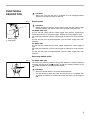
Selecting the action mode
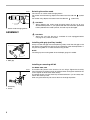
This tool has an action mode changing button.
For rotation with hammering, depress the button from the side with
symbol
fully.
For rotation only, depress the button from the side with
symbol fully.
1
•
CAUTION:
Always depress the action mode changing button all the way to your
desired mode position. If you operate the tool with the button positioned
halfway between the mode symbols, the tool may be damaged.
•
CAUTION:
Always be sure that the tool is switched off and unplugged before
carrying out any work on the tool.
1. Action mode changing button
ASSEMBLY
004198
Installing side grip (auxiliary handle)
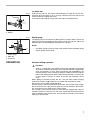
Always use the side grip to ensure operating safety. Install the side grip on the
tool barrel. Then tighten the grip by turning clockwise at the desired position. It
may be swung 360° so as to be secured at any position.
1
NOTE:
The side grip cannot swing 360° when the depth gauge is installed.
2
1. Grip base
2. Side grip
Installing or removing drill bit
For Model 8450, 8452
002454
1
2
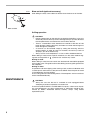
1. Chuck key
2. Chuck
6
To install the bit, place it in the chuck as far as it will go. Tighten the chuck by
hand. Place the chuck key in each of the three holes and tighten clockwise. Be
sure to tighten all three chuck holes evenly.
To remove the bit, turn the chuck key counterclockwise in just one hole, then
loosen the chuck by hand.
After using the chuck key, be sure to return to the original position.