1
FUNCTIONAL
DESCRIPTION
•
004194
CAUTION:
Always be sure that the tool is switched off and unplugged before
adjusting or checking function on the tool.
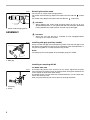
Switch action
CAUTION:
Before plugging in the tool, always check to see that the switch trigger
actuates properly and returns to the “OFF” position when released.
For Model 8450, 8451
To start the tool, simply pull the switch trigger. Tool speed is increased by
increasing pressure on the switch trigger. Release the switch trigger to stop.
For continuous operation, pull the switch trigger and then push in the lock button.
To stop the tool from the locked position, pull the switch trigger fully, then
release it.
For Model 8452
To start the tool, simply pull the switch trigger. Release the switch trigger to
stop.
For continuous operation, pull the switch trigger and then push in the lock button.
To stop the tool from the locked position, pull the switch trigger fully, then
release it.
2
•
1
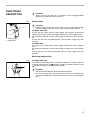
1. Switch trigger
2. Lock button
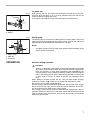
Reversing switch action
002410
B
A
1
For Model 8450, 8451
This tool has a reversing switch to change the direction of rotation. Move the
reversing switch lever to the
position (A side) for clockwise rotation or the
position (B side) for counterclockwise rotation.
•
•
1. Reversing switch lever
CAUTION:
Always check the direction of rotation before operation.
Use the reversing switch only after the tool comes to a complete stop.
Changing the direction of rotation before the tool stops may damage the
tool.
5