1
Activity Master
User’s Manual
Steve Davis
Skyline Computing
ActivityMaster™ by Skyline Computing – User’s Manual
Page 2
Table of Contents
Overview of Basic Procedures ..................................................................... 3
Eliminating Rolling Stock Downloads ........................................................................... 3
Choosing the Locomotives You’ll Drive in an Activity................................................. 6
Spicing Up Activities: Using your Purchased/Downloaded Cars/Engines..................... 7
Customizing Activities to use ONLY Rolling Stock (or Locomotives) from a Virtual
Railroad, or, your favorite railroad. ................................................................................ 8
Changing Locomotive Types between Steam, Diesel and Electric. ............................... 9
Changing Activity Start Time, Season, and Weather ................................................... 10
Printing the Activity Briefing and Work Order. ........................................................... 11
Figure A: Sample Printable Work Order and Briefing ............................................. 12
Screen Walk-Through and Details............................................................ 13
Figure 1: Initial Welcome Screen ................................................................................. 13
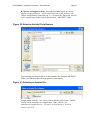
Figure 1A: Select an Activity File to Examine (or Modify)..................................... 14
Figure 1B: Select an Activity File to Restore. .......................................................... 15
Figure 1C: Selecting an Archive File........................................................................ 15
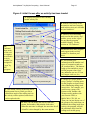
Figure 2: Initial Screen after an activity has been loaded............................................. 16
Figure 2A: View/Edit Rolling Stock Screen............................................................. 17
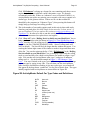
Figure 2B: ActivityMaster Default Car Type Codes and Definitions: ..................... 18
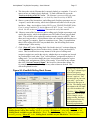
Figure 3: ID Unknown ‘Type’ Cars.............................................................................. 21
Figure 4: Create/Manage Rolling Stock Groups........................................................... 21
Figure 5: Replace Rolling Stock Control Screen.......................................................... 22
Figure 5A: Setup Steam Tenders ............................................................................. 27
Figure 6: Manually Choose Locomotives to Drive (Player Service)............................ 30
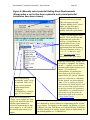
Figure 7: Manually select potential Rolling Stock Replacements (Initial, “unexpanded”
screen). .......................................................................................................................... 30
Figure 8: Manually select potential Rolling Stock Replacements (Shown when a car
list has been expanded, and several potential substitutes have been chosen)............... 31
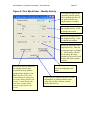
Figure 9: Print Work Order – Modify Activity............................................................. 32
Technical Issues and Support .................................................................... 34
System Requirements.................................................................................................... 34
Obtaining Technical Support ........................................................................................ 34
Using ActivityMaster with TrainStore™...................................................................... 35
A. What happens when rolling stock and/or engines are “Stored” using
TrainStore™ ............................................................................................................. 35
B. Using TrainStore as a Tool When Replacing Rolling Stock............................... 36
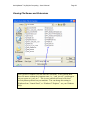
Viewing File Names and Extensions ............................................................................ 38
Copyrights/Trademarks............................................................................. 38
Credits/Acknowledgments ......................................................................... 39
ActivityMaster™ by Skyline Computing – User’s Manual
Page 3
Overview of Basic Procedures
Important facts:
⇒ All of the procedures described here work for both SwitchList Generator™
Templates1, and for standard activities. To modify the rolling stock used in any of
your SwitchList Generator™ templates, simply load the template’s “.act” file (the
one with the word “Template” in the file name) to change out the rolling stock
used in the template, or to eliminate the need to download any of the rolling stock
“required” for that template! Then, every time you generate a new activity from
that template, the activities you generate will contain your chosen rolling stock
and engines.
⇒ ActivityMaster works hand in hand with TrainStore™ if desired. However, you
should read the section in this manual, “Working With TrainStore™”.
⇒ Caution: It’s possible that you might instruct the program to replace a number of
small (say, 40’) box cars or other cars with much larger cars (60’ or 70’). In that
case, depending on the siding lengths, some of the consists may no longer fit. If
this happens you’ll get an error message when you load the activity in MSTS,
possibly stating “Objects begin in collision”. Should that occur, simply press
“Restore an Original Activity” to “undo” the replacements, and when replacing
again, create a list or group that excludes really long rolling stock. The length (in
meters) is given on some of the ActivityMaster screens, and often appears in the
rolling stock (“wagon”) name as well.
Eliminating Rolling Stock Downloads
One of the features of Activity Master is the ability to download virtually any activity,
install it, and run it, WITHOUT having to download any of the required rolling stock.
The required rolling stock will be replaced by cars and engines on your drive, according
to rules you set.
Basic Steps:
1
•
Install the activity by unpacking or unzipping as per the downloaded instructions
or “readme” file.
•
Press “Load an Activity File” on the main screen shown in “Figure 1”.
•
ID the unknown rolling stock for best results by pressing both “ID Unknowns”
buttons on the main screen.
•
Click the “Prepare to Replace Rolling Stock” button.
Visit www.skylinecomputing.com for more information on SwitchList Generator™.
ActivityMaster™ by Skyline Computing – User’s Manual
Page 4
•
On the screen of Figure 5, leave the “Master Control Slider” all the way to the left
(0).
•
Choose whether the replacements should come from a list you’ll create (by
clicking the “Specific List” option buttons, or should be selected by
ActivityMaster.
•
Click “Choose Player Locomotives” if you want to choose the locomotive(s)
you’ll drive in the activity.
•
Click “Replace Rolling Stock” to replace any rolling stock in this activity that
isn’t on your hard drive, with rolling stock that is. An unaltered backup will be
saved.
•
Run the activity in MSTS!
Detailed step by step:
1. Install the activity as instructed in the “readme” or other instructions that came
with it; i.e., either unzip it, or unpack it as usual.
2. Start ActivityMaster. You’ll see the screen portrayed in Figure 1. Press the
“Load an Activity File” button, and browse to the route, then the
“\ACTIVITIES” folder within that route, to read in the activity file, as shown in
Figure 1A: Select an Activity File to Examine (or Modify).
Note: Pressing “Load an Activity File” WON’T change the original
activity in any way. It only reads and analyzes the file.
3. Once the file is selected and loaded, you’ll see the screen shown in Figure 2. This
screen gives you an overview of the rolling stock used in this activity, and which
of it is, and isn’t, on your hard drive.
4. If there is a significant number of “Unknown Frt” cars listed in the “Rolling
Stock Available on your Hard Drive” box, it’s a good idea to assign types to
these cars. This generally only needs to be done once, unless you’ve downloaded
or installed a number of new rolling stock that the program can’t identify.
Investing some time here at the beginning will enable ActivityMaster to do a
much better job of replacing the rolling stock in activities. To do this, click on the
“ID Unknown” button in the “Rolling Stock Available on your Hard Drive”
box.
5. This button brings up the screen shown in Figure 3. Select the car type from the
drop down box (a listing of possible car types initially supplied with the program
appears in this manual as Figure 2B: ActivityMaster Default Car Type Codes and
Definitions.
6. Likewise, if there is a non-zero number in the “Unknown Frt” box in the
“Rolling Stock Used in this Activity” box, it is a good idea to click the “ID
Unknown” button in the “Rolling Stock Used in this Activity” box to assign
Types to the cars that ActivityMaster couldn’t identify. Doing this will help
ActivityMaster™ by Skyline Computing – User’s Manual
Page 5
ActivityMaster make more intelligent substitutions, i.e., tank cars replaced by
other tank cars, etc.
7. Press the button (now “enabled”), labeled “Prepare to Replace Rolling Stock in
Selected Activity”.
8. Next you’ll see the screen shown in Figure 5, “Replace Rolling Stock in
Activity.” Keep the “Master Control Slider” (the only slider, near the top of the
screen) all the way to the left (on ‘0’) if all you want to replace is just the rolling
stock you don’t have on your drive, so you can run this activity.
9. You can click “Diesel”, “Steam” or “Electric” to replace any engines you don’t
have, with that type of engine. It’s best to stick with the type of engine used in
the activity, unless you’ll be replacing ALL the engines.
10. Under “Replace Unknown Rolling Stock With”, you can click “Any Railcar
with Matching Coupler” (which could put ANY railcar on your hard drive in the
place of railcars in the activity which aren’t on your hard drive and for which
Activity Master couldn’t determine the “Type”, or, you can click “Specific List”,
to see a list that will enable you to tell Activity Master which cars to choose from
as substitutes for any unknown cars in this activity. If you choose “Specific
List”, the button labeled “Replace Rolling Stock” changes to “Setup
Replacement List.” See Figure 5: Replace Rolling Stock Control Screen.
11. Under “Replace Railcars of Known Types With”, you have one more choice
(since, the type of car the program will be replacing is known.) You can choose
“Any Railcar with Matching Coupler” as before (not recommended though), or
“Any Railcar of Same Type” (the default, which will cause Activity Master to
replace box cars with other box cars, tank cars with other tank cars, etc.)., or,
again, “Specific List”, to call up a list that enables you to select the potential
replacements for each railcar not on your hard drive (if you’re willing to take the
time to do this, this yields the best results).
12. It’s a good idea to click “Choose Player Locomotives” to manually choose the
locomotive(s) you’ll drive in an activity. If you don’t, ActivityMaster will
randomly select the locomotives you’ll drive from a list of all driveable
locomotives on your hard drive (if a Rolling Stock Group was selected, as
detailed in Figure 4: Create/Manage Rolling Stock Groups, the program will only
select locomotives from that group).
13. If Steam Locomotives (engines) will be used as potential replacements, you
should click “Setup Steam Tenders” at least once to associate tenders with the
steam engines on your hard drive, since each steam engine needs a tender and
Activity Master can’t always determine which tender goes with each engine (it
WILL determine this on it’s own in 90% of the cases though). See Figure 5A:
Setup Steam Tenders.
14. If you selected “Specific List” as the replacement method under either “Replace
Railcars of Unknown Types With” or “Replace Railcars of Known Types
With” then the bottom left button will read “Setup Replacement List” (if not,
skip to the next step). You’ll need to click this next, to set up the list, to continue.
ActivityMaster™ by Skyline Computing – User’s Manual
Page 6
The screen shown in Figure 7: Manually select potential Rolling Stock
Replacements (Initial, “unexpanded” screen) will come up. Click the “+” to the
left of a railcar, to expand the list and show the cars this car or engine could
potentially replaced with. If you check the box next to the “parent” railcar, ALL
potential replacement railcars will be checked. Check the boxes next to the
cars/engines you’d like ActivityMaster to consider as potential replacements for
the “parent” car or engine. Click “Proceed with Replacement” when you’re
done.
15. The bottom left button on the “Replace Rolling Stock in Activity” screen (Figure
5) will now read “Replace Rolling Stock”. The original activity, and all
associated consists, will be backed up in an Archive subfolder of the
“\ACTIVITIES” folder before any changes are made. Then, the activity will be
processed and all missing rolling stock will be replaced with rolling stock present
on your hard drive (and if the Slider setting in step 8 was anything other than “0”,
some or all of the remaining rolling stock in the activity will also be replaced.
16. If there were no errors reported, exit ActivityMaster and run the activity in MSTS.
Choosing the Locomotives You’ll Drive in an Activity.
You can use Activity Master JUST to change the locomotives you drive in any activity,
or, you can do this while also having Activity Master automatically change out some or
all of the other rolling stock (engines and locomotives) in the activity.
Basic Steps:
•
Open Activity Master and press “Load an Activity (.act) File” (see Figure 1).
•
Click “Prepare to Replace Rolling Stock in Selected Activity”.
•
On the screen of Figure 5, click “Choose Player Locomotives.”
•
The Locomotive Selection Screen of Figure 6 comes up.
•
Use the provided buttons/functions to get the locomotives you’ll drive in the list
box on the right hand side. Press “OK – Use Selected Locomotives” to exit and
return to the screen of Figure 5.
•
You can also set the “Master Control Slider” and choose either “Specific List”
or one of the automatic replacement options, if you want ActivityMaster to also
replace some or all of the non-driveable locomotives and rolling stock in this
activity (see “Spicing up activities using your purchased/downloaded
cars/engines”, or “Customizing Activities to use ONLY Rolling Stock (or
Locomotives) from a Virtual Railroad, or, your favorite railroad” in this manual).
•
Click “Replace Rolling Stock”. An unaltered backup of the original will be
created.
•
Run the modified activity in MSTS.
ActivityMaster™ by Skyline Computing – User’s Manual
Page 7
Spicing Up Activities: Using your Purchased/Downloaded
Cars/Engines
ActivityMaster can replace some or all of the cars and engines in any activity, with
preferred cars and engines you’d like to see and run. So if you downloaded an activity
that uses only default cars, perhaps because the designer didn’t want to require a lot of
downloads, you can enjoy all the rolling stock and engines you’ve downloaded or
purchased, by telling ActivityMaster to substitute some or all of the rolling stock used in
any activity, with selected rolling stock from your collection on your hard drive.
Basic Steps:
•
Open Activity Master and press “Load an Activity (.act) File” (see Figure 1).
•
Identify any “Unknown” rolling stock used in the activity, and on your hard drive,
for best results.
•
Optional: create or edit, and use, a “Rolling Stock Group” (press
“Create/Manage Rolling Stock Groups”)
•
Click “Prepare to Replace Rolling Stock in Selected Activity”.
•
On the screen of Figure 5, slide the “Master Control Slider” to the right: further
to replace more of the rolling stock in the activity.
•
Click “Choose Player Locomotives” if you want to manually choose the
locomotive(s) you’ll drive in this activity.
•
If you are using a “Rolling Stock Group”, that list already contains your chosen
replacements, so if you don’t want to refine things further, you can simply click
on “Replace Rolling Stock” to substitute some (or all) of the rolling stock in the
activity with rolling stock you’ve chosen. Otherwise, we recommend you set up a
list by pressing the “Specific List” radio buttons on the “Replace Rolling Stock
in Activity” screen.
•
Click “Replace Rolling Stock”. An unaltered backup of the original activity, and
all consists used by it, will be created in an Archive folder.
•
Run the modified activity in MSTS.
Detailed step by step:
Follow the same steps outlined for “Eliminating Rolling Stock Downloads”
except, in step 8, set the Master Control Slider to any setting between 1 and
9:
8. Next you’ll see the screen shown in Figure 5, “Replace Rolling Stock in
Activity.” Move the “Master Control Slider” (the only slider, near the top of
the screen) to the right. As you move it, you’ll notice a number appears above
ActivityMaster™ by Skyline Computing – User’s Manual
Page 8
the slider control. A setting of “1” (one step from the far left) means that 1 car
or engine in every 10 will be replaced with rolling stock of your choosing, the
rest will remain as in the original activity. A setting of “5” will replace half of
all the rolling stock in the activity. A setting of “10” will replace ALL rolling
stock in the activity with rolling stock from your chosen list or group.
Customizing Activities to use ONLY Rolling Stock (or
Locomotives) from a Virtual Railroad, or, your favorite railroad.
ActivityMaster can substitute all the rolling stock in an activity, with only specific rolling
stock you want to use. Or, you can substitute just the locomotives. Or, ALL the
locomotives, and most of the rolling stock.
Basic Steps:
•
Open ActivityMaster and press “Load an Activity (.act) File” (see Figure 1).
•
Identify any “Unknown” rolling stock used in the activity, and on your hard drive,
for best results.
•
Recommended but optional: create or edit, and use, a “Rolling Stock Group”
(press “Create/Manage Rolling Stock Groups”) and include only the cars and
engines you’ll want, in that group.
•
Click “Prepare to Replace Rolling Stock in Selected Activity”.
•
On the screen of Figure 5, slide the “Master Control Slider” all the way to the
right.
•
Optional: Click “Choose Player Locomotives” to choose the locomotive(s) you’ll
drive in this activity.
•
If you are using a “Rolling Stock Group”, that list already contains your chosen
replacements. You can simply click on “Replace Rolling Stock” to substitute
some (or all) of the rolling stock in the activity with rolling stock in that group. If
you only want to change out specific cars, or (for example) all locomotives but
not necessarily all the rolling stock, then set up a list by pressing the “Specific
List” radio buttons on the “Replace Rolling Stock in Activity” screen.
•
Click “Replace Rolling Stock”. An unaltered backup of the original will be
created.
•
Run the modified activity in MSTS.
Detailed step by step:
Follow the same steps outlined for “Eliminating Rolling Stock Downloads”
except, in Step 8, set the Master Control Slider to any setting to 10:
ActivityMaster™ by Skyline Computing – User’s Manual
Page 9
8. Next you’ll see the screen shown in Figure 5, “Replace Rolling Stock in
Activity.” Move the “Master Control Slider” (the only slider, near the top of
the screen) all the way to the right. This setting (“10”) will replace ALL
rolling stock in the activity with rolling stock from your chosen list or group
(but, you can limit what’s replaced by using the “ Specific List” function.)
Changing Locomotive Types between Steam, Diesel and
Electric.
If you want to run steam engines but can’t find enough good activities designed for them,
or, you have a favorite activity that uses a steam engine but you’d prefer to drive a diesel,
ActivityMaster can take care of this. ActivityMaster can also replace steam, or diesel
locomotives with Electric locomotives, or electric locos with steam or diesel. There are a
couple of caveats however:
1. If you’re going to replace steam or diesel with electric locomotives, be sure the
route is electrified! Otherwise your locomotives won’t run on the route. So, for
NEC4 or the default NEC (for example), you can replace diesels with electrics.
But if you do this on the default Marias Pass route, the electrics won’t have the
power to run.
2. The combination of a steam engine and tender can be longer than a diesel engine.
So for some activities that require turning on a wye, or other maneuvers in small
space, there may not be room for the steam engine and tender, while there was
plenty of room for the smaller diesel or electric. Also, AI traffic meets may be
affected since the player, or AI traffic, may cover the route at a different speed
than the activity designer. Also if you run low on water or coal and the route
doesn’t have any water tower or coaling facility, well …. Our suggestion: try it,
and if you don’t like the results, use the “Restore an Original Activity” feature to
“undo” the changes.
Basic Steps:
•
Open ActivityMaster and press “Load an Activity (.act) File” (see Figure 1).
•
Identify any “Unknown” rolling stock used in the activity, and on your hard drive,
for best results.
•
Optional: create or edit, and use, a “Rolling Stock Group” (press
“Create/Manage Rolling Stock Groups”) and include only the cars and engines
you’ll want, in that group.
•
Click “Prepare to Replace Rolling Stock in Selected Activity”.
•
On the screen of Figure 5, slide the “Master Control Slider” all the way to the
right.
ActivityMaster™ by Skyline Computing – User’s Manual
Page 10
•
In the “Replace Locomotives With” box, click “Diesel”, “Steam” or “Electric”
as desired. Locomotives in the activity will be replaced with the chosen type.
•
Optional: Click “Choose Player Locomotives” if you want to choose the
locomotive(s) you’ll drive in the activity.
•
If you are using a “Rolling Stock Group”, that list already contains your chosen
replacements. You can simply click on “Replace Rolling Stock” to substitute
some (or all) of the rolling stock in the activity with rolling stock in that group. If
you only want to change out specific cars, or (for example) all locomotives but
not necessarily all the rolling stock, then set up a list by pressing the “Specific
List” radio buttons on the “Replace Rolling Stock in Activity” screen.
•
Click “Replace Rolling Stock”. An unaltered backup of the original will be
created.
•
Run the modified activity in MSTS.
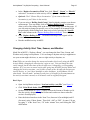
Changing Activity Start Time, Season, and Weather
Much like in MSTS’s “Explore a Route”, you can change the Start Time, Season, and
Weather easily using ActivityMaster. You can change a daytime activity to nighttime to
use your custom night cabviews, or, move a night activity to daytime, etc.
Note: While you can also change the season and weather fairly easily using the MSTS
Activity Editor, changing the start time isn’t quite as easy. You can change the time
easily enough, but the start times of the AI traffic aren’t changed by a corresponding
amount. So, if you were to run an activity after going into the MSTS Activity Editor and
changing the activity start time,, you’d either see none of the AI traffic the designer put
into the activity, or, you’d have standoffs or other bad meets. ActivityMaster, on the
other hand, “does the math” and moves each piece of AI traffic by the same amount as
the activity start time is moved, so all AI meets work as originally designed.
Basic Steps:
•
Open ActivityMaster and press “Load an Activity (.act) File” (see Figure 1).
•
Click “Print Work Order, Modify Activity.”
•
On the screen shown in Figure 9, simply click on the Season or Weather you’d
like (the activity designer’s original season and weather are shown when the
screen is first displayed).
•
Enter the desired start hour in the “hour” box, between 0 (for midnight) and 12
(for noon), using 12 hour format. Then click “AM” or “PM”. So enter 1:30 pm
by typing ‘1’ in the “hour” box, “30” in the “minute” box, and clicking the “PM”
radio button.
ActivityMaster™ by Skyline Computing – User’s Manual
Page 11
•
Click “Modify this Activity” to create an automatic backup, then rewrite the
activity (.act) file with the information you’ve chosen.
•
You’ll be returned to the starting screen, from which you can replace locomotives,
rolling stock, etc. as desired.
•
It doesn’t make any difference whether you modify the weather, season, start
time, etc., FIRST, or if you replace/modify the rolling stock first.
Printing the Activity Briefing and Work Order.
Some activities come with a printed work order, others don’t. ActivityMaster has a
function that will print out a standardized work order for any activity, which shows all
cars to be picked up, all setouts (and where the cars originally came from), and even the
car names and types! The briefing written by the activity designer is also printed out.
This can be a big help, since rather than having to read through sometimes confusing
directions or work orders, or having to constantly press “F11” to view the Work Order
and/or Briefing, all of your work orders can printed out, and in the same, consistent
format.
Basic Steps:
•
Open ActivityMaster and press “Load an Activity (.act) File” (see Figure 1).
•
Click “Print Work Order, Modify Activity.”
•
On the screen shown in Figure 9, click “Print Work Order and Briefing”. It
will be opened in Notepad™. You’ll need to have Microsoft Notepad™, which
comes with most versions of Microsoft Windows™, in your \WINDOWS or
\WINDOWS\SYSTEM folder. If you can’t open your work order in Notepad,
please contact Skyline Computing (see Obtaining Technical Support), we can
help you with this issue.
•
Either save or print your work order and briefing, as you desire.
•
It doesn’t make any difference whether you modify the weather, season, start
time, etc., FIRST, or, if you replace/modify the rolling stock first.
Hint: If you had Activity Master change out a lot of rolling stock, the wagon names in the
work order you see will be based on those in the original activity before you modified it.
Usually this doesn’t make much difference. However if you want more exact wagon and
engine names, you can perform your replacements, then re-load the activity, then, print
the Work Order. We may force an automatic reload when the “Print Work Order and
Briefing” button is pressed if we get enough user comments about this issue.
ActivityMaster™ by Skyline Computing – User’s Manual
Page 12
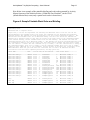
Here below is an example of the printable briefing and work order generated by Activity
Master from one of the default activities (“Whitefish Yard Switcher”) in the USA2
(default Marias Pass) route (only a partial work order is shown here):
Figure A: Sample Printable Work Order and Briefing
Activity Briefing: ----------------------Difficulty: Hard
Estimated time to complete: 1hour.
August 15th, 17:00.You are responsible for switching the Whitefish Yard to sort the cars off the
inbound Kalispell and Columbia Falls local trains into outbound cuts for westbound and eastbound
mainline pickups. The inbound cars from the Kalispell local are located on Whitefish Siding 1. The
inbound cars from Columbia Falls are on Whitefish Siding 2.You will also switch the inbound cars
dropped off by mainline trains so that they are placed on the right track for the outbound Kalispell
local tomorrow morning, and the Columbia Falls local the next evening. The inbound cars from the
westbound mainline train are on Whitefish Siding 5. The inbound cars from the eastbound mainline train
are on Whitefish Siding 6.You will be taking cars from these various sidings and using them to build
cuts for tomorrow s trains. The west outbound cars go to Siding 7; the east outbound cars to Siding 8;
the outbound Kalispell local cars to Siding 3; and the outbound Columbia Falls local cars to Siding
4.When you have completed all of your switching, end the Activity by spotting your locomotives on the
Whitefish Water Track.See your work order for a detailed list of cars to be switched and their
locations.To learn more about completing Activities, see Help (press F1).
TRACK NAME-----------------WORK----CONSIST-CAR#-CAR DESCRIPTION-----TYPE-SOURCE TRACK-----------_________________________________________________________________________________________________
Whitefish Siding 8
SETOUT 32768
0
US2FCarRF2
L
Whitefish Siding 1
Whitefish Siding 8
SETOUT 32768
1
US2FCarRF2
L
Whitefish Siding 1
Whitefish Siding 8
SETOUT 32768
2
US2FCarRF2
L
Whitefish Siding 1
Whitefish Siding 8
SETOUT 32768
5
US2Freight6
BX
Whitefish Siding 1
Whitefish Siding 8
SETOUT 32768
6
US2Freight6
BX
Whitefish Siding 1
Whitefish Siding 8
SETOUT 32768
7
US2Freight6
BX
Whitefish Siding 1
Whitefish Siding 8
SETOUT 32769
6
US2ChemiCar
T
Whitefish Siding 2
Whitefish Siding 8
SETOUT 32769
7
US2ChemiCar
T
Whitefish Siding 2
Whitefish Siding 8
SETOUT 32769
9
US2FreightcarYel1
AUTO Whitefish Siding 2
Whitefish Siding 8
SETOUT 32769
10
US2FreightcarYel1
AUTO Whitefish Siding 2
Whitefish Siding 8
SETOUT 32769
11
US2FreightcarYel1
AUTO Whitefish Siding 2
Whitefish Siding 8
SETOUT 32769
12
US2Freightcar5
TOFC Whitefish Siding 2
Whitefish Siding 8
SETOUT 32769
13
US2Freightcar5
TOFC Whitefish Siding 2
Whitefish Siding 8
SETOUT 32773
2
US2EmpLoggerCar
LG
Whitefish Siding 11
Whitefish Siding 8
SETOUT 32773
3
US2EmpLoggerCar
LG
Whitefish Siding 11
Whitefish Siding 8
SETOUT 32773
4
US2EmpLoggerCar
LG
Whitefish Siding 11
Plug
SETOUT
32770
15
US2Freightcar3
T
Whitefish Siding 5
West Rip
West Rip
SETOUT
SETOUT
32771
32771
3
4
US2EmpLoggerCar
US2EmpLoggerCar
LG
LG
Whitefish Siding 6
Whitefish Siding 6
ActivityMaster™ by Skyline Computing – User’s Manual
Page 13
Screen Walk-Through and Details
Important: In the following Figures throughout this “Screen Walk-Through and Details”
section, look for letters in bold, such as “A.”, “B.” etc. in the yellow explanation call out
boxes. The page following each screen picture/figure provides more detailed descriptions
of each button or function, based on this key letter.
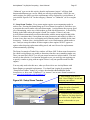
Figure 1: Initial Welcome Screen
When the program
first starts, this
explanation is
visible to help get
you started.
A. Usually, you’ll select this
option first, to open (and
analyze) an activity file. Doing
this will tell you if the activity
contains any rolling stock you
don’t have on your hard drive,
anong other things. Just
loading an activity file won’t
change the file in any way.
B. Before any of your activity
or consist files are changed by
Activity Master, they are
automatically archived
(saved). Pressing this button
enables you to restore any
activities you’ve modified
back to their original state.
Debug check box: If you’re having problems with ActivityMaster, check this
box before loading an activity file. You can either view the “debug.txt” file
which will then be created in your ‘Program Files\ActivityMaster” folder, or
send it to Skyline Computing to aid in diagnosing your problem. You can
open the debug.txt file with Notepad™ or any text editor. See the section on
Obtaining Technical Support.
ActivityMaster™ by Skyline Computing – User’s Manual
Page 14
A. Load an Activity (.act) File. Pressing this button is usually your first step
when using ActivityMaster. However, if you want to Restore an activity that
you’ve modified using ActivityMaster, you should click “Restore an
Original Activity” before doing anything else. Then, when you click the
“Load an Activity (.act) file” button, you’ll be loading the original, unaltered
activity. This is usually the best course to follow when you’ll be modifying,
again, an activity you’ve already modified.
When you click the “Load an Activity (.act) file” button, you’ll see a “File
Open” dialog box, usually showing the Activities folder for the route you
were working with last. If this is the first time you’ve used ActivityMaster,
you may need to “browse” to your Train Simulator folder, and then, to the
route folder the activity is located in, and finally, to the \ACTIVITIES folder
in that route folder. For example, if your installation of Microsoft Train
Simulator™ is located in the default location of C:\Program Files\Microsoft
Games\Train Simulator, and you’re wanting to open or modify an activity in
the default Marias Pass route (which is in a folder called “\USA2”, “USA1”
being the default Northeast Corridor route), then your screen will look
something like Figure 1A below:
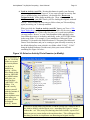
Figure 1A: Select an Activity File to Examine (or Modify).
These subfolders in
the “ACTIVITIES”
folder are created
by ActivityMaster
just before it
modifies an
activity. All the
files related to that
activity, BEFORE
any modifications
took place, are
stored in these
“ARCHIVE” subfolders. You
needn’t usually
concern yourself
with the contents of
these folders –
ActivityMaster uses
them when you
press the “Restore
an Original
Activity” button.
If all you’re seeing when you click the “Load an Activity File” button is one of
the Archive folders, with no files in it (i.e., something like Figure 1C except
without the “.acr” file (or any file) showing, then first click this “up one level”
button to get to a screen similar to the one shown here. This will happen if the
last thing you did in ActivityMaster was Restoring an Original Activity.
ActivityMaster™ by Skyline Computing – User’s Manual
Page 15
B. Restore an Original Activity. Pressing this button brings up a screen
similar to Figure 1B below. You’ll want to open one of the “archive” subfolders ActivityMaster created for you. I.e., to restore the “Dawn Oil” activity
to it’s original state, double click on the “dawnoil – ARCHIVE” folder.
Figure 1B: Select an Activity File to Restore.
After opening one of these folders, in this example, the “dawnoil-ARCHIVE”
folder, you’ll then see the following (partial screen shown):
Figure 1C: Selecting an Archive File.
Simply double-click the “.acr” file, or click it and then click “Open”, and the
activity will be restored to it’s original state. Note: it WON’T be
automatically loaded however. To load it, click on button A, “Load an
Activity (.act) File”.
ActivityMaster™ by Skyline Computing – User’s Manual
Page 16
Figure 2: Initial Screen after an activity has been loaded.
A. Displays the name of the currently
loaded activity file.
B. Indicates how many of the
locomotives and cars (wagons)
used in this activity are available
on your hard drive.
C. Shows a list of all rolling
stock used in this activity, and
enables you to set the “types”
for any that the program
couldn’t identify. See the
section on “ID Unknown”
B1.
Indicates
how many
of the cars
or engines
used in this
activity
couldn’t be
assigned a
“type” by
the
program.
D. Indicates how many engines
and wagons in this activity
couldn’t be found on your
drive.
E. This section gives
information on the number and
types of locomotives and cars
on your hard drive. The buttons
bring up lists and allow you to
tell the program what “type”
any unknown cars are (i.e. box
car, hopper, tank car, etc.)
G. This button calls up the Rolling Stock
Replacement Screen, which you use to
control how much of the rolling stock in
the activity will be replaced, and what it
can be replaced with.
H. Here you can change the activity start time,
season, and weather, and print the work order.
When the start time is changed, the start time for all
AI traffic is also changed by the same amount.
F. Brings up a screen used to
set up “groups” of rolling stock
for the program to choose from
when substituting rolling stock
in activities. For example, you
could set up a group with
Eastern roads, another with
Western roads, another with
your favorite VRR, or
B&O/C&O, CSX, NS, etc.
Then you can just choose one of
the groups to use, and when you
substitute the rolling stock in an
activity, the program will pull
the substitutes only from the
rolling stock in that group.
ActivityMaster™ by Skyline Computing – User’s Manual
Page 17
A. This shows the activity filename that’s currently loaded, as a reminder. You can’t
enter text here or change what’s displayed. To load a different file, press the
“Load an Activity (.act) File” button. The filename is not necessarily the same
as the “Name” of the activity users see when they load the activity in MSTS.
B. Shows a count of the locomotives, and rolling stock (freight or passenger cars, or
“wagons”) used in this activity, which ActivityMaster was able to locate on your
hard drive. Note: ActivityMaster looks ONLY in your \TRAINS\TRAINSET folder.
If you’re using TrainStore™, ActivityMaster will NOT “locate” cars if they’re
stored. See the section on TrainStore™ towards the end of this manual.
B1. Shows a count of the locomotives and/or rolling stock (freight or passenger cars)
used in this activity, which ActivityMaster was NOT able to locate on your hard
drive. This will have to be replaced in order to run the activity in MSTS. Since
these aren’t on your drive, ActivityMaster often can’t determine whether these are
cars (“wagons”) or engines. However sometimes it can. Thus, it’s possible that
there will be rolling stock NOT on your hard drive, but NO rolling stock on an
“unknown type” in the activity.
C. Click “Show All” in the “Rolling Stock Used in this Activity” section to bring up
a list of all the rolling stock used in the activity, whether it’s on your hard drive,
or not. This list indicates how many instances of the piece of rolling stock
(wagon or engine) are used in the activity, whether that car or engine was located
on your hard drive, and, what “Type” ActivityMaster” assigned to each piece of
rolling stock. You can also change the types ActivityMaster assigned to a piece
of rolling stock, and print out a list for your records. If you click in any column,
then click “Sort on Current Column”, the list will re-sort on that column. So,
for example, you can sort by Car Type or any other column as desired. This
affects the printed list also.
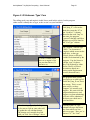
Click in any cell in the
“Car Type” column to get
Figure 2A: View/Edit Rolling Stock Screen
a list of car types to
choose from (and change
this car’s type to.) You
can also type in your own
type code -- you’re not
restricted to the types in
the list. The change won’t
be written to the cell until
you click in another cell.
Click the “Save Changes”
button after you’ve made
all the changes you’re
going to make, and these
will be saved for use by
ActivityMaster when
selecting replacements.
Note: you can change the “Car Types” assigned to each kind of railcar after pressing “Show All” in the
“Rolling Stock Used in This Activity” block, or, pressing “ID Unknown” from either that block, or the
“Rolling Stock Available on your Hard Drive” block. You CAN’T change the Car Types if you got to this
screen by pressing “Show All” in the “Rolling Stock Available on your Hard Drive” block, however.
ActivityMaster™ by Skyline Computing – User’s Manual
Page 18
Click “ID Unknown” to bring up a shorter list, one containing only those cars or
engines for which ActivityMaster couldn’t determine a type. We strongly
recommend you do this, if there are “unknown” cars (see section B1 above), so
ActivityMaster can replace any missing cars or engines, with cars or engines of a
similar type, for the greatest realism. If there are no cars that couldn’t be
identified by the program (no “Unknown Types”), then pressing this button will
simply bring up a message box telling you that.
D. This is the number of cars and/or engines used in this activity that could not be
found on your hard drive (this MAY simply be because they’ve been stored – if
you use TrainStore™, be sure and see the section on using ActivityMaster with
TrainStore™). In order to be able to run this activity in MSTS, ActivityMaster
will at the minimum need to replace these cars/engines.
E. Click “Show All” in the “Rolling Stock Available on your Hard Drive” box to
bring up a list, similar to the list shown in Figure 2A: View/Edit Rolling Stock
Screen, showing ALL the rolling stock ActivityMaster was able to locate on your
hard drive (in your \TRAINS\TRAINSET folder. “Stored” rolling stock will
NOT be shown). The list will likely be larger than the window that opens. You
can drag the bottom right corner of the window to make it larger and show more
of the list. You can also print out the list. Click “ID Unknown” in the “Rolling
Stock Available on your Hard Drive” box, to bring up a list of only the rolling
stock on your hard drive for which ActivityMaster was unable to assign a “type”
code. You can then tell ActivityMaster what “type” each piece of unknown
rolling stock is. See the detailed example in Figure 3, “ID Unknown ‘Type’
Cars”. You aren’t limited to the types ActivityMaster suggests. You can design
your own types by typing in any code. The next time you run ActivityMaster
(after closing it out and then reloading it), the new types types you created will
also appear in the drop-down “combo box” list for you to choose from. The types
initially supplied with ActivityMaster are shown below in Figure 2B.
Figure 2B: ActivityMaster Default Car Type Codes and Definitions:
AUTO
BX
CL
CMT
F
G
HP
L
LG
RFR
STL
T
TOFC
W
Auto rack
Box car
Coal
Cement
Flat
Gondola
Hopper cars
Lumber (beam car)
Logs
Refrigerator
Coil Steel
Tank car
TOFC (baretable)
Woodchip
ActivityMaster™ by Skyline Computing – User’s Manual
Page 19
Also shown in the “Rolling Stock Available on Your Hard Drive” box, are the
number of Diesel, Steam, Electric, ID’d Freight (freight cars for which
ActivityMaster could determine the “type”), and Passenger cars ActivityMaster
found on your hard drive (but only those that aren’t “stored” using TrainStore™,
see Using Activity Master with TrainStore.) ActivityMaster can always identify
whether an engine on your hard drive is a Diesel, Steam or Electric, because that
information is present in the locomotive’s “.eng” file. Likewise, passenger cars
can be identified because they have the type “Carriage” assigned in their
associated “.wag” files. So the only cars ActivityMaster should have any trouble
idendifying will be Freight cars. The box “Unknown Frt” shows, as you’d
expect, how many Freight cars on your hard drive ActivityMaster was unable to
assign a type to. If you set up the types for these as shown in Figure 3, then
ActivityMaster will be able to use these cars as substitutes when appropriate.
F. Pressing “Create/Manage Rolling Stock Groups” enables you to create
“groups” of rolling stock. For example, you might have one group consisting of
Western roads, such as UP, BNSF, SP, ATSF, BN, etc. Or you might even divide
these so you only see BNSF, BN, and ATSF locomotives (but just about ANY
freight cars of the modern era) on your BNSF routes, and only UP, SP and CNW
locomotives (and again, just about any freight cars of the modern era) in another
group. There could be a group for B&O/C&O, a CSX and NS group. Then,
select one of those groups, and when replacing rolling stock, ActivityMaster will
only choose from cars in the selected group when making it’s replacements. This
can save you a lot of work: set the group up once, perhaps for your VRR, and
download any activity and replace some, or all, of the rolling stock in that activity
(or, at least the rolling stock in that activity which you don’t have on your hard
drive) with ONLY the rolling stock on that group. A note for TrainStore™ users
here: It’s probably easier to use TrainStore™, if you have it, to set up groups of
cars you want ActivityMaster to choose from, by “unstoring” only the routes
which have the rolling stock you want to use, rather than setting up these groups.
See the section on Using Activity Master with TrainStore™. If you DO use the
Rolling Stock Group feature, AND you use TrainStore™, you could run into
trouble, IF you have rolling stock in a group, which is has been stored since you
created the group. That could cause activity master to generate an error message
when it tries to select a piece of rolling stock as a substitute which isn’t actually
available on your hard drive (because it’s “stored”). For more details on using
the “Create/Manage Rolling Stock Groups” function, see Figure 4:
Create/Manage Rolling Stock Groups.
G. Replace Rolling Stock in Selected Activity. While this is the “meat” of
ActivityMaster, you needn’t worry about clicking on this button. Clicking the
button won’t actually modify your activity or change any of the rolling stock in it.
It merely brings up the main “Replace Rolling Stock” control screen. For more
information, see Figure 5, Replace Rolling Stock Control Screen
H. Print Work Order, Modify Activity. Pressing this won’t modify the activity; it
merely brings up the Print Work Order/Modify Activity screen. The types of
ActivityMaster™ by Skyline Computing – User’s Manual
Page 20
modifications you can perform from this screen include changing the activity’s
Season, Weather, and Start Time. This ISN’T the screen to use when you want to
replace the rolling stock in the activity: to do that, use the previous button,
described in “G”, above, “Replace Rolling Stock in Selected Activity.” For more
information on the Modify Activity screen, or printing a Work Order and the
Activity Briefing, see Figure 9, Print Work Order, Modify Activity.
ActivityMaster™ by Skyline Computing – User’s Manual
Page 21
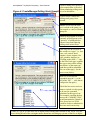
Figure 3: ID Unknown ‘Type’ Cars
The rolling stock (cars and engines) in this list are used in this activity, but the program
either couldn’t identify the car type, or the car isn’t on your hard drive.
This car, with wagon name
“bn2_hop_fl”, is not on the
hard drive (note the “N” in
the “On drive?” column.)
Based on the word “hop” in
the name, the program
“guessed” that this could be a
hopper car, so HP is listed in
the “Car Type” column.
N in this column means
the car or engine is Not
on your hard drive (a Y
means it is).
The “wagons” with car type
“ENG~” are locomotives
(engines) which are not on the
hard drive, so the type
(Diesel, Steam, or Electric)
couldn’t be determined by the
program. You don’t have to
edit the “type” for these:
they’ll be replaced by either
Steam, Diesel, or Electric
locomotives based on a
setting on the Replacement
screen (discussed later).
The program made a pretty
good guess as to what type of
car the bn2_hop_fl was, but it
was wrong. This is a coal
train activity, so these
“hoppers” are actually coal
hoppers. We want to tell the
program that these are coal
hoppers, so when substituting,
coal cars will be substituted
for these cars which aren’t
your hard drive.
After choosing a type (by clicking on
it), be sure to click on some other cell,
to update the cell with that change.
The change won’t actually be saved
until you click “Save Changes” above.
Clicking in the Car Type
column calls up a drop down
box, from which you can
select a car type. Here, we’ve
chosen “CL”, for “Coal”.
Opens a rollingPage
stock22
group file
you created earlier, to be used
when substituting rolling stock,
Figure 4: Create/Manage Rolling Stock Groups or, to be edited here.
ActivityMaster™ by Skyline Computing – User’s Manual
Used to create a whole new
rolling stock group, from
scratch.
Enables you to save the edits
you’ve made or the group you
just created, to a new or existing
group file.
Instructs the program to use the
currently selected group as the
“universe” of rolling stock to
choose from when replacing
rolling stock in an activity.
This list gives an overview of
the various car “types”, i.e., box
cars, coal, cement, diesel
engines, electric engines, flat
cars, gondolas, hoppers, etc.
Clicking on the small “+” sign
to the left of each type, expands
the type to show all the rolling
stock that is of the same type
(and thus could be substituted
for cars of that type). See the
next screen (below).
Here’s a view of the list
expanded (note the “-“ to the
left of the “BX” … click that to
collapse the list again.)
Check the box next to each car
name to include it in this group,
to be used as a potential
substitute for this type of car.
For example, checking the box
next to the “CNJ40ftb_23506”
would mean that the Central of
New Jersey box car 23506
could be used as a substitute for
box cars used in an activity.
If there is a .jpg or .gif file in the car or engine folder with the same filename as the .eng or .wag file,
then clicking on one of the car/engine names shown here will bring up a picture of that car or engine.
ActivityMaster™ by Skyline Computing – User’s Manual
The file namePage
of the23activity
currently being processed.
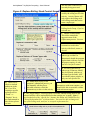
Figure 5: Replace Rolling Stock Control Screen
A. Shows the coupler type
used by the rolling stock in this
activity. Activity Master will
only replace the rolling stock
with rolling stock that has the
same coupler type.
B. The name of the current
Rolling Stock Group, if you’ve
selected one.
C. Master control slider.
This slider controls the
aggressiveness of the
replacement process. See text.
D. Choose whether to replace
locomotives used in this
activity with diesel, steam, or
electric.
E. For cars in this activity
whose type couldn’t be
determined, should the program
replace them with any car with
the proper coupler, or, only
cars in a list you’ll create?
F. For cars in this activity
whose type IS known, should
they be replaced with cars of
the same type (default), ANY
car with the proper coupler, or,
only cars in a specific list.
K. Check boxes:
Check to include
unknowns in the
list, if you’ll be
creating a specific
replacement list.
“Loads” vs.
“Empties” box is
not implemented in
this version, please
see text.
H. Rather than relying on the
program’s substitution process, you
can manually edit the player
driveable consist to select the
locomotive(s) to drive in the activity.
G. If you’ll be replacing existing
locomotives with steam engines, you
should click this to associate a tender
with each steam engine.
J. The “trigger button” for this program. Press this, and the rolling stock in the
selected activity will be replaced based on the settings you’ve made. Note: if
you checked one of the “specific list” buttons, this button will CHANGE to say
“Set up Replacement List” as shown below. You won’t be able to change out
any of the rolling stock, until you’ve set up the replacement list.
ActivityMaster™ by Skyline Computing – User’s Manual
Page 24
A. Coupler Type. ActivityMaster searches the activity to determine what type of
coupler is used by the rolling stock in that activity. There are currently 4 coupler types
supported by MSTS: “Bar” (used on the Acela equipment), “Automatic” most modern
equipment and all US equipment EXCEPT Acela) and “Chain” (Scotsman). These types
are incompatible. Because of that, ActivityMaster will select only cars with the coupler
type shown here, when setting up potential replacement lists and performing the actual
replacements. The vast majority of MSTS equipment is “Automatic” coupler type.
B. Current Rolling Stock Group. If you created, and selected, a “Rolling Stock
Group” as described in Figure 4, “Create/Manage Rolling Stock Groups”, then the name
of the Rolling Stock Group you’ve selected appears here. If no group has been selected
to use, then this box will read “< No group – using all rolling stock >” as shown here.
In that case (the default situation), ActivityMaster will pull cars from all available cars on
your drive, either according to the criteria set using the other controls on this screen, or,
based on a list you’ll create (if you click either of the “Specific List” buttons).
C. Master Control Slider: As you slide this (slide it by pointing the mouse at it and
holding down the left button as you move the mouse), a number will appear above the
slider. When the slider is all the way to the left (0), the program will ONLY replace
rolling stock in the activity that you don’t have on your hard drive. This is all you need
to do if your desire is to run an activity without having to download any of the required
rolling stock.
Setting the slider to 1 means that all the rolling stock not on your drive will be replaced,
plus, 1 in 10 of the cars and engines in the activity which you DO have on your hard
drive will ALSO be replaced (for a little variety). Sliding to ‘5’ likewise replaces all the
rolling stock not on your hard drive, and HALF of the rolling stock that IS on your drive
(giving you more variety). Finally, sliding all the way to the right-hand side (10) will
cause the program to replace ALL of the rolling stock in this activity, whether or not it’s
on your hard drive, with rolling stock that meets the other criteria you’ve set on this
screen. This might be used to select only rolling stock for a virtual railroad, or your
favorite road, etc. ALL the other settings are controlled by this slider.
For example, if you chose to replace locomotives with steam, if this slider is on 0, only
those locomotives in the activity not on your hard drive would be replaced with steam. If
on 10, ALL locomotives in the activity will be replaced with steam. Likewise, if you set
up “rolling stock group” or put together a specific list for the program to select from
when replacing, if you set the slider to 0, only rolling stock not on your hard drive will be
replaced by rolling stock in that group or list. If you set it to 5, ALL rolling stock in the
activity, whether on your hard drive or not, will be replaced by rolling stock in the group
or list.
D. Replace Locomotives With. Choose whether to replace locomotives in this activity
with Diesel, Steam or Electric (by clicking the appropriate button) This setting affects
both the automatic selection/substitution process, and the contents of the replacement lists
you’ll have to choose from.
ActivityMaster™ by Skyline Computing – User’s Manual
Page 25
There are some considerations with regard to this: If the route is not electrified,
ActivityMaster (at least at the current version) will still go ahead and replace locomotives
with electric locomotives if instructed to do so. However, without power, these
locomotives will be unable to run. So, we recommend you know whether or not a route
is electrified before substituting Steam or Diesel locomotives in an activity with Electric
locomotives. Steam and Diesel locomotives, on the other hand, can run on any route.
Diesel locomotives can run on any route. Steam should always work also, however you
need to consider the fact that a steam engine and tender combination is often longer than
a single diesel engine. Thus, it is possible that when replacing other types with steam, the
player consist may be too long to turn on a wye or perform another move required to
complete and activity, and, it’s also possible (though not too likely) that some AI consists
may be unable to fit in passing sidings (they’d have to be really close to maximum length
already for this to happen though).
Note on Locomotive power: AI trains will have the same “pulling power” and should
run ok regardless the engine(s) ActivityMaster uses to replace the original engine(s), as
this was set up when the consist was originally put together, and is reflected in a
“MaxVelocity” setting in the .con file. The horsepower to weight ratio of the player
train, on the other hand, is calculated during the activity (so it can reflect pickups and
setouts you make, etc.). Because of this, when you substitute locomotives in the player
consist (the one you’ll drive), it’s possible that you may not have enough power to pull a
train or make it up the grade. Because of this, we recommend you manually select the
locomotives you’ll drive for the player consist (using the button described in “H”), and,
just as a real railroader would have to do, make sure you have enough power to do the
necessary work!
E. Replace Unknown Railcars (rolling stock) with: (Any railcar with matching
coupler, or Specific List). If there are unknown type cars in this activity, and you didn’t
select a “Type” for them in accordance with the procedure outlined in “Figure 3: ID
Unknown Type Cars”, then the two selections here control how ActivityMaster will deal
with those Unknown Type cars in the activity. If you check “Any railcar with matching
coupler”, then ActivityMaster will pick replacements randomly from any railcar on your
hard drive that has the correct coupler type (see “A: Coupler Type” above), EXCEPT, IF
you created and selected a Rolling Stock Group (see item “B” above, or see Figure 4:
Create/Manage Rolling Stock Groups), then, ActivityMaster will only select rolling stock
FROM THAT GROUP (that also has the correct coupler type).
If you check the “Specific List” button, the “Replace Rolling Stock” button will instead
change to read “Set up Replacement List”, as shown/described in item J. Press that
button to open up a list where you tell ActivityMaster what rolling stock from your hard
drive, is an acceptable replacement for each piece of “unknown type” rolling stock in the
activity. See Figure 7: Manually select potential Rolling Stock Replacements for more
on how to do this.
ActivityMaster™ by Skyline Computing – User’s Manual
Page 26
F. Replace Railcars of Known Types with: (Any railcar with matching coupler,
Same Type, Specific List). This works the same as the “Replace Railcars of Unknown
Types” option group described in item “E” above, except there’s an added option, “Same
Type”, which is the default selection. Since ActivityMaster “knows” what type of cars
these are (hence the “known types” classification!), it works best to permit
ActivityMaster to replace cars in the activity with cars of the same “type”, so for instance
tank cars are replaced with other tank cars, box cars are replaced with box cars, etc.
Cautionary Note (applies to replacing Unknown types as well): depending on
the rolling stock you have on your drive, it’s possible you could replace a lot of
shorter cars in an activity, with much longer cars on your drive, i.e., replacing 40’
box cars in the activity with 60’ or even 80’ cars. This may not be a problem.
But if these cars are in short sidings, or are placed close to the end of the sidings,
the cars may not fit. This can result in MSTS failing to load the activity, most
likely with the error “Activity begins with objects in collision, which is
prohibited”. If you have this problem, restore the original activity, and make an
effort to match the car lengths being replaced, with cars of equal or shorter length.
To help you do do this, many of the type assignment screens, such as the “ID
Unknowns” screen shown in Figure 3: ID Unknown ‘Type’ Cars, also show the
lengths of the rolling stock (in meters). You can also change the types of
“Known” type cars (see Figure 2A: View/Edit Rolling Stock Screen) . You might
choose to substitute more “length conscious” type names for the types provided,
such as BX-LNG and BX-40 (for “Long Box Car” and “40’ Box Car”) in place of
the generic “BX” type that ActivityMaster defaults to (see Figure 2B:
ActivityMaster Default Car Type Codes and Definitions: for the default type
names). Don’t be overly concerned with trying to do this though, unless you
actually have this problem. We’ve beta tested this on many routes and many
activities, and as yet haven’t experienced this problem. We alert you to it just in
case YOU are the first to have to experience it, so you’ll know what to do.
Then there’s still the “Specific List” option. If you check the “Specific List” button, the
“Replace Rolling Stock” button will instead change to read “Set up Replacement List”,
as shown/described in item J. Press that button to open up a list where you tell
ActivityMaster what rolling stock from your hard drive, is an acceptable replacement for
each piece of “unknown type” rolling stock in the activity. See Figure 7: Manually select
potential Rolling Stock Replacements for more on how to do this.
If you checked “Specific List” for EITHER “Known” or “Unknown” type cars, or both,
the effect is similar: the “Replace Rolling Stock” button changes to read “Set up
Replacement List”, and you will need to set up a list. What’s different is the
CONTENTS of that list: if ONLY “Unknown” types were to be handled by a userdefined list, then when you click “Set up Replacement List” will only show Unknown
type cars in the activity for which you’ll need to assign potential replacements. Likewise,
if you chose to replace “Known” type cars with cars from a “Specific List”, then the list
will show “Known” type cars as the “targets” for which you’ll need to specify
replacements. Finally, if you clicked “Specific List” for BOTH “Known” AND
ActivityMaster™ by Skyline Computing – User’s Manual
Page 27
“Unknown” type cars in this activity, then the replacement “targets” will show both
known and unknown type cars for which you can select replacements. ONLY the cars
and/or engines for which you select replacements will be replaced by ActivityMaster, if
you selected “Specific List” for that category (“Known” or “Unknown”) of car or engine
type.
G. Setup Steam Tenders. Every steam engine requires an accompanying tender in
order to run. Pressing this button brings up a list of Steam Locomotives, and allows you
to associate the correct tender with each steam engine. ActivityMaster does a pretty good
job of determining, on its own, which tenders go with which locomotives. It does this by
looking in the folder where the engine is found, for a tender. If there’s only one,
ActivityMaster automatically associates that tender with the steam engine in that folder.
However, sometimes there is more than one steam locomotive and tender in a folder, or,
in some cases, there may be a coal burning and oil burning tender available for the same
locomotive. In these cases, ActivityMaster can’t on its own determine which tender to
use. Until you set up the tenders for these engines, those engines WON’T appear as
options when choosing replacement rolling stock, and won’t be used as replacements
when automatically replacing.
The Steam Locomotive/Tender Pairs window will show ONLY those steam locomotives
for which ActivityMaster was unable to determine what the correct matching tender was.
Thus, you most likely WON’T see all your steam locomotives in this window. This isn’t
an error in the software, it’s a function designed to save you work (by not requiring you
to specify a tender as going with an engine if there’s only one possible tender for that
engine).
You may only need to do this once, when you first wish to use ActivityMaster with
Steam Engines as potential replacements. You should run it again (by pressing the
“Setup Steam Tenders” button), if you have downloaded/added additional Steam
locomotives, or, have used “TrainStore™” to “unstore” one or more Steam locomotives
(see Using ActivityMaster with TrainStore™).
3. After making your choices,
click “Save Changes” to exit and
write out your choices.
Figure 5A: Setup Steam Tenders
1. Click in this cell to pull down
a drop-down list of potential
tenders to choose from.
2. Click one of the selections in
the Tender to Use drop down box,
then click in the “Engine Name”
box to set that tender as your
choice.
ActivityMaster™ by Skyline Computing – User’s Manual
Page 28
H. Choose Player Locomotives. Press this button to bring up the screen shown in
Figure 6: Manually Select Player Locomotives. Taking this step will give you complete
control of the locomotives you’ll drive in this activity. You will be able to choose from
all driveable locomotives on your hard drive, REGARDLESS of whether you set the
“Replace Locomotives With” option button discussed in item D (earlier in this section)
to Diesel, Steam or Electric (that option button only impacts the locomotives
ActivityMaster uses when creating a replacement list for you to choose from, or when
automatically substituting rolling stock. You can press the “Choose Player
Locomotives” button either before or after you set up a replacement list. You have to do
this before you click “Replace Rolling Stock” though, since pressing that button actually
replaces the rolling stock, and exits this “Replace Rolling Stock Control Screen.”
J. Replace Rolling Stock OR Set up Replacement List button. As explained in items
D and E earlier in this section, this button might display “Replace Rolling Stock”, or,
“Set up Replacement List.”
If “Specific List” was selected in either the option box “Replace Unknown
Railcars (Rolling Stock) With” or “Replace Known Railcars (Rolling Stock)
With”, then this button will change to read “Set up Replacement List.” Once
you’ve set up the replacement list as outlined in Figure 7: Manually select potential
Rolling Stock Replacements and pressed “Proceed with Replacement”, this button
will change to read “Replace Rolling Stock”.
If “Specific List” WASN’T selected in either of the “Replace Railcars” option
boxes, or, it was, but the selections were made and “Proceed with Replacement”
was pressed, this button will read “Replace Rolling Stock”. This then becomes the
program’s “trigger” button. Press this, and an archive copy of the original activity
will be saved in an “ARCHIVE” sub-folder of the \ACTIVITIES folder in which the
activity being modified (see Figure 1B: Select an Activity File to Restore), and the
rolling stock in the current activity will be replaced in accordance with your settings.
You’ll be returned to the screen shown in Figure 2: Initial Screen after an activity has
been loaded.
K. Check boxes: “Include Unknown Rolling Stock on your drive in the
Replacement List”, and “Consider whether cars are loads or empties (where
known).”
•
Include Unknown Rolling Stock on your drive in the Replacement List. This
check box will be “enabled” (i.e., not “grayed out”) IF you selected “Specific
List” for “Replace Unknown Railcars with” or “Replace Known Railcars
with”, or both. If you check this box, then when the screen shown in Figure 8:
Manually select potential Rolling Stock Replacements is expanded as shown, the
potential replacements you can choose from for each car or engine used in the
activity will include not only cars or engines of the same “type” as the car or
engine being replaced (where the type of the replacement target is known), but
also, will include all rolling stock on your hard drive for which the type is
ActivityMaster™ by Skyline Computing – User’s Manual
Page 29
unknown, and for which you haven’t set up a type (as described in Figure 3: ID
Unknown ‘Type’ Cars).
We highly recommend that you DO set up type codes for the
rolling stock on your hard drive so ActivityMaster can make more
“intelligent” replacement choices. However, if you don’t want to do this - perhaps, you’re in a hurry to get started and have a lot of rolling stock
ActivityMaster couldn’t identify on your drive, you can still have some
control of how these get used by selecting “Specific List” and then
including “unknown types” in that list (by checking this box). Hopefully,
you’ll know what types these railcars actually are, and can “guide”
ActivityMaster to make reasonable substitutions using the replacement
selection screen.
•
Consider whether cars are loads or empties (where known). This function is
not implemented in this version. It will likely be implemented in a future
version, if there’s enough interest from our users.
What this check box would do would be to cause ActivityMaster to replace
loaded railcars (those with an “L” in the “Load?” column as shown in one of the
railcar screens, such as Figure 2A: View/Edit Rolling Stock Screen) with only
other loaded railcars of the same type, or cars of the same type that are neither
designated as “Loads” or “Empties”, and, conversely, all railcars designated as
“Empty” would be replaced only with other railcars of the same type designated
as “Empties” or unknown load status.
How can you accomplish this now, since this check box doesn’t do anything in
this version? It’s really pretty easy. For those cars you’re really concerned with,
such as coal cars (where it’s obvious, by looking at them, whether they’re loaded
or empty), simply define your own car “type” for loaded cars, that’s different
from the “unloaded” cars, using the screen shown in Figure 2A: View/Edit
Rolling Stock Screen . So instead of designating a coal car as “CL” as shown in
Figure 2B: ActivityMaster Default Car Type Codes and Definitions, in the drop
down box type in a new type definition for your loaded coal cars, such as “CLLD”, and another for the empties, such as “CL-MT”. That way if you have a
string of loaded coal cars sitting at a coal mine waiting to be picked up (and
replaced with empties), ActivityMaster won’t replace any of those with empties,
thus possibly calling for a most likely unprototypical work order in which you
would be called on to pick up some loads, and some empties, at the coal mine.
creating a specific replacement list. “Loads” vs. “Empties” box is not
implemented in this version, please see text.
ActivityMaster™ by Skyline Computing – User’s Manual
Page 30
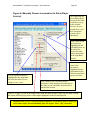
Figure 6: Manually Choose Locomotives to Drive (Player
Service)
This right-hand list
box initially shows
the player-driveable
locomotives set up
in the original
activity. As you
modify these, your
new locomotive
consist will be
shown here.
Press “Add” to add
the locomotive
highlighted in the
left hand list box to
the end of the
player-driveable
consist being built
in the right-hand
list box.
Press to flip the locomotive
highlighted in the right-hand
list from forward to reverse
facing (or vice versa)
Press “Remove” to
remove the
locomotive
highlighted in the
right-hand list box
from the consist the
player will drive.
Press “Remove All” to remove all the
locomotives from the player driveable list on
the right, so you can build your desired loco
consist from scratch.
If there is a .jpg or .gif file in the engine folder with the same filename as the .eng file, then clicking
this button will bring up a picture of the engine highlighted in the left hand list box.
⇒ Important note: if you’re selecting Steam locomotives, be certain to select a Tender for
each steam engine, placed immediately after the engine! Don’t “flip” the tender.
ActivityMaster™ by Skyline Computing – User’s Manual
Page 31
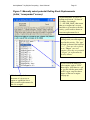
Figure 7: Manually select potential Rolling Stock Replacements
(Initial, “unexpanded” screen).
As described here, if a piece of
rolling stock has an * in front of
it’s name, for example:
“* - 48TANK_BASF, that means
that car or engine isn’t on your
hard drive, so in order to run this
acitivy, you’ll need to choose at
least one replacement for it.
Here you’ll see the pieces of
rolling stock (cars and engines)
used in this activity. The ‘type’
of each is shown in the brackets
“< >”. These are also referred
to as “Target” cars and
engines, since they are potential
“targets” for replacement by
Activity Master.
Click the “+” symbol next to
the name of a given car or
engine to expand the list to
show possible replacements for
that car or engine.
If you click on the name of a
car or engine, such as “GP38”
shown here, AND there is a .gif
or .jpg file with the same name
as the .wag or .eng file, then a
picture of that car or engine
will pop up.
ActivityMaster™ by Skyline Computing – User’s Manual
Page 32
Figure 8: Manually select potential Rolling Stock Replacements
(Shown when a car list has been expanded, and several potential
substitutes have been chosen).
Click this to finalize the
substitute selections you made.
This will return you to the
“Replace Rolling Stock” screen,
where you’ll need to press
“Replace Rolling Stock” to
actually make the replacements.
“Target” cars and engines are to
the left. These are the cars and
engines that are used in this
activity. ActivityMaster can
replace them for you, if you
select at least one potential
replacement from the list below.
The text in brackets, such as < T
> or < G >, is the car’s “type”.
See “Car Type Codes” for a
discussion of thee type codes.
These lines point up
towards the “target” car to
be replaced. Thus, all of
these cars are potential
replacements for the
“target car”,
“US2BNSFCar”, which is
type “G” for “Gondola”.
If you click in a box next to a
“Target” car or engine (one at the
top of a list), that will cause ALL
possible replacements to be
selected as replacements for that
car or engine, or, it will clear all
the selected replacements (it’s a
toggle).
When the list beneath a “Target” car
or engine is “expanded” (by clicking
on the “+” symbol), you see all the
potential replacements for that car or
engine. You can then tell
ActivityMaster, by checking the
boxes next to any of the cars or
engines below the “parent”, that the
given car is ok to use as a substitute
for the “parent” car when replacing.
Note: if you’re wanting to replace
locomotives with Steam engines, and
many of your steam engines seem to
be missing from the list of potential
replacements, it’s probably because
you need to set up the tenders for
them as described in the section on
“Setup Steam Tenders”.
Check the box next to a given car or engine for that car or engine to
be considered by Activity Master as a replacement for the “Parent”
car or engine. For instance, in this example, the BNgon_coil_load,
CBQgon_coil_load, DRGWgon_coil_load and ELgon_loaded have
all been selected to be used by Activity Master as replacements for
the default gondola car, “US2BNSFCar”.
ActivityMaster™ by Skyline Computing – User’s Manual
Page 33
Figure 9: Print Work Order – Modify Activity
Gives the file name of the
currently selected activity
file to modify (the file will
be archived before any
modifications are made).
Shows the season set for
the original activity. Click
to change the season.
Shows the weather set for
the original activity. Click
to change the weather.
Shows the start time of the
original activity. Enter the
desired start time to change
it. All AI traffic will also
be moved by the same
amount, so meets will work
as they did in the original
activity.
Press this to save an archive of
the original activity, then
rewrite the activity with the
changes made on this screen.
Note: this does NOT cause
ActivityMaster to change out
any of the Rolling Stock in the
activity. It only changes the
start time, weather and/or
season as specified on this
screen.
Press to view or print the
activity briefing and work
order.
Click if all you wanted to do was view the
information, or perhaps print the work
order, but you don’t want to actually
modify this activity.
ActivityMaster™ by Skyline Computing – User’s Manual
Page 34
Technical Issues and Support
System Requirements
In order to install and run ActivityMaster successfully, you must have:
•
•
•
•
Pentium II 266 MHz or better
Microsoft Train Simulator™ Installed and operating correctly (installation of all
available patches and updates is recommended but not required).
Microsoft Windows NT, Windows 98, Windows XP (Pro or Home), Windows
98SE2.
At least 5 MB of free hard drive space.
Obtaining Technical Support
Technical support is available at no cost on the Skyline Computing web site,
www.skylinecomputing.com. You may also e-mail ActivityMaster’s author/developer,
Steve Davis, directly, at [email protected] . For urgent issues e-mail is recommended.
Except in extraordinary circumstances we will respond to your email inquiries within 24
hours of receipt.
If you are having a problem, or getting an error message when running ActivityMaster,
please do the following:
2
•
Restart ActivityMaster.
•
Restore the original activity that generated the error, using the “Restore an
Activity” function (if Activity Master didn’t make any changes, due to the error,
there may not be an activity to restore. If you can’t find the backup activity in a
sub folder of the route’s activity folder, as described in “Initial Welcome Screen,
Section B: Restore an Original Activity”, then you can skip this step).
•
Click the check box labeled “Check Here to Generate Debug File” before doing
anything else!
•
Press the “Load an Activity (.act) File” button.
All Windows™ versions are registered trademarks of Microsoft, Inc. Skyline Computing, distributor and
creator of ActivityMaster™, is not affiliated with Microsoft. It is believed that Activity Master runs
without issues on Windows™ ME (“Millenium Edition”) , however it has not been specifically tested on
that platform. Microsoft has not agreed to support ActivityMaster. Please direct your ActivityMaster
support issues to Skyline Computing directly, at www.skylinecomputing.com.
ActivityMaster™ by Skyline Computing – User’s Manual
Page 35
•
Perform the same steps, preferable in the same order, you followed before you
observed the problem or got the error message.
•
Find the file “debug.txt” (it may appear as only “debug” in your Windows
Explorer, depending on how your version of Windows is set up. See the section
on “File Names and Extensions” for more on this). There are two ways to locate
this file:
1. Use “My Computer” or “Windows™ Explorer” to open your \Program
Files\ActivityMaster folder, and look for the file, “debug.txt”, or just “debug”.
2. Click “Start” then “Search” then “All Files and Folders” (exact text may vary
depending on your version of Windows™) and enter “debug.txt” in the search
box. Then click “Search” to locate this file. If there is more than one file
found, use the one in the “\ActivityMaster” folder.
•
Email a description of the problem you had, along with the debug.txt file attached,
and a good e-mail address where you can be reached, to [email protected]
Note: be sure your spam blocker will accept e-mail messages from [email protected],
or you will not be able to receive our e-mailed responses!
There is also a “known issues” and “FAQ” section on the Skyline Computing web site,
which will be continually updated as issues are reported and identified.
Using ActivityMaster with TrainStore™
While there is no contractual or other relationship between Skyline Computing,
developers of ActivityMaster, and the developer of the freeware product “TrainStore™”,
ActivityMaster has been tested and determined to work well with TrainStore™. There
are some things to consider when using ActivityMaster with TrainStore™. Using
TrainStore™ can make it appear that less rolling stock is available to ActivityMaster to
use when substituting rolling stock. This can also make using ActivityMaster easier,
since ActivityMaster will only “pull from” UNSTORED rolling stock.
A. What happens when rolling stock and/or engines are “Stored”
using TrainStore™
When a freight or passenger car (also known in MSTS parlance as a “wagon”, thanks to
British developers Kuju), or a locomotive/engine is “stored” using TrainStore™, what
actually happens is, the .wag file associated with the piece of rolling stock, or the .eng file
associated with the locomotive, is deleted from the MSTS \TRAINS\TRAINSET folder,
and instead is stored in a sub-folder of the \TrainStore storage folder set up within
TrainStore™.
ActivityMaster™ by Skyline Computing – User’s Manual
Page 36
What this means to ActivityMaster is, when creating rolling stock groups, searching your
hard drive for rolling stock you have, selecting replacements from a list, or performing
any other ActivityMaster functions, any rolling stock or engines “stored” by TrainStore™
basically DON’T EXIST insofar as ActivityMaster is concerned.
Usually this isn’t a problem. Where it CAN be a problem is, if you do some
substitutions, and then store rolling stock, it of course won’t be available when you load
the activity in MSTS, and you’ll get errors when loading, possibly even the dreaded
“send/don’t send” error. Also, if a lot of your rolling stock is “stored”, but some of that
rolling stock is used in the activity you downloaded, then ActivityMaster will tell you
that that rolling stock is not present on your hard drive, even though you actually DO
have that rolling stock (car or engine).
Ensuring all rolling stock on your hard drive is available to ActivityMaster when
replacing rolling stock in an activity:
To avoid problems, one suggestion is to unstore all rolling stock when first analyzing an
activity that you downloaded or installed for the first time. Then, perform substitutions
if/as needed. After that, when you use TrainStore™, since the activity has now been
modified and saved to reference all needed rolling stock, TrainStore™ shouldn’t store
any of the rolling stock you need/use in that activity. So, you could once again store all
unneeded rolling stock, and as long as you didn’t store the activity you just modified (and
presumably, intend to run), TrainStore will “know” that the rolling stock is “in use” and
won’t “store” it.
B. Using TrainStore as a Tool When Replacing Rolling Stock
If your desire is to replace all rolling stock in an activity with only rolling stock (by this
we mean engines, and cars/wagons) used in a specific route, or activity, you can save
yourself some work by using TrainStore™ to store all of your activities/routes EXCEPT
the activity/route which holds the rolling stock you want to use in the activity you’re
modifying.
When you do this, ActivityMaster will only pull potential substitute cars or engines from
the cars and engines referenced in activities (and their associated consists) in the unstored
activities or routes.
For example: let’s say you have Maple Leaf Tracks™’ “Sandpatch” route, plus their
“B&O/C&O Heritage Pack.” If you unstore all the Sandpatch activities, including the
“Heritage” add on pack activities, and store everything else, then open an activity to
modify, ActivityMaster will ONLY replace the rolling stock (you select to replace) using
the “unstored” rolling stock. So you should get an activity with all Maple Leaf Tracks’
rolling stock, plus any other rolling stock used in any other activities or routed you’ve
unstored.
ActivityMaster™ by Skyline Computing – User’s Manual
Page 37
Of course this works the same way for Dekosoft™, 3DTrains™, NALW™ and
3DTrainStuff™ rolling stock (and that of any other payware or freeware third party
rolling stock developer).
Note that TrainStore™ stores all engines and rolling stock that isn’t used in an
unstored activity, or in a consist referenced by an unstored activity. Thus, if you
downloaded an engine or car, but it isn’t referenced in a consist or activity that’s
unstored, then TrainStore™ will store that engine or car and it WON’T be available to
ActivityMaster when substituting rolling stock.
There are several ways to be sure that the rolling stock you want ActivityMaster to use as
replacements, is available for it to use, including:
•
For engines and/or railcars associated with routes, such as the equipment used in
3DTS™’ Tehachapi or Cajon routes, be sure and unstore all the activities in those
routes (since, some rolling stock may not be used in all the activities in a route).
We recommend simply “unstoring” the entire route.
•
For engines/railcars you downloaded individually, but which may not be a part of
a consist, you can do one of the following:
•
Use the MSTS Activity Editor to create a new service, then a consist for that
service, and include the engines or cars you want to have available, in that
consist. Then, make sure the consist is referenced as an “explore mode
consist” in TrainStore™, and DON’T store the “Explore Mode Consists” (for
more information on this and other functions of the TrainStore™ software,
please see the excellent and detailed user’s manual that comes with
TrainStore™.)
•
Use ConBuilder™ to create a consist including the cars and/or engines you
want to be available to ActivityMaster when substituting rolling stock, and,
again, be sure an include those consists in a TrainStore™ “Explore Mode
Consist” and don’t store the “Explore Mode Consists”.
•
Follow the instructions given in section “A”, preceeding, entitled “Ensuring
all rolling stock on your hard drive is available to ActivityMaster when
replacing rolling stock in an activity”, to make sure ALL possible rolling
stock is available to the program to choose from. Then possibly narrow down
the choices ActivityMaster will be selecting from by using the “Set Rolling
Stock Groups” function described elsewhere in this manual.
ActivityMaster™ by Skyline Computing – User’s Manual
Page 38
Viewing File Names and Extensions
Your version of windows may not show the extensions. It may instead show
these file names without the extension name, i.e., “yard_two.act” would appear
on your screen as “yard_two”. This is not a problem and won’t affect how
ActivityMaster performs on your machine. You can change this setting in
Windows from “Control Panel”, or “Windows™ Explorer”: see your Windows
Help.
ActivityMaster™ by Skyline Computing – User’s Manual
Page 39
Copyrights/Trademarks
ActivityMaster is a Trademark of Skyline Computing, aka Steve Davis. The program
described herein may not be duplicated, except for archival purposes by the purchaser of
the product, or distributed in any manner, without the express written permission of the
Author, Steve Davis. This manual, on the other hand, MAY be freely distributed using
any and all means including electronic posting on web sites, without any further
permission from the author or Skyline Computing.
We ask our users to help us to keep the cost of this and other products low by adhering to
US and International Copyright Laws. Purchase of this product entitles the user to make
archival backup copies of the program, and to run the program on any or all computers
upon which said user also has a legal version of Microsoft™ Train Simulator™ installed.
Steve Davis and Skyline Computing are not affiliated with Microsoft™ or any other
software suppliers or distributors, including but not limited to those mentioned within this
manual. Such mentions are made only for informational purposes and with regard to the
use of ActivityMaster in conjunction with the mentioned product or work, whether such
mentioned program is provided for free, or for a charge or other consideration.
Credits/Acknowledgments
I owe a debt of gratitude to the following folks, without whom this project would never
have been completed!
Dan Mosko – Chief Beta Tester.
Dan put this program through it’s paces in every
imaginable way and provided me with an incredible volume of feedback. We exchanged
emails often several times a day as we went through the development and testing process.
Dan, without you, I wouldn’t have completed this. Thank you!!
Rich Garber – Guidance and Artistic Direction.
Rich provided me with ideas as to
features to add, support and guidance throughout the development process, and designed
the Skyline Computing Logo! For those who don’t know Rich (are there any in the
MSTS community who don’t?), he is the designer of two of the most popular freeware
routes available, East Metro and Ohio Rail, as well as a great payware route I highly
recommend: Canton. Canton is a photo-realistic route with all manually operable
switches. Canton is an excellent companion to our other product, “SwitchList Generator”
since players can go anywhere they need/want to, there are no signals to contend with or
switches that can’t be operated.
Craig Koepe – Beta testing team, steam power division.
Thanks for your help and
input!
Dennis Paul Gaucci
- Beta testing team and quality control. Thanks to you also!