1
5.3 Search Filters
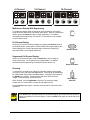
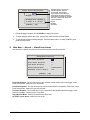
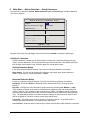
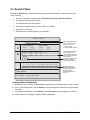
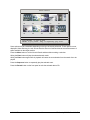
Pressing the Search button a second time brings up the Search Filters Menu. Use the Search Filters
menu to specify:
•
The type of operation to be performed: Play from Disk or Copy from Disk to Archive.
•
The Start and Stop date of the search.
•
The Start and Stop time of the search.
•
Searching for recorded activity, events, retail text, or alarms.
•
Searching for a text string.
•
Which cameras to search inclusively or exclusively.
Search Filters
Operation:
The following options are
available when an archive
device is connected:
Play from Disk
DATE (MM/DD/YY)
TIME (HH:MM)
Start
Stop
Start
Stop
01/27/04
01/27/04
20:57
20:59
Activity
Event
Text
Alarm
1. Play from Disk.
2. Copy from Disk to Archive.
Selecting these functions
displays thumbnails in
the Search Results window
if the Operation selected is
Play from Disk.
X
Retail
To access the Retail Search
Menu select ‘RETAIL’
and press the ‘ZOOM’ key.
X
Camera
1
2
3
4
5
6
7
8
9 10 11 12 13 14 15 16
X
X
X
X
X
X
X
X
X
X
[CANCEL]
[START SEARCH]
X
X
X
X
X
X
EDIT MODE
Hit Camera buttons to
select/deselect individual
cameras. Use the Zoom
button to globally
select/deselect cameras
to search.
Hit ‘ZOOM’ to edit retail text list
Hit ‘ENTER’ to toggle EDIT Mode
Selecting Search Parameters
1. Rotating the Jog to navigate, highlight the box adjacent to the parameters that you wish to modify.
2. Once in the Parameter Box, use the Shuttle to navigate through the fields and the Jog to change
the values.
3. To activate the parameter, use the Shuttle or the Enter button to place an [X] in the check box.
4. When finished, use the Jog to navigate to another parameter.
0150-0295B
63
GE Security DVMRe StoreSafe Pro