1
Orchard Carbon Calculator: Setup
Go to www.orchardcarbontool.com.au
(i.e. Type this address into the address bar on your web browser)
First-time users
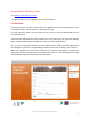
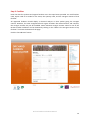
If this is the first time you have used the site click on “Register” from the “Carbon Calculator” menu
on the right of screen. This will take you to the registration page.
Fill in the registration details. You may choose any user name you wish, provided another user has
not already chosen it.
If you are an SPC Ardmona grower please ensure that you select that “Yes” you are an SPC Ardmona
grower from the drop-down box which is initially set to “No”, then enter your unique SPC Ardmona
grower number (between 0001 and 9999) and answer the data sharing question.
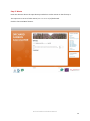
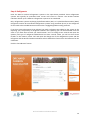
Once you have completed all the fields, click the “Submit” button. After a successful registration a
link will appear on the screen. To begin adding information about your orchard(s), click on this link.
Note: Your registered user name will be emailed to the supplied email address to confirm your
registration, but your password will not. Please take note of your user name and password and keep
them somewhere safe. You will need these for future logins.
Orchard Carbon Calculator Manual
7