1
SPHINX
Myth 7
1. UNPACKING .......................................................................................................................................3
2. SPHINX WARRANTY CARD ..............................................................................................................3
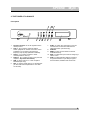
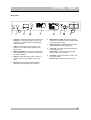
3. THE TUNER AT A GLANCE...............................................................................................................4
Front panel................................................................................................................................................... 4
Rear panel ................................................................................................................................................... 5
4. DISPLAY .............................................................................................................................................6
5. INSTALLATION AND CONNECTIONS ..............................................................................................7
Installation.................................................................................................................................................... 7
Power supply ............................................................................................................................................... 7
Connecting the amplifier .............................................................................................................................. 7
Connecting the optical cable........................................................................................................................ 7
Connecting the antenna............................................................................................................................... 7
Power on/off................................................................................................................................................. 7
Antenna input sensitivity .............................................................................................................................. 7
Selecting AM or FM ..................................................................................................................................... 8
Auto Tuning.................................................................................................................................................. 8
Manual Tuning ............................................................................................................................................. 8
Bandwidth selection ..................................................................................................................................... 8
FM reception mono/stereo ........................................................................................................................... 9
Station Memory............................................................................................................................................ 9
Storing a station in memory ......................................................................................................................... 9
Recalling a station from memory ................................................................................................................. 9
Clearing a memory location ....................................................................................................................... 10
RDS (Radio Data System) ......................................................................................................................... 10
Radiotext.................................................................................................................................................... 10
Clock-Time................................................................................................................................................. 10
Program Type recognition (PTY) ............................................................................................................... 10
Assigning station names............................................................................................................................ 10
Editing data................................................................................................................................................ 10
Erasing a station name .............................................................................................................................. 10
Storing information..................................................................................................................................... 10
Selecting display mode.............................................................................................................................. 11
Last Station Memory .................................................................................................................................. 11
7. IMPORTANT INFORMATION ...........................................................................................................12
RDS Radio Data System ........................................................................................................................... 12
Program Type (PTY) .................................................................................................................................. 12
Language selection.................................................................................................................................... 13
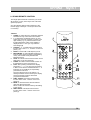
8. SPHINX REMOTE CONTROL ..........................................................................................................14
Toetsen ...................................................................................................................................................... 14
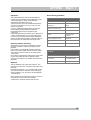
Operation ................................................................................................................................................... 15
Selecting without switching ........................................................................................................................ 15
Batteries..................................................................................................................................................... 15
Encountering problems.............................................................................................................................. 15
9. CARE AND MAINTENANCE.............................................................................................................16
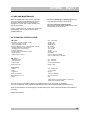
10. TECHNICAL SPECIFICATIONS .....................................................................................................16
2