1
1.
How does an email address relate to a URL?
A URL or Universal Resource Locator is the term given to an "address" of a specific location on
the Internet, in the same way as a ZIP code or Postal code gives a location using normal realworld postage systems.
This is an example of an URL, as used in web browsers:
The URL is broken down as follows:
Protocol
This just tells the web browser the what to do when connecting to the
machine addressed in the rest of the URL, in this case HTTP, (for HyperText Transfer Protocol)
which is the standard language for sending web pages. There are other protocols that can be
specified, such as FTP (File Transfer Protocol) for the transmission of files.
Machine name
The specific machine name where the web server is located within the
vicomsoft.com domain.
Domain
2.
name as per the domain name used in the email address.
How does email get from the email client to the email server, and vice-versa?
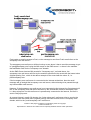
When sending mail, the email client finds the mail server using the Domain Name System
(DNS)* and contacts it using the Simple Mail Transfer Protocol (SMTP).
Once the mail server has been contacted, the message is sent and the email client then
proceeds to send any further pending messages, or logs out of the mail server.
To collect mail a similar procedure is followed, using the Post Office Protocol (POP), with the
email client sending an account name & password to tell the mail server who's mail to collect
before collecting waiting messages, which are then collected one at a time.
*please note that on a local network there may not be a DNS server. This usually means that
the mail server is referred to by it's actual IP address, rather than by name.
3.
What is SMTP?
Content of this page in its entirety is protected by US & UK Copyright
© 2002 Vicomsoft Ltd
Reproduction in electronic and written form is expressly forbidden without written permission.