1
ADDENDUM: TP-300FW
This addendum clarifies that only SHIELDED CABLES should be used
with the TP-300FW and the chronological order in which the TP-300FW
should be connected.
Amendment to Section 3
In the following text— Enables 1394 100Mbps signals to be transmitted and
received across an extended range on unshielded twisted pair cable—the word
“unshielded” is replaced by “shielded”.
Amendment to Section 5
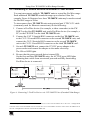
To avoid interference in normal operation, be sure to follow the correct order.
When connecting the TP-300FW FireWire Range Extender, connect in the
following order:
1. Connect to the power using the 12V power supply (provided).
2. Connect the CAT-5 cable with RJ-45 connectors at both ends.
3. Connect the FireWire cables.
When disconnecting1 the TP-300FW FireWire Range Extender, connect in
the following order:
1. Disconnect the FireWire cables.
2. Disconnect the CAT-5 cable with RJ-45 connectors at both ends.
3. Unplug the 12V power adapter.
Notes:
Apply the same rules for both source and destination FireWire
equipment (that is, first connect the power to both TP-300FW units and only
then connect the Firewire cables).
When reconnecting two TP-300FW units, first disconnect the cable,
and only then reconnect them.
Wait 5 seconds (after completing all the connections) for the picture to
appear on the destination device.
If the picture fails to appear on the destination device after 5 seconds, press
the RESET Button to reboot the setup.
Wait another 5 seconds for the picture to appear on the destination device.
There is no need to use the Kramer PT-1FW DV Line Protector on the
line with TP-300FW units because the TP-300FW already has this
technology built-in!
1 Disconnect in reverse order
P/N: 2900 0003002
A1