1
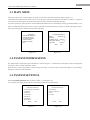
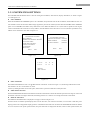
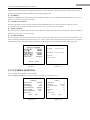
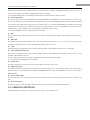
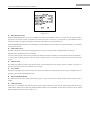
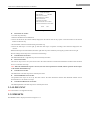
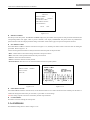
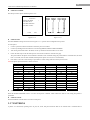
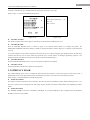
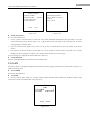
14 6 Inch Network Medium Speed Dome User Manual azimuth/elevation and zoom label are displayed all the time in other status. The external alarm response actions can be activated in non-menu programming mode while disabled in the menu programming mode. IP ADDRESS Enter the IP ADDRESS menu and then use the direction buttons to define of value of IP address and sub mask. Finally click the Iris+ button to save settings and exit the current menu. POWER LOSS POSITION The dome supports the power loss position capability with the predefined dwell time. It allows the dome to resume its previous position after power is restored. The function can be set to 30 sec, 60 sec, 300 sec, 600 sec or Disable. REBOOT PERIOD The dome reboots at 00:00:00 of the current day for the first time, and the second reboot action will take place after the predefined period which can be set to 1~7 days or Disable. PT ADJUST PERIOD The dome performs pan and tilt self-test at 00:00:00 of the current day for the first time, and the second pan/tilt self-test action will take place after the predefined period which can be set to 1~7 days or Disable. If the reboot time and the PT adjust time are overlapped with each other, the system will perform the scheduled reboot with the priority, and no scheduled PT adjust action will be taken. IP ADDR: 172 008 003 205 SUB MASK: 255 255 255 000 IRIS+OK IRIS- CANCEL Figure 3.3.6 Figure 3.3.7 3.3.2 CAMERA SETTINGS Note: The menu varies depending on camera models. Enter the Camera Settings menu, as shown in Figure 3.3.8, Figure 3.3.9 and Figure 3.3.10. <CAMERA> <CAMERA> AUTO FOCUS ZOOM LIMIT ZOOM SPEED ENABLE 36 HIGH SLOW SHUTTER IR CUT FILTER IRCUT SENSITIVITY NEXT PAGE ENABLE NIGHT N/A BACK EXIT Figure 3.3.8 SHARPNESS BLC/WDR 9 DISABLE EXPOSURE MODE IRIS AUTO 10 SHUTTER 60 GAIN NEXT PAGE 1 BACK EXIT Figure 3.3.9