1
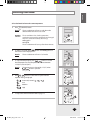
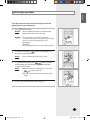
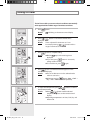
ENGLISH Selecting Dry mode Select Dry mode if the room is too humid. Using this mode will slightly lower the room temperature. 1 2 Press The air-conditioner will turn on with the mode selected when the unit was last used. Caution The air-conditioner has a built-in protection mechanism to prevent the unit from being damaged when it is started immediately after being: Plugged in Stopped The air-conditioner will start up after three minutes. To select Dry mode, press the remote control display. Result: 3 (ON/OFF) button. Result: button until Dry appears on The air-conditioner will run in Dry mode. To adjust the temperature, press button to set the desired temperature. The temperature can be set between 18°C(65°F) and 30°C(86°F). Result: The temperature is adjusted by 1°C(1°F) when button is pressed. The fan speed is adjusted automatically in Dry mode. 4 To adjust the airflow direction refer to page 13. E-11 MR-BH01_IB_E_27997.indd 11 2007-06-05 ソタネト 2:13:55