1
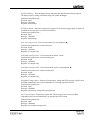
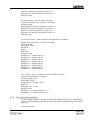
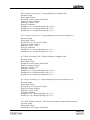
Databyte1<5..0>: Time Remaining <19..14>
Databyte2<6..0>: Time Remaining <13..7>
Databyte3<6..0>: Time Remaining <6..0>
Note: A negative time remaining means the time remaining until the battery needs to be charged is infinite
because the average current is positive (battery is being charged). On the monitor this is displayed as four dashes:
---- h.
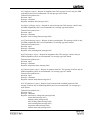
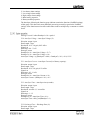
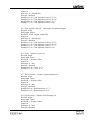
0x66 Temperature – Battery temperature.
Transmission repetition rate: 1s
Direction: output
Data Length: 3 bytes
Resolution: 0.1°C / bit gain, 0°C offset
Signed: yes
Data range: -20.0 – 50.0°C
Data type: measured
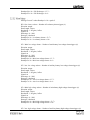
Databyte1<6>: Sign (0 = positive temperature, 1 = negative temperature)
Databyte1<1..0>: Temperature <15..14>
Databyte2<6..0>: Temperature <13..7>
Databyte3<6..0>: Temperature <6..0>
Note:
The step size of temperature is 0.5°C, so the outputted value changes with increments of 5.
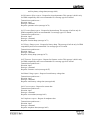
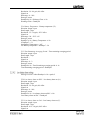
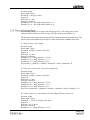
0x67 Monitor Status – Status of the battery monitor.
Transmission repetition rate: 1s
Direction: output
Data Length: 3 bytes
Resolution: Signed: Data range: Data type: status
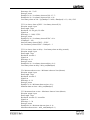
Databyte1<6>: reserved
Databyte1<5>: reserved
Databyte1<4>: Auto-Sync Voltage – Voltage > Auto-Sync Voltage level
Databyte1<3>: Auto-Sync Current – Current < Auto-Sync Current level
Databyte1<2>: Auto-Sync Charge – Battery has been discharge far enough to let it Auto-Sync
again
Databyte1<1>: XBM Compatibility Mode – Battery monitor is outputting data in XBM
compatibility mode
Databyte1<0>: Alarm Test – Alarm switch triggered due to command ‘Alarm switch on’
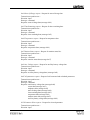
Databyte2<6>: Backlight Test – Backlight switched on due to command ‘Backlight on’
Databyte2<5>: Display Test – Display test switched on due to command ‘Display test on’
Databyte2<4>: No Temperature Sensor – No temperature sensor detected by battery monitor
Databyte2<3>: Aux. High Voltage Alarm – The auxiliary battery’s high voltage alarm is
triggered
Databyte2<2>: Aux. Low Voltage Alarm – The auxiliary battery’s low voltage alarm is
triggered
Databyte2<1>: Installer Lock – Installer-lock is enabled