1
█ ATTACHING THE QLINK TO YOUR
TELEVISION
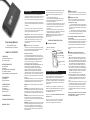
Before attaching to your television, refer to your TV's
user manual for information on your TV's audio
output. The QLINK must be connected to an analog
audio out jack.
Attaching to a 3.5mm Headset Jack:
Plug the 3.5mm plug into the 3.5mm Headset Jack on
located on your TV. Refer to your TV User Manual for
location of the headset jack. The volume of the
headset jack will be controlled by the TV's volume
control unless the TV has independent controls for
the headset jack.
Once you've paired the QLINK and Quattro, you should not
need to repeat the pairing process when you want to reconnect.
█ POWER SAVING MODE
If the QLINK is out of range of your QUATTRO for more than 2
minutes, your QLINK will go into “Power Saving Mode” and
will turn-off automatically to conserve battery power. To reestablish the connection, return within range of your QLINK
Transmitter and press the On/Off Multi Function Button for 2
seconds until the Blue light flashes, then release.
█ OUT OF RANGE
Intermittent sound or silence is an indication that you have
moved out of range of the QLINK. The QLINK will continue to
search for the QUATTRO (or the last Bluetooth Headset the
QLINK was paired to). If the QUATTRO is turned on and is
within range of the QLINK, the QLINK will connect to the
QUATTRO automatically.
Low Battery Power
When the QLINK is switched on and battery power is low, the
light will flash RED every 5 seconds. For use with fixed
position devices like the TV, you can use the QLINK while
plugged into the power adapter and not be concerned that the
battery will have to be recharged.
RE-CONNECTING THE QLINK
If the QLINK can not find the QUATTRO because the
QUATTRO is either turned off or not within range, it will turn off
automatically.
█
Attaching to an Analog RCA Audio Out Jack:
1.Take the RCA Cable included in the package and
put the red plug into the matching red jack on the
TV and the white plug into the matching white jack
on the TV.
2.Take the QLINK and put the 3.5mm plug into the
black 3.5mm jack on the RCA cable.
Attaching to a Digital Coax or Digital Optical
Audio Out Jack:
In order to connect to this type of output jack, you
must purchase a digital to analog convertor. Please
contact a Customer Solutions Representative at 800965-9043 for more information if you do not have this
device.
1.Install the Digital to Analog Convertor following
that product's instructions.
2.Plug the QLINK directly into the 3.5mm jack on
the Digital to Analog Convertor.
█ ATTACHING THE QLINK TO YOUR MP3
PLAYER OR OTHER SOUND OUTPUT DEVICE
Simply plug the QLINK into the 3.5mm headset jack
on your audio device.
The QLINK is designed to be used with STEREO
devices. If you are attaching the QLINK to a mono
audio device you must use a 3.5mm mono to
stereo adapter.
Your QLINK and QUATTRO are now ready to be
used.
QLINK OR QUATTRO HAS BEEN TURNED OFF
If either the QLINK or QUATTRO have been powered off, you
will need to re-connect.
1.Make sure the QLINK is fully charged.
2.Make sure the QUATTRO is fully charged and turned on.
3.Place the QUATTRO within 2-3 feet of the QLINK.
4.Press and hold the On/Off Multi Function Button on the
QLINK for 2 seconds until the Blue light flashes and then
release.
5.The QLINK will automatically connect to the QUATTRO. If the
QLINK can not find the QUATTRO within 2 minutes, it will
turn off automatically. If this occurs, make sure both devices
are fully charged and within range of each other, then repeat
the process.
6.If they still do not re-connect, you may need to repeat the
pairing process. See Pairing the QLINK with the
QUATTRO.
Please Note: Follow the same instructions when using
other Bluetooth Compatible Headsets.
Intermittent sound may also be an indication that you have a
low battery.
█ DUAL CONNECTION
Your QUATTRO (or other Bluetooth Headset) may be
connected with the QLINK and your cell phone at the same
time and you may be able to answer your cell phone while
listening to the QLINK-connected audio device. Please visit
www.clearsounds.com or call 800-965-9043 for more
information.
TROUBLESHOOTING
If you are having difficulty connecting the QLINK with your
QUATTRO, check the following:
[
Ensure the QLINK has been paired with your QUATTRO
[
Ensure the QLINK is charged and has been turned ON
[
Ensure the QUATTRO is charged and is turned ON. Refer to
your QUATTRO User manual for more information on
charging and activating the QUATTRO.
[
Ensure the distance between the QLINK and the QUATTRO
is less than 30 feet and there is no obstruction such as walls
or other electronic devices between the units.
OTHER FUNCTIONS
█
POWER ON AND OFF
To turn the QLINK ON:
Press and hold the On/Off Multi Function Button located on the
top of the QLINK for 2 seconds. The light will flash blue and
search for available paired devices.
To turn the QLINK OFF:
Press and hold the Multi Function Button located on the front of
the QLINK for 3 seconds. The light will flash red for 1 second,
then the QLINK will switch off.
█ RESETTING THE QLINK
To reset the QLINK, press the Restoration Key when the unit is
ON. The QLINK will automatically turn off.
TECHNICAL SPECIFICATIONS
Bluetooth Specifications:
Profile:
Frequency:
Playing Time:
Dimension:
Weight:
Range:
Charging Time:
V2.1+EDR, Class 2
A2DP
2.4 GHz Spectrum
Up to 7 hours
2L x 1 W x .4H mm
.6 oz
Up to 30 feet
2-3 hours
LIMITED ONE-YEAR WARRANTY
The QLINK is warranted by ClearSounds against
manufacturing defect in material and workmanship under
normal use for one (1) year from the date of purchase. Should
you experience a problem, contact our customer service
department or visit our website at www.clearsounds.com.
Be sure to save your sale receipt as the proof of purchase
date should you need warranty service.
In the event that this product fails to function properly within
one year of the original purchase due to defects in materials
or workmanship, return the unit (freight prepaid) with proof
of purchase (sales receipt or packing slip, no exceptions) to
ClearSounds Communications. ClearSounds
Communications will either repair or replace the unit (with a
refurbished unit or unit of equal condition) and return it you
(using UPS/USPS ground shipping) at no cost to you. The
warranty replacement or repair will be warranted for a period
of 90 days or the remainder of the original warranty period
(from original purchase date); whichever is longer.
The warranty does not cover accidents, negligence or
breakage to any parts. This includes shipping damage,
failure to follow instructions, misuse, fire, floods, use of
incompatible accessories, Acts of God or damage to the
connecting wire due to excessive stress. The product must
not be tampered with or taken apart by anyone who is not an
authorized ClearSounds Communications® representative.
Tampering with the QLINK will void any written or implied
warranties.
If a defect covered by this warranty should occur, promptly
contact a Customer Service Representative by phone or log
onto www.clearsounds.com to obtain a Return Merchandise
Authorization number and shipping instructions before
shipping the product to us. Any shipment without a (RMA)
Return Merchandise Authorization number will not be
accepted and will be returned to you at your expense. All
authorized returned products must be accompanied with
proof of purchase and a brief explanation of the problem.
For out of warranty repairs and service, please contact our
Customer Service Department for instructions. The repair
shall be warranted for 90 days.
IMPORTANT: YOUR RECEIPT IS PART OF YOUR
WARRANTY AND MUST BE RETAINED AND PRODUCED
IN THE EVENT OF A WARRANTY CLAIM.
Service in United States and Canada, contact:
ClearSounds Communications®
Attention: Repair Center
1743 Quincy Avenue, Suite 155
Naperville, IL 60540
USA
800-965-9043
Check our website, www.clearsounds.com, for additional
information and to download additional manuals and
information.