1
QLINKTV
BLUETOOTH STEREO AUDIO TRANSMITTER
USER GUIDE
Better Sound in Every Ear
Welcome
Thank you for purchasing the ClearSounds QLinkTV Bluetooth Stereo Audio
Transmitter. You are either really smart for purchasing the QLinkTV or someone really
likes you and bought this for you. Or maybe you are both smart AND lucky to have
someone who gave you the QLinkTV. Either way, nicely done.
The QLinkTV is an innovative Bluetooth® stereo transmitter. Bluetooth is a technology
that uses radio waves to transmit data between devices over short distances. It offers
an array of features that will connect you to your mobile phone so you can actually
hear conversations clearly, and connect you to your music & TV to bring back the joy of
entertainment.
With all this awesomeness comes some new technology that may require a learning
curve. Have no fear; our remarkably patient & passionate team of Customer Solutions
Consultants are here to help.
1
Welcome
Contact Information
Please contact us with any questions that you might have. We are happy to assist you!
ClearSounds Communications, Inc.
1743 Quincy Avenue, Suite 143
Naperville, IL 60540 USA
800-965-9043 (toll-free)
Information Online
To view & print additional
copies of this manual
or spec sheet or to view
instructional videos,
please visit the Support
section on our website.
www.clearsounds.com
2
Safety Precautions
The following precautions are the kind of boring but important information you
should read to ensure maximum performance and safety when using the QLinkTV.
Although it may seem fairly obvious that standing outside in a lightning storm
wearing an electronic device is not wise, we do have to officially advise you that it’s
not a good idea to do that-- along with these other nuggets of wisdom.
Warnings
Warnings must be observed to prevent bodily injury.
WARNING: Use the equipment only in the described manner to avoid bodily injury or
damage to the equipment.
WARNING: To avoid electrical shock, locate and use the QLinkTV away from water
and damp areas, such as swimming pools, bathtubs, sinks and damp basements,
and do not use the QLinkTV when you are wet.
WARNING: Do not overload extension cords or power strips. This can result in
electrical shock.
WARNING: Avoid using the QLinkTV during an electrical storm. There is a slight
risk of electrical shock from lightning during a storm.
3
Safety Precautions
WARNING: Use the QLinkTV only with the supplied AC power adapter. Other types of
power adapters can damage the QLinkTV and cause personal injury.
WARNING: The QLinkTV is able to amplify volume, which can cause hearing loss. To
avoid the risk of hearing loss, instruct each user of proper usage, adjust the volume
to each user’s personal preference and set the volume to ‘low’ when not in use.
WARNING: Do not spill liquid on the QLinkTV or clean it while it is plugged into AC
power. This can cause a short circuit, a fire or electrical shock.
WARNING: Do not push any type of object into the QLinkTV. Contact with dangerous
voltage points can occur, resulting in fire, electrical shock or parts damage.
WARNING: Do not disassemble the QLinkTV. Dangerous voltage or other risks can
occur. Use after incorrect reassembly can lead to electrical shock.
WARNING: Keep the QLinkTV out of reach of small children.
WARNING: The QLinkTV contains a magnet in the body of the unit that could
potentially affect pacemakers. If you wear a pacemaker, please check with your
instrument provider to verify if the QLinkTV will affect your pacemaker.
4
Safety Precautions
Cautions
Cautions indicate practices that could harm the QLinkTV or other objects.
CAUTION: Some electronic devices that are not properly shielded will generate
electromagnetic interference (EMI) that may cause buzzing or odd sounds in the QLinkTV
(or any headset, for that matter). Examples of potential EMI-emitting devices include
PCs, automobiles and large screen TVs.
CAUTION: Turn off the QLinkTV in any facility where posted notices instruct you to
do so. Hospitals or health care facilities might include equipment that is sensitive to
external radio frequency (RF) energy that can cause EMI.
CAUTION: While on board aircraft, turn off the QLinkTV in accordance with airline
regulations and flight crew instructions.
CAUTION: If you use any personal medical device, consult the manufacturer of the
device to determine if it is adequately shielded from RF energy. Your physician may
be able to assist you in obtaining this information.
CAUTION: Avoid dropping the QLinkTV.
5
Safety Precautions
CAUTION: Do not expose the QLinkTV to excessive moisture, including sweat, humidity
or steam.
CAUTION: Connect the supplied AC power adapter into a surge protector. Power
surges can damage the equipment.
CAUTION: To clean the QLinkTV unit, use only a cloth slightly dampened in a mild
soap and water solution. Do not use harsh chemical or solvent cleaners or abrasive
detergents.
CAUTION: In these circumstances, refer to our customer service department:
• Liquid spills in the QLinkTV, or it is exposed to rain or precipitation.
• The QLinkTV does not operate according to descriptions in this manual,
or performance distinctly changes.
• The QLinkTV is dropped or the casing is damaged.
6
Contents
Overview..................................................................................................................8
Unpack....................................................................................................................9
Getting Familiar....................................................................................................10
Charging................................................................................................................12
Turning On/Off.......................................................................................................13
Attaching...............................................................................................................14 .
Pairing to Bluetooth Devices.................................................................................16
Reconnecting to Bluetooth Devices.......................................................................18
LED Indicator.........................................................................................................19
Care and Maintenance...........................................................................................20
FAQs......................................................................................................................21
Glossary of Terms.................................................................................................22
Specifications........................................................................................................24
Warranty Information............................................................................................25
7
Overview
About the QLinkTV
The QLinkTV is a Bluetooth stereo transmitter. Music, radio, TV shows, audiobooks and
videos can be transmitted wirelessly from your MP3 player, computer, TV and other
devices to your Bluetooth stereo receiver using the QLinkTV. Examples of compatible
receivers include A2DP Bluetooth-enabled speakers, earphones, headsets, hearing aid
streamers, personal neckloops and hearing aids with t-coils. We recommend using the
ClearSounds Quattro 4.0 Amplified Bluetooth System as your stereo receiver, but then
again, we’re probably a little biased.
Your QLinkTV should include the following items, shown on page 9:
• QLinkTV transmitter
• Stereo 3.5mm audio cable
• Stereo RCA analog audio to stereo 3.5mm audio cable
• USB charging cable
• AC power adapter
• User Guide
8
Unpack
Contents of the QLinkTV
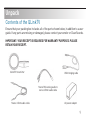
Ensure that your packing box includes all of the parts shown below, in addition to a user
guide. If any parts are missing or damaged, please contact your vendor or ClearSounds.
IMPORTANT: YOUR RECEIPT IS REQUIRED FOR WARRANTY PURPOSES. PLEASE
RETAIN YOUR RECEIPT.
QLinkTV transmitter
USB charging cable
Stereo RCA analog audio to
stereo 3.5mm audio cable
Stereo 3.5mm audio cable
AC power adapter
9
Getting Familiar
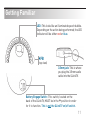
AC power adapter: This is where you
plug the standard end of the USB
charging cable into the AC power
adapter.
Charging port: This is where you
plug the micro end of the USB
charging cable into the QLinkTV.
MFB
Multi-Function Button: This button is
used to turn the QLinkTV on and off, pair the
QLinkTV to your Bluetooth stereo receiver (e.g.
headset) and connect the QLinkTV to a paired
receiver.
10
Getting Familiar
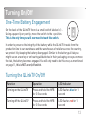
LED: This looks like an illuminated speech bubble.
Depending on the action being performed, the LED
indicator will be either red or blue.
MFB
(top view)
3.5mm jack: This is where
you plug the 3.5mm audio
cable into the QLinkTV.
Battery Engage Switch: This switch, located on the
back of the QLinkTV, MUST be in the position in order
for it to function. This is not the QLinkTV on/off switch.
+
11
Charging
Charging the QLinkTV
The QLinkTV has a built-in rechargeable battery and can be used for up to 7 hours
when fully charged. Before using it for the first time, it is recommended to charge the
battery fully. When the QLinkTV is low on power, the red LED will flash, indicating that
it is time to charge the battery.
To charge, connect the USB cable to the QLinkTV and to the AC power adapter as shown
on page 10, then plug the AC power adapter into a standard power outlet or surge
protector (recommended). The red LED will be on during charging. It takes about 3
hours to fully charge the battery. Once charging is complete, the red LED will turn blue.
Alternately, you can safely leave the power supply plugged into the QLinkTV at all
times, eliminating the need to re-charge its battery.
Note: Please do not attempt to take the battery out of the QLinkTV, as this may damage
the QLinkTV and will void your warranty.
Important:
1) The QLinkTV battery is recyclable.
2) Do not dispose of the battery in a fire, as this will result in an explosion.
12
Turning On/Off
One-Time Battery Engagement
On the back of the QLinkTV there is a small switch labeled +/- .
Using a paperclip or pen tip, move the switch to the + position.
This is the only time you will ever need to touch this switch.
In order to preserve the integrity of the battery while the QLinkTV travels from the
production line to our warehouse and the warehouses of retailers across the country,
we protect it by keeping the battery disengaged. Similar to the battery pull tab you
might see on a new toy or on hearing aid batteries in their packaging, once you remove
the tab, the battery becomes engaged. You will only need to do this once; as mentioned
on page 11, this is NOT an on/off switch.
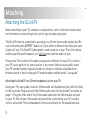
Turning the QLinkTV On/Off
Function
Operation
LED Indicator
Turning on the QLinkTV
Press and hold the MFB
for 3-5 seconds
LED flashes blue for 1
second
Turning off the QLinkTV
Press and hold the MFB
for 3-5 seconds
LED flashes red for 1
second
13
Attaching
Attaching the QLinkTV
Before attaching to your TV, computer or audio device, refer to the instructions below
for information on connecting to the correct type of audio output jack.
The QLinkTV must be connected to an analog or a 3.5mm stereo audio output jack. Be
sure to find the audio OUTPUT (‘audio-out’) jack, which is different than the audio input
(‘audio-in’) jack. The QLinkTV is designed to send sound out of your TV or other device
and into your Bluetooth headset, so it will not work with the audio-in jack.
Please note: The location of the audio output jack is different for every TV, so refer to
your TV’s user guide for its exact location. If you cannot find your user guide, locate
your TV’s model number (typically listed on a sticker on the back side) and do an
Internet search to find it using your TV model number and the words “user guide.”
Attaching the QLinkTV to a 3.5mm headphone jack on your TV:
Using your TV’s user guide, locate its 3.5mm audio-out (headphone) jack, which is likely
on the back side. Plug one end of the 3.5mm audio cable into the QLinkTV as shown on
page 11. Plug the other end of the 3.5mm audio cable into the 3.5mm audio-out jack
on your TV. The volume of the audio-out jack will be controlled by your TV’s volume
control, unless the TV has independent controls specifically for the headphone jack.
14
Attaching
Attaching the QLinkTV
Attaching to analog RCA audio output jacks on your cable box, DVD player or TV:
Using your cable box, DVD player or TV’s user guide if needed, locate the analog RCA
audio output (the red and white connectors), which is likely on the back side. Plug one
end of the 3.5mm audio cable into the QLinkTV as shown on page 11. Plug the other end
of the 3.5mm audio cable into the single ‘female’ end of the analog RCA cable. Plug the
RCA cable’s red and white connectors into the corresponding red and white audio jacks
on your cable box, DVD player, TV or other device.*
*It is important to make sure the audio jacks are labeled “AUDIO OUT” as there will usually be an “AUDIO IN” jack
next to it. If plugged into the “AUDIO IN” jack, the audio will not be heard.
Attaching to your MP3 player, laptop or other sound output device:
Using your device’s user guide if needed, locate the 3.5mm headset jack. Plug one end
of the 3.5mm audio cable into the QLinkTV as shown on page 11. Plug the other end of
the 3.5mm audio cable into the headset jack on your device.
Please note: The QLinkTV is designed for use only with STEREO devices. If you plan to
use your QLinkTV with a mono audio device, you will need a 3.5mm mono-to-stereo
adapter (not included).
15
Pairing
Pairing to Bluetooth Devices
Once the QLinkTV is attached to your audio source, it will need to be paired to your
Bluetooth stereo receiver in order to wirelessly enjoy audio. Before pairing, make sure
your receiver supports A2DP Bluetooth.
Pairing to your Bluetooth stereo receiver (we recommend our QT4 or QT4L):
1. Make sure the QLinkTV is off using the MFB (instructions on page 13). Again,
do not use the +/- switch for this.
2. Keep the QLinkTV within 5 feet of your Bluetooth stereo receiver.
3. Switch on your Bluetooth stereo receiver and set it to pairing mode. If needed,
consult the receiver’s user guide for instructions.
4. On the QLinkTV, press and hold the MFB until the blue and red LEDs flash
alternately, indicating that the QLinkTV is in pairing mode.
5. The QLinkTV will automatically search for the Bluetooth stereo receiver and
complete the pairing process.
6. Once the two are successfully connected, the blue LED on the QLinkTV will flash
every 4 seconds.
16
Pairing
Pairing to Bluetooth Devices
Things to note:
• Pairing mode will last 1 minute. If no devices can be connected within that
minute, the QLinkTV will enter standby mode and you will need to restart the
pairing process.
• The QLinkTV can only be paired to 1 Bluetooth stereo receiver at a time.
• The QLinkTV can remember up to 8 paired devices. When the number of paired
devices exceeds 8, the least-recently connected (used) device will be replaced.
• The QLinkTV will pair with any Bluetooth stereo receiver whose PIN is ‘0000’,
‘1234’, ‘1111’ or ‘8888’.
• The +/- switch on the back of the transmitter should not be used unless you
plan to go an extended time without using your QLinkTV. For normal use, use
the MFB to turn the QLinkTV on and off as detailed on page 13.
• All Bluetooth-enabled devices can sometimes cause a slight delay or echo in
the sound transmission. This latency is typically about 25-50 milliseconds, less
than a quarter of a second.
17
Connecting
Reconnecting to Bluetooth Devices
Automatic connection
Every time you turn on the QLinkTV, it will automatically reconnect to the last
connected device as long as:
• The QLinkTV and the device are within 33 feet (‘in range’) of each other.
• The receiving device has also been turned on.
• Bluetooth has been enabled on the receiving device.
Manual connection
When the QLinkTV is in standby mode and not connecting to any devices, briefly press
the MFB once and it will automatically connect to the last connected device, as long
as the above criteria are met.
Receiver-initiated connection
In standby mode, the QLinkTV can also accept a connection request sent by a
Bluetooth receiver that has previously paired with the QLinkTV. Pairing action is
dictated by the Bluetooth headset and will vary depending on the headset. With the
Quattro 4.0 or the Quattro 4.0 LITE, press the multi-function button once to re-pair.
18
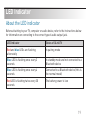
LED Indicator
About the LED indicator
Before attaching to your TV, computer or audio device, refer to the instructions below
for information on connecting to the correct type of audio output jack.
LED Indicator
Status of QLinkTV
Red and blue LEDs are flashing
alternately
In pairing mode
Blue LED is flashing once every 2
seconds
In standby mode and not connected to a
Bluetooth device
Blue LED is flashing once every 4
seconds
Connected to a Bluetooth device (this is
the normal mode)
Red LED is flashing twice every 30
seconds
The battery power is low
19
Care and Maintenance
Recommendations for the QLinkTV
Before using the QLinkTV, please read the following recommendations to help you
enjoy using it for many years.
• Do not expose the QLinkTV to liquid, moisture or humidity, to avoid potential
damage to its internal circuit.
• Do not expose the QLinkTV to extremely high or low temperatures, as this will
shorten the life of electronic devices, destroy the battery or distort certain
plastic parts.
• Do not use abrasive cleaning solvents to clean the product. Refer to page 6 for
detailed cleaning instructions.
• Do not dispose of the product in a fire, as this will result in an explosion.
• Do not expose the product to sharp objects, as this will cause scratches and
damage that may void your warranty.
• Do not drop the product or allow it to fall onto the floor, as the internal circuit
can get damaged and void your warranty.
20
FAQs
Frequently Asked Questions
1) Why won’t my QLinkTV turn on?
This is typically caused by lack of battery power. Follow the charging instructions on
page 12, being sure the +/- switch is set to +. If your battery is fully charged and still
won’t turn on, please contact our Customer Solutions team (see next page).
2) What should I do if my QLinkTV won’t pair & connect to a Bluetooth stereo receiver?
First, make sure the Bluetooth stereo receiver supports A2DP v3 Bluetooth. Second,
make sure the Bluetooth stereo receiver is placed within 5 feet of the QLinkTV. Third,
make sure the Bluetooth stereo receiver has already entered into pairing mode (see
page 16).
3) What should I do when I can’t hear any audio from the Bluetooth stereo receiver?
First, make sure the QLinkTV is properly connected to the audio source. Second, make
sure the QLinkTV and Bluetooth stereo receiver are properly paired. Third, make sure
the audio source is playing sound. Fourth, adjust the volume of the audio.
Additional resources can be found on our website at www.clearsounds.com/support.
For further assistance, please contact our Customer Solutions team by email at
21
Glossary
A2DP: The abbreviation for Advanced Audio Distribution Profile. A2DP allows CDquality stereo music or audio to be sent (‘streamed’) from one device to another using
Bluetooth instead of wires or cables.
AC Power: The abbreviation for Alternating Current. AC power is the type of
electricity found in wall outlets in the United States and most other countries.
Audio Output: Also known as ‘audio-out’, this is the jack on a TV, MP3 player or
other device that sends sound (audio) out of the device. The QLinkTV, speakers,
headphones or other listening tools get plugged into a device’s audio output.
Bluetooth: A wireless technology that uses short radio waves to exchange data
between compatible devices over distances up to 33 feet.
Connectable: A Bluetooth-enabled device in-range that will respond to another
Bluetooth device and set up a connection.
Connected: When a Bluetooth-enabled device is within range of another Bluetooth
device and the two are communicating over the wireless Bluetooth link.
Discoverable: A Bluetooth-enabled device that other Bluetooth devices can detect
(‘discover’), pair to or connect to.
22
Glossary
EDR: The abbreviation for Enhanced Data Rate. EDR technology provides a faster data
rate (speed) for seamless synchronization of sound and video.
Pairing: The process of creating a persistent link between two Bluetooth-enabled
devices. This only occurs once; future connections between the two devices are made
(authenticated) automatically.
Profile: A specification of Bluetooth wireless communication between devices. In order
to use Bluetooth technology to connect two devices, they must both be compatible with
the same Bluetooth profile. The QLinkTV’s Bluetooth profile is A2DP.
Range: The maximum distance a Bluetooth signal is able to travel between two
Bluetooth-enabled devices. For the QLinkTV (and many other Bluetooth devices), the
range is 33 feet.
RCA: The abbreviation for the Radio Corporation of America. RCA carries audio and
video signals through color-coded plugs and jacks; red & white for audio and yellow for
video. The QLinkTV’s RCA cable is audio-only, so it is only red and white.
USB: The abbreviation for Universal Serial Bus. USB defines the connection,
communication and power supply between computers and electronic devices.
23
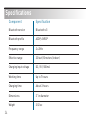
Specifications
24
Component
Specification
Bluetooth version
Bluetooth v3
Bluetooth profile
A2DP, AVRCP
Frequency range
2.4 GHz
Effective range
33 feet/10 meters (indoor)
Charging input voltage
DC, 5V / 500mA
Working time
Up to 7 hours
Charging time
About 3 hours
Dimensions
2” in diameter
Weight
3.52 oz
Warranty
Your ClearSounds QLinkTV Bluetooth Stereo Audio Transmitter comes with a
one-year limited warranty from the date of purchase. This product is warranted
by ClearSounds against manufacturing defect in material and workmanship under
normal use. In the event that this product fails to function properly due to defects in
materials or workmanship within one year of the original purchase, return the unit
with proof of purchase (sales receipt or packing slip, no exceptions) to ClearSounds
Communications.
ClearSounds Communications will either repair or replace the unit (with a
refurbished unit or unit of equal condition) and return it you (using UPS/USPS
ground shipping) at no cost to you. The warranty replacement or repair will be
warranted for a period of 90 days or the remainder of the original warranty period
(from original purchase date), whichever is longer.
The warranty does not cover accidents, negligence or breakage to any parts. This
includes shipping damage, failure to follow instructions, misuse, fire, floods, use of
incompatible accessories, acts of God or failure in your phone service carrier’s line
service. The product must not be tampered with or taken apart by anyone who is not
an authorized ClearSounds Communications representative. Tampering with the
QLink TV will void any written or implied warranties.
25
Warranty
If a defect covered by this warranty should occur, promptly contact a Customer Service
representative by phone, or log on to www.clearsounds.com/contact-us to obtain a
Return Merchandise Authorization (RMA) number and shipping instructions before
shipping the product to us. Any shipment without an RMA number will not be accepted
and will be returned to you at your expense. All authorized returned products must be
accompanied with proof of purchase and a brief explanation of the problem.
For out-of-warranty repairs and service, please contact our Customer Service
department for instructions. The repair shall be warranted for 90 days.
IMPORTANT: YOUR RECEIPT IS PART OF YOUR WARRANTY AND MUST BE RETAINED
AND PRODUCED IN THE EVENT OF A WARRANTY CLAIM.
Notes:
1. This device complies with Part 15 of the FCC Rules. Operation is subject to the
following two conditions: (1) this device may not cause harmful interference,
and (2) this device must accept any interference received, including interference
that may cause undesired operation.
2. Changes or modifications not expressly approved by the party responsible for
compliance could void the user’s authority to operate the equipment.
26
Additional Products
Ok, we may be a bit biased, but these products are fantastic complements to the
QLinkTV. Together, they provide a solution for every aspect of communication. From
personal listening to mobile phones, TV & entertainment to the office – we’ve got you
covered.
And hey, since you read through this ENTIRE manual, you deserve a reward. Order any
of our Q Portfolio of products online using Coupon Code IREADIT and we’ll take 25% off
your order!! Shop now at www.clearsounds.com.
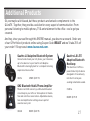
Quattro 4.0 Adaptive Bluetooth System
Connect and stream your cell phone, your television,
up to five devices to your Quattro 4.0 Adaptive
Bluetooth Listening System for a complete listening
experience like no other.
CSQT4
MSRP: $299.95
QH2 Bluetooth Hub & Phone Amplifier
The discreet QH2 connects your Bluetooth headset
or neckloop to your office or home phone for handsfree and cord-free conversation. Adjustable volume,
tone and amplification settings ensure perfect
sound on every call.
CSQH2
MSRP: $229.95
Quattro 4.0 LITE
Adaptive Bluetooth
Neckloop
The Quattro 4.0 LITE is a
powerful but stylish device
designed to fit seamlessly
into the life of anyone
seeking remarkable sound.
CSQT4L
MSRP: $199.95
27
© 2015 ClearSounds QLinkTV UG Ver 1