1
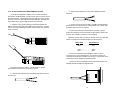
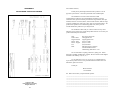
8. Place the 2 halves of the strain relief assembly on either side of
the telephone wire and press together very lightly. Slide the assembly
so that it is about 2 inches from the terminal posts and press together
firmly. If your cable diameter is too small or too large for our strain
relief, please contact our technical support. We have strain relief
assemblies to accommodate most cable diameters.
+RCV- G -XMT+
11. Insert one captive screw through a saddle washer, then insert
the captive screw with the washer on it through the hole in the DB-25
end of the case. Snap that side of the case closed. Repeat the
process for the other side. This completes the cable installation
process.
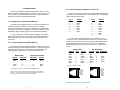
4.2 CONNECTION TO THE RS-232 INTERFACE
9. Insert the strain relief assembly with the wire going through it
into the slot in the bottom half of the modem case and set it into the
recess in the case.
Once you have configured the Model 222N for DTE or DCE and
connected the twisted pair wires correctly, simply plug the 222N directly
into the DB-25 port of the RS-232 device. After doing so, remember to
insert and tighten the two captive connector screws.
NOTE: If you must use a cable to connect the Model 222N to the
RS-232 device, make sure it is a straight through cable of the
shortest possible length—we recommend 6 ft or less.
4.3 OPERATING THE MODEL 222N
Once the Model 222N is properly installed, it should operate
transparently—as if it were a standard cable connection. Operating
power is derived from the RS-232 data and control signals; there is no
"ON/OFF" switch. All data signals from the RS-232 and RS-422
interfaces are passed straight through. All control signals from the RS232 interface are looped back.
10. BEND the top half of the case as necessary to place it over the
strain relief assembly. Do not snap the case together yet.
9
NOTE: If your system requires hardware flow control, you will
need the Patton Model 285 RS-232 to RS-485 converter. Call
Patton Customer Service at 301-975-1007.
10