1
USER MANUAL
Direction for use
1. Connect the load wires at first, following by the power wires; Please ensure that
short circuit can not occur between connecting wires before you turn on the power
2. In order to receive the infrared control signal normally, it is necessary to
ensure that there is no barrier between the remote control and infrared
detector.
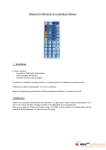
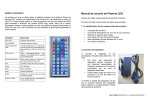
3. The key-press functions are shown below:
Section A:
: Brightness add button
: Brightness subtract button
Section A
Section B
Section C
Section B:
: Pause button
: On/off button
Section C:
Display the corresponding
color of the button on the
remote control panel and there
Section D
are 20 kinds of colors
Section E
Section D:
↑: R/G/B color add one step
↓: R/G/B color subtract one step
(among R/G/B color, which color will be change, is decided by what color display on panel )
DIY1~DIY6:
Custom button; Using this button, and ↑ ↓ , users can match any color. There are six
custom buttons which can match six custom color
Section E:
JUMP3/JUMP7: Three/seven-color jumpy change
FADE3/FADE7: Three/seven-color gradual change
FLASH:White Strobe
AUTO: Automatic play five dynamic modes above
QUICK:To speed up color change
SLOW: To speed down color change