1
RTI Monitor
Getting Started Guide
Version 5.1.0
© 2011-2013 Real-Time Innovations, Inc.
All rights reserved.
Printed in U.S.A. First printing.
December 2013.
Trademarks
Real-Time Innovations, RTI, and Connext are trademarks or registered trademarks of Real-Time
Innovations, Inc. All other trademarks used in this document are the property of their respective owners.
Copy and Use Restrictions
No part of this publication may be reproduced, stored in a retrieval system, or transmitted in any form
(including electronic, mechanical, photocopy, and facsimile) without the prior written permission of RealTime Innovations, Inc. The software described in this document is furnished under and subject to the RTI
software license agreement. The software may be used or copied only under the terms of the license
agreement.
Technical Support
Real-Time Innovations, Inc.
232 E. Java Drive
Sunnyvale, CA 94089
Phone:
(408) 990-7444
Email:
[email protected]
Website:
https://support.rti.com/
Contents
1
Welcome............................................................................................1-1
2
Installation and Start Up ...................................................................2-1
2.1 Instructions for Linux Systems ............................................................................................................ 2-1
2.1.1 Installing .................................................................................................................................... 2-1
2.1.2 Running ..................................................................................................................................... 2-1
2.2 Instructions for Windows Systems...................................................................................................... 2-2
2.2.1 Installing .................................................................................................................................... 2-2
2.2.2 Running ..................................................................................................................................... 2-2
2.3 Installing the License File ..................................................................................................................... 2-2
2.4 Command-line Options ........................................................................................................................ 2-3
3
A Demo using RTI Shapes Demo .....................................................3-1
3.1 Showing System Topology, Sample Counts and Rates..................................................................... 3-1
3.2 Showing Content-Filtered Samples................................................................................................... 3-12
3.3 Showing Deadlines .............................................................................................................................. 3-13
3.4 Showing a ‘Samples Rejected’ Scenario ........................................................................................... 3-16
4
Troubleshooting.................................................................................4-1
4.1 Debugging Problems with Monitor on Windows System ............................................................... 4-1
4.2 Running Monitor on a System with Limited Memory..................................................................... 4-1
4.3 Running Monitor with a Large System .............................................................................................. 4-1
4.4 Error Regarding ‘Incompatible Shared Memory Segment’ ............................................................. 4-2
4.5 Unable to Create Participant in Connext Application...................................................................... 4-2
4.6 Not Receiving Monitoring Data due to Inconsistent QoS ............................................................... 4-3
4.7 Not Receiving Monitoring Data for Entities ...................................................................................... 4-3
4.8 No Type Code for Some Entities in Description Panel..................................................................... 4-4
4.9 Running out of Memory ....................................................................................................................... 4-5
4.10 Running without an Active Network Interface................................................................................. 4-5
iii
Chapter 1
Welcome
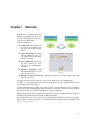
RTI® Monitor is a graphical tool that
displays monitoring data from RTI
Connext™ (formerly RTI Data Distribution Service) applications.
Monitor will help you:
❏ Understand your system with
an easy-to-use graphical view
into your entire Connext application.
❏ Verify your design by making
sure the entities in your Connext applications are communicating as expected.
❏ Tune performance by providing deep statistics on every
aspect of the middleware’s
operation.
❏ Optimize
integration with
detailed information on every
entity in your system.
❏ Monitor real-time operation with a dashboard of tools to see traffic patterns, errors, lost
samples, and more.
You can run Monitor on the same host as the Connext application or on a different host.
To enable a Connext application to provide monitoring data to Monitor, the application needs to
use the Monitoring Library plug-in.
Connext notifies Monitoring Library every time an entity is created/deleted or a QoS is changed.
Monitoring Library also periodically queries the status of all entities. Monitoring Library sends all
the data to Monitor once it gets the data from the Connext application.
Monitoring is enabled in the application by setting values in the DomainParticipant’s PropertyQosPolicy (programmatically or through an XML QoS profile).
Refer to the Monitoring Library Getting Started Guide, included with the Monitoring Library bundle, for details. Monitoring Library is available from the RTI Support Portal (accessible from
https://support.rti.com/).
1-1
Chapter 2
Installation and Start Up
2.1
Instructions for Linux Systems
2.1.1
Installing
Monitor is included with RTI Connext Messaging. Use the installation instructions in this chapter
only if you are installing Monitor independently (not as part of RTI Connext Messaging).
1. Untar RTI_Monitor-<version>-Linux.tar.gz in a directory where you have write access.
For example, enter:
> cd /opt/rti
> gunzip RTI_Monitor-<version>-Linux.tar.gz
> gtar xvf RTI_Monitor-<version>-Linux.tar
The resulting installation will be in /opt/rti/RTI_Monitor_<version>.
2. See Installing the License File (Section 2.3).
3. Monitor is designed to monitor Connext applications that are using Monitoring Library. If
you have not yet installed Monitoring Library for use with your Connext applications, you
may want to do so now. Refer to the Monitoring Library Getting Started Guide that is provided with the Monitoring Library bundle.
Monitoring Library is available from the RTI Support Portal (accessible from https://
support.rti.com/).
2.1.2
Running
If you have RTI Launcher, you can use its Tools tab to start Monitor.
Or you can start Monitor using the provided rtimonitor script. For example, if you installed
Monitor in /opt/rti, start it by entering:
> /opt/rti/RTI_Monitor_<version>/scripts/rtimonitor
Command-line options are described in Section 2.4.
2-1
Instructions for Windows Systems
2.2
Instructions for Windows Systems
2.2.1
Installing
Monitor is included with RTI Connext Messaging. Use the installation instructions in this chapter
only if you are installing Monitor independently (not as part of RTI Connext Messaging).
1. Right-click RTI_Monitor-<version>-Win.zip and select Extract All... to install Monitor in
the directory of your choice. You must have write access to the directory.
If you choose c:\RTI, the resulting installation will be in c:\RTI\RTI_Monitor_<version>.
2. See Installing the License File (Section 2.3).
3. Monitor is designed to monitor Connext applications that are using Monitoring Library. If
you have not yet installed Monitoring Library for use with your Connext applications, you
may want to do so now. Refer to the documentation in the Monitoring Library bundle for
details.
Monitoring Library is available from the RTI Support Portal (accessible from https://
support.rti.com/).
2.2.2
Running
If you have RTI Launcher, you can use its Tools tab to start Monitor.
Or, from the Windows Start menu, navigate to RTI Connext <version>, RTI Connext Tools
<version> Components, RTI Monitor <version> and select RTI Monitor.
Or you can double-click <installation directory>\scripts\rtimonitor.bat in your browser.
You can also start it from the command-line if you need to use any of the options described in
Section 2.4.
2.3
Installing the License File
Monitor requires a valid license to run. You will receive one via email after you download the
software.
Save the license file in any location of your choice. When Monitor starts, it will look in these locations until it finds a valid license:
1. The last saved, valid license location of the current user (if Monitor has been run before).
2. The file specified in the environment variable RTI_LICENSE_FILE, which you may set to
point to the full path of the license file, including the filename (for example,
C:\RTI\my_rti_license.dat).
3. The file rti_license.dat in the current working directory.
4. The file rti_license.dat in the directory specified by the environment variable
NDDSHOME.
If Monitor cannot find a valid license file automatically, it will prompt you to enter the location of
a license file.
If you have any questions about license installation, please contact [email protected].
2-2
Command-line Options
2.4
Command-line Options
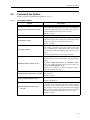
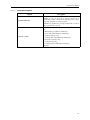
Monitor accepts the command-line options in Table 2.1.
Table 2.1
Command-line Options
Option
-aggregationPeriodSeconds <seconds>
Description
Monitor periodically goes through all the monitored entities
in the system (this information is saved in its own database)
to calculate aggregated statistics and states. This value controls that minimum period (specified in seconds).
Default: 5 seconds
-help
Displays all command-line options.
-historyDepth <value>
Monitor saves some statistics’ history, so it can be displayed
in the charts. This option controls how much historical data
(number of samples) is saved per monitoring topic.
Default: 12 samples
-ignoreTypeConflicts
Instructs Monitor to ignore any type conflicts. In Monitor,
type conflicts are based on type-code equality rather than
type compatibility. This command-line option can be useful
if you have types that have different type-code but are compatible.
Default: Not specified (do not ignore type conflicts)
Specifies which domains Monitor will join when it starts up.
<domain_id_list> is a list of domain IDs, each separated by a
comma.
-initialDomainIds <domain_id_list>
To specify multiple domain IDs on a Windows system,
enclose the comma-separated IDs in quotation marks. For
example: -initialDomainIds “31, 32”.
Default: If not specified, you will be prompted to enter a
domain ID when Monitor starts.
-matchRefreshPeriodSeconds <seconds>
Specifies the period at which to refresh the system overview
panel's matches.
Default: 5 seconds
-notificationHistoryDepth <value>
-pruneDeadObjectsPeriodSeconds
<seconds>
Specifies the number of notifications to keep per entity.
Default: 12 notifications
Sets the period at which Monitor should clean up user-interface objects (such as the Host, and Process nodes in the tree
views) that are no longer current (have no more children
nodes in the tree view). This value should be increased when
dealing with very large systems where the time to complete
discovery is longer than the default value of 3 seconds.
Default: 3 seconds
2-3
Command-line Options
Table 2.1
Command-line Options
Option
-spawnReadThreads
Description
Instructs Monitor to use multiple threads (according to the
number of cores on the host) to retrieve data from its
DataReaders (which contain monitoring data). This is typically only needed for very large systems.
Default: Not specified (use a single read thread to retrieve
data at a period of 1 second)
Sets the verbosity for Monitor and the Connext Core Libraries.
-verbosity <value>
0: silent (both Core Libraries and Monitor)
1: errors (both Core Libraries and Monitor)
2: warnings (Monitor only)
3: warnings (both Core Libraries and Monitor)
4: information (Monitor only)
5: tracing (Monitor only)
6: tracing (both Core Libraries and Monitor)
Default: 1
2-4
Chapter 3
A Demo using RTI Shapes Demo
Before going through the steps in this chapter, make sure that both RTI Monitor and RTI Shapes
Demo are installed.
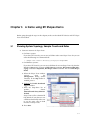
3.1
Showing System Topology, Sample Counts and Rates
1. Start two instances of Shapes Demo:
• On Linux systems:
If you have RTI Launcher, you can use its Utilities tab to start Shapes Demo. Or you can
enter the following in a command shell:
> <Shapes Demo install directory>/scripts/rtishapesdemo
• On Windows systems:
If you have RTI Launcher, you can use its Utilities tab to start Shapes Demo. Or, from the
Windows Start menu, navigate to RTI Connext <version>, RTI Connext DDS Messaging <version> Components, RTI Shapes Demo <version> and select RTI Shapes
Demo.
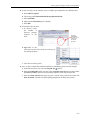
a. When the Shapes Demo window
appears,
open
the
Configuration dialog (under
Controls). If the Stop button is
enabled, press it.
b. Uncheck the Enable distributed
logger checkbox.
c. From the drop-down list of
profiles,
choose
MonitorDemoLibrary::Monitor
Default.
Shapes Demo will use domain ID
0 by default. If you choose to use
a different domain ID, make sure
to use the same value in both
instances of Shapes Demo.
d. Press Start.
3-1
Showing System Topology, Sample Counts and Rates
e. Repeat, so you are running two instances of Shapes Demo.
2. In one instance of Shapes Demo, create a reliable square publisher as follows:
a. Select Publish, Square.
b. Choose the profile MonitorDemoLibrary::MonitorDefault.
c. Make sure the Reliability box is checked.
d. Select OK.
3. In the other instance of Shapes Demo, create a reliable square subscriber as follows:
a. Select Subscribe, Square.
b. Choose the profile MonitorDemoLibrary::MonitorDefault.
c. Check the Reliability box.
d. Select OK.
4. Start Monitor:
• On Linux systems:
If you have RTI Launcher, you can use its Tools tab to start Monitor.
Or you can start Monitor using the provided rtimonitor script. For example, if you
installed Monitor in /opt/rti, start it by entering:
> /opt/rti/RTI_Monitor_<version>/scripts/rtimonitor
• On Windows systems:
If you have RTI Launcher, you can use its Tools tab to start Monitor.
Or, from the Windows Start menu, navigate to RTI Connext <version>, RTI Connext
Tools <version> Components, RTI Monitor <version> and select RTI Monitor.
Or double-click <installation directory>\scripts\rtimonitor.bat in your browser.
3-2
Showing System Topology, Sample Counts and Rates
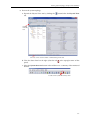
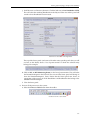
5. Review the system topology:
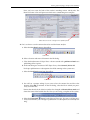
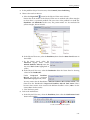
a. Expand the Physical View tree by clicking the
tab.
button below the Physical View
Expand
the Entity
tree
Summary of the current number of entities being monitored
b. Close the Status Panel on the right (select the red
panel).
at the top-right corner of that
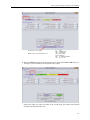
c. Select the System Overview button in the toolbar to see a summary of the monitored
domain.
Create a new System Overview panel
3-3
Showing System Topology, Sample Counts and Rates
Visual map of the system
Outer-most box represents the host
T=
DR =
DW =
Sub =
Pub =
DP =
P:# =
Topic
DataReader
DataWriter
Subscriber
Publisher
DomainParticipant
process ID
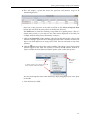
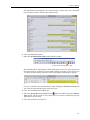
d. Select the Matches option in the System Overview panel. Select DW or DR in the system map to see what entities are matched in the system.
Notice that when you select an entity in the system map, that entity also becomes
selected in the Physical View tree.
3-4
Showing System Topology, Sample Counts and Rates
e. Click the Back button
on the toolbar; it will change the selection back to the previously selected entity—in the Physical View tree and the System Overview panel. Try
the Forward button
too.
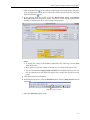
f. In the System Overview panel, select the Measurement option and Samples
Received Count in the drop-down menu. You will see a color map that indicates the
number of samples received by various entities in the system.
Notes:
• To change the scaling of the numbers indicated in the color map, use the Scale
drop-down menu.
• Move the mouse over the entities in the map to see a tooltip of the actual value.
• You can select different Display Name Controls for each kind of entity (or all entities) to control how much detail will appear in the map in the System Overview
panel.
g. Close the System Overview panel.
h. In the Physical View tree, select the DataWriter, then select the Status Panel button in
the toolbar.
Create a new Status panel
i. Select the Advanced display mode.
3-5
Showing System Topology, Sample Counts and Rates
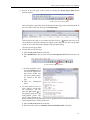
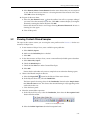
j. Scroll down to see Discovery Statistics. Click the link next to Last DataReader GUID.
This will select the matching DataReader in the Physical View tree and the panel will
switch to show DataReader status instead.
Click here to select the matching reader
The top of the Status panel (and some of the other entity-specific panels that you will
see later in this demo) shows a list of parent entities to which the selected entity
belongs. For example:
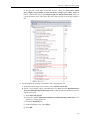
k. Click on DP : 0 { RTI Monitoring Demo } in the list of parent entities. This will select
the DomainParticipant in the Physical View tree and the Status panel will change to
show the DomainParticipant’s status. Notice that the Status panel now shows an
aggregation of the statuses of all the DataWriters and DataReaders that belong to the
selected DomainParticipant.
l. Close the Status panel.
6. Review all the processes in the system:
a. Select the Processes Table button from the toolbar.
Create a new Processes Table
3-6
Showing System Topology, Sample Counts and Rates
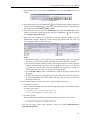
b. This will display a panel that shows the processor and memory usage of all
monitored processes.
Select one of the processes in the table and click on the Select in Physical View
button; this will select the same process in the Physical View tree.
The Find button is useful for searching a large table for a specific process. (This is a
simple string search, so you must use the same format displayed in the table; for
example, notice that the process ID includes a comma.)
c. Click on the Total CPU column heading. This will sort the table by the values in this
column. Clicking it again will sort in the opposite order. This is useful to watch in real
time to see which processes are using a lot of CPU. You can sort based on any of the
columns.
d. Click the
button just above the vertical scrollbar. This allows you to choose which
columns appear in the table. For instance, to remove the ID column, uncheck it.
(Note: to enable the ‘Pack Selected Column’ option, select a cell in the top row.)
Click here to
see these
options
To resize columns (such as this one) to fit
their contents, select this option:
You can also change the order of the columns by simply dragging them to a new place
in the table.
e. Close the Processes Table.
3-7
Showing System Topology, Sample Counts and Rates
7. Review all the data types in the system by selecting the System Types Table button
from the toolbar.
Create a new System Types Table
This will display a panel that shows all the known data types in the selected domain. In
this case, there is only one data type called ShapeType.
Like the Processes Table we saw earlier, this table also has a
button (above the vertical scrollbar) to control the columns that appear in the table. You can also sort the table
based on any of the columns by clicking on the column heading.
Close the System Types Table.
8. Show details of each data type:
a. Select the Physical View tab on the left.
b. Select DataReader in the tree, then select the Description Panel button from the toolbar.
Create a new Description panel
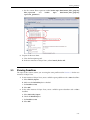
c. In the Description panel,
select the DataType tab to
see the data type for the
data reader in IDL. You
can also see other properties related to the data
type.
d. Close the
Panel.
Description
9. To show panels for two or
more entities side-by-side
for comparison, you can
press the pin button
at
the top-left corner of all the
entity-specific panels. The
panel is then pinned to the
entity and the panel will periodically receive updated data for the pinned entity—even
when another entity is selected in the tree.
a. Select the Physical View tab on the left.
b. From the menu, make sure Window, Auto Checkerboard Tile is checked.
3-8
Showing System Topology, Sample Counts and Rates
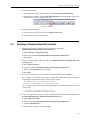
c. In the Physical View tree, select the DataWriter, then press the Chart button in the
toolbar.
Create a new Chart panel
d. In the Chart panel, press the pin button
on the top-left corner. Notice that the button has changed to pinned
to indicate that the panel is pinned to a specific entity.
For Chart Data, select Samples Written Counts.
e. In the Physical View tree, select the DataReader, then press the Chart button in the
toolbar to create the second Chart panel and press its pin button
. For Chart Data,
select Samples Received Counts.
f. Now you can compare the DataWriter’s Samples Written Counts and the
DataReader’s Samples Received Counts side-by-side. Notice that the send and
receive sample counts are about the same.
Notes:
• The default settings set the publish rate of the monitoring topics to 5 seconds.
Therefore, you may need to wait 5 seconds for the Monitor data to be updated.
• The charts for Samples Written Counts and Samples Received Counts show the
number of samples sent/received in the last sample period. In this case, the sample period is 5 seconds. Since Shapes Demo publishes 16 samples per second, you
will see approximately 80 (5 x 16) samples per sample period.
• The Chart Time Range slider (at the bottom of Monitor) changes the time scale of
the graphs.
• To unpin the panels, press their pin buttons again. Notice that now both chart panels are showing DR as the current entity at the top, since that entity is selected in
the Physical View tree.
10. Start a third instance of Shapes Demo with a specific publishing interval:
• On Windows systems:
Open a command prompt and enter the following (replacing the installation directory
to match your system):
> cd <Shapes Demo installation directory>
> scripts\rtishapesdemo –pubInterval 250
• On Linux systems:
Enter the following (replacing the installation directory to match your system):
> cd <Shapes Demo installation directory>
> scripts/rtishapesdemo –pubInterval 250
Just like the other Shapes Demo instances, choose the profile MonitorDemoLibrary::MonitorDefault.
3-9
Showing System Topology, Sample Counts and Rates
11. In the new Shapes Demo window, create a reliable square publisher of a different color:
a. Select Publish, Square.
b. Choose the profile MonitorDemoLibrary::MonitorDefault.
c. Select YELLOW.
d. Make sure the Reliability box is checked.
e. Select OK.
12. Examine the data in chart:
a. In Monitor, notice
the number of
received samples
increases in the
chart.
The new
DataWriter
increases the
number of
received
samples.
b. Right-click in the
white space in one of the charts to see how you
can change the chart:
c. Close the two Chart panels.
13. Let’s see how to determine which DataWriter is contributing more received samples:
a. In the Physical View tree, select the Expand All
button.
b. Select the DataReader in the tree, then select the Status Panel button from the toolbar.
For Filter by match, select the first matching endpoint in the drop-down menu.
c. Select the Status Panel button again to open a second status panel for the reader. For
Filter by match, select the second matching endpoint in the drop-down menu.
3-10
Showing System Topology, Sample Counts and Rates
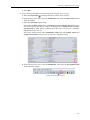
Now you have status for both of the reader’s matching writers side-by-side. The
Received Count values will point out which one is contributing more samples.
Delta value shows the change for the update period
14. Let’s see how to save the current data to be used for future analysis:
a. Select the Save Data button in the toolbar.
Save Data...
b. Select a location and enter a filename in the file dialog.
c. Close the third instance of Shapes Demo—the one started with -pubInterval 250 that is
publishing yellow squares.
d. In the remaining two instances of RTI Shapes Demo, select Controls, Delete All.
No shapes publications or subscriptions should be running in the system now.
e. Select the Load Data button from the toolbar.
Load Data...
f. You will see a prompt asking if you want to lose the current data and leave the
domain. Select OK to continue. In the file dialog, select the file in which you previously saved the data.
Notice that the title of the Monitor window has changed to Historical data mode and
shows the name of the loaded data file. Now you are seeing a snapshot of the system.
g. Select the Expand All
button for the Physical View tree. You can see all the previously created entities, even though no publications or subscriptions are currently running.
3-11
Showing Content-Filtered Samples
h. Select Domain, Show Current Domain from the menu. Notice that you are not joined
to any domain now because Monitor is showing historical data instead of live data.
Click OK to close the dialog box.
15. Prepare for the next demo:
a. Select the Join Domain button
from the toolbar. You will see a prompt asking if
you want to lose the currently loaded data. Click OK to continue. Rejoin your original
domain by entering the domain ID, then click OK.
Notice that the title of Monitor is no longer showing Historical data mode. Monitor is
showing live data again.
b. Close all the panels.
3.2
Showing Content-Filtered Samples
The steps in this section assume you are using the same profile used in Section 3.1 for the two
instances of Shapes Demo.
1. In one instance of Shapes Demo, create a reliable square publisher:
a. Select Publish, Square.
b. Make sure the Reliability box is checked.
c. Select OK.
2. In the other instance of Shapes Demo, create a content-filtered, reliable square subscriber:
a. Select Subscribe, Square.
b. Check the Reliability box.
c. Check the Use Filter box under Content Filter Topic.
d. Select OK.
Notice that the subscriber only receives samples that are within the filtering square.
3. Observe the filtered samples in Monitor:
a. Select the Expand All
button for the Physical View tree in Monitor.
b. In the Physical View tree, select the DataReader.
The Status panel is showing values for the DataReader. Notice that the Sample Statistics, Filtered Count is zero. This shows that content filtering is only happening on the
writer side in this case.
c. Close the Status panel.
4. Show the content-filter expression:
a. In the Physical View tree, select the DataReader, then select the Description Panel
button from the toolbar.
Create a new Description panel
b. Select the Builtin Topic Data tab in the Description Panel.
3-12
Showing Deadlines
c. See the content filter expression under builtin topic data/content_filter_property/
filter_expression
and
builtin
topic
data/content_filter_property/
expression_parameters.
5. Prepare for the next demo:
a. Close the Description panel.
b. In the two instances of Shapes Demo, select Controls, Delete All.
3.3
Showing Deadlines
The steps in this section assume you are using the same profile used in Section 3.1 for the two
instances of Shapes Demo.
1. In one instance of Shapes Demo, create a reliable square publisher with a 100ms deadline:
a. Select Publish, Square.
b. Make sure the Reliability box is checked.
c. Set Deadline to 100.
d. Select OK.
2. In the other instance of Shapes Demo, create a reliable square subscriber with a 250ms
deadline:
a. Select Subscribe, Square.
b. Check the Reliability box.
c. Set Deadline to 250.
d. Select OK.
3-13
Showing Deadlines
3. In the publisher Shapes Demo instance, select Controls, Pause Publishing.
4. Observe the results in Monitor:
a. Select the Expand All
button for the Physical View tree in Monitor.
Notice that all the entities in the Physical View tree are marked with yellow triangles
to show there is a potential problem. The root cause of the problem is in bold (the
DataWriter and DataReader in this case). The parent entities are also marked with
yellow triangles, but not in bold.
b. In the Physical View tree, select the DataWriter, then select the Status Panel button in
the toolbar.
c. In the Status panel, select the
Advanced display mode. Under
Offered Deadlines Missed, notice the
non-zero Total Count highlighted in
yellow.
d. In the Physical View tree, select the DataReader. Now the Status Panel is showing
values for the DataReader.
Under
Requested
Deadlines
Missed, you will see a non-zero
Total Count highlighted in yellow.
You may notice that the DataWriter’s Offered Deadlines Missed Total Count is different than the DataReader’s Requested Deadlines Missed Total Count. That’s
because these entities were created with different deadline values (100ms for the
writer, 250ms for the reader).
e. Close the Status panel.
5. Look at the notifications:
a. In the Physical View tree, select the DataWriter, then select the Notifications Panel
button in the toolbar.
Create a new Notifications panel
3-14
Showing Deadlines
The Notifications panel displays the selected entity’s current status and a historical
list of all alarm statuses related to the selected entity.
b. Close the Notifications panel.
c. Select the All Notifications Table button from the toolbar.
Create a new All Notifications Table
The All Notifications Table displays all the notifications in the entire system (not just for
the selected entity). By default, it shows both warnings and errors. You can choose to
see either just the warnings or just the errors by checking/unchecking the options.
If a row is selected in the All Notifications Table, clicking the Select In Views button
will select the corresponding entity in the tree views.
d. Close the All Notifications Table panel.
e. Select the System Overview Panel button
from the toolbar. Select the Notifications option. All the entities in the system that have caused a notification are highlighted in the system map.
f. Close the System Overview Panel.
3-15
Showing a ‘Samples Rejected’ Scenario
6. Clear the notifications:
a. In the publisher shapes demo instance, select Controls, Resume Publishing.
b. From Monitor’s menu, select the Clear All Notifications button from the toolbar. This
will clear all the yellow markers in the tree.
Clear All Notifications
7. Prepare for the next demo:
a. In one instance of Shapes Demo, select Controls, Delete All.
b. Close the other Shapes Demo instance.
3.4
Showing a ‘Samples Rejected’ Scenario
1. Configure the existing instance of Shapes Demo to use the profile,
MonitorDemoLibrary::SamplesRejectedScenario.
a. Select Controls, Configuration, Stop.
b. Choose the profile MonitorDemoLibrary::SamplesRejectedScenario.
c. Select Start.
2. Create a reliable square publisher with the MonitorDemoLibrary::SamplesRejectedScenario profile:
a. Select Publish, Square.
b. Choose the profile MonitorDemoLibrary::SamplesRejectedScenario.
c. Make sure the Reliability box is checked.
d. Select OK.
3. Create a new Shapes Demo instance with a reliable subscribing rate of 1,000 ms:
For example, on a Windows system open a command prompt and enter the following
(replacing the installation directory to match your system):
> cd <Shapes Demo installation directory>
> scripts\rtishapesdemo.bat –subInterval 1000
Or, on a Linux system enter the following (replacing the installation directory to match
your system):
> cd <Shapes Demo installation directory>
> scripts/rtishapesdemo –subInterval 1000
4. In the new Shapes Demo instance, create a reliable square subscriber that uses take() and
the MonitorDemoLibrary::SamplesRejectedScenario profile:
a. Select Subscribe, Square.
b. Choose the profile MonitorDemoLibrary::SamplesRejectedScenario.
c. Check the Reliability box.
d. For the Read method to use, select Take().
3-16
Showing a ‘Samples Rejected’ Scenario
e. Select OK.
5. Notice that the subscriber is not receiving all the samples. Let’s see why.
a. Select the Expand All
button for the Physical View tree in Monitor.
b. In the Physical View tree, select the DataReader, then select the Status Panel button
from the toolbar.
c. Select the Advanced display mode.
Notice that the Total Count values for Samples Lost and Samples Rejected are nonzero. This indicates that not all samples are being received. Samples Lost and Samples Rejected are both yellow to indicate that this may or may not be a problem,
depending on your use case.
Also notice further down under DataReader Cache that both Sample Count and
Sample Count Peak are 2 (you will see why this is significant later).
d. In the Physical View tree, select the DataReader, then select the Description Panel
button from the toolbar.
Create a new Description panel
3-17
Showing a ‘Samples Rejected’ Scenario
In the QoS tab, scroll down and notice that the values for qos/resource_limits/
max_samples and qos/reader_resource_limits/max_samples_per_remote_writer are
both 2, which is the same as the Sample Count and Sample Count Peak values we
saw in the Status panel. This shows that the reader’s queue for receiving samples is
full.
6. Fix the problem by creating a DataReader with a larger queue size:
a. In the Subscriber Shapes Demo instance, select Controls, Delete All.
b. Create a new reliable square subscriber that uses take() and the MonitorDemoLibrary::FixedSamplesRejectedScenario profile, which will fix the problem by increasing the queue size.
c. Select Subscribe, Square.
d. Choose the profile MonitorDemoLibrary::FixedSamplesRejectedScenario. This
profile uses a larger queue size.
e. Check the Reliability box.
f. For Read method to use, select Take().
g. Select OK.
3-18
Showing a ‘Samples Rejected’ Scenario
7. Verify the new reader queue size in Monitor:
a. Select the Expand All
button under the Physical View tab.
b. In the Physical View tree, select the DataReader.
c. In the Status panel that is already open, notice that the Total Count values for Samples Lost and Samples Rejected are now zero.
In the DataReader Cache section, notice the values for Sample Count and Sample
Count Peak.
In the Description panel that is already open, notice in the QoS tab that the values for
qos/resource_limits/max_samples
and
qos/reader_resource_limits/
max_samples_per_remote_writer are now 100. This is larger than the SampleCount
and Sample Count Peak values seen in the Status panel. This shows that now the
reader queue still has a lot of room before it becomes full and starts dropping samples.
This concludes the demo.
3-19
Chapter 4
4.1
Troubleshooting
Debugging Problems with Monitor on Windows System
If you run Monitor on a Windows system and it is not showing any error messages, but the Monitor window is not showing up, or you are not seeing any data in the Monitor window, you can
modify the file <installation directory>\scripts\rtimonitor.bat to change javaw.exe to
java.exe, so that error messages will be displayed in a command prompt to help you debug the
issue.
4.2
Running Monitor on a System with Limited Memory
Monitor runs with Java and a default maximum Java heap size of 500m. If you are monitoring on
a system with very little memory and you are only monitoring a very small system, you may be
able to reduce memory usage by modifying the file in <installation directory>\scripts\rtimonitor.bat (on Windows systems) or <installation directory>/scripts/rtimonitor (on Linux systems) to decrease the maximum Java heap size usage.
For example, in the script change “-Xmx500m” to “-Xmx300m”.
Monitor will save some history of statistics to be displayed in the charts. By default, this value is
12. If you are running on a system with limited memory, you can decrease this value with the
command-line option, -historyDepth <value> (see page 2-3).
4.3
Running Monitor with a Large System
Monitor runs with Java and a default maximum Java heap size of 500m. If you are monitoring a
very large system, you may need to modify the file <installation directory>\scripts\rtimonitor.bat (on Windows systems) or <installation directory>/scripts/rtimonitor (on Linux systems) to increase the maximum Java heap size usage. For example, in the script change “Xmx500m” to “-Xmx1536m”.
4-1
Error Regarding ‘Incompatible Shared Memory Segment’
4.4
Error Regarding ‘Incompatible Shared Memory Segment’
If you see the following error messages:
[D0000|ENABLE]NDDS_Transport_Shmem_attach_writer:incompatible shared memory segment found.
Found segment with max message size 9216. Needed 65530.
These messages likely mean either:
a.
Another application is currently running on the same host, in the same domain, with different shared-memory transport settings, or
b. If you are on a Linux system, there was an old application running on that domain ID
before—with different shared-memory transport settings—that was not terminated gracefully.
To correct problem (a), if you do not intend to monitor the application that has different sharedmemory settings on the same host, you can use another domain ID for the monitoring topics,
both in Monitor and in the Connext applications that you want to monitor. If you intend to monitor all the Connext applications in that domain on the same host, make sure that all the applications running on the same host with the same domain ID have consistent shared-memory
transport settings.
The
QoS
profile
used
by
Monitor
is
in
<installation
directory>/config/
rtimonitor_qos_profiles.xml. The transport settings in this profile need to be consistent with the
transport settings in all the Connext applications that are running on the same host with the
same domain ID. All shared-memory transport settings are specified under the participant_qos
and have property names that begin with dds.transport.shmem.builtin. See the documentation
for Monitoring Library for an explanation of the transport settings.
To correct problem (b), use the ipcrm command to clean up the shared-memory and sharedsemaphore resources. See the RTI Core Libraries and Utilities Platform Notes for details. You can
also run Monitor and the Connext application that you want to monitor with another domain ID
that doesn’t have any shared-memory or shared-semaphore resources left-over from previous
runs.
4.5
Unable to Create Participant in Connext Application
If you see error messages similar to the following:
[CREATE Participant]RTIOsapiLibrary_open:error opening library
rtimonitoringnothing.dll
[CREATE Participant]DDS_DomainParticipantMonitoring_
initializeMonitoringLibrary:
ERROR: Failed to get load monitoring library
[CREATE Participant]DDS_DomainParticipantMonitoring_initializeI:
!create monitoring library instance
[CREATE Participant]DDS_DomainParticipant_createI:!create builtin monitoring support
[CREATE Participant]DDS_DomainParticipantFactory_create_participant_
disabledI:!create participant
These messages most likely mean that your Connext application is configured to load the monitoring library dynamically, but you don’t have the monitoring library in your path.
4-2
Not Receiving Monitoring Data due to Inconsistent QoS
If you are running on a Linux system, make sure that your LD_LIBRARY_PATH environment
variable includes the monitoring library. If you are running on Windows, make sure that your
PATH environment variable includes the monitoring library.
If you are seeing error messages similar to the following:
[CREATE Participant]DDS_DomainParticipantFactory_set_default_participant_qos:ERROR: Inconsistent QoS (more information at WARN verbosity
level)
[CREATE Participant]DDS_DomainParticipantFactory_load_profilesI:ERROR: loading profiles
[CREATE Participant]DDS_DomainParticipantFactory_create_participant_-disabledI:ERROR: loading profiles
These messages most likely mean that you are using a lot of properties in the ParticipantQos to
configure
monitoring,
and
participant_property_string_max_length
or
participant_property_list_max_length in the ResourceLimitsQosPolicy in DomainParticipantQos is not large enough to accommodate all the properties. Try increasing those values in
your Connext application to fix the problem.
4.6
Not Receiving Monitoring Data due to Inconsistent QoS
If you see an error message similar to the following:
WARN : com.rti.dds.monitor.util.DebugDataReaderListener.on_requested_incompatible_qos(Unknown Source) : - topic: rti/dds/monitoring/domainParticipantDescription :
RequestedIncompatibleQosStatus[total_count=1, total_count_change=1,
last_policy_id=Durability, policies=[QosPolicyCount[policy_id=Durability,
count=1]]]
This message most likely means that the internal DataWriters created by Monitoring Library for
publishing monitoring topics have QoS that are incompatible with the QoS of the internal
DataReaders created by Monitor for subscribing to monitoring topics.
If you see this error message, try specifying the rti.monitor.config.qos_library and rti.monitor.config.qos_profile properties in the Connext application that has monitoring turned on, to
ensure that the internally created DataWriters are using the correct QoS values. The default QoS
values used for the internally created DataReaders are listed in RTIMonitoringQosLibrary and
RTIMonitoringPublishingQosProfile in the file <Monitoring Library installation directory>/
resource/xml/MONITORING_QOS_PROFILES.xml in the Monitoring Library bundle. Refer to
Monitoring Library’s documentation in the Monitoring Library bundle for an explanation of the
QoS settings that are required to specify the QoS library and profile.
4.7
Not Receiving Monitoring Data for Entities
Some of the monitoring topics (the description monitoring topics) can have data that is larger
than what is supported by the default transport settings, especially for cases in which a lot of
propagated properties are added to the PropertyQosPolicy, or a large UserDataQosPolicy, TopicDataQosPolicy, or GroupDataQosPolicy is involved. By default, asynchronous publishing is
4-3
No Type Code for Some Entities in Description Panel
used for the writers in Monitoring Library for these monitoring topics to resolve the large data
issue—transport settings and the maximum type-code serialized size are left at the default values.
The maximum type-code serialized size and transport settings must be consistent between Monitor and the Connext application in which monitoring is enabled. By keeping the maximum typecode serialized size and all the transport settings at default values in the QoS profile used by
Monitor, all monitored Connext applications that use default settings will work with Monitor out
of the box.
If you are not receiving monitoring data, it is most likely because you do have inconsistent
transport settings or inconsistent maximum type-code serialized size settings between Monitor
and the Connext application in which monitoring is enabled (maybe you are not using the
default maximum type-code serialized size or transport settings in the monitored Connext application).
If your monitored Connext application is required to use a large maximum serialized type-code
size or transport settings that support large data, you will need to change the corresponding settings in the QoS profile used by Monitor. The maximum type-code serialized size is configured
under resource_limits for the participant_qos; transport settings are configured under property
for the participant_qos. The QoS profile used by Monitor is in <installation directory>/config/
rtimonitor_qos_profiles.xml. See Section 3.8 in the Monitor User’s Manual for more information
on editing this file.
A sample large-data QoS profile is provided with the Monitoring Library bundle for your reference; it has large-data support turned on for both the UDPv4 and shared-memory transports,
and uses large maximum type-code serialized size support. If you need to use large data or large
type-code in your Connext application, you can use this provided large-data QoS profile in the
monitored application and also uncomment the corresponding transport and maximum typecode serialized size settings in the Monitor QoS profile; this will enable consistent large maximum type-code serialized size and large-data transport settings. Please see the documentation
in the Monitoring Library bundle for an explanation of this large-data QoS profile.
4.8
No Type Code for Some Entities in Description Panel
If the type code for your user data type is larger than the default maximum type-code serialized
size, the IDL for that data type may not show up in the DataType tab in Monitor’s Description
Panel. However, it should not affect the rest of the monitoring data.
To see the IDL representation of large type-code in Monitor, you can increase the maximum typecode serialized size, both in the monitored Connext application and in Monitor. However, if you
do that, you will also need to increase the values in the transport settings to support large data
in Connext discovery traffic—both in the monitored Connext application and in Monitor.
A sample large-data QoS profile is shipped with the Monitoring Library bundle; it has large-data
support turned on for both the UDPv4 and shared-memory transports, and a larger maximum
type-code serialized size. Please see the documentation in the Monitoring Library bundle for an
explanation of the large-data QoS profile. If you use the provided large-data QoS profile, you
can uncomment the corresponding settings in the Monitor QoS profile to enable support for
large type-code and large data. Both the monitored Connext application and Monitor must have
a consistent maximum type-code serialized size and consistent transport settings. The QoS profile used by Monitor is in <installation directory>/config/rtimonitor_qos_profiles.xml.
4-4
Running out of Memory
4.9
Running out of Memory
If Monitor is running out of memory, you can use a smaller value for the -historyDepth command-line option or run Monitor on a 64-bit machine.
4.10
Running without an Active Network Interface
If you run Monitor on a computer that does not have an active network interface, you may see an
error message stating “No interface found enabled for multicast.”
Modify the QoS profile used by Monitor to turn off UDPv4 and only use the shared-memory
transport:
<participant_qos>
......
<transport_builtin>
<mask>SHMEM</mask>
</transport_builtin>
</participant_qos>
The
QoS
profile
used
by
Monitor
is
in
<installation
directory>/config/
rtimonitor_qos_profiles.xml. See Section 3.8 in the Monitor User’s Manual for more information
on editing this file.
4-5