1
Add new IP Address
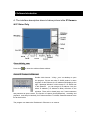
If add a IP 9000 / 9100 product but not show on Message
Windows, please click “ Refresh” to update the status.
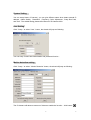
You can also manual add by type http://xxx.xxx.xxx.xxx
( add new IP address of IP 9XXX ) ,then click “Addcam” 。
Display Another IP Address
Click the IP and you can get the appointed video 。
Display Multiple IP
Click the button below Windows “
“ to get One IP video,Two IP
video,Three IP video or Four IP video。The screen will be multiple and you can fix IP
address in direct position. If need to display certain IP address in appointed location,
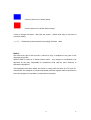
click the area and it will be in RED edge then click IP Address in Message Windows。
Capture still picture (Snap Shot)
Click snapshot button ”
“ infinity_cam will capture the view video to default directory :
.
Record as picture (JPG file ) or Movie
Click
(AVI file )
and jump following wizard:
1) For 9000 / 9100 :
5
5