1
3. Setup
Disconnect the power cord before replacing a fuse and always replace with the
same type fuse.
3.1 Fuse replacement
With a flat head screwdriver wedge the fuse hold out of its housing. Remove the
damaged fuse from its holder and replace with exact same type fuse. Insert the
fuse holder back in its place and reconnect power.
3.2 Fixture linking
You will need a serial data link to run light show of one or more fixtures using a
DMX-512 controller or to run synchronized on two or more fixtures set to a
master/slave operating mode. The combined number of channels required by all
the fixtures on a serial data link determines the number of fixtures the data link
can support.
Maximum recommended serial data link distance:500 meters(1640ft).
Maximum recommended number of fixtures on a serial data link:32 fixtures.
Data cabling
To link fixtures together you must obtain data cables. If you choose to create
your own cable please use data-grade cables that can carry a high quality signal
and are less prone to electromagnetic interference.
DMX data cable
Use a belden 9841 or equivalent cable which meets the specifications for EIA
RS-485 applications. Standard microphone cables cannot transmit DMX data
reliably over long distances. The cable will have the following characteristics:
2-conductor twisted pair plus a shield.
maximum capacitance between conductors-30 pF/ft.
maximum capacitance between conductor and shield -55 pF/ft.
maximum resistance of 20 ohms/1000ft.
nominal impedance 100-140 ohms.
3.3
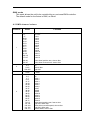
3-Pin to 5-Pin conversion chart
Note! If you use a controller with a 5 pin DMX output connector. you will need to
use a 5pin to 3 pin adapter
CHAUVET Model No:DMX5M. or DMX 5F
The chart below details a proper cable conversion: