1
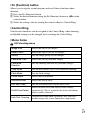
x Fn (Function) button
Allows you to register seven functions and recall those functions when
shooting.
1 Press the Fn (Function) button.
2 Select the desired function using the Fn (Function) button or b/B on the
control wheel.
3 Select the setting value by turning the control wheel or Control Ring.
x Control Ring
Your favorite functions can be assigned to the Control Ring; when shooting,
established settings can be changed just by turning the Control Ring.
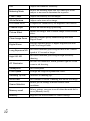
x Menu Items
Still shooting menu
Image Size
Selects the size of still images.
Aspect Ratio
Selects the aspect ratio for still images.
Quality
Sets the image quality for still images.
Panorama: Size
Selects the size of panoramic images.
Panorama:
Direction
Sets the shooting direction for panoramic images.
Drive Mode
Sets the drive mode, such as for continuous shooting.
Flash Mode
Sets the flash settings.
Focus Mode
Selects the focus method.
Autofocus Area
Selects the area of focus.
Soft Skin Effect
Sets the Soft Skin Effect and the effect level.
Smile/Face Detect.
Selects to detect faces and adjust various settings
automatically. Sets to automatically release the shutter
when a smile is detected.
Auto Port. Framing
Analyzes the scene when capturing a face and saves
another image with a more impressive composition.
GB
21